返回列表
🧠 阿头学 · 💬 讨论题

高效使用 Codex Goals 的方法论与边界

这篇文章最有价值的判断是:`/goal` 模式不是“更会聊天”,而是“更依赖可评分目标的循环系统”,但作者明显把一套经验技巧包装得比它实际适用范围更通用。
打开原文 ↗

2026-05-13 原文链接 ↗
阅读简报
双语对照
完整翻译
原文
讨论归档

核心观点

  • 目标必须可判定 作者对 goal mode 的理解是对的:如果目标不能被清楚判断是否达成,智能体就会要么过早停机,要么反复乱改;因此“让代码更好”是坏目标,“在不引发现有测试回归的前提下把某文件运行时间降低 20%”才是好目标。
  • 定性任务要先工程化 作者提出先把模糊要求拆成 checklist,再让智能体逐条完成,这个方法是全文最可迁移的部分;它本质上不是让模型“更聪明”,而是给模型造一个代理评分器,让任务从主观判断变成离散验证。
  • 反馈回路越紧越有效 文章强调先用小模型、小数据、快速测试环境拿反馈,这个判断非常扎实;对 agent 来说,几分钟一次的评分显著优于几天一次的评分,因为前者能支持真实的试错循环,后者只会放大成本和错误路径。
  • 外部记忆比上下文硬扛更可靠 用 PLAN.md、EXPERIMENTS.md、EXPERIMENT_NOTES.md 追踪长期任务,是对当前 agent 记忆脆弱性的务实补丁;这不是锦上添花,而是在长周期任务里避免思路断裂和重复劳动的必要工程措施。
  • 方法有效,但被说得过满 作者用代码优化、论文格式转换、蛋白质模型搜索来证明方法有效,这些案例本来就适合 checklist 和 benchmark;因此文章的结论对工程优化类任务很强,但对开放式研究、产品判断、创意设计未必成立。

跟我们的关联

  • 对 ATou 意味着什么:如果你想把 Codex 真正当执行代理而不是聊天工具,就必须先写验收标准,而不是写愿景口号;下一步可以把常见任务改写成“目标 + 约束 + 停止条件”的模板。
  • 对 Neta 意味着什么:涉及实验、模型、数据流程的工作最适合这套方法,因为这类任务天然有可比较指标;下一步可以优先为每个任务补一个小规模、低成本、可快速复现的评测 harness。
  • 对 Uota 意味着什么:如果 Uota 负责流程设计或协作规范,这篇文章说明 agent 管理本质上接近人类团队管理;下一步可以把 PLAN/EXPERIMENTS/NOTES 变成标准工作台账,而不是临时发挥。
  • 对三者共同意味着什么:真正决定 agent 产出的,不只是模型能力,而是目标函数和反馈系统设计;下一步不是继续卷 prompt 文采,而是补齐 checklist、测试、日志和回滚机制。

讨论引子

1. 哪些任务其实不适合被强行改写成可量化目标,强行量化反而会劣化结果? 2. checklist 和 benchmark 会不会让 agent 过拟合代理指标,做出“分数更高但真实更差”的优化? 3. PLAN.md 这类外部记忆在什么规模下是增益,在什么规模下会变成新的维护负担?

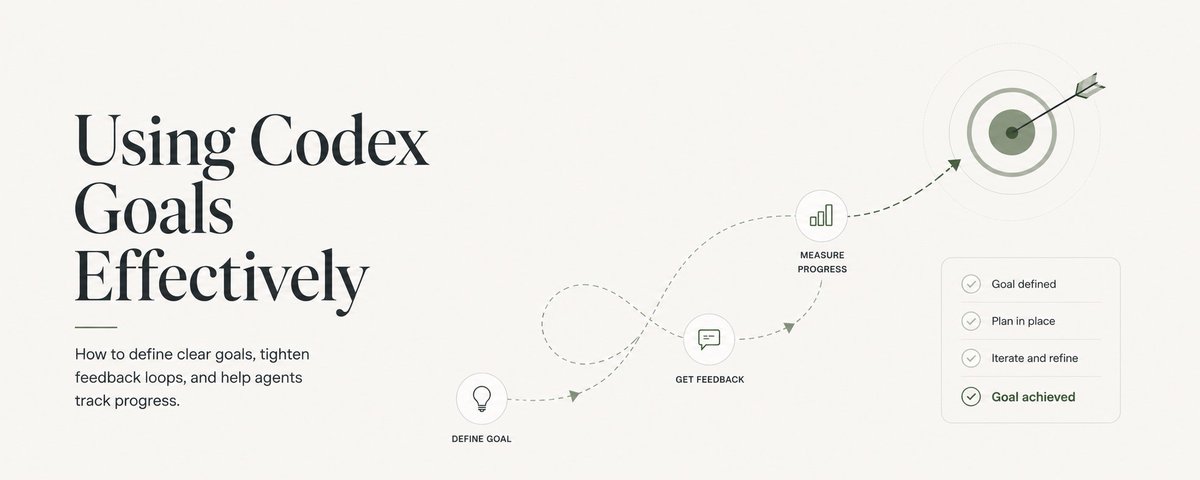
细心的 Codex 用户已经注意到,Codex 应用现在提供了 /goal 命令。你只需要在提示词开头写上 /goal,再说明你希望智能体替你完成什么。

这会触发 Codex 持续循环执行,直到它达成你的目标。但要让智能体高效做到这件事,我们就得稍微换一种方式来给模型下提示,不能完全沿用你平时习惯的写法。

这篇文章里,我会分享一些自己在 OpenAI 内部以及个人项目中使用 goal mode 时总结出来的经验,帮助你把 Codex 用到更极致。

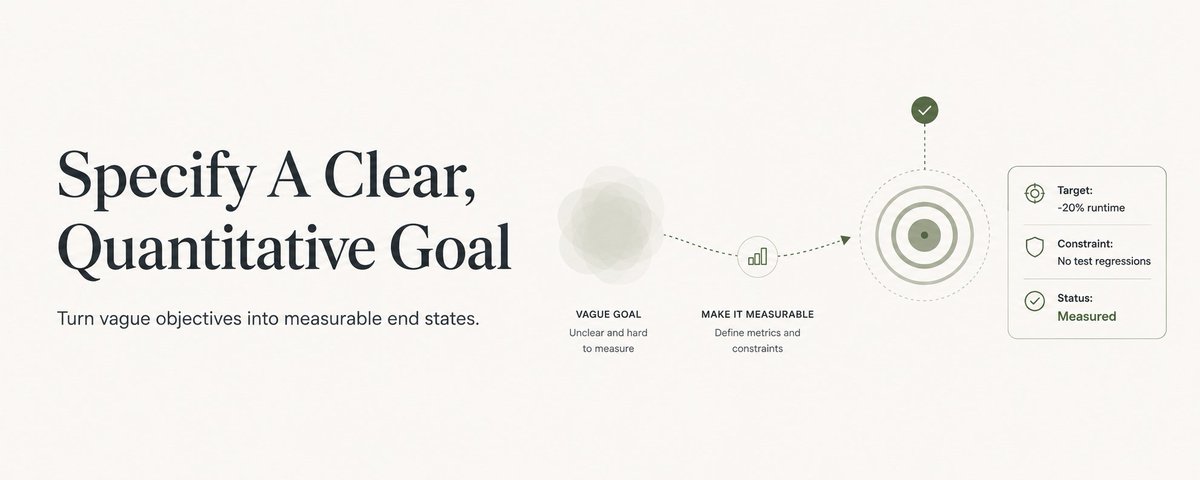
明确写出清晰且可量化的目标

过去大约 6 个月里,模型能力提升得太快,导致我们很多人在日常工作流里给提示词时都变懒了。我们只需要大致比划一下想让 GPT-5.5 做什么,它通常就已经很擅长自己判断该做什么,以及该怎么做到。

但这种提示风格,在 goal mode 里恰恰是我最常见到的一种失败模式。

goal mode 的本质是一个循环。智能体会执行一些动作,对这些动作打分,检查这个分数是否满足目标,如果还没满足就继续,如果满足了就终止。

这里最核心的是第 3 步,也就是检查分数是否满足目标。要是目标写得模糊又偏定性,比如 让我的代码更好,那这个循环到底该在什么状态下结束,其实根本没说清楚。智能体怎么知道自己什么时候算是达成目标,从而结束循环?代码处于什么状态才算更好?又要好到什么程度才该停?

我观察到,这类定义不充分的目标通常会让模型出现两种明显的失败模式。有时候模型会过早放弃,只工作几分钟就停了。还有些时候模型则会一直干下去,盲目地来回改动,试图去满足一个根本无法满足的目标。

比起 让我的代码更好,更好的目标写法会是这样,reduce the runtime of the code contained in specific_file by 20% without causing any regressions in existing unit tests and integration tests.

这时,智能体就有了一个明确且可量化的目标,也就是把特定文件中的代码运行时间降低 20%,同时还有清晰的约束条件,也就是不能让现有单元测试和集成测试出现回归。

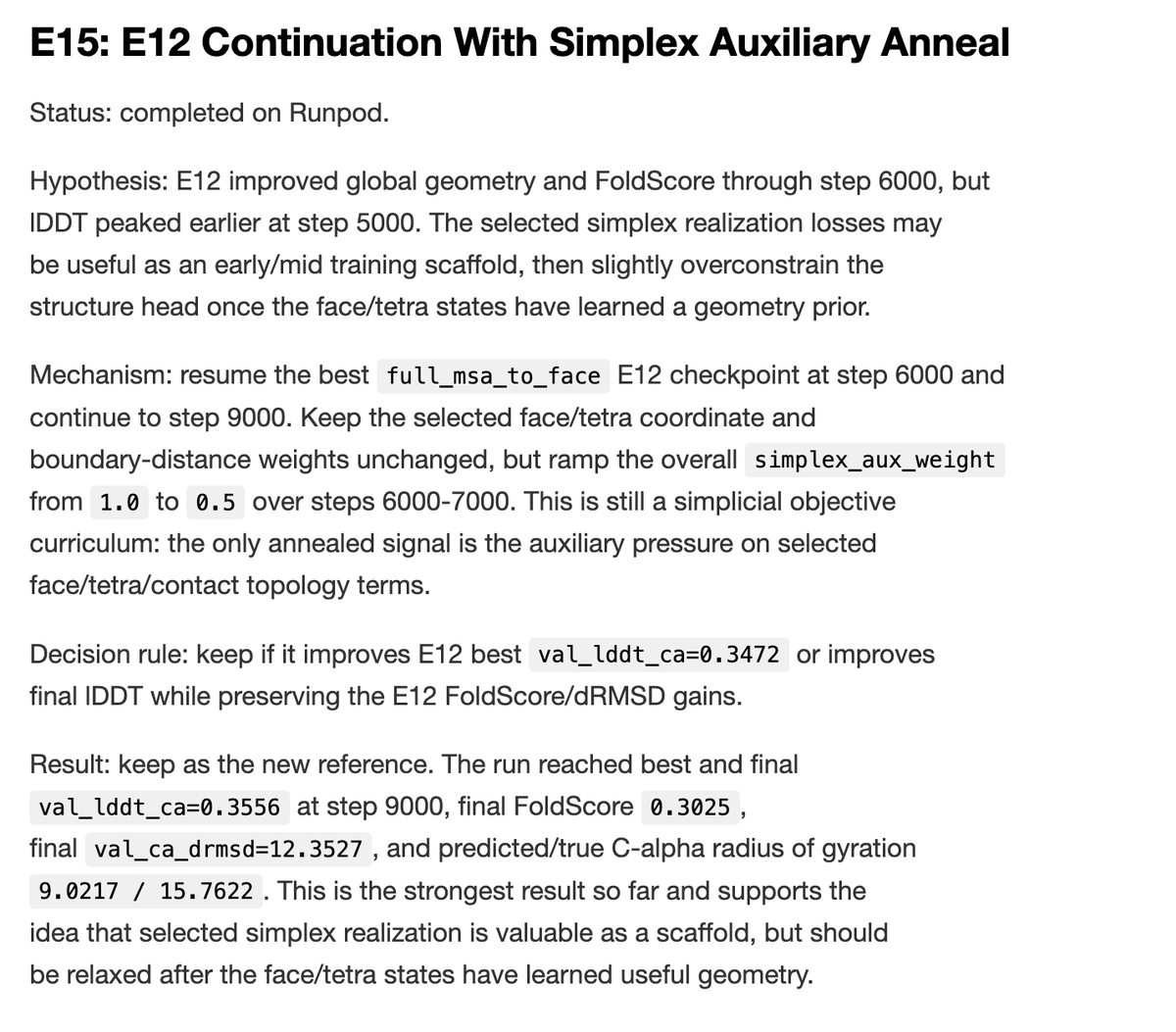
还要注意一点,只要目标依然清晰且可量化,模型有时也能自己完成打分。比如我曾经用 goal mode 把一篇 NeurIPS 论文预印本改成 ICML workshop 论文格式。ICML 有一长串格式要求,保存在一个 LaTeX 文件里,直接拿来判断并不方便。为了解决这个问题,我让 Codex 先把这些规则提取成一个 markdown 文件,里面是一份包含 200 多条格式与写作风格规则的检查清单。下面是这份清单的一小段示例。

接着,Codex 的目标就变成了,根据提供的 checklist.md,在不改动论文任何技术内容的前提下,把这篇 NeurIPS 论文改成 ICML 格式。

通过提供一份检查清单,我们就把一个定性目标转成了定量目标。Codex 只需要这样想,我在 200 条规则全部都打勾以后,就算完成了目标。虽然每条规则本身可能仍然有些模糊,但相比直接判断整个目标本身是否模糊,Codex 更擅长推理每一条规则什么时候算完成。

我还额外要求它在完成某项内容后,就顺手把清单里的对应条目标记掉。这样模型就能把自己的状态持续写进文件系统里,我也能直观看到它的进度。

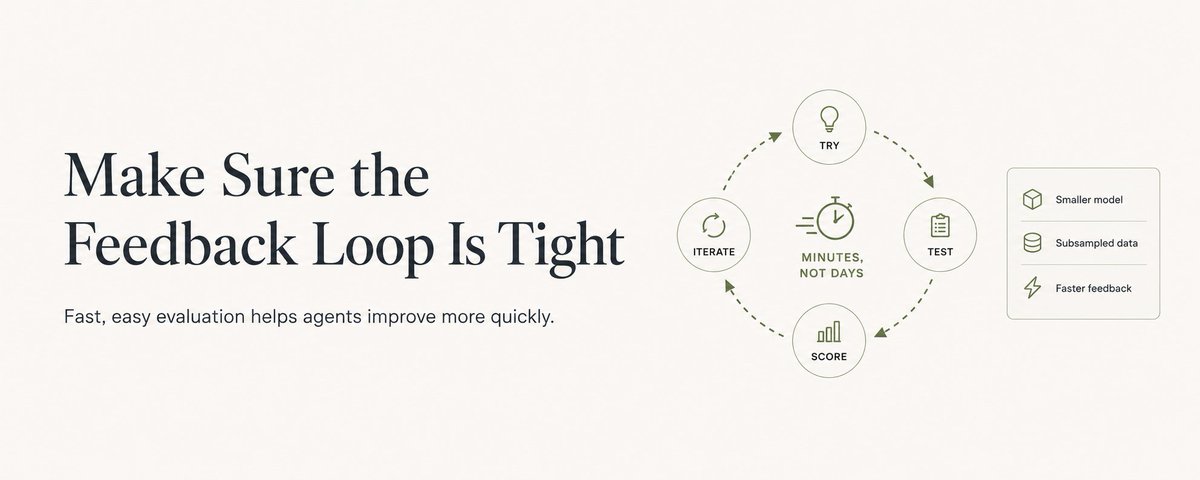
确保反馈回路足够紧

要让智能体把自己的行为和你的目标进行对照评估,它就必须有某种机制来测试自己的改动。

这个测试跑得越快,你把执行方式设计得越容易,模型就越能更快得到反馈,知道自己离目标还有多远。

比如说,如果你让智能体去改进某个机器学习算法的架构,那么让它先在更小的模型规模和抽样后的数据集上工作,通常会很有帮助,而不是一上来就直接跑完整训练。这样一来,模型试错的速度会快得多,不必被生产环境训练配置拖慢。

只要不损害模型拿到分数的质量,就尽量想办法把这条反馈回路再压紧一点。

以我自己搜索更优蛋白质结构模型架构的任务为例,我用的是 NanoFold,一个体量较小但采样质量不错的数据集来跑实验。这样一来,评分所需时间就从完整训练集动辄几天,缩短到了几分钟。

给你的智能体准备 Markdown 文件做追踪

在 goal mode 下,你可以让 GPT-5.5 连续运行好几天。即便 Codex 自带很强的压缩能力,要让模型在这么长的时间跨度里始终维持一条连贯的思路,依然非常困难。

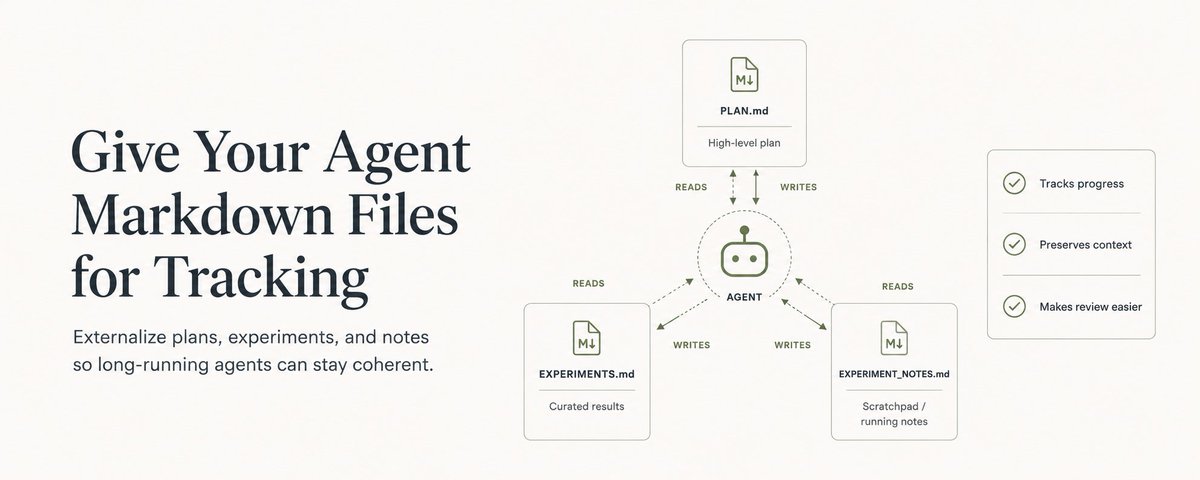
与其强迫模型把所有相关上下文都一直记在脑子里,不如直接给它一些 markdown 文件,让它把过程写进去,用来追踪自己在做什么。

我通常会在 goal mode 里给智能体开放 3 个 markdown 文件:

  • PLAN.md 用来记录智能体为了靠近目标打算执行的高层计划。你也可以先把自己对方向的一些初步想法写进去,作为起点。

  • EXPERIMENTS.md 用来记录它运行每个实验时的具体细节。这种文件特别适合机器学习任务,但也完全可以挪到很多别的任务里使用。它通常会整理成一份干净、精炼的实验列表,包含标题、尝试内容的简短说明,以及这次尝试的结果。

  • EXPERIMENT_NOTES.md 这是智能体的草稿本。它会按时间顺序记录自己在执行不同动作时的即时想法。这个文件非常有用,因为你可以据此审查它的思路过程,判断是否需要把它往别的方向推一推。

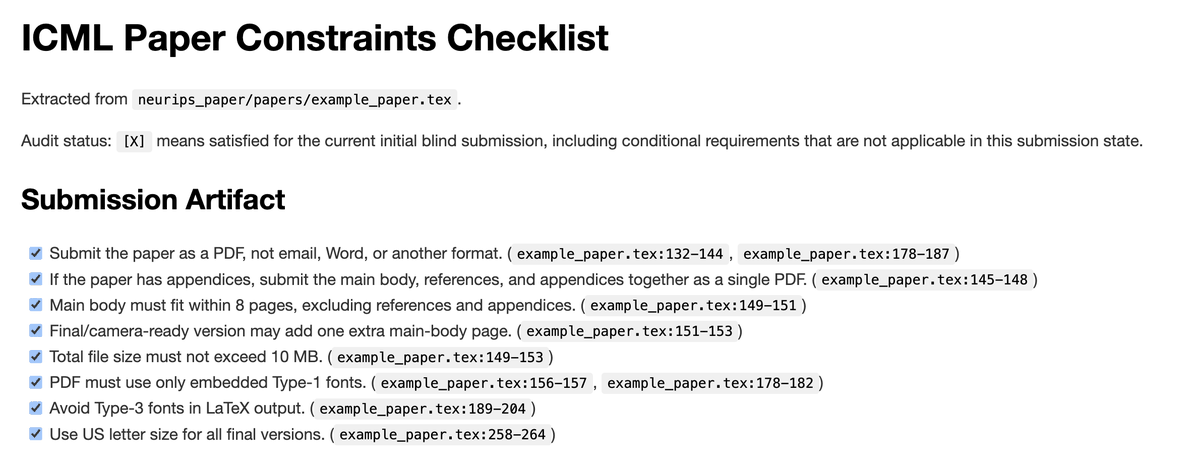
这 3 个文件里,我通常觉得最重要的是 EXPERIMENTS.md,因为它能让你和智能体一起回看它之前为达成目标做过哪些尝试,以及这些尝试为什么有效或无效。下面这个链接可以让你更直观地理解,它在实际使用中大概会是什么样子:

https://huggingface.co/datasets/ChrisHayduk/nanofold-public

差不多就是这些,这整套方法就这么简单。

把目标写清楚,而且能衡量。把反馈回路收紧。再给智能体准备几个 markdown 文件,让它有地方思考。有了这三样,Codex 就会非常老实地在你最难的问题上持续埋头苦干,几个小时都行,几天也行。

现在就去跑几轮循环吧。

Perceptive Codex users have noticed that the /goal command is now available in the Codex app - just start your prompt with /goal, and specify what you want your agent to do.

细心的 Codex 用户已经注意到,Codex 应用现在提供了 /goal 命令。你只需要在提示词开头写上 /goal,再说明你希望智能体替你完成什么。

This will trigger Codex to loop continuously until it achieves your goal. But in order for the agent to do this effectively, we need to think about prompting the model in slightly different ways than you may be used to.

这会触发 Codex 持续循环执行,直到它达成你的目标。但要让智能体高效做到这件事,我们就得稍微换一种方式来给模型下提示,不能完全沿用你平时习惯的写法。

In this article, I'll lay out some tips I've picked up from using goal mode both internally at OpenAI and in my side projects to get the most out of Codex.

这篇文章里,我会分享一些自己在 OpenAI 内部以及个人项目中使用 goal mode 时总结出来的经验,帮助你把 Codex 用到更极致。

Specify A Clear, Quantitative Goal

明确写出清晰且可量化的目标

Models have gotten so good over the past ~6 months that many of us have gotten lazy as prompters in our everyday workflows. We can vaguely gesture at what we want GPT-5.5 to build, and it's pretty good at figuring out what it should be doing and how to get there.

过去大约 6 个月里,模型能力提升得太快,导致我们很多人在日常工作流里给提示词时都变懒了。我们只需要大致比划一下想让 GPT-5.5 做什么,它通常就已经很擅长自己判断该做什么,以及该怎么做到。

This prompting style, however, is a major failure mode I've seen when using goal mode.

但这种提示风格,在 goal mode 里恰恰是我最常见到的一种失败模式。

Goal mode is at its core a loop - the agent executes some actions, scores those actions, checks if the score satisfies the goal, and then continues if it has not (or terminates if it has).

goal mode 的本质是一个循环。智能体会执行一些动作,对这些动作打分,检查这个分数是否满足目标,如果还没满足就继续,如果满足了就终止。

The core piece is step 3 - checking if the score satisfies the goal. With a vague, qualitative goal (e.g., "make my code better"), the loop's end state is underspecified. How can the agent know when it has achieved its goal and execute the loop? What state of the code is "better", and when is it "better enough" to stop?

这里最核心的是第 3 步,也就是检查分数是否满足目标。要是目标写得模糊又偏定性,比如 让我的代码更好,那这个循环到底该在什么状态下结束,其实根本没说清楚。智能体怎么知道自己什么时候算是达成目标,从而结束循环?代码处于什么状态才算更好?又要好到什么程度才该停?

I've noticed that with these underspecified goals, the model has two distinct failure modes. In some cases, the model will give up early, working for only a few minutes before giving up. In other cases, the model will never stop working, making changes that flail about blindly as it tries to satisfy an unsatisfiable target.

我观察到,这类定义不充分的目标通常会让模型出现两种明显的失败模式。有时候模型会过早放弃,只工作几分钟就停了。还有些时候模型则会一直干下去,盲目地来回改动,试图去满足一个根本无法满足的目标。

A better goal than "make my code better" would be something like "reduce the runtime of the code contained in specific_file by 20% without causing any regressions in existing unit tests and integration tests."

比起 让我的代码更好,更好的目标写法会是这样,reduce the runtime of the code contained in specific_file by 20% without causing any regressions in existing unit tests and integration tests.

The agent now has a clear and quantitative goal (20% runtime reduction on code in a specific file) as well as clear constraints (no unit or integration test regressions).

这时,智能体就有了一个明确且可量化的目标,也就是把特定文件中的代码运行时间降低 20%,同时还有清晰的约束条件,也就是不能让现有单元测试和集成测试出现回归。

Note that the model itself can sometimes do scoring if it is still clear and quantitative! For example, I set up goal mode to convert a NeurIPS paper preprint to an ICML workshop paper. ICML has a huge list of formatting constraints saved in a LaTeX file, making them not very accessible to grade against. To resolve this, I had Codex extract these rules into a markdown file that includes a checklist of over 200 formatting and stylistic rules. Here's an excerpt of what this checklist looked like.

还要注意一点,只要目标依然清晰且可量化,模型有时也能自己完成打分。比如我曾经用 goal mode 把一篇 NeurIPS 论文预印本改成 ICML workshop 论文格式。ICML 有一长串格式要求,保存在一个 LaTeX 文件里,直接拿来判断并不方便。为了解决这个问题,我让 Codex 先把这些规则提取成一个 markdown 文件,里面是一份包含 200 多条格式与写作风格规则的检查清单。下面是这份清单的一小段示例。

Codex's goal was then to "change the NeurIPS paper to ICML format based on the provided checklist.md without changing any of the technical content of the paper."

接着,Codex 的目标就变成了,根据提供的 checklist.md,在不改动论文任何技术内容的前提下,把这篇 NeurIPS 论文改成 ICML 格式。

By providing a checklist, we turn a qualitative goal into a quantitative one. Codex just needs to think "I have completed the goal when I have checked off all 200 out of 200 rules". Even though each rule itself might be vague, Codex is able to reason about when each rule is complete better than it is able to reason about the goal itself being vague.

通过提供一份检查清单,我们就把一个定性目标转成了定量目标。Codex 只需要这样想,我在 200 条规则全部都打勾以后,就算完成了目标。虽然每条规则本身可能仍然有些模糊,但相比直接判断整个目标本身是否模糊,Codex 更擅长推理每一条规则什么时候算完成。

I also provided the instruction to check off items in the checklist as they were completed so that the model could persist its status to the filesystem (and so that I could keep tabs on its progress visually).

我还额外要求它在完成某项内容后,就顺手把清单里的对应条目标记掉。这样模型就能把自己的状态持续写进文件系统里,我也能直观看到它的进度。

Make Sure the Feedback Loop Is Tight

确保反馈回路足够紧

In order for your agent to evaluate its actions against your goal, it will need some mechanism by which to test its changes.

要让智能体把自己的行为和你的目标进行对照评估,它就必须有某种机制来测试自己的改动。

The faster you can run this test (and the easier you make it for the model to execute), the faster your model will get feedback on its progress towards the goal.

这个测试跑得越快,你把执行方式设计得越容易,模型就越能更快得到反馈,知道自己离目标还有多远。

For example, if you set up your agent to improve the architecture of a machine learning algorithm, it can be helpful to have it operate on a smaller model size and a subsampled dataset than would be used for a full training run. This will allow the model to test out ideas much more rapidly than if it needed to use the production training setup.

比如说,如果你让智能体去改进某个机器学习算法的架构,那么让它先在更小的模型规模和抽样后的数据集上工作,通常会很有帮助,而不是一上来就直接跑完整训练。这样一来,模型试错的速度会快得多,不必被生产环境训练配置拖慢。

Find any way you can to speed up this feedback loop without compromising the quality of the score that the model receives.

只要不损害模型拿到分数的质量,就尽量想办法把这条反馈回路再压紧一点。

In my case of searching for improved protein structure model architectures, I used NanoFold, a small but well-sampled dataset to run my experiments. This reduced the scoring runtime from days for a full training set run to just minutes.

以我自己搜索更优蛋白质结构模型架构的任务为例,我用的是 NanoFold,一个体量较小但采样质量不错的数据集来跑实验。这样一来,评分所需时间就从完整训练集动辄几天,缩短到了几分钟。

Give Your Agent Markdown Files for Tracking

给你的智能体准备 Markdown 文件做追踪

With goal mode, you can get GPT-5.5 to run continuously for multiple days at a time. Even with the great compaction capabilities built into Codex, it is really hard for the model to maintain a coherent thread over such a long timescale.

在 goal mode 下,你可以让 GPT-5.5 连续运行好几天。即便 Codex 自带很强的压缩能力,要让模型在这么长的时间跨度里始终维持一条连贯的思路,依然非常困难。

Rather than force the model to maintain all of this relevant context in memory, it can be helpful to expose markdown files for it write to in order to keep track of what it's doing.

与其强迫模型把所有相关上下文都一直记在脑子里,不如直接给它一些 markdown 文件,让它把过程写进去,用来追踪自己在做什么。

I generally give my agent access to three markdown files within goal mode:

我通常会在 goal mode 里给智能体开放 3 个 markdown 文件:

  • PLAN.md - captures the high-level plan that the agent intends to follow as it moves towards the goal. You can seed this with initial ideas you have as to the direction it should follow.
  • PLAN.md 用来记录智能体为了靠近目标打算执行的高层计划。你也可以先把自己对方向的一些初步想法写进去,作为起点。
  • EXPERIMENTS.md - where the agent tracks the details around each experiment it runs (this is specific to machine learning, but you can repurpose this type of file for many different tasks). This typically looks a clean, curated list of experiments with a title, brief description of what was tried, and the result of that attempt.
  • EXPERIMENTS.md 用来记录它运行每个实验时的具体细节。这种文件特别适合机器学习任务,但也完全可以挪到很多别的任务里使用。它通常会整理成一份干净、精炼的实验列表,包含标题、尝试内容的简短说明,以及这次尝试的结果。
  • EXPERIMENT_NOTES.md - this is the agent's scratchpad. It's a chronologically-ordered list of its real-time thoughts as it executes different actions. This file is great to have so that you can audit the agent's thought process and see if you need to nudge it back in another direction.
  • EXPERIMENT_NOTES.md 这是智能体的草稿本。它会按时间顺序记录自己在执行不同动作时的即时想法。这个文件非常有用,因为你可以据此审查它的思路过程,判断是否需要把它往别的方向推一推。

I tend to think EXPERIMENTS.md is the most important of the three, as it lets both you and the agent review its previous attempts at achieving the goal and why they did/didn't work. Here's an excerpt from my agent's EXPERIMENTS.md to get an idea of what this looks like in practice:

这 3 个文件里,我通常觉得最重要的是 EXPERIMENTS.md,因为它能让你和智能体一起回看它之前为达成目标做过哪些尝试,以及这些尝试为什么有效或无效。下面这个链接可以让你更直观地理解,它在实际使用中大概会是什么样子:

And that's it! That's the whole playbook.

差不多就是这些,这整套方法就这么简单。

Set up a clear, measurable goal, keep the feedback loop tight, and give the agent markdown files to think in. With those three pieces in place, Codex will happily grind for hours (or even days) on your hardest problems.

把目标写清楚,而且能衡量。把反馈回路收紧。再给智能体准备几个 markdown 文件,让它有地方思考。有了这三样,Codex 就会非常老实地在你最难的问题上持续埋头苦干,几个小时都行,几天也行。

Now go run some loops!

现在就去跑几轮循环吧。

Perceptive Codex users have noticed that the /goal command is now available in the Codex app - just start your prompt with /goal, and specify what you want your agent to do.

This will trigger Codex to loop continuously until it achieves your goal. But in order for the agent to do this effectively, we need to think about prompting the model in slightly different ways than you may be used to.

In this article, I'll lay out some tips I've picked up from using goal mode both internally at OpenAI and in my side projects to get the most out of Codex.

Specify A Clear, Quantitative Goal
Models have gotten so good over the past ~6 months that many of us have gotten lazy as prompters in our everyday workflows. We can vaguely gesture at what we want GPT-5.5 to build, and it's pretty good at figuring out what it should be doing and how to get there.

This prompting style, however, is a major failure mode I've seen when using goal mode.

Goal mode is at its core a loop - the agent executes some actions, scores those actions, checks if the score satisfies the goal, and then continues if it has not (or terminates if it has).

The core piece is step 3 - checking if the score satisfies the goal. With a vague, qualitative goal (e.g., "make my code better"), the loop's end state is underspecified. How can the agent know when it has achieved its goal and execute the loop? What state of the code is "better", and when is it "better enough" to stop?

I've noticed that with these underspecified goals, the model has two distinct failure modes. In some cases, the model will give up early, working for only a few minutes before giving up. In other cases, the model will never stop working, making changes that flail about blindly as it tries to satisfy an unsatisfiable target.

A better goal than "make my code better" would be something like "reduce the runtime of the code contained in specific_file by 20% without causing any regressions in existing unit tests and integration tests."

The agent now has a clear and quantitative goal (20% runtime reduction on code in a specific file) as well as clear constraints (no unit or integration test regressions).

Note that the model itself can sometimes do scoring if it is still clear and quantitative! For example, I set up goal mode to convert a NeurIPS paper preprint to an ICML workshop paper. ICML has a huge list of formatting constraints saved in a LaTeX file, making them not very accessible to grade against. To resolve this, I had Codex extract these rules into a markdown file that includes a checklist of over 200 formatting and stylistic rules. Here's an excerpt of what this checklist looked like.
Codex's goal was then to "change the NeurIPS paper to ICML format based on the provided checklist.md without changing any of the technical content of the paper."

By providing a checklist, we turn a qualitative goal into a quantitative one. Codex just needs to think "I have completed the goal when I have checked off all 200 out of 200 rules". Even though each rule itself might be vague, Codex is able to reason about when each rule is complete better than it is able to reason about the goal itself being vague.

I also provided the instruction to check off items in the checklist as they were completed so that the model could persist its status to the filesystem (and so that I could keep tabs on its progress visually).

Make Sure the Feedback Loop Is Tight
In order for your agent to evaluate its actions against your goal, it will need some mechanism by which to test its changes.

The faster you can run this test (and the easier you make it for the model to execute), the faster your model will get feedback on its progress towards the goal.

For example, if you set up your agent to improve the architecture of a machine learning algorithm, it can be helpful to have it operate on a smaller model size and a subsampled dataset than would be used for a full training run. This will allow the model to test out ideas much more rapidly than if it needed to use the production training setup.

Find any way you can to speed up this feedback loop without compromising the quality of the score that the model receives.

In my case of searching for improved protein structure model architectures, I used NanoFold, a small but well-sampled dataset to run my experiments. This reduced the scoring runtime from days for a full training set run to just minutes.
Give Your Agent Markdown Files for Tracking
With goal mode, you can get GPT-5.5 to run continuously for multiple days at a time. Even with the great compaction capabilities built into Codex, it is really hard for the model to maintain a coherent thread over such a long timescale.

Rather than force the model to maintain all of this relevant context in memory, it can be helpful to expose markdown files for it write to in order to keep track of what it's doing.

I generally give my agent access to three markdown files within goal mode:

  • PLAN.md - captures the high-level plan that the agent intends to follow as it moves towards the goal. You can seed this with initial ideas you have as to the direction it should follow.

  • EXPERIMENTS.md - where the agent tracks the details around each experiment it runs (this is specific to machine learning, but you can repurpose this type of file for many different tasks). This typically looks a clean, curated list of experiments with a title, brief description of what was tried, and the result of that attempt.

  • EXPERIMENT_NOTES.md - this is the agent's scratchpad. It's a chronologically-ordered list of its real-time thoughts as it executes different actions. This file is great to have so that you can audit the agent's thought process and see if you need to nudge it back in another direction.

I tend to think EXPERIMENTS.md is the most important of the three, as it lets both you and the agent review its previous attempts at achieving the goal and why they did/didn't work. Here's an excerpt from my agent's EXPERIMENTS.md to get an idea of what this looks like in practice:

https://huggingface.co/datasets/ChrisHayduk/nanofold-public

And that's it! That's the whole playbook.

Set up a clear, measurable goal, keep the feedback loop tight, and give the agent markdown files to think in. With those three pieces in place, Codex will happily grind for hours (or even days) on your hardest problems.

Now go run some loops!

📋 讨论归档

讨论进行中…