返回列表
🧠 阿头学 · 💬 讨论题 · 🪞 Uota学

HTML 正在取代 Markdown,成为 AI Agent 的高带宽协作界面

这篇文章最有价值的判断是:当 AI 产物越来越复杂时,Markdown 已经不够用,HTML 不是单纯“更好看”,而是在很多高复杂度场景下更适合作为人机协作界面;但作者把它推到近乎默认格式,明显说过头了。
打开原文 ↗

2026-05-09 原文链接 ↗
阅读简报
双语对照
完整翻译
原文
讨论归档

核心观点

  • HTML 的本质优势是“高带宽表达” 作者说服力最强的部分,不是 HTML 能做表格和配色,而是它能同时承载结构、视觉、交互和导出能力。对复杂方案、代码解释、研究报告、设计原型这类内容,HTML 确实比 Markdown 更接近“可审阅界面”而不是“长文本附件”。
  • 真正被替代的不是 Markdown,而是低效审阅方式 作者反复强调“100 行以上 markdown 很难认真读完”,这个判断虽然主观,但方向成立。AI 时代的瓶颈已经不是生成,而是人能否快速读懂、比较、批注和决策;HTML 在这件事上明显更强,尤其适合并排对比、流程图、重点高亮、折叠分层。
  • “一次性编辑器”是最硬的杀手级场景 文中最站得住脚的创新点,不是“用 HTML 写报告”,而是让 Claude 生成只服务当前任务的临时工具:拖拽 ticket、调整 prompt 参数、编辑 feature flag、导出 JSON/prompt/diff。这不是文档升级,而是把 prompt 直接变成一次性软件,这一步 Markdown 根本做不到。
  • 作者把“展示格式”偷换成了“默认协作格式” 这是文章最大问题。HTML 当然更适合展示和交互,但不代表它应该普遍替代 Markdown。作者自己也承认 HTML 更慢、token 更多、diff 更差、版本控制更吵,这意味着它更像“高保真中间产物”,而不是所有场景的默认底座。
  • 这篇文章本质上在为 Claude Code 工作流做 evangelism 文中频繁把 HTML 的价值和 Claude Code 的大上下文、MCP、设计插件、代码库访问能力捆绑在一起,这说明它不是中性格式讨论,而是在推一种特定工具链。结论不是没道理,但适用前提被作者淡化了。

跟我们的关联

  • 对 ATou 意味着什么、下一步怎么用 对 ATou 来说,这不是“以后别写 Markdown”,而是遇到复杂决策时别再死磕长文档。下一步最值得试的是:把“多方案对比、PR 说明、系统解释、路线排序”改成 HTML artifact,尤其要求并排比较、重点标注、最后可导出结论。
  • 对 Neta 意味着什么、下一步怎么用 对 Neta 的意义在于,这提供了一个“提高人类审阅吞吐量”的方法。下一步可以把它当成 agent workflow 的一层 UI:先生成探索型 HTML,再生成实现计划 HTML,再把这些一起喂回执行 agent,形成“生成—审阅—收敛—执行”的闭环。
  • 对 Uota 意味着什么、下一步怎么用 对 Uota 来说,最值得抓住的不是 HTML,而是“临时工具化”的产品观。下一步可以专门讨论哪些任务最适合 Disposable UI:例如排序、打标、调参、批注、解释复杂机制;这些地方比单纯聊天更接近高价值的人机协作点。
  • 对通用团队意味着什么、下一步怎么用 对普通团队而言,别被作者带偏成“全面 HTML 化”。更合理的用法是:Markdown 继续做可编辑、可版本控制的底稿;HTML 专门做对外展示、复杂审阅和交互式说明。下一步应该先挑 1-2 个高痛点场景试点,而不是改整个文档栈。

讨论引子

1. 如果 HTML 更适合“读”和“比”,那团队文档的最佳结构是不是应该变成“Markdown 作为源文件,HTML 作为阅读层”? 2. “一次性编辑器”会不会比很多轻量 SaaS 更有产品潜力,还是只是高阶用户的效率玩具? 3. 当 agent 开始输出带脚本的 HTML 时,我们愿意为了更强交互,接受多少安全、成本和版本控制上的代价?

Markdown 已经成了 agent 与我们沟通时最主流的文件格式。它简单、便携,具备一定的富文本能力,也方便你自己编辑。Claude 甚至已经意外地很擅长用 ASCII 在 markdown 文件里画图。

但随着 agent 变得越来越强,我开始觉得 markdown 也越来越像一种限制。超过一百行的 markdown 文件,读起来就会变得吃力。想要更丰富的可视化、颜色和图表,也想更方便地把这些内容分享出去。

而且现在,这些文件也越来越不是我自己亲手在改了,更多是把它们当成规格说明、参考资料、头脑风暴产物之类来用。真要改的时候,通常也是让 Claude 去改,这样一来,markdown 最大的优势之一也就没那么重要了。

所以我开始更偏向把 HTML 当成输出格式,而不是 Markdown。Claude Code 团队里也越来越多人这么做。原因就在这里。

(如果你想先看几个例子,这里有一批可以直接看:https://thariqs.github.io/html-effectiveness ,不过记得回来继续看看为什么)

为什么是 HTML?

信息密度

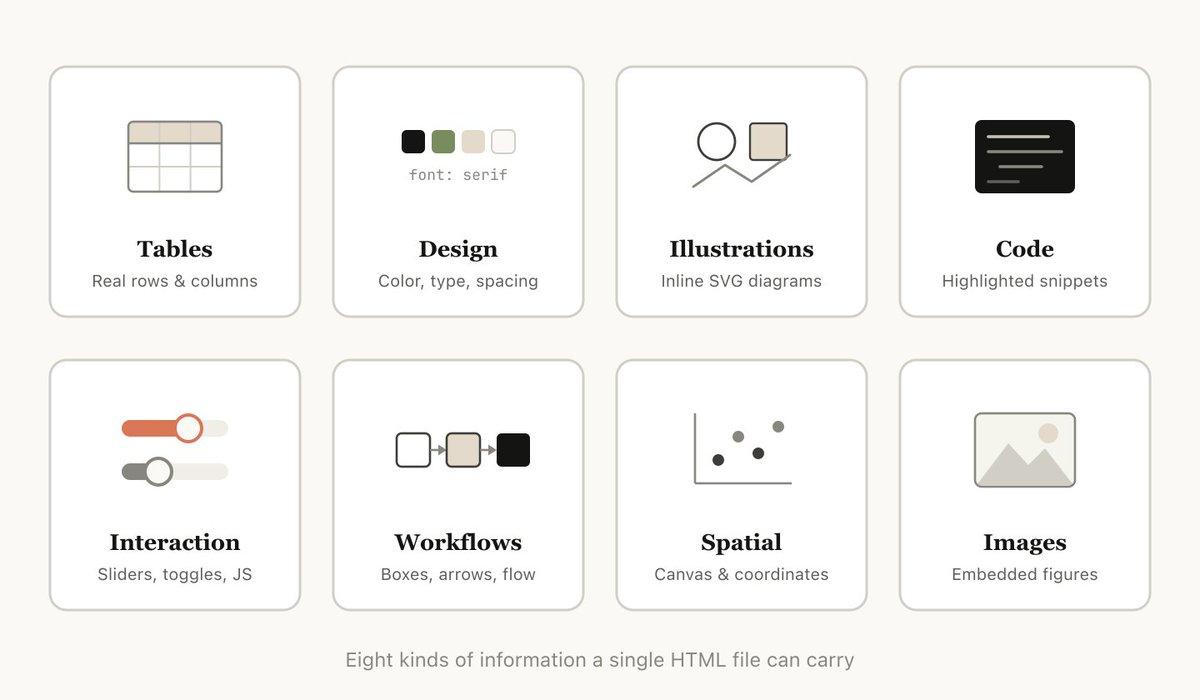
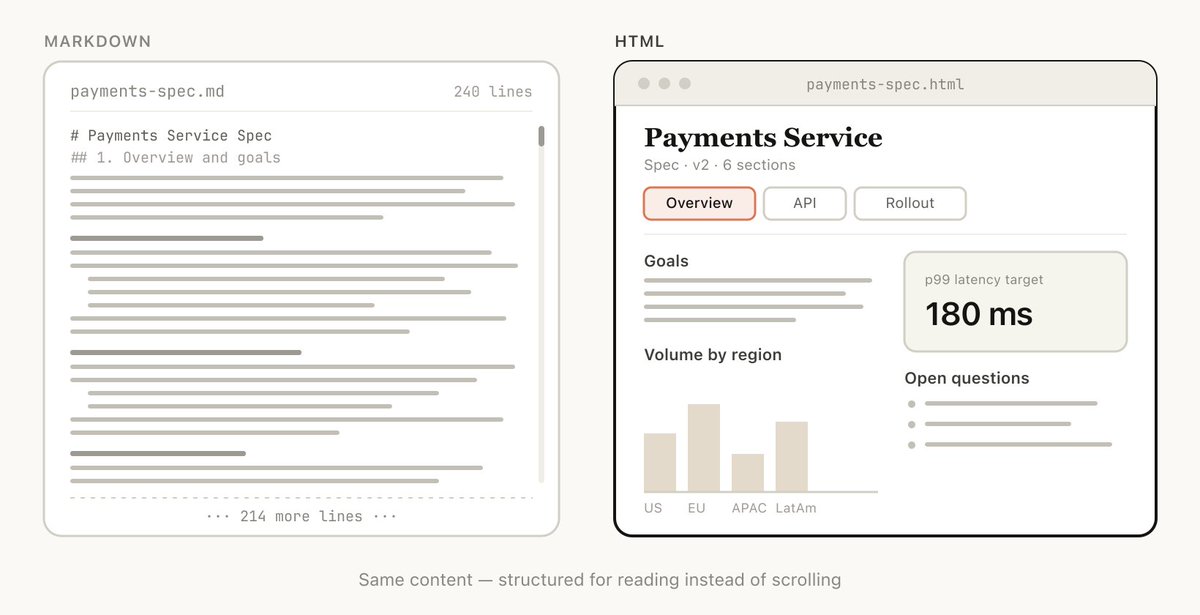
和 markdown 相比,HTML 能承载丰富得多的信息。它当然也能处理标题、排版这些简单的文档结构,但它还能表达很多别的内容,比如:

  • 用表格展示表格型数据

  • 用 CSS 展示设计数据

  • 用 SVG 展示插图

  • 用 script 标签展示代码片段

  • 用 HTML 元素配合 javascript + CSS 实现交互

  • 用 SVG 和 HTML 展示工作流

  • 用绝对定位和 canvas 展示空间数据

  • 用图片标签展示图像

甚至可以说,只要是 Claude 能读懂的一组信息,几乎都可以相当高效地用 HTML 表达出来。这样一来,模型就能更高效地把深入的信息传达给你,你也更容易阅读和审阅。

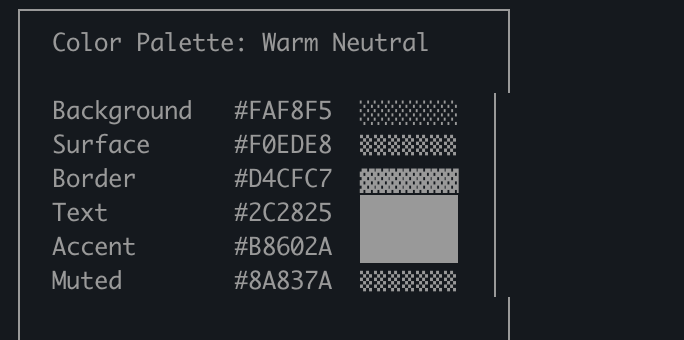
我的体验是,如果做不到这一点,模型在 markdown 里就会转而采用一些更低效的做法,比如 ASCII 图,或者我最喜欢的那种,在 Claude Code 里用 unicode 字符去估颜色,下面这张截图就是例子。

视觉清晰度与可读性

随着 Claude 能处理越来越复杂的工作,它写出来的规格和计划也越来越长。实际情况是,超过 100 行的 markdown 文件,我往往根本不会认真读完,更别说让组织里的其他人去读了。

但 HTML 文档就容易读得多。Claude 可以在视觉上把结构组织得更适合浏览,配上标签页、插图、链接等等。甚至还能做成响应式布局,这样你在不同设备上看时,都能有更合适的阅读方式。

更容易分享

Markdown 文件其实不太好分享,因为大多数浏览器对它都没有原生、良好的渲染支持。很多时候你得把它当成附件发到邮件或消息里。

HTML 就不一样了。只要把文件传上去,比如传到 S3,你就能很方便地分享链接。你的同事可以在任何地方打开,也更容易引用。

如果你的规格、报告或者 PR 说明是 HTML 格式,别人真的去读它的概率会高非常多。

双向交互

https://x.com/trq212/status/2017024445244924382

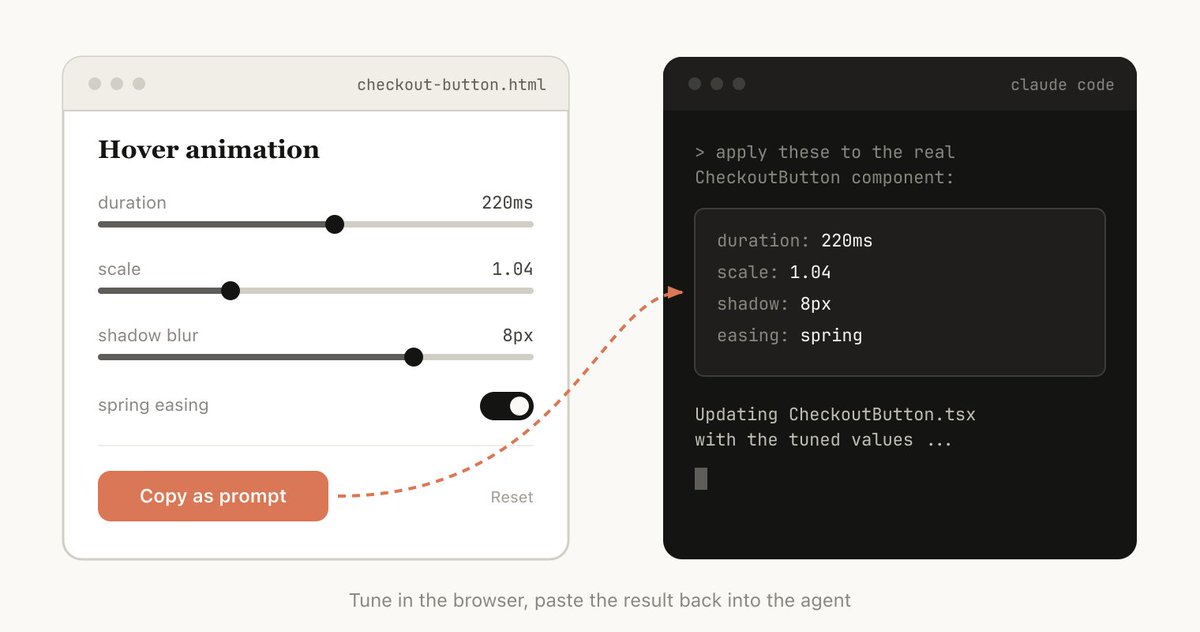
HTML 还能让你和文档互动。比如你可能会想让它加上一些滑块或旋钮,用来调设计;或者允许你微调算法里的不同选项,看看会发生什么。你也可以让它把这些修改整理成一段 prompt,方便直接复制回 Claude Code 里。

关于这种双向交互的例子,可以看看我那篇讲 playground 的帖子:https://x.com/trq212/status/2017024445244924382

数据摄取能力

为什么要用 Claude Code 来做 HTML 文件,而不是用 ClaudeAI 或 Claude Design 之类的工具?其中一个最大原因,是 Claude Code 能摄取的上下文非常多。

比如写这篇文章时,我让 Claude Code 去读我的代码目录,找出我生成过的所有 HTML 文件,把它们分组、分类,然后再做一个 HTML 文件,用图表表示每一种类型。你在这篇文章里看到的图,就是直接这样做出来的。

除了文件系统,Claude Code 还能通过你的 MCP 获取更多上下文,比如 Slack、Linear 等等,也可以从你的浏览器里拿上下文(比如 Chrome 里的 Claude),还可以看 git 历史,等等。

它更让人开心

用 Claude 做 HTML 文档就是更有意思,也会让我觉得自己更参与其中,对产出的东西更投入。光这一点,其实就已经够了。

如何开始

我有点担心,有人看完这篇文章之后会把它做成一个 /html skill 之类的东西。那样也许有点价值,但我还是想强调,其实没必要做太多额外工作,Claude 就能做到。你只要直接让它 make a HTML file 或 make a HTML artifact 就行。

真正的关键,是先想清楚你想让这个 artifact 做什么,以及你准备怎么用它。以后你也许会慢慢做出一个 skill,但现在更建议直接从零开始写 prompt,先熟悉它在不同场景里的用法。

使用场景

为了说得更具体一点,我已经针对很多不同场景做过各种 HTML 文件。你可以在这里看完整例子:https://thariqs.github.io/html-effectiveness/ ,下面先给一个概览。

规格、规划与探索

HTML 给了 Claude 一个很丰富的画布,让它能真正钻进问题里。现在我开始处理一个问题时,不再只期待得到一份简单的 markdown 计划,而是更像会得到一整张由 HTML 文件组成的网。比如,我可能会先让 Claude Code 做头脑风暴,探索几种不同方案。然后再让它把其中一种展开得更深入,可能做点 mockup 或代码片段。最后,等感觉差不多了,再让它写一份实现计划。等我对计划满意,就会开一个新会话,把这些文件都丢进去,让它开始实现。

做验证的时候,也会让验证 agent 把这些文件一起读进去,这样它对真正需要做的事就会有更完整的上下文。

示例提示词:

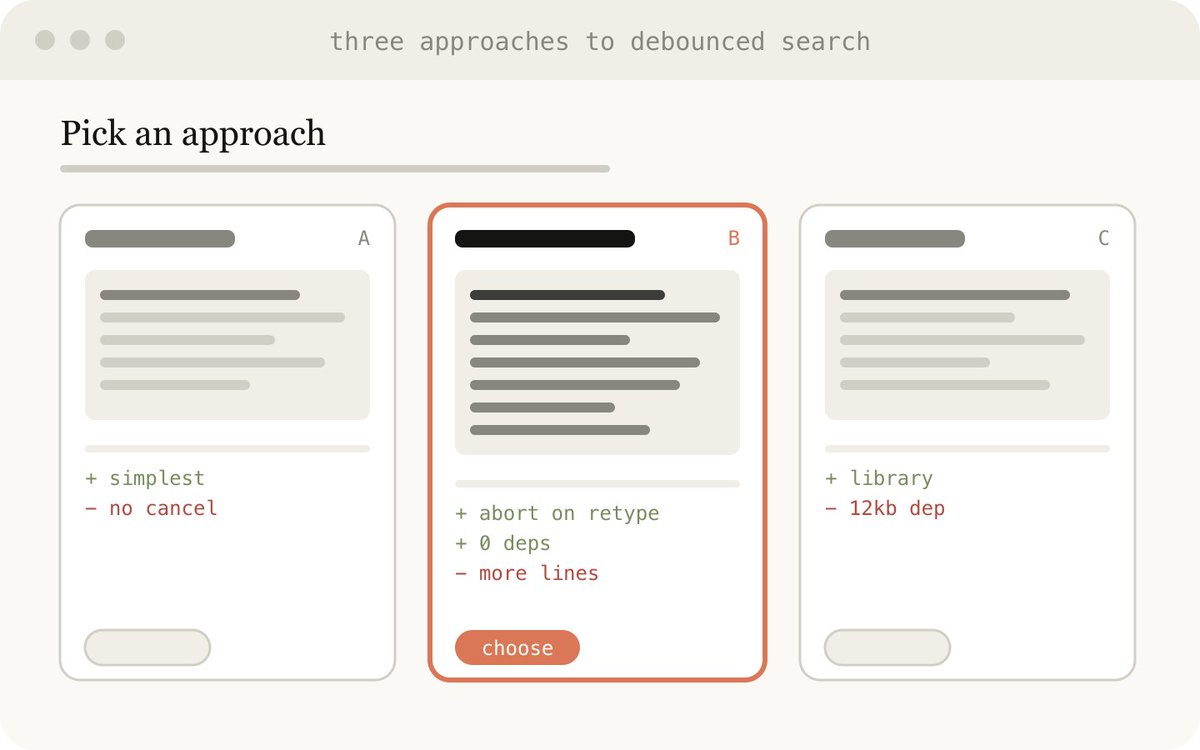
  • 我不确定 onboarding 页面该往哪个方向做。生成 6 种明显不同的方案,在布局、语气和信息密度上都拉开差异,然后把它们放进同一个 HTML 文件里,用网格排开,让我能并排比较。给每个方案都标出它的取舍点。

  • 做一份完整的实现计划,输出成 HTML 文件,记得加一些 mockup,展示数据流,再放上我可能需要审阅的重要代码片段。排版要容易阅读,容易消化。

使用场景:

  • 探索某段代码还有哪些别的实现方式

  • 探索多种视觉设计方案

代码审查与理解

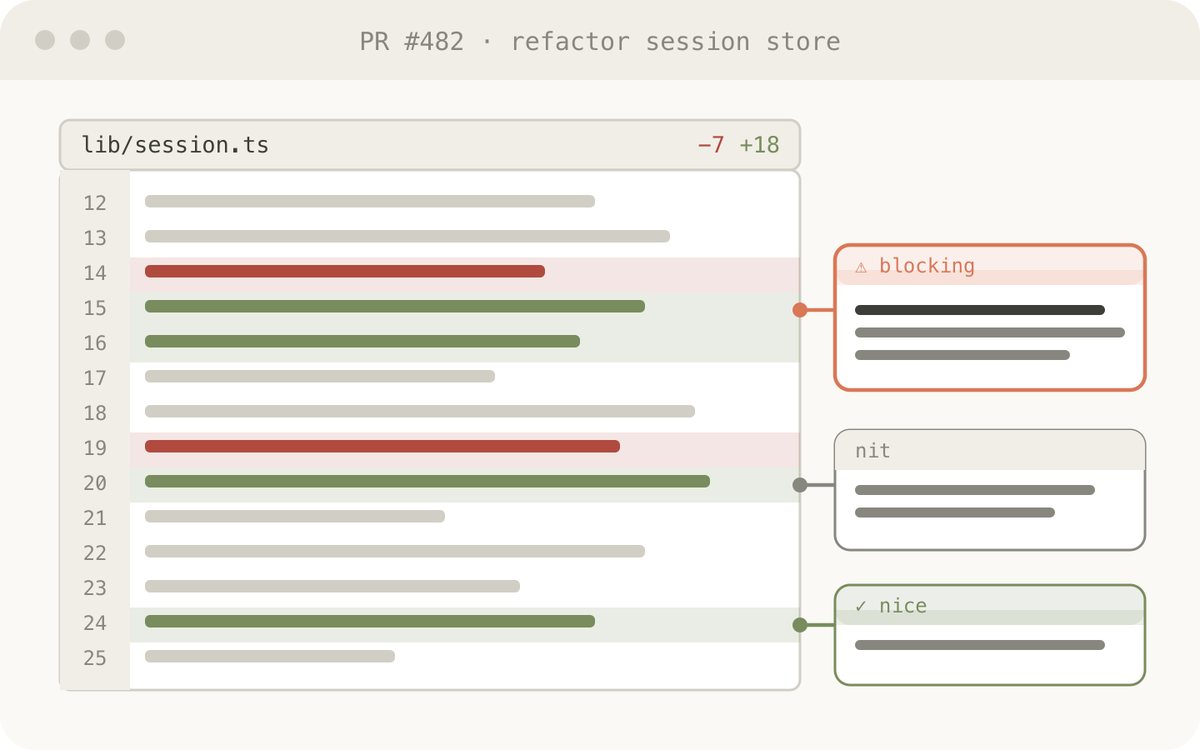
代码放在 Markdown 文件里往往不太好读。但到了 HTML 里,我们可以渲染 diff、批注、流程图、模块图等等。它可以用来理解 agent 写出来的代码,也可以用来做 code review,或者把一个 PR 讲清楚给审代码的人看。我发现这往往比 Github 默认的 diff 视图更好用。现在我提的每一个 PR,都会附上一份 HTML 版代码说明。

https://thariqs.github.io/html-effectiveness/

示例提示词:

帮我审这个 PR,做一个 HTML artifact 来说明它。我对 streaming/backpressure 这部分逻辑不太熟,所以重点放在这里。把实际 diff 渲染出来,在边栏直接加行内批注,按严重程度给问题上色,再补上任何能更好传达这个概念的东西。

使用场景:

  • 创建一个 PR

  • 审查一个 PR

  • 理解代码里的某个主题

设计与原型

Claude Design 之所以基于 HTML,是因为 HTML 在设计表达上强得惊人,就算最终落地的界面并不是 HTML 也是一样。Claude 可以先用 HTML 把设计草图画出来,再按你要的语言去实现,比如 React、Swift 等等。

你也可以拿它来原型化交互,比如动画、动作等等。不妨让 Claude 加上滑块、旋钮之类的控制项,方便你把想要的效果调得更准。

示例提示词:

我想给新的结账按钮做个原型,点击之后先播一个动画,然后快速变成紫色。做一个 HTML 文件,里面放几组滑块和选项,让我能试不同的动画参数。再给我一个复制按钮,把效果最好的参数复制出来。

适合用在:

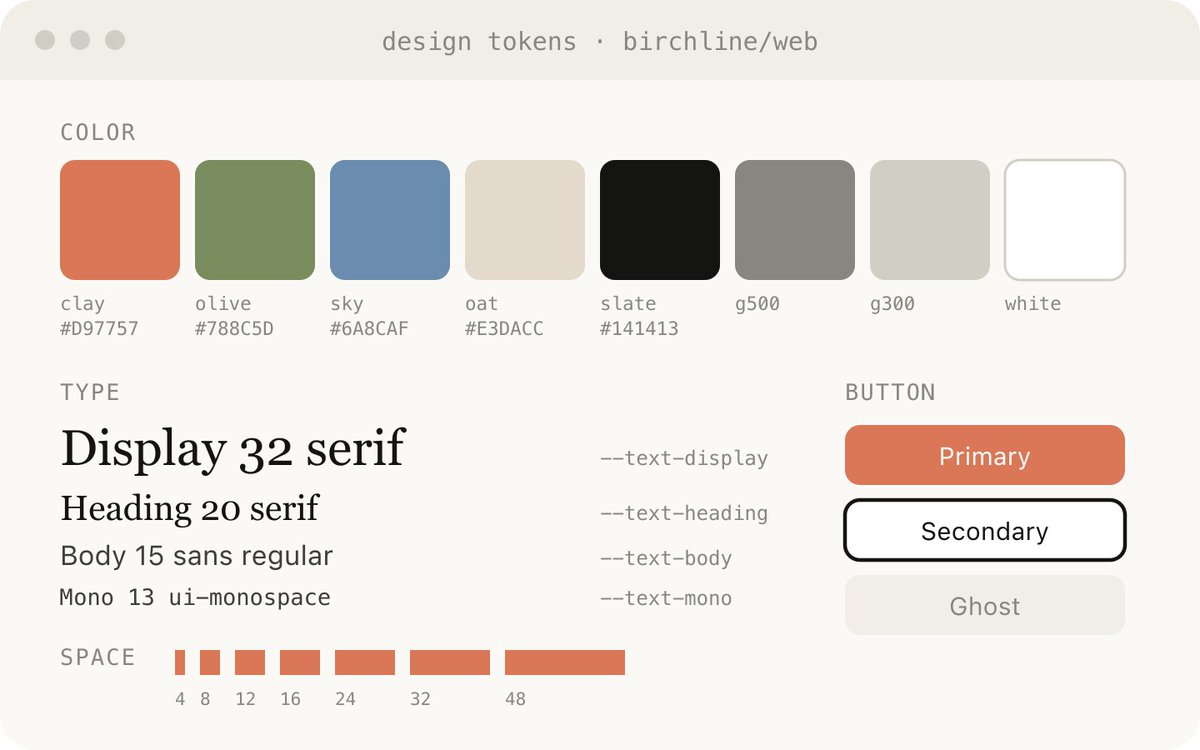
  • 制作设计系统相关产物

  • 调整组件

  • 可视化组件库

  • 原型化那些让人开心的动画

报告、研究与学习

Claude Code 在跨多个数据源整合信息,再把它整理成一份易读报告这件事上,表现非常强。你可以让 Claude 去搜 Slack、代码库、git 历史、互联网等等,然后生成非常好读的报告,给自己看,给管理层看,给团队看,都可以。

这些内容可以被组织成长篇 HTML 文档、交互式说明页,甚至是一整套幻灯片。也可以让 Claude 用 SVG 画图,帮助可视化。

比如我写 prompt caching 那几篇文章时,就让 Claude 先把 git 历史读一遍,然后给我准备一份 HTML 版的深入研究文件,专门梳理我们对 prompt caching 做过的所有改动,方便我自己读。

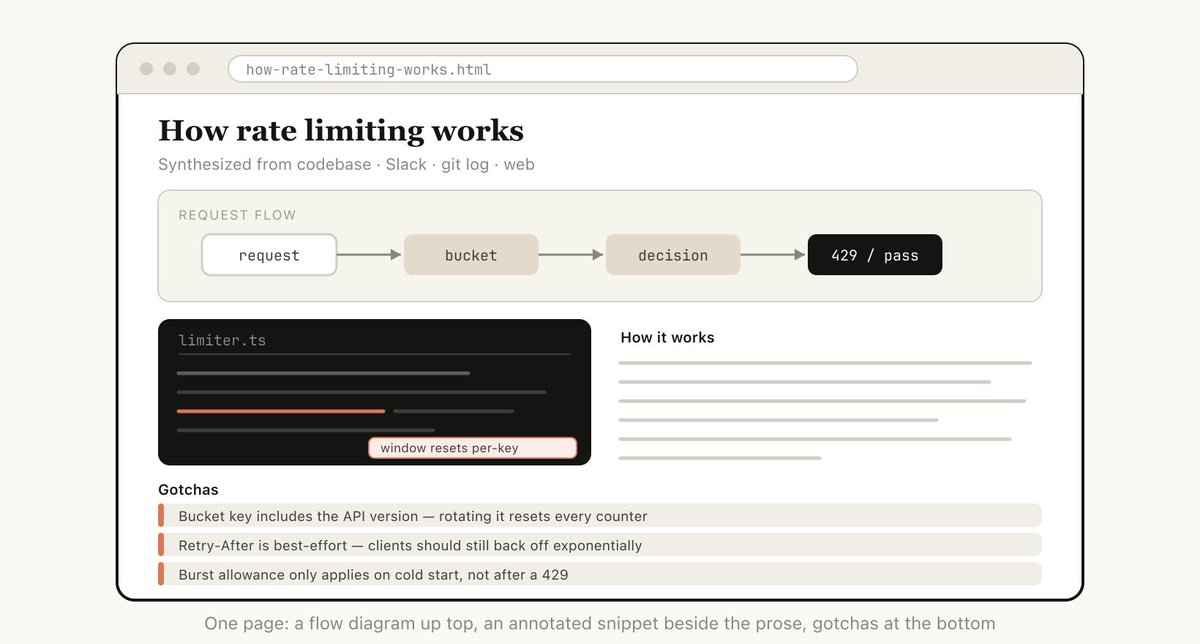
示例提示词: 我一直没搞懂我们的 rate limiter 实际是怎么工作的。去读相关代码,然后做一个单页 HTML 说明文档,里面要有 token-bucket 流程图、3 到 4 段带注释的关键代码片段,以及放在底部的 gotchas 部分。按那种只读一遍的人来优化可读性。

适合用在:

  • 总结一个功能是怎么工作的

  • 给我解释一个概念

  • 写给老板的周报

  • 写给管理层的事故报告

  • SVG 插图、流程图、技术图解等等

定制编辑界面

有时候,光靠一个文本框很难把自己想要的东西说清楚。这种时候,我会让 Claude 直接给我搭一个一次性编辑器,专门针对眼前这件事。不是产品,不是复用工具,就是一个单独的 HTML 文件,只为这份数据量身定做。

诀窍永远是最后一定要有导出能力。比如一个 copy as JSON 或 copy as prompt 按钮,把我在界面里做的操作重新变成一段可以粘回 Claude Code 的内容。

示例提示词:

  • 我需要重新给这 30 个 Linear ticket 排优先级。做一个 HTML 文件,把每个 ticket 做成可拖拽卡片,放到 Now / Next / Later / Cut 这几列里。先按你的最佳判断预排一次。再加一个 copy as markdown 按钮,把最终排序导出出来,并给每个 bucket 补一行理由。

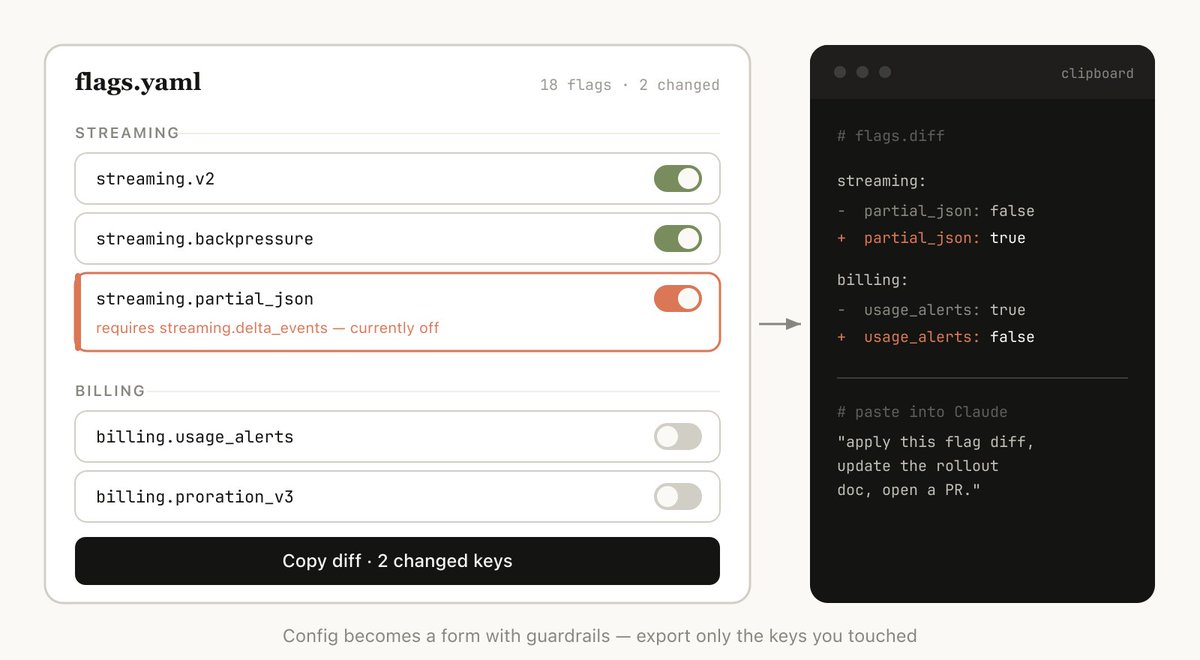
  • 这是我们的 feature flag 配置。给它做一个表单式编辑器,按区域给 flag 分组,显示它们之间的依赖关系,如果我打开了某个前置条件还没开的 flag,就提示我。再加一个 copy diff 按钮,只输出发生变化的键。

  • 我在调这个 system prompt。做一个左右并排的编辑器,左边是可编辑的 prompt,并把变量槽位高亮出来,右边放三个示例输入,实时重渲染填充后的模板。再加上字符数和 token 数计数器,以及复制按钮。

适合用在:

  • 重新排序、分流或归类各种东西,比如 ticket、测试用例、反馈

  • 编辑结构化配置,比如 feature flag、环境变量、带约束的 JSON/YAML

  • 调 prompt、模板或文案,并实时预览

  • 整理数据集,审批或拒绝行,给样本打标签,导出筛选结果

  • 给文档、转录稿或 diff 做批注,并导出这些批注

  • 选择那些很难用文字表达的值,比如颜色、缓动曲线、裁剪区域、cron 时间表、正则表达式

常见问题

我已经跟很多人讲过自己切换到 HTML 的事,也看到一些问题反复出现。

这样不是更浪费 token 吗? 虽然 markdown 往往 token 更少,但我发现 HTML 的表达力更强,而且我真的更容易把它读完,所以整体上输出反而更好。Opus 4.7 已经有 1MM 的上下文窗口,这点额外 token 消耗放在上下文里,几乎感觉不到。

那你现在什么时候还会用 markdown? 老实说,几乎什么场景我都不太用 markdown 了,不过这可能也说明我确实是比较极端的 HTML maximalist。

HTML 文件要怎么看? 我一般就是本地直接用浏览器打开它(你也可以让 Claude 帮你打开),如果想分享链接,就传到 S3。

生成 HTML 会不会比 markdown 慢很多? 确实会更慢。HTML 可能会比 Markdown 慢 2 到 4 倍,但我觉得结果值得。

版本控制怎么办? 说实话,这真的是 HTML 最大的缺点之一。HTML 的 diff 噪声很大,和 Markdown 比起来更难审。

怎么让 Claude 更贴近我的审美,不至于做得太丑? frontend design plugin 能帮 Claude 做出更好看的 HTML 文件。但如果你想贴近自己公司的风格,可以先让 Claude 对着你的代码库做出一份单独的设计系统 HTML 文件。之后别的 html 文件都可以拿这份设计系统文件当参考。

保持参与感

上面这些,其实都指向同一件事。我觉得自己之所以用 HTML,真正原因是它让我在和 Claude 协作时更有参与感。

之前一度担心,因为自己已经不再认真读那些计划,最后会不会只能任由 Claude 自己做决定。

但现在可以很高兴地说,开始用 HTML 之后,这种参与感反而比以前更强了。也希望你会有同样的感觉。

Markdown has become the dominant file format used by agents to communicate with us. It’s simple, portable, has some rich text capability and is easy for you to edit. Claude has even gotten surprisingly good at using ASCII to make diagrams inside of markdown files.

But as agents have become more and more powerful, I have felt that markdown has become a restricting format. I find it difficult to read a markdown file of more than a hundred lines. I want richer visualizations, color and diagrams and I want to be able to share them easily.

I'm also increasingly not editing these files myself, but using them as specs, reference files, brainstorming outputs, etc. When I do make edits, I’m usually prompting Claude to edit them, which removes one of markdown’s largest benefits.

I’ve started preferring HTML as an output format instead of Markdown and increasingly see this being used by others on the Claude Code team, this is why.

(if you want to start with some examples, you can see a bunch here: https://thariqs.github.io/html-effectiveness, just be sure to come back and read more about why)
Why HTML?

Markdown 已经成了 agent 与我们沟通时最主流的文件格式。它简单、便携,具备一定的富文本能力,也方便你自己编辑。Claude 甚至已经意外地很擅长用 ASCII 在 markdown 文件里画图。

但随着 agent 变得越来越强,我开始觉得 markdown 也越来越像一种限制。超过一百行的 markdown 文件,读起来就会变得吃力。想要更丰富的可视化、颜色和图表,也想更方便地把这些内容分享出去。

而且现在,这些文件也越来越不是我自己亲手在改了,更多是把它们当成规格说明、参考资料、头脑风暴产物之类来用。真要改的时候,通常也是让 Claude 去改,这样一来,markdown 最大的优势之一也就没那么重要了。

所以我开始更偏向把 HTML 当成输出格式,而不是 Markdown。Claude Code 团队里也越来越多人这么做。原因就在这里。

(如果你想先看几个例子,这里有一批可以直接看:https://thariqs.github.io/html-effectiveness ,不过记得回来继续看看为什么)

为什么是 HTML?

Information Density

HTML can convey much richer information compared to markdown. It can of course do simple document structure like headers and formatting, but it can also represent all sorts of other information such as:

  • Tabular data using tables

  • Design data with CSS

  • Illustrations with SVG

  • Code snippets with script tags

  • Interactions using HTML elements with javascript + CSS

  • Workflows using SVG and HTML

  • Spatial data using absolute positions and canvases

  • Images using image tags

I would go so far as to say that there is almost no set of information that Claude can read that you cannot fairly efficiently represent with HTML. This makes it a highly efficient way for the model to communicate in-depth information to you and for you to revie wit.

I’ve found that in the absence of being able to do this, the model may do more inefficient things in markdown like ASCII diagrams or, my favorite, estimating colors with unicode characters like in this screenshot from Claude Code.

信息密度

和 markdown 相比,HTML 能承载丰富得多的信息。它当然也能处理标题、排版这些简单的文档结构,但它还能表达很多别的内容,比如:

  • 用表格展示表格型数据

  • 用 CSS 展示设计数据

  • 用 SVG 展示插图

  • 用 script 标签展示代码片段

  • 用 HTML 元素配合 javascript + CSS 实现交互

  • 用 SVG 和 HTML 展示工作流

  • 用绝对定位和 canvas 展示空间数据

  • 用图片标签展示图像

甚至可以说,只要是 Claude 能读懂的一组信息,几乎都可以相当高效地用 HTML 表达出来。这样一来,模型就能更高效地把深入的信息传达给你,你也更容易阅读和审阅。

我的体验是,如果做不到这一点,模型在 markdown 里就会转而采用一些更低效的做法,比如 ASCII 图,或者我最喜欢的那种,在 Claude Code 里用 unicode 字符去估颜色,下面这张截图就是例子。

Visual Clarity & Ease of Reading

As Claude is able to do more complex work, it is also writing larger and larger specs and plans. In practice, I've found I tend to not actually read more than a 100-line markdown file, and I certainly am not able to get anyone else in my organization to read it.

But HTML documents are much easier to read, Claude can organize the structure visually to be ideal to navigate with tabs, illustrations, links, etc. It can even be mobile responsive so you can read it differently based on your form factor.

视觉清晰度与可读性

随着 Claude 能处理越来越复杂的工作,它写出来的规格和计划也越来越长。实际情况是,超过 100 行的 markdown 文件,我往往根本不会认真读完,更别说让组织里的其他人去读了。

但 HTML 文档就容易读得多。Claude 可以在视觉上把结构组织得更适合浏览,配上标签页、插图、链接等等。甚至还能做成响应式布局,这样你在不同设备上看时,都能有更合适的阅读方式。

Ease of Sharing

Markdown files are fairly hard to share since most browsers do not render them natively well. You often have to add them as attachments to emails or messages.

With HTML, as long as you upload the file (for example to S3), you can share the link easily. Your colleagues can open it wherever they wish and easily reference it.

The chance of someone actually reading your spec, report or PR writeup is much much higher if it’s in HTML.

更容易分享

Markdown 文件其实不太好分享,因为大多数浏览器对它都没有原生、良好的渲染支持。很多时候你得把它当成附件发到邮件或消息里。

HTML 就不一样了。只要把文件传上去,比如传到 S3,你就能很方便地分享链接。你的同事可以在任何地方打开,也更容易引用。

如果你的规格、报告或者 PR 说明是 HTML 格式,别人真的去读它的概率会高非常多。

Two-way Interaction

https://x.com/trq212/status/2017024445244924382

HTML can allow you to interact with the document, for example you might want to ask it to add sliders or knobs to adjust a design or allow you to tweak different options in the algorithm to see what happens. You can also ask it to let you copy these changes into a prompt to paste back into Claude Code.

Read more about my playgrounds post to see examples of this two way interaction: https://x.com/trq212/status/2017024445244924382

Data Ingestion

Why use Claude Code to make HTML files instead of ClaudeAI or Claude Design for example? One of the biggest reasons is all the context Claude Code can ingest.

For example, when writing this article, I asked Claude Code to read through my code folder and find all the HTML files I’ve generated, group and categorize them and then make an HTML file with all diagrams representing each type. The diagrams you see in this article are a direct result of that.

Besides the file system, Claude Code can find additional context using your MCPs (like Slack, Linear, etc.), your web browser (with Claude in Chrome), your git history, etc.

双向交互

https://x.com/trq212/status/2017024445244924382

HTML 还能让你和文档互动。比如你可能会想让它加上一些滑块或旋钮,用来调设计;或者允许你微调算法里的不同选项,看看会发生什么。你也可以让它把这些修改整理成一段 prompt,方便直接复制回 Claude Code 里。

关于这种双向交互的例子,可以看看我那篇讲 playground 的帖子:https://x.com/trq212/status/2017024445244924382

数据摄取能力

为什么要用 Claude Code 来做 HTML 文件,而不是用 ClaudeAI 或 Claude Design 之类的工具?其中一个最大原因,是 Claude Code 能摄取的上下文非常多。

比如写这篇文章时,我让 Claude Code 去读我的代码目录,找出我生成过的所有 HTML 文件,把它们分组、分类,然后再做一个 HTML 文件,用图表表示每一种类型。你在这篇文章里看到的图,就是直接这样做出来的。

除了文件系统,Claude Code 还能通过你的 MCP 获取更多上下文,比如 Slack、Linear 等等,也可以从你的浏览器里拿上下文(比如 Chrome 里的 Claude),还可以看 git 历史,等等。

It’s Joyful

Making HTML documents with Claude is just more fun and makes me feel more involved and invested in the creation, and that by itself is enough.

它更让人开心

用 Claude 做 HTML 文档就是更有意思,也会让我觉得自己更参与其中,对产出的东西更投入。光这一点,其实就已经够了。

How to Get Started

I’m a little bit afraid that people will read this article and turn it into a /html skill or something. While there might be some value in that, I want to emphasize that you don’t need to do much to get Claude to do this. You can just ask it to “make a HTML file” or “make a HTML artifact”.

The trick is knowing what you want the artifact to do and how you might use it. You may over time make a skill, but for now I’d suggest just prompting from scratch to get a hang of how to use it in different cases.

Use Cases

To make this more concrete, I’ve made many different HTML files for different use cases. You can view all of them here: https://thariqs.github.io/html-effectiveness/ but here’s an overview.

如何开始

我有点担心,有人看完这篇文章之后会把它做成一个 /html skill 之类的东西。那样也许有点价值,但我还是想强调,其实没必要做太多额外工作,Claude 就能做到。你只要直接让它 make a HTML file 或 make a HTML artifact 就行。

真正的关键,是先想清楚你想让这个 artifact 做什么,以及你准备怎么用它。以后你也许会慢慢做出一个 skill,但现在更建议直接从零开始写 prompt,先熟悉它在不同场景里的用法。

使用场景

为了说得更具体一点,我已经针对很多不同场景做过各种 HTML 文件。你可以在这里看完整例子:https://thariqs.github.io/html-effectiveness/ ,下面先给一个概览。

Specs, Planning & Exploration

HTML is a rich canvas for Claude to dive into a problem. When I start working on a problem instead of a simple markdown plan I expect to make a web of HTML files. For example, I might start with asking Claude Code to brainstorm and create some explorations of different options. I would then ask it to expand more into one, maybe make mockups or code snippets. Finally, when I feel good I’ll ask it to write an implementation plan. When I’m happy with the plan I’ll create a new session and pass in all of these files for it to implement.

When verifying I’ll also ask the verification agent to read in the files and it will have much broader context on what is needed.

Example Prompts:

  • I'm not sure what direction to take the onboarding screen. Generate 6 distinctly different approaches — vary layout, tone, and density — and lay them out as a single HTML file in a grid so I can compare them side by side. Label each with the tradeoff it's making.

  • Create a thorough implementation plan in a HTML file, be sure to make some mockups, show data flow and add important code snippets I might want to review. Make it easy to read and digest.

Use Cases:

  • Exploring other ways to implement something in code

  • Exploring multiple visual designs

规格、规划与探索

HTML 给了 Claude 一个很丰富的画布,让它能真正钻进问题里。现在我开始处理一个问题时,不再只期待得到一份简单的 markdown 计划,而是更像会得到一整张由 HTML 文件组成的网。比如,我可能会先让 Claude Code 做头脑风暴,探索几种不同方案。然后再让它把其中一种展开得更深入,可能做点 mockup 或代码片段。最后,等感觉差不多了,再让它写一份实现计划。等我对计划满意,就会开一个新会话,把这些文件都丢进去,让它开始实现。

做验证的时候,也会让验证 agent 把这些文件一起读进去,这样它对真正需要做的事就会有更完整的上下文。

示例提示词:

  • 我不确定 onboarding 页面该往哪个方向做。生成 6 种明显不同的方案,在布局、语气和信息密度上都拉开差异,然后把它们放进同一个 HTML 文件里,用网格排开,让我能并排比较。给每个方案都标出它的取舍点。

  • 做一份完整的实现计划,输出成 HTML 文件,记得加一些 mockup,展示数据流,再放上我可能需要审阅的重要代码片段。排版要容易阅读,容易消化。

使用场景:

  • 探索某段代码还有哪些别的实现方式

  • 探索多种视觉设计方案

Code Review & Understanding

Code can be difficult to read in a Markdown file. But with HTML we can render diffs, annotations, flowcharts, modules, etc. Use this to understand code that the agent has written, to get code review or to explain a PR to someone reviewing your code. I find this often works better than the default Github diff view, and I attach a HTML code explainer to every PR I make now.

https://thariqs.github.io/html-effectiveness/

Example prompt:

Help me review this PR by creating an HTML artifact that describes it. I'm not very familiar with the streaming/backpressure logic so focus on that. Render the actual diff with inline margin annotations, color-code findings by severity and whatever else might be needed to convey the concept well.

Use Cases:

  • Creating a PR

  • Reviewing a PR

  • Understanding a topic in Code

代码审查与理解

代码放在 Markdown 文件里往往不太好读。但到了 HTML 里,我们可以渲染 diff、批注、流程图、模块图等等。它可以用来理解 agent 写出来的代码,也可以用来做 code review,或者把一个 PR 讲清楚给审代码的人看。我发现这往往比 Github 默认的 diff 视图更好用。现在我提的每一个 PR,都会附上一份 HTML 版代码说明。

https://thariqs.github.io/html-effectiveness/

示例提示词:

帮我审这个 PR,做一个 HTML artifact 来说明它。我对 streaming/backpressure 这部分逻辑不太熟,所以重点放在这里。把实际 diff 渲染出来,在边栏直接加行内批注,按严重程度给问题上色,再补上任何能更好传达这个概念的东西。

使用场景:

  • 创建一个 PR

  • 审查一个 PR

  • 理解代码里的某个主题

Design & Prototypes

Claude Design is based on HTML because HTML is incredibly expressive at design, even if your end surface is not HTML. Claude can sketch out a design in HTML and then write it in your language of choice, be it React, Swift, etc.

You can also prototype interactions, such as animations, actions, etc. Consider asking Claude to make sliders, knobs, etc. to tune in exactly what you’re looking for.

Example prompt:

I want to prototype a new checkout button, when clicked it does a play animation and then turns purple quickly. Create a HTML file with several sliders and options for me to try different options on this animation, give me a copy button to copy the parameters that worked well.

Use this for:

  • Creating design system artifacts

  • Adjusting components

  • Visualizing component libraries

  • Prototyping Joyful Animations

设计与原型

Claude Design 之所以基于 HTML,是因为 HTML 在设计表达上强得惊人,就算最终落地的界面并不是 HTML 也是一样。Claude 可以先用 HTML 把设计草图画出来,再按你要的语言去实现,比如 React、Swift 等等。

你也可以拿它来原型化交互,比如动画、动作等等。不妨让 Claude 加上滑块、旋钮之类的控制项,方便你把想要的效果调得更准。

示例提示词:

我想给新的结账按钮做个原型,点击之后先播一个动画,然后快速变成紫色。做一个 HTML 文件,里面放几组滑块和选项,让我能试不同的动画参数。再给我一个复制按钮,把效果最好的参数复制出来。

适合用在:

  • 制作设计系统相关产物

  • 调整组件

  • 可视化组件库

  • 原型化那些让人开心的动画

Reports, Research & Learning

Claude Code is incredibly good at synthesizing information across multiple data sources and converting it into a report for readability. You can prompt Claude to search your Slack, your codebase, git history, the internet, etc. and use it to generate extremely readable reports for yourself, for leadership, for your team, etc.

You could assemble this in the form of a long HTML document, an interactive explainer or even a slideshow/deck. Ask Claude to use SVG for diagrams to help visualize it.

For example, for my posts on prompt caching, I asked Claude to prepare an in-depth research file in HTML for me to read on all of our changes to prompt caching after reading the git history.

Example prompt: I don't understand how our rate limiter actually works. Read the relevant code and produce a single HTML explainer page: a diagram of the token-bucket flow, the 3–4 key code snippets annotated, and a "gotchas" section at the bottom. Optimize it for someone reading it once.

Use this for:

  • Summarize how a feature works

  • Explain a concept to me

  • Weekly status reports to your boss

  • Incident reports to your leadership

  • SVG illustrations, flowcharts, technical diagrams, etc

Custom Editing Interfaces

Sometimes it’s hard to describe what you want purely in a text box. In this case, I'll ask Claude to build me a throwaway editor for the exact thing I'm working on. Not a product, or a reusable tool, but a single HTML file, purpose-built for this one piece of data.

The trick is always to end with an export: a "copy as JSON" or "copy as prompt" button that turns whatever I did in the UI back into something I can paste into Claude Code.

Example prompts:

  • I need to reprioritize these 30 Linear tickets. Make me an HTML file with each ticket as a draggable card across Now / Next / Later / Cut columns. Pre-sort them by your best guess. Add a "copy as markdown" button that exports the final ordering with a one-line rationale per bucket.

  • Here's our feature flag config. Build a form-based editor for it, group flags by area, show dependencies between them, warn me if I enable a flag whose prerequisite is off. Add a "copy diff" button that gives me just the changed keys.

  • I'm tuning this system prompt. Make a side-by-side editor: editable prompt on the left with the variable slots highlighted, three sample inputs on the right that re-render the filled template live. Add a character/token counter and a copy button.

Use this for:

  • Reordering, triaging, or bucketing anything (tickets, test cases, feedback)

  • Editing structured config (feature flags, env vars, JSON/YAML with constraints)

  • Tuning prompts, templates, or copy with live preview

  • Curating datasets, approve/reject rows, tag examples, export the selection

  • Annotating a document, transcript, or diff and exporting the annotations

  • Picking values that are painful to express in text: colors, easing curves, crop regions, cron schedules, regexes.

报告、研究与学习

Claude Code 在跨多个数据源整合信息,再把它整理成一份易读报告这件事上,表现非常强。你可以让 Claude 去搜 Slack、代码库、git 历史、互联网等等,然后生成非常好读的报告,给自己看,给管理层看,给团队看,都可以。

这些内容可以被组织成长篇 HTML 文档、交互式说明页,甚至是一整套幻灯片。也可以让 Claude 用 SVG 画图,帮助可视化。

比如我写 prompt caching 那几篇文章时,就让 Claude 先把 git 历史读一遍,然后给我准备一份 HTML 版的深入研究文件,专门梳理我们对 prompt caching 做过的所有改动,方便我自己读。

示例提示词: 我一直没搞懂我们的 rate limiter 实际是怎么工作的。去读相关代码,然后做一个单页 HTML 说明文档,里面要有 token-bucket 流程图、3 到 4 段带注释的关键代码片段,以及放在底部的 gotchas 部分。按那种只读一遍的人来优化可读性。

适合用在:

  • 总结一个功能是怎么工作的

  • 给我解释一个概念

  • 写给老板的周报

  • 写给管理层的事故报告

  • SVG 插图、流程图、技术图解等等

定制编辑界面

有时候,光靠一个文本框很难把自己想要的东西说清楚。这种时候,我会让 Claude 直接给我搭一个一次性编辑器,专门针对眼前这件事。不是产品,不是复用工具,就是一个单独的 HTML 文件,只为这份数据量身定做。

诀窍永远是最后一定要有导出能力。比如一个 copy as JSON 或 copy as prompt 按钮,把我在界面里做的操作重新变成一段可以粘回 Claude Code 的内容。

示例提示词:

  • 我需要重新给这 30 个 Linear ticket 排优先级。做一个 HTML 文件,把每个 ticket 做成可拖拽卡片,放到 Now / Next / Later / Cut 这几列里。先按你的最佳判断预排一次。再加一个 copy as markdown 按钮,把最终排序导出出来,并给每个 bucket 补一行理由。

  • 这是我们的 feature flag 配置。给它做一个表单式编辑器,按区域给 flag 分组,显示它们之间的依赖关系,如果我打开了某个前置条件还没开的 flag,就提示我。再加一个 copy diff 按钮,只输出发生变化的键。

  • 我在调这个 system prompt。做一个左右并排的编辑器,左边是可编辑的 prompt,并把变量槽位高亮出来,右边放三个示例输入,实时重渲染填充后的模板。再加上字符数和 token 数计数器,以及复制按钮。

适合用在:

  • 重新排序、分流或归类各种东西,比如 ticket、测试用例、反馈

  • 编辑结构化配置,比如 feature flag、环境变量、带约束的 JSON/YAML

  • 调 prompt、模板或文案,并实时预览

  • 整理数据集,审批或拒绝行,给样本打标签,导出筛选结果

  • 给文档、转录稿或 diff 做批注,并导出这些批注

  • 选择那些很难用文字表达的值,比如颜色、缓动曲线、裁剪区域、cron 时间表、正则表达式

Frequently Asked Questions

I’ve been telling many people about how I’ve switched to HTML and I’ve seen a few repeated questions.

Isn’t it less token efficient? While markdown often uses fewer tokens, I’ve found that the added expressiveness of HTML and the much higher likelihood of me reading it means I get overall better output. With the 1MM context window in Opus 4.7, the increased token usage is not really noticeable in the context window.

When do you use markdown for now? I have honestly stopped using markdown altogether for almost everything, but I’m probably far on the HTML maximalist side of things.

How do I view the HTML file? I tend just open it in a browser locally (you can ask Claude to open it), or upload to S3 if you want a shareable link.

Doesn't this take longer to generate than markdown? This does take longer! HTML can take 2-4x longer than Markdown, but I've found the results are worth it.

What about version control? This is honestly one of the biggest downsides of HTML, HTML diffs are noisy and hard to review compared to Markdown.

How do I get Claude to match my taste / not make it ugly? The frontend design plugin helps Claude make good HTML files. But to match your own companies style, you can create a single design system HTML file by pointing Claude at your codebase. You can then use that design system file as a reference for other html files.

常见问题

我已经跟很多人讲过自己切换到 HTML 的事,也看到一些问题反复出现。

这样不是更浪费 token 吗? 虽然 markdown 往往 token 更少,但我发现 HTML 的表达力更强,而且我真的更容易把它读完,所以整体上输出反而更好。Opus 4.7 已经有 1MM 的上下文窗口,这点额外 token 消耗放在上下文里,几乎感觉不到。

那你现在什么时候还会用 markdown? 老实说,几乎什么场景我都不太用 markdown 了,不过这可能也说明我确实是比较极端的 HTML maximalist。

HTML 文件要怎么看? 我一般就是本地直接用浏览器打开它(你也可以让 Claude 帮你打开),如果想分享链接,就传到 S3。

生成 HTML 会不会比 markdown 慢很多? 确实会更慢。HTML 可能会比 Markdown 慢 2 到 4 倍,但我觉得结果值得。

版本控制怎么办? 说实话,这真的是 HTML 最大的缺点之一。HTML 的 diff 噪声很大,和 Markdown 比起来更难审。

怎么让 Claude 更贴近我的审美,不至于做得太丑? frontend design plugin 能帮 Claude 做出更好看的 HTML 文件。但如果你想贴近自己公司的风格,可以先让 Claude 对着你的代码库做出一份单独的设计系统 HTML 文件。之后别的 html 文件都可以拿这份设计系统文件当参考。

Stay in the Loop

All of the above is to say that I think the real reason I use HTML is that I feel much more in the loop with Claude. I had begun to fear that because I had stopped reading plans in depth I would simply have to leave Claude to make its choices.

But I am happy to say instead that I feel more in the loop than ever before when using HTML. I hope you do too.

保持参与感

上面这些,其实都指向同一件事。我觉得自己之所以用 HTML,真正原因是它让我在和 Claude 协作时更有参与感。

之前一度担心,因为自己已经不再认真读那些计划,最后会不会只能任由 Claude 自己做决定。

但现在可以很高兴地说,开始用 HTML 之后,这种参与感反而比以前更强了。也希望你会有同样的感觉。

Markdown has become the dominant file format used by agents to communicate with us. It’s simple, portable, has some rich text capability and is easy for you to edit. Claude has even gotten surprisingly good at using ASCII to make diagrams inside of markdown files.

But as agents have become more and more powerful, I have felt that markdown has become a restricting format. I find it difficult to read a markdown file of more than a hundred lines. I want richer visualizations, color and diagrams and I want to be able to share them easily.

I'm also increasingly not editing these files myself, but using them as specs, reference files, brainstorming outputs, etc. When I do make edits, I’m usually prompting Claude to edit them, which removes one of markdown’s largest benefits.

I’ve started preferring HTML as an output format instead of Markdown and increasingly see this being used by others on the Claude Code team, this is why.

(if you want to start with some examples, you can see a bunch here: https://thariqs.github.io/html-effectiveness, just be sure to come back and read more about why)

Why HTML?

Information Density
HTML can convey much richer information compared to markdown. It can of course do simple document structure like headers and formatting, but it can also represent all sorts of other information such as:

  • Tabular data using tables

  • Design data with CSS

  • Illustrations with SVG

  • Code snippets with script tags

  • Interactions using HTML elements with javascript + CSS

  • Workflows using SVG and HTML

  • Spatial data using absolute positions and canvases

  • Images using image tags

I would go so far as to say that there is almost no set of information that Claude can read that you cannot fairly efficiently represent with HTML. This makes it a highly efficient way for the model to communicate in-depth information to you and for you to revie wit.

I’ve found that in the absence of being able to do this, the model may do more inefficient things in markdown like ASCII diagrams or, my favorite, estimating colors with unicode characters like in this screenshot from Claude Code.
Visual Clarity & Ease of Reading
As Claude is able to do more complex work, it is also writing larger and larger specs and plans. In practice, I've found I tend to not actually read more than a 100-line markdown file, and I certainly am not able to get anyone else in my organization to read it.

But HTML documents are much easier to read, Claude can organize the structure visually to be ideal to navigate with tabs, illustrations, links, etc. It can even be mobile responsive so you can read it differently based on your form factor.

Ease of Sharing

Markdown files are fairly hard to share since most browsers do not render them natively well. You often have to add them as attachments to emails or messages.

With HTML, as long as you upload the file (for example to S3), you can share the link easily. Your colleagues can open it wherever they wish and easily reference it.

The chance of someone actually reading your spec, report or PR writeup is much much higher if it’s in HTML.

Two-way Interaction

https://x.com/trq212/status/2017024445244924382

HTML can allow you to interact with the document, for example you might want to ask it to add sliders or knobs to adjust a design or allow you to tweak different options in the algorithm to see what happens. You can also ask it to let you copy these changes into a prompt to paste back into Claude Code.

Read more about my playgrounds post to see examples of this two way interaction: https://x.com/trq212/status/2017024445244924382
Data Ingestion

Why use Claude Code to make HTML files instead of ClaudeAI or Claude Design for example? One of the biggest reasons is all the context Claude Code can ingest.

For example, when writing this article, I asked Claude Code to read through my code folder and find all the HTML files I’ve generated, group and categorize them and then make an HTML file with all diagrams representing each type. The diagrams you see in this article are a direct result of that.

Besides the file system, Claude Code can find additional context using your MCPs (like Slack, Linear, etc.), your web browser (with Claude in Chrome), your git history, etc.

It’s Joyful

Making HTML documents with Claude is just more fun and makes me feel more involved and invested in the creation, and that by itself is enough.

How to Get Started

I’m a little bit afraid that people will read this article and turn it into a /html skill or something. While there might be some value in that, I want to emphasize that you don’t need to do much to get Claude to do this. You can just ask it to “make a HTML file” or “make a HTML artifact”.

The trick is knowing what you want the artifact to do and how you might use it. You may over time make a skill, but for now I’d suggest just prompting from scratch to get a hang of how to use it in different cases.

Use Cases

To make this more concrete, I’ve made many different HTML files for different use cases. You can view all of them here: https://thariqs.github.io/html-effectiveness/ but here’s an overview.

Specs, Planning & Exploration

HTML is a rich canvas for Claude to dive into a problem. When I start working on a problem instead of a simple markdown plan I expect to make a web of HTML files. For example, I might start with asking Claude Code to brainstorm and create some explorations of different options. I would then ask it to expand more into one, maybe make mockups or code snippets. Finally, when I feel good I’ll ask it to write an implementation plan. When I’m happy with the plan I’ll create a new session and pass in all of these files for it to implement.

When verifying I’ll also ask the verification agent to read in the files and it will have much broader context on what is needed.
Example Prompts:

  • I'm not sure what direction to take the onboarding screen. Generate 6 distinctly different approaches — vary layout, tone, and density — and lay them out as a single HTML file in a grid so I can compare them side by side. Label each with the tradeoff it's making.

  • Create a thorough implementation plan in a HTML file, be sure to make some mockups, show data flow and add important code snippets I might want to review. Make it easy to read and digest.

Use Cases:

  • Exploring other ways to implement something in code

  • Exploring multiple visual designs

Code Review & Understanding

Code can be difficult to read in a Markdown file. But with HTML we can render diffs, annotations, flowcharts, modules, etc. Use this to understand code that the agent has written, to get code review or to explain a PR to someone reviewing your code. I find this often works better than the default Github diff view, and I attach a HTML code explainer to every PR I make now.

https://thariqs.github.io/html-effectiveness/

Example prompt:

Help me review this PR by creating an HTML artifact that describes it. I'm not very familiar with the streaming/backpressure logic so focus on that. Render the actual diff with inline margin annotations, color-code findings by severity and whatever else might be needed to convey the concept well.

Use Cases:

  • Creating a PR

  • Reviewing a PR

  • Understanding a topic in Code

Design & Prototypes

Claude Design is based on HTML because HTML is incredibly expressive at design, even if your end surface is not HTML. Claude can sketch out a design in HTML and then write it in your language of choice, be it React, Swift, etc.

You can also prototype interactions, such as animations, actions, etc. Consider asking Claude to make sliders, knobs, etc. to tune in exactly what you’re looking for.
Example prompt:

I want to prototype a new checkout button, when clicked it does a play animation and then turns purple quickly. Create a HTML file with several sliders and options for me to try different options on this animation, give me a copy button to copy the parameters that worked well.

Use this for:

  • Creating design system artifacts

  • Adjusting components

  • Visualizing component libraries

  • Prototyping Joyful Animations

Reports, Research & Learning

Claude Code is incredibly good at synthesizing information across multiple data sources and converting it into a report for readability. You can prompt Claude to search your Slack, your codebase, git history, the internet, etc. and use it to generate extremely readable reports for yourself, for leadership, for your team, etc.

You could assemble this in the form of a long HTML document, an interactive explainer or even a slideshow/deck. Ask Claude to use SVG for diagrams to help visualize it.

For example, for my posts on prompt caching, I asked Claude to prepare an in-depth research file in HTML for me to read on all of our changes to prompt caching after reading the git history.
Example prompt: I don't understand how our rate limiter actually works. Read the relevant code and produce a single HTML explainer page: a diagram of the token-bucket flow, the 3–4 key code snippets annotated, and a "gotchas" section at the bottom. Optimize it for someone reading it once.

Use this for:

  • Summarize how a feature works

  • Explain a concept to me

  • Weekly status reports to your boss

  • Incident reports to your leadership

  • SVG illustrations, flowcharts, technical diagrams, etc

Custom Editing Interfaces

Sometimes it’s hard to describe what you want purely in a text box. In this case, I'll ask Claude to build me a throwaway editor for the exact thing I'm working on. Not a product, or a reusable tool, but a single HTML file, purpose-built for this one piece of data.

The trick is always to end with an export: a "copy as JSON" or "copy as prompt" button that turns whatever I did in the UI back into something I can paste into Claude Code.
Example prompts:

  • I need to reprioritize these 30 Linear tickets. Make me an HTML file with each ticket as a draggable card across Now / Next / Later / Cut columns. Pre-sort them by your best guess. Add a "copy as markdown" button that exports the final ordering with a one-line rationale per bucket.

  • Here's our feature flag config. Build a form-based editor for it, group flags by area, show dependencies between them, warn me if I enable a flag whose prerequisite is off. Add a "copy diff" button that gives me just the changed keys.

  • I'm tuning this system prompt. Make a side-by-side editor: editable prompt on the left with the variable slots highlighted, three sample inputs on the right that re-render the filled template live. Add a character/token counter and a copy button.

Use this for:

  • Reordering, triaging, or bucketing anything (tickets, test cases, feedback)

  • Editing structured config (feature flags, env vars, JSON/YAML with constraints)

  • Tuning prompts, templates, or copy with live preview

  • Curating datasets, approve/reject rows, tag examples, export the selection

  • Annotating a document, transcript, or diff and exporting the annotations

  • Picking values that are painful to express in text: colors, easing curves, crop regions, cron schedules, regexes.

Frequently Asked Questions

I’ve been telling many people about how I’ve switched to HTML and I’ve seen a few repeated questions.

Isn’t it less token efficient? While markdown often uses fewer tokens, I’ve found that the added expressiveness of HTML and the much higher likelihood of me reading it means I get overall better output. With the 1MM context window in Opus 4.7, the increased token usage is not really noticeable in the context window.

When do you use markdown for now? I have honestly stopped using markdown altogether for almost everything, but I’m probably far on the HTML maximalist side of things.

How do I view the HTML file? I tend just open it in a browser locally (you can ask Claude to open it), or upload to S3 if you want a shareable link.

Doesn't this take longer to generate than markdown? This does take longer! HTML can take 2-4x longer than Markdown, but I've found the results are worth it.

What about version control? This is honestly one of the biggest downsides of HTML, HTML diffs are noisy and hard to review compared to Markdown.

How do I get Claude to match my taste / not make it ugly? The frontend design plugin helps Claude make good HTML files. But to match your own companies style, you can create a single design system HTML file by pointing Claude at your codebase. You can then use that design system file as a reference for other html files.

Stay in the Loop

All of the above is to say that I think the real reason I use HTML is that I feel much more in the loop with Claude. I had begun to fear that because I had stopped reading plans in depth I would simply have to leave Claude to make its choices.

But I am happy to say instead that I feel more in the loop than ever before when using HTML. I hope you do too.

📋 讨论归档

讨论进行中…