返回列表
🧠 阿头学 · 🪞 Uota学 · 💬 讨论题

100 万上下文没有消灭上下文管理,反而放大了会话治理的重要性

这篇文章的关键判断是:Claude Code 的 100 万上下文不是“无限记忆”,而是一个更大的但仍会腐化的工作区,真正影响结果质量的是用户能否在继续、回滚、清空、压缩和分代理之间做出正确选择。
打开原文 ↗

2026-04-16 原文链接 ↗
阅读简报
双语对照
完整翻译
原文
讨论归档

核心观点

  • 大上下文不是免管理 作者明确指出 100 万 token 只是在延长可工作的跨度,并没有消除“上下文腐化”;这个判断基本成立,因为长历史、工具噪声和任务漂移确实会让模型更容易被旧信息拖偏。
  • Rewind 通常强于事后纠错 文中最硬的一条经验法则是“rewind 往往比纠正更好”,这个判断有说服力,因为错误路径一旦进入上下文,后续补丁式提示经常是在污染过的轨迹上继续推理。
  • 新任务应优先新会话 “开始新任务就开新会话”是一个偏保守但有效的规则;它不一定对所有耦合开发场景都最优,但对减少无关历史干扰明显有效,因此作为默认策略比“所有事都接着聊”更靠谱。
  • Compact 有用但有损,不能神化 作者没有把 compact 吹成万能药,而是承认它是有损压缩;这点是诚实的,但他同时低估了一个风险:模型在长会话末端做摘要时,本来就可能最不稳定,所以 compact 本身就是一个新的失真源。
  • Subagent 的本质是隔离噪声 文中提出“以后还需要过程,还是只需要结论”这个判断标准,这个框架非常实用;它准确抓住了 subagent 的价值不是更聪明,而是用新上下文切掉中间垃圾。

跟我们的关联

  • 对 ATou 意味着什么、下一步怎么用 ATou 如果在 Claude Code 里做长链路开发,不该再把“会不会写 prompt”当核心,而该把“每轮结束后该 continue、rewind 还是 clear”当操作系统;下一步可以直接做一张五选一决策卡,贴在自己日常工作流里。
  • 对 Neta 意味着什么、下一步怎么用 Neta 如果在做 agent 或工作流产品,这篇文章说明真正的产品差异点不只是模型参数,而是上下文编排;下一步应该把“何时建议新会话/压缩/回退/派子代理”做成默认 UX,而不是只卖大上下文。
  • 对 Uota 意味着什么、下一步怎么用 Uota 如果关心用户研究或产品叙事,这篇文章证明用户真正困惑的是操作边界而不是技术名词;下一步可以围绕“什么时候切会话”设计教程、提示和埋点,而不是继续抽象宣传 token 数。
  • 对三者共同意味着什么、下一步怎么用 三者都该把“上下文工程”当成独立能力看待,因为很多模型体验差并不是模型不行,而是会话治理差;下一步最值得测试的是:不同任务下 rewind/clear/compact/subagent 的命中率和成本差异。

讨论引子

1. “新任务开新会话”在真实开发里到底是高效默认,还是对复杂耦合任务过于粗暴的切分? 2. 如果 compact 是有损且常在模型状态最差时发生,我们是不是不该信任自动 compact,而该优先人工 brief? 3. subagent 只带回结论听起来很优雅,但如果父会话的隐含约束没传过去,结果失真谁来负责?

今天,我们正在为 /usage 推出一项新更新,帮助你更好地理解自己在 Claude Code 中的使用情况。这次更新来自我们与许多客户的交流。

在这些对话里,反复出现的一个问题是:大家管理会话的方式差异很大,尤其是在 Claude Code 新增 100 万上下文之后。

你是只使用一个会话,或在终端里一直开着两个会话?你会在每次提示时都开启新会话吗?什么时候该使用 compact、rewind 或 subagents?什么情况会导致一次糟糕的 compact?

这里面的细节比想象中多,而且会显著影响你使用 Claude Code 的体验。几乎所有这些体验,都来自你如何管理自己的上下文窗口。

关于上下文、压缩与上下文腐化的快速入门

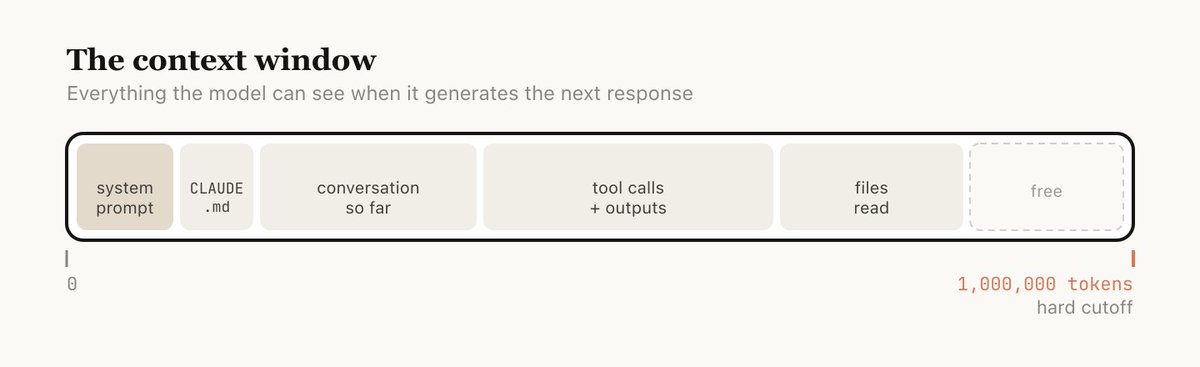
上下文窗口,就是模型在生成下一次回复时一次性能看见的全部内容。它包括系统提示、截至目前的对话、每一次工具调用及其输出,以及所有被读取过的文件。Claude Code 的上下文窗口有 100 万个 token。

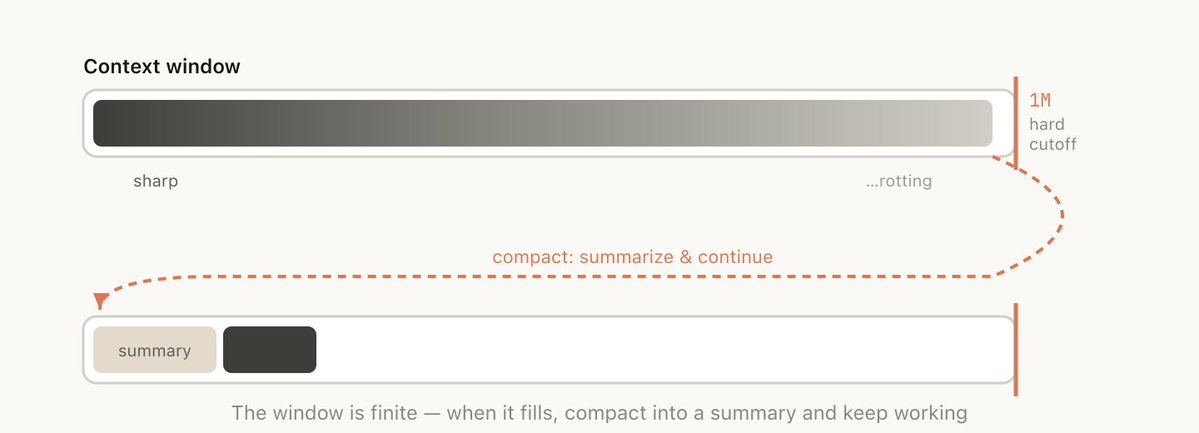
遗憾的是,使用上下文是有轻微代价的,这通常被称为上下文腐化。上下文腐化指的是,随着上下文变长,模型性能会下降,因为注意力被分散到更多 token 上,较早且无关的内容也会开始干扰当前任务。

上下文窗口有明确的硬性上限。所以,当你接近上下文窗口的末尾时,就需要把正在做的任务总结成一段更短的描述,并在新的上下文窗口中继续工作。我们把这称为 compaction。你也可以主动触发 compaction。

每一轮对话都是一个分岔点

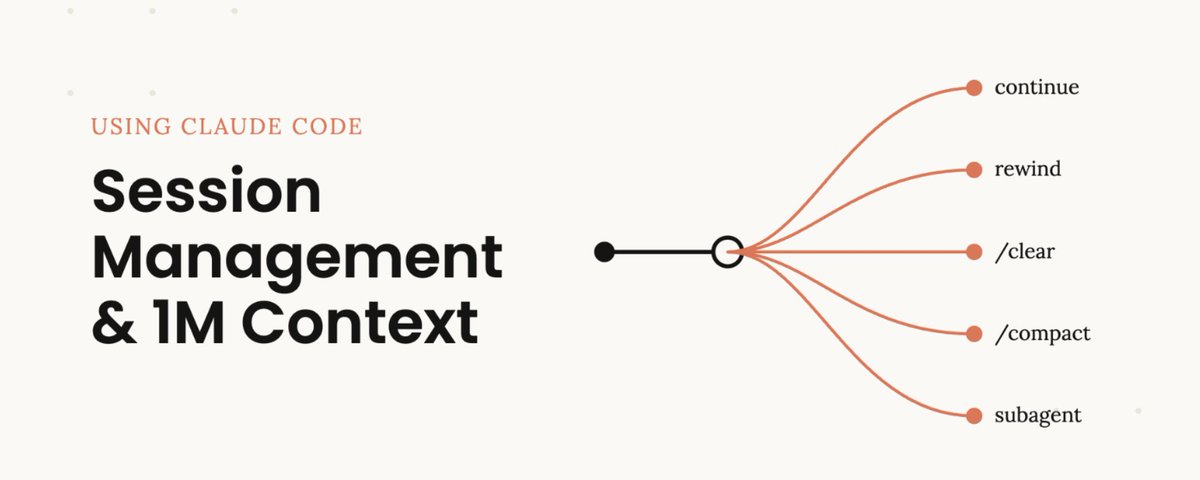
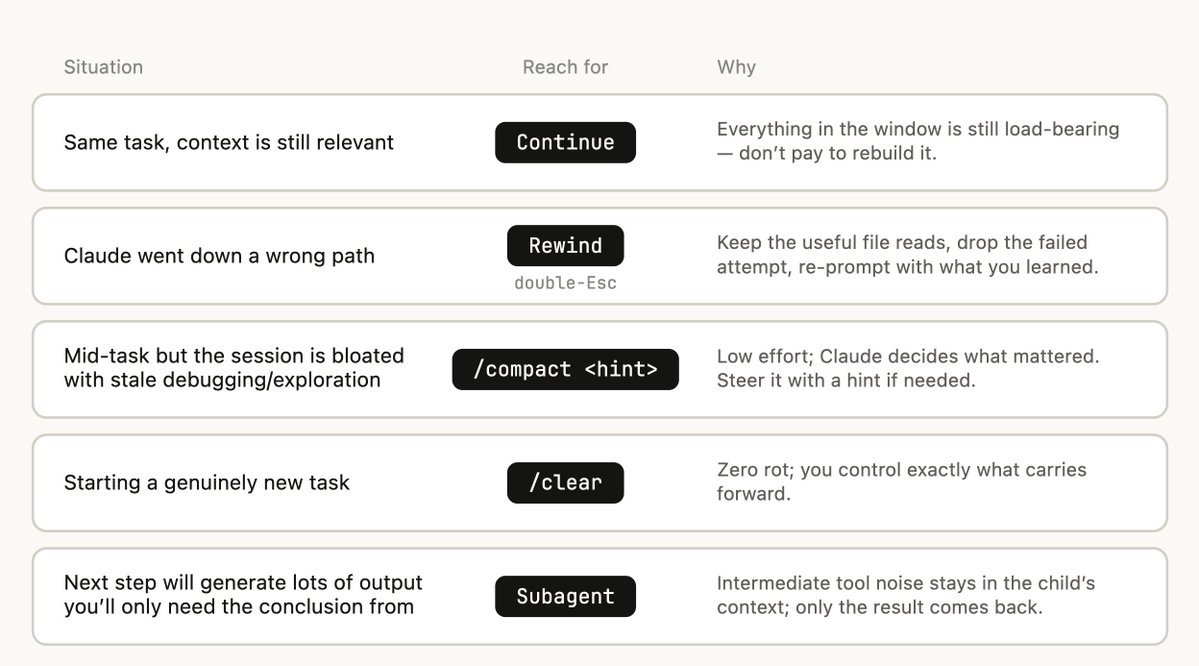
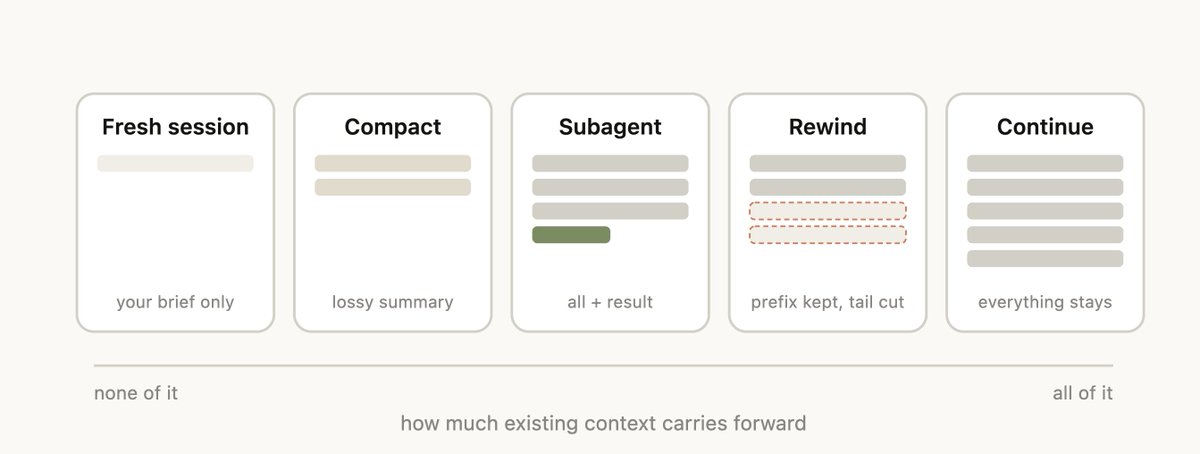
假设你刚刚让 Claude 做了一件事,它也已经完成了。此时,你的上下文里已经有了一些信息,比如工具调用、工具输出和你的指令。接下来你能做的选择,其实比想象中多:

  • 继续 — 在同一个会话里再发送一条消息

  • /rewind (esc esc) — 跳回到之前的某条消息,并从那里重新尝试

  • /clear — 开启一个新会话,通常会带上一段你从刚才学到的信息中提炼出的简报

  • Compact — 总结当前会话的内容,并在这个总结之上继续

  • Subagents — 把下一段工作交给一个拥有干净上下文的 agent,只把它的结果取回当前会话

最自然的做法通常是继续,但另外四个选项的存在,都是为了帮你管理上下文。

什么时候该开启新会话

什么时候该保留一个长期运行的会话,什么时候该开启新会话?我们的经验法则是:当你开始一个新任务时,也应该开启一个新会话。

100 万上下文窗口确实意味着,现在你可以更可靠地完成更长的任务。比如,让它从零开始构建一个全栈应用。

有时你会做一些相关任务,其中一部分上下文仍然必要,但并不是全部都必要。比如,为你刚刚实现的功能写文档。虽然你可以开启一个新会话,但 Claude 就需要重新读取你刚刚实现过的文件,这会更慢,也更贵。

用 Rewind 代替纠正

如果只能选一个能体现良好上下文管理的习惯,那就是 rewind。

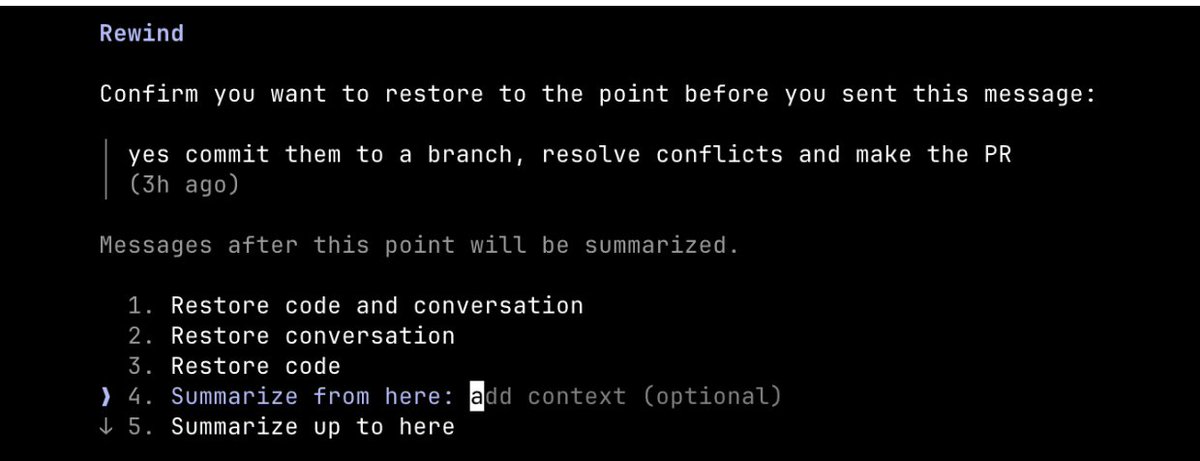
在 Claude Code 中,双击 Esc,或运行 /rewind,可以让你跳回任意一条之前的消息,并从那里重新提示。那个时间点之后的消息会从上下文中移除。

Rewind 往往是比纠正更好的做法。比如,Claude 读取了五个文件,尝试了一种方案,但没有成功。你的直觉可能是输入“那样不行,改试 X”。但更好的做法是,rewind 到刚读完文件之后的位置,然后带着你刚学到的信息重新提示它。“不要用方案 A,foo 模块没有暴露那个能力,直接走 B。”

你也可以使用“summarize from here”,让 Claude 总结它学到的东西,并创建一条交接消息。这有点像未来版本的 Claude 给过去那一轮 Claude 留了一条消息:它已经试过某个方案,但没有成功。

Compacting 与全新会话

当一个会话变得很长时,你有两种方式减轻负担:/compact 或 /clear,也就是重新开始。它们感觉相似,但行为非常不同。

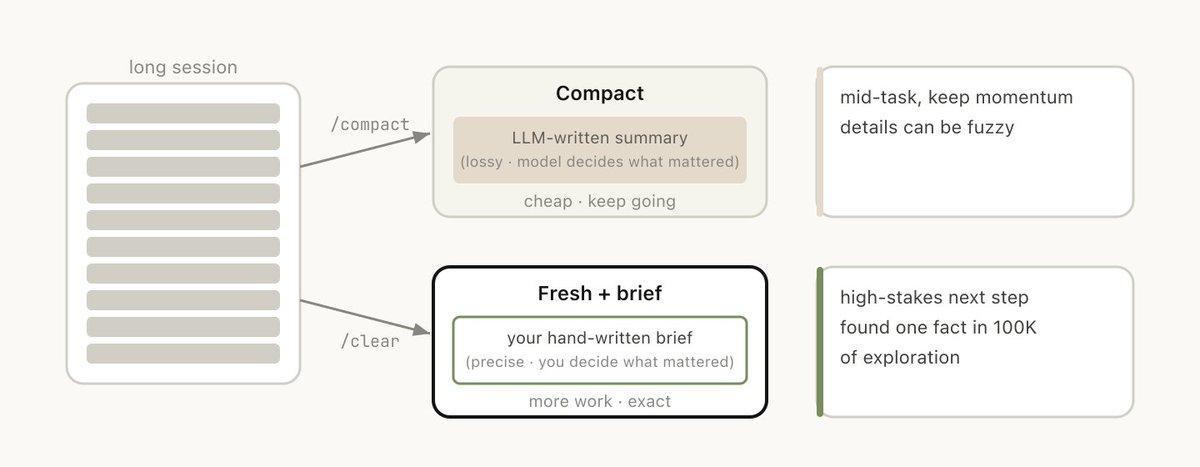
Compact 会让模型总结截至目前的对话,然后用这个总结替换掉历史记录。它是有损的,你是在信任 Claude 判断什么内容重要。但你不需要自己写任何东西,而且 Claude 可能会更完整地纳入重要经验或文件。你也可以通过传入指令来引导它,比如 /compact focus on the auth refactor, drop the test debugging。

使用 /clear 时,由你写下重要内容,比如“我们正在重构 auth middleware,约束是 X,相关文件是 A 和 B,我们已经排除了方案 Y”,然后干净地重新开始。这需要更多工作,但最终得到的上下文,是由你决定什么才相关。

什么会导致糟糕的 Compact?

如果你经常运行很长的会话,可能会注意到有些时候 compact 的效果特别差。在这种情况下,我们经常发现,当模型无法预测你的工作方向时,就容易出现糟糕的 compact。

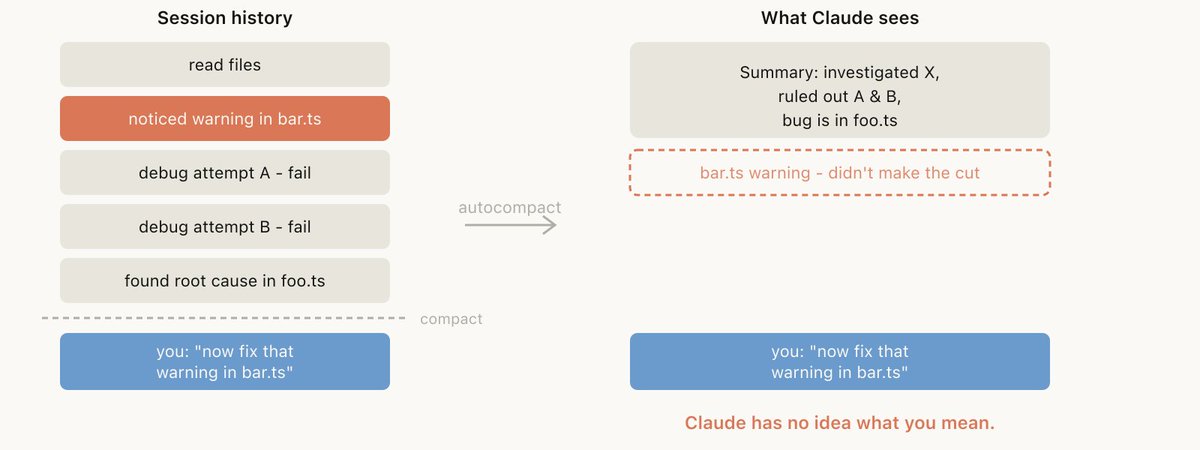
比如,autocompact 在一次漫长的调试会话之后触发,summary 总结了这次调查过程,而你的下一条消息是“现在修一下我们在 bar.ts 里看到的另一个 warning。”

但因为这个会话主要聚焦在调试上,另一个 warning 可能已经从 summary 中被丢掉了。

这件事尤其棘手,因为受上下文腐化影响,模型在执行 compact 时,正处在它最不聪明的时刻。借助 100 万上下文,你现在有更多时间主动使用 /compact,并说明你接下来想做什么。

Subagents 与全新的上下文窗口

http://bar.ts/

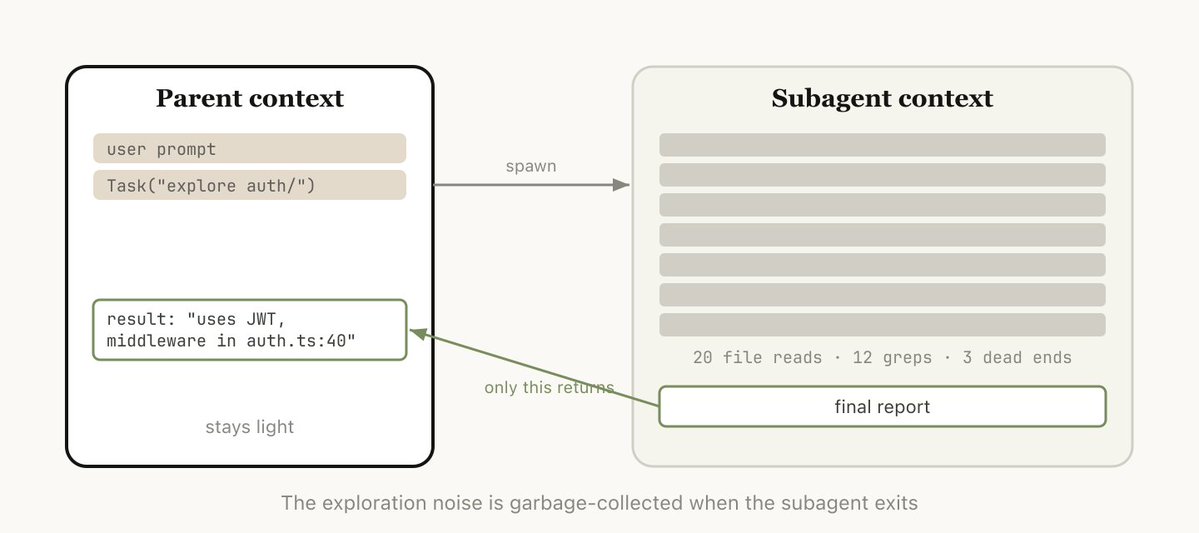
Subagents 是一种上下文管理方式。当你提前知道某一段工作会产生大量中间输出,而这些输出之后不再需要时,它们会很有用。

当 Claude 通过 Agent 工具生成一个 subagent 时,这个 subagent 会获得自己的全新上下文窗口。它可以完成所需的全部工作,然后综合结果,只把最终报告带回父级会话。

我们使用的判断方式是:我之后还会需要这些工具输出,还是只需要结论?

虽然 Claude Code 会自动调用 subagents,但你可能也会想明确告诉它这样做。比如,你可以告诉它:

  • “Spin up a subagent to verify the result of this work based on the following spec file”

  • “Spin off a subagent to read through this other codebase and summarize how it implemented the auth flow, then implement it yourself in the same way”

  • “Spin off a subagent to write the docs on this feature based on my git changes”

总结

总之,当 Claude 结束一轮回复,而你准备发送下一条消息时,你就来到了一个决策点。

随着时间推移,我们预计 Claude 会帮你自己处理这些事情。但目前,这是你可以用来引导 Claude 输出的一种方式。

Today we’re rolling out a new update to /usage to help you understand your usage with Claude Code, this was informed by a number of conversations with customers.

今天,我们正在为 /usage 推出一项新更新,帮助你更好地理解自己在 Claude Code 中的使用情况。这次更新来自我们与许多客户的交流。

What came up again and again in these calls is that there is a lot of variance in how you might manage your sessions, especially with our new update to 1 million context in Claude Code.

在这些对话里,反复出现的一个问题是:大家管理会话的方式差异很大,尤其是在 Claude Code 新增 100 万上下文之后。

Do you only use one session or two sessions that you keep open in a terminal? Do you start a new session with every prompt? When do you use compact, rewind or subagents? What causes a bad compact?

你是只使用一个会话,或在终端里一直开着两个会话?你会在每次提示时都开启新会话吗?什么时候该使用 compact、rewind 或 subagents?什么情况会导致一次糟糕的 compact?

There’s a surprising amount of detail here that can really shape your experience with Claude Code and almost all of it comes from managing your context window.

这里面的细节比想象中多,而且会显著影响你使用 Claude Code 的体验。几乎所有这些体验,都来自你如何管理自己的上下文窗口。

A Quick Primer on Context, Compaction & Context Rot

关于上下文、压缩与上下文腐化的快速入门

The context window is everything the model can "see" at once when generating its next response. It includes your system prompt, the conversation so far, every tool call and its output, and every file that's been read. Claude Code has a context window of one million tokens.

上下文窗口,就是模型在生成下一次回复时一次性能看见的全部内容。它包括系统提示、截至目前的对话、每一次工具调用及其输出,以及所有被读取过的文件。Claude Code 的上下文窗口有 100 万个 token。

Unfortunately using context has a slight cost, which is often called context rot. Context rot is the observation that model performance degrades as context grows because attention gets spread across more tokens, and older, irrelevant content starts to distract from the current task.

遗憾的是,使用上下文是有轻微代价的,这通常被称为上下文腐化。上下文腐化指的是,随着上下文变长,模型性能会下降,因为注意力被分散到更多 token 上,较早且无关的内容也会开始干扰当前任务。

Context windows are a hard cutoff, so when you’re nearing the end of the context window, you will need to summarize the task you’ve been working on into a smaller description and continue the work in a new context window, we call this compaction. You can also trigger compaction yourself.

上下文窗口有明确的硬性上限。所以,当你接近上下文窗口的末尾时,就需要把正在做的任务总结成一段更短的描述,并在新的上下文窗口中继续工作。我们把这称为 compaction。你也可以主动触发 compaction。

Every Turn Is a Branching Point

每一轮对话都是一个分岔点

Say you've just asked Claude to do something and it's finished, you’ve now got some information in your context (tool calls, tool outputs, your instructions) and you have a surprising number of options for what to do next:

假设你刚刚让 Claude 做了一件事,它也已经完成了。此时,你的上下文里已经有了一些信息,比如工具调用、工具输出和你的指令。接下来你能做的选择,其实比想象中多:

  • Continue — send another message in the same session
  • 继续 — 在同一个会话里再发送一条消息
  • /rewind (esc esc) — jump back to a previous message and try again from there
  • /rewind (esc esc) — 跳回到之前的某条消息,并从那里重新尝试
  • /clear — start a new session, usually with a brief you've distilled from what you just learned
  • /clear — 开启一个新会话,通常会带上一段你从刚才学到的信息中提炼出的简报
  • Compact — summarize the session so far and keep going on top of the summary
  • Compact — 总结当前会话的内容,并在这个总结之上继续
  • Subagents — delegate the next chunk of work to an agent with its own clean context, and only pull its result back in
  • Subagents — 把下一段工作交给一个拥有干净上下文的 agent,只把它的结果取回当前会话

While the most natural is just to continue, the other four options exist to help manage your context.

最自然的做法通常是继续,但另外四个选项的存在,都是为了帮你管理上下文。

When to Start a New Session

什么时候该开启新会话

When do you keep a long running session vs starting a new one? Our general rule of thumb is when you start a new task, you should also start a new session.

什么时候该保留一个长期运行的会话,什么时候该开启新会话?我们的经验法则是:当你开始一个新任务时,也应该开启一个新会话。

1M context windows do mean that you can now do longer tasks more reliably, for example to have it build a full-stack app from scratch.

100 万上下文窗口确实意味着,现在你可以更可靠地完成更长的任务。比如,让它从零开始构建一个全栈应用。

Sometimes you may do related tasks where some of the context is still necessary, but not all. For example, writing the documentation for a feature you just implemented. While you could start a new session, Claude would have to reread the files that you just implemented, which would be slower and more expensive.

有时你会做一些相关任务,其中一部分上下文仍然必要,但并不是全部都必要。比如,为你刚刚实现的功能写文档。虽然你可以开启一个新会话,但 Claude 就需要重新读取你刚刚实现过的文件,这会更慢,也更贵。

Rewinding Instead of Correcting

用 Rewind 代替纠正

If I had to pick one habit that signals good context management, it’s rewind.

如果只能选一个能体现良好上下文管理的习惯,那就是 rewind。

In Claude Code, double-tapping Esc(or running /rewind) lets you jump back to any previous message and re-prompt from there. The messages after that point are dropped from the context.

在 Claude Code 中,双击 Esc,或运行 /rewind,可以让你跳回任意一条之前的消息,并从那里重新提示。那个时间点之后的消息会从上下文中移除。

Rewind is often the better approach to correction. For example, Claude reads five files, tries an approach, and it doesn't work. Your instinct may be to type "that didn't work, try X instead." but the better move is to rewind to just after the file reads, and re-prompt with what you learned. "Don't use approach A, the foo module doesn't expose that — go straight to B."

Rewind 往往是比纠正更好的做法。比如,Claude 读取了五个文件,尝试了一种方案,但没有成功。你的直觉可能是输入“那样不行,改试 X”。但更好的做法是,rewind 到刚读完文件之后的位置,然后带着你刚学到的信息重新提示它。“不要用方案 A,foo 模块没有暴露那个能力,直接走 B。”

You can also use “summarize from here” to have Claude summarize its learnings and create a handoff message, kind of like a message to the previous iteration of Claude from its future self that tried something and it didn’t work.

你也可以使用“summarize from here”,让 Claude 总结它学到的东西,并创建一条交接消息。这有点像未来版本的 Claude 给过去那一轮 Claude 留了一条消息:它已经试过某个方案,但没有成功。

Compacting vs. Fresh Sessions

Compacting 与全新会话

Once a session gets long, you have two ways to shed weight: /compact or /clear (and start fresh). They feel similar but behave very differently.

当一个会话变得很长时,你有两种方式减轻负担:/compact 或 /clear,也就是重新开始。它们感觉相似,但行为非常不同。

Compact asks the model to summarize the conversation so far, then replaces the history with that summary. It's lossy, you're trusting Claude to decide what mattered, but you didn't have to write anything yourself and Claude might be more thorough in including important learnings or files. You can also steer it by passing instructions (/compact focus on the auth refactor, drop the test debugging).

Compact 会让模型总结截至目前的对话,然后用这个总结替换掉历史记录。它是有损的,你是在信任 Claude 判断什么内容重要。但你不需要自己写任何东西,而且 Claude 可能会更完整地纳入重要经验或文件。你也可以通过传入指令来引导它,比如 /compact focus on the auth refactor, drop the test debugging。

With /clear you write down what matters ("we're refactoring the auth middleware, the constraint is X, the files that matter are A and B, we've ruled out approach Y") and start clean. It's more work, but the resulting context is what you decided was relevant.

使用 /clear 时,由你写下重要内容,比如“我们正在重构 auth middleware,约束是 X,相关文件是 A 和 B,我们已经排除了方案 Y”,然后干净地重新开始。这需要更多工作,但最终得到的上下文,是由你决定什么才相关。

What Causes a Bad Compact?

什么会导致糟糕的 Compact?

If you run a lot of long running sessions, you might have noticed times in which compacting might be particularly bad. In this case we’ve often found that bad compacts can happen when the model can’t predict the direction your work is going.

如果你经常运行很长的会话,可能会注意到有些时候 compact 的效果特别差。在这种情况下,我们经常发现,当模型无法预测你的工作方向时,就容易出现糟糕的 compact。

For example autocompact fires after a long debugging session and summarizes the investigation and your next message is "now fix that other warning we saw in bar.ts."

比如,autocompact 在一次漫长的调试会话之后触发,summary 总结了这次调查过程,而你的下一条消息是“现在修一下我们在 bar.ts 里看到的另一个 warning。”

But because the session was focused on debugging, the other warning might have been dropped from the summary.

但因为这个会话主要聚焦在调试上,另一个 warning 可能已经从 summary 中被丢掉了。

This is particularly difficult, because due to context rot, the model is at its least intelligent point when compacting. With one million context, you have more time to /compact proactively with a description of what you want to do.

这件事尤其棘手,因为受上下文腐化影响,模型在执行 compact 时,正处在它最不聪明的时刻。借助 100 万上下文,你现在有更多时间主动使用 /compact,并说明你接下来想做什么。

Subagents & Fresh Context Windows

Subagents 与全新的上下文窗口

Subagents are a form of context management, useful for when you know in advance that a chunk of work will produce a lot of intermediate output you won't need again.

Subagents 是一种上下文管理方式。当你提前知道某一段工作会产生大量中间输出,而这些输出之后不再需要时,它们会很有用。

When Claude spawns a subagent via the Agent tool, that subagent gets its own fresh context window. It can do as much work as it needs to, and then synthesize its results so only the final report comes back to the parent.

当 Claude 通过 Agent 工具生成一个 subagent 时,这个 subagent 会获得自己的全新上下文窗口。它可以完成所需的全部工作,然后综合结果,只把最终报告带回父级会话。

The mental test we use: will I need this tool output again, or just the conclusion?

我们使用的判断方式是:我之后还会需要这些工具输出,还是只需要结论?

While Claude Code will automatically call subagents, you may want to tell it to explicitly do this. For example, you may want to tell it to:

虽然 Claude Code 会自动调用 subagents,但你可能也会想明确告诉它这样做。比如,你可以告诉它:

  • “Spin up a subagent to verify the result of this work based on the following spec file”
  • “Spin up a subagent to verify the result of this work based on the following spec file”
  • “Spin off a subagent to read through this other codebase and summarize how it implemented the auth flow, then implement it yourself in the same way”
  • “Spin off a subagent to read through this other codebase and summarize how it implemented the auth flow, then implement it yourself in the same way”
  • “Spin off a subagent to write the docs on this feature based on my git changes”
  • “Spin off a subagent to write the docs on this feature based on my git changes”

Summary

总结

In summary, when Claude has ended a turn and you’re about to send a new message, you have a decision point.

总之,当 Claude 结束一轮回复,而你准备发送下一条消息时,你就来到了一个决策点。

Overtime we expect that Claude will help you handle this itself, but for now this is one of the ways you can guide Claude's output.

随着时间推移,我们预计 Claude 会帮你自己处理这些事情。但目前,这是你可以用来引导 Claude 输出的一种方式。

Today we’re rolling out a new update to /usage to help you understand your usage with Claude Code, this was informed by a number of conversations with customers.

What came up again and again in these calls is that there is a lot of variance in how you might manage your sessions, especially with our new update to 1 million context in Claude Code.

Do you only use one session or two sessions that you keep open in a terminal? Do you start a new session with every prompt? When do you use compact, rewind or subagents? What causes a bad compact?

There’s a surprising amount of detail here that can really shape your experience with Claude Code and almost all of it comes from managing your context window.

A Quick Primer on Context, Compaction & Context Rot
The context window is everything the model can "see" at once when generating its next response. It includes your system prompt, the conversation so far, every tool call and its output, and every file that's been read. Claude Code has a context window of one million tokens.

Unfortunately using context has a slight cost, which is often called context rot. Context rot is the observation that model performance degrades as context grows because attention gets spread across more tokens, and older, irrelevant content starts to distract from the current task.

Context windows are a hard cutoff, so when you’re nearing the end of the context window, you will need to summarize the task you’ve been working on into a smaller description and continue the work in a new context window, we call this compaction. You can also trigger compaction yourself.
Every Turn Is a Branching Point

Say you've just asked Claude to do something and it's finished, you’ve now got some information in your context (tool calls, tool outputs, your instructions) and you have a surprising number of options for what to do next:

  • Continue — send another message in the same session

  • /rewind (esc esc) — jump back to a previous message and try again from there

  • /clear — start a new session, usually with a brief you've distilled from what you just learned

  • Compact — summarize the session so far and keep going on top of the summary

  • Subagents — delegate the next chunk of work to an agent with its own clean context, and only pull its result back in

While the most natural is just to continue, the other four options exist to help manage your context.
When to Start a New Session

When do you keep a long running session vs starting a new one? Our general rule of thumb is when you start a new task, you should also start a new session.

1M context windows do mean that you can now do longer tasks more reliably, for example to have it build a full-stack app from scratch.

Sometimes you may do related tasks where some of the context is still necessary, but not all. For example, writing the documentation for a feature you just implemented. While you could start a new session, Claude would have to reread the files that you just implemented, which would be slower and more expensive.

Rewinding Instead of Correcting
If I had to pick one habit that signals good context management, it’s rewind.

In Claude Code, double-tapping Esc(or running /rewind) lets you jump back to any previous message and re-prompt from there. The messages after that point are dropped from the context.

Rewind is often the better approach to correction. For example, Claude reads five files, tries an approach, and it doesn't work. Your instinct may be to type "that didn't work, try X instead." but the better move is to rewind to just after the file reads, and re-prompt with what you learned. "Don't use approach A, the foo module doesn't expose that — go straight to B."

You can also use “summarize from here” to have Claude summarize its learnings and create a handoff message, kind of like a message to the previous iteration of Claude from its future self that tried something and it didn’t work.
Compacting vs. Fresh Sessions

Once a session gets long, you have two ways to shed weight: /compact or /clear (and start fresh). They feel similar but behave very differently.

Compact asks the model to summarize the conversation so far, then replaces the history with that summary. It's lossy, you're trusting Claude to decide what mattered, but you didn't have to write anything yourself and Claude might be more thorough in including important learnings or files. You can also steer it by passing instructions (/compact focus on the auth refactor, drop the test debugging).
With /clear you write down what matters ("we're refactoring the auth middleware, the constraint is X, the files that matter are A and B, we've ruled out approach Y") and start clean. It's more work, but the resulting context is what you decided was relevant.

What Causes a Bad Compact?
If you run a lot of long running sessions, you might have noticed times in which compacting might be particularly bad. In this case we’ve often found that bad compacts can happen when the model can’t predict the direction your work is going.

For example autocompact fires after a long debugging session and summarizes the investigation and your next message is "now fix that other warning we saw in bar.ts."
But because the session was focused on debugging, the other warning might have been dropped from the summary.

This is particularly difficult, because due to context rot, the model is at its least intelligent point when compacting. With one million context, you have more time to /compact proactively with a description of what you want to do.

Subagents & Fresh Context Windows

http://bar.ts/

Subagents are a form of context management, useful for when you know in advance that a chunk of work will produce a lot of intermediate output you won't need again.

When Claude spawns a subagent via the Agent tool, that subagent gets its own fresh context window. It can do as much work as it needs to, and then synthesize its results so only the final report comes back to the parent.

The mental test we use: will I need this tool output again, or just the conclusion?

While Claude Code will automatically call subagents, you may want to tell it to explicitly do this. For example, you may want to tell it to:

  • “Spin up a subagent to verify the result of this work based on the following spec file”

  • “Spin off a subagent to read through this other codebase and summarize how it implemented the auth flow, then implement it yourself in the same way”

  • “Spin off a subagent to write the docs on this feature based on my git changes”

Summary

In summary, when Claude has ended a turn and you’re about to send a new message, you have a decision point.

Overtime we expect that Claude will help you handle this itself, but for now this is one of the ways you can guide Claude's output.

📋 讨论归档

讨论进行中…