返回列表
🧠 阿头学 · 💬 讨论题

构建 Claude Code 的经验——像智能体一样看世界

Anthropic 用四个产品迭代故事包装了一个核心判断:智能体工具设计的本质不是堆功能,而是持续删减与模型能力不匹配的旧工具——但这篇文章本身就是一篇精心设计的技术 PR,缺乏任何量化证据。
打开原文 ↗

2026-02-28 原文链接 ↗
阅读简报
双语对照
完整翻译
原文
讨论归档

核心观点

  • 工具设计的核心不是功能完备,而是能力匹配 作者明确反对“一个万能工具就够”或“每种场景都配一个工具”的简单化思路,认为工具只有在模型会用、愿意用、用得稳时才成立,这个判断比功能列表更关键。
  • AskUserQuestion 证明专用工具有时比格式约束更可靠 他们先尝试在 ExitPlanTool 里混入提问能力,又尝试靠 Markdown 输出格式约束提问,结果都不稳定;最终独立出 AskUserQuestion,并通过 UI 阻塞用户作答,才显著提升信息引出效果,这说明“让模型自然调用”比“让模型勉强遵守格式”更重要。
  • 旧工具会随着模型变强而变成限制 TodoWrite 最初是为了防止模型跑偏,但在更强模型上反而限制动态修正和多智能体协作,因此被更适合协调依赖和共享更新的 Task Tool 取代;这个判断站得住脚,也揭示了 agent 系统必须跟模型共同进化。
  • 让模型自己构建上下文,比预先塞上下文更可扩展 文章从 RAG 转向 Grep、skills 和 progressive disclosure,本质上是在把“找什么上下文”的决策权交还给模型;这比静态注入上下文更灵活,也更符合开放任务环境。
  • 新增能力不一定要新增工具,子智能体和渐进暴露是更克制的扩展方式 Claude Code Guide 子智能体的例子说明,行动空间可以通过工作流封装和信息分层扩展,而不必总靠增加显式工具;这是对“工具越多越强”这一工程直觉的直接修正。

跟我们的关联

  • 对 ATou 意味着什么、下一步怎么用 ATou 如果在做 agent 产品设计,不该先讨论“还缺什么功能”,而该先检查“模型当前最常误用、绕过、抗拒哪些工具”;下一步可以给现有工具做一次能力匹配审计,区分哪些是补短板、哪些已成束缚。
  • 对 Neta 意味着什么、下一步怎么用 Neta 如果关注 agent 方法论,这篇文章提供了一个比 prompt 技巧更重要的视角:行动空间工程;下一步可以把“模型会不会用、愿不愿用、用了稳不稳”整理成评估模板,用于比较不同 agent 架构。
  • 对 Uota 意味着什么、下一步怎么用 Uota 如果更关注用户交互,这篇文章提醒我们,工具效果未必来自模型变聪明,也可能来自交互摩擦被设计掉了;下一步可以重点拆解 AskUserQuestion 里的 UI 阻塞、选项化交互和结构化输入,看看哪些才是真正提升点。
  • 对三者共同意味着什么、下一步怎么用 这篇文章共同指向一个结论:agent 系统要定期删工具而不是只会加工具;下一步最实用的动作不是再造新能力,而是盘点哪些旧流程、提醒、清单机制已经在拖累强模型。

讨论引子

1. 当模型表现提升时,我们怎么判断一个工具还是“支架”,还是已经变成“束缚”? 2. AskUserQuestion 的成功,究竟主要来自专用工具本身,还是来自 UI、阻塞机制和结构化选项设计? 3. progressive disclosure 真的是降低复杂度,还是只是把复杂度从显式工具转移到了隐式工作流?

构建智能体运行框架时,最难的部分之一,是设计它的行动空间。

Claude 通过工具调用来行动。但在 Claude API 中,有很多种构建工具的方式,可以使用 bash、skills,以及最近推出的代码执行等基础能力。关于 Claude API 上的程序化工具调用,可以阅读 @RLanceMartin 的新文章。

面对这些选项,该如何设计智能体的工具?只需要一个工具,比如代码执行或 bash,就够了吗?如果你有 50 个工具,每个工具对应智能体可能遇到的一种使用场景,又会怎样?

为了让自己进入模型的思维,我喜欢想象自己拿到一道很难的数学题。你会希望用什么工具来解题?这取决于你自己的能力。

纸是最低配置,但你会受限于手算。计算器会更好,但你需要知道如何操作那些更高级的功能。最快、最强大的选择是电脑,但你必须知道如何用它来编写并执行代码。

这是一个很有用的智能体设计框架。你应该给它那些符合自身能力形状的工具。但你怎么知道它有哪些能力?你需要观察,阅读它的输出,做实验。你要学会像智能体一样观察。

下面是我们在构建 Claude Code 时,通过观察 Claude 得到的一些经验。

改进信息引出能力与 AskUserQuestion 工具

https://x.com/trq212/status/2014480496013803643

在构建 AskUserQuestion 工具时,我们的目标是提升 Claude 提问的能力,这通常被称为信息引出。

Claude 当然可以直接用普通文本提问,但我们发现,回答这些问题时,总感觉花了不必要的时间。怎样才能降低这种摩擦,并提高用户与 Claude 之间的沟通带宽?

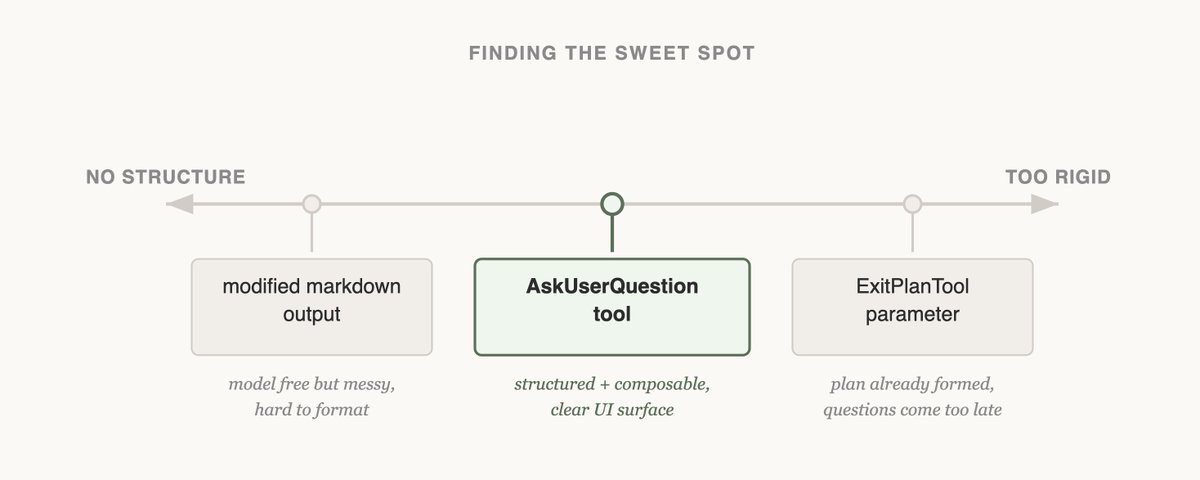
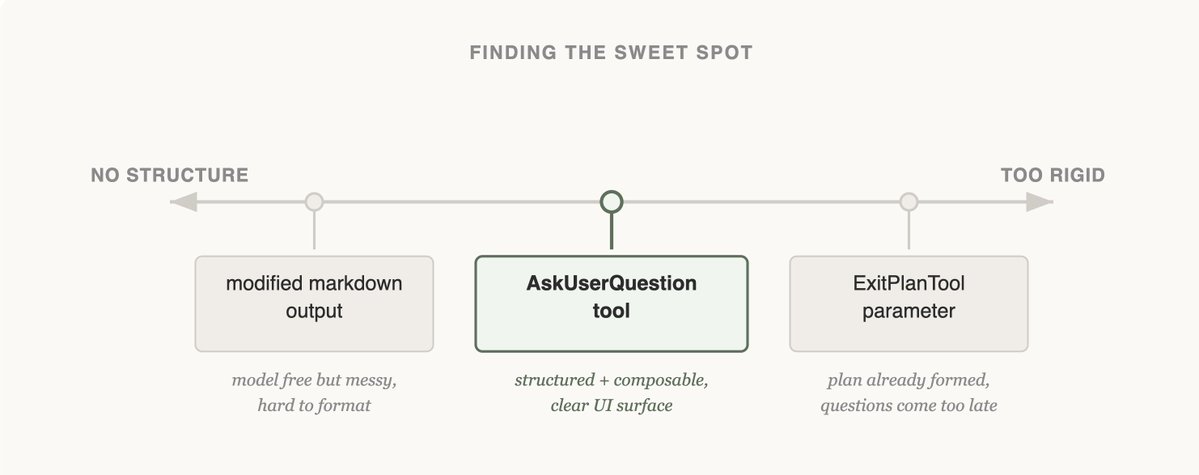
尝试 #1:修改 ExitPlanTool

我们最先尝试的是给 ExitPlanTool 增加一个参数,让它在计划之外还能附带一组问题。这是最容易实现的方案,但它让 Claude 感到困惑,因为我们同时要求它给出一个计划,又要求它提出一组关于这个计划的问题。如果用户的回答和计划内容冲突怎么办?Claude 是否需要调用两次 ExitPlanTool?我们需要换一种方式。

你可以在我们关于 prompt caching 的文章中,读到更多关于为什么要做 ExitPlanTool 的内容。

尝试 #2:改变输出格式

接着,我们尝试修改 Claude 的输出指令,让它使用一种稍微改造过的 Markdown 格式来提问。比如,可以要求它输出一组项目符号问题,并把备选项放在括号中。然后我们可以解析这些问题,并将它们格式化成面向用户的界面。

这是我们能做的最通用的改动,而且 Claude 似乎也能相当不错地输出这种格式。但这并没有保证。Claude 会追加额外的句子,省略选项,或者干脆使用完全不同的格式。

尝试 #3:AskUserQuestion 工具

https://x.com/RLanceMartin/status/2027450018513490419

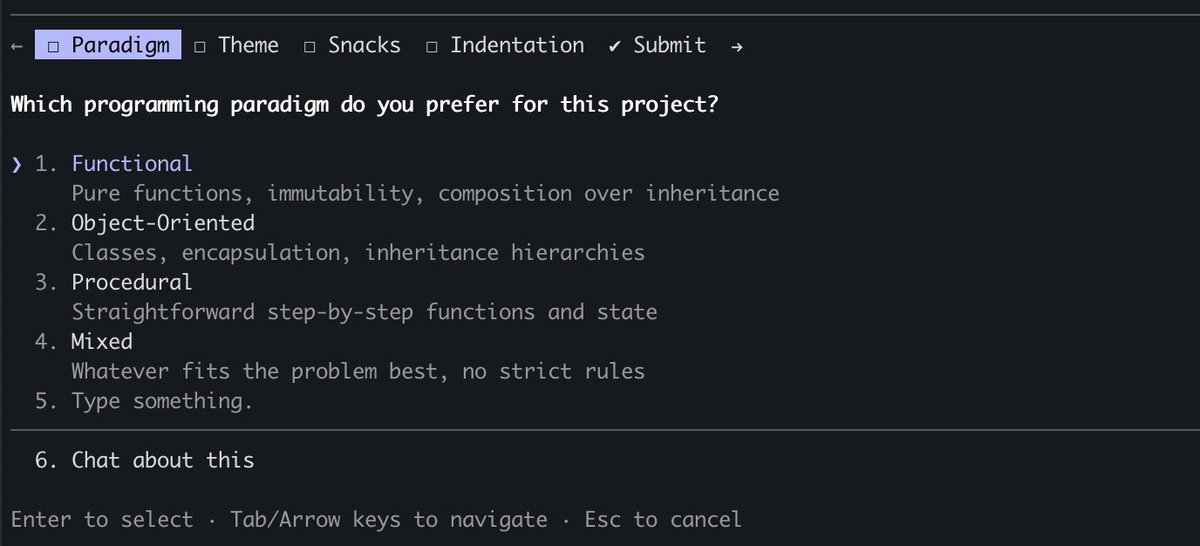
最后,我们选择创建一个 Claude 可以在任意时刻调用的工具,但尤其会在计划模式中提示它使用。当这个工具被触发时,我们会展示一个模态窗口来显示问题,并阻塞智能体循环,直到用户作答。

这个工具让我们可以提示 Claude 给出结构化输出,也帮助我们确保 Claude 会给用户多个选项。它还给了用户组合使用这项能力的方式,比如在 Agent SDK 中调用它,或者在 skills 中引用它。

最重要的是,Claude 似乎喜欢调用这个工具,而且我们发现它的输出效果很好。即使工具设计得再好,如果 Claude 不理解如何调用它,也不会发挥作用。

这就是 Claude Code 中信息引出的最终形态吗?我们还不确定。正如你会在下一个例子里看到的,对一个模型有效的方式,对另一个模型未必就是最好的方式。

随能力变化而更新:Tasks 与 Todos

https://x.com/trq212/status/2024574133011673516

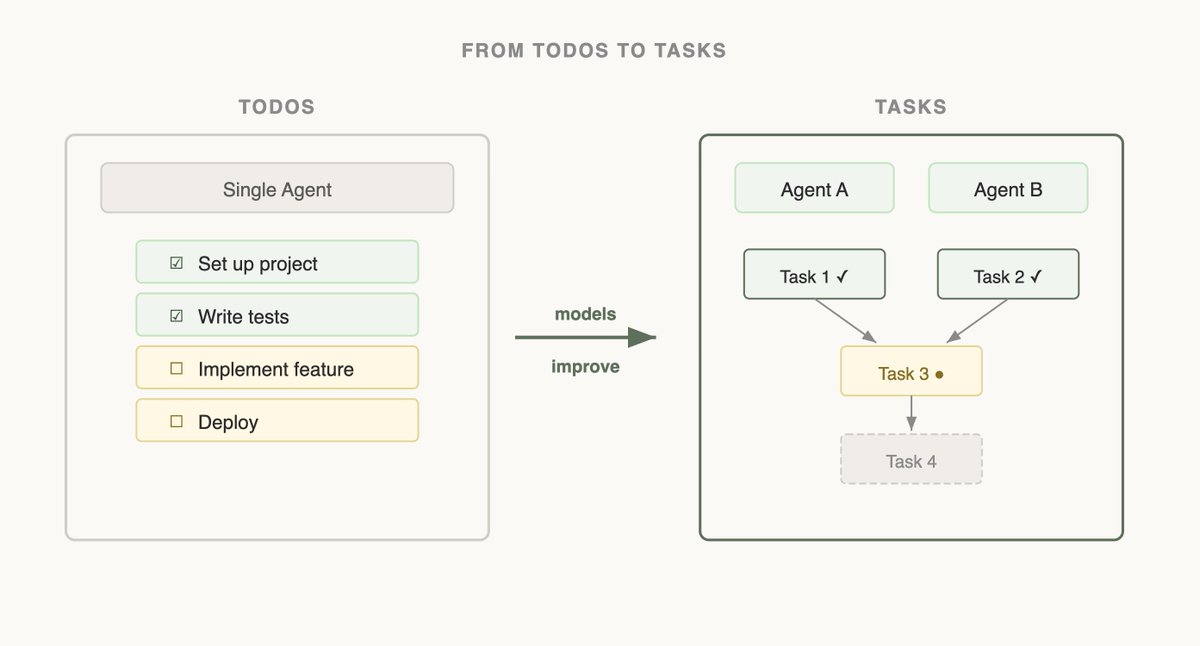
Claude Code 最初发布时,我们意识到模型需要一个 Todo 列表来保持方向。Todos 可以在一开始写下,然后随着模型开展工作逐项勾选。为此,我们给 Claude 提供了 TodoWrite 工具,用来写入或更新 Todos,并展示给用户。

但即便如此,我们仍然经常看到 Claude 忘记自己要做什么。为了适应这一点,我们每隔 5 轮插入一次系统提醒,提醒 Claude 它的目标是什么。

但随着模型能力提升,它们不仅不再需要被提醒 Todo List,反而可能被它限制。收到 Todo List 的提醒,会让 Claude 以为自己必须坚持这个列表,而不是修改它。我们还看到 Opus 4.5 在使用子智能体方面也变得好得多,但子智能体该如何围绕一个共享的 Todo List 协调工作?

看到这一点后,我们用 Task Tool 取代了 TodoWrite。关于 Tasks 可以阅读这里的更多内容。Todos 更关注让模型保持在轨道上,而 Tasks 更关注帮助智能体彼此沟通。Tasks 可以包含依赖关系,可以在子智能体之间共享更新,模型也可以修改或删除它们。

随着模型能力提升,你的模型曾经需要的工具,现在可能正在限制它们。持续重新审视关于所需工具的旧假设非常重要。这也是为什么支持一小组能力画像相近的模型会很有用。

设计搜索界面

对 Claude 来说,搜索工具是一组格外重要的工具,因为它可以用这些工具构建自己的上下文。

Claude Code 刚发布时,我们使用 RAG 向量数据库为 Claude 查找上下文。RAG 很强大,也很快,但它需要索引和配置,而且在各种不同环境中可能很脆弱。更重要的是,这些上下文是被给予 Claude 的,而不是由它自己找到的。

但如果 Claude 能在网上搜索,为什么不能搜索你的代码库?通过给 Claude 一个 Grep 工具,我们可以让它自己搜索文件,并构建上下文。

这是我们随着 Claude 变聪明而看到的一种模式。如果给它合适的工具,它会越来越擅长构建自己的上下文。

当我们引入 Agent Skills 时,我们正式提出了 progressive disclosure 这个想法,让智能体可以通过探索逐步发现相关上下文。

Claude 可以读取 skill 文件,而这些文件又可以引用其他文件,模型可以继续递归读取。事实上,skills 的一个常见用途,就是给 Claude 增加更多搜索能力,比如教它如何使用 API,或者如何查询数据库。

一年时间里,Claude 从不太能构建自己的上下文,变成了能够跨越多层文件进行嵌套搜索,找到自己真正需要的精确上下文。

Progressive disclosure 现在已经成为我们添加新功能时常用的技术,因为它不需要增加一个工具。

Progressive Disclosure:Claude Code Guide 智能体

Claude Code 目前有大约 20 个工具,我们一直在问自己是否真的需要它们。添加新工具的门槛很高,因为这会给模型多一个需要思考的选项。

比如,我们注意到 Claude 对如何使用 Claude Code 了解得不够多。如果你问它如何添加 MCP,或者某个 slash command 是做什么的,它无法回答。

我们本可以把所有这些信息都放进系统提示里,但用户很少问这类问题。这样做会增加上下文腐坏,并干扰 Claude Code 的主要工作:写代码。

于是,我们尝试了一种 progressive disclosure 的形式。我们给 Claude 一个文档链接,它可以加载这个链接,搜索更多信息。这确实可行,但我们发现 Claude 会把大量结果加载进上下文,只为找到正确答案,而实际上你真正需要的只是答案本身。

所以我们构建了 Claude Code Guide 子智能体。当你问 Claude 关于它自己的问题时,Claude 会被提示调用这个子智能体。这个子智能体有大量关于如何高质量搜索文档、以及应该返回什么内容的指令。

虽然这并不完美,当你问 Claude 如何配置它自己时,它仍然可能困惑,但这已经比过去好得多。我们在没有新增工具的情况下,为 Claude 的行动空间添加了东西。

这是一门艺术,不只是一门科学

如果你期待的是一套关于如何构建工具的严格规则,很遗憾,这篇指南并不是那样。为模型设计工具,既是艺术,也是科学。它高度取决于你使用的模型、智能体的目标,以及它所运行的环境。

多做实验,阅读输出,尝试新东西。像智能体一样观察。

One of the hardest parts of building an agent harness is constructing its action space.

Claude acts through Tool Calling, but there are a number of ways tools can be constructed in the Claude API with primitives like bash, skills and recently code execution (read more about programmatic tool calling on the Claude API in @RLanceMartin's new article).
Given all these options, how do you design the tools of your agent? Do you need just one tool like code execution or bash? What if you had 50 tools, one for each use case your agent might run into?

To put myself in the mind of the model I like to imagine being given a difficult math problem. What tools would you want in order to solve it? It would depend on your own skills!

Paper would be the minimum, but you’d be limited by manual calculations. A calculator would be better, but you would need to know how to operate the more advanced options. The fastest and most powerful option would be a computer, but you would have to know how to use it to write and execute code.

This is a useful framework for designing your agent. You want to give it tools that are shaped to its own abilities. But how do you know what those abilities are? You pay attention, read its outputs, experiment. You learn to see like an agent.

Here are some lessons we’ve learned from paying attention to Claude while building Claude Code.

Improving Elicitation & the AskUserQuestion tool

https://x.com/trq212/status/2014480496013803643

When building the AskUserQuestion tool, our goal was to improve Claude’s ability to ask questions (often called elicitation).

While Claude could just ask questions in plain text, we found answering those questions felt like they took an unnecessary amount of time. How could we lower this friction and increase the bandwidth of communication between the user and Claude?

构建智能体运行框架时,最难的部分之一,是设计它的行动空间。

Claude 通过工具调用来行动。但在 Claude API 中,有很多种构建工具的方式,可以使用 bash、skills,以及最近推出的代码执行等基础能力。关于 Claude API 上的程序化工具调用,可以阅读 @RLanceMartin 的新文章。

面对这些选项,该如何设计智能体的工具?只需要一个工具,比如代码执行或 bash,就够了吗?如果你有 50 个工具,每个工具对应智能体可能遇到的一种使用场景,又会怎样?

为了让自己进入模型的思维,我喜欢想象自己拿到一道很难的数学题。你会希望用什么工具来解题?这取决于你自己的能力。

纸是最低配置,但你会受限于手算。计算器会更好,但你需要知道如何操作那些更高级的功能。最快、最强大的选择是电脑,但你必须知道如何用它来编写并执行代码。

这是一个很有用的智能体设计框架。你应该给它那些符合自身能力形状的工具。但你怎么知道它有哪些能力?你需要观察,阅读它的输出,做实验。你要学会像智能体一样观察。

下面是我们在构建 Claude Code 时,通过观察 Claude 得到的一些经验。

Attempt #1 - Editing the ExitPlanTool

The first thing we tried was adding a parameter to the ExitPlanTool to have an array of questions alongside the plan. This was the easiest thing to implement, but it confused Claude because we were simultaneously asking for a plan and a set of questions about the plan. What if the user’s answers conflicted with what the plan said? Would Claude need to call the ExitPlanTool twice? We needed another approach.

(you can read more about why we made an ExitPlanTool in our post on prompt caching)
改进信息引出能力与 AskUserQuestion 工具

https://x.com/trq212/status/2014480496013803643

在构建 AskUserQuestion 工具时,我们的目标是提升 Claude 提问的能力,这通常被称为信息引出。

Claude 当然可以直接用普通文本提问,但我们发现,回答这些问题时,总感觉花了不必要的时间。怎样才能降低这种摩擦,并提高用户与 Claude 之间的沟通带宽?

尝试 #1:修改 ExitPlanTool

我们最先尝试的是给 ExitPlanTool 增加一个参数,让它在计划之外还能附带一组问题。这是最容易实现的方案,但它让 Claude 感到困惑,因为我们同时要求它给出一个计划,又要求它提出一组关于这个计划的问题。如果用户的回答和计划内容冲突怎么办?Claude 是否需要调用两次 ExitPlanTool?我们需要换一种方式。

你可以在我们关于 prompt caching 的文章中,读到更多关于为什么要做 ExitPlanTool 的内容。

尝试 #2:改变输出格式

接着,我们尝试修改 Claude 的输出指令,让它使用一种稍微改造过的 Markdown 格式来提问。比如,可以要求它输出一组项目符号问题,并把备选项放在括号中。然后我们可以解析这些问题,并将它们格式化成面向用户的界面。

这是我们能做的最通用的改动,而且 Claude 似乎也能相当不错地输出这种格式。但这并没有保证。Claude 会追加额外的句子,省略选项,或者干脆使用完全不同的格式。

尝试 #3:AskUserQuestion 工具

https://x.com/RLanceMartin/status/2027450018513490419

最后,我们选择创建一个 Claude 可以在任意时刻调用的工具,但尤其会在计划模式中提示它使用。当这个工具被触发时,我们会展示一个模态窗口来显示问题,并阻塞智能体循环,直到用户作答。

这个工具让我们可以提示 Claude 给出结构化输出,也帮助我们确保 Claude 会给用户多个选项。它还给了用户组合使用这项能力的方式,比如在 Agent SDK 中调用它,或者在 skills 中引用它。

最重要的是,Claude 似乎喜欢调用这个工具,而且我们发现它的输出效果很好。即使工具设计得再好,如果 Claude 不理解如何调用它,也不会发挥作用。

这就是 Claude Code 中信息引出的最终形态吗?我们还不确定。正如你会在下一个例子里看到的,对一个模型有效的方式,对另一个模型未必就是最好的方式。

Attempt #2 - Changing Output Format

Next we tried modifying Claude’s output instructions to serve a slightly modified markdown format that it could use to ask questions. For example, we could ask it to output a list of bullet point questions with alternatives in brackets. We could then parse and format that question as UI for the user.

While this was the most general change we could make and Claude even seemed to be okay at outputting this, it was not guaranteed. Claude would append extra sentences, omit options, or use a different format altogether.

随能力变化而更新:Tasks 与 Todos

https://x.com/trq212/status/2024574133011673516

Claude Code 最初发布时,我们意识到模型需要一个 Todo 列表来保持方向。Todos 可以在一开始写下,然后随着模型开展工作逐项勾选。为此,我们给 Claude 提供了 TodoWrite 工具,用来写入或更新 Todos,并展示给用户。

但即便如此,我们仍然经常看到 Claude 忘记自己要做什么。为了适应这一点,我们每隔 5 轮插入一次系统提醒,提醒 Claude 它的目标是什么。

但随着模型能力提升,它们不仅不再需要被提醒 Todo List,反而可能被它限制。收到 Todo List 的提醒,会让 Claude 以为自己必须坚持这个列表,而不是修改它。我们还看到 Opus 4.5 在使用子智能体方面也变得好得多,但子智能体该如何围绕一个共享的 Todo List 协调工作?

看到这一点后,我们用 Task Tool 取代了 TodoWrite。关于 Tasks 可以阅读这里的更多内容。Todos 更关注让模型保持在轨道上,而 Tasks 更关注帮助智能体彼此沟通。Tasks 可以包含依赖关系,可以在子智能体之间共享更新,模型也可以修改或删除它们。

随着模型能力提升,你的模型曾经需要的工具,现在可能正在限制它们。持续重新审视关于所需工具的旧假设非常重要。这也是为什么支持一小组能力画像相近的模型会很有用。

Attempt #3 - The AskUserQuestion Tool

https://x.com/RLanceMartin/status/2027450018513490419

Finally, we landed on creating a tool that Claude could call at any point, but it was particularly prompted to do so during plan mode. When the tool triggered we would show a modal to display the questions and block the agent's loop until the user answered.

This tool allowed us to prompt Claude for a structured output and it helped us ensure that Claude gave the user multiple options. It also gave users ways to compose this functionality, for example calling it in the Agent SDK or using referring to it in skills.

Most importantly, Claude seemed to like calling this tool and we found its outputs worked well. Even the best designed tool doesn’t work if Claude doesn’t understand how to call it.

Is this the final form of elicitation in Claude Code? We’re not sure. As you’ll see in the next example, what works for one model may not be the best for another.

Updating with Capabilities - Tasks & Todos

https://x.com/trq212/status/2024574133011673516

When we first launched Claude Code, we realized that the model needed a Todo list to keep it on track. Todos could be written at the start and checked off as the model did work. To do this we gave Claude the TodoWrite tool, which would write or update Todos and display them to the user.

But even then we often saw Claude forgetting what it had to do. To adapt, we inserted system reminders every 5 turns that reminded Claude of its goal.

But as models improved, they not only did not need to be reminded of the Todo List but could find it limiting. Being sent reminders of the todo list made Claude think that it had to stick to the list instead of modifying it. We also saw Opus 4.5 also get much better at using subagents, but how could subagents coordinate on a shared Todo List?

Seeing this, we replaced TodoWrite with the Task Tool (read more on Tasks here). Whereas Todos were about keeping the model on track, Tasks were more about helping agents communicate with each other. Tasks could include dependencies, share updates across subagents and the model could alter and delete them.
As model capabilities increase, the tools that your models once needed might now be constraining them. It’s important to constantly revisit previous assumptions on what tools are needed. This is also why it's useful to stick to a small set of models to support that have a fairly similar capabilities profile.

Designing a Search Interface

A particularly important set of tools for Claude are the search tools that can be used to build its own context.

When Claude Code first came out, we used a RAG vector database to find context for Claude. While RAG was powerful and fast it required indexing and setup and could be fragile across a host of different environments. More importantly, Claude was given this context instead of finding the context itself.

But if Claude could search on the web, why not search your codebase? By giving Claude a Grep tool, we could let it search for files and build context itself.

This is a pattern we’ve seen as Claude gets smarter, it becomes increasingly good at building its context if it’s given the right tools.

When we introduced Agent Skills we formalized the idea of progressive disclosure, which allows agents to incrementally discover relevant context through exploration.

Claude could read skill files and those files could then reference other files that the model could read recursively. In fact, a common use of skills is to add more search capabilities to Claude like giving it instructions on how to use an API or query a database.

Over the course of a year Claude went from not really being able to build its own context, to being able to do nested search across several layers of files to find the exact context it needed.

Progressive disclosure is now a common technique we use to add new functionality without adding a tool.

Progressive Disclosure - The Claude Code Guide Agent

Claude Code currently has ~20 tools, and we are constantly asking ourselves if we need all of them. The bar to add a new tool is high, because this gives the model one more option to think about.

For example, we noticed that Claude did not know enough about how to use Claude Code. If you asked it how to add a MCP or what a slash command did, it would not be able to reply.

We could have put all of this information in the system prompt, but given that users rarely asked about this, it would have added context rot and interfered with Claude Code’s main job: writing code.

Instead, we tried a form of progressive disclosure. We gave Claude a link to its docs which it could then load to search for more information. This worked but we found that Claude would load a lot of results into context to find the right answer when really all you needed was the answer.

So we built the Claude Code Guide subagent which Claude is prompted to call when you ask about itself, the subagent has extensive instructions on how to search docs well and what to return.

While this isn’t perfect, Claude can still get confused when you ask it about how to set itself up, it is much better than it used to be! We were able to add things to Claude's action space without adding a tool.

设计搜索界面

对 Claude 来说,搜索工具是一组格外重要的工具,因为它可以用这些工具构建自己的上下文。

Claude Code 刚发布时,我们使用 RAG 向量数据库为 Claude 查找上下文。RAG 很强大,也很快,但它需要索引和配置,而且在各种不同环境中可能很脆弱。更重要的是,这些上下文是被给予 Claude 的,而不是由它自己找到的。

但如果 Claude 能在网上搜索,为什么不能搜索你的代码库?通过给 Claude 一个 Grep 工具,我们可以让它自己搜索文件,并构建上下文。

这是我们随着 Claude 变聪明而看到的一种模式。如果给它合适的工具,它会越来越擅长构建自己的上下文。

当我们引入 Agent Skills 时,我们正式提出了 progressive disclosure 这个想法,让智能体可以通过探索逐步发现相关上下文。

Claude 可以读取 skill 文件,而这些文件又可以引用其他文件,模型可以继续递归读取。事实上,skills 的一个常见用途,就是给 Claude 增加更多搜索能力,比如教它如何使用 API,或者如何查询数据库。

一年时间里,Claude 从不太能构建自己的上下文,变成了能够跨越多层文件进行嵌套搜索,找到自己真正需要的精确上下文。

Progressive disclosure 现在已经成为我们添加新功能时常用的技术,因为它不需要增加一个工具。

An Art, not a Science

If you were hoping for a set of rigid rules on how to build your tools, unfortunately that is not this guide. Designing the tools for your models is as much an art as it is a science. It depends heavily on the model you're using, the goal of the agent and the environment it’s operating in.

Experiment often, read your outputs, try new things. See like an agent.

Progressive Disclosure:Claude Code Guide 智能体

Claude Code 目前有大约 20 个工具,我们一直在问自己是否真的需要它们。添加新工具的门槛很高,因为这会给模型多一个需要思考的选项。

比如,我们注意到 Claude 对如何使用 Claude Code 了解得不够多。如果你问它如何添加 MCP,或者某个 slash command 是做什么的,它无法回答。

我们本可以把所有这些信息都放进系统提示里,但用户很少问这类问题。这样做会增加上下文腐坏,并干扰 Claude Code 的主要工作:写代码。

于是,我们尝试了一种 progressive disclosure 的形式。我们给 Claude 一个文档链接,它可以加载这个链接,搜索更多信息。这确实可行,但我们发现 Claude 会把大量结果加载进上下文,只为找到正确答案,而实际上你真正需要的只是答案本身。

所以我们构建了 Claude Code Guide 子智能体。当你问 Claude 关于它自己的问题时,Claude 会被提示调用这个子智能体。这个子智能体有大量关于如何高质量搜索文档、以及应该返回什么内容的指令。

虽然这并不完美,当你问 Claude 如何配置它自己时,它仍然可能困惑,但这已经比过去好得多。我们在没有新增工具的情况下,为 Claude 的行动空间添加了东西。

这是一门艺术,不只是一门科学

如果你期待的是一套关于如何构建工具的严格规则,很遗憾,这篇指南并不是那样。为模型设计工具,既是艺术,也是科学。它高度取决于你使用的模型、智能体的目标,以及它所运行的环境。

多做实验,阅读输出,尝试新东西。像智能体一样观察。

One of the hardest parts of building an agent harness is constructing its action space.

Claude acts through Tool Calling, but there are a number of ways tools can be constructed in the Claude API with primitives like bash, skills and recently code execution (read more about programmatic tool calling on the Claude API in @RLanceMartin's new article).

Given all these options, how do you design the tools of your agent? Do you need just one tool like code execution or bash? What if you had 50 tools, one for each use case your agent might run into?

To put myself in the mind of the model I like to imagine being given a difficult math problem. What tools would you want in order to solve it? It would depend on your own skills!

Paper would be the minimum, but you’d be limited by manual calculations. A calculator would be better, but you would need to know how to operate the more advanced options. The fastest and most powerful option would be a computer, but you would have to know how to use it to write and execute code.

This is a useful framework for designing your agent. You want to give it tools that are shaped to its own abilities. But how do you know what those abilities are? You pay attention, read its outputs, experiment. You learn to see like an agent.

Here are some lessons we’ve learned from paying attention to Claude while building Claude Code.

Improving Elicitation & the AskUserQuestion tool

https://x.com/trq212/status/2014480496013803643

When building the AskUserQuestion tool, our goal was to improve Claude’s ability to ask questions (often called elicitation).

While Claude could just ask questions in plain text, we found answering those questions felt like they took an unnecessary amount of time. How could we lower this friction and increase the bandwidth of communication between the user and Claude?

Attempt #1 - Editing the ExitPlanTool

The first thing we tried was adding a parameter to the ExitPlanTool to have an array of questions alongside the plan. This was the easiest thing to implement, but it confused Claude because we were simultaneously asking for a plan and a set of questions about the plan. What if the user’s answers conflicted with what the plan said? Would Claude need to call the ExitPlanTool twice? We needed another approach.

(you can read more about why we made an ExitPlanTool in our post on prompt caching)

Attempt #2 - Changing Output Format

Next we tried modifying Claude’s output instructions to serve a slightly modified markdown format that it could use to ask questions. For example, we could ask it to output a list of bullet point questions with alternatives in brackets. We could then parse and format that question as UI for the user.

While this was the most general change we could make and Claude even seemed to be okay at outputting this, it was not guaranteed. Claude would append extra sentences, omit options, or use a different format altogether.

Attempt #3 - The AskUserQuestion Tool

https://x.com/RLanceMartin/status/2027450018513490419

Finally, we landed on creating a tool that Claude could call at any point, but it was particularly prompted to do so during plan mode. When the tool triggered we would show a modal to display the questions and block the agent's loop until the user answered.

This tool allowed us to prompt Claude for a structured output and it helped us ensure that Claude gave the user multiple options. It also gave users ways to compose this functionality, for example calling it in the Agent SDK or using referring to it in skills.

Most importantly, Claude seemed to like calling this tool and we found its outputs worked well. Even the best designed tool doesn’t work if Claude doesn’t understand how to call it.

Is this the final form of elicitation in Claude Code? We’re not sure. As you’ll see in the next example, what works for one model may not be the best for another.

Updating with Capabilities - Tasks & Todos

https://x.com/trq212/status/2024574133011673516

When we first launched Claude Code, we realized that the model needed a Todo list to keep it on track. Todos could be written at the start and checked off as the model did work. To do this we gave Claude the TodoWrite tool, which would write or update Todos and display them to the user.

But even then we often saw Claude forgetting what it had to do. To adapt, we inserted system reminders every 5 turns that reminded Claude of its goal.

But as models improved, they not only did not need to be reminded of the Todo List but could find it limiting. Being sent reminders of the todo list made Claude think that it had to stick to the list instead of modifying it. We also saw Opus 4.5 also get much better at using subagents, but how could subagents coordinate on a shared Todo List?

Seeing this, we replaced TodoWrite with the Task Tool (read more on Tasks here). Whereas Todos were about keeping the model on track, Tasks were more about helping agents communicate with each other. Tasks could include dependencies, share updates across subagents and the model could alter and delete them.

As model capabilities increase, the tools that your models once needed might now be constraining them. It’s important to constantly revisit previous assumptions on what tools are needed. This is also why it's useful to stick to a small set of models to support that have a fairly similar capabilities profile.

Designing a Search Interface

A particularly important set of tools for Claude are the search tools that can be used to build its own context.

When Claude Code first came out, we used a RAG vector database to find context for Claude. While RAG was powerful and fast it required indexing and setup and could be fragile across a host of different environments. More importantly, Claude was given this context instead of finding the context itself.

But if Claude could search on the web, why not search your codebase? By giving Claude a Grep tool, we could let it search for files and build context itself.

This is a pattern we’ve seen as Claude gets smarter, it becomes increasingly good at building its context if it’s given the right tools.

When we introduced Agent Skills we formalized the idea of progressive disclosure, which allows agents to incrementally discover relevant context through exploration.

Claude could read skill files and those files could then reference other files that the model could read recursively. In fact, a common use of skills is to add more search capabilities to Claude like giving it instructions on how to use an API or query a database.

Over the course of a year Claude went from not really being able to build its own context, to being able to do nested search across several layers of files to find the exact context it needed.

Progressive disclosure is now a common technique we use to add new functionality without adding a tool.

Progressive Disclosure - The Claude Code Guide Agent

Claude Code currently has ~20 tools, and we are constantly asking ourselves if we need all of them. The bar to add a new tool is high, because this gives the model one more option to think about.

For example, we noticed that Claude did not know enough about how to use Claude Code. If you asked it how to add a MCP or what a slash command did, it would not be able to reply.

We could have put all of this information in the system prompt, but given that users rarely asked about this, it would have added context rot and interfered with Claude Code’s main job: writing code.

Instead, we tried a form of progressive disclosure. We gave Claude a link to its docs which it could then load to search for more information. This worked but we found that Claude would load a lot of results into context to find the right answer when really all you needed was the answer.

So we built the Claude Code Guide subagent which Claude is prompted to call when you ask about itself, the subagent has extensive instructions on how to search docs well and what to return.

While this isn’t perfect, Claude can still get confused when you ask it about how to set itself up, it is much better than it used to be! We were able to add things to Claude's action space without adding a tool.

An Art, not a Science

If you were hoping for a set of rigid rules on how to build your tools, unfortunately that is not this guide. Designing the tools for your models is as much an art as it is a science. It depends heavily on the model you're using, the goal of the agent and the environment it’s operating in.

Experiment often, read your outputs, try new things. See like an agent.

📋 讨论归档

讨论进行中…