返回列表
🧠 阿头学 · 💬 讨论题

AI剪辑工作流重构:从执行苦力到创意总监的范式转移

AI并未压缩剪辑总工时,而是将时间结构从机械执行强制转移至决策审查,专业剪辑师的护城河已彻底转向审美判断与指令工程能力。
打开原文 ↗

2026-09-13 原文链接 ↗
阅读简报
双语对照
完整翻译
原文
讨论归档

核心观点

  • 角色跃迁而非效率碾压:AI工具未实现“一键成片”,而是接管同步、粗剪、加过渡帧等标准化操作,迫使人类从逐帧操作者转型为负责构思、走查与修正的创意总监。
  • 时间守恒与并行红利:实际投入总时长与手动剪辑持平,但AI后台运行释放了创作者的并行算力,使其能在渲染期同步处理缩略图或策划,实现产能横向扩展而非纵向压缩。
  • 能力断层暴露于非结构化决策:AI在对话呼吸感、情绪断点等隐性节奏把控上依然笨拙,频繁出现“确认能力却不执行”的推理脱节,证明当前Agent的短板在于意图到动作的精准对齐。
  • 经验兜底决定交付质量:成片“无AI感”的核心并非工具成熟,而是作者15年经验沉淀的自定义技能库与精准提示词在持续兜底,新手直接套用极易陷入调试泥潭。

跟我们的关联

  • 对 ATou 意味着:AI 代理的“意图-动作对齐”缺陷是产品落地的核心瓶颈,下一步需建立强制状态校验与执行闭环协议,彻底切断大模型自证能力的无效循环。
  • 对 Neta 意味着:工具评估指标必须从“总时长节省率”切换为“认知决策/机械执行时间比”,下一步应封装高频确定性动作为标准化 SOP,以验证 AI 提效的真实杠杆。
  • 对 Uota 意味着:人机协作本质是“管理者带实习生”的 SOP 外包模型,下一步需将隐性经验显性化为可复用的技能模块,并建立“时间戳+口述修正”的靶向验收流程。

讨论引子

  • 当 AI 无法压缩总工时仅改变时间结构时,我们应如何重新定义“生产力提升”的量化指标以避免陷入营销幻觉?
  • 面对 Agent“想得多做得少”的执行脱节,是应该优化提示词工程,还是必须引入底层 API 的强制调用机制?
  • “无 AI 感”作为交付标准,是否会掩盖 AI 在复杂叙事与多轨调度上的能力缺失,导致工具评价陷入幸存者偏差?

我是 Alex。我有 15 年以上的剪辑经验,目前为 @MatthewBerman 做剪辑。 我一直在使用 Astra,通过 MCP 直接在 DaVinci Resolve 中进行剪辑。短短几天内,它彻底改变了我剪辑的方方面面。我说的可是方方面面。

首先让我们澄清几点:

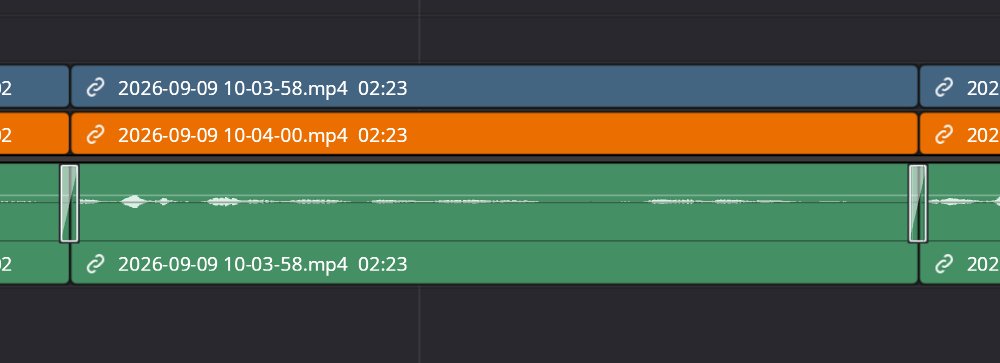
不,它不是那种一键“完美剪辑整段视频”的解决方案。而且,它的剪辑水平也还没达到我的高度。但这种差距主要体现在决策上,而非剪辑操作本身。 现在我不再仅仅是个视频剪辑师,而是成了一名创意总监(creative director,该说法由 @chefbrent 提出)。我负责管理 Astra,而 Astra 替我完成大量实际的剪辑工作。这依然需要花费时间,但繁杂的苦力活大幅减少,整个流程也高效得多。 最引人注目的第一点就是 Astra 的速度有多快。 我在“轻度”推理模式下使用 Astra,向它输入一个超长的提示词,描述我想让它做的所有事情。它会思考、规划,然后就开始在时间线上飞速穿梭剪辑。 GIF Astra 实时放置片段 看着它在时间线上操作真是一种乐趣。我以前从未见过这样的场景。 我只需把对视频的构想口述出来,就能看着 Astra 将它们化为现实。大多数时候,它做出来的效果已经非常接近我的预期。但这并非完美无缺。我依然需要进行一些微调,不过它提供的起点已经极其出色了。 我目前的工作流程大致如下: 首先,我使用了一个自己制作的设置技能。它会提取我所有的素材,寻找同步点,并在时间线上将所有内容同步对齐。 接着我有一个初剪技能(非常感谢 @ForwardEditor 提供的基础技能)。这个技能会让 Astra 浏览整个视频,在它认为需要的地方进行剪切,并初步清理时间线。 之后,我会运行一个自定义的清理剪辑技能作为第二轮处理。它会尝试找出 Astra 将某个词修剪得过短或在片段开头留下过多空白的地方。它在这方面的表现还算可以,但对话剪辑可能仍是 Astra 尚未完善的最大领域之一。它经常会在剪辑点末尾切掉某个词的最后几个字母,或者在下一个片段开头留下稍多的静音部分。我甚至专门制作了一个技能来处理这个问题,但依然不够完全可靠。有时我甚至会让它分析音频波形,这确实有帮助,但仍有不足。 因此,在自动化处理之后,我通常会进行一次实时观看,一边播放视频一边将我注意到的问题口述给 Astra 进行修正。这通常是这样的: “在一分二十七秒处,你把这个词剪得太短了。”或者“在我的播放头所在位置,加上一张正在谈论的那个人的照片。” 就是把原始的想法直接倾倒进提示词里。 Astra 会返回进行修改,结果通常近乎完美。如果不完美?我就再输入一次提示词。 我喜欢的另一点是,能够把我常用的剪辑技巧教给 Astra。你可以把它们转化为技能,或者直接让它记住你的需求。例如,每当遇到全屏面部摄像头画面时,我就会让 Astra 添加推近和缩放效果,让视频感觉更具动感。它每次都能完美拿捏。效果很自然,看起来也很棒,而且这本来就是以前我会手动去做的事情。现在我只管交给 Astra 处理。 音频过渡也是同理。手动剪辑时,我通常会在剪切处添加两帧的音频交叉淡入淡出。这有助于平滑融合音频,特别是当剪辑点差一帧太短或差一帧太长时。所以我也让 Astra 照做。 正是这些细节让 AI 剪辑显得更加自然。 Astra 应用的两帧音频过渡 现在我们来聊聊 MCP。

DaVinci MCP 本身也非常出色,但当某些功能无法通过 MCP 实现时,Astra 偶尔会混用计算机操作,这倒也无妨,但我确实更希望它能完全在 MCP 内运行,这样它就不会接管我的电脑控制权。 尽管 MCP 感觉极其流畅且集成度很高,但你仍能看出它还处于早期阶段。并非所有功能都可用。诸如编辑设置、应用某些音频效果、更改片段持续时间以及点击 DaVinci 中的某些菜单等操作,MCP 都还不支持。但计算机操作可以毫无问题地处理这一切。

整个工作流程中最酷的一点是,由于是通过 MCP 运行的,Astra 可以在剪辑的同时让我去忙别的事。当我的视频正在被剪辑时,我可以去制作缩略图、策划视频或者看看新闻。这太不可思议了! 不过,尽管 Astra 已经在很大程度上改变了我的工作生活,但它仍存在一些令人抓狂的行为。 有时我会明确指示 Astra 去做某件事,但它不仅没有实际执行,反而会去思考自己能不能做到,跟 DaVinci Resolve 确认一番,然后基本就回我一句:“是的,我能做到。”

但然后它就不做了。 当我的提示词已经明确要求它去执行操作时,这就特别让人抓狂。 对话剪辑仍需改进。有时得逼 Astra 一下它才会真正采取行动。而且我依然需要通看视频并作出修正。

除此之外,实际花在剪辑或指导上的时间与手动剪辑依然差不多。所以别指望按下一个按钮视频就能完美出炉。目前还没达到那个程度。 但总而言之,这种体验绝对超现实。 我只需描述想要的剪辑效果,看着 Astra 在时间线上风驰电掣,然后把时间花在指导和修正上,而不是由我亲自去完成每一次微小的剪辑。 经历了 15 年的剪辑生涯,这是一种截然不同且令人兴奋的工作方式,我非常期待未来会有怎样的发展。

我用 Astra 剪辑的第一支完整视频已经发布在这里。Matt 看了没发现……观众们看了也没发现……

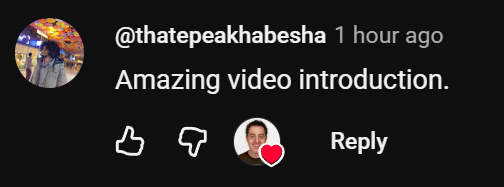
事实上,甚至还有人专门表示他们有多喜欢这支视频!

I’m Alex. I've been editing for 15+ years and I currently edit for @MatthewBerman I’ve been using Astra to edit directly in DaVinci Resolve through MCP and in just a few days, it’s completely changed everything about how I edit. And I mean everything.

我是 Alex。我有 15 年以上的剪辑经验,目前为 @MatthewBerman 做剪辑。 我一直在使用 Astra,通过 MCP 直接在 DaVinci Resolve 中进行剪辑。短短几天内,它彻底改变了我剪辑的方方面面。我说的可是方方面面。

First let's clear some things up:

首先让我们澄清几点:

No, it’s not a one-button “edit my entire video perfectly” solution. And no, it’s not quite as good at editing as I am. But that difference mostly comes down to decision making, not the actual task of editing itself. Instead of being a video editor, now I’m a creative director (coined by @chefbrent). I manage Astra while Astra does a lot of the actual editing for me. It still takes time, but there’s significantly less grunt work, and the whole process is much more efficient. The first thing that stands out is just how fast Astra is. I'm using Astra on 'Light' reasoning, giving it a huge prompt describing everything I want it to do. It thinks, plans, and then it just starts flying through the edit. GIF Astra placing clips in real time Watching it work on the timeline is genuinely fun. I've never seen anything like it before. I can speak the things I want in my video into existence and watch Astra make them happen. And most of the time, it gets pretty close to what I want. But it’s not perfect. There are definitely micro adjustments I still have to make, but the starting point it gives me is extremely good. My current workflow looks something like this: First, I have a setup skill I made. It takes all of my footage, finds the sync points, and syncs everything together on the timeline. Then I have a first-cut skill (big thanks to @ForwardEditor for the base skill). This skill has Astra goes through the video, makes the cuts where it thinks they need to be, and generally cleans up the timeline. After that, I run a custom cleanup cut skill as a second pass. It tries to catch places where Astra trimmed a word too short or left too much space at the beginning of a clip. It does an okay job at this, but dialogue editing is probably one of the biggest areas where Astra still isn’t perfect. It’ll frequently cut off the last few letters of a word at the end of a cut, or leave slightly too much dead space at the beginning of the next clip. I’ve even made a skill specifically to help with this, and it still isn’t completely reliable. Sometimes I’ll even have it analyze the audio waveforms, which helps, but it’s still not perfect. So after the automated passes, I usually do a live watch where I play through the video and dictate corrections as I notice them to Astra. This usually looks like: “You trimmed this word too short at one minute and twenty-seven seconds.” or "Add a photo of the guy being talked about here where my playhead is." Just raw thoughts dumped into a prompt. Astra goes back in, makes the adjustments, and the result is usually near flawless. If its not? I just prompt again. Another thing I love is being able to give Astra editing tips that I use all the time. You can turn them into skills or just have it remember what you want. For example, whenever I have a full-screen face cam, I’ll tell Astra to add punch-ins and zooms to make the video feel more dynamic. It nails them every time. They feel natural, they look good, and it’s something I would normally be doing manually anyway. Now I just have Astra do it. Same thing with audio transitions. When I’m editing by hand, I normally add a two-frame audio crossfade at cuts. It helps smoothly blend the audio together, especially when a cut is a frame too short or a frame too long. So I just have Astra do that too. Those little things make the AI edits feel much more natural. The 2 frame audio transitions applied by Astra Now let's talk about the MCP.

不,它不是那种一键“完美剪辑整段视频”的解决方案。而且,它的剪辑水平也还没达到我的高度。但这种差距主要体现在决策上,而非剪辑操作本身。 现在我不再仅仅是个视频剪辑师,而是成了一名创意总监(creative director,该说法由 @chefbrent 提出)。我负责管理 Astra,而 Astra 替我完成大量实际的剪辑工作。这依然需要花费时间,但繁杂的苦力活大幅减少,整个流程也高效得多。 最引人注目的第一点就是 Astra 的速度有多快。 我在“轻度”推理模式下使用 Astra,向它输入一个超长的提示词,描述我想让它做的所有事情。它会思考、规划,然后就开始在时间线上飞速穿梭剪辑。 GIF Astra 实时放置片段 看着它在时间线上操作真是一种乐趣。我以前从未见过这样的场景。 我只需把对视频的构想口述出来,就能看着 Astra 将它们化为现实。大多数时候,它做出来的效果已经非常接近我的预期。但这并非完美无缺。我依然需要进行一些微调,不过它提供的起点已经极其出色了。 我目前的工作流程大致如下: 首先,我使用了一个自己制作的设置技能。它会提取我所有的素材,寻找同步点,并在时间线上将所有内容同步对齐。 接着我有一个初剪技能(非常感谢 @ForwardEditor 提供的基础技能)。这个技能会让 Astra 浏览整个视频,在它认为需要的地方进行剪切,并初步清理时间线。 之后,我会运行一个自定义的清理剪辑技能作为第二轮处理。它会尝试找出 Astra 将某个词修剪得过短或在片段开头留下过多空白的地方。它在这方面的表现还算可以,但对话剪辑可能仍是 Astra 尚未完善的最大领域之一。它经常会在剪辑点末尾切掉某个词的最后几个字母,或者在下一个片段开头留下稍多的静音部分。我甚至专门制作了一个技能来处理这个问题,但依然不够完全可靠。有时我甚至会让它分析音频波形,这确实有帮助,但仍有不足。 因此,在自动化处理之后,我通常会进行一次实时观看,一边播放视频一边将我注意到的问题口述给 Astra 进行修正。这通常是这样的: “在一分二十七秒处,你把这个词剪得太短了。”或者“在我的播放头所在位置,加上一张正在谈论的那个人的照片。” 就是把原始的想法直接倾倒进提示词里。 Astra 会返回进行修改,结果通常近乎完美。如果不完美?我就再输入一次提示词。 我喜欢的另一点是,能够把我常用的剪辑技巧教给 Astra。你可以把它们转化为技能,或者直接让它记住你的需求。例如,每当遇到全屏面部摄像头画面时,我就会让 Astra 添加推近和缩放效果,让视频感觉更具动感。它每次都能完美拿捏。效果很自然,看起来也很棒,而且这本来就是以前我会手动去做的事情。现在我只管交给 Astra 处理。 音频过渡也是同理。手动剪辑时,我通常会在剪切处添加两帧的音频交叉淡入淡出。这有助于平滑融合音频,特别是当剪辑点差一帧太短或差一帧太长时。所以我也让 Astra 照做。 正是这些细节让 AI 剪辑显得更加自然。 Astra 应用的两帧音频过渡 现在我们来聊聊 MCP。

The DaVinci MCP itself is also really good but Astra will occasionally mix in computer use when something isn’t available through the MCP, which is fine, but I definitely prefer when it can stay entirely inside the MCP so it doesn't take over my computer. Though the MCP feels incredibly smooth and tightly integrated, you can tell it's still in its early stages. Not everything is available. Things like editing your settings, applying certain audio effects, changing clip durations and clicking around some of the menus in DaVinci aren't supported by the MCP. But computer use can handle all of these without issue.

DaVinci MCP 本身也非常出色,但当某些功能无法通过 MCP 实现时,Astra 偶尔会混用计算机操作,这倒也无妨,但我确实更希望它能完全在 MCP 内运行,这样它就不会接管我的电脑控制权。 尽管 MCP 感觉极其流畅且集成度很高,但你仍能看出它还处于早期阶段。并非所有功能都可用。诸如编辑设置、应用某些音频效果、更改片段持续时间以及点击 DaVinci 中的某些菜单等操作,MCP 都还不支持。但计算机操作可以毫无问题地处理这一切。

One of the coolest parts of this whole workflow is that since it works through the MCP, Astra can be editing while I’m working on something else. I can be creating thumbnails, planning videos or keep up with the news while my video is being edited. It's crazy! Now although Astra has been pretty life changing, there are still some annoying behaviors. Sometimes I’ll explicitly tell Astra to do something, and instead of actually doing it, it’ll think through whether it can do it, check with DaVinci Resolve, and then basically respond with, “Yep, I could do that.”

整个工作流程中最酷的一点是,由于是通过 MCP 运行的,Astra 可以在剪辑的同时让我去忙别的事。当我的视频正在被剪辑时,我可以去制作缩略图、策划视频或者看看新闻。这太不可思议了! 不过,尽管 Astra 已经在很大程度上改变了我的工作生活,但它仍存在一些令人抓狂的行为。 有时我会明确指示 Astra 去做某件事,但它不仅没有实际执行,反而会去思考自己能不能做到,跟 DaVinci Resolve 确认一番,然后基本就回我一句:“是的,我能做到。”

But then it doesn’t actually do it. It’s especially frustrating when my prompt specifically told it to go perform the action. Dialogue editing still needs work. Sometimes Astra needs to be pushed to actually take action. And I still need to watch through the video and make corrections.

但然后它就不做了。 当我的提示词已经明确要求它去执行操作时,这就特别让人抓狂。 对话剪辑仍需改进。有时得逼 Astra 一下它才会真正采取行动。而且我依然需要通看视频并作出修正。

In addition to this, the actual time spent editing or directing is still similar to editing by hand. So don't expect to just push a button and the video be perfect. It's not quite there yet. But overall the experience is absolutely surreal. I can describe how I want an edit to look, watch Astra rip through the timeline, and then spend my time directing and correcting it instead of manually performing every tiny edit myself. After 15 years of editing, it's a very different, exciting way of working and I'm very excited to see what the future holds.

除此之外,实际花在剪辑或指导上的时间与手动剪辑依然差不多。所以别指望按下一个按钮视频就能完美出炉。目前还没达到那个程度。 但总而言之,这种体验绝对超现实。 我只需描述想要的剪辑效果,看着 Astra 在时间线上风驰电掣,然后把时间花在指导和修正上,而不是由我亲自去完成每一次微小的剪辑。 经历了 15 年的剪辑生涯,这是一种截然不同且令人兴奋的工作方式,我非常期待未来会有怎样的发展。

The first full video I've edited with Astra is live here. Matt watched it and didn't notice... The world has watched it and didn't notice...

我用 Astra 剪辑的第一支完整视频已经发布在这里。Matt 看了没发现……观众们看了也没发现……

In fact someone even pointed out how much they liked it!

事实上,甚至还有人专门表示他们有多喜欢这支视频!

I’m Alex. I've been editing for 15+ years and I currently edit for @MatthewBerman I’ve been using Astra to edit directly in DaVinci Resolve through MCP and in just a few days, it’s completely changed everything about how I edit. And I mean everything.

First let's clear some things up:

No, it’s not a one-button “edit my entire video perfectly” solution. And no, it’s not quite as good at editing as I am. But that difference mostly comes down to decision making, not the actual task of editing itself. Instead of being a video editor, now I’m a creative director (coined by @chefbrent). I manage Astra while Astra does a lot of the actual editing for me. It still takes time, but there’s significantly less grunt work, and the whole process is much more efficient. The first thing that stands out is just how fast Astra is. I'm using Astra on 'Light' reasoning, giving it a huge prompt describing everything I want it to do. It thinks, plans, and then it just starts flying through the edit. GIF Astra placing clips in real time Watching it work on the timeline is genuinely fun. I've never seen anything like it before. I can speak the things I want in my video into existence and watch Astra make them happen. And most of the time, it gets pretty close to what I want. But it’s not perfect. There are definitely micro adjustments I still have to make, but the starting point it gives me is extremely good. My current workflow looks something like this: First, I have a setup skill I made. It takes all of my footage, finds the sync points, and syncs everything together on the timeline. Then I have a first-cut skill (big thanks to @ForwardEditor for the base skill). This skill has Astra goes through the video, makes the cuts where it thinks they need to be, and generally cleans up the timeline. After that, I run a custom cleanup cut skill as a second pass. It tries to catch places where Astra trimmed a word too short or left too much space at the beginning of a clip. It does an okay job at this, but dialogue editing is probably one of the biggest areas where Astra still isn’t perfect. It’ll frequently cut off the last few letters of a word at the end of a cut, or leave slightly too much dead space at the beginning of the next clip. I’ve even made a skill specifically to help with this, and it still isn’t completely reliable. Sometimes I’ll even have it analyze the audio waveforms, which helps, but it’s still not perfect. So after the automated passes, I usually do a live watch where I play through the video and dictate corrections as I notice them to Astra. This usually looks like: “You trimmed this word too short at one minute and twenty-seven seconds.” or "Add a photo of the guy being talked about here where my playhead is." Just raw thoughts dumped into a prompt. Astra goes back in, makes the adjustments, and the result is usually near flawless. If its not? I just prompt again. Another thing I love is being able to give Astra editing tips that I use all the time. You can turn them into skills or just have it remember what you want. For example, whenever I have a full-screen face cam, I’ll tell Astra to add punch-ins and zooms to make the video feel more dynamic. It nails them every time. They feel natural, they look good, and it’s something I would normally be doing manually anyway. Now I just have Astra do it. Same thing with audio transitions. When I’m editing by hand, I normally add a two-frame audio crossfade at cuts. It helps smoothly blend the audio together, especially when a cut is a frame too short or a frame too long. So I just have Astra do that too. Those little things make the AI edits feel much more natural. The 2 frame audio transitions applied by Astra Now let's talk about the MCP.

The DaVinci MCP itself is also really good but Astra will occasionally mix in computer use when something isn’t available through the MCP, which is fine, but I definitely prefer when it can stay entirely inside the MCP so it doesn't take over my computer. Though the MCP feels incredibly smooth and tightly integrated, you can tell it's still in its early stages. Not everything is available. Things like editing your settings, applying certain audio effects, changing clip durations and clicking around some of the menus in DaVinci aren't supported by the MCP. But computer use can handle all of these without issue.

One of the coolest parts of this whole workflow is that since it works through the MCP, Astra can be editing while I’m working on something else. I can be creating thumbnails, planning videos or keep up with the news while my video is being edited. It's crazy! Now although Astra has been pretty life changing, there are still some annoying behaviors. Sometimes I’ll explicitly tell Astra to do something, and instead of actually doing it, it’ll think through whether it can do it, check with DaVinci Resolve, and then basically respond with, “Yep, I could do that.”

But then it doesn’t actually do it. It’s especially frustrating when my prompt specifically told it to go perform the action. Dialogue editing still needs work. Sometimes Astra needs to be pushed to actually take action. And I still need to watch through the video and make corrections.

In addition to this, the actual time spent editing or directing is still similar to editing by hand. So don't expect to just push a button and the video be perfect. It's not quite there yet. But overall the experience is absolutely surreal. I can describe how I want an edit to look, watch Astra rip through the timeline, and then spend my time directing and correcting it instead of manually performing every tiny edit myself. After 15 years of editing, it's a very different, exciting way of working and I'm very excited to see what the future holds.

The first full video I've edited with Astra is live here. Matt watched it and didn't notice... The world has watched it and didn't notice...

In fact someone even pointed out how much they liked it!
📋 讨论归档

讨论进行中…