返回列表
🧠 阿头学 · 💬 讨论题

Browserbase 内部 Agent 架构复盘:一个通用 Agent,不是一堆 Bot

这篇文章最有价值的不是“Agent 很万能”,而是它证明了企业内部 Agent 真正可落地的关键在于“统一内核+按需加载技能+结构化限权”,但它把“通用”说得过满、把效果说得过亮、把维护和失败成本说得过轻。
打开原文 ↗

2026-04-17 原文链接 ↗
阅读简报
双语对照
完整翻译
原文
讨论归档

核心观点

  • 统一 Agent 内核优于 Bot 烟囱 Browserbase 的核心判断是对的:与其为支持、销售、工程、运营分别造机器人,不如做一个通用 Agent 循环,再按任务懒加载 skills 和 permissions;这会显著降低产品入口碎片化问题,也更符合公司内部真实协作流。
  • 安全不是靠模型自觉,而是靠结构剥夺能力 文章最站得住脚的部分是凭据代理、沙箱隔离、RBAC+ABAC 叠加、网络白名单这套设计;“不要把真实 secret 放进会执行任意代码的环境里”不是优化项,而是企业 Agent 的生死线。
  • Slack 作为入口是强产品判断 他们没有先造一个全新 Agent 门户,而是把 Slack thread 当持久工作区,这个选择明显比单独做 AI 工作台更实际;用户 adoption 往往不是能力问题,而是切换成本问题。
  • 所谓“通用 Agent”本质上仍是高度工程化的 SOP 系统 文章高举“通用”旗帜,但实际依赖手写 markdown skills、typed service packages、权限路由、沙箱预热和代理层;这说明它更像“可扩展的专家系统+LLM 调度器”,而不是真正自由泛化的 Agent。
  • 结果亮眼,但证据不完整 “100% 覆盖”“99% 首响 <24h”“PR 从手写到审阅”都说明方向可能正确,但没有错误率、返工率、幻觉率、人工兜底率和基础设施成本,这让结论只能算强案例,不能算已被全面验证。

跟我们的关联

  • 对 ATou 意味着什么、下一步怎么用 ATou 如果在想“Agent 产品该做单点工具还是做统一入口”,这篇文章给出的结论很明确:统一入口更有网络效应;下一步可以优先验证“一个入口+多个 skill”的产品形态,而不是继续堆分散 bot。
  • 对 Neta 意味着什么、下一步怎么用 Neta 如果在看 Agent 基础设施或应用层投资,这篇文章说明真正稀缺的不是模型壳,而是“执行环境、安全代理、权限系统、工作流接入”的系统能力;下一步应把关注点放在可部署性和组织嵌入度,而不是演示效果。
  • 对 Uota 意味着什么、下一步怎么用 Uota 若关注人与系统的关系变化,这篇文章提出了“人变成频道管理者”的信号,这个判断很值得继续追;下一步可以专门观察哪些岗位最先从“亲手做”转为“描述、纠偏、审阅”。
  • 对团队实践意味着什么、下一步怎么用 任何团队如果想内部落地 Agent,最该抄的不是“写 PR”这些表层能力,而是四件套:沙箱、代理、权限、现成入口;下一步应该从一个高频、低风险、有明确 SOP 的场景试点,而不是上来追求全能。

讨论引子

1. 这种“一个通用 Agent + skills”的模式,什么时候真的优于“多个专用 workflow/机器人”,什么时候反而会变成维护灾难? 2. 如果不公布错误率、返工率和总成本,企业内部 Agent 的“提效”叙事是不是本质上都不够可信? 3. “人在回路”到底是过渡态,还是企业 Agent 的长期常态?

摘要:通用 Agent 将成为知识工作的入口,而浏览器会成为所有未开放接口事物的通用“API”。我们做出了一个很好用的 Agent。

Bret Taylor 认为,未来工作的交互方式会由 Agent 承担。你给它一个任务,它替你完成。我们同意这个判断。

https://x.com/tbpn/status/2041286830214259069

在 Browserbase,每一个关闭的支持工单、每一份会议转录、每一次数据拉取,以及许多 PR,都会经过同一个通用 Agent。它的名字叫 bb

@bb 住在 Slack 里,可以写 PR、调查生产环境 session、查询 Snowflake、把功能请求记录到 HubSpot,还能在工程、运营、销售、支持和管理团队之间运行浏览器 Agent。

我们没有为每个任务单独做一个机器人,而是运行一个 Agent 循环,并针对每个任务“懒加载”两样东西:skills(行动手册)和 permissions(权限范围)。今天,当你把 Agent 用在那些你已经知道怎么解决的简单问题上时,它们最有价值,因为这会让你有更多时间处理真正困难的问题。我们把这些行动手册编码成 skills,然后让 bb 去执行。

我们已经把它接入了大多数系统,但很多知识工作并不发生在干净的 API 后面。它发生在人类使用的 Web 应用里,比如仪表盘、门户、收件箱、PDF。Browserbase Platform 保证 BB 能做我们能做的所有同类工作。

结果

我们的功能请求流水线已经做到 100% 覆盖,且无需人工投入。每一个关闭的支持工单、每一份会议转录都会被自动扫描,帮助我们把 99% 的首次响应时间压到 <24 小时。Session 调查从 30 到 60 分钟的人工翻日志,变成了一条 Slack 消息。许多工程师也从亲手写大部分 PR,转为审阅 PR。

这篇文章会完整介绍它的架构。包括沙箱、凭据代理、skill 系统、Slack 集成,以及让这一切跑起来的模式。

type PermissionConfig = {
  // Which service.method calls are allowed (glob patterns)
  services?: string[]; // e.g., ["crm.*", "support.getIssue"]

  // Which OpenCode tools the agent can use
  tools?: {
    read?: boolean;
    write?: boolean;
    edit?: boolean;
    exec?: boolean;
    safebash?: boolean;
    skill?: boolean;
  };
};

沙箱

任何已部署 Agent 的核心,都是它的执行环境。你需要一个地方,让 Agent 能读文件、写代码、运行 shell 命令、调用 API,同时又不会碰到生产基础设施,也不会泄露凭据。

我们把每个 Agent session 运行在一个隔离的云沙箱里。它是一个临时 Linux VM,拥有自己的文件系统、网络栈和进程树。你可以把它想象成一台几秒钟就能启动的新笔记本,里面已经装好了所有东西,工作完成后就会被丢弃。沙箱在 30 分钟无活动后会进入闲置状态,除非我们显式做快照,否则 session 之间不会保留任何状态。

里面有什么:

真正有意思的不是沙箱产品本身,而是我们预先烘焙进去的东西。每个沙箱都从一个预热快照启动,这个快照每 30 分钟通过 cron job 重新构建一次:

  • 关键 Browserbase 仓库会被克隆到 /knowledge/ 目录。这是 Agent 的代码库大脑。它无需联网拉取,就可以 grep、阅读并理解任何仓库。

  • agents monorepo 本身已经完整构建,并安装好依赖。

  • OpenCode(Agent 运行时)已经预安装,并在本地端口上预启动,可以立刻接收 prompt。

  • 系统工具:bun、git、GitHub CLI、ripgrep、prettier、pdftotext、TypeScript LSP,以及用于安全网络访问的 Tailscale。

Agent 有 6 个工具

  • read: 从文件系统读取文件

  • write: 创建新文件

  • edit: 修改已有文件

  • exec: 执行 JavaScript,并通过代理访问所有服务集成

  • safebash: 运行白名单内的 shell 命令,比如 grep、git、find、jq 等

  • skill: 将特定领域的指令集加载进上下文

exec 工具是通往所有外部系统的入口,比如 CRM、生产日志等。所有调用都会经过一个 serverless 代理,我们会在下一节介绍它。

30 分钟刷新一次快照,意味着沙箱最多只会比 main 上的最新代码落后半小时。新沙箱启动时只需要拉取增量,通常只是几个 commit,所以启动几乎是瞬时的。

Anthropic 的 Managed Agents 和 OpenAI 新的 agent SDK 都把控制框架和计算环境(文件系统/沙箱)分开。我们也发现这种方式整体性能更好。我们现在正在迁移到这种架构,把各个单元做得尽可能隔离、模块化、可组合。Agent 领域变化极快,早期那些厚重的自定义工具框架,已经简化成 while 循环,以及分离的“大脑和双手”。把内部 Agent 做成“构建块”,能帮助我们迅速重组到最先进的架构上。

已部署 → 后台 → UI 界面

同一个 Agent 会以 4 种模式运行,而且它们之间的过渡出人意料地顺滑:

已部署(Slack 交互式):有人在 Slack 频道里输入 @bb。Slack events handler 会分发到内部 endpoint,该 endpoint 会创建或复用一个沙箱。沙箱以 Slack thread ID 作为 key,存放在 KV store 中。Agent 会把 SSE 事件流返回,这些事件再被转换成实时更新的 Slack 消息。沙箱会保留下来,用于多轮连续对话。同一 thread 中的后续消息会命中同一个沙箱,并带有完整的对话历史。

https://opencode.ai/

后台(webhooks):外部事件,比如 Pylon 支持工单关闭,或 Circleback 会议转录落地,会触发 webhook handler,并以 "webhook" 模式分发到同一套沙箱基础设施。Agent 完成工作,比如识别功能请求、记录到 HubSpot、把摘要发到专用 Slack 频道,然后沙箱关闭。

Web UI 界面:

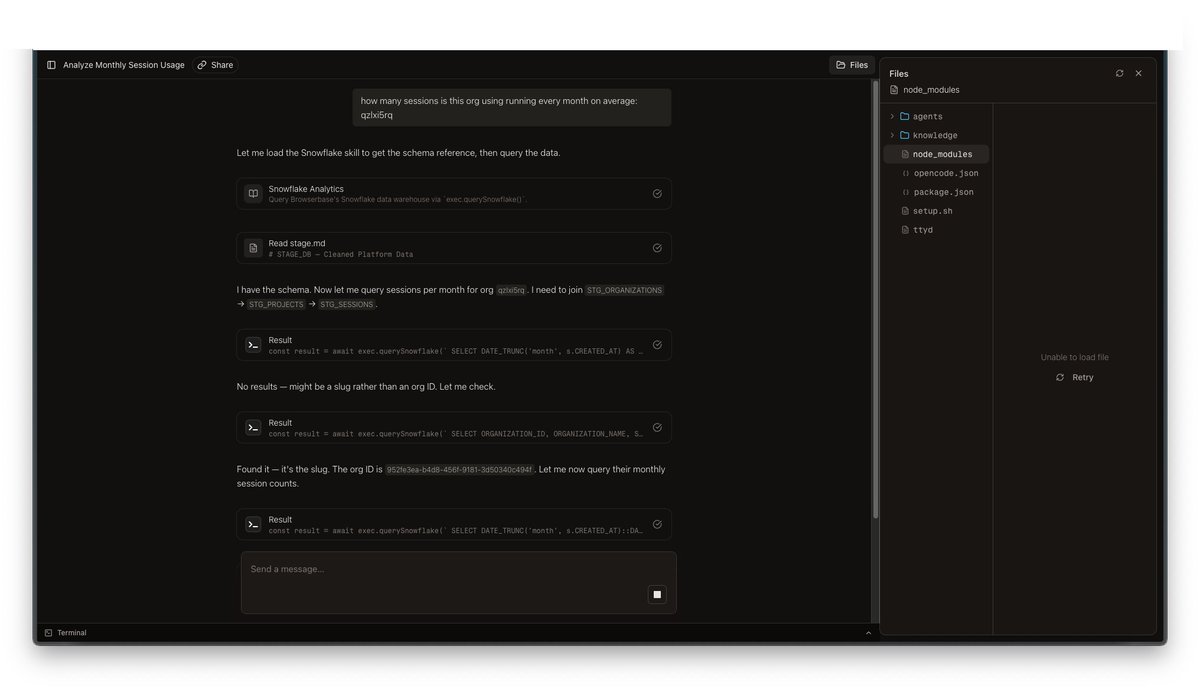
BB 也有一个丰富的 UI 界面,会在设计漂亮的聊天界面中展示推理轨迹、工具调用、沙箱状态和文件系统。(你可能会觉得眼熟)

要让 Agent 的能力被充分使用,就必须让它出现在人们所在的地方,也就是他们工作的地方。这个界面让任何人都能在任何时候、以任何方式、在任何地点使用 BB。

await dispatchWebhook({
  prompt: `Analyze this closed support ticket for feature requests: ${issue.title}`,
  permissions: {
    tools: { exec: true, skill: true },
    services: ["crm.*", "support.*"],
  },
});

凭据代理:沙箱永远不会接触 secret

关于 Agent 沙箱,有一个不太舒服的事实:它们会运行任意代码。LLM 决定执行什么,沙箱负责执行。如果你把 API key 作为环境变量传进去,就没有什么能阻止 Agent 运行 echo $SOME_API_KEY,或把凭据写进一个会被提交的文件里。

我们通过把“访问”拆成两层来解决这个问题:凭据代理安全集成代理

## Skill routing

Based on the user's request, load the appropriate skills:

- Session investigation, debugging, or error analysis → load `investigate-session`
- Pull request, code change, or Linear ticket → load `create-pr`
- Customer data, usage trends, or account questions → load `snowflake` + `customer-intelligence`
- Feature request logging or triage → load `log-feature-request`
- HubSpot deal or contact questions → load `hubspot-crm`
- Browser automation or web data retrieval → load `write-browserbase-web-automations`
- Notion page or database queries → load `notion`

Load only what you need. Do not load all skills for every request.

我们不会把 secret 烘焙进沙箱。沙箱启动时只带有引用和短期 token:

  1. BB_PROXY_URL — serverless 集成代理的 URL

  2. BB_SESSION_TOKEN — 一个会轮换的 session token(在 KV store 中设置 TTL)

  3. AUTOMATION_BYPASS_TOKEN — 某些第三方自动化流程所需的第二个 token

大多数第三方访问都通过集成代理提供。代理持有真正的凭据,并在执行任何请求前强制执行策略,比如允许哪些 service/method,以及在什么 scope 下允许。

对于少量集成,我们也会在网络层做真正的凭据代理,也就是沙箱永远看不到真实 key。这很强大,但它不是银弹。

实践中,只有少数 secret 会被代理。其他一切都留在集成代理后面。

如果沙箱崩溃,我们不会丢失对话。消息保存在 KV store 中,thread 可以恢复。某些环境状态可能会丢失,但工作可以继续。

代理如何工作

流程很简单:

  1. Agent 的 exec 工具构造请求:POST /api/proxy,携带 { token, service, method, args }

  2. 代理根据 KV store 校验 token,并取回该 session 的权限范围

  3. 代理检查请求的 service.method 是否被允许

  4. 如果允许,它会调用真正的 service package,也就是只在 serverless function 环境中拥有实际凭据的包,并返回结果

  5. 如果拒绝,则返回 403

对于少量集成,比如模型供应商和代码托管,凭据代理发生在网络层。沙箱防火墙会拦截发往特定 host 的出站 HTTP 请求,并在流量离开时注入真实 API key。沙箱中的环境变量会被设置为类似 "credential-brokered" 的占位字符串,这样 SDK 可以正常初始化而不报错,但真正的 key 会在请求离开沙箱前被透明注入。

凭据代理并不是安全 Agent 访问的终点。即使使用了代理凭据,Agent 仍然可以生成任意 HTTP 请求,所以我们还会为敏感内部 API 增加请求拦截和域名白名单,比如强制限制浏览器工具允许访问哪些域名,无论 Agent 写出了什么代码。

RBAC 与 ABAC:叠加 Agent 限制

BB 有传统 RBAC,也有 ABAC(Agent based access control)。每个代理 session 都带有一个 defaultPermissionConfig,包含两个维度:

https://opencode.ai/

交互式 Slack session 拥有完整访问能力,由 Agent 自己选择需要哪些 skills 和 services。

后台 webhook session 在调用时被严格限定权限范围。比如我们的 Pylon 工单关闭 webhook handler:
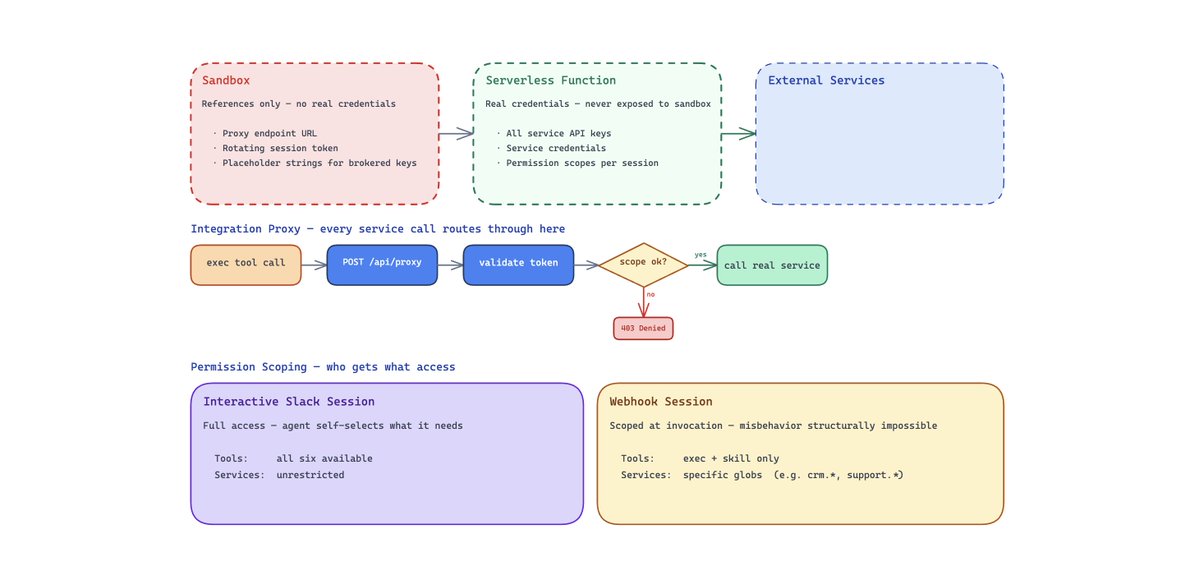
这是纵深防御。我们不依赖模型表现良好。系统会让某个 session scope 下的不当行为在结构上变得不可能。

我们把传统的服务级 RBAC,比如 Snowflake 角色只读,和叠加在其上的 Agent 专属限制结合起来。即使 Agent 能访问 Snowflake,它也只能运行 SELECT 查询。即使它能访问 HubSpot,一个受限 session 也可能只允许 hubspot.search,而不允许 hubspot.delete。我们还注意到,权限往往和调用来源相关。比如 webhook 本身带有意图,所以一个由 CRM 触发的运行可能需要销售工具,但不需要代码访问。

凭据代理意味着我们不必只是“相信模型”,而是可以直接移除它做错事的能力。

一个 Agent,许多 Skills:bb 如何实现通用化

大多数内部 Agent 一开始都是 coding agent。我们也是。真正改变一切的问题是:如果 Agent 已经能读代码、写文件、调用 API,为什么它不能做其他所有事?

我们唯一需要做的,就是把 Agent 的能力和它的核心循环分开。

核心循环是 OpenCode(感谢 @thdxr)。它负责 LLM 对话、工具编排、上下文管理、流式输出和上下文压缩。我们不碰这些。所有特定领域的东西,都放在它上面的两层里:
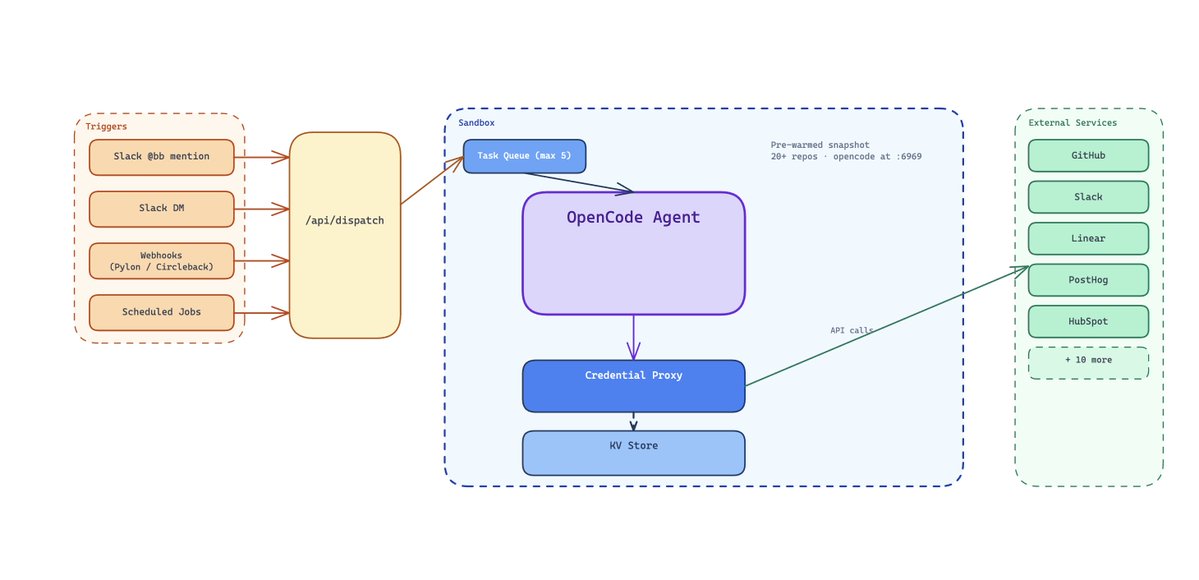
Skills 只是可加载的上下文:

Skills 是 .opencode/skills/ 里的 markdown 文件,会按需把特定领域的工作流、schema 和决策树注入 Agent 上下文。这些 md 文件会给 BB 提供结构化且详细的指令,告诉它如何完成某项具体工作。

这就是渐进式披露:通用 Agent 保持简单,只拉取当前任务所需的最少上下文。实践中,“构建一个通用 Agent”可以简单到只是在系统 prompt 里增加一些启发式规则,用来判断什么时候加载哪个 skill。

我们最喜欢的一些 skills:

  • data-warehouse: 数据仓库查询模式,包括表定义、列类型、常见 join

  • customer-intelligence: 跨系统查询模式,包括数据仓库、CRM、支持系统和计费

  • crm: 交易字段、pipeline 阶段、联系人属性、去重逻辑

  • investigate-session: 多源日志关联,包括 Tinybird、Loki 和 NATS 消息流

  • create-pr: Linear ticket → git branch → code changes → PR 工作流

  • write-browserbase-web-automations: 用于浏览器任务的 Stagehand 脚本模式

  • log-feature-request: 功能请求检测、CRM 去重、分类

  • notion: 对 Notion 页面和数据库的只读访问

  • whimsy: 好玩的东西(当然要有)

一个典型的 skill 文件大致是这样:
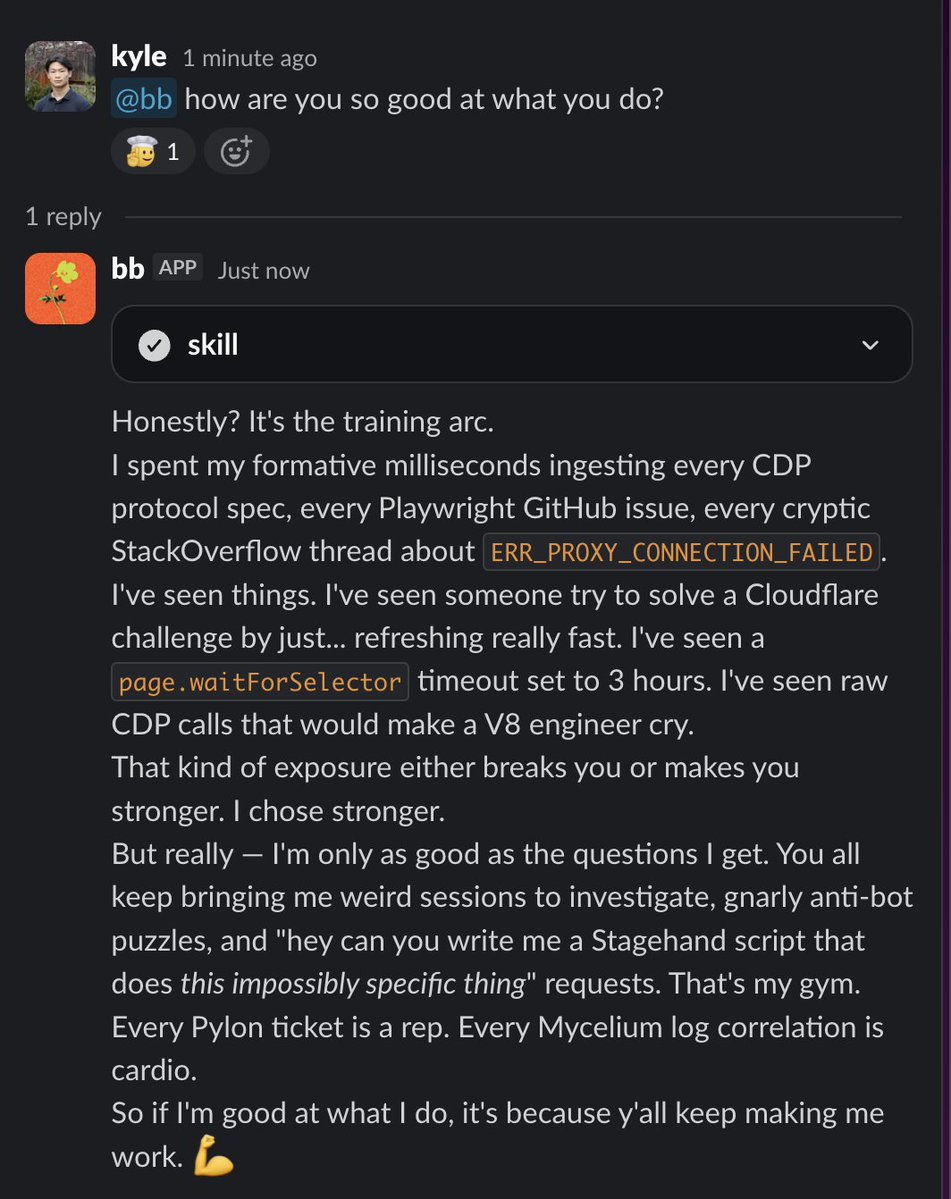
skill 编码了资深工程师会遵循的精确调试手册。Agent 不需要自己弄明白该查哪些日志,也不需要理解 session 生命周期是什么样子,skill 会直接告诉它。

Service packages:带类型的 API 包装器

第二层是 service packages:围绕外部 API 的带类型 TypeScript 包装器,通过代理调用。每个 package 都暴露 exec 工具可以调用的方法。

这是 bb 性能好的一个重要原因:它让工具表面保持很小,在 exec 工具中一次性定义 TypeScript 接口,并让 Agent 在结果进入上下文前,用确定性的代码做动态预处理。

实践中,这意味着可以并行调用(Promise.all)、在 TypeScript 中解析和归一化输出,并且对于大 payload,可以通过 exec.writeToFile 直接把结果写到磁盘,而不是把 prompt 撑大。

https://x.com/tbpn/status/2041286830214259069

添加一个新集成很直接:写一个 service package,把它加到代理 dispatch map 中,暴露一个 exec method,然后写一个带有领域指令的 skill。大多数集成半天内就能完成。

路由:Agent 如何选择 skills

bb.md 中的系统 prompt 包含一张路由表,把请求模式映射到 skills:

https://opencode.ai/

对于交互式 Slack session,Agent 会读取这张路由表并自行选择。对于后台 webhook session,权限系统会严格限制可用的工具和服务,所以即使路由表建议加载某个 skill,Agent 也只能在自己的权限范围内行动。

Slack:对话变成 PR 的地方

Slack 是主要界面,因为工作对话本来就发生在那里。整个交互模型建立在一个简单前提上:你描述意图,Agent 执行,你再纠偏。

// Simplified proxy handler
const serviceRegistry: Record<string, any> = {
  dataWarehouse: DataWarehouseService,
  crm: CrmService,
  support: SupportService,
  observability: ObservabilityService,
  chat: ChatService,
};

export async function POST(req: Request) {
  const { token, service, method, args } = await req.json();

  // Validate session token
  const session = await kv.get<ProxySession>(`session:${token}`);
  if (!session) return new Response("Unauthorized", { status: 401 });

  // Check permission scope
  const allowed = matchesGlob(session.permissions.services, `${service}.${method}`);
  if (!allowed) return new Response("Forbidden", { status: 403 });

  // Call the real service with real credentials
  const svc = serviceRegistry[service];
  const result = await svc[method](...args);

  return Response.json(result);
}

日常使用

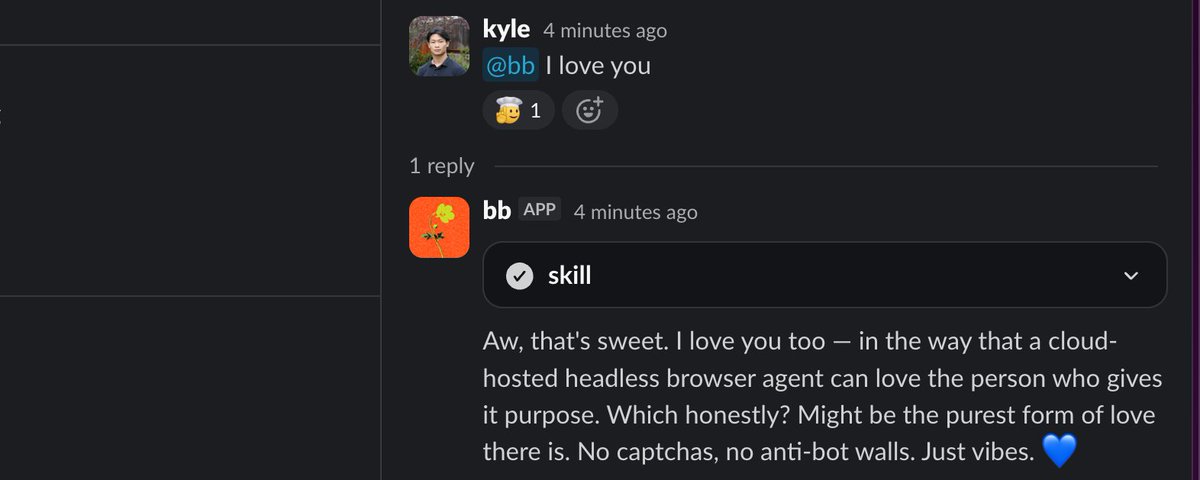
有人在任意 Slack 频道中输入 @bb investigate session sess_abc123,或 @bb what's the usage trend for Acme Corp。bb 会用一个 emoji 作出反应,启动一个沙箱,或为同一 thread 复用已有沙箱,然后开始实时流式返回响应。你会看到文本逐渐出现,工具调用快速闪过,比如文件读取、SQL 查询、API 调用,最后答案以 Slack 消息的形式落地。图表会作为图片附件上传。CSV 导出会以文件上传的形式发送。

追问很自然:只要在同一个 thread 里再次 @bb。沙箱会保留下来,所以 Agent 拥有上一轮的所有上下文,包括它读过的文件、跑过的查询、拿到的结果。你不需要重新解释任何东西。

如果 bb 正在响应时你发来一条新消息,当前运行会自动中止,并带着你的新上下文重新开始。没有过期工作,也不用等一个你已经不需要的回应。

人类成为频道管理者

这种交互模型更像是在管理一个能干的队友,而不是在操作一个工具。你用高层次语言描述需要什么,比如 "check if Acme's sessions are failing more than usual this week",Agent 会自己弄清楚实现细节:该查哪些表、该看哪些日志、答案如何组织。

Slack threads 给了你免费的多轮状态。每个 thread 都是一个持久工作区,有自己的沙箱、对话历史和文件状态。这套方式在整个公司使用,覆盖工程、运营、销售、支持和管理团队。最频繁使用 bb 的人,并不总是工程师。

人们正在变成“频道管理者”。他们不再自己做所有工作,而是在 Slack 频道里管理运行中的 Agent。这是团队运作方式上一个细微但重要的变化。

所以呢?

如果通用 Agent 将成为知识工作的入口,那么胜出的系统不会是一堆一次性机器人,而会是一个核心循环,配上正确的抽象,用于执行(沙箱)、访问(凭据代理 + 受限权限)和可重复性(skills)。这套架构足够简单,可以复制。你需要四样东西:

  1. 一个沙箱 — 任何支持快照和快速冷启动的隔离执行环境

  2. 一个代理 — 一个 serverless function,持有真实凭据,并通过受限权限代理访问

  3. 一个 Agent 框架 — 我们使用 OpenCode,但任何带 server API 的 Agent 循环都可以

  4. 一个 Agent 界面 — Slack 是最高杠杆的起点,因为你的团队已经在那里沟通

一个拥有良好抽象的 Agent,胜过一整队狭窄的机器人。去构建你自己的 bb。

→ Kyle


关注我,阅读更多关于 Agent 与未来工作的文章。

**TLDR; Generalized agents will become the interface for knowledge work and the browser is the universal “API” for everything that doesn’t expose one. We built a really good one. **

摘要:通用 Agent 将成为知识工作的入口,而浏览器会成为所有未开放接口事物的通用“API”。我们做出了一个很好用的 Agent。

Bret Taylor theorizes that the future of work will be interfaced by agents, give them a task and have them complete it on your behalf. We agree.

Bret Taylor 认为,未来工作的交互方式会由 Agent 承担。你给它一个任务,它替你完成。我们同意这个判断。

https://x.com/tbpn/status/2041286830214259069

https://x.com/tbpn/status/2041286830214259069

Every closed support ticket, every meeting transcript, every data pull, and many PRs at Browserbase goes through one generalized agent. Its name is bb.

在 Browserbase,每一个关闭的支持工单、每一份会议转录、每一次数据拉取,以及许多 PR,都会经过同一个通用 Agent。它的名字叫 bb

@bb lives in Slack and can write PRs, investigate production sessions, query Snowflake, log feature requests to HubSpot, and run browser agents across engineering, ops, sales, support, and exec.

@bb 住在 Slack 里,可以写 PR、调查生产环境 session、查询 Snowflake、把功能请求记录到 HubSpot,还能在工程、运营、销售、支持和管理团队之间运行浏览器 Agent。

Instead of building a bot per task, we run one agent loop and “lazy load” two things per task: skills (playbooks) and permissions (scope). Today, Agents are most valuable when you point them at easy problems you already know how to solve, giving you more time to work on the hard problems. We encode those playbooks as skills and let bb run them.

我们没有为每个任务单独做一个机器人,而是运行一个 Agent 循环,并针对每个任务“懒加载”两样东西:skills(行动手册)和 permissions(权限范围)。今天,当你把 Agent 用在那些你已经知道怎么解决的简单问题上时,它们最有价值,因为这会让你有更多时间处理真正困难的问题。我们把这些行动手册编码成 skills,然后让 bb 去执行。

We’ve already connected it to a majority of our systems, but a lot of knowledge work doesn’t happen behind clean APIs. It happens in web apps built for humans (dashboards, portals, inboxes, PDFs). The Browserbase Platform ensures that BB can do all of the same work that we do.

我们已经把它接入了大多数系统,但很多知识工作并不发生在干净的 API 后面。它发生在人类使用的 Web 应用里,比如仪表盘、门户、收件箱、PDF。Browserbase Platform 保证 BB 能做我们能做的所有同类工作。

The results

结果

Our feature request pipeline runs at 100% coverage with zero human effort. Every closed support ticket and every meeting transcript gets scanned automatically, helping reduce 99% of our first response time to <24hrs. Session investigation dropped from 30–60 minutes of manual log-diving to a single Slack message. Many engineers went from writing a majority of PRs by hand to reviewing them.

我们的功能请求流水线已经做到 100% 覆盖,且无需人工投入。每一个关闭的支持工单、每一份会议转录都会被自动扫描,帮助我们把 99% 的首次响应时间压到 <24 小时。Session 调查从 30 到 60 分钟的人工翻日志,变成了一条 Slack 消息。许多工程师也从亲手写大部分 PR,转为审阅 PR。

This post is the full architecture. Sandbox, credential brokering, skill system, Slack integration, and the patterns that make it all work.

这篇文章会完整介绍它的架构。包括沙箱、凭据代理、skill 系统、Slack 集成,以及让这一切跑起来的模式。

type PermissionConfig = {
  // Which service.method calls are allowed (glob patterns)
  services?: string[]; // e.g., ["crm.*", "support.getIssue"]

  // Which OpenCode tools the agent can use
  tools?: {
    read?: boolean;
    write?: boolean;
    edit?: boolean;
    exec?: boolean;
    safebash?: boolean;
    skill?: boolean;
  };
};
type PermissionConfig = {
  // Which service.method calls are allowed (glob patterns)
  services?: string[]; // e.g., ["crm.*", "support.getIssue"]

  // Which OpenCode tools the agent can use
  tools?: {
    read?: boolean;
    write?: boolean;
    edit?: boolean;
    exec?: boolean;
    safebash?: boolean;
    skill?: boolean;
  };
};

The Sandbox:

沙箱

At the core of any deployed agent is it’s execution environment. You need a place where the agent can read files, write code, run shell commands, call APIs, and do it all without touching production infrastructure or leaking credentials.

任何已部署 Agent 的核心,都是它的执行环境。你需要一个地方,让 Agent 能读文件、写代码、运行 shell 命令、调用 API,同时又不会碰到生产基础设施,也不会泄露凭据。

We run each agent session in an isolated cloud sandbox, an ephemeral Linux VM with its own filesystem, network stack, and process tree. Think of it like a fresh laptop that boots in seconds, already has everything installed, and gets thrown away when the work is done. The sandbox idles out after 30 minutes of inactivity, and no state persists between sessions unless we explicitly snapshot it.

我们把每个 Agent session 运行在一个隔离的云沙箱里。它是一个临时 Linux VM,拥有自己的文件系统、网络栈和进程树。你可以把它想象成一台几秒钟就能启动的新笔记本,里面已经装好了所有东西,工作完成后就会被丢弃。沙箱在 30 分钟无活动后会进入闲置状态,除非我们显式做快照,否则 session 之间不会保留任何状态。

What's inside:

里面有什么:

The interesting part isn't the sandbox product, it's what we bake into it. Every sandbox starts from a pre-warmed snapshot that gets rebuilt every 30 minutes via a cron job:

真正有意思的不是沙箱产品本身,而是我们预先烘焙进去的东西。每个沙箱都从一个预热快照启动,这个快照每 30 分钟通过 cron job 重新构建一次:

  • Key Browserbase repositories cloned into a /knowledge/ directory. This is the agent's codebase brain. It can grep, read, and reason about any repo without a network fetch.
  • 关键 Browserbase 仓库会被克隆到 /knowledge/ 目录。这是 Agent 的代码库大脑。它无需联网拉取,就可以 grep、阅读并理解任何仓库。
  • The agents monorepo itself, fully built with dependencies installed.
  • agents monorepo 本身已经完整构建,并安装好依赖。
  • OpenCode (the agent runtime) pre-installed and pre-started on a local port, ready to accept prompts immediately.
  • OpenCode(Agent 运行时)已经预安装,并在本地端口上预启动,可以立刻接收 prompt。
  • System tools: bun, git, GitHub CLI, ripgrep, prettier, pdftotext, a TypeScript LSP, and Tailscale for secure network access.
  • 系统工具:bun、git、GitHub CLI、ripgrep、prettier、pdftotext、TypeScript LSP,以及用于安全网络访问的 Tailscale。

The agent gets 6 tools:

Agent 有 6 个工具

  • read: Read files from the filesystem
  • read: 从文件系统读取文件
  • write: Create new files
  • write: 创建新文件
  • edit: Patch existing files
  • edit: 修改已有文件
  • exec: Execute JavaScript with access to all service integrations via proxy
  • exec: 执行 JavaScript,并通过代理访问所有服务集成
  • safebash: Run allowlisted shell commands (grep, git, find, jq, etc.)
  • safebash: 运行白名单内的 shell 命令,比如 grep、git、find、jq 等
  • skill: Load domain-specific instruction sets into context
  • skill: 将特定领域的指令集加载进上下文

The exec tool is the gateway to everything external (CRM, Production Logs, etc), all routed through a serverless proxy that we'll cover in the next section.

exec 工具是通往所有外部系统的入口,比如 CRM、生产日志等。所有调用都会经过一个 serverless 代理,我们会在下一节介绍它。

The 30-minute snapshot refresh means the sandbox is at most half an hour behind the latest code on main. When a new sandbox boots, it pulls just the delta (typically a handful of commits) making startup nearly instant.

30 分钟刷新一次快照,意味着沙箱最多只会比 main 上的最新代码落后半小时。新沙箱启动时只需要拉取增量,通常只是几个 commit,所以启动几乎是瞬时的。

Anthropic’s Managed Agents and OpenAI’s new agent SDK both separate the harness from the compute (filesystem/sandbox), something we’ve also found to be more performant over all. We’re currently migrating to that architecture, building composable units as isolated and modular as possible. The landscape of agents changes extremely fast, what started as thick custom-tool harnesses has simplified to while loops and separated “brain and hands”. Building our internal agents in “building blocks” helps us reconfigure to SOTA architectures rapidly.

Anthropic 的 Managed Agents 和 OpenAI 新的 agent SDK 都把控制框架和计算环境(文件系统/沙箱)分开。我们也发现这种方式整体性能更好。我们现在正在迁移到这种架构,把各个单元做得尽可能隔离、模块化、可组合。Agent 领域变化极快,早期那些厚重的自定义工具框架,已经简化成 while 循环,以及分离的“大脑和双手”。把内部 Agent 做成“构建块”,能帮助我们迅速重组到最先进的架构上。

Deployed → Background → UI Interface

已部署 → 后台 → UI 界面

The same agent runs in 4 modes, and the transition between them is surprisingly smooth:

同一个 Agent 会以 4 种模式运行,而且它们之间的过渡出人意料地顺滑:

Deployed (Slack interactive): Someone types @bb in a Slack channel. The Slack events handler dispatches to an internal endpoint, which creates or reuses a sandbox keyed by the Slack thread ID in a KV store. The agent streams SSE events back, which get translated into real-time Slack message updates. The sandbox persists for multi-turn continuity and follow-up messages in the same thread hit the same sandbox with full conversation history.

已部署(Slack 交互式):有人在 Slack 频道里输入 @bb。Slack events handler 会分发到内部 endpoint,该 endpoint 会创建或复用一个沙箱。沙箱以 Slack thread ID 作为 key,存放在 KV store 中。Agent 会把 SSE 事件流返回,这些事件再被转换成实时更新的 Slack 消息。沙箱会保留下来,用于多轮连续对话。同一 thread 中的后续消息会命中同一个沙箱,并带有完整的对话历史。

Background (webhooks): External events like a Pylon support ticket closing or a Circleback meeting transcript landing trigger webhook handlers that dispatch to the same sandbox infrastructure in "webhook" mode. The agent does its work (detect feature requests, log to HubSpot, post a summary to a dedicated Slack channel) and the sandbox shuts down.

后台(webhooks):外部事件,比如 Pylon 支持工单关闭,或 Circleback 会议转录落地,会触发 webhook handler,并以 "webhook" 模式分发到同一套沙箱基础设施。Agent 完成工作,比如识别功能请求、记录到 HubSpot、把摘要发到专用 Slack 频道,然后沙箱关闭。

Web UI Interface:

Web UI 界面:

BB also has a rich UI interface, which displays reasoning traces, tool calls, and the sandbox state and filesystem, all in a beautifully designed chat. (Which you might recognize)

BB 也有一个丰富的 UI 界面,会在设计漂亮的聊天界面中展示推理轨迹、工具调用、沙箱状态和文件系统。(你可能会觉得眼熟)

For agents to be used to their full capacity, you have to be able to meet people where they are (and where they work). This interface allows anyone to use BB at anytime, whenever, however, and wherever they are.

要让 Agent 的能力被充分使用,就必须让它出现在人们所在的地方,也就是他们工作的地方。这个界面让任何人都能在任何时候、以任何方式、在任何地点使用 BB。

await dispatchWebhook({
  prompt: `Analyze this closed support ticket for feature requests: ${issue.title}`,
  permissions: {
    tools: { exec: true, skill: true },
    services: ["crm.*", "support.*"],
  },
});
await dispatchWebhook({
  prompt: `Analyze this closed support ticket for feature requests: ${issue.title}`,
  permissions: {
    tools: { exec: true, skill: true },
    services: ["crm.*", "support.*"],
  },
});

Credential Brokering: The Sandbox never touches a secret

凭据代理:沙箱永远不会接触 secret

Here's the uncomfortable truth about agent sandboxes: they run arbitrary code. The LLM decides what to execute, and the sandbox executes it. If you pass API keys as environment variables, nothing stops the agent from running echo $SOME_API_KEY or writing credentials to a file that gets committed.

关于 Agent 沙箱,有一个不太舒服的事实:它们会运行任意代码。LLM 决定执行什么,沙箱负责执行。如果你把 API key 作为环境变量传进去,就没有什么能阻止 Agent 运行 echo $SOME_API_KEY,或把凭据写进一个会被提交的文件里。

We solve this by splitting “access” into two layers: credential brokering and a secure integration proxy.

我们通过把“访问”拆成两层来解决这个问题:凭据代理安全集成代理

## Skill routing

Based on the user's request, load the appropriate skills:

- Session investigation, debugging, or error analysis → load `investigate-session`
- Pull request, code change, or Linear ticket → load `create-pr`
- Customer data, usage trends, or account questions → load `snowflake` + `customer-intelligence`
- Feature request logging or triage → load `log-feature-request`
- HubSpot deal or contact questions → load `hubspot-crm`
- Browser automation or web data retrieval → load `write-browserbase-web-automations`
- Notion page or database queries → load `notion`

Load only what you need. Do not load all skills for every request.

## Skill routing

Based on the user's request, load the appropriate skills:

- Session investigation, debugging, or error analysis → load `investigate-session`
- Pull request, code change, or Linear ticket → load `create-pr`
- Customer data, usage trends, or account questions → load `snowflake` + `customer-intelligence`
- Feature request logging or triage → load `log-feature-request`
- HubSpot deal or contact questions → load `hubspot-crm`
- Browser automation or web data retrieval → load `write-browserbase-web-automations`
- Notion page or database queries → load `notion`

Load only what you need. Do not load all skills for every request.

Instead of baking secrets into the sandbox, the sandbox boots with only references and short-lived tokens:

我们不会把 secret 烘焙进沙箱。沙箱启动时只带有引用和短期 token:

  1. BB_PROXY_URL — the URL of a serverless integration proxy
  1. BB_PROXY_URL — serverless 集成代理的 URL
  1. BB_SESSION_TOKEN — a rotating session token (TTL’d in a KV store)
  1. BB_SESSION_TOKEN — 一个会轮换的 session token(在 KV store 中设置 TTL)
  1. AUTOMATION_BYPASS_TOKEN — a second token required for certain third-party automation flows
  1. AUTOMATION_BYPASS_TOKEN — 某些第三方自动化流程所需的第二个 token

Most third-party access is served through the integration proxy, which holds the real credentials and enforces policy (what services/methods are allowed, and under what scope) before any request is executed.

大多数第三方访问都通过集成代理提供。代理持有真正的凭据,并在执行任何请求前强制执行策略,比如允许哪些 service/method,以及在什么 scope 下允许。

For a small set of integrations, we also do true credential brokering at the network layer (the sandbox never sees the real key). This is powerful, but it’s not a silver bullet.

对于少量集成,我们也会在网络层做真正的凭据代理,也就是沙箱永远看不到真实 key。这很强大,但它不是银弹。

In practice, only a few secrets are brokered. Everything else stays behind the integration proxy.

实践中,只有少数 secret 会被代理。其他一切都留在集成代理后面。

If a sandbox crashes, we don’t lose the conversation. Messages live in the KV store and the thread can be resumed. Some environment state may be lost, but the work can continue.

如果沙箱崩溃,我们不会丢失对话。消息保存在 KV store 中,thread 可以恢复。某些环境状态可能会丢失,但工作可以继续。

How the proxy works

代理如何工作

The flow is simple:

流程很简单:

  1. The agent's exec tool constructs a request: POST /api/proxy with { token, service, method, args }
  1. Agent 的 exec 工具构造请求:POST /api/proxy,携带 { token, service, method, args }
  1. The proxy validates the token against the KV store and retrieves the session's permission scope
  1. 代理根据 KV store 校验 token,并取回该 session 的权限范围
  1. The proxy checks if the requested service.method is allowed
  1. 代理检查请求的 service.method 是否被允许
  1. If allowed, it calls the real service package (which has actual credentials available only inside the serverless function's environment) and returns the result
  1. 如果允许,它会调用真正的 service package,也就是只在 serverless function 环境中拥有实际凭据的包,并返回结果
  1. If denied, it returns a 403
  1. 如果拒绝,则返回 403

For a small set of integrations (model providers and code hosting), credential brokering happens at the network level. The sandbox firewall intercepts outbound HTTP requests to specific hosts and injects real API keys on egress. The sandbox environment variable is set to a placeholder string like "credential-brokered" so the SDK initializes without erroring, but the actual key gets injected transparently before the request ever leaves the sandbox.

对于少量集成,比如模型供应商和代码托管,凭据代理发生在网络层。沙箱防火墙会拦截发往特定 host 的出站 HTTP 请求,并在流量离开时注入真实 API key。沙箱中的环境变量会被设置为类似 "credential-brokered" 的占位字符串,这样 SDK 可以正常初始化而不报错,但真正的 key 会在请求离开沙箱前被透明注入。

Credential brokering isn’t the final frontier for secure agent access. Even with brokered credentials, an agent can still generate arbitrary HTTP requests, so we add request interception and domain allowlisting for sensitive internal APIs (e.g., enforcing what domains the browser tool is allowed to reach) regardless of what code the agent writes.

凭据代理并不是安全 Agent 访问的终点。即使使用了代理凭据,Agent 仍然可以生成任意 HTTP 请求,所以我们还会为敏感内部 API 增加请求拦截和域名白名单,比如强制限制浏览器工具允许访问哪些域名,无论 Agent 写出了什么代码。

RBAC & ABAC: Layering Agent Restrictions

RBAC 与 ABAC:叠加 Agent 限制

BB has traditional RBAC, but also ABAC (Agent based access control). Each proxy session carries a defaultPermissionConfig with two dimensions:

BB 有传统 RBAC,也有 ABAC(Agent based access control)。每个代理 session 都带有一个 defaultPermissionConfig,包含两个维度:

Interactive Slack sessions get full access, the agent self-selects which skills and services it needs.

交互式 Slack session 拥有完整访问能力,由 Agent 自己选择需要哪些 skills 和 services。

Background webhook sessions get hard-scoped permissions at invocation time. For example, our Pylon ticket-closed webhook handler:

后台 webhook session 在调用时被严格限定权限范围。比如我们的 Pylon 工单关闭 webhook handler:

This is defense in depth. We don't rely on the model to behave. The system makes misbehavior structurally impossible for a given session scope.

这是纵深防御。我们不依赖模型表现良好。系统会让某个 session scope 下的不当行为在结构上变得不可能。

We combine traditional service-level RBAC (e.g., the Snowflake role is read-only) with agent-specific restrictions layered on top. Even if the agent has access to Snowflake, it can only run SELECT queries. Even if it has access to HubSpot, a scoped session might only allow hubspot.search and not hubspot.delete. We’ve also noticed permissions tend to correlate with invocation source. For example webhooks carry intent, so a CRM-triggered run might need sales tools but not code access.

我们把传统的服务级 RBAC,比如 Snowflake 角色只读,和叠加在其上的 Agent 专属限制结合起来。即使 Agent 能访问 Snowflake,它也只能运行 SELECT 查询。即使它能访问 HubSpot,一个受限 session 也可能只允许 hubspot.search,而不允许 hubspot.delete。我们还注意到,权限往往和调用来源相关。比如 webhook 本身带有意图,所以一个由 CRM 触发的运行可能需要销售工具,但不需要代码访问。

Credential brokering means we don’t have to just “trust the model”, we can just remove it’s ability to do wrong.

凭据代理意味着我们不必只是“相信模型”,而是可以直接移除它做错事的能力。

One Agent, Many Skills: How bb Generalizes

一个 Agent,许多 Skills:bb 如何实现通用化

Most internal agents start as coding agents. Ours did too. The question that changed everything was: if the agent can already read code, write files, and call APIs, why can't it do everything else?

大多数内部 Agent 一开始都是 coding agent。我们也是。真正改变一切的问题是:如果 Agent 已经能读代码、写文件、调用 API,为什么它不能做其他所有事?

All we had to do was separate the agent's capabilities from its core loop.

我们唯一需要做的,就是把 Agent 的能力和它的核心循环分开。

The core loop is OpenCode (shoutout @thdxr). It handles the LLM conversation, tool orchestration, context management, streaming, and context compaction. We don't touch any of that. Everything domain-specific lives in two layers on top:

核心循环是 OpenCode(感谢 @thdxr)。它负责 LLM 对话、工具编排、上下文管理、流式输出和上下文压缩。我们不碰这些。所有特定领域的东西,都放在它上面的两层里:

Skills are just loadable context:

Skills 只是可加载的上下文:

Skills are markdown files in .opencode/skills/ that inject domain-specific workflows, schemas, and decision trees into the agent's context on demand. These md files give BB structured and detailed instructions on how to do a specific job.

Skills 是 .opencode/skills/ 里的 markdown 文件,会按需把特定领域的工作流、schema 和决策树注入 Agent 上下文。这些 md 文件会给 BB 提供结构化且详细的指令,告诉它如何完成某项具体工作。

This is progressive disclosure: the general agent stays simple, and only pulls in the minimum context it needs for the task. In practice, “building a general agent” can be as easy as adding heuristics in the system prompt for when to load which skill.

这就是渐进式披露:通用 Agent 保持简单,只拉取当前任务所需的最少上下文。实践中,“构建一个通用 Agent”可以简单到只是在系统 prompt 里增加一些启发式规则,用来判断什么时候加载哪个 skill。

Some of our favorite skills:

我们最喜欢的一些 skills:

  • data-warehouse: Warehouse query patterns — table definitions, column types, common joins
  • data-warehouse: 数据仓库查询模式,包括表定义、列类型、常见 join
  • customer-intelligence: Cross-system query patterns (data warehouse + CRM + support system + billing)
  • customer-intelligence: 跨系统查询模式,包括数据仓库、CRM、支持系统和计费
  • crm: Deal fields, pipeline stages, contact properties, dedup logic
  • crm: 交易字段、pipeline 阶段、联系人属性、去重逻辑
  • investigate-session: Multi-source log correlation (Tinybird + Loki + NATS message flow)
  • investigate-session: 多源日志关联,包括 Tinybird、Loki 和 NATS 消息流
  • create-pr: Linear ticket → git branch → code changes → PR workflow
  • create-pr: Linear ticket → git branch → code changes → PR 工作流
  • write-browserbase-web-automations: Stagehand scripting patterns for browser tasks
  • write-browserbase-web-automations: 用于浏览器任务的 Stagehand 脚本模式
  • log-feature-request: Feature request detection, CRM dedup, categorization
  • log-feature-request: 功能请求检测、CRM 去重、分类
  • notion: Read-only access to Notion pages and databases
  • notion: 对 Notion 页面和数据库的只读访问
  • whimsy: For fun (of course)
  • whimsy: 好玩的东西(当然要有)

A typical skill file looks something like this:

一个典型的 skill 文件大致是这样:

The skill encodes the exact debugging playbook a senior engineer would follow. The agent doesn't need to figure out which logs to check or what the session lifecycle looks like, the skill just tells it.

skill 编码了资深工程师会遵循的精确调试手册。Agent 不需要自己弄明白该查哪些日志,也不需要理解 session 生命周期是什么样子,skill 会直接告诉它。

Service packages: Typed API wrappers

Service packages:带类型的 API 包装器

The second layer is service packages: typed TypeScript wrappers around external APIs that get called through the proxy. Each package exposes methods that the exec tool can invoke.

第二层是 service packages:围绕外部 API 的带类型 TypeScript 包装器,通过代理调用。每个 package 都暴露 exec 工具可以调用的方法。

This is a big reason bb is performant: it keeps the tool surface small, defines the TypeScript interfaces once in the exec tool, and lets the agent do dynamic pre-transforming in deterministic code before results ever hit context.

这是 bb 性能好的一个重要原因:它让工具表面保持很小,在 exec 工具中一次性定义 TypeScript 接口,并让 Agent 在结果进入上下文前,用确定性的代码做动态预处理。

In practice that means parallel calls (Promise.all), parsing/normalizing outputs in TypeScript, and for large payloads writing results straight to disk via exec.writeToFile instead of bloating the prompt.

实践中,这意味着可以并行调用(Promise.all)、在 TypeScript 中解析和归一化输出,并且对于大 payload,可以通过 exec.writeToFile 直接把结果写到磁盘,而不是把 prompt 撑大。

Adding a new integration is straightforward: write a service package, add it to the proxy dispatch map, expose an exec method, and write a skill with domain-specific instructions. Most integrations take less than an afternoon.

添加一个新集成很直接:写一个 service package,把它加到代理 dispatch map 中,暴露一个 exec method,然后写一个带有领域指令的 skill。大多数集成半天内就能完成。

Routing: How the agent picks skills

路由:Agent 如何选择 skills

The system prompt in bb.md contains a routing table that maps request patterns to skills:

bb.md 中的系统 prompt 包含一张路由表,把请求模式映射到 skills:

For interactive Slack sessions, the agent reads this routing table and self-selects. For background webhook sessions, the permissions system hard-restricts which tools and services are available so even if the routing table suggests loading a skill, the agent can only act within its scoped permissions.

对于交互式 Slack session,Agent 会读取这张路由表并自行选择。对于后台 webhook session,权限系统会严格限制可用的工具和服务,所以即使路由表建议加载某个 skill,Agent 也只能在自己的权限范围内行动。

Slack: Where conversations become PRs

Slack:对话变成 PR 的地方

Slack is the primary interface because that's where work conversations already happen. The entire interaction model is built around a simple premise: you describe intent, the agent executes, you course-correct.

Slack 是主要界面,因为工作对话本来就发生在那里。整个交互模型建立在一个简单前提上:你描述意图,Agent 执行,你再纠偏。

// Simplified proxy handler
const serviceRegistry: Record<string, any> = {
  dataWarehouse: DataWarehouseService,
  crm: CrmService,
  support: SupportService,
  observability: ObservabilityService,
  chat: ChatService,
};

export async function POST(req: Request) {
  const { token, service, method, args } = await req.json();

  // Validate session token
  const session = await kv.get<ProxySession>(`session:${token}`);
  if (!session) return new Response("Unauthorized", { status: 401 });

  // Check permission scope
  const allowed = matchesGlob(session.permissions.services, `${service}.${method}`);
  if (!allowed) return new Response("Forbidden", { status: 403 });

  // Call the real service with real credentials
  const svc = serviceRegistry[service];
  const result = await svc[method](...args);

  return Response.json(result);
}
// Simplified proxy handler
const serviceRegistry: Record<string, any> = {
  dataWarehouse: DataWarehouseService,
  crm: CrmService,
  support: SupportService,
  observability: ObservabilityService,
  chat: ChatService,
};

export async function POST(req: Request) {
  const { token, service, method, args } = await req.json();

  // Validate session token
  const session = await kv.get<ProxySession>(`session:${token}`);
  if (!session) return new Response("Unauthorized", { status: 401 });

  // Check permission scope
  const allowed = matchesGlob(session.permissions.services, `${service}.${method}`);
  if (!allowed) return new Response("Forbidden", { status: 403 });

  // Call the real service with real credentials
  const svc = serviceRegistry[service];
  const result = await svc[method](...args);

  return Response.json(result);
}

Day-to-day

日常使用

Someone types @bb investigate session sess_abc123 or @bb what's the usage trend for Acme Corp in any Slack channel. bb reacts with an emoji, spins up a sandbox (or reuses an existing one for the same thread), and starts streaming its response back in real-time. You see text appear, tool calls flash by (file reads, SQL queries, API calls) and the final answer lands as a Slack message. Charts get uploaded as image attachments. CSV exports get sent as file uploads.

有人在任意 Slack 频道中输入 @bb investigate session sess_abc123,或 @bb what's the usage trend for Acme Corp。bb 会用一个 emoji 作出反应,启动一个沙箱,或为同一 thread 复用已有沙箱,然后开始实时流式返回响应。你会看到文本逐渐出现,工具调用快速闪过,比如文件读取、SQL 查询、API 调用,最后答案以 Slack 消息的形式落地。图表会作为图片附件上传。CSV 导出会以文件上传的形式发送。

Follow-ups are natural: just @bb again in the same thread. The sandbox persists, so the agent has all the context from the previous turn including files it read, queries it ran, results it got. You don't re-explain anything.

追问很自然:只要在同一个 thread 里再次 @bb。沙箱会保留下来,所以 Agent 拥有上一轮的所有上下文,包括它读过的文件、跑过的查询、拿到的结果。你不需要重新解释任何东西。

If bb is mid-response and you send a new message, the current run auto-aborts and restarts with your new context. No stale work, no waiting for a response you've already moved past.

如果 bb 正在响应时你发来一条新消息,当前运行会自动中止,并带着你的新上下文重新开始。没有过期工作,也不用等一个你已经不需要的回应。

Humans as channel managers

人类成为频道管理者

The interaction model is closer to managing a competent teammate than running a tool. You describe what you need at a high level, "check if Acme's sessions are failing more than usual this week" and the agent figures out the implementation: which tables to query, which logs to check, how to format the answer.

这种交互模型更像是在管理一个能干的队友,而不是在操作一个工具。你用高层次语言描述需要什么,比如 "check if Acme's sessions are failing more than usual this week",Agent 会自己弄清楚实现细节:该查哪些表、该看哪些日志、答案如何组织。

Slack threads give you free multi-turn state. Each thread is a persistent workspace with its own sandbox, conversation history, and file state. This is used across the entire company, engineering, ops, sales, support, and exec. The people using bb most heavily aren't always engineers.

Slack threads 给了你免费的多轮状态。每个 thread 都是一个持久工作区,有自己的沙箱、对话历史和文件状态。这套方式在整个公司使用,覆盖工程、运营、销售、支持和管理团队。最频繁使用 bb 的人,并不总是工程师。

People are becoming "channel managers." Instead of doing the work themselves, they manage agents running in Slack channels. It's a subtle but significant shift in how a team operates.

人们正在变成“频道管理者”。他们不再自己做所有工作,而是在 Slack 频道里管理运行中的 Agent。这是团队运作方式上一个细微但重要的变化。

So?

所以呢?

If generalized agents are going to be the interface for knowledge work, then the winning systems won’t be a pile of one-off bots, they’ll be one core loop with the right abstractions for execution (the sandbox), access (credential brokering + scoped permissions), and repeatability (skills). The architecture is simple enough to replicate. You need four things:

如果通用 Agent 将成为知识工作的入口,那么胜出的系统不会是一堆一次性机器人,而会是一个核心循环,配上正确的抽象,用于执行(沙箱)、访问(凭据代理 + 受限权限)和可重复性(skills)。这套架构足够简单,可以复制。你需要四样东西:

  1. A sandbox — any isolated execution environment with snapshot support and fast cold starts
  1. 一个沙箱 — 任何支持快照和快速冷启动的隔离执行环境
  1. A proxy — a serverless function that holds real credentials and brokers access with scoped permissions
  1. 一个代理 — 一个 serverless function,持有真实凭据,并通过受限权限代理访问
  1. An agent harness — we use OpenCode, but any agent loop with a server API works
  1. 一个 Agent 框架 — 我们使用 OpenCode,但任何带 server API 的 Agent 循环都可以
  1. An agent interface — Slack is the highest-leverage starting point because it's where your team already communicates
  1. 一个 Agent 界面 — Slack 是最高杠杆的起点,因为你的团队已经在那里沟通

One agent with good abstractions beats a fleet of narrow bots. Build your own bb.

一个拥有良好抽象的 Agent,胜过一整队狭窄的机器人。去构建你自己的 bb。

→ Kyle

→ Kyle


Follow for more articles about agents & the future of work.

关注我,阅读更多关于 Agent 与未来工作的文章。

**TLDR; Generalized agents will become the interface for knowledge work and the browser is the universal “API” for everything that doesn’t expose one. We built a really good one. **

Bret Taylor theorizes that the future of work will be interfaced by agents, give them a task and have them complete it on your behalf. We agree.

https://x.com/tbpn/status/2041286830214259069

Every closed support ticket, every meeting transcript, every data pull, and many PRs at Browserbase goes through one generalized agent. Its name is bb.

@bb lives in Slack and can write PRs, investigate production sessions, query Snowflake, log feature requests to HubSpot, and run browser agents across engineering, ops, sales, support, and exec.

Instead of building a bot per task, we run one agent loop and “lazy load” two things per task: skills (playbooks) and permissions (scope). Today, Agents are most valuable when you point them at easy problems you already know how to solve, giving you more time to work on the hard problems. We encode those playbooks as skills and let bb run them.

We’ve already connected it to a majority of our systems, but a lot of knowledge work doesn’t happen behind clean APIs. It happens in web apps built for humans (dashboards, portals, inboxes, PDFs). The Browserbase Platform ensures that BB can do all of the same work that we do.

The results

Our feature request pipeline runs at 100% coverage with zero human effort. Every closed support ticket and every meeting transcript gets scanned automatically, helping reduce 99% of our first response time to <24hrs. Session investigation dropped from 30–60 minutes of manual log-diving to a single Slack message. Many engineers went from writing a majority of PRs by hand to reviewing them.

This post is the full architecture. Sandbox, credential brokering, skill system, Slack integration, and the patterns that make it all work.

type PermissionConfig = {
  // Which service.method calls are allowed (glob patterns)
  services?: string[]; // e.g., ["crm.*", "support.getIssue"]

  // Which OpenCode tools the agent can use
  tools?: {
    read?: boolean;
    write?: boolean;
    edit?: boolean;
    exec?: boolean;
    safebash?: boolean;
    skill?: boolean;
  };
};

The Sandbox:

At the core of any deployed agent is it’s execution environment. You need a place where the agent can read files, write code, run shell commands, call APIs, and do it all without touching production infrastructure or leaking credentials.

We run each agent session in an isolated cloud sandbox, an ephemeral Linux VM with its own filesystem, network stack, and process tree. Think of it like a fresh laptop that boots in seconds, already has everything installed, and gets thrown away when the work is done. The sandbox idles out after 30 minutes of inactivity, and no state persists between sessions unless we explicitly snapshot it.

What's inside:

The interesting part isn't the sandbox product, it's what we bake into it. Every sandbox starts from a pre-warmed snapshot that gets rebuilt every 30 minutes via a cron job:

  • Key Browserbase repositories cloned into a /knowledge/ directory. This is the agent's codebase brain. It can grep, read, and reason about any repo without a network fetch.

  • The agents monorepo itself, fully built with dependencies installed.

  • OpenCode (the agent runtime) pre-installed and pre-started on a local port, ready to accept prompts immediately.

  • System tools: bun, git, GitHub CLI, ripgrep, prettier, pdftotext, a TypeScript LSP, and Tailscale for secure network access.

The agent gets 6 tools:

  • read: Read files from the filesystem

  • write: Create new files

  • edit: Patch existing files

  • exec: Execute JavaScript with access to all service integrations via proxy

  • safebash: Run allowlisted shell commands (grep, git, find, jq, etc.)

  • skill: Load domain-specific instruction sets into context

The exec tool is the gateway to everything external (CRM, Production Logs, etc), all routed through a serverless proxy that we'll cover in the next section.

The 30-minute snapshot refresh means the sandbox is at most half an hour behind the latest code on main. When a new sandbox boots, it pulls just the delta (typically a handful of commits) making startup nearly instant.

Anthropic’s Managed Agents and OpenAI’s new agent SDK both separate the harness from the compute (filesystem/sandbox), something we’ve also found to be more performant over all. We’re currently migrating to that architecture, building composable units as isolated and modular as possible. The landscape of agents changes extremely fast, what started as thick custom-tool harnesses has simplified to while loops and separated “brain and hands”. Building our internal agents in “building blocks” helps us reconfigure to SOTA architectures rapidly.

Deployed → Background → UI Interface

The same agent runs in 4 modes, and the transition between them is surprisingly smooth:

Deployed (Slack interactive): Someone types @bb in a Slack channel. The Slack events handler dispatches to an internal endpoint, which creates or reuses a sandbox keyed by the Slack thread ID in a KV store. The agent streams SSE events back, which get translated into real-time Slack message updates. The sandbox persists for multi-turn continuity and follow-up messages in the same thread hit the same sandbox with full conversation history.

https://opencode.ai/

Background (webhooks): External events like a Pylon support ticket closing or a Circleback meeting transcript landing trigger webhook handlers that dispatch to the same sandbox infrastructure in "webhook" mode. The agent does its work (detect feature requests, log to HubSpot, post a summary to a dedicated Slack channel) and the sandbox shuts down.

Web UI Interface:

BB also has a rich UI interface, which displays reasoning traces, tool calls, and the sandbox state and filesystem, all in a beautifully designed chat. (Which you might recognize)

For agents to be used to their full capacity, you have to be able to meet people where they are (and where they work). This interface allows anyone to use BB at anytime, whenever, however, and wherever they are.

await dispatchWebhook({
  prompt: `Analyze this closed support ticket for feature requests: ${issue.title}`,
  permissions: {
    tools: { exec: true, skill: true },
    services: ["crm.*", "support.*"],
  },
});

Credential Brokering: The Sandbox never touches a secret

Here's the uncomfortable truth about agent sandboxes: they run arbitrary code. The LLM decides what to execute, and the sandbox executes it. If you pass API keys as environment variables, nothing stops the agent from running echo $SOME_API_KEY or writing credentials to a file that gets committed.

We solve this by splitting “access” into two layers: credential brokering and a secure integration proxy.

## Skill routing

Based on the user's request, load the appropriate skills:

- Session investigation, debugging, or error analysis → load `investigate-session`
- Pull request, code change, or Linear ticket → load `create-pr`
- Customer data, usage trends, or account questions → load `snowflake` + `customer-intelligence`
- Feature request logging or triage → load `log-feature-request`
- HubSpot deal or contact questions → load `hubspot-crm`
- Browser automation or web data retrieval → load `write-browserbase-web-automations`
- Notion page or database queries → load `notion`

Load only what you need. Do not load all skills for every request.

Instead of baking secrets into the sandbox, the sandbox boots with only references and short-lived tokens:

  1. BB_PROXY_URL — the URL of a serverless integration proxy

  2. BB_SESSION_TOKEN — a rotating session token (TTL’d in a KV store)

  3. AUTOMATION_BYPASS_TOKEN — a second token required for certain third-party automation flows

Most third-party access is served through the integration proxy, which holds the real credentials and enforces policy (what services/methods are allowed, and under what scope) before any request is executed.

For a small set of integrations, we also do true credential brokering at the network layer (the sandbox never sees the real key). This is powerful, but it’s not a silver bullet.

In practice, only a few secrets are brokered. Everything else stays behind the integration proxy.

If a sandbox crashes, we don’t lose the conversation. Messages live in the KV store and the thread can be resumed. Some environment state may be lost, but the work can continue.

How the proxy works

The flow is simple:

  1. The agent's exec tool constructs a request: POST /api/proxy with { token, service, method, args }

  2. The proxy validates the token against the KV store and retrieves the session's permission scope

  3. The proxy checks if the requested service.method is allowed

  4. If allowed, it calls the real service package (which has actual credentials available only inside the serverless function's environment) and returns the result

  5. If denied, it returns a 403

For a small set of integrations (model providers and code hosting), credential brokering happens at the network level. The sandbox firewall intercepts outbound HTTP requests to specific hosts and injects real API keys on egress. The sandbox environment variable is set to a placeholder string like "credential-brokered" so the SDK initializes without erroring, but the actual key gets injected transparently before the request ever leaves the sandbox.

Credential brokering isn’t the final frontier for secure agent access. Even with brokered credentials, an agent can still generate arbitrary HTTP requests, so we add request interception and domain allowlisting for sensitive internal APIs (e.g., enforcing what domains the browser tool is allowed to reach) regardless of what code the agent writes.

RBAC & ABAC: Layering Agent Restrictions

BB has traditional RBAC, but also ABAC (Agent based access control). Each proxy session carries a defaultPermissionConfig with two dimensions:

https://opencode.ai/

Interactive Slack sessions get full access, the agent self-selects which skills and services it needs.

Background webhook sessions get hard-scoped permissions at invocation time. For example, our Pylon ticket-closed webhook handler:

This is defense in depth. We don't rely on the model to behave. The system makes misbehavior structurally impossible for a given session scope.

We combine traditional service-level RBAC (e.g., the Snowflake role is read-only) with agent-specific restrictions layered on top. Even if the agent has access to Snowflake, it can only run SELECT queries. Even if it has access to HubSpot, a scoped session might only allow hubspot.search and not hubspot.delete. We’ve also noticed permissions tend to correlate with invocation source. For example webhooks carry intent, so a CRM-triggered run might need sales tools but not code access.

Credential brokering means we don’t have to just “trust the model”, we can just remove it’s ability to do wrong.

One Agent, Many Skills: How bb Generalizes

Most internal agents start as coding agents. Ours did too. The question that changed everything was: if the agent can already read code, write files, and call APIs, why can't it do everything else?

All we had to do was separate the agent's capabilities from its core loop.

The core loop is OpenCode (shoutout @thdxr). It handles the LLM conversation, tool orchestration, context management, streaming, and context compaction. We don't touch any of that. Everything domain-specific lives in two layers on top:

Skills are just loadable context:

Skills are markdown files in .opencode/skills/ that inject domain-specific workflows, schemas, and decision trees into the agent's context on demand. These md files give BB structured and detailed instructions on how to do a specific job.

This is progressive disclosure: the general agent stays simple, and only pulls in the minimum context it needs for the task. In practice, “building a general agent” can be as easy as adding heuristics in the system prompt for when to load which skill.

Some of our favorite skills:

  • data-warehouse: Warehouse query patterns — table definitions, column types, common joins

  • customer-intelligence: Cross-system query patterns (data warehouse + CRM + support system + billing)

  • crm: Deal fields, pipeline stages, contact properties, dedup logic

  • investigate-session: Multi-source log correlation (Tinybird + Loki + NATS message flow)

  • create-pr: Linear ticket → git branch → code changes → PR workflow

  • write-browserbase-web-automations: Stagehand scripting patterns for browser tasks

  • log-feature-request: Feature request detection, CRM dedup, categorization

  • notion: Read-only access to Notion pages and databases

  • whimsy: For fun (of course)

A typical skill file looks something like this:

The skill encodes the exact debugging playbook a senior engineer would follow. The agent doesn't need to figure out which logs to check or what the session lifecycle looks like, the skill just tells it.

Service packages: Typed API wrappers

The second layer is service packages: typed TypeScript wrappers around external APIs that get called through the proxy. Each package exposes methods that the exec tool can invoke.

This is a big reason bb is performant: it keeps the tool surface small, defines the TypeScript interfaces once in the exec tool, and lets the agent do dynamic pre-transforming in deterministic code before results ever hit context.

In practice that means parallel calls (Promise.all), parsing/normalizing outputs in TypeScript, and for large payloads writing results straight to disk via exec.writeToFile instead of bloating the prompt.

https://x.com/tbpn/status/2041286830214259069

Adding a new integration is straightforward: write a service package, add it to the proxy dispatch map, expose an exec method, and write a skill with domain-specific instructions. Most integrations take less than an afternoon.

Routing: How the agent picks skills

The system prompt in bb.md contains a routing table that maps request patterns to skills:

https://opencode.ai/

For interactive Slack sessions, the agent reads this routing table and self-selects. For background webhook sessions, the permissions system hard-restricts which tools and services are available so even if the routing table suggests loading a skill, the agent can only act within its scoped permissions.

Slack: Where conversations become PRs

Slack is the primary interface because that's where work conversations already happen. The entire interaction model is built around a simple premise: you describe intent, the agent executes, you course-correct.

// Simplified proxy handler
const serviceRegistry: Record<string, any> = {
  dataWarehouse: DataWarehouseService,
  crm: CrmService,
  support: SupportService,
  observability: ObservabilityService,
  chat: ChatService,
};

export async function POST(req: Request) {
  const { token, service, method, args } = await req.json();

  // Validate session token
  const session = await kv.get<ProxySession>(`session:${token}`);
  if (!session) return new Response("Unauthorized", { status: 401 });

  // Check permission scope
  const allowed = matchesGlob(session.permissions.services, `${service}.${method}`);
  if (!allowed) return new Response("Forbidden", { status: 403 });

  // Call the real service with real credentials
  const svc = serviceRegistry[service];
  const result = await svc[method](...args);

  return Response.json(result);
}

Day-to-day

Someone types @bb investigate session sess_abc123 or @bb what's the usage trend for Acme Corp in any Slack channel. bb reacts with an emoji, spins up a sandbox (or reuses an existing one for the same thread), and starts streaming its response back in real-time. You see text appear, tool calls flash by (file reads, SQL queries, API calls) and the final answer lands as a Slack message. Charts get uploaded as image attachments. CSV exports get sent as file uploads.

Follow-ups are natural: just @bb again in the same thread. The sandbox persists, so the agent has all the context from the previous turn including files it read, queries it ran, results it got. You don't re-explain anything.

If bb is mid-response and you send a new message, the current run auto-aborts and restarts with your new context. No stale work, no waiting for a response you've already moved past.

Humans as channel managers

The interaction model is closer to managing a competent teammate than running a tool. You describe what you need at a high level, "check if Acme's sessions are failing more than usual this week" and the agent figures out the implementation: which tables to query, which logs to check, how to format the answer.

Slack threads give you free multi-turn state. Each thread is a persistent workspace with its own sandbox, conversation history, and file state. This is used across the entire company, engineering, ops, sales, support, and exec. The people using bb most heavily aren't always engineers.

People are becoming "channel managers." Instead of doing the work themselves, they manage agents running in Slack channels. It's a subtle but significant shift in how a team operates.

So?

If generalized agents are going to be the interface for knowledge work, then the winning systems won’t be a pile of one-off bots, they’ll be one core loop with the right abstractions for execution (the sandbox), access (credential brokering + scoped permissions), and repeatability (skills). The architecture is simple enough to replicate. You need four things:

  1. A sandbox — any isolated execution environment with snapshot support and fast cold starts

  2. A proxy — a serverless function that holds real credentials and brokers access with scoped permissions

  3. An agent harness — we use OpenCode, but any agent loop with a server API works

  4. An agent interface — Slack is the highest-leverage starting point because it's where your team already communicates

One agent with good abstractions beats a fleet of narrow bots. Build your own bb.

→ Kyle


Follow for more articles about agents & the future of work.

📋 讨论归档

讨论进行中…