返回列表
🧠 阿头学 · 💬 讨论题

后端上下文工程决定 Agent 成本,InsForge 的“三层架构”有料但对比结论被营销放大

这篇文章对“后端如何向 Agent 暴露上下文”提出了一个很强的工程判断,但把 InsForge 的平台封装红利包装成纯粹的“上下文工程胜利”,结论明显夸大。
打开原文 ↗

2026-04-22 原文链接 ↗
阅读简报
双语对照
完整翻译
原文
讨论归档

核心观点

  • 真正的成本黑洞不是模型,而是环境探索 文章最站得住脚的判断是:Claude Code 的高成本往往不来自写代码,而来自查文档、拼状态、猜错误来源和反复重试;信息不完整时,更强模型不会自动补洞,反而会更积极探索,所以 token 更贵,这个判断很符合 Agent 实战。
  • 三层架构比“全靠 MCP”更合理 作者主张用 Skills 承载静态知识、CLI 承载可执行操作、MCP 只负责实时状态,这个分层判断是对的;静态知识不该每次检索,执行接口必须结构化,动态状态才适合按需查询,这比把文档、状态、执行都塞给 MCP 明显更高效。
  • Supabase 被批评的点,有些是接口设计问题,不是平台原罪 文中批评 Supabase 文档返回过量、状态视图碎片化、错误上下文不分层,这些问题很真实,但更像当前 MCP/Skill 设计不佳,而不是 Supabase 天生不适合 Agent;如果接口改造得当,这些成本未必不可收敛。
  • InsForge 的优势不止是“上下文工程”,更是全家桶封装 InsForge 之所以更省 token,不只是因为上下文喂得好,也因为它把 model gateway、认证集成、CLI、诊断模式都内建了,减少了跨服务接线和出错面;这属于产品边界设计优势,不该被偷换成单一的上下文优化能力。
  • 案例有启发,但证据不够干净 DocuRAG 对比里 Supabase 侧多接了一套 OpenAI API、还需要手动配 Google OAuth,而 InsForge 侧直接走内置网关,这不是严格对照;再加上 Supabase 成本被一次 8 轮 debug 放大,用它来支撑“砍到三分之一”这个口号,营销味很重。

跟我们的关联

  • 对 ATou 意味着什么、下一步怎么用 这篇最适合拿来校正产品直觉:不要再把 Agent 成本只归因给模型和 prompt,下一步应把“状态是否可一次性获取、错误是否结构化、操作是否可编程”纳入工具选型标准。
  • 对 Neta 意味着什么、下一步怎么用 这篇提供了一个可执行的 Agent-friendly 基础设施框架,下一步可以直接做一份三层清单:哪些知识该变成静态 skill,哪些动作必须走 JSON CLI,哪些状态才值得暴露成 MCP。
  • 对 Uota 意味着什么、下一步怎么用 这篇说明“面向人类好用”和“面向 Agent 好用”不是一回事,下一步讨论时可以把所有内部系统过一遍:如果一个新人或 Agent 看不到全局状态、看不懂错误分层,那这个系统就是高摩擦系统。
  • 对 ATou/Neta/Uota 都意味着什么、下一步怎么用 不要被“成本降到三分之一”的结论直接带节奏,下一步应做自己的小样本 A/B:同一任务、同一提示词、同一外部依赖,单独比较 MCP、CLI、预置技能三种方式的 token 与人工介入次数。

讨论引子

1. 如果把 Supabase 也补上聚合 metadata、结构化错误码和细粒度 skills,它和 InsForge 的差距还会剩多少? 2. Agent 成本优化里,平台封装红利和上下文工程红利,应该怎么拆账才不自欺欺人? 3. 团队内部的工具链,有哪些其实不是“功能不够”,而是“状态暴露太差”,导致人和 Agent 都在瞎猜?

完整拆解一个开源工具如何在不改动 CLAUDE.md、提示词或模型的前提下,把你的 Claude Code 会话成本降到原来的三分之一,并附上配置指南和它为什么有效的解释。
MCPMark V2 基准测试揭示了一个违反直觉的现象。

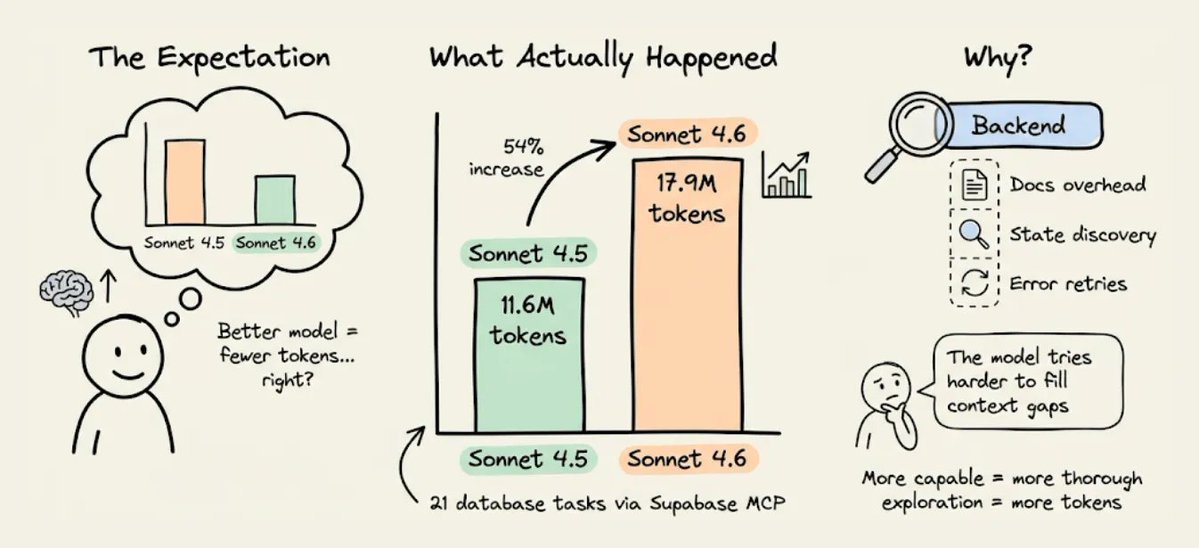
当 Claude 从 Sonnet 4.5 升级到 Sonnet 4.6 时,通过 Supabase 的 MCP 服务器进行后端操作的 token 用量反而上升了,在 21 个数据库任务中,从 1160 万涨到了 1790 万 token。

模型变得更聪明了,但后端 token 用量却真的增加了。

json{
  "auth": {
    "providers": ["google", "github"],
    "jwt_secret": "configured"
  },
  "tables": [
    {"name": "users", "columns": ["id", "email", "created_at"], "rls": "enabled"},
    {"name": "posts", "columns": ["id", "title", "body", "author_id"], "rls": "enabled"}
  ],
  "storage": { "buckets": ["avatars", "documents"] },
  "ai": { "models": [{"id": "gpt-4o", "capabilities": ["chat", "vision"]}] },
  "hints": ["Use RPC for batch operations", "Storage accepts files up to 50MB"]
}

原因很微妙,而且跟模型本身无关。

真正相关的是,后端把信息暴露给代理的方式。上下文不完整时,能力更强的模型并不会直接跳过缺口。

它会花更多 token 去推理这个缺口,运行更多发现性查询,也会更频繁地重试。所以缺失的上下文不会因为模型更好就消失,只会变得更贵。

下面来看看,为什么后端会成为代理的 token 黑洞,一种替代架构是什么样子,以及在真实项目里成本差异到底有多大。
为什么 Supabase 的 MCP 服务器会浪费 token

Supabase 是个很好的后端。但它并不是为 AI 代理操作而设计的,后来加上的 MCP 服务器也继承了这个限制。

有三个具体机制会导致 token 膨胀。

1) 文档检索会把所有内容都返回出来

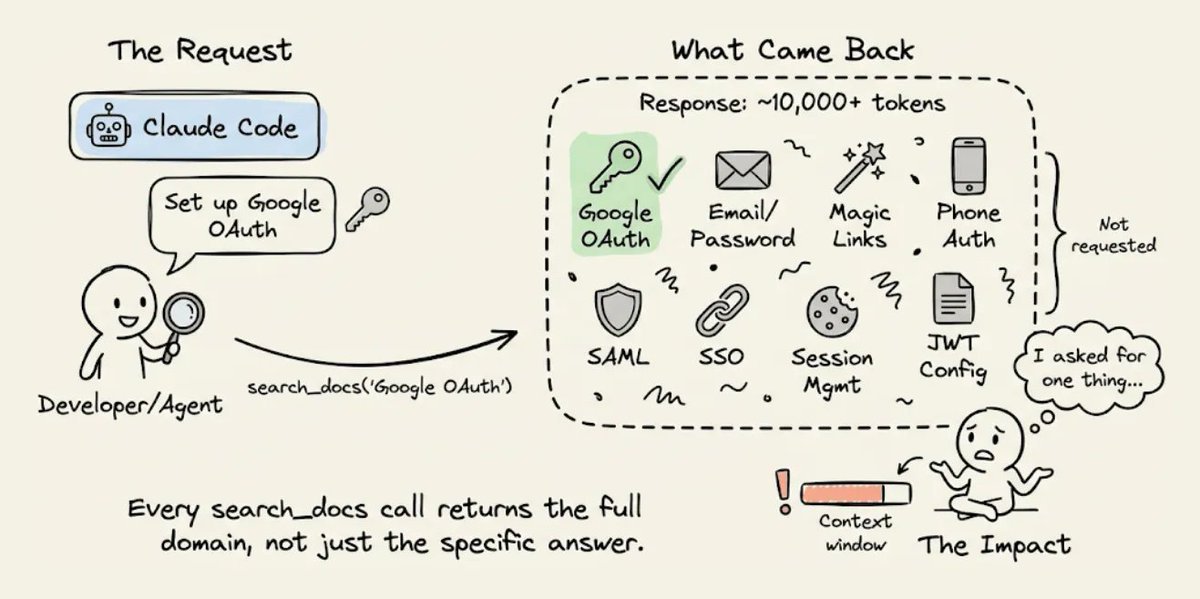
当 CC 需要通过 Supabase 配置 Google OAuth 时,它会调用 search_docs 这个 MCP 工具。

Supabase 的实现会在每次调用时都返回完整的 GraphQL schema 元数据,token 数量通常是代理真正需要的 5 到 10 倍。

Build a chat with document app called DocuRAG.
It will be a typical RAG setup where a user
can upload a document. It will be chunked,
embedded, and stored in a vector DB. Once done,
A user can ask questions about the document.
The engine will retrieve the relevant chunks
after embedding the query. Finally, it will
generate a coherent response using GPT-4o based on
the query and the retrieved context. Add Google OAuth.
Use Insforge as the backend and also for the model
gateway. Build the front-end in Next.js.

如果代理想要的是 OAuth 配置说明,它拿到的却是整套认证文档,里面还包括邮箱密码、魔法链接、手机认证、SAML 和 SSO 等章节。

每次调用 search_docs 都会这样,比如数据库查询、存储配置和 edge function 部署时也是一样。

每次调用都会把整个领域的完整元数据倒出来。在一次会话里,如果代理要配置认证、数据库、存储和函数,仅仅文档开销就可能浪费掉几千个 token。

2) 看不到后端状态

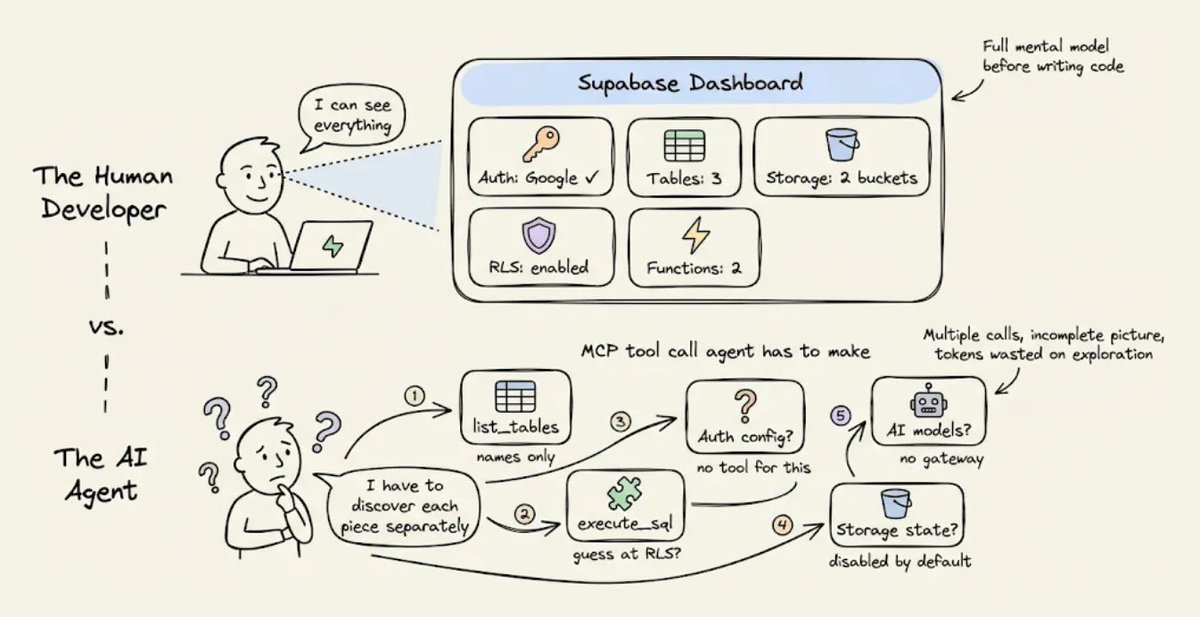
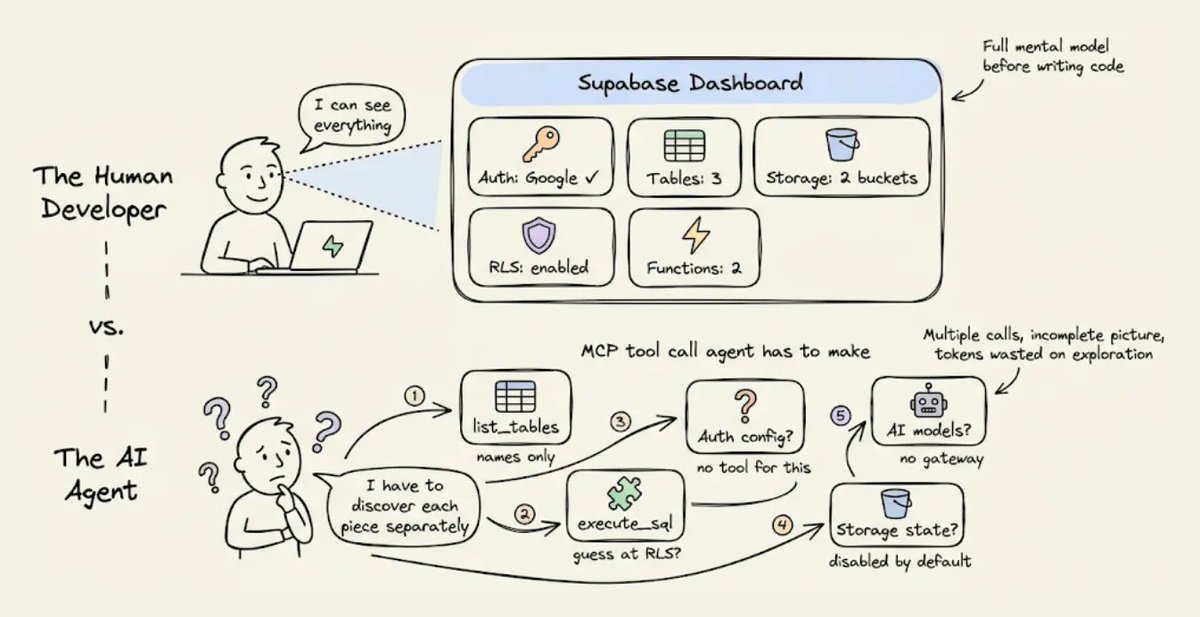
人类开发者使用 Supabase 时,会打开控制台,一眼就能看到所有东西,比如启用中的认证提供商、数据表、RLS 策略、配置好的存储桶、已部署的 edge function 等等。

代理看不到控制台。

Supabase 的 MCP 服务器确实会通过一些独立工具暴露部分状态,比如 list_tables 和 execute_sql,但它没有办法让你问一句 现在我的整个后端长什么样 然后一次性返回一个结构化结果。
所以代理只能靠多次调用去拼出来。每次调用只返回局部视图,而且有些信息根本没法通过 MCP 拿到,比如到底配置了哪些认证提供商。

这种碎片化的发现过程会消耗 token,而且代理往往需要尝试好几次,因为返回的信息不完整,或者格式还需要进一步查询才能看懂。

3) 没有结构化的错误上下文

一旦出错了,而且一定会出错,因为代理本来就是在猜,Supabase 返回的是原始错误消息。可能是 RLS 拒绝导致的 403,也可能是 edge function 配错导致的 500,等等。

人类开发者会看到错误后去查 Supabase 控制台,再对照日志,最后把问题修掉。

代理没有这条路径。它只能拿到错误消息,推理可能的原因,然后尝试修复。

如果修错了,就继续重试。每次重试都会把整段对话历史重新发一遍,token 成本也会层层叠加。
这三个机制,也就是文档开销、状态发现和错误重试循环,会非常快地叠加起来。

像 Sonnet 4.6 这种推理更充分的模型,会让每一步探索都更彻底,也更昂贵。

这就是为什么 Sonnet 4.5 到 4.6 之间的 token 差距变大了,而且随着每一代新模型发布,这个差距大概率还会继续扩大。

npx skills add supabase/agent-skills

后端上下文工程应该是什么样

解决办法不是换一个模型。

而是给代理一个结构化的后端上下文,这样它就不用一边探索一边猜了。

这正是 Karpathy 所说的上下文工程,也就是 把恰好合适的信息放进上下文窗口里,以支撑下一步。这句话里他明确把工具和状态也算进上下文。大多数人会把这个思路用在提示词和 RAG 检索上。

但后端也是上下文窗口的一部分,而且现在几乎没人去优化这一层。

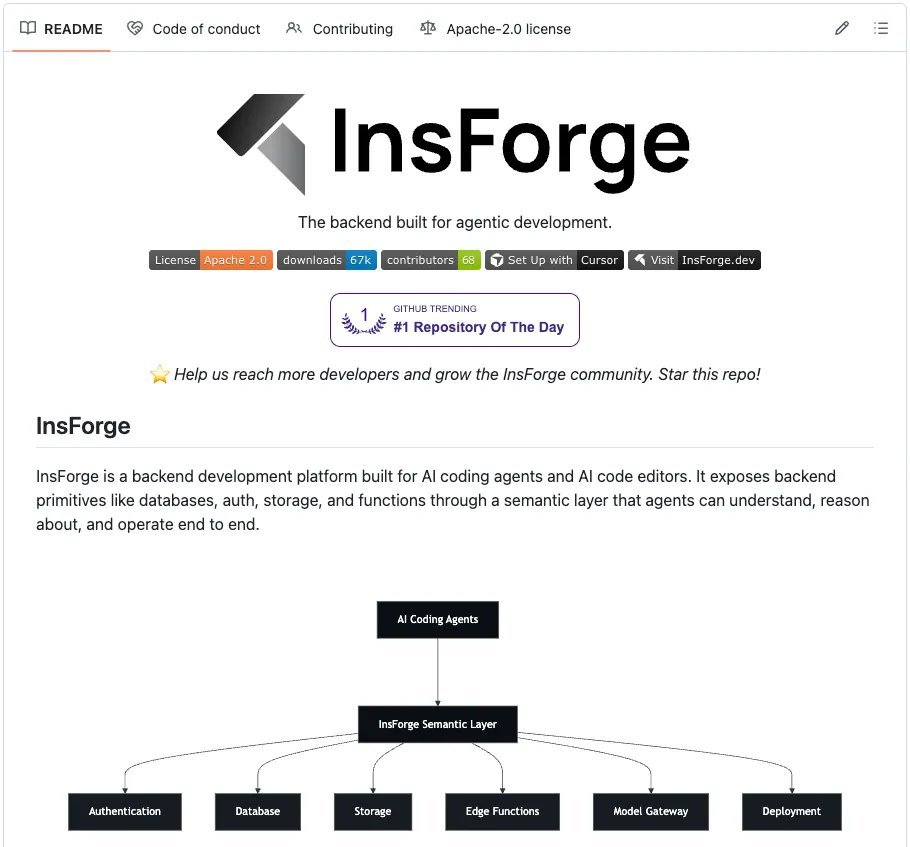
想看实际落地是什么样,可以看看 InsForge 这个项目,它是开源的,已有 8k stars,就是按这个思路实现的。
它提供了和 Supabase 相同的基础能力,比如带 pgvector 的 Postgres、认证、存储、edge functions 和 realtime,但它把信息层做成了更适合代理高效消费的结构。

它和 Claude Code 对接时,关键的架构差异就在于上下文是怎么传递的。

这里有三层一起配合工作。

  • 用 Skills 提供静态知识

  • 用 CLI 执行直接的后端操作

  • 用 MCP 检查实时状态

每一层都在解决不同的问题,也会从不同角度减少 token 消耗。

1) Skills 提供静态知识,零往返

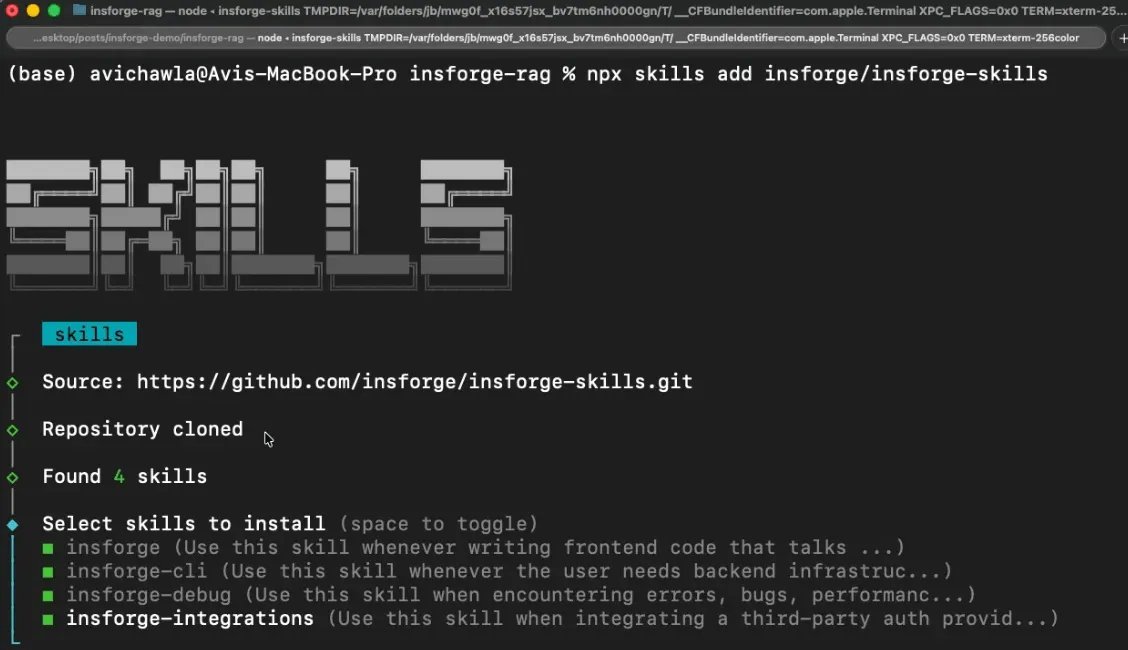
知识层的主要方案是 Skills。它们会在会话开始时直接加载进代理上下文,所以所有后端操作需要的 SDK 模式、代码示例和边界情况,不需要任何工具调用就能拿到。

Skills 还采用渐进式披露机制,起初只加载元数据,也就是名字、描述,以及每个 skill 大约 70 到 150 个 token 的信息。

只有当代理判断当前任务和某个 skill 匹配时,才会加载这个 skill 的完整内容。也就是说,你可以装上 100 多个 skills 而不会把上下文撑爆,这一点是 MCP 那种全有或全无的 schema 加载方式做不到的。

四个 skill 覆盖完整技术栈,而且每个都只负责一个明确领域。

  • insforge 负责和后端交互的前端代码

  • insforge-cli 负责后端基础设施管理

  • insforge-debug 负责结构化错误诊断,覆盖常见失败场景,比如认证错误、慢查询、edge function 故障、RLS 拒绝、部署问题和性能退化

  • insforge-integrations 负责第三方认证提供商,比如 Clerk、Auth0、WorkOS、Kinde、Stytch

一条命令就能把这四个都装上。

2) CLI 用于直接执行

真正在执行后端操作时,比如建表、跑 SQL、部署函数、管理密钥,InsForge CLI 是主接口。

每条命令都支持 --json 结构化输出,支持 -y 跳过确认提示,还会返回语义化退出码,这样代理就能以编程方式识别认证失败、项目缺失或权限错误。

这很有帮助,因为 Claude Code 可以把 CLI 输出继续交给 jqgrepawk 处理,而如果走 MCP,往往得串行调用多个工具才能做到同样的事。

Scalekit 的基准测试显示,在单用户工作流里,CLI+Skills 的成功率接近 100%,token 效率比等价的 MCP 方案高 10 到 35 倍。

下面是代理真实运行过的一些操作。
代理会解析 JSON,并根据退出码来处理错误。

3) MCP 工具用于检查实时后端状态

MCP 依然有用,但适用范围更窄,比如在后端状态持续变化时,用来检查当前状态。

InsForge 的 MCP 服务器暴露了一个轻量级的 get_backend_metadata 工具,只需一次调用,就能返回完整后端拓扑的结构化 JSON。

https://x.com/@_avichawla

只需一次调用和大约 500 个 token,代理就能掌握完整的后端拓扑。里面的 hints 字段还会提供面向代理的指导,减少错误 API 用法。

这里最关键的设计选择是,MCP 被用来检查状态,也就是那些会随着代理工作而变化的信息,而不是拿来检索文档,也就是那些不会变化的信息。

这和典型用法正好相反,也是 InsForge 在同类任务里 token 消耗远低于 Supabase 的主要原因。

Supabase 对比 Insforge,用 Claude Code 构建 DocuRAG

为了让这件事更具体,我在两个后端上分别用 Claude Code 构建了同一个应用,并记录了完整会话。

这个应用叫 DocuRAG。用户通过 Google OAuth 登录,上传 PDF,系统把文本切块并做 embedding,使用 text-embedding-3-small,1536 维,把向量存进 pgvector,然后用户可以用自然语言提问,最终由 GPT-4o 回答。

这个应用几乎同时碰到了所有后端基础能力,用户认证、文件存储、documents 表、向量 embedding、embedding 生成、聊天补全、检索 edge function,以及用 RLS 隔离每个用户的文档。

下面是两边各自的配置方式。

Supabase

  • 创建一个 Supabase 账号并新建项目

  • 把 MCP 服务器接到 Claude Code 并完成认证

  • 安装 Supabase 的 Agent Skills,Supabase 官方配置里把它标成了 Optional

https://github.com/InsForge/InsForge

这样会装上两个 skill。

  • supabase,一个大而全的通用 skill,覆盖 Database、Auth、Edge Functions、Realtime、Storage、Vectors、Cron、Queues、客户端库,比如 supabase-js、@ supabase/ssr,SSR 集成,比如 Next.js、React、SvelteKit、Astro、Remix,还有 CLI、MCP、schema 变更、迁移和 Postgres 扩展

  • supabase-postgres-best-practices,一个专门做 Postgres 性能优化的 skill,覆盖 8 个类别

Supabase 提供的是一个面向 任何涉及 Supabase 的任务 的大 skill,再加一个专门做 Postgres 优化的 skill。只要 Supabase skill 被触发,它的全部内容就会被加载,因为触发条件几乎覆盖了整个平台的所有能力。

Insforge

  • 创建一个 Insforge 账号并新建项目,也可以自托管,用 Docker Compose 在本地完整运行

  • 安装全部四个 Skills

npx skills add insforge/insforge-skills

这会安装 insforge,也就是 SDK 模式,insforge-cli,也就是基础设施命令,insforge-debug,也就是故障诊断,以及 insforge-integrations,也就是第三方认证提供商集成。

  • 把 CLI 关联到你的项目,也就是主要执行层

InsForge 提供四个粒度很窄的 skill,每个都只覆盖一个明确领域。

  • 写前端代码时,只会激活 Insforge

  • 建表时,只会激活 insforge-cli

  • 出问题时,只会激活 insforge-debug

只有和当前任务匹配的那个 skill,才会加载完整内容。其余三个只保留元数据成本。

两边会话用的提示词几乎一样,只有一个关键差别。

  • Supabase
npx skills add insforge/insforge-skills

  • InsForge

Supabase 的提示词写的是 通过 OpenAI API 使用 LLM 和 embedding 模型,也就是要接两套系统。InsForge 的提示词写的是 也作为 model gateway,也就是只接一套系统。

我把两个会话并排跑了一遍,记录了完整构建过程。下面这个并排视频展示了从提示词到应用跑通的整个过程。
里面也展示了两个会话的最终应用,分别构建在两套不同的后端上。

视频里没体现的一点是,Supabase 需要在 Claude Code 之外手动配置 Google OAuth。我得自己去 Google Cloud Console,创建一个 OAuth 2.0 client ID,配置 consent screen,把自己的邮箱加成测试用户,复制 Client ID 和 Client Secret,再粘进 Supabase 的控制台里。Insforge 不需要这一步。

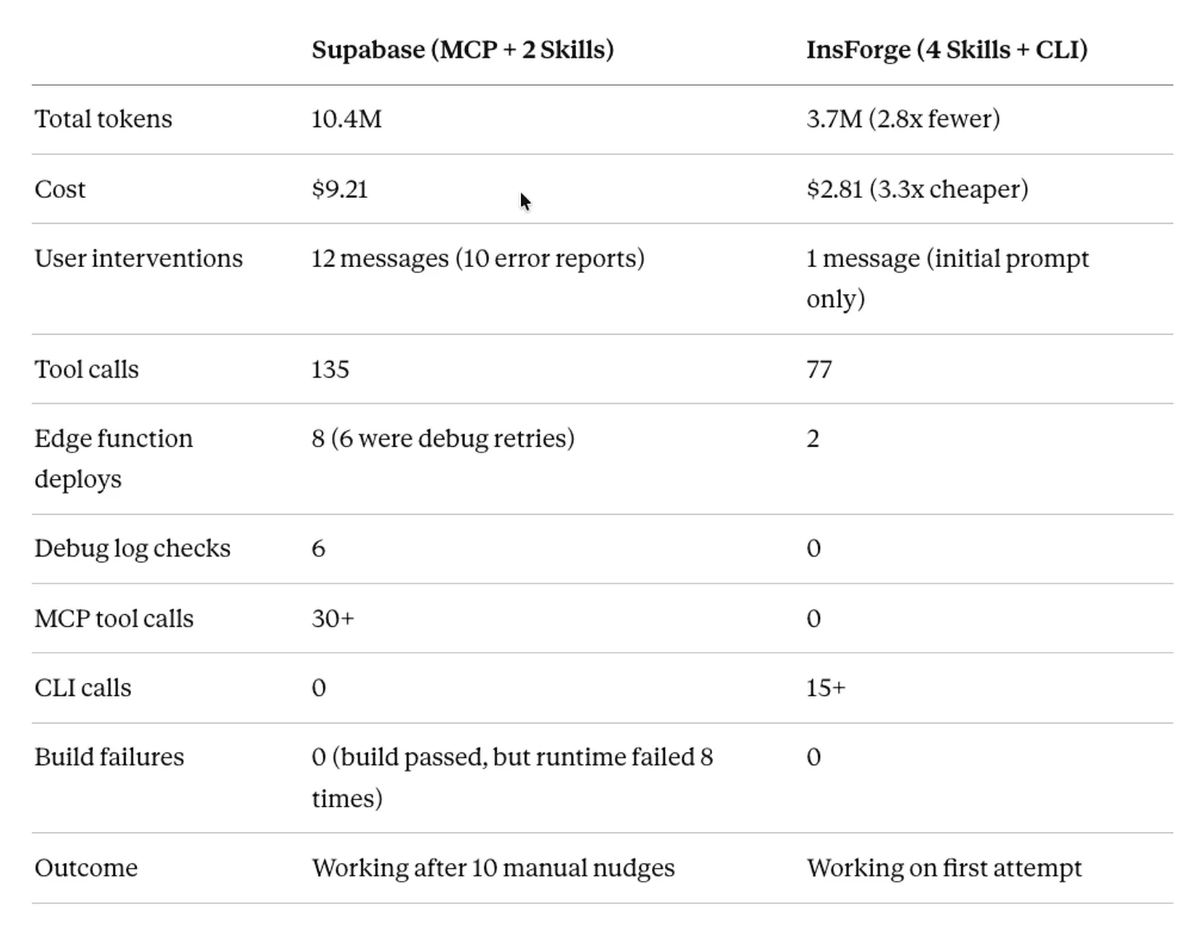
在进入具体会话细节前,先看最终数字。

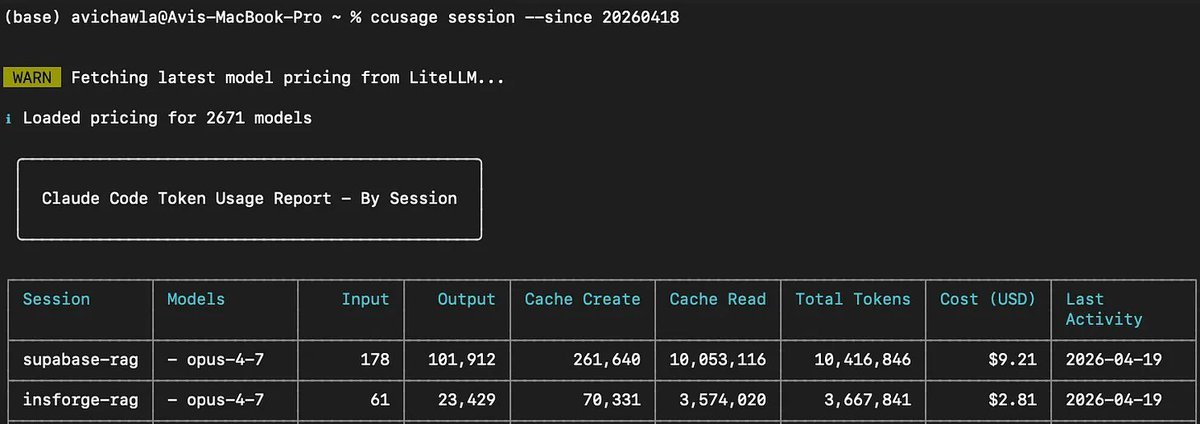
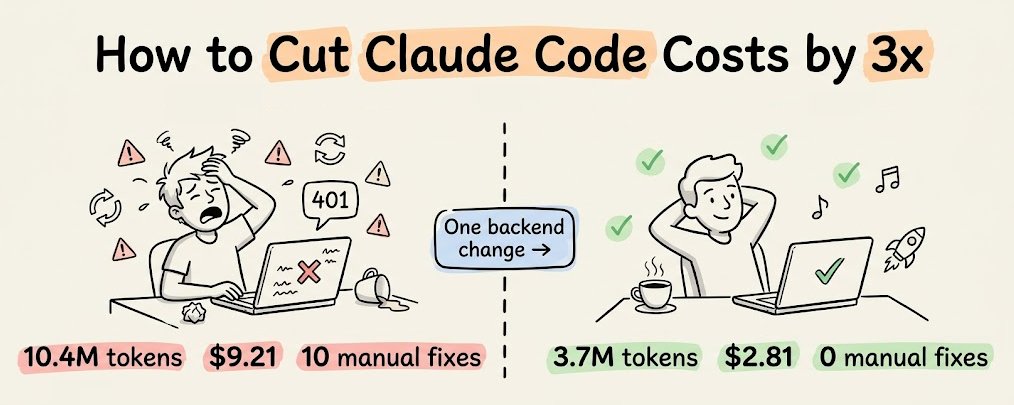
  • Supabase: 1040 万 token,成本 9.21 美元,共 12 条用户消息,其中 10 条是错误反馈

  • InsForge: 370 万 token,成本 2.81 美元,共 1 条用户消息,其中 0 条是错误反馈

下面来看两个会话里到底发生了什么。

为了尽量客观地分析这两个会话,我把两次运行的完整 Claude Code 会话历史都导出了,格式是 JSONL,然后喂给另一个 Claude 实例。下面这部分分析,包括工具调用次数、错误序列和 token 拆分,都是通过解析这些会话日志得出的。

Supabase 版,消耗 1040 万 token,成本 9.21 美元

最初的构建过程很顺利。

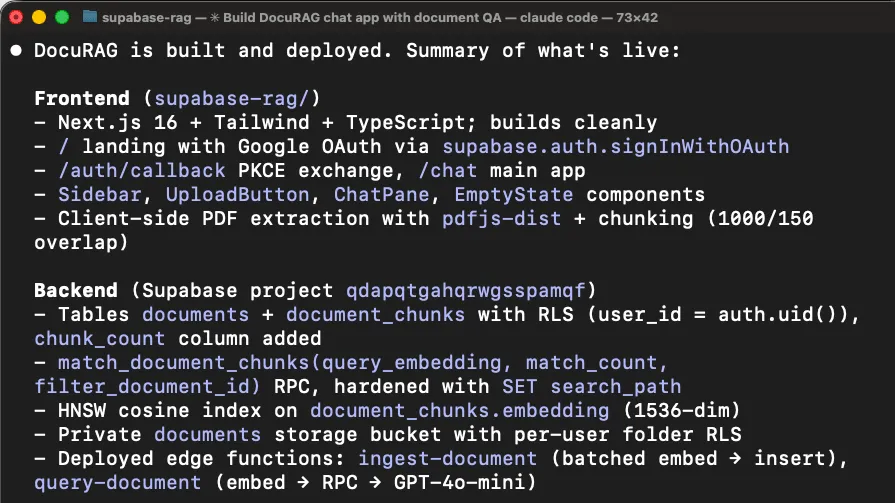
代理加载了 supabase skill,通过 MCP 工具发现后端状态,比如 list_tables、list_extensions、execute_sql,然后搭起了 Next.js 项目,创建了数据库 schema,写了两个 edge function,也就是 ingest-document 和 query-document,并把所有东西都部署了。构建通过。
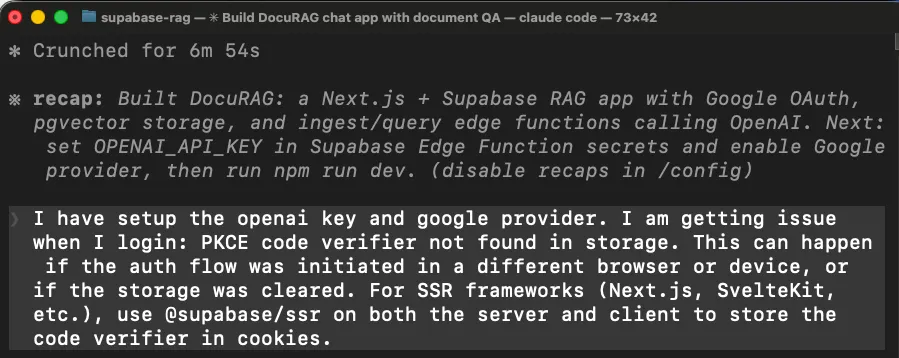
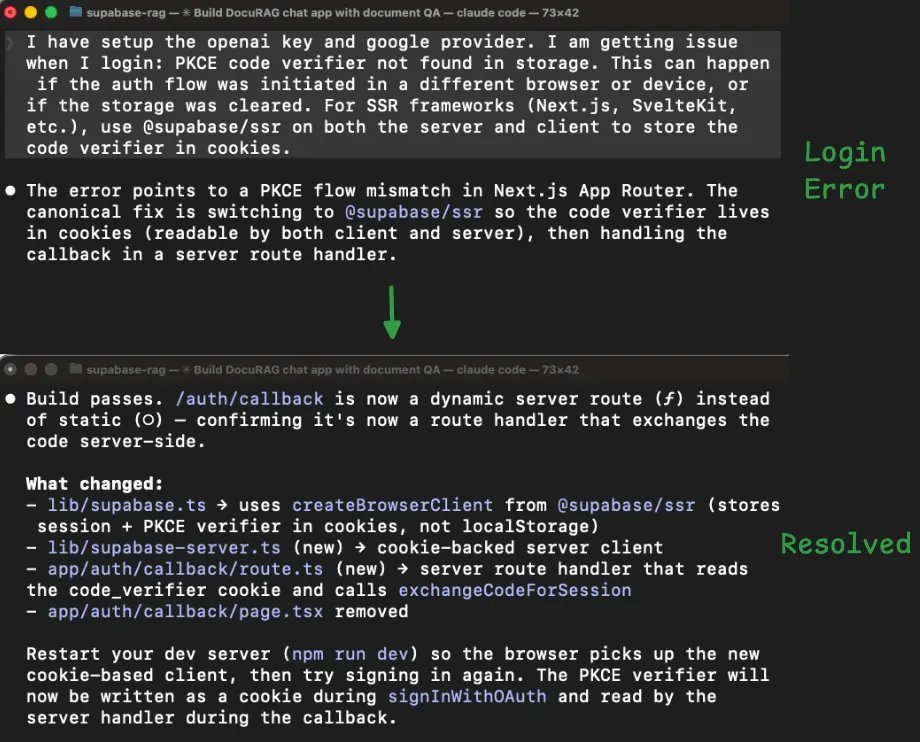
第一个问题,登录不能用

npx @insforge/cli link --project-id <project-id>

我尝试用 Google OAuth 登录时,应用直接报错。代理在 Next.js 里接认证时用了错误的 Supabase 客户端库。
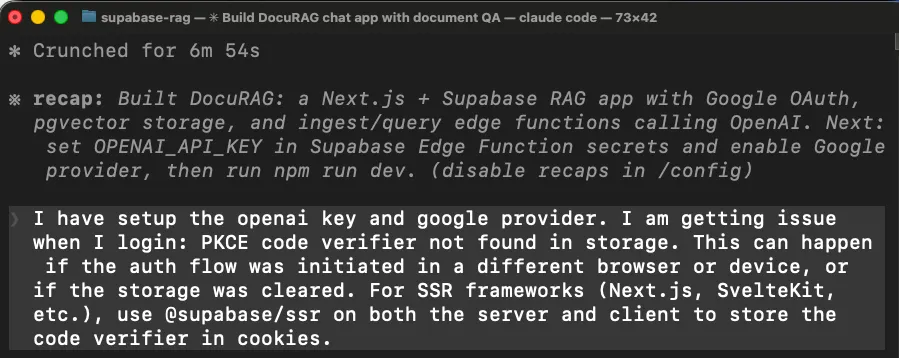
在 Next.js 里,OAuth 回调运行在服务端,但代理用的是一个客户端库,这个库把登录状态存进浏览器。服务端拿不到浏览器里的状态,所以整个登录流程就坏了。

代理最后通过换另一个库,也就是 @ supabase/ssr,重写应用处理登录 session 的方式,再重新构建,才把这个问题修掉。

claude mcp add --scope project --transport http supabase \
  "https://mcp.supabase.com/mcp?project_ref=<your-project-ref>"

claude /mcp

文档上传失败,花了 8 个回合才修好

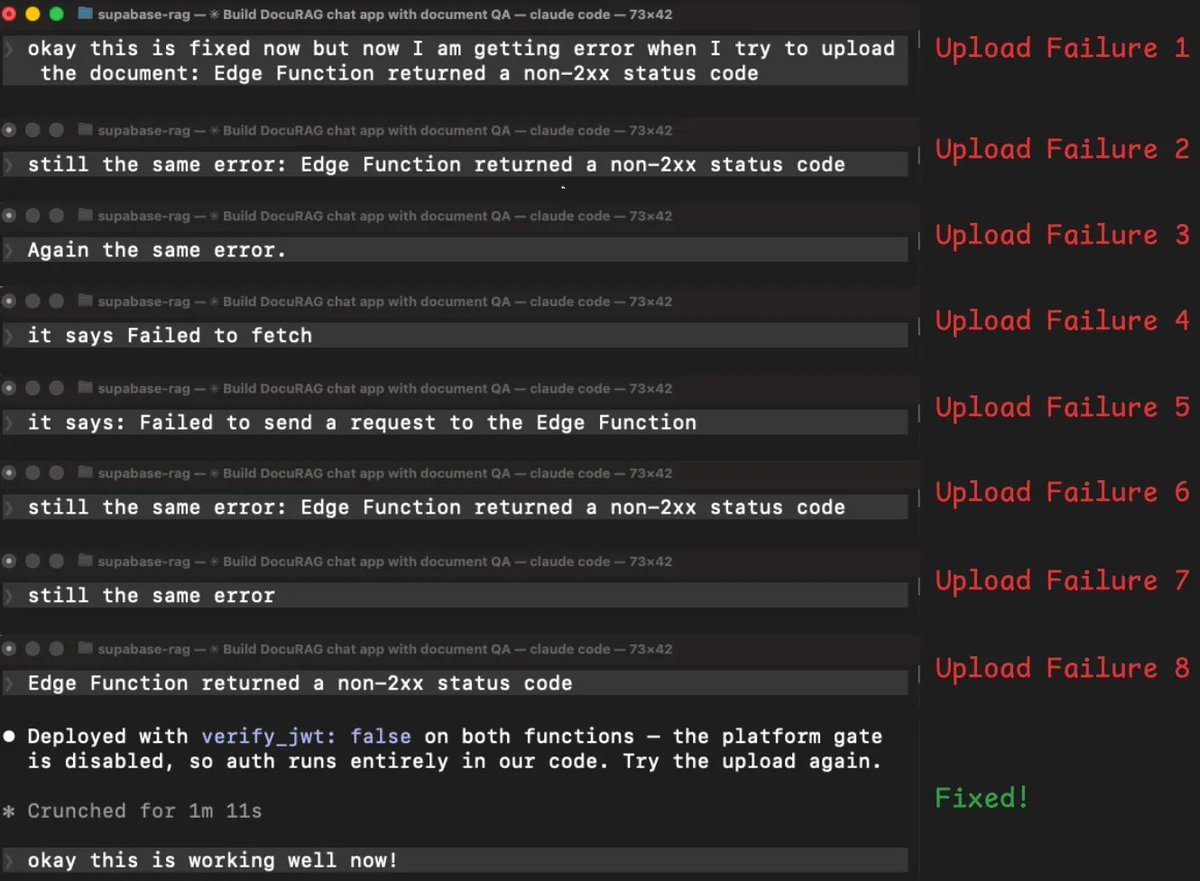
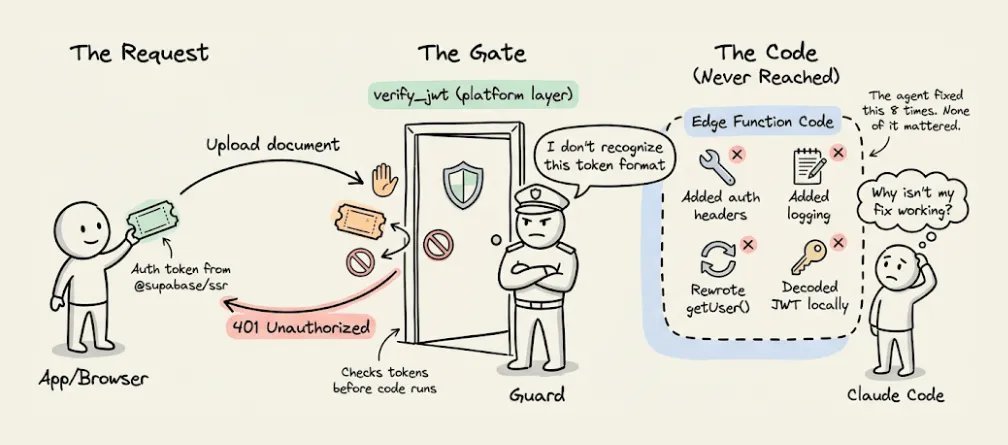
登录修好后,我开始上传文档。edge function 返回了错误,我把错误反馈给代理,它尝试修复,失败了,然后我再试一次,还是同样的错误。这个循环一共重复了 8 次。
  • 代理尝试手动加认证头,结果还是同样的错误

  • 它重新部署并加了更多日志,想看清发生了什么,结果还是同样的错误

  • 它试着把真实错误信息展示出来,而不是泛化错误,结果变成了另一个错误,现在成了网络或 CORS 问题

  • 它修了 CORS 问题,结果又回到最初的错误

  • 它又试了另一种读取用户登录 token 的方式,结果还是同样的错误

  • 它又换了另一套认证方案,结果还是同样的错误

在 8 次失败后,代理终于意识到问题所在。它的结论是 这些 401 很可能发生在平台的 verify_jwt 门禁层,在我们的代码运行之前就被拦下来了。

翻成人话就是,Supabase 有一层安全机制,会在 edge function 代码真正开始执行前先检查登录 token。代理为了解决第一个问题而装上的新认证库,发出去的是一种这层安全机制不认的 token 格式。

所以每个请求都是刚到门口就被拒了,函数代码根本没机会执行。这就是为什么前面那些代码层面的修复全都没用。

代理花了 8 轮去修代码层的问题,但真正的问题根本不在代码里,而是在代码上游。

解决办法其实很简单,把平台自动验 token 这层关掉,改成在函数代码内部自己处理认证。

之所以花了 8 次,是因为每次它看到的都只是一个 401,也就是未授权错误,但没有任何信息告诉它,这个拒绝到底是从哪一层来的。没有这个信号,它就只能不停尝试修代码。

而在整个调试过程中,edge function 被重新部署了 8 次,再加上最初构建时的 2 次部署。每次重部署、查日志和重试,都会把不断变长的整段对话历史再发一遍,token 成本也就越滚越大。

最终这次会话的统计是这样的。

  • 12 条用户消息,其中 10 条是错误反馈

  • 135 次工具调用

  • 30 多次 MCP 工具调用

  • 1040 万 token

  • 9.21 美元成本

Insforge 版,消耗 370 万 token,成本 2.81 美元

InsForge 这次会话里,没有出现任何需要我介入的错误。

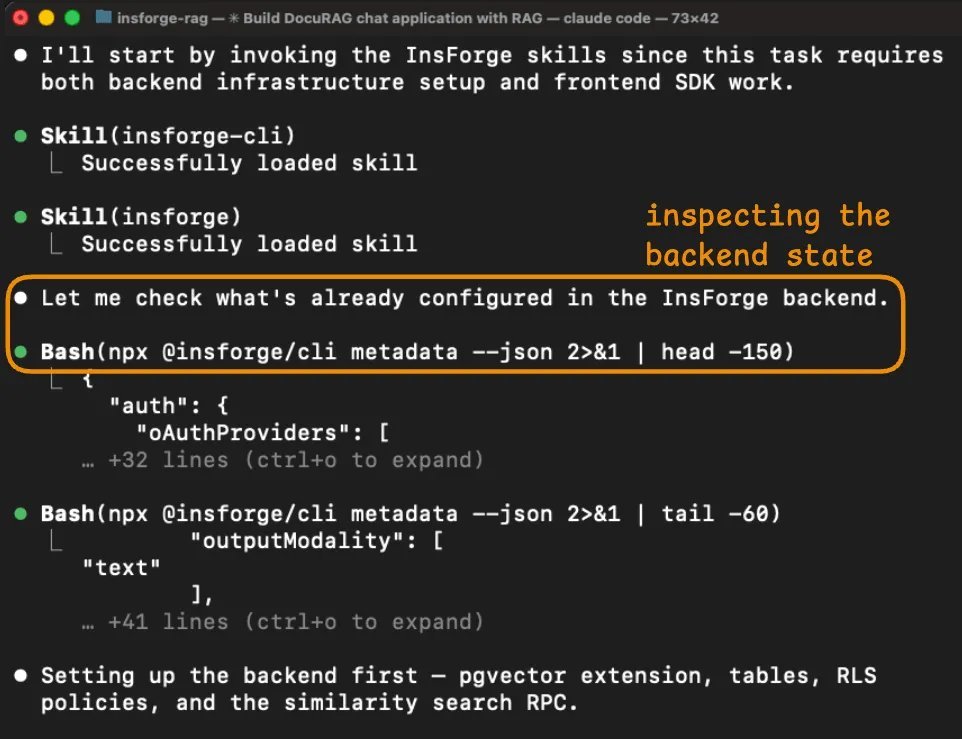
代理先做的事是检查后端状态。

它的第一个动作是运行 npx @ insforge/cli metadata --json,返回的是项目的结构化概览,包括已配置的认证提供商、现有数据表、存储桶、可用 AI 模型以及实时通道。

这让代理在写任何代码之前,就先拿到了完整的工作对象全貌。

在 Supabase 那次会话里,代理需要多次调用 MCP,比如 list_tables、list_extensions 和 execute_sql,才能拼出一个差不多的理解。即便这样,它依然漏掉了 verify_jwt 这种关键信息。

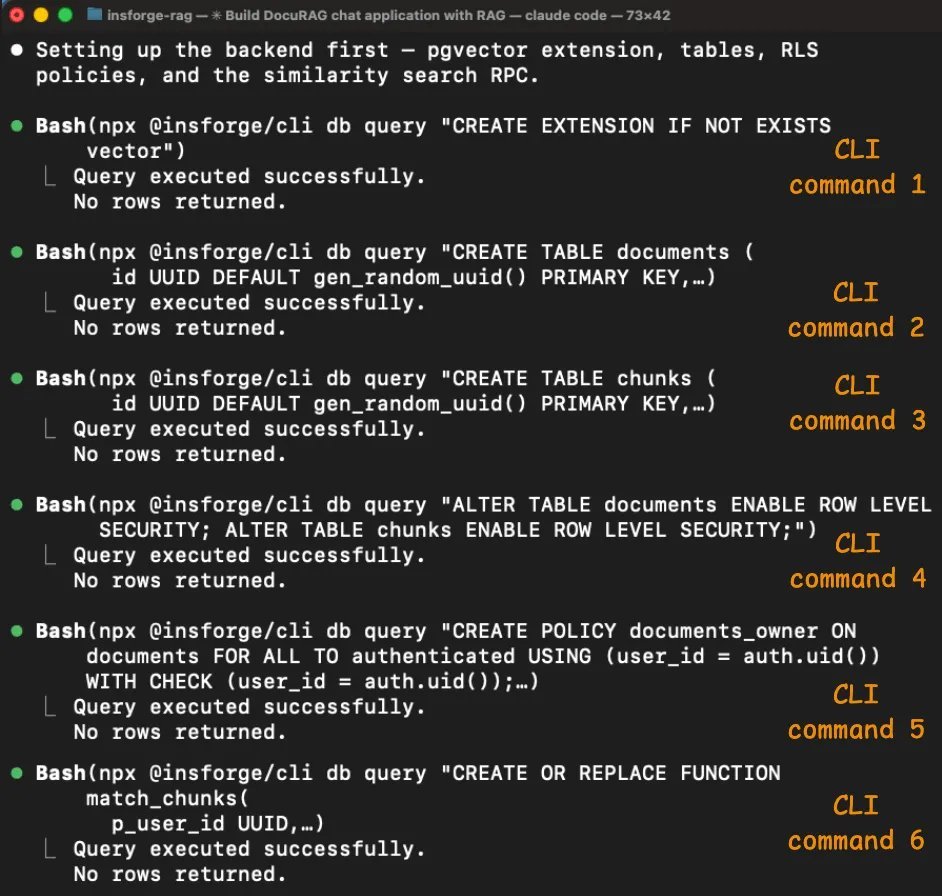
schema 配置一共通过 6 条 CLI 命令完成,而且全部成功。
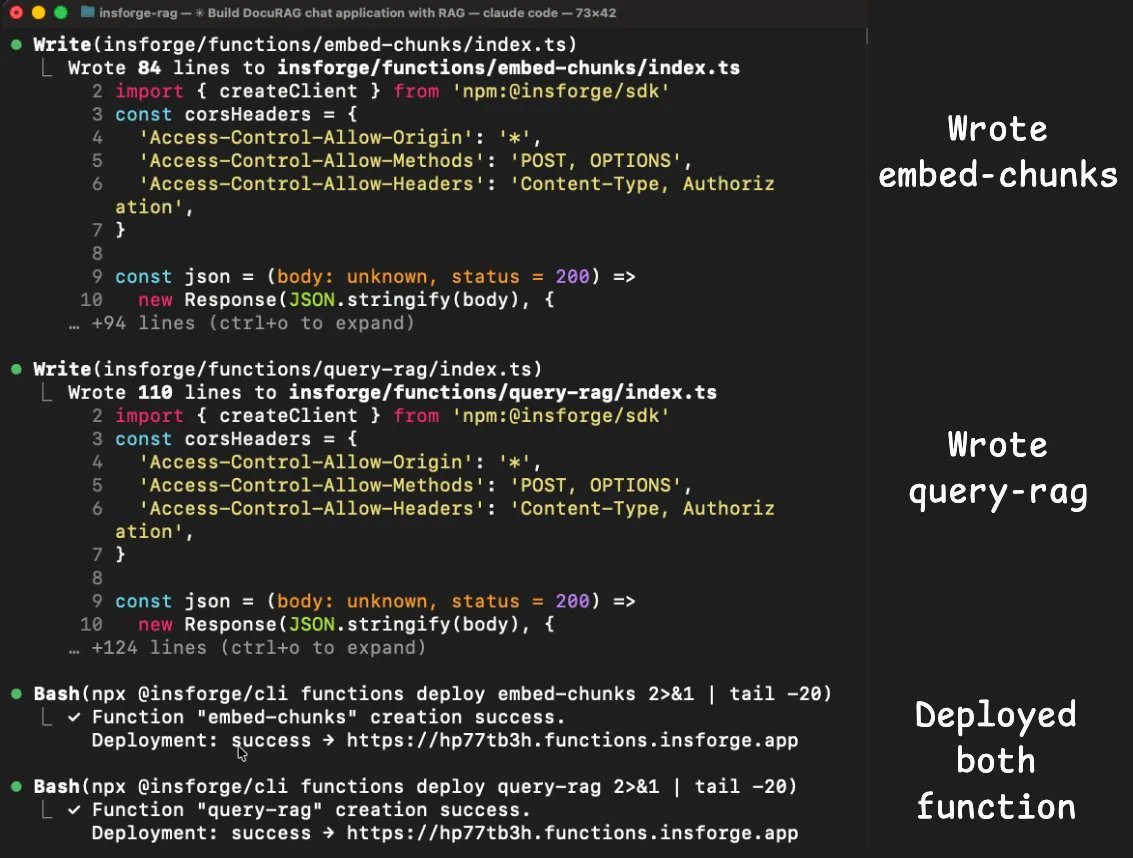
代理启用了 pgvector,创建了 documents 和 chunks 两张表,其中包含一个 vector(1536) 列,为两张表都启用了 Row Level Security,创建了访问策略,并设置了 match_chunks 相似度搜索函数。

每条命令都会返回结构化结果,明确告诉它刚刚发生了什么,所以代理能在进入下一步前确认每一步已经完成。

Supabase 那次会话里的认证和 edge function 问题,在这里都没有出现。

insforge skill 里已经包含了适用于 Next.js 的正确客户端库模式,所以代理第一次就把认证接对了。

两个 edge function,也就是 embed-chunks 和 query-rag,也都顺利部署并正常运行,因为 embedding 和聊天补全所需的 model gateway 本来就是同一个后端的一部分。

代理不需要再单独接 OpenAI,不需要再管第二套 API key,也不用处理跨服务认证。

metadata 响应里已经列出了 text-embedding-3-smallgpt-4o 这两个可用模型,所以代理直接通过 InsForge SDK 调用了它们。

最终这次会话的统计是这样的。

  • 1 条用户消息

  • 77 次工具调用

  • 0 次 MCP 工具调用

  • 370 万 token

  • 2.81 美元成本

我让 Claude 生成了一份表格摘要,下面是它给出的内容。

Build a chat with document app called DocuRAG.
It will be a typical RAG setup where a user
can upload a document. It will be chunked, embedded,
and stored in a vector DB. Once done, a user can ask
questions about the document. The engine will retrieve
the relevant chunks after embedding the query. Finally,
it will generate a coherent response using GPT-4o based
on the query and the retrieved context. Add Google OAuth.
Use Supabase as the backend and LLMs/embedding models via
the OpenAI API. Build frontend in next.js.

Supabase 这次会话的 token 成本,主要就是被错误重试循环拉高的。

8 次 edge function 重部署,每次都会把完整对话历史重新发一遍,而且这段历史会随着每次尝试不断变长。

代理查了 6 次日志,重部署了 8 次函数,在找到根因前尝试了 6 套不同的认证策略。

这不是代理的错。真正的问题在于,Supabase 平台的 verify_jwt 门禁层在函数代码运行前就把 token 拒掉了,而日志又没有区分平台层拒绝和代码层拒绝。

Insforge 那次会话能避开这些问题,是因为 skills 一开始就加载了正确的认证模式,CLI 为每一步操作都提供了结构化反馈,而 model gateway 让整个流程不需要再接第二个服务。

代理全程没有撞上任何一个需要调试的错误。
串起来看

这个对比揭示的问题,其实不只和 Supabase 有关。

大多数后端本来都是为人类开发者设计的。人类可以看控制台,可以理解模糊错误,也能在脑子里跟踪多个服务之间的状态。

一旦把这套工作流交给代理,这些默认前提就失效了。代理看不到控制台。日志不说清楚,它就不知道错误到底来自哪里。每猜错一次,token 成本就会继续叠加。

https://github.com/InsForge/InsForge

InsForge 是围绕另一套前提构建的。

  • 后端通过结构化元数据暴露状态,CLI 让代理能以程序方式控制后端,并且成功和失败信号都很明确

  • skills 直接编码了正确模式,所以代理不用靠反复试错去发现它们

  • model gateway 把 LLM 操作留在同一个后端内部,避开了大部分 Supabase 会话里出现的跨服务集成问题

这些架构选择对你重不重要,取决于你怎么使用 Claude Code 或其他编码代理。

如果你做的是纯前端应用,后端层不会是 token 消耗的主要来源。

如果你做的是带认证、存储、向量检索和 LLM 调用的全栈应用,那后端恰恰就是 token 成本所在,而这个后端是怎么和代理沟通的,确实会带来可量化的差异。

不过这里最核心的洞察,不管你用什么工具都成立。

如果你的代理把 token 花在摸清后端怎么工作、猜配置、以及因为错误消息没说清楚问题而反复重试上,那你真正付费买单的是缺失的上下文。

解决办法不是更好的模型,也不是更长的上下文窗口。真正的办法,是在代理开始写代码之前,就把结构化的后端信息给到它。

这就是把上下文工程用在后端上。Karpathy 说得对,把正确的信息填进上下文窗口,本来就是核心能力。

这次实验给出的启发是,你的后端基础设施其实是这些上下文里最大的来源之一,而大多数人都还没有这样对待它。

InsForge 在 Apache 2.0 协议下完全开源,也可以通过 Docker 自托管。

代码、skills 和 CLI 全都在它的 GitHub 仓库里,地址是 https://github.com/InsForge/InsForge
附注。这次实验里 2.8 倍的 token 降幅,部分原因来自 Supabase 这一侧的调试循环。代理花了 8 轮去修一个问题,最后发现问题其实在它自己的代码上游。这是一个真实场景,但不是每次会话都会撞上这个具体问题。MCPMark V2 基准测试覆盖了 21 个数据库任务,每个任务独立运行 4 次,在 Sonnet 4.6 上显示出了更稳定的 2.4 倍降幅。
到这里就结束了。

如果你喜欢这篇教程:

可以在这里找到我 → @_avichawla
我每天都会分享 DS、ML、LLM 和 RAG 相关的教程与洞见。

A full breakdown of how one open-source tool cuts your Claude Code session costs by 3x, without any changes to CLAUDE.md, prompts, or models (covered with a setup guide and why it is effective).

完整拆解一个开源工具如何在不改动 CLAUDE.md、提示词或模型的前提下,把你的 Claude Code 会话成本降到原来的三分之一,并附上配置指南和它为什么有效的解释。

The MCPMark V2 benchmarks revealed something counterintuitive.

MCPMark V2 基准测试揭示了一个违反直觉的现象。

When Claude moved from Sonnet 4.5 to Sonnet 4.6, backend token usage through Supabase’s MCP server went up, from 11.6M to 17.9M tokens across 21 database tasks.

当 Claude 从 Sonnet 4.5 升级到 Sonnet 4.6 时,通过 Supabase 的 MCP 服务器进行后端操作的 token 用量反而上升了,在 21 个数据库任务中,从 1160 万涨到了 1790 万 token。

The model got smarter, but the backend token usage actually increased.

模型变得更聪明了,但后端 token 用量却真的增加了。

json{
  "auth": {
    "providers": ["google", "github"],
    "jwt_secret": "configured"
  },
  "tables": [
    {"name": "users", "columns": ["id", "email", "created_at"], "rls": "enabled"},
    {"name": "posts", "columns": ["id", "title", "body", "author_id"], "rls": "enabled"}
  ],
  "storage": { "buckets": ["avatars", "documents"] },
  "ai": { "models": [{"id": "gpt-4o", "capabilities": ["chat", "vision"]}] },
  "hints": ["Use RPC for batch operations", "Storage accepts files up to 50MB"]
}
json{
  "auth": {
    "providers": ["google", "github"],
    "jwt_secret": "configured"
  },
  "tables": [
    {"name": "users", "columns": ["id", "email", "created_at"], "rls": "enabled"},
    {"name": "posts", "columns": ["id", "title", "body", "author_id"], "rls": "enabled"}
  ],
  "storage": { "buckets": ["avatars", "documents"] },
  "ai": { "models": [{"id": "gpt-4o", "capabilities": ["chat", "vision"]}] },
  "hints": ["Use RPC for batch operations", "Storage accepts files up to 50MB"]
}

The reason is subtle, and it has nothing to do with the model.

原因很微妙,而且跟模型本身无关。

Instead, it has to do with how the backend exposes info to the agent. When context is incomplete, a more capable model doesn’t just skip the gap.

真正相关的是,后端把信息暴露给代理的方式。上下文不完整时,能力更强的模型并不会直接跳过缺口。

It spends more tokens reasoning about the gap, runs more discovery queries, and retries more frequently. So the missing context doesn’t disappear with a better model. It gets more expensive.

它会花更多 token 去推理这个缺口,运行更多发现性查询,也会更频繁地重试。所以缺失的上下文不会因为模型更好就消失,只会变得更贵。

Let’s look at why backends are a token sink for agents, what an alternative architecture looks like, and what the cost difference is on a real project.

下面来看看,为什么后端会成为代理的 token 黑洞,一种替代架构是什么样子,以及在真实项目里成本差异到底有多大。

Why Supabase’s MCP server wastes tokens

为什么 Supabase 的 MCP 服务器会浪费 token

Supabase is a great backend. But it wasn’t designed to be operated by AI agents, and the MCP server that was added later inherits that limitation.

Supabase 是个很好的后端。但它并不是为 AI 代理操作而设计的,后来加上的 MCP 服务器也继承了这个限制。

Three specific mechanisms cause the token bloat.

有三个具体机制会导致 token 膨胀。

1) Documentation retrieval returns everything

1) 文档检索会把所有内容都返回出来

When CC needs to set up Google OAuth through Supabase, it invokes the search_docs MCP tool.

当 CC 需要通过 Supabase 配置 Google OAuth 时,它会调用 search_docs 这个 MCP 工具。

Supabase’s implementation returns full GraphQL schema metadata on every call, which has 5-10x more tokens than the agent actually needs.

Supabase 的实现会在每次调用时都返回完整的 GraphQL schema 元数据,token 数量通常是代理真正需要的 5 到 10 倍。

Build a chat with document app called DocuRAG.
It will be a typical RAG setup where a user
can upload a document. It will be chunked,
embedded, and stored in a vector DB. Once done,
A user can ask questions about the document.
The engine will retrieve the relevant chunks
after embedding the query. Finally, it will
generate a coherent response using GPT-4o based on
the query and the retrieved context. Add Google OAuth.
Use Insforge as the backend and also for the model
gateway. Build the front-end in Next.js.
Build a chat with document app called DocuRAG.
It will be a typical RAG setup where a user
can upload a document. It will be chunked,
embedded, and stored in a vector DB. Once done,
A user can ask questions about the document.
The engine will retrieve the relevant chunks
after embedding the query. Finally, it will
generate a coherent response using GPT-4o based on
the query and the retrieved context. Add Google OAuth.
Use Insforge as the backend and also for the model
gateway. Build the front-end in Next.js.

If the agent asked for OAuth setup instructions, it got the entire authentication docs, including sections on email/password, magic links, phone auth, SAML, and SSO.

如果代理想要的是 OAuth 配置说明,它拿到的却是整套认证文档,里面还包括邮箱密码、魔法链接、手机认证、SAML 和 SSO 等章节。

This happens on every search_docs call, like database queries, storage configuration, and edge function deployment.

每次调用 search_docs 都会这样,比如数据库查询、存储配置和 edge function 部署时也是一样。

Each call dumps the full metadata for that entire domain. Across a session where the agent sets up auth, database, storage, and functions, the docs overhead alone can account for thousands of wasted tokens.

每次调用都会把整个领域的完整元数据倒出来。在一次会话里,如果代理要配置认证、数据库、存储和函数,仅仅文档开销就可能浪费掉几千个 token。

2) No visibility into backend state

2) 看不到后端状态

When you use Supabase as a human dev, you open the dashboard and see everything at a glance, like active auth providers, tables, RLS policies, configure storage buckets, deployed edge functions, etc.

人类开发者使用 Supabase 时,会打开控制台,一眼就能看到所有东西,比如启用中的认证提供商、数据表、RLS 策略、配置好的存储桶、已部署的 edge function 等等。

An agent can’t see the dashboard.

代理看不到控制台。

Supabase’s MCP server does expose some state through individual tools like list_tables and execute_sql, but there’s no way to ask “what does my entire backend look like right now?” and get one structured response.

Supabase 的 MCP 服务器确实会通过一些独立工具暴露部分状态,比如 list_tables 和 execute_sql,但它没有办法让你问一句 现在我的整个后端长什么样 然后一次性返回一个结构化结果。

So the agent pieces it together through multiple calls, each call returns a partial view, and some info (like which auth providers are configured) isn’t available through MCP at all.

所以代理只能靠多次调用去拼出来。每次调用只返回局部视图,而且有些信息根本没法通过 MCP 拿到,比如到底配置了哪些认证提供商。

This fragmented discovery process costs tokens, and the agent often needs several attempts because the information comes back incomplete or in a format that requires further queries to interpret.

这种碎片化的发现过程会消耗 token,而且代理往往需要尝试好几次,因为返回的信息不完整,或者格式还需要进一步查询才能看懂。

3) No structured error context

3) 没有结构化的错误上下文

When something goes wrong (and it will, because the agent is guessing), Supabase returns raw error messages. It could be a 403 from an RLS denial, a 500 from a misconfigured edge function, etc.

一旦出错了,而且一定会出错,因为代理本来就是在猜,Supabase 返回的是原始错误消息。可能是 RLS 拒绝导致的 403,也可能是 edge function 配错导致的 500,等等。

A human dev would look at it, check the Supabase dashboard, cross-reference with the logs, and fix the issue.

人类开发者会看到错误后去查 Supabase 控制台,再对照日志,最后把问题修掉。

The agent doesn’t have that path. It gets the error message, reasons about what might have caused it, and tries a fix.

代理没有这条路径。它只能拿到错误消息,推理可能的原因,然后尝试修复。

If the fix is wrong, it retries. Each retry re-sends the entire conversation history and compounds the token cost.

如果修错了,就继续重试。每次重试都会把整段对话历史重新发一遍,token 成本也会层层叠加。

These three mechanisms (doc overhead, state discovery, error retry loops) compound fast.

这三个机制,也就是文档开销、状态发现和错误重试循环,会非常快地叠加起来。

A model that reasons more extensively, like Sonnet 4.6, makes each exploration step more thorough and more expensive.

像 Sonnet 4.6 这种推理更充分的模型,会让每一步探索都更彻底,也更昂贵。

That’s why the token gap widened from Sonnet 4.5 to 4.6, and it’ll likely widen further with each new model release.

这就是为什么 Sonnet 4.5 到 4.6 之间的 token 差距变大了,而且随着每一代新模型发布,这个差距大概率还会继续扩大。

npx skills add supabase/agent-skills

What “backend context engineering” should look like

后端上下文工程应该是什么样

The fix isn’t switching to another model.

解决办法不是换一个模型。

It’s giving the agent a structured backend context so it doesn’t have to explore and guess.

而是给代理一个结构化的后端上下文,这样它就不用一边探索一边猜了。

This is what Karpathy means by context engineering: "the delicate art and science of filling the context window with just the right information for the next step." He explicitly includes tools and state as part of that context. Most people apply the idea to prompts and RAG retrieval.

这正是 Karpathy 所说的上下文工程,也就是 把恰好合适的信息放进上下文窗口里,以支撑下一步。这句话里他明确把工具和状态也算进上下文。大多数人会把这个思路用在提示词和 RAG 检索上。

But the backend is part of the context window too, and right now, it's the part almost nobody is optimizing.

但后端也是上下文窗口的一部分,而且现在几乎没人去优化这一层。

To see what this looks like in practice, InsForge (open source with 8k stars) implements this approach.

想看实际落地是什么样,可以看看 InsForge 这个项目,它是开源的,已有 8k stars,就是按这个思路实现的。

It provides the same primitives as Supabase (Postgres with pgvector, auth, storage, edge functions, and realtime) but structures the information layer so agents can consume it efficiently.

它提供了和 Supabase 相同的基础能力,比如带 pgvector 的 Postgres、认证、存储、edge functions 和 realtime,但它把信息层做成了更适合代理高效消费的结构。

The key architectural difference is how it delivers context to Claude Code.

它和 Claude Code 对接时,关键的架构差异就在于上下文是怎么传递的。

Three layers work together:

这里有三层一起配合工作。

  • Skills for static knowledge.
  • 用 Skills 提供静态知识
  • CLI for direct backend operations.
  • 用 CLI 执行直接的后端操作
  • MCP for live state inspection.
  • 用 MCP 检查实时状态

Each layer solves a different problem and reduces tokens for a different reason.

每一层都在解决不同的问题,也会从不同角度减少 token 消耗。

1) Skills: static knowledge with zero round-trips

1) Skills 提供静态知识,零往返

The primary approach for knowledge is Skills. They load directly into the agent’s context at session start, so the SDK patterns, code examples, and edge cases for every backend operation are available without any tool calls.

知识层的主要方案是 Skills。它们会在会话开始时直接加载进代理上下文,所以所有后端操作需要的 SDK 模式、代码示例和边界情况,不需要任何工具调用就能拿到。

Skills also use progressive disclosure, wherein only the metadata (name, description, ~70-150 tokens per skill) loads initially.

Skills 还采用渐进式披露机制,起初只加载元数据,也就是名字、描述,以及每个 skill 大约 70 到 150 个 token 的信息。

The full skill content loads only when the agent determines it matches the current task. This means you can have 100+ skills installed without context bloat, which isn’t possible with MCP’s all-or-nothing schema loading.

只有当代理判断当前任务和某个 skill 匹配时,才会加载这个 skill 的完整内容。也就是说,你可以装上 100 多个 skills 而不会把上下文撑爆,这一点是 MCP 那种全有或全无的 schema 加载方式做不到的。

Four skills cover the full stack, each scoped to a specific domain:

四个 skill 覆盖完整技术栈,而且每个都只负责一个明确领域。

  • insforge for frontend code that talks to the backend.
  • insforge 负责和后端交互的前端代码
  • insforge-cli for backend infrastructure management
  • insforge-cli 负责后端基础设施管理
  • insforge-debug for structured error diagnosis across common failures like auth errors, slow queries, edge function failures, RLS denials, deployment issues, and performance degradation)
  • insforge-debug 负责结构化错误诊断,覆盖常见失败场景,比如认证错误、慢查询、edge function 故障、RLS 拒绝、部署问题和性能退化
  • insforge-integrations for third-party auth providers (Clerk, Auth0, WorkOS, Kinde, Stytch).
  • insforge-integrations 负责第三方认证提供商,比如 Clerk、Auth0、WorkOS、Kinde、Stytch

Install all four with one command:

一条命令就能把这四个都装上。

2) CLI for direct execution

2) CLI 用于直接执行

For actually executing backend operations (creating tables, running SQL, deploying functions, managing secrets), the InsForge CLI is the primary interface.

真正在执行后端操作时,比如建表、跑 SQL、部署函数、管理密钥,InsForge CLI 是主接口。

Every command supports --json for structured output, -y to skip confirmation prompts, and returns semantic exit codes so agents can detect auth failures, missing projects, or permission errors programmatically.

每条命令都支持 --json 结构化输出,支持 -y 跳过确认提示,还会返回语义化退出码,这样代理就能以编程方式识别认证失败、项目缺失或权限错误。

This is helpful because Claude Code can pipe CLI output through jq, grep, and awk in ways that would require multiple sequential MCP tool calls.

这很有帮助,因为 Claude Code 可以把 CLI 输出继续交给 jqgrepawk 处理,而如果走 MCP,往往得串行调用多个工具才能做到同样的事。

Benchmarks from Scalekit showed CLI+Skills achieving near-100% success rates with 10-35x better token efficiency than equivalent MCP setups for single-user workflows.

Scalekit 的基准测试显示,在单用户工作流里,CLI+Skills 的成功率接近 100%,token 效率比等价的 MCP 方案高 10 到 35 倍。

These are some example operations the agent actually runs:

下面是代理真实运行过的一些操作。

The agent parses the JSON and handles errors based on exit codes.

代理会解析 JSON,并根据退出码来处理错误。

3) MCP tools for live backend state

3) MCP 工具用于检查实时后端状态

MCP is still useful, but for a narrower purpose, like inspecting the current state of your backend when that state is changing.

MCP 依然有用,但适用范围更窄,比如在后端状态持续变化时,用来检查当前状态。

InsForge’s MCP server exposes a lightweight get_backend_metadata tool that returns a structured JSON with the full backend topology in a single call:

InsForge 的 MCP 服务器暴露了一个轻量级的 get_backend_metadata 工具,只需一次调用,就能返回完整后端拓扑的结构化 JSON。

In one call and ~500 tokens, the agent knows the full backend topology. The hints field provides agent-specific guidance that reduces incorrect API usage.

只需一次调用和大约 500 个 token,代理就能掌握完整的后端拓扑。里面的 hints 字段还会提供面向代理的指导,减少错误 API 用法。

The key design choice here is that MCP is used for state inspection (which changes as the agent works), not for documentation retrieval (which doesn’t).

这里最关键的设计选择是,MCP 被用来检查状态,也就是那些会随着代理工作而变化的信息,而不是拿来检索文档,也就是那些不会变化的信息。

This inverts the typical usage pattern and is the main reason InsForge consumes far fewer tokens than Supabase on equivalent tasks.

这和典型用法正好相反,也是 InsForge 在同类任务里 token 消耗远低于 Supabase 的主要原因。

Supabase vs Insforge: Build DocuRAG with Claude Code

Supabase 对比 Insforge,用 Claude Code 构建 DocuRAG

To make this concrete, I built the same app using Claude Code on both backends and recorded the full session.

为了让这件事更具体,我在两个后端上分别用 Claude Code 构建了同一个应用,并记录了完整会话。

The app is called DocuRAG. Users sign in via Google OAuth, upload PDFs, the system chunks and embeds the text (text-embedding-3-small, 1536 dimensions), stores the vectors in pgvector, and users ask natural-language questions answered via GPT-4o.

这个应用叫 DocuRAG。用户通过 Google OAuth 登录,上传 PDF,系统把文本切块并做 embedding,使用 text-embedding-3-small,1536 维,把向量存进 pgvector,然后用户可以用自然语言提问,最终由 GPT-4o 回答。

This touches nearly every backend primitive at once: user auth, file storage, a documents table, vector embeddings, embedding generation, chat completion, a retrieval edge function, and RLS to isolate each user’s documents.

这个应用几乎同时碰到了所有后端基础能力,用户认证、文件存储、documents 表、向量 embedding、embedding 生成、聊天补全、检索 edge function,以及用 RLS 隔离每个用户的文档。

Here's the setup for each.

下面是两边各自的配置方式。

Supabase

Supabase

  • Create a Supabase account and create a new project.
  • 创建一个 Supabase 账号并新建项目
  • Connect the MCP server to Claude Code and authenticate:
  • 把 MCP 服务器接到 Claude Code 并完成认证

  • Install Supabase's Agent Skills (marked as “Optional” in Supabase's official setup):
  • 安装 Supabase 的 Agent Skills,Supabase 官方配置里把它标成了 Optional

This installs two skills:

这样会装上两个 skill。

  • supabase: broad catch-all skill covering Database, Auth, Edge Functions, Realtime, Storage, Vectors, Cron, Queues, client libraries (supabase-js, @ supabase/ssr), SSR integrations (Next.js, React, SvelteKit, Astro, Remix), CLI, MCP, schema changes, migrations, and Postgres extensions
  • supabase,一个大而全的通用 skill,覆盖 Database、Auth、Edge Functions、Realtime、Storage、Vectors、Cron、Queues、客户端库,比如 supabase-js、@ supabase/ssr,SSR 集成,比如 Next.js、React、SvelteKit、Astro、Remix,还有 CLI、MCP、schema 变更、迁移和 Postgres 扩展
  • supabase-postgres-best-practices: Postgres performance optimization across 8 categories
  • supabase-postgres-best-practices,一个专门做 Postgres 性能优化的 skill,覆盖 8 个类别

Supabase ships one broad skill that triggers on "any task involving Supabase," plus a specialized Postgres optimization skill. When the Supabase skill activates, all its content loads because the trigger conditions cover almost the entire product surface.

Supabase 提供的是一个面向 任何涉及 Supabase 的任务 的大 skill,再加一个专门做 Postgres 优化的 skill。只要 Supabase skill 被触发,它的全部内容就会被加载,因为触发条件几乎覆盖了整个平台的所有能力。

Insforge

Insforge

  • Create an Insforge account and create a new project (you can also self-host and run it fully locally using Docker Compose).
  • 创建一个 Insforge 账号并新建项目,也可以自托管,用 Docker Compose 在本地完整运行
  • Install all four Skills:
  • 安装全部四个 Skills
npx skills add insforge/insforge-skills

This installs insforge (SDK patterns), insforge-cli (infrastructure commands), insforge-debug (failure diagnostics), and insforge-integrations (third-party auth providers).

这会安装 insforge,也就是 SDK 模式,insforge-cli,也就是基础设施命令,insforge-debug,也就是故障诊断,以及 insforge-integrations,也就是第三方认证提供商集成。

  • Link the CLI to your project (primary execution layer):
  • 把 CLI 关联到你的项目,也就是主要执行层

InsForge ships four narrowly scoped skills, each covering a specific domain.

InsForge 提供四个粒度很窄的 skill,每个都只覆盖一个明确领域。

  • When you're writing frontend code, only Insforge activates.
  • 写前端代码时,只会激活 Insforge
  • When you're creating tables, only insforge-cli activates.
  • 建表时,只会激活 insforge-cli
  • When something breaks, only insforge-debug activates.
  • 出问题时,只会激活 insforge-debug

Full skill content only loads for the one skill that matches the current task. The other three remain at metadata-only cost.

只有和当前任务匹配的那个 skill,才会加载完整内容。其余三个只保留元数据成本。

The prompt is nearly identical for both sessions, with one key difference.

两边会话用的提示词几乎一样,只有一个关键差别。

  • Supabase:
  • Supabase
npx skills add insforge/insforge-skills

npx skills add insforge/insforge-skills

  • InsForge:
  • InsForge

The Supabase prompt says "LLMs/embedding models via the OpenAI API" (two systems to wire). The InsForge prompt says "also for the model gateway" (one system).

Supabase 的提示词写的是 通过 OpenAI API 使用 LLM 和 embedding 模型,也就是要接两套系统。InsForge 的提示词写的是 也作为 model gateway,也就是只接一套系统。

I ran both sessions side by side and recorded the full build. Here’s the side-by-side video showing what happened from prompt to working app.

我把两个会话并排跑了一遍,记录了完整构建过程。下面这个并排视频展示了从提示词到应用跑通的整个过程。

It also showcases the final app from both sessions, built on two different backends.

里面也展示了两个会话的最终应用,分别构建在两套不同的后端上。

One thing not captured in the video: Supabase required manual Google OAuth setup outside of Claude Code. I had to navigate to Google Cloud Console, create an OAuth 2.0 client ID, configure the consent screen, add my email as a test user, copy the Client ID and Client Secret, then paste it into Supabase’s dashboard. This was not required in Insforge.

视频里没体现的一点是,Supabase 需要在 Claude Code 之外手动配置 Google OAuth。我得自己去 Google Cloud Console,创建一个 OAuth 2.0 client ID,配置 consent screen,把自己的邮箱加成测试用户,复制 Client ID 和 Client Secret,再粘进 Supabase 的控制台里。Insforge 不需要这一步。

Before diving into the session-specific details, here’s what the numbers looked like at the end:

在进入具体会话细节前,先看最终数字。

  • Supabase: 10.4M tokens; $9.21 Cost with 12 user messages (10 error reports)
  • Supabase: 1040 万 token,成本 9.21 美元,共 12 条用户消息,其中 10 条是错误反馈
  • InsForge: 3.7M tokens; $2.81 Cost, with 1 user messages (0 error reports)
  • InsForge: 370 万 token,成本 2.81 美元,共 1 条用户消息,其中 0 条是错误反馈

Now let’s look at what actually happened in each session.

下面来看两个会话里到底发生了什么。

To analyze both sessions objectively, I exported the full Claude Code session history from both runs (as JSONL files) and fed them to a separate Claude instance. The analysis below, including tool call counts, error sequences, and token breakdowns, comes from parsing those session logs.

为了尽量客观地分析这两个会话,我把两次运行的完整 Claude Code 会话历史都导出了,格式是 JSONL,然后喂给另一个 Claude 实例。下面这部分分析,包括工具调用次数、错误序列和 token 拆分,都是通过解析这些会话日志得出的。

Supabase (consumed 10.4M tokens with $9.21 cost)

Supabase 版,消耗 1040 万 token,成本 9.21 美元

The initial build went smoothly.

最初的构建过程很顺利。

The agent loaded the supabase skill, discovered the backend state via MCP tools (list_tables, list_extensions, execute_sql), scaffolded the Next.js project, created the database schema, wrote two edge functions (ingest-document and query-document), and deployed everything. The build passed.

代理加载了 supabase skill,通过 MCP 工具发现后端状态,比如 list_tables、list_extensions、execute_sql,然后搭起了 Next.js 项目,创建了数据库 schema,写了两个 edge function,也就是 ingest-document 和 query-document,并把所有东西都部署了。构建通过。

First problem: login didn’t work

第一个问题,登录不能用

npx @insforge/cli link --project-id <project-id>

When I tried to sign in with Google OAuth, the app threw an error. The agent had wired the authentication using the wrong Supabase client library for Next.js.

我尝试用 Google OAuth 登录时,应用直接报错。代理在 Next.js 里接认证时用了错误的 Supabase 客户端库。

In Next.js, the OAuth callback runs on the server, but the agent used a client-side library that stores login state in the browser. The browser state isn’t available on the server, so the login flow broke.

在 Next.js 里,OAuth 回调运行在服务端,但代理用的是一个客户端库,这个库把登录状态存进浏览器。服务端拿不到浏览器里的状态,所以整个登录流程就坏了。

The agent fixed this by switching to a different library (@ supabase/ssr), rewriting how the app handles login sessions, and rebuilding.

代理最后通过换另一个库,也就是 @ supabase/ssr,重写应用处理登录 session 的方式,再重新构建,才把这个问题修掉。

claude mcp add --scope project --transport http supabase \
  "https://mcp.supabase.com/mcp?project_ref=<your-project-ref>"

claude /mcp
claude mcp add --scope project --transport http supabase \
  "https://mcp.supabase.com/mcp?project_ref=<your-project-ref>"

claude /mcp

Document upload failed (took 8 turns to fix)

文档上传失败,花了 8 个回合才修好

After the login was fixed, I tried uploading a document. The edge function returned an error, I reported it, it tried a fix, failed, then I tried again, and it returned the same error. This cycle repeated 8 times:

登录修好后,我开始上传文档。edge function 返回了错误,我把错误反馈给代理,它尝试修复,失败了,然后我再试一次,还是同样的错误。这个循环一共重复了 8 次。

  • The agent tried adding auth headers manually → Same error.
  • 代理尝试手动加认证头,结果还是同样的错误
  • Redeployed with extra logging to see what was happening → Same error.
  • 它重新部署并加了更多日志,想看清发生了什么,结果还是同样的错误
  • Tried showing the real error message instead of the generic one → Different error (now a network/CORS issue).
  • 它试着把真实错误信息展示出来,而不是泛化错误,结果变成了另一个错误,现在成了网络或 CORS 问题
  • Fixed the CORS issue → Back to the original error.
  • 它修了 CORS 问题,结果又回到最初的错误
  • Tried a different way of reading the user’s login token → Same error.
  • 它又试了另一种读取用户登录 token 的方式,结果还是同样的错误
  • Tried yet another authentication approach → Same error.
  • 它又换了另一套认证方案,结果还是同样的错误

After 8 failed attempts, the agent finally figured out what was going on: “The 401s may be happening at the platform’s verify_jwt gate before our code even runs.”

在 8 次失败后,代理终于意识到问题所在。它的结论是 这些 401 很可能发生在平台的 verify_jwt 门禁层,在我们的代码运行之前就被拦下来了。

In plain terms, Supabase has a security layer that checks login tokens before the edge function code even starts. The new auth library the agent installed (to fix the first problem) was sending a token format that this security layer didn’t recognize.

翻成人话就是,Supabase 有一层安全机制,会在 edge function 代码真正开始执行前先检查登录 token。代理为了解决第一个问题而装上的新认证库,发出去的是一种这层安全机制不认的 token 格式。

So every request was getting rejected at the door before the function code had a chance to run. That’s why none of the code-level fixes worked.

所以每个请求都是刚到门口就被拒了,函数代码根本没机会执行。这就是为什么前面那些代码层面的修复全都没用。

The agent spent 8 rounds fixing code-level issues when the problem was upstream of the code entirely.

代理花了 8 轮去修代码层的问题,但真正的问题根本不在代码里,而是在代码上游。

The solution was simple: turn off the platform’s automatic token checking and handle authentication inside the function code instead.

解决办法其实很简单,把平台自动验 token 这层关掉,改成在函数代码内部自己处理认证。

It took 8 attempts because every time, it saw a 401 (unauthorized) error, but nothing told it where the rejection was coming from. Without that signal, it kept attempting to fix the code.

之所以花了 8 次,是因为每次它看到的都只是一个 401,也就是未授权错误,但没有任何信息告诉它,这个拒绝到底是从哪一层来的。没有这个信号,它就只能不停尝试修代码。

But during this debugging process, the edge function was redeployed 8 times (on top of 2 initial deploys during the build). Each redeployment, log check, and retry re-sent the entire growing conversation history, compounding the token cost.

而在整个调试过程中,edge function 被重新部署了 8 次,再加上最初构建时的 2 次部署。每次重部署、查日志和重试,都会把不断变长的整段对话历史再发一遍,token 成本也就越滚越大。

Final session stats involved:

最终这次会话的统计是这样的。

  • 12 user messages (10 were error reports)
  • 12 条用户消息,其中 10 条是错误反馈
  • 135 tool calls
  • 135 次工具调用
  • 30+ MCP tool calls.
  • 30 多次 MCP 工具调用
  • 10.4M tokens
  • 1040 万 token
  • $9.21 Cost
  • 9.21 美元成本

Insforge (consumed 3.7M tokens with $2.81 cost)

Insforge 版,消耗 370 万 token,成本 2.81 美元

The InsForge session completed without any errors that required my intervention.

InsForge 这次会话里,没有出现任何需要我介入的错误。

The agent started by inspecting the backend state.

代理先做的事是检查后端状态。

Its first action was npx @ insforge/cli metadata --json, which returned a structured overview of the project, including the configured auth providers, existing tables, storage buckets, available AI models, and real-time channels.

它的第一个动作是运行 npx @ insforge/cli metadata --json,返回的是项目的结构化概览,包括已配置的认证提供商、现有数据表、存储桶、可用 AI 模型以及实时通道。

This gave the agent a complete picture of what it was working with before it wrote any code.

这让代理在写任何代码之前,就先拿到了完整的工作对象全貌。

In the Supabase session, the agent needed multiple MCP calls (list_tables, list_extensions, execute_sql) to piece together a similar understanding, and even then, it missed critical details like the verify_jwt behavior.

在 Supabase 那次会话里,代理需要多次调用 MCP,比如 list_tables、list_extensions 和 execute_sql,才能拼出一个差不多的理解。即便这样,它依然漏掉了 verify_jwt 这种关键信息。

The schema setup ran through 6 CLI commands, all of which succeeded.

schema 配置一共通过 6 条 CLI 命令完成,而且全部成功。

The agent enabled pgvector, created the documents and chunks tables (with a vector(1536) column), enabled Row Level Security on both, created the access policies, and set up the match_chunks similarity search function.

代理启用了 pgvector,创建了 documents 和 chunks 两张表,其中包含一个 vector(1536) 列,为两张表都启用了 Row Level Security,创建了访问策略,并设置了 match_chunks 相似度搜索函数。

Each command returned structured output confirming what happened, so the agent could verify each step before moving to the next.

每条命令都会返回结构化结果,明确告诉它刚刚发生了什么,所以代理能在进入下一步前确认每一步已经完成。

The auth and edge function problems from the Supabase session didn't occur here.

Supabase 那次会话里的认证和 edge function 问题,在这里都没有出现。

The insforge skill included the correct client library patterns for Next.js, so the agent wired authentication correctly on the first attempt.

insforge skill 里已经包含了适用于 Next.js 的正确客户端库模式,所以代理第一次就把认证接对了。

And the two edge functions (embed-chunks and query-rag) both deployed and ran without errors because the model gateway for embeddings and chat completion was part of the same backend.

两个 edge function,也就是 embed-chunks 和 query-rag,也都顺利部署并正常运行,因为 embedding 和聊天补全所需的 model gateway 本来就是同一个后端的一部分。

The agent didn't need to integrate OpenAI separately, manage a second API key, or deal with cross-service authentication.

代理不需要再单独接 OpenAI,不需要再管第二套 API key,也不用处理跨服务认证。

The metadata response already listed text-embedding-3-small and gpt-4o as available models, so the agent called them directly through the InsForge SDK.

metadata 响应里已经列出了 text-embedding-3-smallgpt-4o 这两个可用模型,所以代理直接通过 InsForge SDK 调用了它们。

Final session stats involved:

最终这次会话的统计是这样的。

  • 1 user message
  • 1 条用户消息
  • 77 tool calls
  • 77 次工具调用
  • 0 MCP tool calls.
  • 0 次 MCP 工具调用
  • 3.7M tokens
  • 370 万 token
  • $2.81 Cost
  • 2.81 美元成本

I asked Claude to generate a tabular summary, and here’s what it produced:

我让 Claude 生成了一份表格摘要,下面是它给出的内容。

Build a chat with document app called DocuRAG.
It will be a typical RAG setup where a user
can upload a document. It will be chunked, embedded,
and stored in a vector DB. Once done, a user can ask
questions about the document. The engine will retrieve
the relevant chunks after embedding the query. Finally,
it will generate a coherent response using GPT-4o based
on the query and the retrieved context. Add Google OAuth.
Use Supabase as the backend and LLMs/embedding models via
the OpenAI API. Build frontend in next.js.
Build a chat with document app called DocuRAG.
It will be a typical RAG setup where a user
can upload a document. It will be chunked, embedded,
and stored in a vector DB. Once done, a user can ask
questions about the document. The engine will retrieve
the relevant chunks after embedding the query. Finally,
it will generate a coherent response using GPT-4o based
on the query and the retrieved context. Add Google OAuth.
Use Supabase as the backend and LLMs/embedding models via
the OpenAI API. Build frontend in next.js.

The Supabase session’s token cost was driven by the error retry loop.

Supabase 这次会话的 token 成本,主要就是被错误重试循环拉高的。

Each of the 8 edge functions redeploys re-sent the entire conversation history (which grew with each attempt).

8 次 edge function 重部署,每次都会把完整对话历史重新发一遍,而且这段历史会随着每次尝试不断变长。

The agent checked logs 6 times, redeployed functions 8 times, and tried 6 different authentication strategies before finding the root cause.

代理查了 6 次日志,重部署了 8 次函数,在找到根因前尝试了 6 套不同的认证策略。

None of this was the agent’s fault. The Supabase platform’s verify_jwt gate was rejecting the token before the function code ran, and the logs didn’t distinguish between platform-level and code-level rejections.

这不是代理的错。真正的问题在于,Supabase 平台的 verify_jwt 门禁层在函数代码运行前就把 token 拒掉了,而日志又没有区分平台层拒绝和代码层拒绝。

The Insforge session avoided these problems because the skills loaded the correct auth patterns from the start, the CLI gave structured feedback on every operation, and the model gateway meant there was no second service to integrate.

Insforge 那次会话能避开这些问题,是因为 skills 一开始就加载了正确的认证模式,CLI 为每一步操作都提供了结构化反馈,而 model gateway 让整个流程不需要再接第二个服务。

The agent didn’t hit a single error that required debugging.

代理全程没有撞上任何一个需要调试的错误。

Putting it together

串起来看

This comparison highlights a problem that goes beyond Supabase specifically.

这个对比揭示的问题,其实不只和 Supabase 有关。

Most backends were designed for human developers who can read dashboards, interpret ambiguous errors, and mentally track state across multiple services.

大多数后端本来都是为人类开发者设计的。人类可以看控制台,可以理解模糊错误,也能在脑子里跟踪多个服务之间的状态。

When an agent takes over that workflow, the assumptions break. The agent can’t see the dashboard. It can’t tell where an error came from if the logs don’t say. And every time it guesses wrong, the token cost compounds.

一旦把这套工作流交给代理,这些默认前提就失效了。代理看不到控制台。日志不说清楚,它就不知道错误到底来自哪里。每猜错一次,token 成本就会继续叠加。

InsForge is built around a different set of assumptions.

InsForge 是围绕另一套前提构建的。

  • The backend exposes its state through structured metadata and the CLI gives the agent programmatic control with clear success/failure signals.
  • 后端通过结构化元数据暴露状态,CLI 让代理能以程序方式控制后端,并且成功和失败信号都很明确
  • The skills encode the correct patterns so the agent doesn’t have to discover them through trial and error.
  • skills 直接编码了正确模式,所以代理不用靠反复试错去发现它们
  • And the model gateway keeps LLM operations inside the same backend, which removes the cross-service integration issues that caused most of the Supabase session's debugging.
  • model gateway 把 LLM 操作留在同一个后端内部,避开了大部分 Supabase 会话里出现的跨服务集成问题

Whether these architectural choices matter to you depends on how you’re using Claude Code or any other coding agent.

这些架构选择对你重不重要,取决于你怎么使用 Claude Code 或其他编码代理。

If you’re building frontend-only apps, the backend layer isn’t where your tokens go.

如果你做的是纯前端应用,后端层不会是 token 消耗的主要来源。

If you’re building full-stack applications with auth, storage, vector search, and LLM calls, the backend is exactly where the token cost lives, and how that backend communicates with the agent makes a measurable difference.

如果你做的是带认证、存储、向量检索和 LLM 调用的全栈应用,那后端恰恰就是 token 成本所在,而这个后端是怎么和代理沟通的,确实会带来可量化的差异。

But the core insight applies regardless of what tools you use.

不过这里最核心的洞察,不管你用什么工具都成立。

If your agent is spending tokens discovering how your backend works, guessing at configurations, and retrying operations because error messages don't tell it what went wrong, you're paying for missing context.

如果你的代理把 token 花在摸清后端怎么工作、猜配置、以及因为错误消息没说清楚问题而反复重试上,那你真正付费买单的是缺失的上下文。

The fix isn't a better model or a longer context window. It's giving the agent structured information about your backend before it starts writing code.

解决办法不是更好的模型,也不是更长的上下文窗口。真正的办法,是在代理开始写代码之前,就把结构化的后端信息给到它。

That's context engineering applied to the backend. Karpathy said it right that filling the context window with the right information is the core skill.

这就是把上下文工程用在后端上。Karpathy 说得对,把正确的信息填进上下文窗口,本来就是核心能力。

The insight from this experiment is that your backend infrastructure is one of the biggest sources of that context, and most of us aren't treating it that way.

这次实验给出的启发是,你的后端基础设施其实是这些上下文里最大的来源之一,而大多数人都还没有这样对待它。

InsForge is fully open source under Apache 2.0, and you can self-host it via Docker.

InsForge 在 Apache 2.0 协议下完全开源,也可以通过 Docker 自托管。

The code, the skills, and the CLI are all on its GitHub repo: https://github.com/InsForge/InsForge

代码、skills 和 CLI 全都在它的 GitHub 仓库里,地址是 https://github.com/InsForge/InsForge

P.S. The 2.8x token reduction in this experiment was partly driven by the debugging loop on the Supabase side, where the agent spent 8 rounds fixing an issue that turned out to be upstream of its own code. That's a real scenario, but not every session might hit that specific problem. The MCPMark V2 benchmarks tested 21 database tasks across 4 independent runs each and showed a more consistent 2.4x reduction on Sonnet 4.6.

附注。这次实验里 2.8 倍的 token 降幅,部分原因来自 Supabase 这一侧的调试循环。代理花了 8 轮去修一个问题,最后发现问题其实在它自己的代码上游。这是一个真实场景,但不是每次会话都会撞上这个具体问题。MCPMark V2 基准测试覆盖了 21 个数据库任务,每个任务独立运行 4 次,在 Sonnet 4.6 上显示出了更稳定的 2.4 倍降幅。

That's a wrap!

到这里就结束了。

If you enjoyed this tutorial:

如果你喜欢这篇教程:

Find me → @_avichawla

可以在这里找到我 → @_avichawla

Every day, I share tutorials and insights on DS, ML, LLMs, and RAGs.

我每天都会分享 DS、ML、LLM 和 RAG 相关的教程与洞见。

A full breakdown of how one open-source tool cuts your Claude Code session costs by 3x, without any changes to CLAUDE.md, prompts, or models (covered with a setup guide and why it is effective).

The MCPMark V2 benchmarks revealed something counterintuitive.

When Claude moved from Sonnet 4.5 to Sonnet 4.6, backend token usage through Supabase’s MCP server went up, from 11.6M to 17.9M tokens across 21 database tasks.

The model got smarter, but the backend token usage actually increased.

json{
  "auth": {
    "providers": ["google", "github"],
    "jwt_secret": "configured"
  },
  "tables": [
    {"name": "users", "columns": ["id", "email", "created_at"], "rls": "enabled"},
    {"name": "posts", "columns": ["id", "title", "body", "author_id"], "rls": "enabled"}
  ],
  "storage": { "buckets": ["avatars", "documents"] },
  "ai": { "models": [{"id": "gpt-4o", "capabilities": ["chat", "vision"]}] },
  "hints": ["Use RPC for batch operations", "Storage accepts files up to 50MB"]
}

The reason is subtle, and it has nothing to do with the model.

Instead, it has to do with how the backend exposes info to the agent. When context is incomplete, a more capable model doesn’t just skip the gap.

It spends more tokens reasoning about the gap, runs more discovery queries, and retries more frequently. So the missing context doesn’t disappear with a better model. It gets more expensive.

Let’s look at why backends are a token sink for agents, what an alternative architecture looks like, and what the cost difference is on a real project.

Why Supabase’s MCP server wastes tokens

Supabase is a great backend. But it wasn’t designed to be operated by AI agents, and the MCP server that was added later inherits that limitation.

Three specific mechanisms cause the token bloat.

1) Documentation retrieval returns everything

When CC needs to set up Google OAuth through Supabase, it invokes the search_docs MCP tool.

Supabase’s implementation returns full GraphQL schema metadata on every call, which has 5-10x more tokens than the agent actually needs.

Build a chat with document app called DocuRAG.
It will be a typical RAG setup where a user
can upload a document. It will be chunked,
embedded, and stored in a vector DB. Once done,
A user can ask questions about the document.
The engine will retrieve the relevant chunks
after embedding the query. Finally, it will
generate a coherent response using GPT-4o based on
the query and the retrieved context. Add Google OAuth.
Use Insforge as the backend and also for the model
gateway. Build the front-end in Next.js.

If the agent asked for OAuth setup instructions, it got the entire authentication docs, including sections on email/password, magic links, phone auth, SAML, and SSO.

This happens on every search_docs call, like database queries, storage configuration, and edge function deployment.

Each call dumps the full metadata for that entire domain. Across a session where the agent sets up auth, database, storage, and functions, the docs overhead alone can account for thousands of wasted tokens.

2) No visibility into backend state

When you use Supabase as a human dev, you open the dashboard and see everything at a glance, like active auth providers, tables, RLS policies, configure storage buckets, deployed edge functions, etc.

An agent can’t see the dashboard.

Supabase’s MCP server does expose some state through individual tools like list_tables and execute_sql, but there’s no way to ask “what does my entire backend look like right now?” and get one structured response.

So the agent pieces it together through multiple calls, each call returns a partial view, and some info (like which auth providers are configured) isn’t available through MCP at all.

This fragmented discovery process costs tokens, and the agent often needs several attempts because the information comes back incomplete or in a format that requires further queries to interpret.

3) No structured error context

When something goes wrong (and it will, because the agent is guessing), Supabase returns raw error messages. It could be a 403 from an RLS denial, a 500 from a misconfigured edge function, etc.

A human dev would look at it, check the Supabase dashboard, cross-reference with the logs, and fix the issue.

The agent doesn’t have that path. It gets the error message, reasons about what might have caused it, and tries a fix.

If the fix is wrong, it retries. Each retry re-sends the entire conversation history and compounds the token cost.

These three mechanisms (doc overhead, state discovery, error retry loops) compound fast.

A model that reasons more extensively, like Sonnet 4.6, makes each exploration step more thorough and more expensive.

That’s why the token gap widened from Sonnet 4.5 to 4.6, and it’ll likely widen further with each new model release.

npx skills add supabase/agent-skills

What “backend context engineering” should look like

The fix isn’t switching to another model.

It’s giving the agent a structured backend context so it doesn’t have to explore and guess.

This is what Karpathy means by context engineering: "the delicate art and science of filling the context window with just the right information for the next step." He explicitly includes tools and state as part of that context. Most people apply the idea to prompts and RAG retrieval.

But the backend is part of the context window too, and right now, it's the part almost nobody is optimizing.

To see what this looks like in practice, InsForge (open source with 8k stars) implements this approach.

It provides the same primitives as Supabase (Postgres with pgvector, auth, storage, edge functions, and realtime) but structures the information layer so agents can consume it efficiently.

The key architectural difference is how it delivers context to Claude Code.

Three layers work together:

  • Skills for static knowledge.

  • CLI for direct backend operations.

  • MCP for live state inspection.

Each layer solves a different problem and reduces tokens for a different reason.

1) Skills: static knowledge with zero round-trips

The primary approach for knowledge is Skills. They load directly into the agent’s context at session start, so the SDK patterns, code examples, and edge cases for every backend operation are available without any tool calls.

Skills also use progressive disclosure, wherein only the metadata (name, description, ~70-150 tokens per skill) loads initially.

The full skill content loads only when the agent determines it matches the current task. This means you can have 100+ skills installed without context bloat, which isn’t possible with MCP’s all-or-nothing schema loading.

Four skills cover the full stack, each scoped to a specific domain:

  • insforge for frontend code that talks to the backend.

  • insforge-cli for backend infrastructure management

  • insforge-debug for structured error diagnosis across common failures like auth errors, slow queries, edge function failures, RLS denials, deployment issues, and performance degradation)

  • insforge-integrations for third-party auth providers (Clerk, Auth0, WorkOS, Kinde, Stytch).

Install all four with one command:

2) CLI for direct execution

For actually executing backend operations (creating tables, running SQL, deploying functions, managing secrets), the InsForge CLI is the primary interface.

Every command supports --json for structured output, -y to skip confirmation prompts, and returns semantic exit codes so agents can detect auth failures, missing projects, or permission errors programmatically.

This is helpful because Claude Code can pipe CLI output through jq, grep, and awk in ways that would require multiple sequential MCP tool calls.

Benchmarks from Scalekit showed CLI+Skills achieving near-100% success rates with 10-35x better token efficiency than equivalent MCP setups for single-user workflows.

These are some example operations the agent actually runs:

The agent parses the JSON and handles errors based on exit codes.

3) MCP tools for live backend state

MCP is still useful, but for a narrower purpose, like inspecting the current state of your backend when that state is changing.

InsForge’s MCP server exposes a lightweight get_backend_metadata tool that returns a structured JSON with the full backend topology in a single call:

https://x.com/@_avichawla

In one call and ~500 tokens, the agent knows the full backend topology. The hints field provides agent-specific guidance that reduces incorrect API usage.

The key design choice here is that MCP is used for state inspection (which changes as the agent works), not for documentation retrieval (which doesn’t).

This inverts the typical usage pattern and is the main reason InsForge consumes far fewer tokens than Supabase on equivalent tasks.

Supabase vs Insforge: Build DocuRAG with Claude Code

To make this concrete, I built the same app using Claude Code on both backends and recorded the full session.

The app is called DocuRAG. Users sign in via Google OAuth, upload PDFs, the system chunks and embeds the text (text-embedding-3-small, 1536 dimensions), stores the vectors in pgvector, and users ask natural-language questions answered via GPT-4o.

This touches nearly every backend primitive at once: user auth, file storage, a documents table, vector embeddings, embedding generation, chat completion, a retrieval edge function, and RLS to isolate each user’s documents.

Here's the setup for each.

Supabase

  • Create a Supabase account and create a new project.

  • Connect the MCP server to Claude Code and authenticate:

  • Install Supabase's Agent Skills (marked as “Optional” in Supabase's official setup):

https://github.com/InsForge/InsForge

This installs two skills:

  • supabase: broad catch-all skill covering Database, Auth, Edge Functions, Realtime, Storage, Vectors, Cron, Queues, client libraries (supabase-js, @ supabase/ssr), SSR integrations (Next.js, React, SvelteKit, Astro, Remix), CLI, MCP, schema changes, migrations, and Postgres extensions

  • supabase-postgres-best-practices: Postgres performance optimization across 8 categories

Supabase ships one broad skill that triggers on "any task involving Supabase," plus a specialized Postgres optimization skill. When the Supabase skill activates, all its content loads because the trigger conditions cover almost the entire product surface.

Insforge

  • Create an Insforge account and create a new project (you can also self-host and run it fully locally using Docker Compose).

  • Install all four Skills:

npx skills add insforge/insforge-skills

This installs insforge (SDK patterns), insforge-cli (infrastructure commands), insforge-debug (failure diagnostics), and insforge-integrations (third-party auth providers).

  • Link the CLI to your project (primary execution layer):

InsForge ships four narrowly scoped skills, each covering a specific domain.

  • When you're writing frontend code, only Insforge activates.

  • When you're creating tables, only insforge-cli activates.

  • When something breaks, only insforge-debug activates.

Full skill content only loads for the one skill that matches the current task. The other three remain at metadata-only cost.

The prompt is nearly identical for both sessions, with one key difference.

  • Supabase:
npx skills add insforge/insforge-skills

  • InsForge:

The Supabase prompt says "LLMs/embedding models via the OpenAI API" (two systems to wire). The InsForge prompt says "also for the model gateway" (one system).

I ran both sessions side by side and recorded the full build. Here’s the side-by-side video showing what happened from prompt to working app.

It also showcases the final app from both sessions, built on two different backends.

One thing not captured in the video: Supabase required manual Google OAuth setup outside of Claude Code. I had to navigate to Google Cloud Console, create an OAuth 2.0 client ID, configure the consent screen, add my email as a test user, copy the Client ID and Client Secret, then paste it into Supabase’s dashboard. This was not required in Insforge.

Before diving into the session-specific details, here’s what the numbers looked like at the end:

  • Supabase: 10.4M tokens; $9.21 Cost with 12 user messages (10 error reports)

  • InsForge: 3.7M tokens; $2.81 Cost, with 1 user messages (0 error reports)

Now let’s look at what actually happened in each session.

To analyze both sessions objectively, I exported the full Claude Code session history from both runs (as JSONL files) and fed them to a separate Claude instance. The analysis below, including tool call counts, error sequences, and token breakdowns, comes from parsing those session logs.

Supabase (consumed 10.4M tokens with $9.21 cost)

The initial build went smoothly.

The agent loaded the supabase skill, discovered the backend state via MCP tools (list_tables, list_extensions, execute_sql), scaffolded the Next.js project, created the database schema, wrote two edge functions (ingest-document and query-document), and deployed everything. The build passed.

First problem: login didn’t work

npx @insforge/cli link --project-id <project-id>

When I tried to sign in with Google OAuth, the app threw an error. The agent had wired the authentication using the wrong Supabase client library for Next.js.

In Next.js, the OAuth callback runs on the server, but the agent used a client-side library that stores login state in the browser. The browser state isn’t available on the server, so the login flow broke.

The agent fixed this by switching to a different library (@ supabase/ssr), rewriting how the app handles login sessions, and rebuilding.

claude mcp add --scope project --transport http supabase \
  "https://mcp.supabase.com/mcp?project_ref=<your-project-ref>"

claude /mcp

Document upload failed (took 8 turns to fix)

After the login was fixed, I tried uploading a document. The edge function returned an error, I reported it, it tried a fix, failed, then I tried again, and it returned the same error. This cycle repeated 8 times:

  • The agent tried adding auth headers manually → Same error.

  • Redeployed with extra logging to see what was happening → Same error.

  • Tried showing the real error message instead of the generic one → Different error (now a network/CORS issue).

  • Fixed the CORS issue → Back to the original error.

  • Tried a different way of reading the user’s login token → Same error.

  • Tried yet another authentication approach → Same error.

After 8 failed attempts, the agent finally figured out what was going on: “The 401s may be happening at the platform’s verify_jwt gate before our code even runs.”

In plain terms, Supabase has a security layer that checks login tokens before the edge function code even starts. The new auth library the agent installed (to fix the first problem) was sending a token format that this security layer didn’t recognize.

So every request was getting rejected at the door before the function code had a chance to run. That’s why none of the code-level fixes worked.

The agent spent 8 rounds fixing code-level issues when the problem was upstream of the code entirely.

The solution was simple: turn off the platform’s automatic token checking and handle authentication inside the function code instead.

It took 8 attempts because every time, it saw a 401 (unauthorized) error, but nothing told it where the rejection was coming from. Without that signal, it kept attempting to fix the code.

But during this debugging process, the edge function was redeployed 8 times (on top of 2 initial deploys during the build). Each redeployment, log check, and retry re-sent the entire growing conversation history, compounding the token cost.

Final session stats involved:

  • 12 user messages (10 were error reports)

  • 135 tool calls

  • 30+ MCP tool calls.

  • 10.4M tokens

  • $9.21 Cost

Insforge (consumed 3.7M tokens with $2.81 cost)

The InsForge session completed without any errors that required my intervention.

The agent started by inspecting the backend state.

Its first action was npx @ insforge/cli metadata --json, which returned a structured overview of the project, including the configured auth providers, existing tables, storage buckets, available AI models, and real-time channels.

This gave the agent a complete picture of what it was working with before it wrote any code.

In the Supabase session, the agent needed multiple MCP calls (list_tables, list_extensions, execute_sql) to piece together a similar understanding, and even then, it missed critical details like the verify_jwt behavior.

The schema setup ran through 6 CLI commands, all of which succeeded.

The agent enabled pgvector, created the documents and chunks tables (with a vector(1536) column), enabled Row Level Security on both, created the access policies, and set up the match_chunks similarity search function.

Each command returned structured output confirming what happened, so the agent could verify each step before moving to the next.

The auth and edge function problems from the Supabase session didn't occur here.

The insforge skill included the correct client library patterns for Next.js, so the agent wired authentication correctly on the first attempt.

And the two edge functions (embed-chunks and query-rag) both deployed and ran without errors because the model gateway for embeddings and chat completion was part of the same backend.

The agent didn't need to integrate OpenAI separately, manage a second API key, or deal with cross-service authentication.

The metadata response already listed text-embedding-3-small and gpt-4o as available models, so the agent called them directly through the InsForge SDK.

Final session stats involved:

  • 1 user message

  • 77 tool calls

  • 0 MCP tool calls.

  • 3.7M tokens

  • $2.81 Cost

I asked Claude to generate a tabular summary, and here’s what it produced:

Build a chat with document app called DocuRAG.
It will be a typical RAG setup where a user
can upload a document. It will be chunked, embedded,
and stored in a vector DB. Once done, a user can ask
questions about the document. The engine will retrieve
the relevant chunks after embedding the query. Finally,
it will generate a coherent response using GPT-4o based
on the query and the retrieved context. Add Google OAuth.
Use Supabase as the backend and LLMs/embedding models via
the OpenAI API. Build frontend in next.js.

The Supabase session’s token cost was driven by the error retry loop.

Each of the 8 edge functions redeploys re-sent the entire conversation history (which grew with each attempt).

The agent checked logs 6 times, redeployed functions 8 times, and tried 6 different authentication strategies before finding the root cause.

None of this was the agent’s fault. The Supabase platform’s verify_jwt gate was rejecting the token before the function code ran, and the logs didn’t distinguish between platform-level and code-level rejections.

The Insforge session avoided these problems because the skills loaded the correct auth patterns from the start, the CLI gave structured feedback on every operation, and the model gateway meant there was no second service to integrate.

The agent didn’t hit a single error that required debugging.

Putting it together

This comparison highlights a problem that goes beyond Supabase specifically.

Most backends were designed for human developers who can read dashboards, interpret ambiguous errors, and mentally track state across multiple services.

When an agent takes over that workflow, the assumptions break. The agent can’t see the dashboard. It can’t tell where an error came from if the logs don’t say. And every time it guesses wrong, the token cost compounds.

https://github.com/InsForge/InsForge

InsForge is built around a different set of assumptions.

  • The backend exposes its state through structured metadata and the CLI gives the agent programmatic control with clear success/failure signals.

  • The skills encode the correct patterns so the agent doesn’t have to discover them through trial and error.

  • And the model gateway keeps LLM operations inside the same backend, which removes the cross-service integration issues that caused most of the Supabase session's debugging.

Whether these architectural choices matter to you depends on how you’re using Claude Code or any other coding agent.

If you’re building frontend-only apps, the backend layer isn’t where your tokens go.

If you’re building full-stack applications with auth, storage, vector search, and LLM calls, the backend is exactly where the token cost lives, and how that backend communicates with the agent makes a measurable difference.

But the core insight applies regardless of what tools you use.

If your agent is spending tokens discovering how your backend works, guessing at configurations, and retrying operations because error messages don't tell it what went wrong, you're paying for missing context.

The fix isn't a better model or a longer context window. It's giving the agent structured information about your backend before it starts writing code.

That's context engineering applied to the backend. Karpathy said it right that filling the context window with the right information is the core skill.

The insight from this experiment is that your backend infrastructure is one of the biggest sources of that context, and most of us aren't treating it that way.

InsForge is fully open source under Apache 2.0, and you can self-host it via Docker.

The code, the skills, and the CLI are all on its GitHub repo: https://github.com/InsForge/InsForge

P.S. The 2.8x token reduction in this experiment was partly driven by the debugging loop on the Supabase side, where the agent spent 8 rounds fixing an issue that turned out to be upstream of its own code. That's a real scenario, but not every session might hit that specific problem. The MCPMark V2 benchmarks tested 21 database tasks across 4 independent runs each and showed a more consistent 2.4x reduction on Sonnet 4.6.

That's a wrap!

If you enjoyed this tutorial:

Find me → @_avichawla

Every day, I share tutorials and insights on DS, ML, LLMs, and RAGs.

📋 讨论归档

讨论进行中…