返回列表
🧠 阿头学 · 💬 讨论题

Grok Bot:一人公司自动化跃迁与权限失控风险

Grok Bot 通过“云端计算机+角色章程+群聊协作”将创始人从执行层抽离,但其高昂的试错成本与共享会话带来的“爆炸半径”风险,决定了它目前仅是高阶玩家的效率杠杆而非普惠工具。
打开原文 ↗

2026-08-20 原文链接 ↗
阅读简报
双语对照
完整翻译
原文
讨论归档

核心观点

  • 范式转移:从提示词交互到权限委派 AI 的核心价值不再是单次问答,而是通过“章程”划定所有权、质量红线与上报机制,实现人类决策与机器执行的物理隔离。
  • 架构创新:会话级授权与多智能体协同 机器人通过共享浏览器会话直连真实工具,并通过群聊目标下发实现 Bot 间的自主交接,大幅降低跨平台串联的上下文损耗。
  • 落地门槛:高成本与高脆弱性并存 每月 200-300 美元的订阅费与 Beta 期 UI 自动化的固有缺陷,决定了该方案仅适用于高频、稳定、可逆的跨工具任务,盲目用于核心数据将引发不可控灾难。

跟我们的关联

  • 对 👤ATou 意味着个人执行带宽的彻底释放,下一步必须用“演示录制+定时触发”接管跨平台线索初筛,并为所有外发内容强制设置人工审批节点。
  • 对 🪞Uota 意味着组织 SOP 的自动化重构,下一步需将“Bot 入职章程”直接映射为人类员工的权责矩阵,用群聊目标替代线性派单以验证多智能体路由的真实容错率。
  • 对 🧠Neta 意味着“会话态鉴权”与“爆炸半径”已成为 Agent 落地的核心瓶颈,下一步应重点攻坚沙箱隔离模型与动态权限熔断机制,而非继续堆砌 Prompt 技巧。

讨论引子

  • 当 AI 代理的“爆炸半径”覆盖核心业务数据时,创始人应如何设计不可逆操作的熔断机制,才能在效率与安全之间取得平衡?
  • “从提示到委派”的范式转移是否会导致创始人丧失对一线业务细节的感知力,进而削弱长期产品判断力?
  • 面对 UI 自动化极高的维护成本,企业级 Agent 的演进路线应继续死磕“拟人操作”,还是全面转向底层 API 与标准化协议?

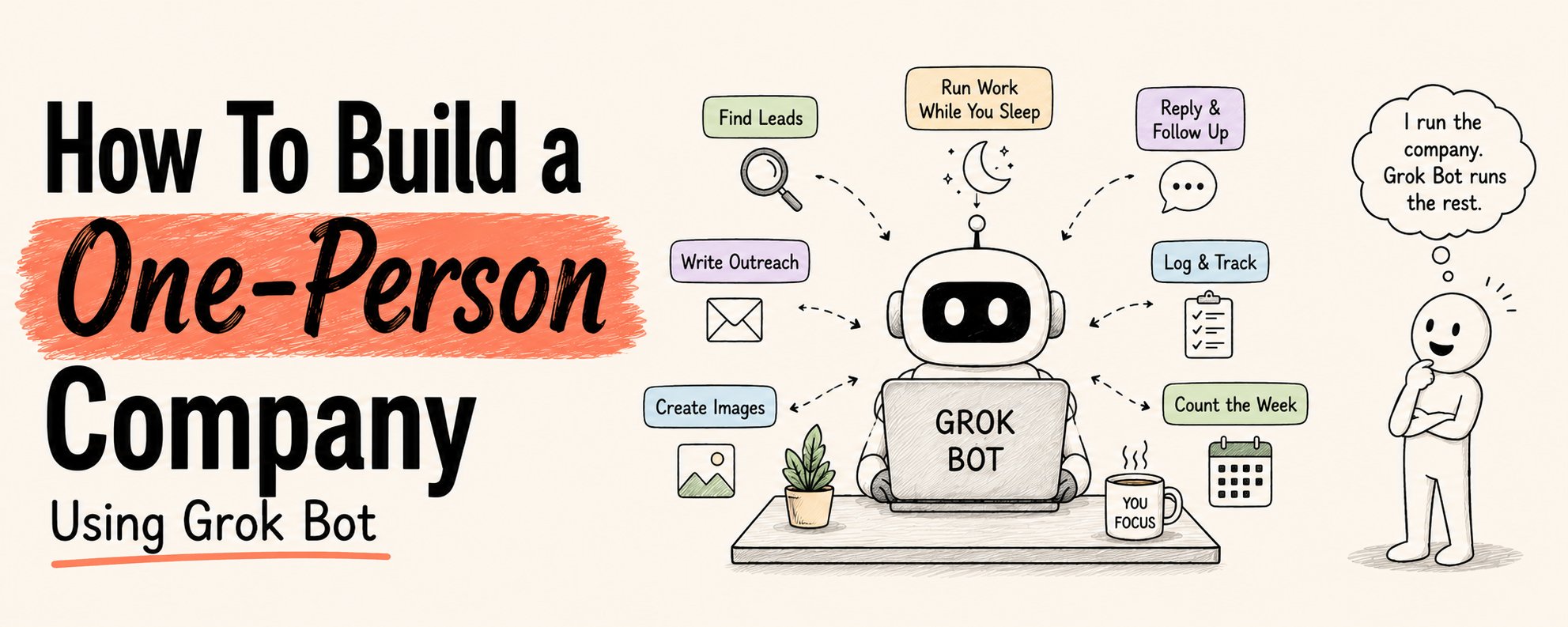
你正在经营一家一人公司。 你寻找线索。撰写外联邮件。制作图片。回复消息。数着日子过完一周。 一切都在等你。没有任何事情可以交接出去。 等到一天结束,待办清单依然原封不动地躺在那里。 Grok Bot 改变了这一切。 不是让你在这些任务上做得更快。 而是将你彻底从中抽离出来。 以下是完整的系统指南。 保存它。你每天都会用到。

Grok Bot 究竟是什么

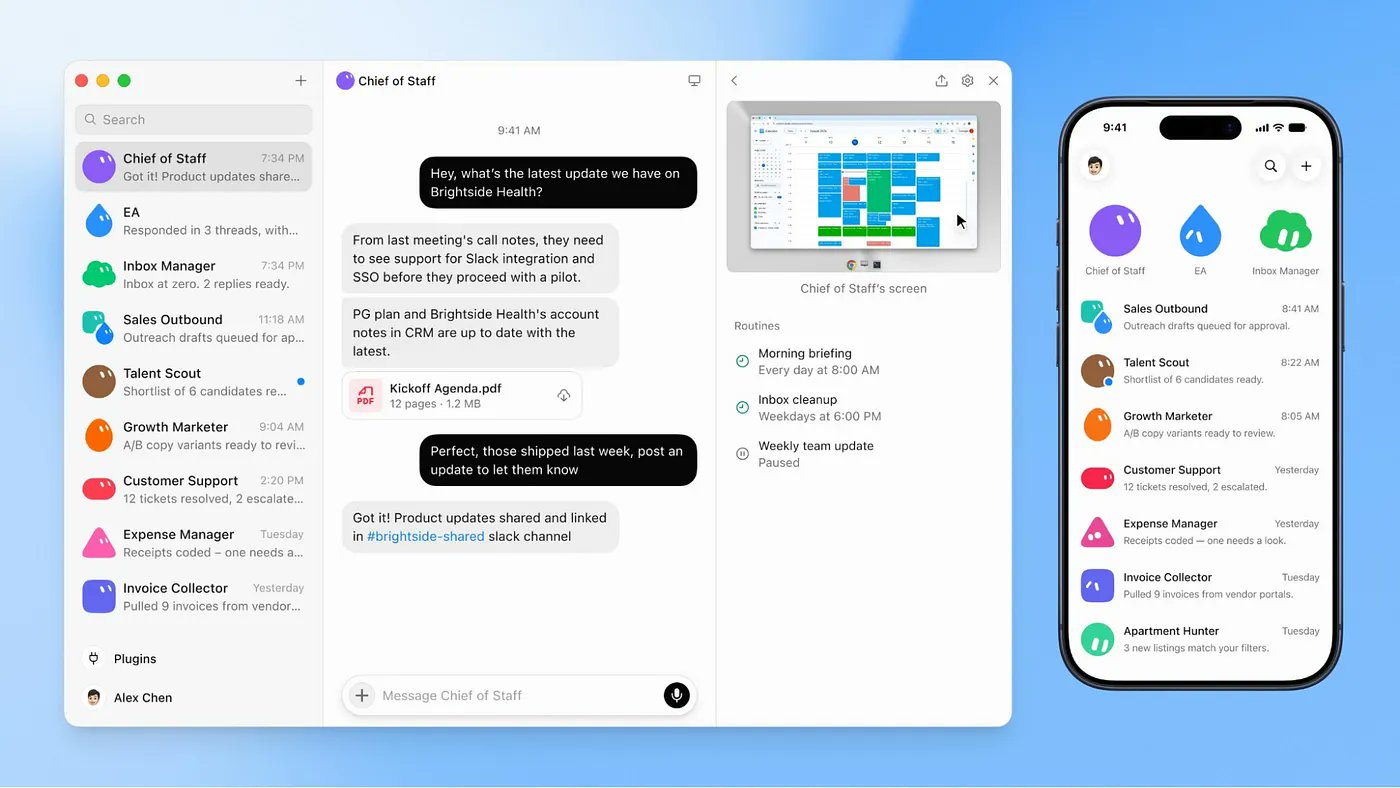
大多数人会打开它,输入一个问题,阅读答案,然后关闭标签页。 这仅仅用到了它 10% 的能力。 Grok Bot 不是聊天机器人。 每个机器人(Bot)都拥有自己独立的云端计算机。 它会登录你真实的工具——LinkedIn、Gmail、Slack、Notion、你的 CRM,并像你一样使用它们。 它会点击。会导航。会填写表单。会发送。会记录日志。 而且在你合上笔记本电脑后,它仍会继续工作。 一个账号。一台共享的云端计算机。最多可同时运行 50 个机器人。 文件、浏览器会话和登录状态全部共享。

为什么这能奏效

构建 Grok Bot 的整个公司(SpaceX/xAI)内部就是这样运作的。 那里的人们同时运行多个机器人,并由其中一个在顶层管理其余的。 一个幕僚长(Chief of Staff)。然后是每个业务线的专家。 他们的一位工程师这样描述之前的个人智能体(Personal Agents): “把时间花在配置、调配、委派和分诊上,而不是做有用的事。” Grok Bot 将其彻底反转。 你用一句话描述一项工作。 机器人拥有计算机、登录凭证、记忆和时间。 而你负责做决策。 从“提示(Prompting)”到“委派(Delegating)”的转变,就是其核心所在。

步骤 1 —— 获取访问权限

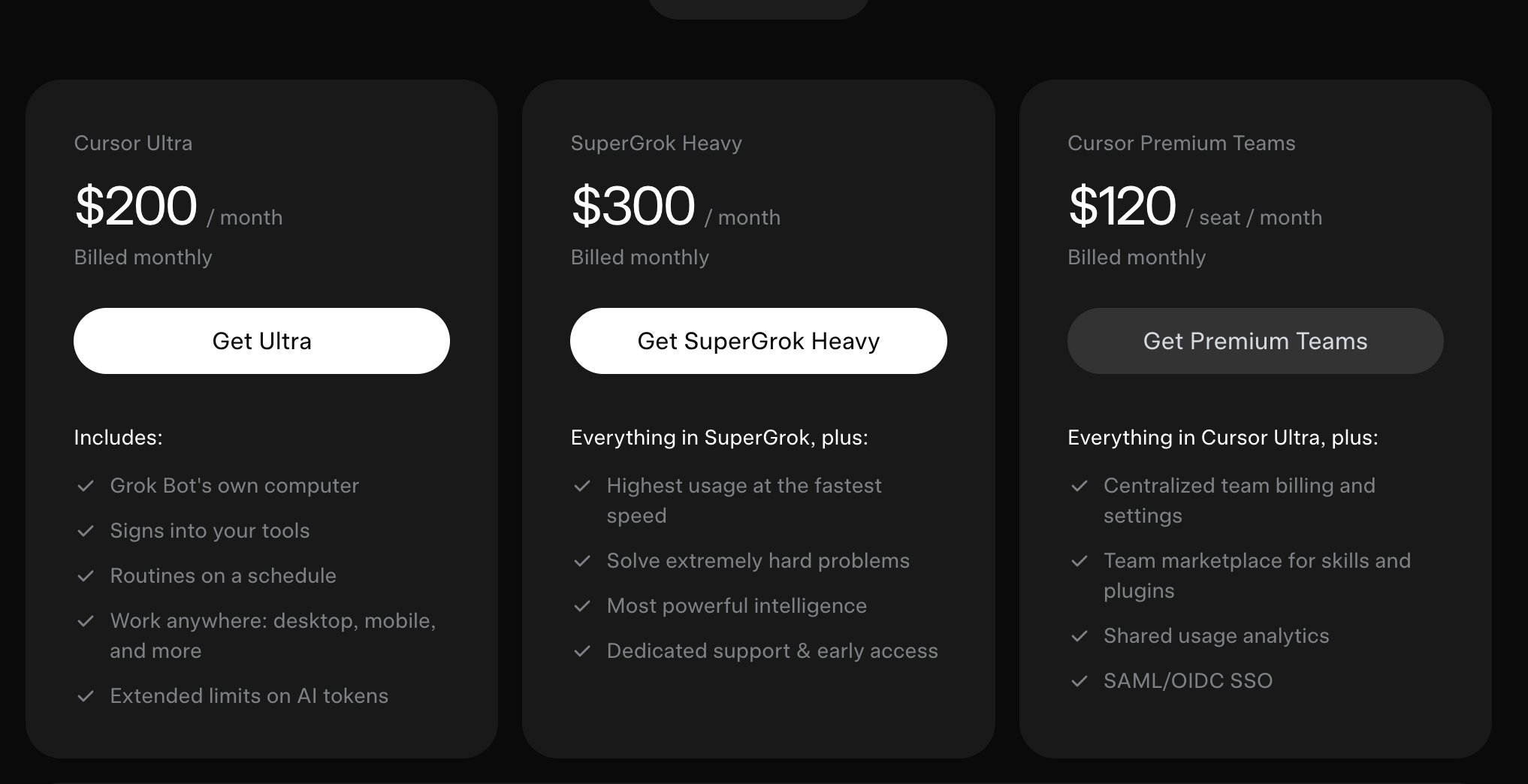
三种接入方式: → SuperGrok Heavy:来自 xAI,300 美元/月 → Cursor Ultra:200 美元/月(使用同一账号登录即可打开 Grok Bot) → Cursor Teams Premium:120 美元/月/席位 前往 x.ai/bot 下载适用于 macOS 或 iOS 的桌面应用。 使用你的 Cursor 或 SuperGrok 账号登录。 整个设置流程——从下载到启动第一个机器人,大约只需 4 分钟。 在引导过程中,它会问一个问题: 你每天使用哪些工具? 你会看到一个网格选项:Google Workspace、Slack、Notion、LinkedIn、GitHub、Salesforce、HubSpot、Figma、Canva、Zoom 等等。 选择你的技术栈(Stack)。在你要求它们做任何事情之前,机器人就已经知道该在哪些平台上操作了。

步骤 2 —— 雇佣你的第一个机器人

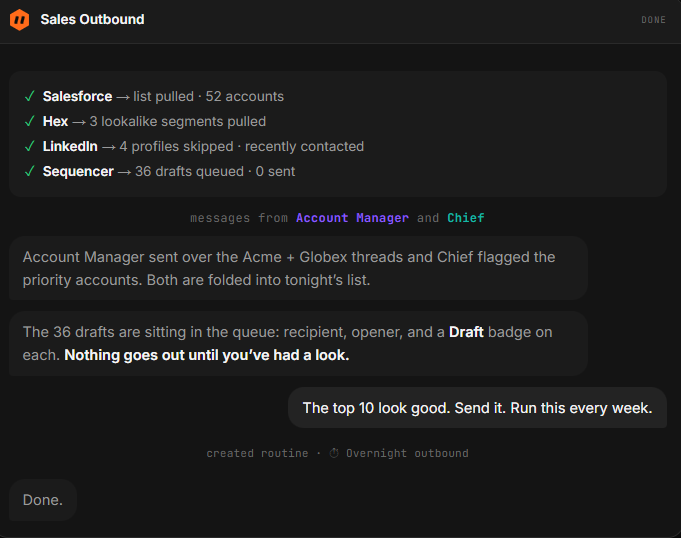
这一步决定了你是能从 Grok Bot 中获得价值,还是对它望而却步。 提示词(Prompt)是一个请求。 机器人是一个角色。 用一个真实存在的职位名称来命名它。 收件箱管理员。人才侦察员。销售外联专员。SEO 专家。营销总监。 然后,像你在第一天给新员工做入职简报那样,为它撰写章程(Charter): → 它负责什么 → 优秀的产出长什么样 → 未经你事先同意,它绝对不能做什么 最后这条边界不是走形式。 正是它让你能够放心地让机器人在无人值守的情况下运行,因为你已经提前划定了它的权限边界。

章程提示词模板 —— 适配并用于每个机器人

You are my Outbound SDR.

// what you own
Run daily outbound without asking me.
Pull 40 prospects matching [industry, size, title, region].
Research each one. Write a 3-line cold email:
- one specific line about them
- one line on the outcome we deliver
- one soft ask for a 15-minute call.
Send from [inbox]. Respect replies.
When someone says yes, book from my calendar.
Log everything in [CRM].
Send me a 5-line summary each morning.

// what good looks like
Emails sound human. Never more than 3 sentences.
One specific detail per email — not a template.

// where you stop
Never add someone to a sequence twice.
Never buy a list.
If a reply mentions legal, money, or contract terms — stop and ask me.

凡事都要请示的机器人毫无用处。 从不请示的机器人则充满危险。 章程就是你一次性划清这条界限的地方,而不是每天为此提心吊胆。

步骤 3 —— 一次性连接工具

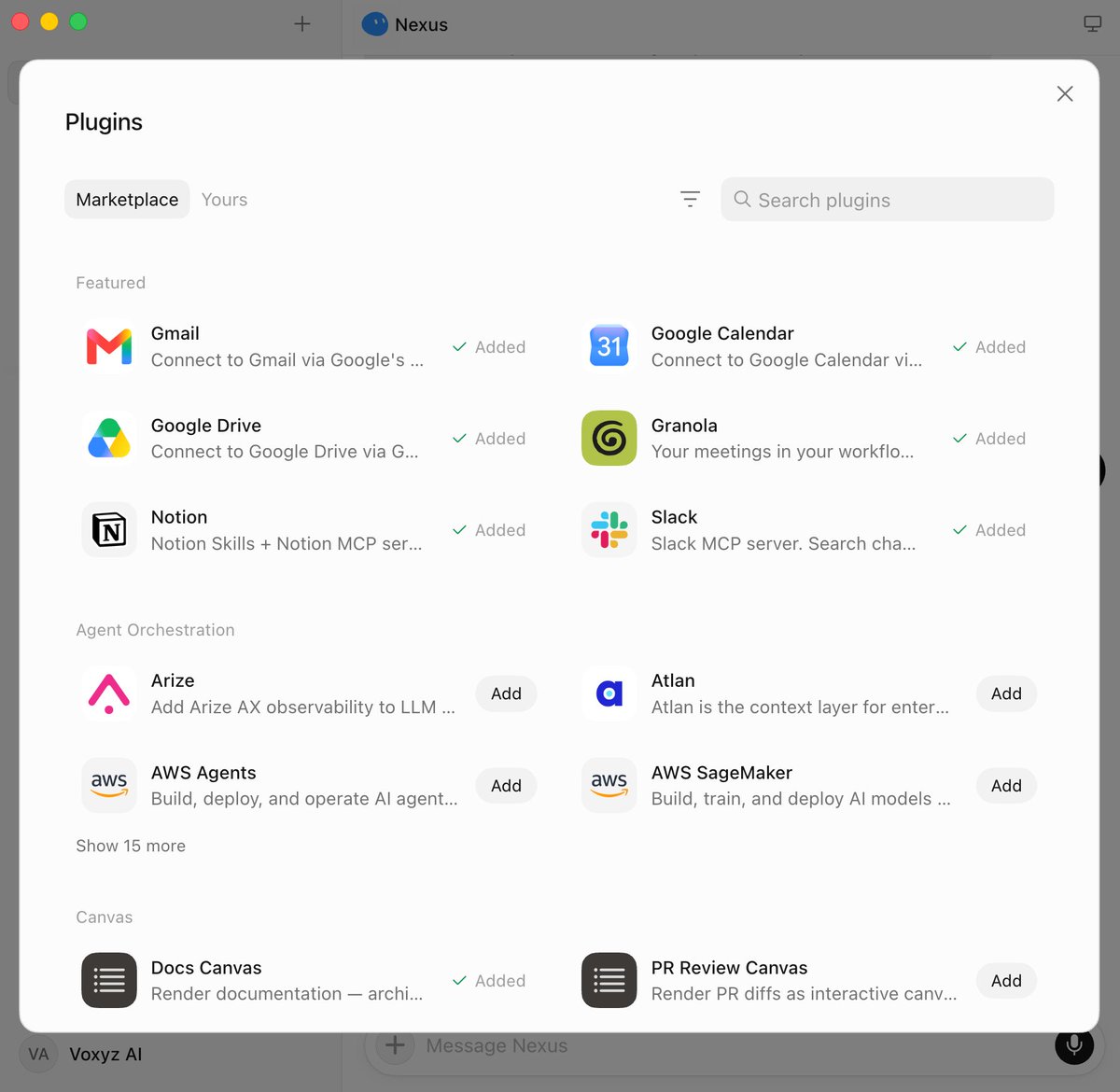
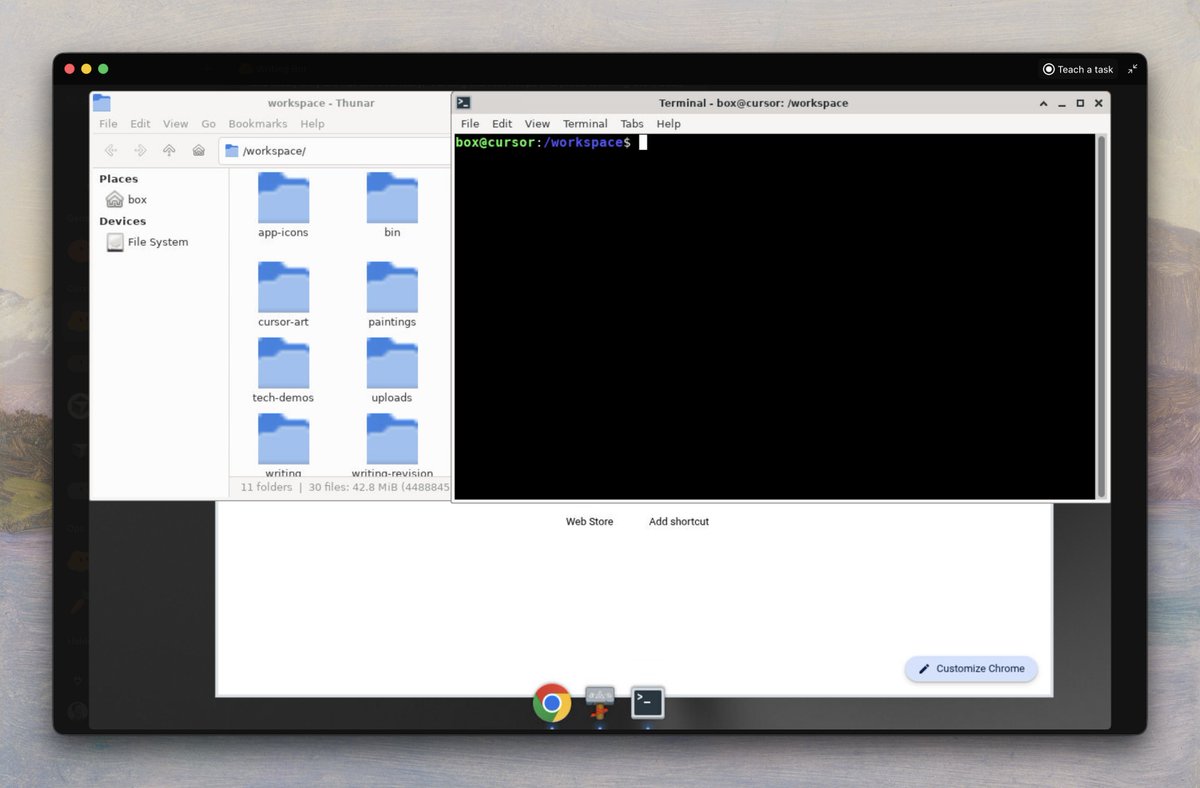
设置 → 插件(Plugins)。 一键连接:Notion、Slack、Google Drive、Gmail、GitHub、Linear、Salesforce、HubSpot 等等。 值得注意的细节: 连接状态在你的整个账号内共享。 只需连接一次 Gmail,你未来创建的每一个机器人都能使用它。 你只需操作一次。这是账号级别的底层管道(Plumbing)。 这也意味着,一个连接的“爆炸半径(Blast Radius)”将覆盖你未来创建的所有机器人。 在测试版(Beta)期间,仅连接你实际需要的账号。 对于没有插件的工具: 机器人会在自己的云端浏览器中导航,直到遇到登录墙。 它会将屏幕交给你。 你完成身份验证。点击完成。 机器人会在同一个浏览器中从断点处继续运行。 你永远不需要在聊天消息中输入凭证。 机器人获得的是一个会话(Session),而不是密钥(Secret)。 登录一次。整个机器人团队就全部登录了。

步骤 4 —— 演示一次。永久运行。

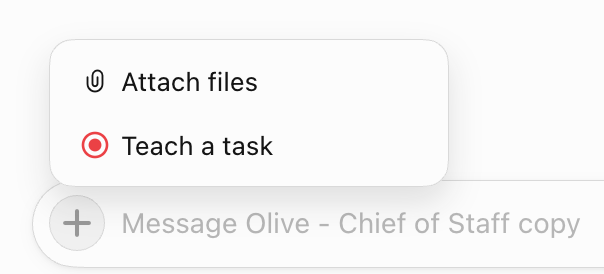
这是改变一切的功能。 你在机器人观看的情况下,完整走一遍任务流程。 它会将整个流程保存为一个已命名的常规任务(Routine)。 然后,它会全天候运行该常规任务,自行修正错误,而你完全无需介入。 你过去每周都要咬牙硬扛的事情,现在每晚都会自动完成。 这大致就是“拥有一个工具”和“拥有一名员工”之间的全部差距。 如何教授任务: → 打开机器人的云端计算机(右上角图标) → 点击 "Teach a task" → 在机器人观看的情况下走一遍工作流(最长 10 分钟) → 点击 Stop → 机器人会根据你的演示创建一个已命名的、可复用的技能(Skill) 最适合你首次测试的任务: 你至少每周执行一次、涉及两个或以上工具、且步骤极少变化的任务。 重复性。多工具。稳定性。 任何同时满足这三点的任务,都是一个等待从你肩上卸下的常规流程。

步骤 5 —— 将其转化为定时常规任务

已保存的技能仍然需要一个触发理由。 两种触发器(Trigger)类型,均通过对话设置,而非构建工作流: 定时(Schedule):每天早上 7 点,每周五下午 5 点,每月第一天。 事件(Trigger):收到匹配特定模式的新邮件、收到新的 Slack 消息、文档发生变更。 触发器是让机器人感觉“时刻在线”而不仅仅是“准时打卡”的关键。

// MORNING BRIEF — schedule trigger
Every weekday at 7:00 AM, check my calendar, inbox, and #launches Slack.
Give me one short brief: what's on today, what needs a reply,
what changed overnight. Save as Morning-Brief-[DATE].md.
Do not send anything. Just prepare and report.

// INBOUND CATCHER — event trigger
Whenever an email arrives from a domain not in my contacts
and it mentions pricing — draft a reply from my template
and park it for my review. Never send.

// FRIDAY CLOSE — schedule trigger
Every Friday at 5:00 PM, pull this week's receipts from my inbox.
File them. Tell me anything that has no matching invoice.
Post a 5-line summary in this conversation.
Do not change any billing settings.

你甚至可以在任务结束后直接说“每周运行此任务”,它就会自动创建日程。 这就是完整的流程。

步骤 6 —— 将它们放入群聊

这就是一个助手蜕变为一家公司的地方。 将多个机器人放入同一个群聊,它们会在无需你干预的情况下自行协调。 它们彼此交接工作。分配负责人。只在需要你做判断时才将你拉入。 你给群组的是一个目标(Objective),而不是任务清单。 任务清单意味着你已经完成了任务拆解。 而目标则让机器人自行拆分,这才是其核心意义所在。

// GROUP CHAT OPENING — adapt for your project

@Mara gather 40 qualified prospects matching [criteria].
Research each one and flag the 10 highest-signal contacts.

@Cole take Mara's top 10 and draft personalized outreach.
One specific hook per email. Draft only — do not send.

@Vince once Cole has drafts ready, review for tone.
Flag anything that doesn't sound human.

Do not publish or send anything without my approval.
One owner per stage. No parallel handoffs.

这种交接——一个机器人判断另一个更合适并移交所有权——在此之前的任何 AI 工具中都不曾存在。 幕僚长(Chief of Staff)设置: 创建一个幕僚长机器人,其职责是协调其他机器人。 将以下内容粘贴进去:

Take a look at me and what I do.
Find all info you can on me.
Look at the bots I have created — these are your team.
Tell me if we need to change anything or add more bots.
What is the best way to manage these bot teams?
What else would make me maximally productive?

它会读取你的团队名单,并返回一个你无需亲自编写的管理架构。

6 个开箱即用的机器人

这是最值得优先构建的 6 个机器人。 直接将描述复制到你的机器人设置中(以此为基础,但请务必更新、补充、细化,使其真正好用。请像撰写职位描述那样写,就像你对真实人类员工说的话一样)

  1. Chief of Staff(协调)
Own daily coordination across all bots and tasks.
Read today's tasks and each bot's last checkpoint.
Set priorities. Hand work to the right specialist.
Run the nightly review. Update one TEAM_ALIGNMENT.md file.

Escalate to me: conflicts, external messages, spending decisions,
changes to important files. Nothing else needs me.
  1. Scout(研究)
Own all inbound research. Read X, GitHub, docs, papers, videos daily.
Run the content radar every morning.

Every result needs: source, why it's worth following, next owner.
Content signals → Quill. Customer leads → Guide. Technical issues → Forge.
  1. Quill(内容)
Own content production. Read my writing rules, past work, and approved phrasing.
Turn research into posts, articles, replies.

When facts are missing, ask Scout. For code details, ask Forge.
Prepare drafts. Never publish on your own.
  1. Forge(工程)
Own code, automations, and deployments.
Write code, build tools, deploy, verify the result.

Every delivery needs test results, screenshots, or files I can inspect.
A delivery does not count as complete without evidence.
  1. Guide(客户)
Own customers, prospects, delivery, and follow-up.
Each important customer gets a context packet:
recent conversations, current goals, promises made, open problems.

Customer emails remain drafts. Label every draft:
BOT DRAFT · NOT SENT · HUMAN REVIEW REQUIRED
  1. Ledger(财务)
Own reconciliation, revenue records, and anomaly alerts.
Read invoices and subscription data through my connected tools.

Prepare payment or refund recommendations.
Every financial write needs my approval. No exceptions.

你可以用 @bot 实现的一些用例

以下是你可以在 Grok Bot 上实际运行的场景: 销售与外联: → 用你的语气撰写个性化冷邮件,收到回复后自动预约进日历 → 向目标职位发送 LinkedIn 好友请求,自动发送会议邀请 → 无需打开 CRM,即可根据通话录音更新 Salesforce 商机备注 → 每次通话前进行客户背景调研,数据从 Slack、邮件和 LinkedIn 自动抓取 研究与内容: → 每天早晨扫描你所在领域的头部 YouTube 频道,标记异常数据 → 监控竞争对手定价页面,一旦有变立即发送 Slack 警报 → 基于历史表现数据分析管理内容日历 → 根据通话笔记起草 LinkedIn 和 X 帖子,等待你的审批 运营与财务: → 每天早晨对收件箱进行分级——紧急、今日、本周、忽略 → 从照片堆中归档收据,并自动归类到正确科目 → 使用记账技能追踪发票实际金额 → 运行订阅审计,找出被遗忘的订阅项以便取消 个人生活: → 值机窗口开放时自动办理航班值机(会向你请求 2FA 验证) → 每天两次根据预算和条件检查房源列表,标记低于市场价的房源 → 根据食谱照片生成购物车,并下单配送 → 监控护照和签证预约名额,经你确认后完成预订

坦诚的部分

Grok Bot 目前并不适合所有人。 最低 200 美元/月。你需要通过 Cursor Ultra 或 SuperGrok Heavy 访问。没有独立套餐。免费试用需要绑定信用卡。 仍处于早期测试版(Beta)。因为机器人会点击真实的界面,所以重新设计的布局或随机弹窗可能会让它们出错。任何涉及资金、法律或实时客户邮件的操作都需要设置安全护栏(Guardrail)。 先交给它可逆的、低风险的任务。比你认为需要的程度更密切地观察它的早期运行。只有当它证明自己后,才真正放开缰绳。 它真正适合谁: → 如果你的 AI 预算是每月 20 美元且仍在学习阶段,这不是你的下一步。先熟练掌握 Claude。 → 如果你已经是每天运行多个工具的 AI 高级用户,那么这是一个真正的飞跃。基础设施由系统代管的便利性是实实在在的。 权衡取舍: 使用 Grok Bot,意味着你将凭证交给了运行在你无法控制的计算机上的机器人。 xAI 自己的材料将这台共享计算机称为“真正的爆炸半径(Blast Radius)”。 这可不是对自己产品让人安心的描述。 用于 Trello 规划器没问题。但对于财务或客户数据,在信任它之前,请先了解其隔离模型(Isolation Model)。

你的最初 10 分钟

不要读完这篇就什么都不做。 从你的一周中挑选一项符合以下条件的任务: → 你至少每周执行一次 → 涉及两个或以上工具 → 步骤极少变化 打开 Grok Bot。创建一个新机器人。 给它起个名字。写一份 4 句话的章程。通过亲自操作一次来教它这项任务。 然后离开。 明天早上再回来。 任务在你不在时已经运行完毕。 那一刻,当你第一次回来看到自己没做却已完成的工作时,一切都会发生改变。 你不再需要亲自去点击。

如果本文对你有帮助: → 转发分享给你认识的每一位独立创始人(Solo Founder) → 关注 @sairahul1,获取更多无需你干预即可运行的系统指南 → 收藏本文,这 6 个机器人角色和 3 个章程部分值得保留 我专注于撰写关于 AI、产品以及在你睡眠时也能运转的系统的文章。
You are running a one-person company. You find the leads. Write the outreach. Make the images. Answer the replies. Count the week. Everything waits for you. Nothing gets handed off. And by the time the day is gone, the list is still sitting there. Grok Bot changes this. Not by making you faster at those tasks. By removing you from them entirely. Here is the exact system. Save this. You will use it every day. What Grok Bot actually is Most people will open it, type a question, read an answer, and close the tab. That is using 10% of it. Grok Bot is not a chatbot. Each bot gets its own cloud computer. It signs into your real tools - LinkedIn, Gmail, Slack, Notion, your CRM and uses them the way you do. It clicks. It navigates. It fills forms. It sends. It logs. And it keeps working after you shut your laptop. One account. One shared cloud computer. Up to 50 bots running on it at once. Files, browser sessions, and logins are all shared. Why this works The whole company that built Grok Bot (SpaceX/xAI) runs this way internally. People there keep several bots going at once, with one on top managing the rest. A chief of staff. Then a specialist for each lane. One of their engineers described previous personal agents like this: "Configuring, provisioning, delegating, and triaging instead of doing useful things." Grok Bot inverts that. You describe a job in a sentence. The bot has the computer, the logins, the memory, and the time. You have the decisions. That shift from prompting to delegating is the entire thing. Step 1 — Get access Three ways in: → SuperGrok Heavy: $300/month from xAI → Cursor Ultra: $200/month (same login opens Grok Bot) → Cursor Teams Premium: $120/month per seat Download the desktop app for macOS or iOS at x.ai/bot Sign in with your Cursor or SuperGrok account. The whole setup -> download to first bot takes about 4 minutes. During onboarding it asks one question: What tools do you use every day? You get a grid: Google Workspace, Slack, Notion, LinkedIn, GitHub, Salesforce, HubSpot, Figma, Canva, Zoom, and more. Pick your stack. The bots know where to operate before you ask them to do anything. Step 2 — Hire your first bot This is the step that separates people who get value from Grok Bot from people who bounce off it. A prompt is a request. A bot is a role. Name it after a job someone could actually hold. Inbox Manager. Talent Scout. Sales Outbound. SEO Guru. Marketing Head. Then write its charter the way you would brief a new hire on day one: → What it owns → What good output looks like → What it must never do without asking you first That last boundary is not paperwork. It is the thing that lets you leave the bot running unattended because you have defined in advance where its authority stops. THE CHARTER PROMPT — adapt and use for every bot plaintext You are my Outbound SDR.

// what you own Run daily outbound without asking me. Pull 40 prospects matching [industry, size, title, region]. Research each one. Write a 3-line cold email: - one specific line about them - one line on the outcome we deliver - one soft ask for a 15-minute call. Send from [inbox]. Respect replies. When someone says yes, book from my calendar. Log everything in [CRM]. Send me a 5-line summary each morning.

// what good looks like Emails sound human. Never more than 3 sentences. One specific detail per email — not a template.

// where you stop Never add someone to a sequence twice. Never buy a list. If a reply mentions legal, money, or contract terms — stop and ask me. Bots that have to ask about everything are useless. Bots that never ask are dangerous. The charter is where you draw that line once instead of worrying about it daily. Step 3 — Connect the tools once Settings → Plugins. One-click connections to: Notion, Slack, Google Drive, Gmail, GitHub, Linear, Salesforce, HubSpot, and more. The detail worth knowing: Connections are shared across your entire account. Connect Gmail once, every bot you ever create can use it. You do this once. It is account-level plumbing. That also means the blast radius of a connection is every bot you will ever create. Connect only the accounts you actually need during beta. For tools with no plugin: The bot navigates on its own cloud browser until it hits a login wall. It hands you the screen. You authenticate. Click done. The bot resumes on that same browser from where it left off. You never type a credential into a chat message. The bot gets a session, not a secret. Sign in once. The whole team of bots is signed in. Step 4 — Show it once. It runs forever. This is the feature that changes everything. You walk through a task one time while the bot watches. It saves the entire flow as a named routine. Then it runs that routine around the clock, fixing its own mistakes, with you nowhere near it. Something you used to grind through every week now happens every night on its own. That is roughly the whole gap between owning a tool and having an employee. How to teach a task: → Open the bot's cloud computer (top-right corner icon) → Click "Teach a task" → Walk through the workflow while the bot watches (up to 10 minutes) → Click Stop → The bot creates a named, reusable skill from what you demonstrated The best candidate for your first testing: Something you do at least weekly, that involves two or more tools, and where the steps rarely change. Recurring. Multi-tool. Stable. Anything that fits all three is a routine waiting to be lifted off your plate. Step 5 — Turn it into a scheduled routine A saved skill still needs a reason to fire. Two types of triggers, both set by talking, not by building a workflow: Schedule: every morning at 7am, every Friday at 5pm, first of the month. Trigger: new email matching a pattern, new Slack message, document changed. Triggers are what make a bot feel present rather than just punctual. plaintext // MORNING BRIEF — schedule trigger Every weekday at 7:00 AM, check my calendar, inbox, and #launches Slack. Give me one short brief: what's on today, what needs a reply, what changed overnight. Save as Morning-Brief-[DATE].md. Do not send anything. Just prepare and report.

// INBOUND CATCHER — event trigger Whenever an email arrives from a domain not in my contacts and it mentions pricing — draft a reply from my template and park it for my review. Never send.

// FRIDAY CLOSE — schedule trigger Every Friday at 5:00 PM, pull this week's receipts from my inbox. File them. Tell me anything that has no matching invoice. Post a 5-line summary in this conversation. Do not change any billing settings. You can even say "run this every week" right after a task and it creates the schedule. That is the entire flow. Step 6 — Put them in a group chat This is where one assistant becomes a company. Put multiple bots in one group chat and they coordinate without you. They pass work between each other. They assign ownership. They pull you in only for judgment calls. You give the group an objective, not a task list. A task list means you already did the decomposition. An objective lets the bots split it, which is the whole point. plaintext // GROUP CHAT OPENING — adapt for your project

@Mara gather 40 qualified prospects matching [criteria]. Research each one and flag the 10 highest-signal contacts.

@Cole take Mara's top 10 and draft personalized outreach. One specific hook per email. Draft only — do not send.

@Vince once Cole has drafts ready, review for tone. Flag anything that doesn't sound human.

Do not publish or send anything without my approval. One owner per stage. No parallel handoffs. The handoff, one bot deciding another is better suited and passing ownership, is something that did not exist in any AI tool before this. The Chief of Staff setup: Create one chief-of-staff bot whose job is coordinating the others. Paste this into it: plaintext Take a look at me and what I do. Find all info you can on me. Look at the bots I have created — these are your team. Tell me if we need to change anything or add more bots. What is the best way to manage these bot teams? What else would make me maximally productive? It reads your roster and returns a management structure you never had to write. 6 Ready-to-use bots These are the 6 bots worth building first. Copy the descriptions directly into your bot setup (take these as base but please update, add, be more detailed to make them really good. Write like a job description, what you say to an actual human employee) 1. Chief of Staff (Coordination) plaintext Own daily coordination across all bots and tasks. Read today's tasks and each bot's last checkpoint. Set priorities. Hand work to the right specialist. Run the nightly review. Update one TEAM_ALIGNMENT.md file.

Escalate to me: conflicts, external messages, spending decisions, changes to important files. Nothing else needs me. 2. Scout (Research) plaintext Own all inbound research. Read X, GitHub, docs, papers, videos daily. Run the content radar every morning.

Every result needs: source, why it's worth following, next owner. Content signals → Quill. Customer leads → Guide. Technical issues → Forge. 3. Quill (Content) plaintext Own content production. Read my writing rules, past work, and approved phrasing. Turn research into posts, articles, replies.

When facts are missing, ask Scout. For code details, ask Forge. Prepare drafts. Never publish on your own. 4. Forge (Engineering) plaintext Own code, automations, and deployments. Write code, build tools, deploy, verify the result.

Every delivery needs test results, screenshots, or files I can inspect. A delivery does not count as complete without evidence. 5. Guide (Customers) plaintext Own customers, prospects, delivery, and follow-up. Each important customer gets a context packet: recent conversations, current goals, promises made, open problems.

Customer emails remain drafts. Label every draft: BOT DRAFT · NOT SENT · HUMAN REVIEW REQUIRED 6. Ledger (Finance) plaintext Own reconciliation, revenue records, and anomaly alerts. Read invoices and subscription data through my connected tools.

Prepare payment or refund recommendations. Every financial write needs my approval. No exceptions. Some use cases you can do with @bot Here are real things you can run on Grok Bot: Sales and outreach: → Personalized cold email in your voice, booked into calendar when reply comes → LinkedIn connection requests to targeted titles, meeting requests sent automatically → Salesforce opportunity notes updated from call transcripts without opening the CRM → Account research before every call, pulled from Slack, email, and LinkedIn Research and content: → Top YouTube channels in your niche scanned every morning, outliers flagged → Competitor pricing page monitored, Slack alert the moment something changes → Content calendar managed based on past performance analytics → LinkedIn and X posts drafted from call notes, waiting for your approval Operations and finance: → Inbox triaged every morning - urgent, today, this week, ignore → Receipts filed from a photo dump, coded to the right category → Invoice actuals tracked with a bookkeeping skill → Subscription audit run, forgotten ones surfaced for cancellation Personal: → Flights checked in automatically when the window opens (asks you for 2FA) → Property listings checked twice daily against budget and criteria, flagged under market → Grocery cart built from a recipe photo, order placed for delivery → Passport and visa appointment slots watched, booking confirmed after your approval The honest part Grok Bot is not for everyone right now. $200/month minimum. You access it through Cursor Ultra or SuperGrok Heavy. There is no standalone plan. Free trial requires a credit card. Still in early beta. Because bots click through real interfaces, a redesigned layout or random popup can trip them. Anything touching money, legal, or live customer emails needs a guardrail. Hand it reversible, low-stakes jobs first. Watch the early runs more closely than you think you need to. Only let it off the leash once it has earned it. Who this is actually for: → If your AI budget is $20/month and you are still learning, this is not your next step. Get fluent with Claude first. → If you are already a real AI power user running multiple tools daily, then this is a legitimate leap forward. The convenience of having the infrastructure handled is real. Trade-off: With Grok Bot, you are handing credentials to bots that live on a computer you do not control. xAI's own material calls the shared computer "a real blast radius." That is not reassuring language about your own product. For a Trello planner, fine. For finances or client data, understand the isolation model before you trust it. Your first 10 minutes Don't read this and do nothing. Pick one task from your week that is: → Something you do at least weekly → Involves two or more tools → Steps that rarely change Open Grok Bot. Create a new bot. Give it a name. Write a 4-sentence charter. Teach it the task by doing it once. Walk away. Come back tomorrow morning. The task ran without you. That moment, the first time you come back to finished work you did not do, is when everything shifts. You stop being the one doing the clicking. If this was useful: → Repost to share it with every solo founder you know → Follow @sairahul1 for more systems that run without you → Bookmark this, the 6 bot roles and the 3 charter sections are worth keeping I write about AI, products, and systems that work while you sleep.

你正在经营一家一人公司。 你寻找线索。撰写外联邮件。制作图片。回复消息。数着日子过完一周。 一切都在等你。没有任何事情可以交接出去。 等到一天结束,待办清单依然原封不动地躺在那里。 Grok Bot 改变了这一切。 不是让你在这些任务上做得更快。 而是将你彻底从中抽离出来。 以下是完整的系统指南。 保存它。你每天都会用到。

Grok Bot 究竟是什么

大多数人会打开它,输入一个问题,阅读答案,然后关闭标签页。 这仅仅用到了它 10% 的能力。 Grok Bot 不是聊天机器人。 每个机器人(Bot)都拥有自己独立的云端计算机。 它会登录你真实的工具——LinkedIn、Gmail、Slack、Notion、你的 CRM,并像你一样使用它们。 它会点击。会导航。会填写表单。会发送。会记录日志。 而且在你合上笔记本电脑后,它仍会继续工作。 一个账号。一台共享的云端计算机。最多可同时运行 50 个机器人。 文件、浏览器会话和登录状态全部共享。

为什么这能奏效

构建 Grok Bot 的整个公司(SpaceX/xAI)内部就是这样运作的。 那里的人们同时运行多个机器人,并由其中一个在顶层管理其余的。 一个幕僚长(Chief of Staff)。然后是每个业务线的专家。 他们的一位工程师这样描述之前的个人智能体(Personal Agents): “把时间花在配置、调配、委派和分诊上,而不是做有用的事。” Grok Bot 将其彻底反转。 你用一句话描述一项工作。 机器人拥有计算机、登录凭证、记忆和时间。 而你负责做决策。 从“提示(Prompting)”到“委派(Delegating)”的转变,就是其核心所在。

步骤 1 —— 获取访问权限

三种接入方式: → SuperGrok Heavy:来自 xAI,300 美元/月 → Cursor Ultra:200 美元/月(使用同一账号登录即可打开 Grok Bot) → Cursor Teams Premium:120 美元/月/席位 前往 x.ai/bot 下载适用于 macOS 或 iOS 的桌面应用。 使用你的 Cursor 或 SuperGrok 账号登录。 整个设置流程——从下载到启动第一个机器人,大约只需 4 分钟。 在引导过程中,它会问一个问题: 你每天使用哪些工具? 你会看到一个网格选项:Google Workspace、Slack、Notion、LinkedIn、GitHub、Salesforce、HubSpot、Figma、Canva、Zoom 等等。 选择你的技术栈(Stack)。在你要求它们做任何事情之前,机器人就已经知道该在哪些平台上操作了。

步骤 2 —— 雇佣你的第一个机器人

这一步决定了你是能从 Grok Bot 中获得价值,还是对它望而却步。 提示词(Prompt)是一个请求。 机器人是一个角色。 用一个真实存在的职位名称来命名它。 收件箱管理员。人才侦察员。销售外联专员。SEO 专家。营销总监。 然后,像你在第一天给新员工做入职简报那样,为它撰写章程(Charter): → 它负责什么 → 优秀的产出长什么样 → 未经你事先同意,它绝对不能做什么 最后这条边界不是走形式。 正是它让你能够放心地让机器人在无人值守的情况下运行,因为你已经提前划定了它的权限边界。

章程提示词模板 —— 适配并用于每个机器人

You are my Outbound SDR.

// what you own
Run daily outbound without asking me.
Pull 40 prospects matching [industry, size, title, region].
Research each one. Write a 3-line cold email:
- one specific line about them
- one line on the outcome we deliver
- one soft ask for a 15-minute call.
Send from [inbox]. Respect replies.
When someone says yes, book from my calendar.
Log everything in [CRM].
Send me a 5-line summary each morning.

// what good looks like
Emails sound human. Never more than 3 sentences.
One specific detail per email — not a template.

// where you stop
Never add someone to a sequence twice.
Never buy a list.
If a reply mentions legal, money, or contract terms — stop and ask me.

凡事都要请示的机器人毫无用处。 从不请示的机器人则充满危险。 章程就是你一次性划清这条界限的地方,而不是每天为此提心吊胆。

步骤 3 —— 一次性连接工具

设置 → 插件(Plugins)。 一键连接:Notion、Slack、Google Drive、Gmail、GitHub、Linear、Salesforce、HubSpot 等等。 值得注意的细节: 连接状态在你的整个账号内共享。 只需连接一次 Gmail,你未来创建的每一个机器人都能使用它。 你只需操作一次。这是账号级别的底层管道(Plumbing)。 这也意味着,一个连接的“爆炸半径(Blast Radius)”将覆盖你未来创建的所有机器人。 在测试版(Beta)期间,仅连接你实际需要的账号。 对于没有插件的工具: 机器人会在自己的云端浏览器中导航,直到遇到登录墙。 它会将屏幕交给你。 你完成身份验证。点击完成。 机器人会在同一个浏览器中从断点处继续运行。 你永远不需要在聊天消息中输入凭证。 机器人获得的是一个会话(Session),而不是密钥(Secret)。 登录一次。整个机器人团队就全部登录了。

步骤 4 —— 演示一次。永久运行。

这是改变一切的功能。 你在机器人观看的情况下,完整走一遍任务流程。 它会将整个流程保存为一个已命名的常规任务(Routine)。 然后,它会全天候运行该常规任务,自行修正错误,而你完全无需介入。 你过去每周都要咬牙硬扛的事情,现在每晚都会自动完成。 这大致就是“拥有一个工具”和“拥有一名员工”之间的全部差距。 如何教授任务: → 打开机器人的云端计算机(右上角图标) → 点击 "Teach a task" → 在机器人观看的情况下走一遍工作流(最长 10 分钟) → 点击 Stop → 机器人会根据你的演示创建一个已命名的、可复用的技能(Skill) 最适合你首次测试的任务: 你至少每周执行一次、涉及两个或以上工具、且步骤极少变化的任务。 重复性。多工具。稳定性。 任何同时满足这三点的任务,都是一个等待从你肩上卸下的常规流程。

步骤 5 —— 将其转化为定时常规任务

已保存的技能仍然需要一个触发理由。 两种触发器(Trigger)类型,均通过对话设置,而非构建工作流: 定时(Schedule):每天早上 7 点,每周五下午 5 点,每月第一天。 事件(Trigger):收到匹配特定模式的新邮件、收到新的 Slack 消息、文档发生变更。 触发器是让机器人感觉“时刻在线”而不仅仅是“准时打卡”的关键。

// MORNING BRIEF — schedule trigger
Every weekday at 7:00 AM, check my calendar, inbox, and #launches Slack.
Give me one short brief: what's on today, what needs a reply,
what changed overnight. Save as Morning-Brief-[DATE].md.
Do not send anything. Just prepare and report.

// INBOUND CATCHER — event trigger
Whenever an email arrives from a domain not in my contacts
and it mentions pricing — draft a reply from my template
and park it for my review. Never send.

// FRIDAY CLOSE — schedule trigger
Every Friday at 5:00 PM, pull this week's receipts from my inbox.
File them. Tell me anything that has no matching invoice.
Post a 5-line summary in this conversation.
Do not change any billing settings.

你甚至可以在任务结束后直接说“每周运行此任务”,它就会自动创建日程。 这就是完整的流程。

步骤 6 —— 将它们放入群聊

这就是一个助手蜕变为一家公司的地方。 将多个机器人放入同一个群聊,它们会在无需你干预的情况下自行协调。 它们彼此交接工作。分配负责人。只在需要你做判断时才将你拉入。 你给群组的是一个目标(Objective),而不是任务清单。 任务清单意味着你已经完成了任务拆解。 而目标则让机器人自行拆分,这才是其核心意义所在。

// GROUP CHAT OPENING — adapt for your project

@Mara gather 40 qualified prospects matching [criteria].
Research each one and flag the 10 highest-signal contacts.

@Cole take Mara's top 10 and draft personalized outreach.
One specific hook per email. Draft only — do not send.

@Vince once Cole has drafts ready, review for tone.
Flag anything that doesn't sound human.

Do not publish or send anything without my approval.
One owner per stage. No parallel handoffs.

这种交接——一个机器人判断另一个更合适并移交所有权——在此之前的任何 AI 工具中都不曾存在。 幕僚长(Chief of Staff)设置: 创建一个幕僚长机器人,其职责是协调其他机器人。 将以下内容粘贴进去:

Take a look at me and what I do.
Find all info you can on me.
Look at the bots I have created — these are your team.
Tell me if we need to change anything or add more bots.
What is the best way to manage these bot teams?
What else would make me maximally productive?

它会读取你的团队名单,并返回一个你无需亲自编写的管理架构。

6 个开箱即用的机器人

这是最值得优先构建的 6 个机器人。 直接将描述复制到你的机器人设置中(以此为基础,但请务必更新、补充、细化,使其真正好用。请像撰写职位描述那样写,就像你对真实人类员工说的话一样)

  1. Chief of Staff(协调)
Own daily coordination across all bots and tasks.
Read today's tasks and each bot's last checkpoint.
Set priorities. Hand work to the right specialist.
Run the nightly review. Update one TEAM_ALIGNMENT.md file.

Escalate to me: conflicts, external messages, spending decisions,
changes to important files. Nothing else needs me.
  1. Scout(研究)
Own all inbound research. Read X, GitHub, docs, papers, videos daily.
Run the content radar every morning.

Every result needs: source, why it's worth following, next owner.
Content signals → Quill. Customer leads → Guide. Technical issues → Forge.
  1. Quill(内容)
Own content production. Read my writing rules, past work, and approved phrasing.
Turn research into posts, articles, replies.

When facts are missing, ask Scout. For code details, ask Forge.
Prepare drafts. Never publish on your own.
  1. Forge(工程)
Own code, automations, and deployments.
Write code, build tools, deploy, verify the result.

Every delivery needs test results, screenshots, or files I can inspect.
A delivery does not count as complete without evidence.
  1. Guide(客户)
Own customers, prospects, delivery, and follow-up.
Each important customer gets a context packet:
recent conversations, current goals, promises made, open problems.

Customer emails remain drafts. Label every draft:
BOT DRAFT · NOT SENT · HUMAN REVIEW REQUIRED
  1. Ledger(财务)
Own reconciliation, revenue records, and anomaly alerts.
Read invoices and subscription data through my connected tools.

Prepare payment or refund recommendations.
Every financial write needs my approval. No exceptions.

你可以用 @bot 实现的一些用例

以下是你可以在 Grok Bot 上实际运行的场景: 销售与外联: → 用你的语气撰写个性化冷邮件,收到回复后自动预约进日历 → 向目标职位发送 LinkedIn 好友请求,自动发送会议邀请 → 无需打开 CRM,即可根据通话录音更新 Salesforce 商机备注 → 每次通话前进行客户背景调研,数据从 Slack、邮件和 LinkedIn 自动抓取 研究与内容: → 每天早晨扫描你所在领域的头部 YouTube 频道,标记异常数据 → 监控竞争对手定价页面,一旦有变立即发送 Slack 警报 → 基于历史表现数据分析管理内容日历 → 根据通话笔记起草 LinkedIn 和 X 帖子,等待你的审批 运营与财务: → 每天早晨对收件箱进行分级——紧急、今日、本周、忽略 → 从照片堆中归档收据,并自动归类到正确科目 → 使用记账技能追踪发票实际金额 → 运行订阅审计,找出被遗忘的订阅项以便取消 个人生活: → 值机窗口开放时自动办理航班值机(会向你请求 2FA 验证) → 每天两次根据预算和条件检查房源列表,标记低于市场价的房源 → 根据食谱照片生成购物车,并下单配送 → 监控护照和签证预约名额,经你确认后完成预订

坦诚的部分

Grok Bot 目前并不适合所有人。 最低 200 美元/月。你需要通过 Cursor Ultra 或 SuperGrok Heavy 访问。没有独立套餐。免费试用需要绑定信用卡。 仍处于早期测试版(Beta)。因为机器人会点击真实的界面,所以重新设计的布局或随机弹窗可能会让它们出错。任何涉及资金、法律或实时客户邮件的操作都需要设置安全护栏(Guardrail)。 先交给它可逆的、低风险的任务。比你认为需要的程度更密切地观察它的早期运行。只有当它证明自己后,才真正放开缰绳。 它真正适合谁: → 如果你的 AI 预算是每月 20 美元且仍在学习阶段,这不是你的下一步。先熟练掌握 Claude。 → 如果你已经是每天运行多个工具的 AI 高级用户,那么这是一个真正的飞跃。基础设施由系统代管的便利性是实实在在的。 权衡取舍: 使用 Grok Bot,意味着你将凭证交给了运行在你无法控制的计算机上的机器人。 xAI 自己的材料将这台共享计算机称为“真正的爆炸半径(Blast Radius)”。 这可不是对自己产品让人安心的描述。 用于 Trello 规划器没问题。但对于财务或客户数据,在信任它之前,请先了解其隔离模型(Isolation Model)。

你的最初 10 分钟

不要读完这篇就什么都不做。 从你的一周中挑选一项符合以下条件的任务: → 你至少每周执行一次 → 涉及两个或以上工具 → 步骤极少变化 打开 Grok Bot。创建一个新机器人。 给它起个名字。写一份 4 句话的章程。通过亲自操作一次来教它这项任务。 然后离开。 明天早上再回来。 任务在你不在时已经运行完毕。 那一刻,当你第一次回来看到自己没做却已完成的工作时,一切都会发生改变。 你不再需要亲自去点击。

如果本文对你有帮助: → 转发分享给你认识的每一位独立创始人(Solo Founder) → 关注 @sairahul1,获取更多无需你干预即可运行的系统指南 → 收藏本文,这 6 个机器人角色和 3 个章程部分值得保留 我专注于撰写关于 AI、产品以及在你睡眠时也能运转的系统的文章。
You are running a one-person company. You find the leads. Write the outreach. Make the images. Answer the replies. Count the week. Everything waits for you. Nothing gets handed off. And by the time the day is gone, the list is still sitting there. Grok Bot changes this. Not by making you faster at those tasks. By removing you from them entirely. Here is the exact system. Save this. You will use it every day. What Grok Bot actually is Most people will open it, type a question, read an answer, and close the tab. That is using 10% of it. Grok Bot is not a chatbot. Each bot gets its own cloud computer. It signs into your real tools - LinkedIn, Gmail, Slack, Notion, your CRM and uses them the way you do. It clicks. It navigates. It fills forms. It sends. It logs. And it keeps working after you shut your laptop. One account. One shared cloud computer. Up to 50 bots running on it at once. Files, browser sessions, and logins are all shared. Why this works The whole company that built Grok Bot (SpaceX/xAI) runs this way internally. People there keep several bots going at once, with one on top managing the rest. A chief of staff. Then a specialist for each lane. One of their engineers described previous personal agents like this: "Configuring, provisioning, delegating, and triaging instead of doing useful things." Grok Bot inverts that. You describe a job in a sentence. The bot has the computer, the logins, the memory, and the time. You have the decisions. That shift from prompting to delegating is the entire thing. Step 1 — Get access Three ways in: → SuperGrok Heavy: $300/month from xAI → Cursor Ultra: $200/month (same login opens Grok Bot) → Cursor Teams Premium: $120/month per seat Download the desktop app for macOS or iOS at x.ai/bot Sign in with your Cursor or SuperGrok account. The whole setup -> download to first bot takes about 4 minutes. During onboarding it asks one question: What tools do you use every day? You get a grid: Google Workspace, Slack, Notion, LinkedIn, GitHub, Salesforce, HubSpot, Figma, Canva, Zoom, and more. Pick your stack. The bots know where to operate before you ask them to do anything. Step 2 — Hire your first bot This is the step that separates people who get value from Grok Bot from people who bounce off it. A prompt is a request. A bot is a role. Name it after a job someone could actually hold. Inbox Manager. Talent Scout. Sales Outbound. SEO Guru. Marketing Head. Then write its charter the way you would brief a new hire on day one: → What it owns → What good output looks like → What it must never do without asking you first That last boundary is not paperwork. It is the thing that lets you leave the bot running unattended because you have defined in advance where its authority stops. THE CHARTER PROMPT — adapt and use for every bot plaintext You are my Outbound SDR.

// what you own Run daily outbound without asking me. Pull 40 prospects matching [industry, size, title, region]. Research each one. Write a 3-line cold email: - one specific line about them - one line on the outcome we deliver - one soft ask for a 15-minute call. Send from [inbox]. Respect replies. When someone says yes, book from my calendar. Log everything in [CRM]. Send me a 5-line summary each morning.

// what good looks like Emails sound human. Never more than 3 sentences. One specific detail per email — not a template.

// where you stop Never add someone to a sequence twice. Never buy a list. If a reply mentions legal, money, or contract terms — stop and ask me. Bots that have to ask about everything are useless. Bots that never ask are dangerous. The charter is where you draw that line once instead of worrying about it daily. Step 3 — Connect the tools once Settings → Plugins. One-click connections to: Notion, Slack, Google Drive, Gmail, GitHub, Linear, Salesforce, HubSpot, and more. The detail worth knowing: Connections are shared across your entire account. Connect Gmail once, every bot you ever create can use it. You do this once. It is account-level plumbing. That also means the blast radius of a connection is every bot you will ever create. Connect only the accounts you actually need during beta. For tools with no plugin: The bot navigates on its own cloud browser until it hits a login wall. It hands you the screen. You authenticate. Click done. The bot resumes on that same browser from where it left off. You never type a credential into a chat message. The bot gets a session, not a secret. Sign in once. The whole team of bots is signed in. Step 4 — Show it once. It runs forever. This is the feature that changes everything. You walk through a task one time while the bot watches. It saves the entire flow as a named routine. Then it runs that routine around the clock, fixing its own mistakes, with you nowhere near it. Something you used to grind through every week now happens every night on its own. That is roughly the whole gap between owning a tool and having an employee. How to teach a task: → Open the bot's cloud computer (top-right corner icon) → Click "Teach a task" → Walk through the workflow while the bot watches (up to 10 minutes) → Click Stop → The bot creates a named, reusable skill from what you demonstrated The best candidate for your first testing: Something you do at least weekly, that involves two or more tools, and where the steps rarely change. Recurring. Multi-tool. Stable. Anything that fits all three is a routine waiting to be lifted off your plate. Step 5 — Turn it into a scheduled routine A saved skill still needs a reason to fire. Two types of triggers, both set by talking, not by building a workflow: Schedule: every morning at 7am, every Friday at 5pm, first of the month. Trigger: new email matching a pattern, new Slack message, document changed. Triggers are what make a bot feel present rather than just punctual. plaintext // MORNING BRIEF — schedule trigger Every weekday at 7:00 AM, check my calendar, inbox, and #launches Slack. Give me one short brief: what's on today, what needs a reply, what changed overnight. Save as Morning-Brief-[DATE].md. Do not send anything. Just prepare and report.

// INBOUND CATCHER — event trigger Whenever an email arrives from a domain not in my contacts and it mentions pricing — draft a reply from my template and park it for my review. Never send.

// FRIDAY CLOSE — schedule trigger Every Friday at 5:00 PM, pull this week's receipts from my inbox. File them. Tell me anything that has no matching invoice. Post a 5-line summary in this conversation. Do not change any billing settings. You can even say "run this every week" right after a task and it creates the schedule. That is the entire flow. Step 6 — Put them in a group chat This is where one assistant becomes a company. Put multiple bots in one group chat and they coordinate without you. They pass work between each other. They assign ownership. They pull you in only for judgment calls. You give the group an objective, not a task list. A task list means you already did the decomposition. An objective lets the bots split it, which is the whole point. plaintext // GROUP CHAT OPENING — adapt for your project

@Mara gather 40 qualified prospects matching [criteria]. Research each one and flag the 10 highest-signal contacts.

@Cole take Mara's top 10 and draft personalized outreach. One specific hook per email. Draft only — do not send.

@Vince once Cole has drafts ready, review for tone. Flag anything that doesn't sound human.

Do not publish or send anything without my approval. One owner per stage. No parallel handoffs. The handoff, one bot deciding another is better suited and passing ownership, is something that did not exist in any AI tool before this. The Chief of Staff setup: Create one chief-of-staff bot whose job is coordinating the others. Paste this into it: plaintext Take a look at me and what I do. Find all info you can on me. Look at the bots I have created — these are your team. Tell me if we need to change anything or add more bots. What is the best way to manage these bot teams? What else would make me maximally productive? It reads your roster and returns a management structure you never had to write. 6 Ready-to-use bots These are the 6 bots worth building first. Copy the descriptions directly into your bot setup (take these as base but please update, add, be more detailed to make them really good. Write like a job description, what you say to an actual human employee) 1. Chief of Staff (Coordination) plaintext Own daily coordination across all bots and tasks. Read today's tasks and each bot's last checkpoint. Set priorities. Hand work to the right specialist. Run the nightly review. Update one TEAM_ALIGNMENT.md file.

Escalate to me: conflicts, external messages, spending decisions, changes to important files. Nothing else needs me. 2. Scout (Research) plaintext Own all inbound research. Read X, GitHub, docs, papers, videos daily. Run the content radar every morning.

Every result needs: source, why it's worth following, next owner. Content signals → Quill. Customer leads → Guide. Technical issues → Forge. 3. Quill (Content) plaintext Own content production. Read my writing rules, past work, and approved phrasing. Turn research into posts, articles, replies.

When facts are missing, ask Scout. For code details, ask Forge. Prepare drafts. Never publish on your own. 4. Forge (Engineering) plaintext Own code, automations, and deployments. Write code, build tools, deploy, verify the result.

Every delivery needs test results, screenshots, or files I can inspect. A delivery does not count as complete without evidence. 5. Guide (Customers) plaintext Own customers, prospects, delivery, and follow-up. Each important customer gets a context packet: recent conversations, current goals, promises made, open problems.

Customer emails remain drafts. Label every draft: BOT DRAFT · NOT SENT · HUMAN REVIEW REQUIRED 6. Ledger (Finance) plaintext Own reconciliation, revenue records, and anomaly alerts. Read invoices and subscription data through my connected tools.

Prepare payment or refund recommendations. Every financial write needs my approval. No exceptions. Some use cases you can do with @bot Here are real things you can run on Grok Bot: Sales and outreach: → Personalized cold email in your voice, booked into calendar when reply comes → LinkedIn connection requests to targeted titles, meeting requests sent automatically → Salesforce opportunity notes updated from call transcripts without opening the CRM → Account research before every call, pulled from Slack, email, and LinkedIn Research and content: → Top YouTube channels in your niche scanned every morning, outliers flagged → Competitor pricing page monitored, Slack alert the moment something changes → Content calendar managed based on past performance analytics → LinkedIn and X posts drafted from call notes, waiting for your approval Operations and finance: → Inbox triaged every morning - urgent, today, this week, ignore → Receipts filed from a photo dump, coded to the right category → Invoice actuals tracked with a bookkeeping skill → Subscription audit run, forgotten ones surfaced for cancellation Personal: → Flights checked in automatically when the window opens (asks you for 2FA) → Property listings checked twice daily against budget and criteria, flagged under market → Grocery cart built from a recipe photo, order placed for delivery → Passport and visa appointment slots watched, booking confirmed after your approval The honest part Grok Bot is not for everyone right now. $200/month minimum. You access it through Cursor Ultra or SuperGrok Heavy. There is no standalone plan. Free trial requires a credit card. Still in early beta. Because bots click through real interfaces, a redesigned layout or random popup can trip them. Anything touching money, legal, or live customer emails needs a guardrail. Hand it reversible, low-stakes jobs first. Watch the early runs more closely than you think you need to. Only let it off the leash once it has earned it. Who this is actually for: → If your AI budget is $20/month and you are still learning, this is not your next step. Get fluent with Claude first. → If you are already a real AI power user running multiple tools daily, then this is a legitimate leap forward. The convenience of having the infrastructure handled is real. Trade-off: With Grok Bot, you are handing credentials to bots that live on a computer you do not control. xAI's own material calls the shared computer "a real blast radius." That is not reassuring language about your own product. For a Trello planner, fine. For finances or client data, understand the isolation model before you trust it. Your first 10 minutes Don't read this and do nothing. Pick one task from your week that is: → Something you do at least weekly → Involves two or more tools → Steps that rarely change Open Grok Bot. Create a new bot. Give it a name. Write a 4-sentence charter. Teach it the task by doing it once. Walk away. Come back tomorrow morning. The task ran without you. That moment, the first time you come back to finished work you did not do, is when everything shifts. You stop being the one doing the clicking. If this was useful: → Repost to share it with every solo founder you know → Follow @sairahul1 for more systems that run without you → Bookmark this, the 6 bot roles and the 3 charter sections are worth keeping I write about AI, products, and systems that work while you sleep.

📋 讨论归档

讨论进行中…