返回列表
🧠 阿头学 · 💬 讨论题

用 Claude 和 Obsidian 搭建个人思考操作系统

作者用极简的 Obsidian 结构 + 独立的 Claude 文件夹 + 价值观锚点(Polaris),把 AI 从聊天工具升级成"有原则的思考伙伴",但这套方案的通用性被严重高估了。
打开原文 ↗

2026-02-28 原文链接 ↗
阅读简报
双语对照
完整翻译
原文
讨论归档

核心观点

  • 关注点分离是防范知识熵增的护城河 将 AI 生成的噪声(转写、代码、PRD)与个人思考笔记物理隔离,确保知识库的高信噪比。这个做法有逻辑,但前提是你已经有持续的记笔记习惯——大多数人没有。
  • AI 的最高级形态是"缺位分析"而非"内容生成" 通过扫描你的笔记,Claude 能发现你回避了什么话题、遗漏了什么连接。这种"盲点监测"比"帮我写"更有价值,但也最容易被过度解读成 AI 的"深度洞察"。
  • Polaris + Top of Mind 是给 AI 的"价值观配置文件" 明确写下北极星、人生剃刀、当前优先级,让 AI 在每次建议中自动对齐你的方向。这是个人级对齐的好实践,但维护成本被严重低估——一旦停止更新,AI 的所有建议都基于过时前提。
  • 结构即索引,简单结构能显著提升 AI 效率 作者坚持 6 年不变的极简文件夹 + 嵌套标签体系,让 AI 更容易定位信息。这个论点成立,但隐含前提是"你已经知道自己如何思考"——对新手来说,这个前提本身就是最大的障碍。
  • 隐私与安全问题被刻意轻描淡写 文章建议将公司代码库、客户调研、销售记录全部喂给 Claude,却完全回避企业合规、数据泄露、第三方云服务的法律风险。对职场人士直接照搬可能导致严重后果。

跟我们的关联

  • 对 ATou 意味着什么 这套方法论本质是"个人 AI Agent 的操作系统设计"。如果你已经有结构化的思考习惯,可以直接复用 Polaris-Logs-Commonplace-Outputs 框架,然后用 2-3 个固定的"AI 提问模板"(如 Idea Report、对齐检查)来驱动日常决策。下一步:先写一份 1 页的 Polaris 文档(Top of Mind + Life Razor + Not Doing),然后在每个重大决策前强制自己和 AI 都要读一遍。
  • 对 Neta 意味着什么 这篇文章是典型的"内容营销"——作者通过分享工作流建立个人 IP,最后引导到付费社区 thebuilders.club。文章的论证强度取决于你是否已经是 Obsidian 重度用户;如果不是,这套方案的门槛会被严重低估。下一步:警惕"可直接照搬"的承诺——任何知识管理系统的真实成本都在维护,而不在初始搭建。
  • 对 Uota 意味着什么 从产品设计角度,这篇文章展示了"File over App"理念的价值——用简单的文件夹和标签而非复杂插件,确保数据可迁移性。对团队级应用,可以把 Polaris 思路扩展到"团队北极星文档",让 AI 在做需求拆解时永远对照这份文档。下一步:如果你在做 AI 工具或知识管理产品,考虑如何让用户能轻松定义和维护自己的"价值观锚点",而不是强制他们用你的分类体系。
  • 对通用人群意味着什么 最有价值的不是"怎样接入 Claude",而是"先弄清你如何思考,再让 AI 在这个结构里工作"。这个顺序反了,AI 的价值就会大打折扣。下一步:不要急着上工具,先花一周时间写清楚你的 Top of Mind 和 Life Razor,然后再考虑用什么工具。

讨论引子

  • 你现在有没有一份"北极星文档"来指导重大决策?如果没有,是因为觉得没必要,还是因为不知道怎么写?
  • 当 AI 给出的建议与你的长期目标冲突时,你是倾向于相信 AI 还是坚持自己的判断?这套方法论假设你能清晰定义自己的目标——但大多数人其实做不到。
  • 作者把公司代码库、客户调研全部喂给 Claude,你觉得这在你的公司里可行吗?企业合规和个人效率之间的平衡点在哪里?

我会完整讲一遍我如何组织自己的 @obsdmd vault,以及我在 Obsidian 之外还会用 @claudeai 处理的其他文件。我的目标是让这份指南尽可能可操作,你可以直接照着搭起来。

我拖了好一阵子才写这篇文章,原因有几个。

最近关于 Obsidian 和 Claude 的信息分享非常多——有些我觉得很棒,有些我觉得不那么好。我想确保自己先有一套稳健、经过深思、并且符合我价值观的工作方式,而不是在大量炒作与噪声之中,贡献一套脆弱易碎的“流程”。

过去几个月里,我几乎把全部精力都放在:寻找把 Claude 整合进日常工作的最佳方式,让我在本职工作上更高效,同时也在写作与思考上更高效。

不过现在我觉得我准备好分享我的工作流了。我对它目前的样子很满意,它给我带来的价值也很清晰,而且我不认为它在短期内会发生剧烈变化。

你可以随意借鉴,或者直接用到自己的设置里。它对我来说一直运转得非常好——也希望它同样能对你有用!

另外——如果你有任何问题,欢迎在评论里问。我非常乐意帮忙、给建议,或者就聊聊我的工作流!

1. 文件结构

一开始,我把所有东西都放进 Obsidian vault(会议转写、生成文件等),但很快就意识到这并不适合我。

我的知识图谱被大量文件/转写内容稀释了——这些内容用来和 Claude 对话很有用,但放在 Obsidian 里可视化呈现的价值就没那么大。我尽量在“我亲自写的笔记”和“AI 生成的内容”之间保持关注点分离。

现在我有一个专门的 Claude 文件夹,用来放所有我与 Claude 协作的内容。下面有三个子文件夹:

Github 这里既包含我的个人代码库、工作代码库,也包含我们公司用于 skills/docs 的仓库(我们亲切地把它叫做 “Zkills”)。从 PRD、客户调研转写、销售通话记录,到我们各个仓库的 Claude 配置文件,所有东西都放在这里。

我会让 Claude 解析其中大量信息,并在做工程决策时引用公司文档。它正在成为我们默认的知识库,取代类似 Notion 的东西——而且通过 MCPs,整体流程也高效了很多。

示例提示词:"查看最新的 PRD,并基于 PRD 为我创建一个 Linear 项目。为每个阶段创建具体任务"。

Meeting notes 我用一个 @raycast 扩展把我所有的 Granola 笔记导出到一个专用文件夹里。这在需要 Claude 帮我回忆最近行动时非常有用。

示例提示词:"我和 X 有一场即将到来的 1:1,我们在上次会议里采取了哪些行动?在通话前我还需要做什么吗?"。

Obsidian Vault 我的 Obsidian vault 是我所有写作发生的地方:每日笔记、commonplace 笔记、书面化思考、文章和社交媒体帖子。这套习惯我在 Obsidian 上已经坚持了六年;在那之前也用过其他工具(Roam、Notion 等)。

当 Claude 能访问到这些上下文时,它的价值简直高得离谱,并且彻底改变了我思考与写作的方式。

这篇文章会专门讲这一部分。让我更深入一点……

关键要点

  • 在你的电脑上建立一个专门的 “claude” 文件夹。所有上下文都放在这里。

  • 把 AI 生成的笔记与内容从你的 Obsidian vault 中分离出去。这能让 vault/知识图谱保持干净。把海量生成的转写/笔记堆进 vault,其实对知识图谱并没有那么有用——但让 Claude 能访问它们又确实很有用。

2. Obsidian Vault 结构

Claude 的引入,并没有改变我 Obsidian vault 的主结构。

我从多年前开始使用 Obsidian 时的理念一直是:尽可能保持简单——而我发现这在与 AI 协作时尤其有效。我的设置在过去六年里并没有发生太大变化,因为它是围绕“我喜欢怎样思考、我怎样工作”构建出来的。

在整个 Obsidian vault 里,我主要用三种方式导航:文件夹、标签和反向链接(backlinks)。

文件夹

我的文件夹结构非常简单。我也试过完全不用文件夹,但我更喜欢这种极简的文件夹设置。

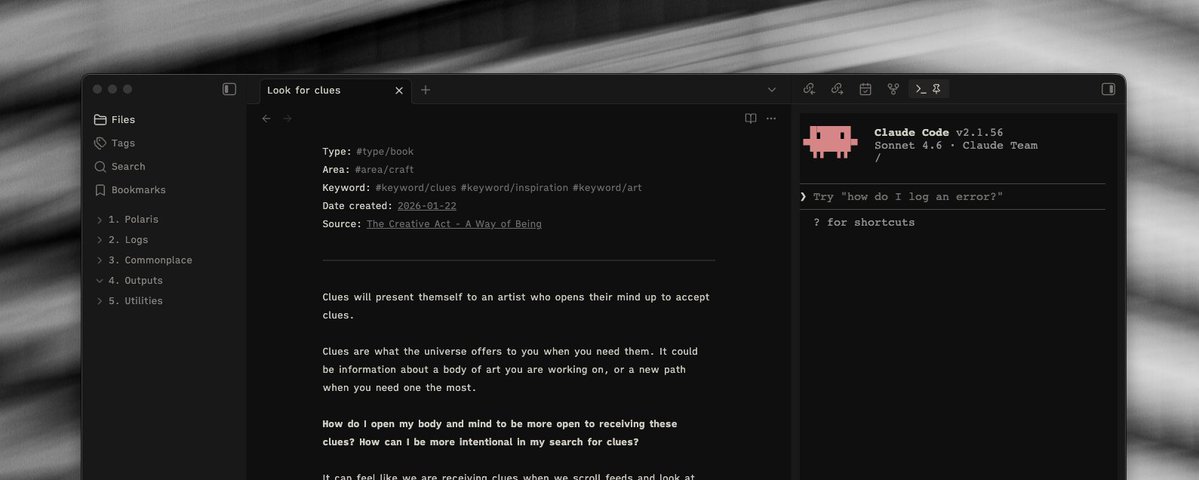
从左侧边栏可以看到,我有 5 个文件夹:

Polaris Polaris 是我 vault 里的“北极星”区域——我把主要目标、愿景、“top of mind”等重要内容都放在这里。

在提升 Claude 效率方面,这是我最大的收获之一,因为它会把这个文件夹当作自己“替我思考”时的指导参照点。(后面会详细说。)

Logs 这里存放每日笔记。我把每日笔记当作一张随手涂写的草稿纸,随时把东西写下来。上面的图片里就有例子。

Commonplace 这是 vault 的主体部分。里面有很多独立笔记,每一篇代表一个不同的想法——这也符合 “commonplace book” 的原始概念。

Outputs 我所有准备对外分享的写作都在这里完成——我现在就是在 vault 的 Outputs 区写这篇文章 :)

Utilities 让 vault 正常运转的各种“零件”:图片、模板、canvas、人物等

标签

在我看来,标签是 Obsidian vault 导航方式里最被严重低估的一种。我很少看到有人用类似的方式工作,我觉得很可惜。

第一,你可以嵌套标签。看上面的左侧边栏,在标签面板里我有“父级”标签,它们可以展开,并把子标签收在里面。

第二,标签很“可迁移”,也符合 “file over app” 的理念。我试过把 vault 迁移到其他应用(比如 Bear notes),它也能无缝工作。

第三,标签和 Claude 的配合很好。我可以在提示词里更具体,比如说“找出 articles 标签里的笔记”,它就会去筛选它们。

我创建的每一篇笔记,顶部都会有一组标签,作为元数据。上面是我当前标签结构的截图。

反向链接

反向链接用来在笔记之间手动建立连接。这是一种为自己的思考留下路径的好方式。

上面的例子是一篇我在读一篇关于显化(manifestation)的文章时写下的笔记。我从那篇文章里带走了几个想法,并且我觉得它们值得各自成为独立笔记。把两者连接起来,就能保证原始上下文不丢失。

另外——Claude 也非常擅长建议你可能遗漏的反向链接与笔记之间的连接。我为它专门写了一个命令。

关键要点

  • 让 vault 的组织方式保持简单、可预测。理想情况下,这是你选定后可以长期沿用、不必频繁更改的结构。

  • 标签是 Obsidian vault 导航中被低估的资源(至少在我看来!)。它们原生好用,也很适合与 Claude 协作!

  • 理解你的 vault 是如何组织的,能帮助你让 Claude 更高效。

  • Claude 很擅长建立连接,并把你可能错过的连接“捞”出来。

3. 用 Claude 搭配 Obsidian

https://x.com/@claudeai

一开始我对这件事到底有多大价值是怀疑的——但随着时间推移,我越来越佩服 Claude 在辅助我思考与工作流方面的能力。它不断让我惊讶:它能如此有效地在我的思路里建立连接、挑战我的假设,并在我需要更深挖的地方轻轻戳一下。

我最喜欢的一个例子

最近,我发现自己即将第一次成为父亲。这条路走了很久——对我来说这是一整套全新的情绪与想法。我想到的一切都会写进 vault。每一个小小的念头、点子、担忧、焦虑,我都会写在这些页面上——我多年一直如此。

Claude 注意到:虽然我什么都写,但关于“成为父亲”这件事本身,我写得并不多——尽管它其实是我最挂在心上的事。它问我:为什么会这样?

这件事我自己完全没意识到——但它戳到了一个我甚至没想到的脆弱点:我为什么在回避这些想法?

它一直在这方面帮助我,而且在我谈到这件事时,它也经常会出现在我的回应里。

在上面的截图里,它还标出了我正在做的一个小说写作项目之间的关联——“算算看”。它对我在情绪层面的笨拙与天真变得有点阴阳怪气。😆

善用 “Top Of Mind” 与 “Polaris”

在 vault 的 “Polaris” 区域里,我会放所有对我重要的东西。其中有一篇笔记叫 “Top Of Mind”。

https://x.com/@obsdmd

我可以把它作为一个参照点,让 Claude 在我思考任何新东西时都能回头对照。它会让我对“走神”、追逐亮闪闪的新玩意儿这件事保持自觉与约束。

这份文档我通常每隔几周会更新一次——它对让 Claude 更聚焦、更高效非常有价值。这里的描述完全不需要很长,只要要点清晰即可。

Life Razor 是我从 @SahilBloom 那里学到的一个概念:用一句话定义你的人生使命。提出这句话本身就是一个很有价值的练习——我当时也用 Claude 来协助;而现在我已经有了这句话,它再次成为一个非常有用的参照点。

示例提示词:"我当前的行动与我 top of mind 的内容有多一致?"

示例提示词:"我在考虑接下 X 这个机会……它会如何帮助或削弱我的 life razor?"

Idea Reports

我之后可能还会再写一篇帖子/文章,专门聊聊我为 Claude 在 Obsidian 里写的一些命令/提示词……但我最喜欢的之一是 “Idea report”。

这里的提示词是:"我有几个小时的空闲专注时间——我应该做什么?"

随后它会给出不同方向的建议——要构建的东西、要联系的人、要调查或继续拓展的想法,以及我可能遗漏的行动项。

它拥有我一直在思考的全部上下文,而从上面的输出里你也能清楚看到:它会在我的各种想法以及我写过的其他内容之间进行交叉引用。

利用 Vault 结构

一个简单的 vault 结构能让导航容易很多。下面是一个例子……

我开始把 “craft” 作为一个主题来写,并且我想从 vault 里捞出相关引用。我知道我有一个 craft 标签,所以我可以让 Claude 把这个标签下的文件都找出来。

然后,我们可以对某些特定笔记继续深挖,或者在它们之间寻找共同主题。

示例提示词:"把我所有带有 craft 标签的 Obsidian 笔记都展示出来"

示例提示词:"这些资源之间有没有相互关联的想法,能成为一个特别有趣、值得专门写的主题?"

关键要点

  • Claude 在寻找尚未被探索的线索、并提出能引导更深思考的问题方面表现极其出色。

  • 引入一个 “polaris” 类型的文档/文件夹——它应当包含你最挂在心上的事、目标、愿景、个人价值观。Claude 会经常引用它,而这些原则会引导它的思考。

  • 创建与你工作方式高度匹配的命令/提示词。

  • 保持简单的 vault 结构,会提升 Claude 的效率。

结语

过去几年里,我在使用 Obsidian 的过程中持续感受到的一点是:很缺少那种专门聚焦“如何在日常中使用它”的信息。作为一个几乎不给你指导、却给你极大自由度的工具,它会让入门变得非常令人望而生畏。

当然,有很多很棒的教程教你如何搭建某个具体东西,但很少有教程告诉你如何搭建一个能覆盖所有事情的工作流。或者说,有些教程很适合做研究工作的人、或全职学习的人,但并不一定适用于更一般的日常使用。

Claude 也是类似的工具,而且在一片炒作的洪流里,找到真实世界的使用案例正变得越来越困难。

希望上面的内容能给大家一个不错的基础,用来开始上手 Obsidian 与 Claude——两款极其强大的工具。

如果你觉得这篇文章有用,也欢迎考虑关注我……我会相当频繁地发布 Obsidian 相关内容。

另外,我也在开始搭建一个社区,聚集那些对“思考工具”感兴趣、并希望用 LLM 加深思考的人——thebuilders.club 🤍

I will run through how I structure my @obsdmd vault, as well as the other files outside of Obsidian that I use @claudeai for. My goal is to make this guide as actionable for yourself as possible.

I have held off for writing this for some time for a couple of reasons.

There has been a lot of information shared recently about Obsidian and Claude - some of it I believe is great, some I believe is not so great. I wanted to make sure that I had a robust and thoughtful way of working that stayed true to my values, rather than contributing something brittle when there was a lot of hype happening and noise.

The last couple of months, I have been entirely focused on finding the best way to integrate Claude into my daily work to help me get more efficient at both my job but also writing and thinking.

I believe now though I am ready to share my workflow. I am pleased with how it is, the value it is bringing to me, and I don't see this changing drastically in the near future.

Feel free to take inspiration, or use it in your own setup. This has been working very well for me - and I hope it will work well for you also!

Also - please ask any questions as a comment. I am more than happy to help, offer guidance or just chat about my workflow!

1. File Structure

Initially, I started putting everything in to my Obsidian vault (meeting transcripts, generated files) however quickly realised this was not a good fit for me.

My knowledge graph was getting diluted by a lot of files/transcriptions - these are useful to speak with Claude about, but less useful to have visually in Obsidian. I try and keep a separation of concerns between notes that I have personally written, and things that are generated by AI.

I now have a dedicated Claude folder, which contains everything that I work with Claude on. There are three sub-folders:

Github This contains both my personal codebases, work codebases and our company repository of skills/docs (affectionately named "Zkills"). Everything goes in there from PRDs, to customer research transcriptions to sales calls to Claude configuration files for our repositories.

I use Claude to parse a lot of this information, and reference company documents when making engineering decisions. This is becoming our default knowledge base over something like Notion - and through MCPs the flows are made much more efficient.

Example prompt: *"Look at the latest PRD and create me a Linear project from the PRD. Create specific tasks for each stage". *

Meeting notes I use a @raycast extension to export all of my Granola notes into their own dedicated folder. This has been really helpful in being able to use Claude to recall recent actions.

Example prompt: "I have a 121 upcoming with X person, what were the actions we took in our last meeting, and is there anything I need to do prior to our call?".

Obsidian Vault My Obsidian vault is where all of my writing happens. Daily notes, commonplace notes, written thinking, articles and social media posts. This is a practice I have been keeping now for the last six years with Obsidian specifically, and then before that other tools (Roam, Notion etc).

Claude has been ridiculously valuable when given access to all of this context, and has been transformational in how I think and write.

This article is about this section specifically. Let me dive deeper...

我会完整讲一遍我如何组织自己的 @obsdmd vault,以及我在 Obsidian 之外还会用 @claudeai 处理的其他文件。我的目标是让这份指南尽可能可操作,你可以直接照着搭起来。

我拖了好一阵子才写这篇文章,原因有几个。

最近关于 Obsidian 和 Claude 的信息分享非常多——有些我觉得很棒,有些我觉得不那么好。我想确保自己先有一套稳健、经过深思、并且符合我价值观的工作方式,而不是在大量炒作与噪声之中,贡献一套脆弱易碎的“流程”。

过去几个月里,我几乎把全部精力都放在:寻找把 Claude 整合进日常工作的最佳方式,让我在本职工作上更高效,同时也在写作与思考上更高效。

不过现在我觉得我准备好分享我的工作流了。我对它目前的样子很满意,它给我带来的价值也很清晰,而且我不认为它在短期内会发生剧烈变化。

你可以随意借鉴,或者直接用到自己的设置里。它对我来说一直运转得非常好——也希望它同样能对你有用!

另外——如果你有任何问题,欢迎在评论里问。我非常乐意帮忙、给建议,或者就聊聊我的工作流!

1. 文件结构

一开始,我把所有东西都放进 Obsidian vault(会议转写、生成文件等),但很快就意识到这并不适合我。

我的知识图谱被大量文件/转写内容稀释了——这些内容用来和 Claude 对话很有用,但放在 Obsidian 里可视化呈现的价值就没那么大。我尽量在“我亲自写的笔记”和“AI 生成的内容”之间保持关注点分离。

现在我有一个专门的 Claude 文件夹,用来放所有我与 Claude 协作的内容。下面有三个子文件夹:

Github 这里既包含我的个人代码库、工作代码库,也包含我们公司用于 skills/docs 的仓库(我们亲切地把它叫做 “Zkills”)。从 PRD、客户调研转写、销售通话记录,到我们各个仓库的 Claude 配置文件,所有东西都放在这里。

我会让 Claude 解析其中大量信息,并在做工程决策时引用公司文档。它正在成为我们默认的知识库,取代类似 Notion 的东西——而且通过 MCPs,整体流程也高效了很多。

示例提示词:"查看最新的 PRD,并基于 PRD 为我创建一个 Linear 项目。为每个阶段创建具体任务"。

Meeting notes 我用一个 @raycast 扩展把我所有的 Granola 笔记导出到一个专用文件夹里。这在需要 Claude 帮我回忆最近行动时非常有用。

示例提示词:"我和 X 有一场即将到来的 1:1,我们在上次会议里采取了哪些行动?在通话前我还需要做什么吗?"。

Obsidian Vault 我的 Obsidian vault 是我所有写作发生的地方:每日笔记、commonplace 笔记、书面化思考、文章和社交媒体帖子。这套习惯我在 Obsidian 上已经坚持了六年;在那之前也用过其他工具(Roam、Notion 等)。

当 Claude 能访问到这些上下文时,它的价值简直高得离谱,并且彻底改变了我思考与写作的方式。

这篇文章会专门讲这一部分。让我更深入一点……

Key Takeaways

  • Setup a dedicated "claude" folder on your machine. All context lives within here.

  • Separate AI generated notes away from your Obsidian vault. This helps keep the vault/knowledge graph clean. Mass amounts of generated transcripts/notes in your vault is not actually that useful on the knowledge graph - however Claude having access to them is useful.

2. Obsidian Vault Structure

The main structure of my Obsidian vault has not changed with the introduction of Claude.

My ethos from starting to use Obsidian years ago has always to keep things as simple as possible - and I have found that this works well, especially when working with AI. My setup has not overly changed in the last six years, because it has been created around how I like to think and how I work.

Across my Obsidian vault I utilise three main forms of navigation: folders, tags and backlinks.

关键要点

  • 在你的电脑上建立一个专门的 “claude” 文件夹。所有上下文都放在这里。

  • 把 AI 生成的笔记与内容从你的 Obsidian vault 中分离出去。这能让 vault/知识图谱保持干净。把海量生成的转写/笔记堆进 vault,其实对知识图谱并没有那么有用——但让 Claude 能访问它们又确实很有用。

2. Obsidian Vault 结构

Claude 的引入,并没有改变我 Obsidian vault 的主结构。

我从多年前开始使用 Obsidian 时的理念一直是:尽可能保持简单——而我发现这在与 AI 协作时尤其有效。我的设置在过去六年里并没有发生太大变化,因为它是围绕“我喜欢怎样思考、我怎样工作”构建出来的。

在整个 Obsidian vault 里,我主要用三种方式导航:文件夹、标签和反向链接(backlinks)。

Folders

I keep my folder structure very simple. I have experimented with no-folders, but like this minimal folder setup.

As you can see from the lefthand sidebar, I have 5 folders:

Polaris Polaris is my North Star section of the vault - this is where I keep my main goals, aspirations, "top of mind", amongst other things.

This has been one of the biggest wins in terms of Claude efficiency, as it uses this folder as a guiding reference point for when it does my thinking. (More on this later).

Logs This is where the daily notes live. I treat a daily note as a scratchpad, writing things down on the fly. An example can be seen in the picture above.

Commonplace This is the main part of my vault. Lots of separate notes live in there, and each represent a different thought - staying true to the original concept of a "commonplace book".

Outputs This is where I do all my writing for things that are going to be shared - currently writing this in the Outputs section of my vault :)

Utilities Bits that help the vault work - images, templates, canvas', people etc

文件夹

我的文件夹结构非常简单。我也试过完全不用文件夹,但我更喜欢这种极简的文件夹设置。

从左侧边栏可以看到,我有 5 个文件夹:

Polaris Polaris 是我 vault 里的“北极星”区域——我把主要目标、愿景、“top of mind”等重要内容都放在这里。

在提升 Claude 效率方面,这是我最大的收获之一,因为它会把这个文件夹当作自己“替我思考”时的指导参照点。(后面会详细说。)

Logs 这里存放每日笔记。我把每日笔记当作一张随手涂写的草稿纸,随时把东西写下来。上面的图片里就有例子。

Commonplace 这是 vault 的主体部分。里面有很多独立笔记,每一篇代表一个不同的想法——这也符合 “commonplace book” 的原始概念。

Outputs 我所有准备对外分享的写作都在这里完成——我现在就是在 vault 的 Outputs 区写这篇文章 :)

Utilities 让 vault 正常运转的各种“零件”:图片、模板、canvas、人物等

Tags

Tags is one of the most criminally underutilised ways of navigating through an Obsidian vault, in my humble opinion. I don't see many people working in a similar way, and I think it is a shame.

Firstly, you can nest tags. Looking at the left sidebar above, in the tag pane I have "parent" tags, these can be opened and sub-tags kept within them.

Secondly, tags are very portable and keep with the "file over app" mentality. I have tried migrating my vault to other applications (Bear notes, as an example) and it works seamlessly.

Thirdly, tags works well with Claude. I can get more specific by prompting "look for notes within the articles tag" and it will filter them.

Each note I create has a set of tags that act as metadata at the top of them. Above is a screenshot of the tag structure as it currently stands.

标签

在我看来,标签是 Obsidian vault 导航方式里最被严重低估的一种。我很少看到有人用类似的方式工作,我觉得很可惜。

第一,你可以嵌套标签。看上面的左侧边栏,在标签面板里我有“父级”标签,它们可以展开,并把子标签收在里面。

第二,标签很“可迁移”,也符合 “file over app” 的理念。我试过把 vault 迁移到其他应用(比如 Bear notes),它也能无缝工作。

第三,标签和 Claude 的配合很好。我可以在提示词里更具体,比如说“找出 articles 标签里的笔记”,它就会去筛选它们。

我创建的每一篇笔记,顶部都会有一组标签,作为元数据。上面是我当前标签结构的截图。

Backlinks

Backlinks are used to make connections manually between notes. It is a good way to leave trails for yourself to help with your thinking.

The example above is a note that I made when reading an article on manifestation. There were several ideas I took from this article, and I decided they warranted their own notes. Building a connection between the two means that original context is not lost.

Also - Claude is very good at suggesting backlinks and connections between notes that you might have missed. I have a command specifically for it.

反向链接

反向链接用来在笔记之间手动建立连接。这是一种为自己的思考留下路径的好方式。

上面的例子是一篇我在读一篇关于显化(manifestation)的文章时写下的笔记。我从那篇文章里带走了几个想法,并且我觉得它们值得各自成为独立笔记。把两者连接起来,就能保证原始上下文不丢失。

另外——Claude 也非常擅长建议你可能遗漏的反向链接与笔记之间的连接。我为它专门写了一个命令。

Key Takeaways

  • Keep vault organisation simple and predictable. Ideally this is something that you pick and should work with for a long time without changing.

  • Tags are an under-utilised source of Obsidian vault navigation (in my humble opinion!). They work well natively, and with Claude!

  • Understanding how your vault is organised, can help you make Claude more efficient.

  • Claude is great at building connections and surfacing connections that you may have missed.

3. Using Claude with Obsidian

https://x.com/@claudeai

At first I was skeptical about how valuable this would be - but as time goes on I become more and more impressed just by how helpful Claude is for my own thinking and workflows. It continues to surprise me at how well it is able to build connections in my thinking, challenge my assumptions and prod at areas that I need to dig deeper into

关键要点

  • 让 vault 的组织方式保持简单、可预测。理想情况下,这是你选定后可以长期沿用、不必频繁更改的结构。

  • 标签是 Obsidian vault 导航中被低估的资源(至少在我看来!)。它们原生好用,也很适合与 Claude 协作!

  • 理解你的 vault 是如何组织的,能帮助你让 Claude 更高效。

  • Claude 很擅长建立连接,并把你可能错过的连接“捞”出来。

3. 用 Claude 搭配 Obsidian

https://x.com/@claudeai

一开始我对这件事到底有多大价值是怀疑的——但随着时间推移,我越来越佩服 Claude 在辅助我思考与工作流方面的能力。它不断让我惊讶:它能如此有效地在我的思路里建立连接、挑战我的假设,并在我需要更深挖的地方轻轻戳一下。

One of my Favourite Examples

Recently, I found out I was going to be becoming a father for the first time. It's been a long road - and this is a whole new set of emotions/thoughts for me. Everything I think of goes into my vault.. I write every little thought, idea, concern, anxiety down onto these pages - I have done this for years.

Claude picked up that whilst I wrote about everything, I didn't write much about the thought of being a father - despite it being something that is top of my mind. It asked why that might be.

This was something I hadn't picked up on - but it prodded a vulnerability that hadn't even crossed my mind. Why was I avoiding those thoughts?

This is something it continues to help me with and it features heavily in my responses especially when speaking about.

In the screenshot above it flagged up a connection between a fiction writing project I have been working on. "Do the math". It is getting snarky at my own emotional incompetence and naivety. 😆

我最喜欢的一个例子

最近,我发现自己即将第一次成为父亲。这条路走了很久——对我来说这是一整套全新的情绪与想法。我想到的一切都会写进 vault。每一个小小的念头、点子、担忧、焦虑,我都会写在这些页面上——我多年一直如此。

Claude 注意到:虽然我什么都写,但关于“成为父亲”这件事本身,我写得并不多——尽管它其实是我最挂在心上的事。它问我:为什么会这样?

这件事我自己完全没意识到——但它戳到了一个我甚至没想到的脆弱点:我为什么在回避这些想法?

它一直在这方面帮助我,而且在我谈到这件事时,它也经常会出现在我的回应里。

在上面的截图里,它还标出了我正在做的一个小说写作项目之间的关联——“算算看”。它对我在情绪层面的笨拙与天真变得有点阴阳怪气。😆

Utilising "Top Of Mind" & "Polaris"

In my "Polaris" section of my vault, I keep everything that is important to me. One of those notes is "Top Of Mind".

https://x.com/@obsdmd

I can use this as a reference point for Claude to refer back to when I am thinking of anything new.. It holds me accountable for losing focus on things and chasing shiny objects.

This is a document that I update every couple of weeks generally - it has been really valuable for making Claude more focused and efficient. The descriptions don't need to be long here at all, as long as the point is clear.

The Life Razor is a concept I picked up from @SahilBloom - where your life's mission is defined by one sentence. Coming up with this has been a valuable exercise it itself I have used Claude for - however, now I have this statement it is again really useful as a reference point.

Example prompt: "How are my current actions aligned with whats top of my mind?"

Example prompt: "I am thinking about taking on X opportunity.. How does this help or detract from my life razor?"

善用 “Top Of Mind” 与 “Polaris”

在 vault 的 “Polaris” 区域里,我会放所有对我重要的东西。其中有一篇笔记叫 “Top Of Mind”。

https://x.com/@obsdmd

我可以把它作为一个参照点,让 Claude 在我思考任何新东西时都能回头对照。它会让我对“走神”、追逐亮闪闪的新玩意儿这件事保持自觉与约束。

这份文档我通常每隔几周会更新一次——它对让 Claude 更聚焦、更高效非常有价值。这里的描述完全不需要很长,只要要点清晰即可。

Life Razor 是我从 @SahilBloom 那里学到的一个概念:用一句话定义你的人生使命。提出这句话本身就是一个很有价值的练习——我当时也用 Claude 来协助;而现在我已经有了这句话,它再次成为一个非常有用的参照点。

示例提示词:"我当前的行动与我 top of mind 的内容有多一致?"

示例提示词:"我在考虑接下 X 这个机会……它会如何帮助或削弱我的 life razor?"

Idea Reports

I will likely do another post/article somewhen on some of the commands/prompts I have written for Claude specifically to use in Obsidian.. but one of my favourite is the "Idea report".

The prompt here is: "I have a few hours of spare focus time - what should I work on"?

This then breaks makes suggestions for different areas - things to build, people to reach out to, ideas to investigate or build on top of as well as actions that I may have missed.

It has the context of everything that I have been thinking about, and the output above you can clearly see the cross-referencing between my thoughts as well as other things I have been writing about.

Idea Reports

我之后可能还会再写一篇帖子/文章,专门聊聊我为 Claude 在 Obsidian 里写的一些命令/提示词……但我最喜欢的之一是 “Idea report”。

这里的提示词是:"我有几个小时的空闲专注时间——我应该做什么?"

随后它会给出不同方向的建议——要构建的东西、要联系的人、要调查或继续拓展的想法,以及我可能遗漏的行动项。

它拥有我一直在思考的全部上下文,而从上面的输出里你也能清楚看到:它会在我的各种想法以及我写过的其他内容之间进行交叉引用。

Making Use of Vault Structure

Having a simple vault structure can make navigation much easier. An example is here below..

I am starting to write about "craft" as a topic, and I want to pick up the references from within my vault. I know I have a craft tag, so I can ask Claude to pick me up the files that sit within that tag.

Then, we can dive down on specific notes or look for specific themes across each of them.

Example prompt: "Show me all of my Obsidian notes that have the tag craft"

Example prompt: *"Is there any connected ideas amongst these resources that would make an interesting topic to write about specifically?" *

利用 Vault 结构

一个简单的 vault 结构能让导航容易很多。下面是一个例子……

我开始把 “craft” 作为一个主题来写,并且我想从 vault 里捞出相关引用。我知道我有一个 craft 标签,所以我可以让 Claude 把这个标签下的文件都找出来。

然后,我们可以对某些特定笔记继续深挖,或者在它们之间寻找共同主题。

示例提示词:"把我所有带有 craft 标签的 Obsidian 笔记都展示出来"

示例提示词:"这些资源之间有没有相互关联的想法,能成为一个特别有趣、值得专门写的主题?"

Key Takeaways

  • Claude performs incredibly well at looking for threads that haven't been explored, and asking questions for deeper thought.

  • Introduce a "polaris" type document/folder - this should include what is top of your mind, goals, aspirations, personal values. Claude will reference this often and these principles help guide it's thinking.

  • Create commands/prompts that are specific to your ways of working.

  • Keeping a simple vault structure will help the efficiency of Claude.

Conclusion

What I have found with Obsidian, pretty continuously over the last few years, is there is a lack of information that focuses very specifically on how to use it day to day. As a tool that provides little guidance and a lot of flexibility, it is very intimidating to get started.

There are great tutorials on how to build a specific thing, but never very many on how to build a workflow that covers everything. Or there are great tutorials for people doing a research job or that are studying full time.

Claude is another such tool, and it is becoming more and more challenging to find real world use cases amongst a barrage of hype.

Hopefully the above has given people a decent foundation for which to get started with Obsidian and Claude - two incredibly powerful tools.

If you have found this useful, please do consider giving me a follow.. I post Obsidian content pretty frequently.

Also I am starting to build a community of people interested in tools for thought and using LLMs to deepen their thinking - thebuilders.club 🤍

Welcome thoughts, feedback and comments etc. Please leave below!
Link: http://x.com/i/article/2026585600627798016

关键要点

  • Claude 在寻找尚未被探索的线索、并提出能引导更深思考的问题方面表现极其出色。

  • 引入一个 “polaris” 类型的文档/文件夹——它应当包含你最挂在心上的事、目标、愿景、个人价值观。Claude 会经常引用它,而这些原则会引导它的思考。

  • 创建与你工作方式高度匹配的命令/提示词。

  • 保持简单的 vault 结构,会提升 Claude 的效率。

结语

过去几年里,我在使用 Obsidian 的过程中持续感受到的一点是:很缺少那种专门聚焦“如何在日常中使用它”的信息。作为一个几乎不给你指导、却给你极大自由度的工具,它会让入门变得非常令人望而生畏。

当然,有很多很棒的教程教你如何搭建某个具体东西,但很少有教程告诉你如何搭建一个能覆盖所有事情的工作流。或者说,有些教程很适合做研究工作的人、或全职学习的人,但并不一定适用于更一般的日常使用。

Claude 也是类似的工具,而且在一片炒作的洪流里,找到真实世界的使用案例正变得越来越困难。

希望上面的内容能给大家一个不错的基础,用来开始上手 Obsidian 与 Claude——两款极其强大的工具。

如果你觉得这篇文章有用,也欢迎考虑关注我……我会相当频繁地发布 Obsidian 相关内容。

另外,我也在开始搭建一个社区,聚集那些对“思考工具”感兴趣、并希望用 LLM 加深思考的人——thebuilders.club 🤍

欢迎你的想法、反馈、评论等等。请在下面留言!

链接:http://x.com/i/article/2026585600627798016

相关笔记

I will run through how I structure my @obsdmd vault, as well as the other files outside of Obsidian that I use @claudeai for. My goal is to make this guide as actionable for yourself as possible.

I have held off for writing this for some time for a couple of reasons.

There has been a lot of information shared recently about Obsidian and Claude - some of it I believe is great, some I believe is not so great. I wanted to make sure that I had a robust and thoughtful way of working that stayed true to my values, rather than contributing something brittle when there was a lot of hype happening and noise.

The last couple of months, I have been entirely focused on finding the best way to integrate Claude into my daily work to help me get more efficient at both my job but also writing and thinking.

I believe now though I am ready to share my workflow. I am pleased with how it is, the value it is bringing to me, and I don't see this changing drastically in the near future.

Feel free to take inspiration, or use it in your own setup. This has been working very well for me - and I hope it will work well for you also!

Also - please ask any questions as a comment. I am more than happy to help, offer guidance or just chat about my workflow!

1. File Structure

Initially, I started putting everything in to my Obsidian vault (meeting transcripts, generated files) however quickly realised this was not a good fit for me.

My knowledge graph was getting diluted by a lot of files/transcriptions - these are useful to speak with Claude about, but less useful to have visually in Obsidian. I try and keep a separation of concerns between notes that I have personally written, and things that are generated by AI.

I now have a dedicated Claude folder, which contains everything that I work with Claude on. There are three sub-folders:

Github This contains both my personal codebases, work codebases and our company repository of skills/docs (affectionately named "Zkills"). Everything goes in there from PRDs, to customer research transcriptions to sales calls to Claude configuration files for our repositories.

I use Claude to parse a lot of this information, and reference company documents when making engineering decisions. This is becoming our default knowledge base over something like Notion - and through MCPs the flows are made much more efficient.

Example prompt: *"Look at the latest PRD and create me a Linear project from the PRD. Create specific tasks for each stage". *

Meeting notes I use a @raycast extension to export all of my Granola notes into their own dedicated folder. This has been really helpful in being able to use Claude to recall recent actions.

Example prompt: "I have a 121 upcoming with X person, what were the actions we took in our last meeting, and is there anything I need to do prior to our call?".

Obsidian Vault My Obsidian vault is where all of my writing happens. Daily notes, commonplace notes, written thinking, articles and social media posts. This is a practice I have been keeping now for the last six years with Obsidian specifically, and then before that other tools (Roam, Notion etc).

Claude has been ridiculously valuable when given access to all of this context, and has been transformational in how I think and write.

This article is about this section specifically. Let me dive deeper...

Key Takeaways

  • Setup a dedicated "claude" folder on your machine. All context lives within here.

  • Separate AI generated notes away from your Obsidian vault. This helps keep the vault/knowledge graph clean. Mass amounts of generated transcripts/notes in your vault is not actually that useful on the knowledge graph - however Claude having access to them is useful.

2. Obsidian Vault Structure

The main structure of my Obsidian vault has not changed with the introduction of Claude.

My ethos from starting to use Obsidian years ago has always to keep things as simple as possible - and I have found that this works well, especially when working with AI. My setup has not overly changed in the last six years, because it has been created around how I like to think and how I work.

Across my Obsidian vault I utilise three main forms of navigation: folders, tags and backlinks.

Folders

I keep my folder structure very simple. I have experimented with no-folders, but like this minimal folder setup.

As you can see from the lefthand sidebar, I have 5 folders:

Polaris Polaris is my North Star section of the vault - this is where I keep my main goals, aspirations, "top of mind", amongst other things.

This has been one of the biggest wins in terms of Claude efficiency, as it uses this folder as a guiding reference point for when it does my thinking. (More on this later).

Logs This is where the daily notes live. I treat a daily note as a scratchpad, writing things down on the fly. An example can be seen in the picture above.

Commonplace This is the main part of my vault. Lots of separate notes live in there, and each represent a different thought - staying true to the original concept of a "commonplace book".

Outputs This is where I do all my writing for things that are going to be shared - currently writing this in the Outputs section of my vault :)

Utilities Bits that help the vault work - images, templates, canvas', people etc

Tags

Tags is one of the most criminally underutilised ways of navigating through an Obsidian vault, in my humble opinion. I don't see many people working in a similar way, and I think it is a shame.

Firstly, you can nest tags. Looking at the left sidebar above, in the tag pane I have "parent" tags, these can be opened and sub-tags kept within them.

Secondly, tags are very portable and keep with the "file over app" mentality. I have tried migrating my vault to other applications (Bear notes, as an example) and it works seamlessly.

Thirdly, tags works well with Claude. I can get more specific by prompting "look for notes within the articles tag" and it will filter them.

Each note I create has a set of tags that act as metadata at the top of them. Above is a screenshot of the tag structure as it currently stands.

Backlinks

Backlinks are used to make connections manually between notes. It is a good way to leave trails for yourself to help with your thinking.

The example above is a note that I made when reading an article on manifestation. There were several ideas I took from this article, and I decided they warranted their own notes. Building a connection between the two means that original context is not lost.

Also - Claude is very good at suggesting backlinks and connections between notes that you might have missed. I have a command specifically for it.

Key Takeaways

  • Keep vault organisation simple and predictable. Ideally this is something that you pick and should work with for a long time without changing.

  • Tags are an under-utilised source of Obsidian vault navigation (in my humble opinion!). They work well natively, and with Claude!

  • Understanding how your vault is organised, can help you make Claude more efficient.

  • Claude is great at building connections and surfacing connections that you may have missed.

3. Using Claude with Obsidian

https://x.com/@claudeai

At first I was skeptical about how valuable this would be - but as time goes on I become more and more impressed just by how helpful Claude is for my own thinking and workflows. It continues to surprise me at how well it is able to build connections in my thinking, challenge my assumptions and prod at areas that I need to dig deeper into

One of my Favourite Examples

Recently, I found out I was going to be becoming a father for the first time. It's been a long road - and this is a whole new set of emotions/thoughts for me. Everything I think of goes into my vault.. I write every little thought, idea, concern, anxiety down onto these pages - I have done this for years.

Claude picked up that whilst I wrote about everything, I didn't write much about the thought of being a father - despite it being something that is top of my mind. It asked why that might be.

This was something I hadn't picked up on - but it prodded a vulnerability that hadn't even crossed my mind. Why was I avoiding those thoughts?

This is something it continues to help me with and it features heavily in my responses especially when speaking about.

In the screenshot above it flagged up a connection between a fiction writing project I have been working on. "Do the math". It is getting snarky at my own emotional incompetence and naivety. 😆

Utilising "Top Of Mind" & "Polaris"

In my "Polaris" section of my vault, I keep everything that is important to me. One of those notes is "Top Of Mind".

https://x.com/@obsdmd

I can use this as a reference point for Claude to refer back to when I am thinking of anything new.. It holds me accountable for losing focus on things and chasing shiny objects.

This is a document that I update every couple of weeks generally - it has been really valuable for making Claude more focused and efficient. The descriptions don't need to be long here at all, as long as the point is clear.

The Life Razor is a concept I picked up from @SahilBloom - where your life's mission is defined by one sentence. Coming up with this has been a valuable exercise it itself I have used Claude for - however, now I have this statement it is again really useful as a reference point.

Example prompt: "How are my current actions aligned with whats top of my mind?"

Example prompt: "I am thinking about taking on X opportunity.. How does this help or detract from my life razor?"

Idea Reports

I will likely do another post/article somewhen on some of the commands/prompts I have written for Claude specifically to use in Obsidian.. but one of my favourite is the "Idea report".

The prompt here is: "I have a few hours of spare focus time - what should I work on"?

This then breaks makes suggestions for different areas - things to build, people to reach out to, ideas to investigate or build on top of as well as actions that I may have missed.

It has the context of everything that I have been thinking about, and the output above you can clearly see the cross-referencing between my thoughts as well as other things I have been writing about.

Making Use of Vault Structure

Having a simple vault structure can make navigation much easier. An example is here below..

I am starting to write about "craft" as a topic, and I want to pick up the references from within my vault. I know I have a craft tag, so I can ask Claude to pick me up the files that sit within that tag.

Then, we can dive down on specific notes or look for specific themes across each of them.

Example prompt: "Show me all of my Obsidian notes that have the tag craft"

Example prompt: *"Is there any connected ideas amongst these resources that would make an interesting topic to write about specifically?" *

Key Takeaways

  • Claude performs incredibly well at looking for threads that haven't been explored, and asking questions for deeper thought.

  • Introduce a "polaris" type document/folder - this should include what is top of your mind, goals, aspirations, personal values. Claude will reference this often and these principles help guide it's thinking.

  • Create commands/prompts that are specific to your ways of working.

  • Keeping a simple vault structure will help the efficiency of Claude.

Conclusion

What I have found with Obsidian, pretty continuously over the last few years, is there is a lack of information that focuses very specifically on how to use it day to day. As a tool that provides little guidance and a lot of flexibility, it is very intimidating to get started.

There are great tutorials on how to build a specific thing, but never very many on how to build a workflow that covers everything. Or there are great tutorials for people doing a research job or that are studying full time.

Claude is another such tool, and it is becoming more and more challenging to find real world use cases amongst a barrage of hype.

Hopefully the above has given people a decent foundation for which to get started with Obsidian and Claude - two incredibly powerful tools.

If you have found this useful, please do consider giving me a follow.. I post Obsidian content pretty frequently.

Also I am starting to build a community of people interested in tools for thought and using LLMs to deepen their thinking - thebuilders.club 🤍

Welcome thoughts, feedback and comments etc. Please leave below!

📋 讨论归档

讨论进行中…