返回列表
🧠 阿头学 · 💬 讨论题 · 💰投资

把 Headless 拉满——为 Agentic 应用封装 codex exec

Codex exec 通过正交的"输出格式 × 权限等级"状态机,把 LLM Agent 从交互式工具降维成可脚本化的系统原语,但文章本身存在严重的代码排版错位和时空矛盾,削弱了其技术可信度。
打开原文 ↗

2026-03-14 原文链接 ↗
阅读简报
双语对照
完整翻译
原文
讨论归档

核心观点

  • I/O 隔离的工程优雅性 将进度流式写入 stderr、最终结果写入 stdout,完全符合 Unix 哲学,让 Agent 无缝接入 Shell 管道生态,既能肉眼监控思考过程,又不污染数据流。这是将 LLM 接入自动化流水线的关键设计。
  • 正交状态机的降维建模 将 66 种 flag 组合抽象为"输出格式 × 权限等级"两个独立维度,提供了一种系统化设计 Agentic 系统的思路——避免功能无限膨胀,用清晰的配置矩阵替代散落的 flag。
  • 结构化输出的强制确定性 JSON Schema 严格模式(additionalProperties: false + 完整 required 列表)的踩坑提示,揭示了一个做 AI 产品的铁律:不要指望大模型自觉,必须用最严苛的工程规则倒逼概率模型输出确定性结果。
  • 生产级黄金路径的缺失 文末虽然给出"从 --full-auto --json 开始"的建议,但这个"90% 覆盖率"完全无证自信,缺乏使用数据、场景统计或用户调研支撑;对不够警觉的读者会产生误导。
  • 安全风险被技巧化处理 文中教你如何跳过保护(--skip-git-repo-check、--yolo),但对这些配置在真实生产环境的风险只给了轻描淡写的提醒,缺乏威胁模型级别的分析——特别是在处理外部 PR 或未受信代码时,赋予 Agent 完整写权限极易遭受提示词注入攻击。

跟我们的关联

  • 对 Neta 意味着什么 Agent 架构设计者应该学会用"状态机"而不是"功能菜单"来思考 CLI 工具,这能帮助你在设计自己的 Agent 平台时,明确分层交互式界面(聊天/TUI)与非交互式执行(exec),避免把产品逻辑绑死在聊天体验里。下一步可以尝试给自己的 Agent 定义一个"exec 层":统一的、无状态的、可幂等调用接口。
  • 对 ATou 意味着什么 这篇文章预示了真正的产业爆发点在于 Headless Agent——不需要人类对话,一次性给齐上下文,单向输出确定性结果,直接塞进 CI/CD 流水线。未来的 AI 增长,得 API/CLI 者得天下。下一步可以思考:你的 AI 产品是否也应该提供一个"exec 模式",让企业客户在 GitHub Actions / GitLab CI 中直接调用,而不是强制集成 SDK?
  • 对 Uota 意味着什么 把 Agent 当作一个"有岗位、有权限边界"的成员来管理——有的只能读、有的可以改、有的在隔离环境里可以全开。这对团队权限治理有启发:设计 Agent 时,先画清楚"这个角色能做什么 / 不能做什么 / 严格禁止什么",配置层就是 Agent 的"岗位职责文档 + 安全边界"。下一步可以建立一套"Agent 权限矩阵",像对待真实员工一样严肃对待。
  • 对通用场景意味着什么 文章揭示了一个产品判断:一条"黄金路径"比一大堆功能更有用。但这篇文章本身没有做到这一点——它提供了太多细节而缺乏清晰的"从这里开始"指引。下一步应该是:如果你要推广一个复杂工具,先明确告诉用户最小化可行配置是什么,其他都是高级用法。

讨论引子

1. 如果 Agent 真的能被封装成"系统调用"级别的 CLI 工具,那么现在还需要 GUI / 聊天界面吗?或者说,GUI 的价值是否只在于"人类学习和调试"阶段,一旦 Agent 成熟就应该被替换成 exec 模式?

2. 文章提到在隔离 CI runner 中可以用 --yolo 绕过所有安全限制,但在处理外部 PR 或开源贡献时,这种配置是否真的安全?提示词注入攻击的风险有多大,现有的沙盒机制能否真正防御?

3. 结构化输出(JSON Schema)的强制确定性能否真正解决 LLM 幻觉问题,还是只是把不确定性从"输出格式"转移到了"语义正确性"?换句话说,一个格式正确但内容错误的 JSON 对自动化流水线的伤害有多大?

本文会带你一步步了解,如何为你的 agentic 应用封装 codex exec。codex exec "your query"(短别名:codex e "your query")是面向无头/可脚本化场景的专用命令:以非交互方式执行,将进度流式写入 stderr,只把最终的 agent 消息输出到 stdout,然后退出。

背景

如果你用过 Codex 的交互式 TUI,你已经知道这个 agent 能做什么。codex exec 让你把同一个 agent 放进脚本和 CI 流水线里。它会把进度流式写到 stderr,同时只把最终的 agent 消息写到 stdout。默认情况下,它在只读 sandbox 中运行,需要一个 Git 仓库,并通过 CODEX_API_KEY 进行认证。

封装 CLI

核心都归结为 codex exec(或 codex e)。它是一次性调用 CLI:运行 agent,把进度流式写到 stderr,并将最终结果输出到 stdout。本文所有结论都来自于对 Codex CLI v0.114.0 的 66 种 flag 组合进行测试,因此这里描述的行为都已对照真实 CLI 验证过。

状态机

可以把 codex exec 看作一个状态机:它有两个彼此独立的维度,并以正交方式组合:

第一个维度是输出格式,决定 stdout 输出什么。

https://developers.openai.com/codex/noninteractive/

第二个维度是权限等级,决定 agent 被允许做什么。

developer_instructions = "IMPORTANT: Always respond in bullet points. Focus on security."

任意输出格式都可以与任意 sandbox 模式搭配使用。与交互模式不同,这里没有双向流式传输——输入一次性给齐,输出单向流出。

有个小细节:--full-auto 是硬覆盖,会始终把 sandbox 锁定为 workspace-write。如果你传了 --full-auto --sandbox danger-full-access,显式的 --sandbox flag 会被静默忽略。想要 full access,请直接用 --sandbox danger-full-access(或 --yolo)。

注意事项

  • codex exec 默认要求 Git 仓库(或受信目录)。用 --skip-git-repo-check 可跳过检查。
  • stderr 用于流式输出进度;stdout 只包含最终结果。做管道/重定向时别搞混。
  • CODEX_API_KEY 只对 codex exec 生效,对其他命令无效。

基本用法模式

数据如何输入:输入方式

把 prompt 传给 codex exec 有多种方式:

  1. Command Line Argument(最常见)
codex exec --json -c model_reasoning_summary=detailed -c hide_agent_reasoning=false "complex task"
  1. Stdin Pipe(从另一个命令把内容管道过来:)
# To terminal (progress on stderr, result on stdout)
codex exec "summarize the repository structure"

# Capture to variable (only gets stdout = final message)
response=$(codex exec "What is 2+2?")
echo "$response"

# Save to file
codex exec "Write a haiku" > haiku.txt

# Pipe to another command
codex exec "generate release notes for the last 10 commits" | tee release-notes.md
  1. Stdin Redirect(从文件读取:)
codex exec -c features.shell_tool=false "analyze this code"
# or equivalently:
codex exec --disable shell_tool "analyze this code"
  1. Here-Doc(多行 Prompt,特别适合带格式的复杂提示)
[mcp_servers.my_server]
enabled = true
command = "npx"
args = ["-y", "my-mcp-server"]
enabled_tools = ["safe_tool_1", "safe_tool_2"]
disabled_tools = ["dangerous_tool"]
required = true
  1. Image Input(附上截图或设计稿——prompt 必须写在 image flag 之前)
codex exec < prompt.txt

组合输入方式

只有在未提供 prompt 参数(或使用 -)时才会读取 stdin。要把上下文与指令结合起来,就把它们拼接成同一条 stdin 流:

import { execSync } from "child_process";

function chat(prompt: string, model = "gpt-5.4"): string {
  const result = execSync(`codex exec --model ${model} --ephemeral`, {
    input: prompt,
    encoding: "utf-8",
  });
  return result;
}

const response = chat("What is the meaning of life?");
console.log(response);

数据如何输出:输出方式

共有 2 种输出格式,外加一个文件捕获 flag:

1:文本输出(默认,人类可读,纯文本)

const readline = require("readline");

for await (const line of readline.createInterface({ input: process.stdin })) {
  const event = JSON.parse(line);
  if (event.type === "item.completed" && event.item?.text) {
    process.stdout.write(event.item.text);
  }
}

2:JSON Lines 输出(机器可读)

通过 --json(或 --experimental-json)获取 JSONL 事件流:

{"type":"thread.started","thread_id":"019ce6ce-65fd-7530-8e6b-9ccce0436091"}
{"type":"turn.started"}
{"type":"item.completed","item":{"id":"item_0","type":"agent_message","text":"PING"}}
{"type":"turn.completed","usage":{"input_tokens":8497,"cached_input_tokens":8448,"output_tokens":51}}

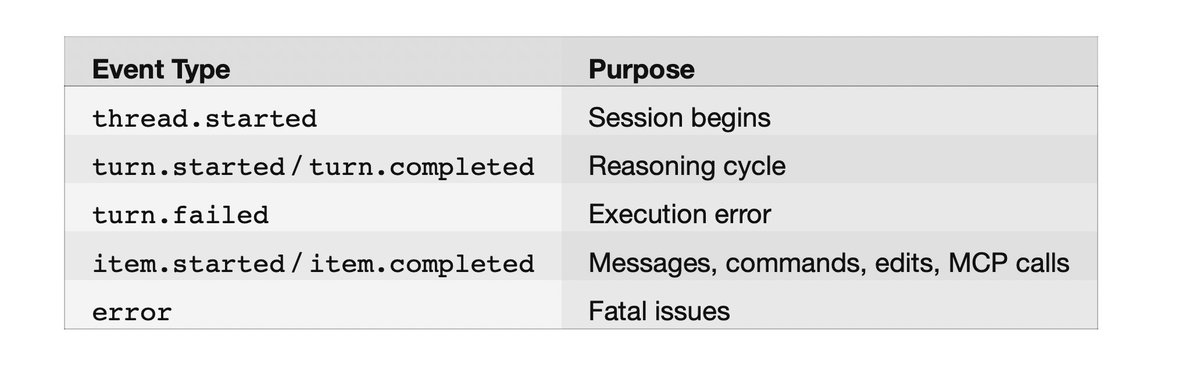
会返回以换行分隔的 JSON 事件,包含这些事件类型:

codex exec --json "summarize the repo structure" | jq

示例事件流:

https://developers.openai.com/codex/cli/features

默认情况下,reasoning items 会从 JSONL 流中隐藏。要把它们包含进来(在使用 model_reasoning_summary 时):

model_instructions_file = "./my-instructions.md"

这会在 agent message 之前新增 item.completed 事件,其 "type": "reasoning"。

用 jq 提取字段:

codex exec -c web_search=live "what is the latest version of React?"

实时解析:

codex exec --full-auto \
  "Read repo, run tests, identify minimal fix, implement only that change, stop."

或在 Node.js 中:

https://developers.openai.com/codex/config-basic/

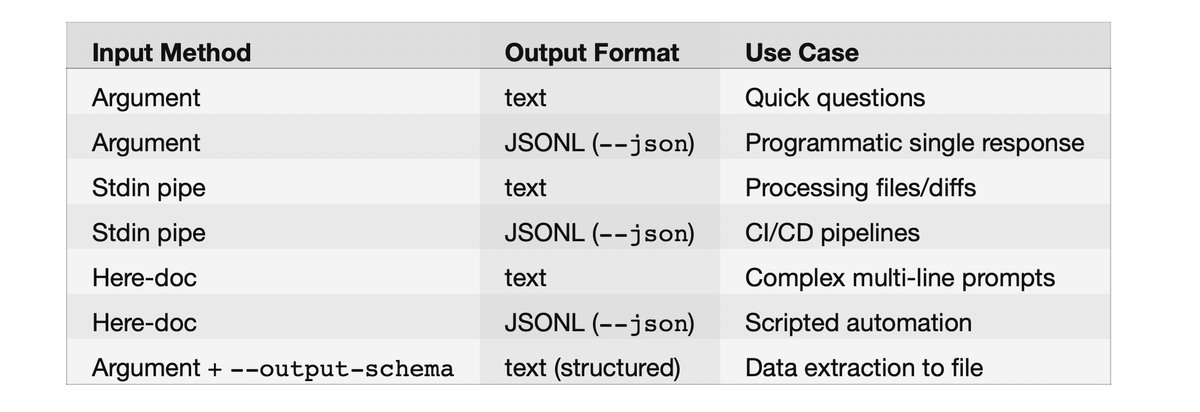
输入/输出组合矩阵

model = "gpt-5.4"

使用 JSON Schema 的结构化输出

这是做数据抽取时的杀手级功能。通过 --output-schema 指定 JSON Schema 文件,即可让响应结构化输出:

# Get just agent messages
codex exec --json "What is 2+2?" | jq 'select(.type == "item.completed") | .item.text'

# Get token usage from turn completion
codex exec --json "Hello" | jq 'select(.type == "turn.completed") | .usage'

示例 schema 文件(schema.json)。提前提醒:OpenAI API 会强制使用 strict mode,因此每个对象都必须包含 additionalProperties: false,并且 required 必须列出所有属性。我为了搞清这一点折腾了两次,第三次才成功:

https://developers.openai.com/codex/config-reference/

最终消息会遵循该 schema,并写入你通过 -o 指定的文件,同时仍会出现在 stdout。注意:-o 总是捕获纯文本。与 --json 结合时,stdout 输出 JSONL 事件流,而文件里只有最终的 agent 消息。这让 -o 很适合在 stdout 上流式输出 JSONL 以便监控的同时,把结果单独抽取出来。

工具配置

默认情况下,Codex exec 可以使用 shell 工具与文件操作。你可以通过 config.toml 对工具进行非常细粒度的配置:

禁用 Shell Tool(纯 LLM)

--enable 与 --disable 这两个 flag 是 -c features.=true/false 的快捷写法。

也可以在 ~/.codex/config.toml 中设置默认值:

[features]
multi_agent = true

[agents]
max_threads = 6
max_depth = 1

[agents.reviewer]
description = "Code reviewer that focuses on security and performance"

按应用控制工具

在 config.toml 中启用/禁用特定 MCP 应用及其单个工具:

网页搜索

交互模式的 --search flag 不能用于 codex exec。要在 exec 模式启用网页搜索,请使用配置键:

codex exec <<EOF
You are a code reviewer. Review this code:

def add(a, b):
    return a + b

Focus on: error handling, edge cases, documentation.
EOF

取值:disabled | cached | live(默认:cached)。

MCP 服务器配置

权限模式

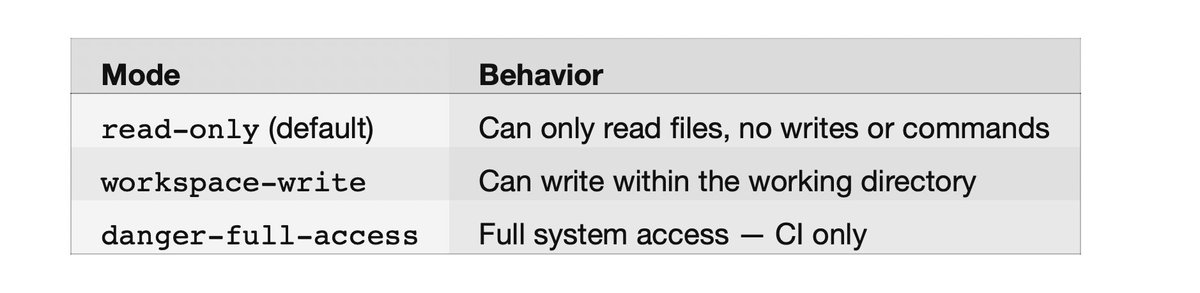
自主执行(autonomous execution)取决于两件事:sandbox policy 与 approval policy。

Sandbox 模式(--sandbox 或 -s):

https://developers.openai.com/codex/auth/

在 exec 模式下,approval 永远是 never,因为没有交互式用户可供提示。--full-auto 的文档把它描述为 on-request,但在 exec 模式里会自动收敛为 never。

便捷 flags

[apps._default]
enabled = false

[apps.my_tool]
enabled = true

[apps.my_tool.tools.dangerous_action]
enabled = false

用于 CI/CD 流水线

https://developers.openai.com/codex/cli/reference

额外可写目录:

# Review uncommitted changes
codex exec review --uncommitted

# Review changes against a branch
codex exec review --base main

# Review a specific commit
codex exec review --commit abc123

Sandbox 细调

https://developers.openai.com/codex/models/

会话管理

临时会话(不落盘)

--ephemeral 会阻止将会话 rollout 文件保存到磁盘:

# Single image
codex exec "Explain this error" -i screenshot.png

# Multiple images
codex exec "Summarize these diagrams" --image img1.png,img2.jpg

恢复之前的会话

用新的指令继续之前的会话:

# Recommended flagship model
codex exec --model gpt-5.4 "complex task"

# Industry-leading coding model
codex exec --model gpt-5.3-codex "standard task"

# Text-only near-instant research preview (ChatGPT Pro only)
codex exec --model gpt-5.3-codex-spark "quick question"

继续最近一次

代码审查

codex exec review 是专门用于自动化代码审查的子命令。它需要一个 git 仓库,并且满足以下之一:

#!/bin/bash
# agentic-codex.sh - Production wrapper for autonomous execution

TASK="$1"

codex exec \
  --model gpt-5.4 \
  --full-auto \
  --ephemeral \
  --json \
  --output-schema ./task-schema.json \
  -o ./result.json \
  "$TASK"

# Extract structured output
success=$(jq -r '.success' ./result.json)
summary=$(jq -r '.summary' ./result.json)

echo "Task: $success"
echo "Summary: $summary"

它会生成结构化的审查评论,包含严重级别(P1-P4)、文件路径与行范围。我真没想到它会这么好用;它甚至抓到了我不小心留在某个文件里的测试标题残留。

自定义系统提示词

完全替换

在 config.toml 中使用 model_instructions_file,可替换内置指令(而不是使用 AGENTS.md):

codex exec "Extract project metadata" \
  --output-schema ./schema.json \
  -o ./project-metadata.json

追加到默认提示(推荐)

在 config.toml 中使用 developer_instructions,可以在不替换默认内容的前提下,注入额外指令:

# Workspace-write sandbox + auto-approval (recommended for local automation)
codex exec --full-auto "your task here"

# Bypass everything — only use in isolated CI runners
codex exec --dangerously-bypass-approvals-and-sandbox "your task here"

# or equivalently:
codex exec --yolo "your task here"

或者在项目根目录放一个 AGENTS.md —— Codex 会自动读取它作为额外上下文。

自定义 Agent

通过 config.toml 配置多 agent 协作:

codex exec --json "Write a story" | \
  while IFS= read -r line; do
    text=$(echo "$line" | jq -r 'select(.type == "item.completed") | .item.text // empty' 2>/dev/null)
    [ -n "$text" ] && printf "%s" "$text"
  done

模型选择

基本模型选择

https://developers.openai.com/codex/concepts/sandboxing/

或在 ~/.codex/config.toml 中设置默认值:

codex exec resume --last "follow up question"

推理控制

无双向流式传输

codex exec 不支持双向流式传输。它是一次性命令:输入需要提前提供(通过参数、stdin 或 here-doc),输出则单向流出。若要实时交互的使用场景,请改用交互式 TUI 模式(codex)。

串起来:整合示例

生产级 Agentic 封装器

聊天机器人封装器

[features]
shell_tool = false

数据抽取流水线

codex exec --full-auto --add-dir /tmp/output "generate reports"

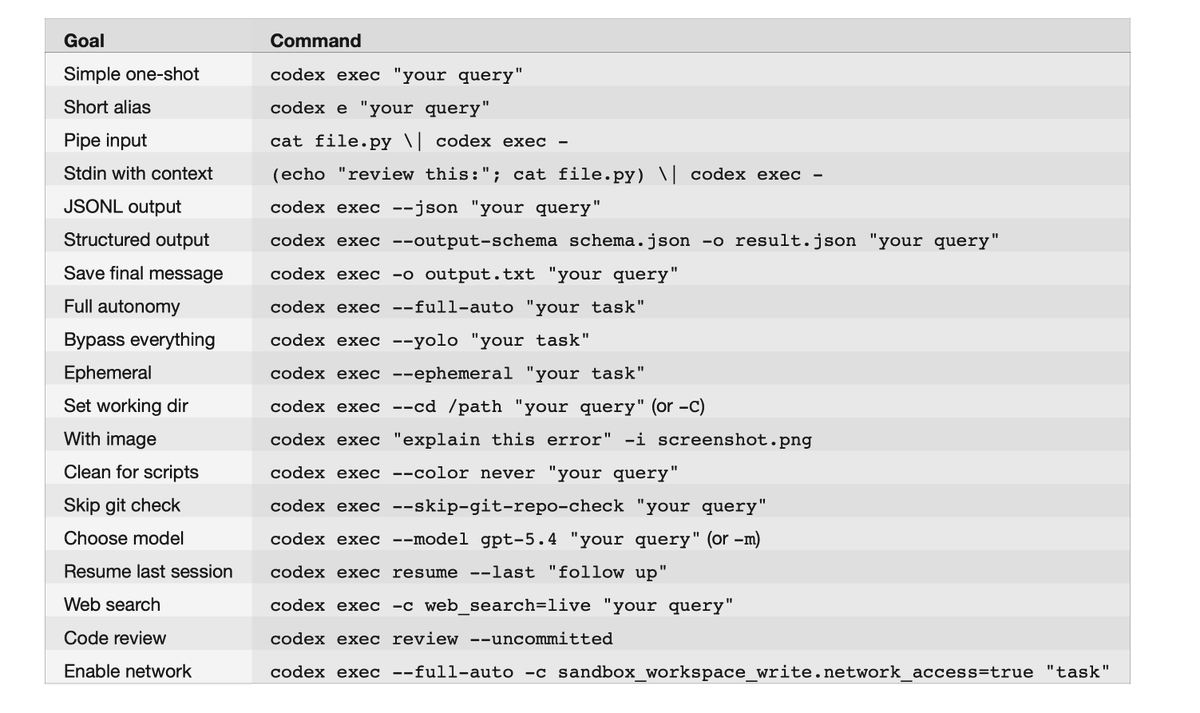
速查

codex exec "explain this function in main.py"
# or short alias:
codex e "explain this function in main.py"

注意事项

I/O

codex exec 默认要求 Git 仓库(或受信目录);可用 --skip-git-repo-check 跳过。进度会流式写到 stderr,只有最终消息会写到 stdout。只有在未提供 prompt 参数(或使用 -)时才会读取 stdin,因此你无法同时提供 prompt 参数并再从 stdin 管道输入内容。图片 flag(-i / --image)必须放在 prompt 参数之后。没有双向流式传输;需要实时聊天请使用交互式 TUI。

结构化输出

--output-schema 接受文件路径,因此先把 schema 写到文件里。schema 必须使用 strict mode:additionalProperties: false,且所有属性都要写进 required。

权限与安全

--yolo 会绕过全部安全限制;只应在不含敏感访问的隔离 CI runner 中使用。required 的 MCP 服务器(required = true)如果初始化失败,会导致退出并报错。--search 不能用于 codex exec(会返回 “unexpected argument”);请改用 -c web_search=live。

认证与环境

CODEX_API_KEY 会覆盖已存储的认证信息,且只对 codex exec 生效。若 ~/.codex/auth.json 中已有有效凭据,OPENAI_API_KEY 会被静默忽略,因此 exec 模式要覆盖认证请用 CODEX_API_KEY。OPENAI_BASE_URL 用于重定向 API 调用(适用于代理与自定义 endpoint)。CODEX_HOME 用于把全部配置、认证与会话存储从 ~/.codex 重定向到其他位置。

会话

恢复一个临时会话(ephemeral session)时,会静默创建新会话而不是报错,因为原会话从未被持久化。

二维状态机(输出格式 × sandbox 等级)让整体足够简单,而 -c 的配置覆盖又能让你无需触碰 config.toml 就能调整其余一切。如果你要在 Codex 之上构建 agentic 应用,从 --full-auto --json 开始;当你需要结构化数据时再叠加 --output-schema。这样就能覆盖 90% 的使用场景。
In this article, I’ll walk through how to wrap codex exec for your agentic apps. codex exec "your query" (short alias: codex e "your query") is the dedicated command for headless/scriptable use cases: non-interactive execution, streams progress to stderr, outputs only the final agent message to stdout, then exits.

本文会带你一步步了解,如何为你的 agentic 应用封装 codex exec。codex exec "your query"(短别名:codex e "your query")是面向无头/可脚本化场景的专用命令:以非交互方式执行,将进度流式写入 stderr,只把最终的 agent 消息输出到 stdout,然后退出。

Context

背景

If you’ve used the Codex interactive TUI, you already know what the agent can do. codex exec is how you put that same agent into your scripts and CI pipelines. It streams progress to stderr while outputting only the final agent message to stdout. By default it runs in a read-only sandbox, requires a Git repository, and authenticates via CODEX_API_KEY.

如果你用过 Codex 的交互式 TUI,你已经知道这个 agent 能做什么。codex exec 让你把同一个 agent 放进脚本和 CI 流水线里。它会把进度流式写到 stderr,同时只把最终的 agent 消息写到 stdout。默认情况下,它在只读 sandbox 中运行,需要一个 Git 仓库,并通过 CODEX_API_KEY 进行认证。

Wrapping the CLI

封装 CLI

This all comes down to codex exec (or codex e). It’s a one-shot invocation of the CLI that runs the agent, streams progress to stderr, and pipes the final result to stdout. Everything in this article is derived from testing 66 flag combinations against Codex CLI v0.114.0, so the behaviors described here are verified against the actual CLI.

核心都归结为 codex exec(或 codex e)。它是一次性调用 CLI:运行 agent,把进度流式写到 stderr,并将最终结果输出到 stdout。本文所有结论都来自于对 Codex CLI v0.114.0 的 66 种 flag 组合进行测试,因此这里描述的行为都已对照真实 CLI 验证过。

The State Machine

状态机

codex exec can be thought of as a state machine with two independent dimensions that combine orthogonally:

可以把 codex exec 看作一个状态机:它有两个彼此独立的维度,并以正交方式组合:

The first dimension is output format, which controls what comes out of stdout.

第一个维度是输出格式,决定 stdout 输出什么。

The second dimension is permission level, which controls what the agent is allowed to do.

第二个维度是权限等级,决定 agent 被允许做什么。

developer_instructions = "IMPORTANT: Always respond in bullet points. Focus on security."

Any output format works with any sandbox mode. Unlike interactive mode, there is no bidirectional streaming — input is provided upfront and output flows one way.

任意输出格式都可以与任意 sandbox 模式搭配使用。与交互模式不同,这里没有双向流式传输——输入一次性给齐,输出单向流出。

One wrinkle: --full-auto is a hard override that always locks the sandbox to workspace-write. If you pass --full-auto --sandbox danger-full-access, the explicit --sandbox flag is silently ignored. To get full access, use --sandbox danger-full-access directly (or --yolo).

有个小细节:--full-auto 是硬覆盖,会始终把 sandbox 锁定为 workspace-write。如果你传了 --full-auto --sandbox danger-full-access,显式的 --sandbox flag 会被静默忽略。想要 full access,请直接用 --sandbox danger-full-access(或 --yolo)。

Gotchas

注意事项

  • codex exec requires a Git repository (or trusted directory) by default. Use --skip-git-repo-check to override.
  • codex exec 默认要求 Git 仓库(或受信目录)。用 --skip-git-repo-check 可跳过检查。
  • stderr 用于流式输出进度;stdout 只包含最终结果。做管道/重定向时别搞混。
  • CODEX_API_KEY 只对 codex exec 生效,对其他命令无效。
  • Stderr streams progress; stdout contains only the final result. Don’t mix them up when piping.

基本用法模式

  • CODEX_API_KEY only works with codex exec, not other commands.

数据如何输入:输入方式

Basic Usage Patterns

把 prompt 传给 codex exec 有多种方式:

Getting Data IN: Input Methods

  1. Command Line Argument(最常见)

There are multiple ways to feed a prompt into codex exec:

codex exec --json -c model_reasoning_summary=detailed -c hide_agent_reasoning=false "complex task"
  1. Command Line Argument (Most Common)
  1. Stdin Pipe(从另一个命令把内容管道过来:)
codex exec --json -c model_reasoning_summary=detailed -c hide_agent_reasoning=false "complex task"
# To terminal (progress on stderr, result on stdout)
codex exec "summarize the repository structure"

# Capture to variable (only gets stdout = final message)
response=$(codex exec "What is 2+2?")
echo "$response"

# Save to file
codex exec "Write a haiku" > haiku.txt

# Pipe to another command
codex exec "generate release notes for the last 10 commits" | tee release-notes.md
  1. Stdin Pipe (Pipe content from another command:)
  1. Stdin Redirect(从文件读取:)
# To terminal (progress on stderr, result on stdout)
codex exec "summarize the repository structure"

# Capture to variable (only gets stdout = final message)
response=$(codex exec "What is 2+2?")
echo "$response"

# Save to file
codex exec "Write a haiku" > haiku.txt

# Pipe to another command
codex exec "generate release notes for the last 10 commits" | tee release-notes.md
codex exec -c features.shell_tool=false "analyze this code"
# or equivalently:
codex exec --disable shell_tool "analyze this code"
  1. Stdin Redirect (Read from a file:)
  1. Here-Doc(多行 Prompt,特别适合带格式的复杂提示)
codex exec -c features.shell_tool=false "analyze this code"
# or equivalently:
codex exec --disable shell_tool "analyze this code"
[mcp_servers.my_server]
enabled = true
command = "npx"
args = ["-y", "my-mcp-server"]
enabled_tools = ["safe_tool_1", "safe_tool_2"]
disabled_tools = ["dangerous_tool"]
required = true
  1. Here-Doc (Multi-line Prompts, perfect for complex prompts with formatting)
  1. Image Input(附上截图或设计稿——prompt 必须写在 image flag 之前)
[mcp_servers.my_server]
enabled = true
command = "npx"
args = ["-y", "my-mcp-server"]
enabled_tools = ["safe_tool_1", "safe_tool_2"]
disabled_tools = ["dangerous_tool"]
required = true
codex exec < prompt.txt
  1. Image Input (Attach screenshots or design specs — prompt must come before the image flag)

组合输入方式

codex exec < prompt.txt

只有在未提供 prompt 参数(或使用 -)时才会读取 stdin。要把上下文与指令结合起来,就把它们拼接成同一条 stdin 流:

Combining Input Methods

import { execSync } from "child_process";

function chat(prompt: string, model = "gpt-5.4"): string {
  const result = execSync(`codex exec --model ${model} --ephemeral`, {
    input: prompt,
    encoding: "utf-8",
  });
  return result;
}

const response = chat("What is the meaning of life?");
console.log(response);

Stdin is only read when no prompt argument is provided (or when - is used). To combine context with instructions, concatenate them into a single stdin stream:

数据如何输出:输出方式

import { execSync } from "child_process";

function chat(prompt: string, model = "gpt-5.4"): string {
  const result = execSync(`codex exec --model ${model} --ephemeral`, {
    input: prompt,
    encoding: "utf-8",
  });
  return result;
}

const response = chat("What is the meaning of life?");
console.log(response);

共有 2 种输出格式,外加一个文件捕获 flag:

Getting Data OUT: Output Methods

1:文本输出(默认,人类可读,纯文本)

There are 2 output formats plus a file-capture flag:

const readline = require("readline");

for await (const line of readline.createInterface({ input: process.stdin })) {
  const event = JSON.parse(line);
  if (event.type === "item.completed" && event.item?.text) {
    process.stdout.write(event.item.text);
  }
}

1: Text Output (Default, human-readable, plain text)

2:JSON Lines 输出(机器可读)

const readline = require("readline");

for await (const line of readline.createInterface({ input: process.stdin })) {
  const event = JSON.parse(line);
  if (event.type === "item.completed" && event.item?.text) {
    process.stdout.write(event.item.text);
  }
}

通过 --json(或 --experimental-json)获取 JSONL 事件流:

2: JSON Lines Output (Machine-Readable)

{"type":"thread.started","thread_id":"019ce6ce-65fd-7530-8e6b-9ccce0436091"}
{"type":"turn.started"}
{"type":"item.completed","item":{"id":"item_0","type":"agent_message","text":"PING"}}
{"type":"turn.completed","usage":{"input_tokens":8497,"cached_input_tokens":8448,"output_tokens":51}}

JSONL event stream via --json (or --experimental-json):

会返回以换行分隔的 JSON 事件,包含这些事件类型:

{"type":"thread.started","thread_id":"019ce6ce-65fd-7530-8e6b-9ccce0436091"}
{"type":"turn.started"}
{"type":"item.completed","item":{"id":"item_0","type":"agent_message","text":"PING"}}
{"type":"turn.completed","usage":{"input_tokens":8497,"cached_input_tokens":8448,"output_tokens":51}}
codex exec --json "summarize the repo structure" | jq

Returns newline-delimited JSON events with these event types:

示例事件流:

codex exec --json "summarize the repo structure" | jq

Sample event stream:

默认情况下,reasoning items 会从 JSONL 流中隐藏。要把它们包含进来(在使用 model_reasoning_summary 时):

model_instructions_file = "./my-instructions.md"

By default, reasoning items are hidden from the JSONL stream. To include them (when using model_reasoning_summary):

这会在 agent message 之前新增 item.completed 事件,其 "type": "reasoning"。

model_instructions_file = "./my-instructions.md"

用 jq 提取字段:

This adds item.completed events with "type": "reasoning" before the agent message.

codex exec -c web_search=live "what is the latest version of React?"

Extract fields with jq:

实时解析:

codex exec -c web_search=live "what is the latest version of React?"
codex exec --full-auto \
  "Read repo, run tests, identify minimal fix, implement only that change, stop."

Parse in real-time:

或在 Node.js 中:

codex exec --full-auto \
  "Read repo, run tests, identify minimal fix, implement only that change, stop."

Or in Node.js:

输入/输出组合矩阵

Input/Output Combination Matrix

使用 JSON Schema 的结构化输出

model = "gpt-5.4"

这是做数据抽取时的杀手级功能。通过 --output-schema 指定 JSON Schema 文件,即可让响应结构化输出:

Structured Output with JSON Schema

# Get just agent messages
codex exec --json "What is 2+2?" | jq 'select(.type == "item.completed") | .item.text'

# Get token usage from turn completion
codex exec --json "Hello" | jq 'select(.type == "turn.completed") | .usage'

This is the killer feature for data extraction. Define a JSON Schema file for structured responses via --output-schema:

示例 schema 文件(schema.json)。提前提醒:OpenAI API 会强制使用 strict mode,因此每个对象都必须包含 additionalProperties: false,并且 required 必须列出所有属性。我为了搞清这一点折腾了两次,第三次才成功:

# Get just agent messages
codex exec --json "What is 2+2?" | jq 'select(.type == "item.completed") | .item.text'

# Get token usage from turn completion
codex exec --json "Hello" | jq 'select(.type == "turn.completed") | .usage'

Example schema file (schema.json). Fair warning: the OpenAI API enforces strict mode, so every object must include additionalProperties: false and requiredmust list all properties. I burned two attempts figuring this out before the third one worked:

最终消息会遵循该 schema,并写入你通过 -o 指定的文件,同时仍会出现在 stdout。注意:-o 总是捕获纯文本。与 --json 结合时,stdout 输出 JSONL 事件流,而文件里只有最终的 agent 消息。这让 -o 很适合在 stdout 上流式输出 JSONL 以便监控的同时,把结果单独抽取出来。

The final message conforms to the schema and is written to the specified file (via -o) while still appearing on stdout. Note that -o always captures plain text. When combined with --json, stdout gets the JSONL event stream while the file gets only the final agent message. This makes -o useful for extracting the result while streaming JSONL events to stdout for monitoring.

默认情况下,Codex exec 可以使用 shell 工具与文件操作。你可以通过 config.toml 对工具进行非常细粒度的配置:

Tool Configuration

禁用 Shell Tool(纯 LLM)

By default, Codex exec has access to a shell tool and file operations. You can get pretty granular with tool configuration via config.toml:

--enable 与 --disable 这两个 flag 是 -c features.=true/false 的快捷写法。

Disable Shell Tool (Pure LLM)

也可以在 ~/.codex/config.toml 中设置默认值:

The --enable and --disable flags are shortcuts for -c features.=true/false.

[features]
multi_agent = true

[agents]
max_threads = 6
max_depth = 1

[agents.reviewer]
description = "Code reviewer that focuses on security and performance"

Or set defaults in ~/.codex/config.toml:

按应用控制工具

[features]
multi_agent = true

[agents]
max_threads = 6
max_depth = 1

[agents.reviewer]
description = "Code reviewer that focuses on security and performance"

在 config.toml 中启用/禁用特定 MCP 应用及其单个工具:

Per-App Tool Control

网页搜索

In config.toml, enable/disable specific MCP apps and their individual tools:

交互模式的 --search flag 不能用于 codex exec。要在 exec 模式启用网页搜索,请使用配置键:

Web Search

codex exec <<EOF
You are a code reviewer. Review this code:

def add(a, b):
    return a + b

Focus on: error handling, edge cases, documentation.
EOF

The interactive --search flag does not work with codex exec. To enable web search in exec mode, use the config key:

取值:disabled | cached | live(默认:cached)。

codex exec <<EOF
You are a code reviewer. Review this code:

def add(a, b):
    return a + b

Focus on: error handling, edge cases, documentation.
EOF

MCP 服务器配置

Values: disabled | cached | live (default: cached).

权限模式

MCP Server Configuration

自主执行(autonomous execution)取决于两件事:sandbox policy 与 approval policy。

Permission Modes

Sandbox 模式(--sandbox 或 -s):

Autonomous execution hinges on two things: sandbox policy and approval policy.

Sandbox modes (--sandbox or -s):

在 exec 模式下,approval 永远是 never,因为没有交互式用户可供提示。--full-auto 的文档把它描述为 on-request,但在 exec 模式里会自动收敛为 never。

In exec mode, approval is always never because there is no interactive user to prompt. The --full-auto docs describe it as on-request, but exec mode collapses this to never automatically.

[apps._default]
enabled = false

[apps.my_tool]
enabled = true

[apps.my_tool.tools.dangerous_action]
enabled = false

Convenience flags:

用于 CI/CD 流水线

[apps._default]
enabled = false

[apps.my_tool]
enabled = true

[apps.my_tool.tools.dangerous_action]
enabled = false

For CI/CD Pipelines

额外可写目录:

# Review uncommitted changes
codex exec review --uncommitted

# Review changes against a branch
codex exec review --base main

# Review a specific commit
codex exec review --commit abc123

Additional writable directories:

Sandbox 细调

# Review uncommitted changes
codex exec review --uncommitted

# Review changes against a branch
codex exec review --base main

# Review a specific commit
codex exec review --commit abc123

Sandbox Fine-Tuning

会话管理

Session Management

--ephemeral 会阻止将会话 rollout 文件保存到磁盘:

Ephemeral Sessions (No Disk Storage)

# Single image
codex exec "Explain this error" -i screenshot.png

# Multiple images
codex exec "Summarize these diagrams" --image img1.png,img2.jpg

--ephemeral prevents saving session rollout files to disk:

恢复之前的会话

# Single image
codex exec "Explain this error" -i screenshot.png

# Multiple images
codex exec "Summarize these diagrams" --image img1.png,img2.jpg

用新的指令继续之前的会话:

Resume Previous Sessions

# Recommended flagship model
codex exec --model gpt-5.4 "complex task"

# Industry-leading coding model
codex exec --model gpt-5.3-codex "standard task"

# Text-only near-instant research preview (ChatGPT Pro only)
codex exec --model gpt-5.3-codex-spark "quick question"

Continue a previous session with new instructions:

继续最近一次

# Recommended flagship model
codex exec --model gpt-5.4 "complex task"

# Industry-leading coding model
codex exec --model gpt-5.3-codex "standard task"

# Text-only near-instant research preview (ChatGPT Pro only)
codex exec --model gpt-5.3-codex-spark "quick question"

代码审查

Continue Most Recent

codex exec review 是专门用于自动化代码审查的子命令。它需要一个 git 仓库,并且满足以下之一:

Code Review

#!/bin/bash
# agentic-codex.sh - Production wrapper for autonomous execution

TASK="$1"

codex exec \
  --model gpt-5.4 \
  --full-auto \
  --ephemeral \
  --json \
  --output-schema ./task-schema.json \
  -o ./result.json \
  "$TASK"

# Extract structured output
success=$(jq -r '.success' ./result.json)
summary=$(jq -r '.summary' ./result.json)

echo "Task: $success"
echo "Summary: $summary"

codex exec review is a dedicated subcommand for automated code review. It requires a git repository and one of:

它会生成结构化的审查评论,包含严重级别(P1-P4)、文件路径与行范围。我真没想到它会这么好用;它甚至抓到了我不小心留在某个文件里的测试标题残留。

#!/bin/bash
# agentic-codex.sh - Production wrapper for autonomous execution

TASK="$1"

codex exec \
  --model gpt-5.4 \
  --full-auto \
  --ephemeral \
  --json \
  --output-schema ./task-schema.json \
  -o ./result.json \
  "$TASK"

# Extract structured output
success=$(jq -r '.success' ./result.json)
summary=$(jq -r '.summary' ./result.json)

echo "Task: $success"
echo "Summary: $summary"

自定义系统提示词

It produces structured review comments with severity levels (P1-P4), file paths, and line ranges. I was genuinely surprised by how useful this is; it caught a leftover test heading I’d accidentally left in a file.

完全替换

Custom System Prompts

在 config.toml 中使用 model_instructions_file,可替换内置指令(而不是使用 AGENTS.md):

Replace Entirely

codex exec "Extract project metadata" \
  --output-schema ./schema.json \
  -o ./project-metadata.json

Use model_instructions_file in config.toml to replace the built-in instructions (instead of AGENTS.md):

追加到默认提示(推荐)

codex exec "Extract project metadata" \
  --output-schema ./schema.json \
  -o ./project-metadata.json

在 config.toml 中使用 developer_instructions,可以在不替换默认内容的前提下,注入额外指令:

Append to Default (Recommended)

# Workspace-write sandbox + auto-approval (recommended for local automation)
codex exec --full-auto "your task here"

# Bypass everything — only use in isolated CI runners
codex exec --dangerously-bypass-approvals-and-sandbox "your task here"

# or equivalently:
codex exec --yolo "your task here"

Use developer_instructions in config.toml to inject additional instructions without replacing the defaults:

或者在项目根目录放一个 AGENTS.md —— Codex 会自动读取它作为额外上下文。

# Workspace-write sandbox + auto-approval (recommended for local automation)
codex exec --full-auto "your task here"

# Bypass everything — only use in isolated CI runners
codex exec --dangerously-bypass-approvals-and-sandbox "your task here"

# or equivalently:
codex exec --yolo "your task here"

自定义 Agent

Or use an AGENTS.md file in the project root — Codex automatically reads it as additional context.

通过 config.toml 配置多 agent 协作:

Custom Agents

codex exec --json "Write a story" | \
  while IFS= read -r line; do
    text=$(echo "$line" | jq -r 'select(.type == "item.completed") | .item.text // empty' 2>/dev/null)
    [ -n "$text" ] && printf "%s" "$text"
  done

Configure multi-agent collaboration via config.toml:

模型选择

codex exec --json "Write a story" | \
  while IFS= read -r line; do
    text=$(echo "$line" | jq -r 'select(.type == "item.completed") | .item.text // empty' 2>/dev/null)
    [ -n "$text" ] && printf "%s" "$text"
  done

基本模型选择

Basic Model Choice

或在 ~/.codex/config.toml 中设置默认值:

codex exec resume --last "follow up question"

Or set a default in ~/.codex/config.toml:

推理控制

codex exec resume --last "follow up question"

无双向流式传输

Reasoning Control

codex exec 不支持双向流式传输。它是一次性命令:输入需要提前提供(通过参数、stdin 或 here-doc),输出则单向流出。若要实时交互的使用场景,请改用交互式 TUI 模式(codex)。

No Bidirectional Streaming

串起来:整合示例

codex exec does not support bidirectional streaming. It is a one-shot command: input is provided upfront (via argument, stdin, or here-doc), and output flows one way. For real-time interactive use cases, use the interactive TUI mode (codex) instead.

生产级 Agentic 封装器

Putting It All Together

聊天机器人封装器

Production Agentic Wrapper

[features]
shell_tool = false

Chatbot Wrapper

数据抽取流水线

[features]
shell_tool = false
codex exec --full-auto --add-dir /tmp/output "generate reports"

Data Extraction Pipeline

速查

codex exec --full-auto --add-dir /tmp/output "generate reports"
codex exec "explain this function in main.py"
# or short alias:
codex e "explain this function in main.py"

Quick Reference

注意事项

codex exec "explain this function in main.py"
# or short alias:
codex e "explain this function in main.py"

I/O

Gotchas

codex exec 默认要求 Git 仓库(或受信目录);可用 --skip-git-repo-check 跳过。进度会流式写到 stderr,只有最终消息会写到 stdout。只有在未提供 prompt 参数(或使用 -)时才会读取 stdin,因此你无法同时提供 prompt 参数并再从 stdin 管道输入内容。图片 flag(-i / --image)必须放在 prompt 参数之后。没有双向流式传输;需要实时聊天请使用交互式 TUI。

I/O

结构化输出

codex exec requires a Git repository (or trusted directory) by default; use --skip-git-repo-check to override. Progress streams to stderr, only the final message goes to stdout. Stdin is only read when no prompt argument is provided (or when - is used), so you cannot combine a prompt argument with piped stdin content. Image flags (-i / --image) must come after the prompt argument. There is no bidirectional streaming; use the interactive TUI for real-time chat.

--output-schema 接受文件路径,因此先把 schema 写到文件里。schema 必须使用 strict mode:additionalProperties: false,且所有属性都要写进 required。

Structured output

权限与安全

--output-schema accepts a file path, so write your schema to a file first. The schema must use strict mode: additionalProperties: false and all properties in required.

--yolo 会绕过全部安全限制;只应在不含敏感访问的隔离 CI runner 中使用。required 的 MCP 服务器(required = true)如果初始化失败,会导致退出并报错。--search 不能用于 codex exec(会返回 “unexpected argument”);请改用 -c web_search=live。

Permissions and safety

认证与环境

--yolo bypasses ALL safety; only use in isolated CI runners with no sensitive access. Required MCP servers (required = true) cause exit with error if they fail to initialize. --search does not work with codex exec (returns “unexpected argument”); use -c web_search=live instead.

CODEX_API_KEY 会覆盖已存储的认证信息,且只对 codex exec 生效。若 ~/.codex/auth.json 中已有有效凭据,OPENAI_API_KEY 会被静默忽略,因此 exec 模式要覆盖认证请用 CODEX_API_KEY。OPENAI_BASE_URL 用于重定向 API 调用(适用于代理与自定义 endpoint)。CODEX_HOME 用于把全部配置、认证与会话存储从 ~/.codex 重定向到其他位置。

Auth and environment

会话

CODEX_API_KEY overrides stored auth and only works with codex exec. OPENAI_API_KEY is silently ignored when ~/.codex/auth.json has valid credentials, so use CODEX_API_KEY for exec-mode auth override. OPENAI_BASE_URL redirects API calls (useful for proxies and custom endpoints). CODEX_HOME redirects all config, auth, and session storage away from ~/.codex.

恢复一个临时会话(ephemeral session)时,会静默创建新会话而不是报错,因为原会话从未被持久化。

Sessions

二维状态机(输出格式 × sandbox 等级)让整体足够简单,而 -c 的配置覆盖又能让你无需触碰 config.toml 就能调整其余一切。如果你要在 Codex 之上构建 agentic 应用,从 --full-auto --json 开始;当你需要结构化数据时再叠加 --output-schema。这样就能覆盖 90% 的使用场景。
Resuming an ephemeral session silently creates a new session instead of erroring, because the original session was never persisted.

Codex CLI 版本:0.114.0 | 测试日期:2026–03–13

The two-dimensional state machine (output format x sandbox level) keeps things simple, and the -c config overrides let you reach everything else without touching config.toml. If you’re building agentic apps on top of Codex, start with --full-auto --json and layer on --output-schema when you need structured data. That covers 90% of use cases.

参考资料

Codex CLI version: 0.114.0 | Tested: 2026–03–13

  • Codex CLI Reference(Command Line Options)
  • Codex CLI Features
  • Codex Non-Interactive Mode
  • Codex Configuration Reference
  • Codex Sandboxing Concepts
  • Codex Authentication
  • Codex Models
  • Codex Config Basics

References

  • Codex CLI Reference (Command Line Options)

  • Codex CLI Features

  • Codex Non-Interactive Mode

  • Codex Configuration Reference

  • Codex Sandboxing Concepts

  • Codex Authentication

链接: http://x.com/i/article/2032545569688670208

  • Codex Models

相关笔记

  • Codex Config Basics

Link: http://x.com/i/article/2032545569688670208

In this article, I’ll walk through how to wrap codex exec for your agentic apps. codex exec "your query" (short alias: codex e "your query") is the dedicated command for headless/scriptable use cases: non-interactive execution, streams progress to stderr, outputs only the final agent message to stdout, then exits.

Context

If you’ve used the Codex interactive TUI, you already know what the agent can do. codex exec is how you put that same agent into your scripts and CI pipelines. It streams progress to stderr while outputting only the final agent message to stdout. By default it runs in a read-only sandbox, requires a Git repository, and authenticates via CODEX_API_KEY.

Wrapping the CLI

This all comes down to codex exec (or codex e). It’s a one-shot invocation of the CLI that runs the agent, streams progress to stderr, and pipes the final result to stdout. Everything in this article is derived from testing 66 flag combinations against Codex CLI v0.114.0, so the behaviors described here are verified against the actual CLI.

The State Machine

codex exec can be thought of as a state machine with two independent dimensions that combine orthogonally:

The first dimension is output format, which controls what comes out of stdout.

https://developers.openai.com/codex/noninteractive/

The second dimension is permission level, which controls what the agent is allowed to do.

developer_instructions = "IMPORTANT: Always respond in bullet points. Focus on security."

Any output format works with any sandbox mode. Unlike interactive mode, there is no bidirectional streaming — input is provided upfront and output flows one way.

One wrinkle: --full-auto is a hard override that always locks the sandbox to workspace-write. If you pass --full-auto --sandbox danger-full-access, the explicit --sandbox flag is silently ignored. To get full access, use --sandbox danger-full-access directly (or --yolo).

Gotchas

  • codex exec requires a Git repository (or trusted directory) by default. Use --skip-git-repo-check to override.

  • Stderr streams progress; stdout contains only the final result. Don’t mix them up when piping.

  • CODEX_API_KEY only works with codex exec, not other commands.

Basic Usage Patterns

Getting Data IN: Input Methods

There are multiple ways to feed a prompt into codex exec:

  1. Command Line Argument (Most Common)
codex exec --json -c model_reasoning_summary=detailed -c hide_agent_reasoning=false "complex task"
  1. Stdin Pipe (Pipe content from another command:)
# To terminal (progress on stderr, result on stdout)
codex exec "summarize the repository structure"

# Capture to variable (only gets stdout = final message)
response=$(codex exec "What is 2+2?")
echo "$response"

# Save to file
codex exec "Write a haiku" > haiku.txt

# Pipe to another command
codex exec "generate release notes for the last 10 commits" | tee release-notes.md
  1. Stdin Redirect (Read from a file:)
codex exec -c features.shell_tool=false "analyze this code"
# or equivalently:
codex exec --disable shell_tool "analyze this code"
  1. Here-Doc (Multi-line Prompts, perfect for complex prompts with formatting)
[mcp_servers.my_server]
enabled = true
command = "npx"
args = ["-y", "my-mcp-server"]
enabled_tools = ["safe_tool_1", "safe_tool_2"]
disabled_tools = ["dangerous_tool"]
required = true
  1. Image Input (Attach screenshots or design specs — prompt must come before the image flag)
codex exec < prompt.txt

Combining Input Methods

Stdin is only read when no prompt argument is provided (or when - is used). To combine context with instructions, concatenate them into a single stdin stream:

import { execSync } from "child_process";

function chat(prompt: string, model = "gpt-5.4"): string {
  const result = execSync(`codex exec --model ${model} --ephemeral`, {
    input: prompt,
    encoding: "utf-8",
  });
  return result;
}

const response = chat("What is the meaning of life?");
console.log(response);

Getting Data OUT: Output Methods

There are 2 output formats plus a file-capture flag:

1: Text Output (Default, human-readable, plain text)

const readline = require("readline");

for await (const line of readline.createInterface({ input: process.stdin })) {
  const event = JSON.parse(line);
  if (event.type === "item.completed" && event.item?.text) {
    process.stdout.write(event.item.text);
  }
}

2: JSON Lines Output (Machine-Readable)

JSONL event stream via --json (or --experimental-json):

{"type":"thread.started","thread_id":"019ce6ce-65fd-7530-8e6b-9ccce0436091"}
{"type":"turn.started"}
{"type":"item.completed","item":{"id":"item_0","type":"agent_message","text":"PING"}}
{"type":"turn.completed","usage":{"input_tokens":8497,"cached_input_tokens":8448,"output_tokens":51}}

Returns newline-delimited JSON events with these event types:

codex exec --json "summarize the repo structure" | jq

Sample event stream:

https://developers.openai.com/codex/cli/features

By default, reasoning items are hidden from the JSONL stream. To include them (when using model_reasoning_summary):

model_instructions_file = "./my-instructions.md"

This adds item.completed events with "type": "reasoning" before the agent message.

Extract fields with jq:

codex exec -c web_search=live "what is the latest version of React?"

Parse in real-time:

codex exec --full-auto \
  "Read repo, run tests, identify minimal fix, implement only that change, stop."

Or in Node.js:

https://developers.openai.com/codex/config-basic/

Input/Output Combination Matrix

model = "gpt-5.4"

Structured Output with JSON Schema

This is the killer feature for data extraction. Define a JSON Schema file for structured responses via --output-schema:

# Get just agent messages
codex exec --json "What is 2+2?" | jq 'select(.type == "item.completed") | .item.text'

# Get token usage from turn completion
codex exec --json "Hello" | jq 'select(.type == "turn.completed") | .usage'

Example schema file (schema.json). Fair warning: the OpenAI API enforces strict mode, so every object must include additionalProperties: false and requiredmust list all properties. I burned two attempts figuring this out before the third one worked:

https://developers.openai.com/codex/config-reference/

The final message conforms to the schema and is written to the specified file (via -o) while still appearing on stdout. Note that -o always captures plain text. When combined with --json, stdout gets the JSONL event stream while the file gets only the final agent message. This makes -o useful for extracting the result while streaming JSONL events to stdout for monitoring.

Tool Configuration

By default, Codex exec has access to a shell tool and file operations. You can get pretty granular with tool configuration via config.toml:

Disable Shell Tool (Pure LLM)

The --enable and --disable flags are shortcuts for -c features.=true/false.

Or set defaults in ~/.codex/config.toml:

[features]
multi_agent = true

[agents]
max_threads = 6
max_depth = 1

[agents.reviewer]
description = "Code reviewer that focuses on security and performance"

Per-App Tool Control

In config.toml, enable/disable specific MCP apps and their individual tools:

Web Search

The interactive --search flag does not work with codex exec. To enable web search in exec mode, use the config key:

codex exec <<EOF
You are a code reviewer. Review this code:

def add(a, b):
    return a + b

Focus on: error handling, edge cases, documentation.
EOF

Values: disabled | cached | live (default: cached).

MCP Server Configuration

Permission Modes

Autonomous execution hinges on two things: sandbox policy and approval policy.

Sandbox modes (--sandbox or -s):

https://developers.openai.com/codex/auth/

In exec mode, approval is always never because there is no interactive user to prompt. The --full-auto docs describe it as on-request, but exec mode collapses this to never automatically.

Convenience flags:

[apps._default]
enabled = false

[apps.my_tool]
enabled = true

[apps.my_tool.tools.dangerous_action]
enabled = false

For CI/CD Pipelines

https://developers.openai.com/codex/cli/reference

Additional writable directories:

# Review uncommitted changes
codex exec review --uncommitted

# Review changes against a branch
codex exec review --base main

# Review a specific commit
codex exec review --commit abc123

Sandbox Fine-Tuning

https://developers.openai.com/codex/models/

Session Management

Ephemeral Sessions (No Disk Storage)

--ephemeral prevents saving session rollout files to disk:

# Single image
codex exec "Explain this error" -i screenshot.png

# Multiple images
codex exec "Summarize these diagrams" --image img1.png,img2.jpg

Resume Previous Sessions

Continue a previous session with new instructions:

# Recommended flagship model
codex exec --model gpt-5.4 "complex task"

# Industry-leading coding model
codex exec --model gpt-5.3-codex "standard task"

# Text-only near-instant research preview (ChatGPT Pro only)
codex exec --model gpt-5.3-codex-spark "quick question"

Continue Most Recent

Code Review

codex exec review is a dedicated subcommand for automated code review. It requires a git repository and one of:

#!/bin/bash
# agentic-codex.sh - Production wrapper for autonomous execution

TASK="$1"

codex exec \
  --model gpt-5.4 \
  --full-auto \
  --ephemeral \
  --json \
  --output-schema ./task-schema.json \
  -o ./result.json \
  "$TASK"

# Extract structured output
success=$(jq -r '.success' ./result.json)
summary=$(jq -r '.summary' ./result.json)

echo "Task: $success"
echo "Summary: $summary"

It produces structured review comments with severity levels (P1-P4), file paths, and line ranges. I was genuinely surprised by how useful this is; it caught a leftover test heading I’d accidentally left in a file.

Custom System Prompts

Replace Entirely

Use model_instructions_file in config.toml to replace the built-in instructions (instead of AGENTS.md):

codex exec "Extract project metadata" \
  --output-schema ./schema.json \
  -o ./project-metadata.json

Append to Default (Recommended)

Use developer_instructions in config.toml to inject additional instructions without replacing the defaults:

# Workspace-write sandbox + auto-approval (recommended for local automation)
codex exec --full-auto "your task here"

# Bypass everything — only use in isolated CI runners
codex exec --dangerously-bypass-approvals-and-sandbox "your task here"

# or equivalently:
codex exec --yolo "your task here"

Or use an AGENTS.md file in the project root — Codex automatically reads it as additional context.

Custom Agents

Configure multi-agent collaboration via config.toml:

codex exec --json "Write a story" | \
  while IFS= read -r line; do
    text=$(echo "$line" | jq -r 'select(.type == "item.completed") | .item.text // empty' 2>/dev/null)
    [ -n "$text" ] && printf "%s" "$text"
  done

Model Selection

Basic Model Choice

https://developers.openai.com/codex/concepts/sandboxing/

Or set a default in ~/.codex/config.toml:

codex exec resume --last "follow up question"

Reasoning Control

No Bidirectional Streaming

codex exec does not support bidirectional streaming. It is a one-shot command: input is provided upfront (via argument, stdin, or here-doc), and output flows one way. For real-time interactive use cases, use the interactive TUI mode (codex) instead.

Putting It All Together

Production Agentic Wrapper

Chatbot Wrapper

[features]
shell_tool = false

Data Extraction Pipeline

codex exec --full-auto --add-dir /tmp/output "generate reports"

Quick Reference

codex exec "explain this function in main.py"
# or short alias:
codex e "explain this function in main.py"

Gotchas

I/O

codex exec requires a Git repository (or trusted directory) by default; use --skip-git-repo-check to override. Progress streams to stderr, only the final message goes to stdout. Stdin is only read when no prompt argument is provided (or when - is used), so you cannot combine a prompt argument with piped stdin content. Image flags (-i / --image) must come after the prompt argument. There is no bidirectional streaming; use the interactive TUI for real-time chat.

Structured output

--output-schema accepts a file path, so write your schema to a file first. The schema must use strict mode: additionalProperties: false and all properties in required.

Permissions and safety

--yolo bypasses ALL safety; only use in isolated CI runners with no sensitive access. Required MCP servers (required = true) cause exit with error if they fail to initialize. --search does not work with codex exec (returns “unexpected argument”); use -c web_search=live instead.

Auth and environment

CODEX_API_KEY overrides stored auth and only works with codex exec. OPENAI_API_KEY is silently ignored when ~/.codex/auth.json has valid credentials, so use CODEX_API_KEY for exec-mode auth override. OPENAI_BASE_URL redirects API calls (useful for proxies and custom endpoints). CODEX_HOME redirects all config, auth, and session storage away from ~/.codex.

Sessions

Resuming an ephemeral session silently creates a new session instead of erroring, because the original session was never persisted.

The two-dimensional state machine (output format x sandbox level) keeps things simple, and the -c config overrides let you reach everything else without touching config.toml. If you’re building agentic apps on top of Codex, start with --full-auto --json and layer on --output-schema when you need structured data. That covers 90% of use cases.

📋 讨论归档

讨论进行中…