返回列表
🧠 阿头学 · 💬 讨论题 · 💰投资

OpenAI Symphony——看板驱动的 AI 工程自动化范式

OpenAI Symphony 通过将 Linear 看板作为 Agent 控制面板,实现了从需求拆解到端到端验证的全流程自驱,但其成功高度依赖工作流设计与提示工程,而非工具本身,且单点案例外推幅度过大。
打开原文 ↗

2026-03-12 原文链接 ↗
阅读简报
双语对照
完整翻译
原文
讨论归档

核心观点

  • 看板即界面的交互范式转变 不需要专门 UI,Linear 看板通过工单状态(Todo/Rework/Backlog)直接驱动 Agent 行为,这种"寄生"在成熟 SaaS 工作流中的模式比独立平台更高效,标志着 Agent 从孤立工具向无感嵌入的转变。
  • 真正的产品是 WORKFLOW.md 而非编排器 文章明确指出 Symphony 只是轮询、分配、控并发的"水管",产出质量 80% 决定于提示词与流程设计,这意味着同一套工具在不同团队手中的生产力差距可能是数量级级别,护城河在工作流设计而非框架。
  • 人类角色从执行者上移到审计者 工作流从"写工单→写代码"转变为"定义方向→审计划→审 PR",Agent 担任技术负责人拆解需求,人类的杠杆点从"分发任务"转向"在 PR 前扼杀坏计划",这是极高效的干预时机。
  • 闭环验证能力决定可信度 文中 Electron 应用的端到端测试通过 CDP 自动挂载、注入探针、制造错误、验证恢复的完整闭环,比单纯生成代码高一个数量级,但这种能力的通用性与稳定性未被充分验证。
  • 单点案例的外推风险 "50 工单→30 PR→7000 行删除→两天无故障"仅限于技术债重写这类逻辑清晰的任务,未涉及模糊需求、跨模块复杂 Bug、业务逻辑权衡,且"什么都没坏"缺乏量化验证标准(测试覆盖率、监控指标、用户量),幸存者偏差明显。

跟我们的关联

  • 对 ATou 意味着什么 这是团队管理的范式转变:不再需要详细分配工单,而是定义方向让 AI 拆分,然后在计划阶段做一次高杠杆审计。下一步可以尝试用 WORKFLOW.md 模板化你的工程标准,把隐性知识显式化为提示词,这样新人(包括 AI)的 onboarding 成本大幅下降。
  • 对 Neta 意味着什么 这验证了 AI 在架构层而非仅代码层的价值——它能拆需求、设计验证方案、甚至反向教你工程最佳实践。下一步应该探索:能否让 AI 在更复杂的场景(跨模块重构、性能优化、安全加固)中自驱,以及失败案例的处理流程。
  • 对 Uota 意味着什么 看板驱动的 Agent 编排模式可以直接迁移到任何研发型工作——不仅是代码,也包括文档重构、运营系统改造、数据分析流程。下一步可以设计通用的"大图→拆分→审计划→执行"工作流模板,降低不同场景的适配成本。
  • 对通用产品判断的启示 评估 AI 产品不要只看"能不能生成 X",而要看"闭环程度":生成代码 < 能跑测试 < 能设计测试 < 能基于反馈迭代,是四个不同层级。Symphony 的价值在于它走到了"自驱验证+反馈迭代"这一层,但这种能力的边界条件仍需明确。

讨论引子

1. 在你的团队或项目中,哪类工作最适合用"看板驱动 Agent"模式?技术债重写之外,还有什么场景能达到类似的自驱程度?

2. WORKFLOW.md 的提示词设计是否可以标准化、模板化?不同行业/技术栈的工程团队能否共享和复用这些工作流配置?

3. 当 Agent 并行处理 50 个工单时,如何确保代码架构一致性、依赖安全性、许可证合规性?目前的"max_concurrent_agents"和"max_turns"参数是否足以应对这些风险?

睡前我往 Linear 里推了 50 个工单——给一个 Electron 应用做技术债重写。醒来时,已经有 30 个 PR 合并。净删 7,000 行代码。两天后,什么都没坏。

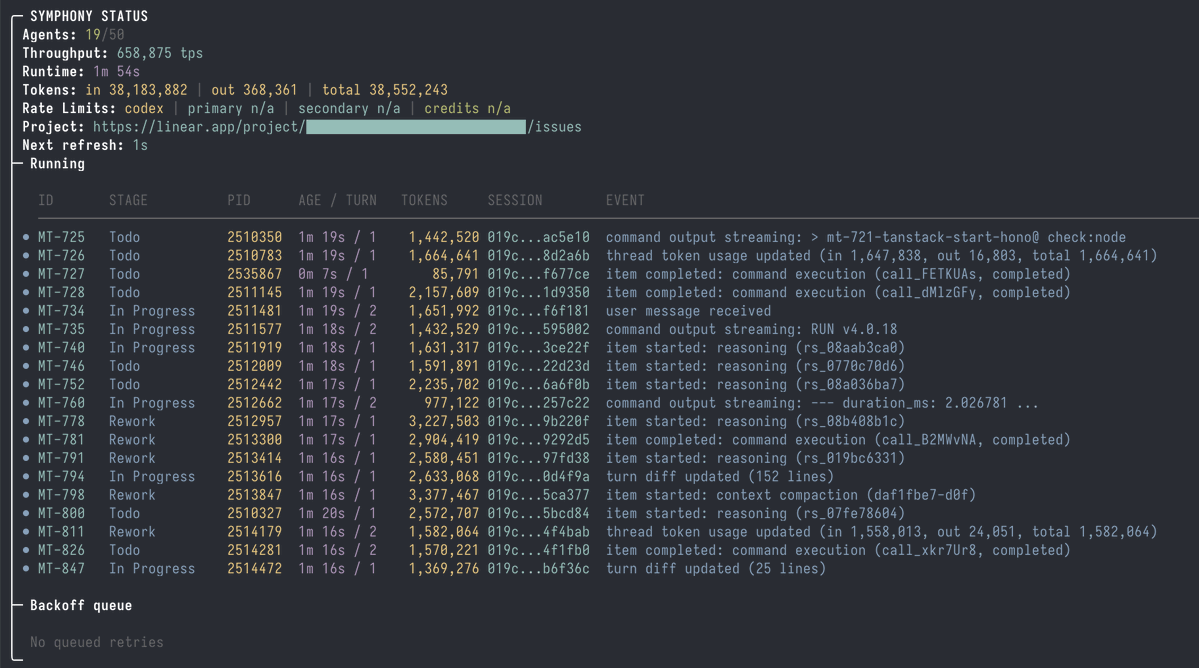
这就是 Symphony——OpenAI 面向 Codex agents 的开源编排器。把它对准一个 Linear 看板,它就能把工单变成拉取请求(PR)。

我甚至都不知道该怎么正确地测试一个 Electron 应用。代理们自己搞定了——通过 agent-browser 走 CDP 挂到正在运行的应用上,做端到端验证,全程自驱。我现在靠读它们的日志,反过来学习怎么测试自己的应用。

开始设置

我维护了一个更容易上手的 fork(我做的改动在 README 里列了)。在你的项目仓库里,运行:

https://linear.app/docs/mcp

然后告诉你的 agent:“为我的仓库设置 Symphony。”

如果要手动设置,请手动按技能说明操作。

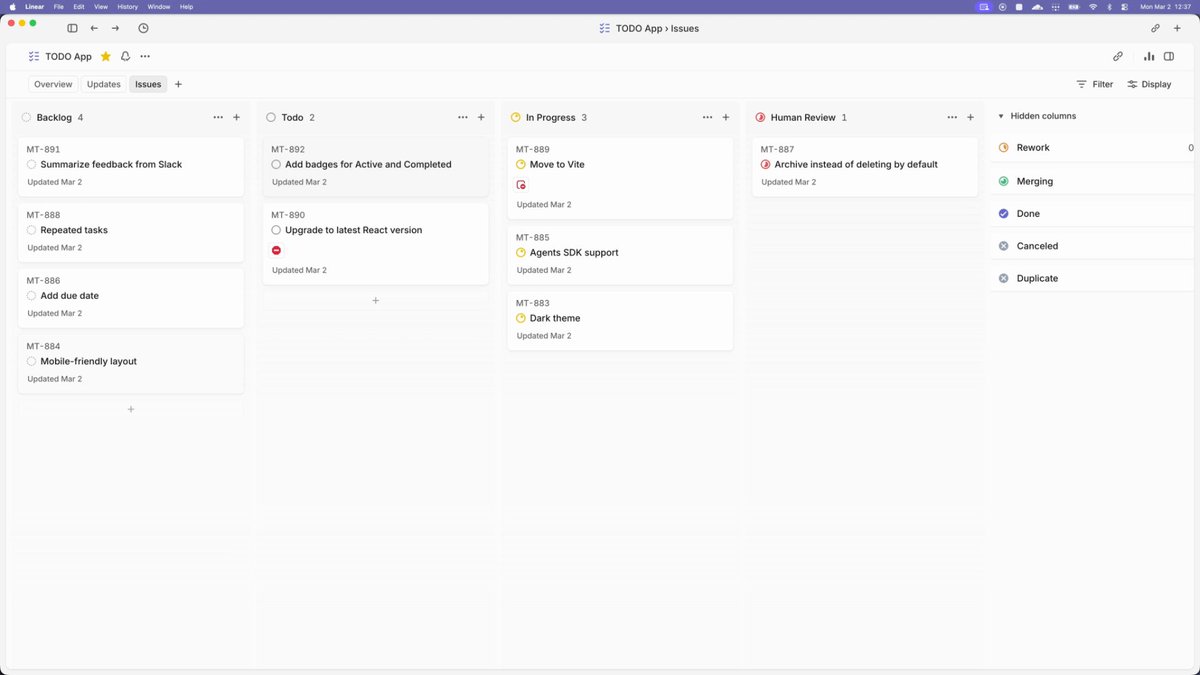
Linear 看板就是你的控制面板

一切都发生在 Linear 里。看板就是界面。

https://github.com/odysseus0/symphony

把一个工单推到 Todo——空闲的 agent 几秒内就会认领。把带着评审意见的工单移到 Rework——agent 会把它捡回来并处理反馈。

从大想法开始,而不是单个工单

如果你已经有一个组织良好的 Linear 看板,把 Symphony 指向它直接开跑就行。如果没有,让你的 agent 当技术负责人——描述需求,让它把工作拆成工单,并把依赖关系画清楚。

给你的 agent 开通 Linear 权限(官方 MCP 设置),把大图交给它:

把这个拆成项目 [slug] 里的工单。每个工单的范围限定为一个可评审的 PR。写清验收标准。在顺序重要的地方设置阻塞关系。

把这一批推到 Todo,让 Symphony 在所有不被阻塞的部分上并行推进。

我那次 50 个工单的 Electron 重写,起点只是一段对话:“这是技术债,这是我希望最终代码库长成的样子。” agent 把它拆解出来,我审了一遍工单,改了几个,然后把它们推到 Todo。

你可以期待什么

每个 worker 都会拿到自己的工作区克隆,读工单,以 Linear 评论的形式写一份计划,开始实现、验证,然后开一个 PR。

npx skills add odysseus0/symphony -s symphony-setup -y

计划这一步很值得盯着看。写代码之前,agent 会先把计划发成一条 Linear 评论。把坏计划扼杀在它变成坏 PR 之前。它会在运行过程中把已完成的 todos 逐项勾掉,最后还会给你一段演示视频!

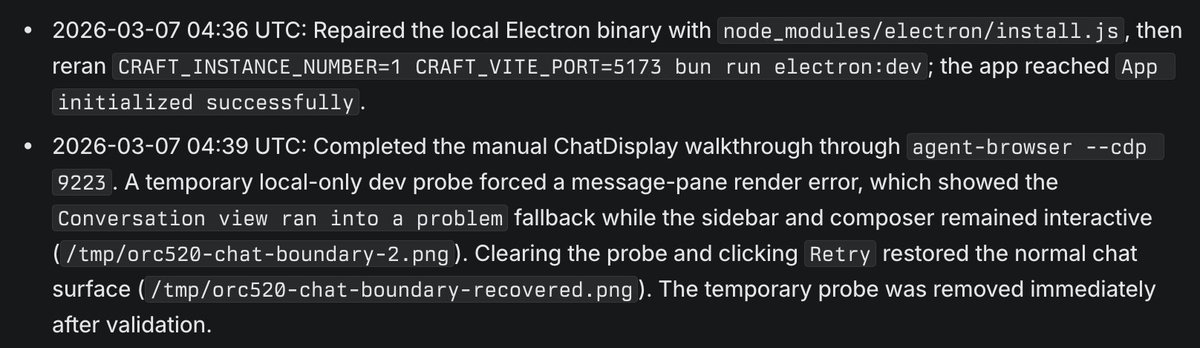
我有个工单要求重构 ChatDisplay——完全没提测试。agent 通过 agent-browser 走 CDP 连接到正在运行的 Electron 应用,注入一个临时探针强制触发渲染错误,验证故障被限制在可控范围内,再点击走通恢复流程,对两种状态分别截图,最后移除探针。一次 UI 变更的端到端验证,全程自驱。

https://github.com/odysseus0/symphony/blob/main/.agents/skills/symphony-setup/SKILL.md

随时调参

取消一个工单——agent 会在下一次轮询时停下。把东西移回 Backlog 先压着。把一批推到 Todo 进行派发。

WORKFLOW.md 一秒内就能热重载——不需要重启。常见调整包括:

  • agent.max_concurrent_agents — 从 2–3 开始,随着信任度提高再加大

  • agent.max_turns — 每个工单的回合上限。复杂工作调高;想控制 token 花费就调低。

真正干活的是什么

让这套东西有效的关键大多不在编排器——而在 WORKFLOW.md 里的提示词。Symphony 只是管道:轮询 Linear、派发 worker、管理并发槽位。提示词才是在教 agent 如何做计划、写测试、处理评审反馈、约束范围。

我会在后续文章里深入聊这个提示词。

链接:http://x.com/i/article/2031521021342388224

I pushed 50 tickets to Linear before bed — a tech debt rewrite of an Electron app. Woke up to 30 merged PRs. 7,000 net lines deleted. Two days later, nothing has broken.

This is Symphony — OpenAI's open-source orchestrator for Codex agents. Point it at a Linear board and it turns tickets into pull requests.

I didn't even know how to properly test an Electron app. The agents figured it out — attaching to the running app over CDP via agent-browser, validating changes end-to-end, entirely self-directed. I'm learning how to test my own app by reading their logs.

睡前我往 Linear 里推了 50 个工单——给一个 Electron 应用做技术债重写。醒来时,已经有 30 个 PR 合并。净删 7,000 行代码。两天后,什么都没坏。

这就是 Symphony——OpenAI 面向 Codex agents 的开源编排器。把它对准一个 Linear 看板,它就能把工单变成拉取请求(PR)。

我甚至都不知道该怎么正确地测试一个 Electron 应用。代理们自己搞定了——通过 agent-browser 走 CDP 挂到正在运行的应用上,做端到端验证,全程自驱。我现在靠读它们的日志,反过来学习怎么测试自己的应用。

Set it up

I maintain a fork that's easier to get started with (changes I made listed in README). From your project repo, run:

https://linear.app/docs/mcp

Then tell your agent: "set up Symphony for my repo."

For manual setup, follow the skill instruction manually.

开始设置

我维护了一个更容易上手的 fork(我做的改动在 README 里列了)。在你的项目仓库里,运行:

https://linear.app/docs/mcp

然后告诉你的 agent:“为我的仓库设置 Symphony。”

如果要手动设置,请手动按技能说明操作。

The Linear board is your control surface

Everything happens through Linear. The board is the interface.

https://github.com/odysseus0/symphony

Push a ticket to Todo — an idle agent claims it within seconds. Move a ticket to Rework with review comments — the agent picks it back up and addresses feedback.

Linear 看板就是你的控制面板

一切都发生在 Linear 里。看板就是界面。

https://github.com/odysseus0/symphony

把一个工单推到 Todo——空闲的 agent 几秒内就会认领。把带着评审意见的工单移到 Rework——agent 会把它捡回来并处理反馈。

Start with a big idea, not individual tickets

If you already have a well-organized Linear board, point Symphony at it and go. If you don't, have your agent play tech lead — describe the feature and let it decompose the work into tickets with dependencies mapped out.

Give your agent access to Linear (official MCP setup) and hand it the big picture:

Break this into tickets in project [slug]. Scope each ticket to one reviewable PR. Include acceptance criteria. Set blocking relationships where order matters.

Push the batch to Todo and let Symphony parallelize across everything that isn't blocked.

My 50-ticket Electron rewrite started as one conversation: "here's the tech debt, here's what I want the codebase to look like after." The agent decomposed it, I reviewed the tickets, adjusted a few, and pushed them to Todo.

从大想法开始,而不是单个工单

如果你已经有一个组织良好的 Linear 看板,把 Symphony 指向它直接开跑就行。如果没有,让你的 agent 当技术负责人——描述需求,让它把工作拆成工单,并把依赖关系画清楚。

给你的 agent 开通 Linear 权限(官方 MCP 设置),把大图交给它:

把这个拆成项目 [slug] 里的工单。每个工单的范围限定为一个可评审的 PR。写清验收标准。在顺序重要的地方设置阻塞关系。

把这一批推到 Todo,让 Symphony 在所有不被阻塞的部分上并行推进。

我那次 50 个工单的 Electron 重写,起点只是一段对话:“这是技术债,这是我希望最终代码库长成的样子。” agent 把它拆解出来,我审了一遍工单,改了几个,然后把它们推到 Todo。

What to expect

Each worker gets its own workspace clone, reads the ticket, writes a plan as a Linear comment, implements, validates, and opens a PR.

npx skills add odysseus0/symphony -s symphony-setup -y

The planning step is worth watching. Before writing code, the agent posts its plan as a Linear comment. Catch bad plans before they become bad PRs. It will check off todos it is done during the run, and give you a demo video at the end!

One of my tickets asked for a ChatDisplay refactor — no mention of testing. The agent attached to the running Electron app over CDP via agent-browser, injected a temporary probe to force a render error, verified the failure was contained, clicked through recovery, screenshotted both states, and removed the probe. End-to-end validation of a UI change, entirely self-directed.

https://github.com/odysseus0/symphony/blob/main/.agents/skills/symphony-setup/SKILL.md

你可以期待什么

每个 worker 都会拿到自己的工作区克隆,读工单,以 Linear 评论的形式写一份计划,开始实现、验证,然后开一个 PR。

npx skills add odysseus0/symphony -s symphony-setup -y

计划这一步很值得盯着看。写代码之前,agent 会先把计划发成一条 Linear 评论。把坏计划扼杀在它变成坏 PR 之前。它会在运行过程中把已完成的 todos 逐项勾掉,最后还会给你一段演示视频!

我有个工单要求重构 ChatDisplay——完全没提测试。agent 通过 agent-browser 走 CDP 连接到正在运行的 Electron 应用,注入一个临时探针强制触发渲染错误,验证故障被限制在可控范围内,再点击走通恢复流程,对两种状态分别截图,最后移除探针。一次 UI 变更的端到端验证,全程自驱。

https://github.com/odysseus0/symphony/blob/main/.agents/skills/symphony-setup/SKILL.md

Tune on the fly

Cancel a ticket — the agent stops on the next poll. Move something back to Backlog to hold it. Push a batch to Todo to dispatch.

WORKFLOW.md hot-reloads within a second — no restart needed. Common adjustments:

  • agent.max_concurrent_agents — start at 2-3, scale up as you trust it

  • agent.max_turns — turn limit per ticket. Higher for complex work, lower to cap token spend.

随时调参

取消一个工单——agent 会在下一次轮询时停下。把东西移回 Backlog 先压着。把一批推到 Todo 进行派发。

WORKFLOW.md 一秒内就能热重载——不需要重启。常见调整包括:

  • agent.max_concurrent_agents — 从 2–3 开始,随着信任度提高再加大

  • agent.max_turns — 每个工单的回合上限。复杂工作调高;想控制 token 花费就调低。

What's actually doing the work

Most of what makes this effective isn't the orchestrator — it's the prompt in WORKFLOW.md. Symphony is plumbing: poll Linear, dispatch workers, manage slots. The prompt teaches the agent how to plan, test, handle review feedback, and constrain scope.

I'll dig into that prompt in a follow-up.

Link: http://x.com/i/article/2031521021342388224

真正干活的是什么

让这套东西有效的关键大多不在编排器——而在 WORKFLOW.md 里的提示词。Symphony 只是管道:轮询 Linear、派发 worker、管理并发槽位。提示词才是在教 agent 如何做计划、写测试、处理评审反馈、约束范围。

我会在后续文章里深入聊这个提示词。

链接:http://x.com/i/article/2031521021342388224

相关笔记

I pushed 50 tickets to Linear before bed — a tech debt rewrite of an Electron app. Woke up to 30 merged PRs. 7,000 net lines deleted. Two days later, nothing has broken.

This is Symphony — OpenAI's open-source orchestrator for Codex agents. Point it at a Linear board and it turns tickets into pull requests.

I didn't even know how to properly test an Electron app. The agents figured it out — attaching to the running app over CDP via agent-browser, validating changes end-to-end, entirely self-directed. I'm learning how to test my own app by reading their logs.

Set it up

I maintain a fork that's easier to get started with (changes I made listed in README). From your project repo, run:

https://linear.app/docs/mcp

Then tell your agent: "set up Symphony for my repo."

For manual setup, follow the skill instruction manually.

The Linear board is your control surface

Everything happens through Linear. The board is the interface.

https://github.com/odysseus0/symphony

Push a ticket to Todo — an idle agent claims it within seconds. Move a ticket to Rework with review comments — the agent picks it back up and addresses feedback.

Start with a big idea, not individual tickets

If you already have a well-organized Linear board, point Symphony at it and go. If you don't, have your agent play tech lead — describe the feature and let it decompose the work into tickets with dependencies mapped out.

Give your agent access to Linear (official MCP setup) and hand it the big picture:

Break this into tickets in project [slug]. Scope each ticket to one reviewable PR. Include acceptance criteria. Set blocking relationships where order matters.

Push the batch to Todo and let Symphony parallelize across everything that isn't blocked.

My 50-ticket Electron rewrite started as one conversation: "here's the tech debt, here's what I want the codebase to look like after." The agent decomposed it, I reviewed the tickets, adjusted a few, and pushed them to Todo.

What to expect

Each worker gets its own workspace clone, reads the ticket, writes a plan as a Linear comment, implements, validates, and opens a PR.

npx skills add odysseus0/symphony -s symphony-setup -y

The planning step is worth watching. Before writing code, the agent posts its plan as a Linear comment. Catch bad plans before they become bad PRs. It will check off todos it is done during the run, and give you a demo video at the end!

One of my tickets asked for a ChatDisplay refactor — no mention of testing. The agent attached to the running Electron app over CDP via agent-browser, injected a temporary probe to force a render error, verified the failure was contained, clicked through recovery, screenshotted both states, and removed the probe. End-to-end validation of a UI change, entirely self-directed.

https://github.com/odysseus0/symphony/blob/main/.agents/skills/symphony-setup/SKILL.md

Tune on the fly

Cancel a ticket — the agent stops on the next poll. Move something back to Backlog to hold it. Push a batch to Todo to dispatch.

WORKFLOW.md hot-reloads within a second — no restart needed. Common adjustments:

  • agent.max_concurrent_agents — start at 2-3, scale up as you trust it

  • agent.max_turns — turn limit per ticket. Higher for complex work, lower to cap token spend.

What's actually doing the work

Most of what makes this effective isn't the orchestrator — it's the prompt in WORKFLOW.md. Symphony is plumbing: poll Linear, dispatch workers, manage slots. The prompt teaches the agent how to plan, test, handle review feedback, and constrain scope.

I'll dig into that prompt in a follow-up.

Link: http://x.com/i/article/2031521021342388224
📋 讨论归档

讨论进行中…