返回列表
🧠 阿头学 · 💬 讨论题 · 🪞 Uota学

用 Claude Code 打造本地化“第二大脑”,价值很实但“生产力翻倍”说过头了

这篇文章最有价值的不是“AI 像人一样会思考”,而是证明了“自动上下文注入 + 混合检索 + 持续记忆更新”确实能显著提升知识工作效率,但作者把这种效率提升直接说成“生产力翻倍”,证据明显不够。
打开原文 ↗

2026-04-16 原文链接 ↗
阅读简报
双语对照
完整翻译
原文
讨论归档

核心观点

  • 真正有效的是工作流,不是神奇模型 文章站得住脚的部分,是把个人历史文档、工具连接器、Claude Code hooks 和 memory 机制拼成一个可运行系统;这说明高价值不在“更强模型”,而在“每次调用都自动带上对的上下文和工具”。
  • 混合检索是硬核亮点 作者同时用语义搜索(vsearch)和关键词搜索(BM25),这个判断是对的;只靠向量搜索一定会漏掉专有名词、缩写和指标,只靠关键词又抓不住模糊意图,企业知识库和个人 RAG 都应该默认采用双引擎。
  • 自动注入上下文比写长 prompt 更关键 作者最强的产品洞察,是让用户继续说“懒散行话”,系统在后台补背景;这比教用户写更长更标准的提示词更实用,因为真正的工作流瓶颈不是生成能力,而是每次都要手动找资料的摩擦。
  • “会学习”这件事有价值,但也最容易自嗨 session 级 / 每日级 / 每月级的记忆更新设计很合理,尤其适合沉淀工具坑点、项目状态和复盘结论;但把 markdown memory 称作“学习”容易夸大,实质上更像“可写回的外部记忆系统”,不是可靠的自主认知。
  • 可复制性被严重高估 这套方法对高权限、高文档密度、熟悉 CLI 和脚本的人很有用,但对普通员工未必成立;作者作为产品副总裁,既有大量历史材料,又有很强工具能力,这种“几小时搭完”的叙事有明显幸存者偏差。

跟我们的关联

  • 对 ATou 意味着什么、下一步怎么用 对 ATou 来说,这不是“做一个更像人的 AI”,而是“做一个默认带记忆和上下文的工作入口”;下一步应该优先实验 hook 式上下文注入,而不是继续堆 prompt 技巧。
  • 对 Neta 意味着什么、下一步怎么用 对 Neta 来说,这说明个人知识沉淀如果不进入调用链,就只是静态仓库;下一步应该把已有文档、复盘、对话记录先做“蒸馏层”,再接检索,不要直接把原始资料一股脑喂给模型。
  • 对 Uota 意味着什么、下一步怎么用 对 Uota 来说,这篇文章最值得学的是“系统化自我反思”,尤其是把绩效反馈、重复错误、项目复盘结构化;下一步可以先从 me.md + monthly retro 开始,低成本验证“反馈镜子”是否真有用。
  • 对三者共同意味着什么、下一步怎么用 共同结论是:第二大脑的最小可行产品不是 agent swarm,而是“资料可检索、上下文自动进 prompt、错误能被记录”;下一步应按 Profile → KB → Distill → Inject → Learn 五步走,小步验证,不要一开始就追求全自动。

讨论引子

1. 如果“生产力翻倍”没有客观指标,我们该怎么判断第二大脑到底是在省时间,还是只是在制造高级感? 2. 把历史绩效反馈喂给 AI 做“实时纠偏”,到底是在放大自我认知,还是在固化旧评价和旧偏见? 3. 企业里最现实的边界到底在哪:哪些数据可以进入个人第二大脑,哪些做法一开始就踩了合规红线?

我通过用 5 年工作历史、1.5 万份文档、350 万字内容,以及我工具栈里的每一个工具,打造了一个“第二大脑”,让自己作为 @mercury 产品副总裁的生产力翻了一倍。它在本地运行,是我每次使用 LLM 时的核心组成部分,并且每天都在变得更好。

今天,我想分享用来构建它的技术栈、工作流和提示词:

背景

我是 @mercury 的产品副总裁。说得长一点,就是我开很多会,在不同工具里消化大量内容,比如 Linear、Slack、Notion、数据分析,同时还得确保自己真的把事情做完。在一家公司工作了 5 年,又是个信息成瘾者,所以从 2021 年到今天,关于 Mercury 的事,我基本上就是一部会走路的百科全书。但最近我发现,我的职责范围和工作量已经意味着,我不可能让每个盘子都一直转着。

有一天,我在刷 X,看到一系列帖子吸引了我的注意。最开始是 @tobi 的 QMD。QMD 是一个本地向量搜索工具。随后又有几条帖子出现,把一些点在我脑子里连了起来:

  • Claude Code 发布了 hooks,也就是按事件注入提示词

  • GasTown / OpenClaw 发布,展示了 orchestrator 写入 memory、委派 sub-agent 的能力,当然还有很多其他模式

  • MCPs/CLIs 达到了临界规模,我日常核心工具里已经有足够多可以直接使用,不必再去找管理员要 API key

  • @tylercowen 做了一次访谈,深入谈到“为 AI 写作”,这点击中了我:已经存在的工作产出里,到底有多少是我没有利用起来的?

我决定,是时候动手构建了。

准备工作(全程约 1-2 小时)

首先,我需要一个资料库,装下所有我可能知道的内容。所以我下载了自己在 Mercury 工作以来创建过的每一份文档,以及任何相关的产品战略、分析、复盘、执行反思等。最后得到的是超过 1.5 万份文档和 350 万字。也许我都读过,但大部分已经忘了。这些内容变成了一个文件夹,我直接叫它“raw data”,然后在电脑上用 QMD 为它建立索引。

为了看看这是否有效,我用 Claude Code 随机询问这个知识库中的记忆和令人意外的洞察。当我看到向量搜索比基于文本的搜索强大这么多时,那种惊喜让我有信心继续做下去。我问了一个问题,想知道它觉得我会喜欢哪些书,结果它给出的推荐好到有点诡异。我觉得这是这段旅程里我最好的建议:每一步都要测试!很容易陷入只是在局部最优点上继续爬坡。

训练我的大脑,并连接到我的工具(约 2 小时)

有了所有原始数据之后,我需要帮助它理解我是谁、我的目标是什么、我使用哪些工具。所以我走了三条路径:

  1. 解释我自己。为了创建第二大脑,它需要知道我的大脑在做什么。我写了一份 me.md,说明我是谁,包括工作和生活,给了它我的目标、过去 5 年的绩效评估,以及一组个人优先事项。最让我谦卑的一点,是系统根据我自己的绩效评估指出,我多年来一直在犯同一个战略错误,而且就在我设置这个系统的那一周,我还在犯这个错误。

  2. “蒸馏”数据。我启动了一个 agent team,让它们用 me.md 和知识库,在我和原始知识库之间创建一组文档。这个想法很大程度上来自这样一个事实:LLM 经常把更小的模型蒸馏出来执行任务。我不知道这对我有没有帮助,但 Agent Teams 刚刚发布,所以我让一群 agent 从知识库中找出我们做过的主要“主题”,给出带来源的历史脉络,并总结关键经验。这些内容创建成了一个 context.md 文件夹。

  3. 工具。我用几个工具,比如 Google Docs、Linear、Notion、Metabase。幸运的是,大多数工具在 Claude Code 上都有连接器,或者这些公司正在积极发布 MCPs/CLIs。少数没有,但我启动了一些特定技能,用来编写直接 API 调用,完成类似“为 XYZ 跑一个查询”这样的任务。

Claude 已经能访问关于我的全部信息、我使用的工具,以及我所有工作的庞大资料库。但它真的知道什么吗?有人知道吗?

接上线(少于 1 小时)

到这个阶段,我已经有了太多文字和文档,是时候真正找到用途,或者干脆弃船了。但我不想每次都自己去搜索这些内容。也就是这个时候,“hooks”吸引了我的注意。

Claude Code 的 hooks 允许你把内容插入提示词里,而不需要主动询问,也可以在 session 开始时、工具使用之后,或 session 停止时插入。通过 UserPromptSubmit hook,我让自己的 Claude Code 可以使用 qmd 查找与我提示词相关的人名、主题和具体文档。

这是一个让人 nerd-out 的时刻,但当你在 Finder 里搜索文件时,它大多只是基于名称和原始文本搜索。而 QMD 可以把上下文带进搜索里。我的系统会先判断查询意图,然后用两种技术之一返回结果:

  1. vsearch(语义/向量)——理解我的问题含义。“How's the funnel performing?” 会找到关于转化率的文档,即使那些文档里没有写 “funnel”。

  2. BM25(关键词)——精确术语匹配。它能抓住专有名词、缩写、具体指标,这些是语义搜索可能漏掉的。

把上下文注入提示词之后,很快我就看到结果质量提升了。我可以带着懒散的行话和有限的背景过来,然后让 Claude 用我的“第二大脑”内容补全它。这让我看到了把正确上下文和工具放进每一次查询里的力量。之后开始发生一些奇怪的事……但这个稍后再说,因为我还有一个重大步骤要解锁。

让它学习

GasTown 和 OpenClaw 的 agent 似乎会变得更好,因为它们会持续更新自己的 memory,也就是一个写入式的 .md 文件。所以我开始想,我是不是也可以用这种方式学习。我发现,进行自我反思、增量更新新知识,大致有三个时间尺度:

  1. 每个 session。我创建了一个 /learn skill,它会读取一次对话,查看我当时试图完成的任务,然后更新我的 .md 文件。这对经常报错的 MCP 特别有用。一旦经历过一次,提示词就会变得更好,从而避免同样的错误。

  2. 每天/每周。我用一个早晨的 chron job 生成每日简报,包含当天将要发生的事情,以及来自知识库的相关上下文。然后用这些内容自动更新我对进展的记忆。

  3. 每月月底。每个月结束时,我会和自己的 Claude Code 做一次关于世界状态的访谈:我们从这个月原本想做什么开始,回顾实际进展如何,哪些做得好,哪些做得差,下个月应该做什么。

实际使用是什么样子

描述自己如何使用一个大脑,或者第二个大脑,是一件很奇怪的事。但我真的相信,整体上我的生产力翻了一倍,所以我想分享一些实际例子。

秒级回忆速度。现在,从我的记忆干草堆里找针变得好得多。我的一天,以及大多数工作任务,都会从 Claude Code session 开始。无论是写文档、做分析,还是回答问题,现在都更快,也更全面。

不再需要会议准备。我的一天从一份关于身边正在发生什么的总结开始,包括会议、Linear 更新、GitHub push、我还没回复的 Slack 消息。因为工作上下文、计划、1:1 会议笔记等都在一个地方,所以当我进入一次 1:1 时,只需要针对即将到来的会议写一两个 prompt,我就已经准备好面对任何话题。

不再遗漏行动项。这很可能是深度使用这个系统后自然涌现出来的结果。但我每天结束时会问:“今天有什么我忘了做的吗?”它经常能找出一两个我忘记收尾的互动。跨工具综合真的太强了。

实时反馈。我已经工作了大约 15 年,而我从经理那里得到反馈的最高频率,通常也就是两周一次,或者最多每周一次。因为这个系统有我的绩效评估,它知道我从经理那里得到过什么反馈,也会指出我正在重复那些曾经被反馈过的模式。

下面是一段真实对话的样子:

主动探索模式

因为这个系统非常能干,也非常了解情况,而我在一份工作里做了 5 年之后,对自己的视角又太有偏见,所以我开始定期让它思考公司的优先事项、我的全部知识和经验。它能访问我拥有的所有工具,因此这个第二大脑系统已经可以做自主研究,帮助我思考如何解决自己的问题。

到这一步,它已经不再是一个连贯的叙事了,因为我正在主动深陷其中:我开始叠加其他新功能,比如 Chron/Scheduled jobs、Agent Teams/Swarm、@karpathy 的 AutoResearch 能力、@lennysan 的访谈档案……这些会流入我的每日简报、被分区写进我的 memory,并变成可复用的 skills。

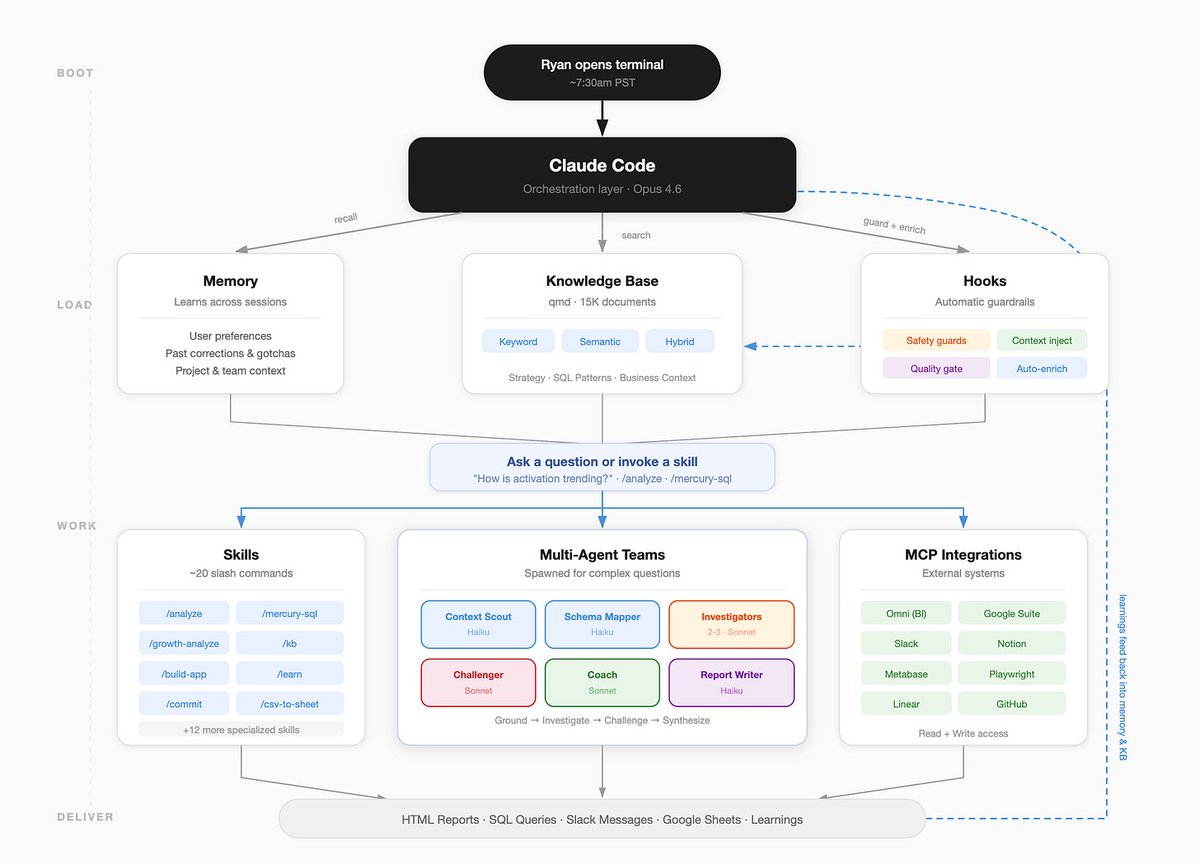
第二大脑系统(由它自己绘制)
一个你可以使用的提示词

I want you to help me build a "Second Brain" — a persistent knowledge system that runs in parallel to my work using Claude Code. We'll do this in 5 phases. Walk me through each one interactively. Don't skip ahead — confirm each phase is working before moving on.

## Phase 1: Interview Me & Create my Profile

Interview me to create a file at ~/Documents/second-brain/me.md that captures:
- Who I am (role, company, responsibilities)
- What I'm optimizing for (goals, priorities, what success looks like)
- My working style (tools I use daily, how I communicate, what frustrates me)
- My growth edges (feedback I've gotten, patterns I want to break)
- What I care about outside work (interests, values — helps with recommendations)

Ask me 5-7 questions conversationally. Don't make me fill out a template. Write the file when you have enough.

## Phase 2: Build the Knowledge Base

Help me collect and index my work history:
1. Ask me where my documents live (Google Docs, Notion exports, local files, etc.)
2. Help me export/download them into ~/Documents/second-brain/raw/
3. Install QMD (https://github.com/tobi/qmd) if not present: `bun install -g qmd`
4. Create a QMD collection from the raw folder: `qmd collection add Documents/second-brain/raw`
5. Index it: `qmd update`
6. **Test it together** — ask me for a few things I remember working on, then search the KB to see if it finds them. Try both `qmd search` (keyword) and `qmd vsearch` (semantic). If results are bad, we troubleshoot before moving on.

## Phase 3: Distill & Summarize

Using me.md + the knowledge base, create ~/Documents/second-brain/summaries/ with:
- strategic-context.md — what my company/team is trying to do and why
- role-context.md — my specific responsibilities and how I fit in
- historical-context.md — key decisions, pivots, lessons from my work history
- team-context.md — who I work with, dynamics, stakeholders
- personal-growth.md — patterns in my feedback, coaching themes

For each file, search the KB extensively (10+ queries mixing keyword and semantic search), cite specific source documents, and flag where you're inferring vs. quoting.

## Phase 4: Wire Up Automatic Context Injection

Create a Claude Code hook that enriches every prompt with relevant KB context.

Create ~/.claude/hooks/context-enrichment.sh that:
1. Extracts key terms and names from my prompt
2. Runs parallel searches (semantic + keyword) against the QMD collection
3. Returns the top results as context injected into the prompt
4. Completes in <2 seconds (kill searches that take longer)

Register it in ~/.claude/settings.local.json as a UserPromptSubmit hook.

The hook should output a <context> block with search results so Claude sees it but it doesn't clutter my conversation.

Test it: I'll type a lazy prompt about something in my KB and we'll see if the hook injects useful context.

## Phase 5: Create the Learning Loop

Set up three learning mechanisms:

### Per-session: /learn skill
Create ~/.claude/skills/learn/SKILL.md that:
- Reviews the conversation for mistakes, surprises, and validated approaches
- Updates ~/.claude/CLAUDE.md with new tool gotchas, workflow preferences, corrections
- Saves important context to memory files in ~/.claude/projects/-Users-{me}/memory/
- Bias toward brevity — only save what's genuinely new and useful for future sessions

Create a script at ~/.claude/scripts/morning-brief.sh that:
- Checks my calendar (if Google CLI is available)
- Searches the KB for context related to today's meetings
- Summarizes any updates from connected tools
- Outputs a brief I can read in 2 minutes

Help me set it up as a launchd job that runs at my preferred morning time.

### Per-month: Retro prompt
Create ~/.claude/skills/retro/SKILL.md that walks me through:
- What were we trying to accomplish this month?
- How did it actually go?
- What patterns are emerging (good and bad)?
- What should change next month?
- Update summaries/ with anything that's shifted.

---

## Rules for this whole process:
- Ask before installing anything
- Test each phase before moving to the next
- If something fails, don't retry — propose 2 alternatives
- Keep all files in ~/Documents/second-brain/ (KB) or ~/.claude/ (config)
- No over-engineering — functions over classes, scripts over frameworks
- Everything should be runnable, debuggable, and modifiable by me later

Start with Phase 1. Interview me.

行动邀请

我分享这套系统,主要是因为我一直受到类似系统的启发,也希望它能变得更好。如果你用了它,哪些地方有效?哪些地方没用?还有没有什么线索是我应该继续追下去的?

I've 2x’d my productivity as a VP of Product @mercury by creating a "Second Brain" using 5 years of work history, 15k docs with 3.5 million words, and every tool in my stack. It runs locally, is a core part of my every use of LLM, and gets better everyday.

我通过用 5 年工作历史、1.5 万份文档、350 万字内容,以及我工具栈里的每一个工具,打造了一个“第二大脑”,让自己作为 @mercury 产品副总裁的生产力翻了一倍。它在本地运行,是我每次使用 LLM 时的核心组成部分,并且每天都在变得更好。

Today, I want to share the stack, the workflow, and the prompt to build it:

今天,我想分享用来构建它的技术栈、工作流和提示词:

**Background **

背景

I am a VP of Product for @mercury, which is a long way of saying I'm in a lot of meetings, consuming a lot of content across different tools (linear, slack, notion, data analyses), and trying to make sure I actually get stuff done. Working at a company for 5 years and being an information addict, I am essentially a walking encyclopedia for Mercury post 2021-today -- but I've recently found that my scope + workload means I can't keep every plate spinning.

我是 @mercury 的产品副总裁。说得长一点,就是我开很多会,在不同工具里消化大量内容,比如 Linear、Slack、Notion、数据分析,同时还得确保自己真的把事情做完。在一家公司工作了 5 年,又是个信息成瘾者,所以从 2021 年到今天,关于 Mercury 的事,我基本上就是一部会走路的百科全书。但最近我发现,我的职责范围和工作量已经意味着,我不可能让每个盘子都一直转着。

One day, I was scrolling X and came across a series of posts that caught my attention, starting with @tobi's QMD. QMD is a local vector search, and then a few other posts started to show up that connected a few dots for me:

有一天,我在刷 X,看到一系列帖子吸引了我的注意。最开始是 @tobi 的 QMD。QMD 是一个本地向量搜索工具。随后又有几条帖子出现,把一些点在我脑子里连了起来:

  • Claude Code launched hooks (per-event prompt injections)
  • Claude Code 发布了 hooks,也就是按事件注入提示词
  • GasTown / OpenClaw launched with the power of orchestrators writing memory + delegating to sub-agents (among many other patterns)
  • GasTown / OpenClaw 发布,展示了 orchestrator 写入 memory、委派 sub-agent 的能力,当然还有很多其他模式
  • MCPs/CLIs hit a critical mass, and enough of my core tools were available without having to ask admins to give me API keys
  • MCPs/CLIs 达到了临界规模,我日常核心工具里已经有足够多可以直接使用,不必再去找管理员要 API key
  • @tylercowen did an interview and talked extensively about "writing for AI" in a way that struck a chord - how much output of work already exists that I'm not using?
  • @tylercowen 做了一次访谈,深入谈到“为 AI 写作”,这点击中了我:已经存在的工作产出里,到底有多少是我没有利用起来的?

I decided that it was time to build

我决定,是时候动手构建了。

Prep work (~1-2 hours end to end)

准备工作(全程约 1-2 小时)

To start, I needed a library of all the content I could know about... so I downloaded every document I've ever created for my job at Mercury + any relevant product strategy, analysis, retro, reflection on execution, etc. This netted out to over 15k documents and 3.5 million words. Maybe I've read them all, but I've forgotten most. These became a folder that I just called "raw data", and I ran QMD to index this on my computer.

首先,我需要一个资料库,装下所有我可能知道的内容。所以我下载了自己在 Mercury 工作以来创建过的每一份文档,以及任何相关的产品战略、分析、复盘、执行反思等。最后得到的是超过 1.5 万份文档和 350 万字。也许我都读过,但大部分已经忘了。这些内容变成了一个文件夹,我直接叫它“raw data”,然后在电脑上用 QMD 为它建立索引。

To see if this worked, I used Claude Code to ask about random memories and surprising insights from this knowledge base - the amount of delight/surprise I experienced in seeing how much more capable vector search was than text-based search gave me the confidence to keep going. I asked one questions about books that it would think I like, and it was spooky how good of recommendations it gave me. I think this is my best advice in this journey: test every step of the way! Easy to get caught in hill climbing a local maxima

为了看看这是否有效,我用 Claude Code 随机询问这个知识库中的记忆和令人意外的洞察。当我看到向量搜索比基于文本的搜索强大这么多时,那种惊喜让我有信心继续做下去。我问了一个问题,想知道它觉得我会喜欢哪些书,结果它给出的推荐好到有点诡异。我觉得这是这段旅程里我最好的建议:每一步都要测试!很容易陷入只是在局部最优点上继续爬坡。

**Train my brain and connect it to my tools ** (~2 hours)

训练我的大脑,并连接到我的工具(约 2 小时)

With all the raw data, I needed to help it make sense of me + what my goals are + the tools I used, so pursued three paths:

有了所有原始数据之后,我需要帮助它理解我是谁、我的目标是什么、我使用哪些工具。所以我走了三条路径:

  1. Explain myself - to be able to create a second brain, it needed to know what mine was doing. I wrote up a me.md explaining who I am (work + life), gave it my goals + performance reviews for the last 5 years + set of personal priorities. The most humbling part was the system pointing out that I've been making the same strategic mistake for years, according to my own performance reviews, and was making it that week as I was setting up the system
  1. 解释我自己。为了创建第二大脑,它需要知道我的大脑在做什么。我写了一份 me.md,说明我是谁,包括工作和生活,给了它我的目标、过去 5 年的绩效评估,以及一组个人优先事项。最让我谦卑的一点,是系统根据我自己的绩效评估指出,我多年来一直在犯同一个战略错误,而且就在我设置这个系统的那一周,我还在犯这个错误。
  1. "Distill" the data - I spun up an agent team to use the me.md + the knowledge base to create a set of docs between me <> raw knowledge base. This idea largely came from the idea that LLMs regularly distill down smaller models to take tasks, and I had no idea if it would help me in this, but Agent Teams had just launched and so I had a swarm of them find the main "themes" we've worked on from the knowledge, give sourced histories of this, and summarize key lessons. These created a **context.md ** folder
  1. “蒸馏”数据。我启动了一个 agent team,让它们用 me.md 和知识库,在我和原始知识库之间创建一组文档。这个想法很大程度上来自这样一个事实:LLM 经常把更小的模型蒸馏出来执行任务。我不知道这对我有没有帮助,但 Agent Teams 刚刚发布,所以我让一群 agent 从知识库中找出我们做过的主要“主题”,给出带来源的历史脉络,并总结关键经验。这些内容创建成了一个 context.md 文件夹。
  1. Tools - I use a few tools (Google Docs, Linear, Notion, Metabase) , and luckily most have connectors on Claude Code or these companies are actively launching MCPs/CLIs. A few didn't, but I spun up specific skills that crafted direct API calls to be able to complete tasks like "run a query for XYZ".
  1. 工具。我用几个工具,比如 Google Docs、Linear、Notion、Metabase。幸运的是,大多数工具在 Claude Code 上都有连接器,或者这些公司正在积极发布 MCPs/CLIs。少数没有,但我启动了一些特定技能,用来编写直接 API 调用,完成类似“为 XYZ 跑一个查询”这样的任务。

Claude had access to all the information about me + the tools I used + had a massive library of all my work, but did it really know anything? Does anyone?

Claude 已经能访问关于我的全部信息、我使用的工具,以及我所有工作的庞大资料库。但它真的知道什么吗?有人知道吗?

Wire it up (<1 hour)

接上线(少于 1 小时)

At this point, I had so many words + documents that it was time to actually find use or abandon ship. But I didn't want to have to go search this every time and that's when "hooks" caught my attention.

到这个阶段,我已经有了太多文字和文档,是时候真正找到用途,或者干脆弃船了。但我不想每次都自己去搜索这些内容。也就是这个时候,“hooks”吸引了我的注意。

Hooks from Claude Code let you insert content into your prompt without needing to ask (or when a session starts, after a tool use, or when a session stops). Using the UserPromptSubmit hook, I enabled my Claude Code to use qmd to find names + topics + specific documents related to my prompt.

Claude Code 的 hooks 允许你把内容插入提示词里,而不需要主动询问,也可以在 session 开始时、工具使用之后,或 session 停止时插入。通过 UserPromptSubmit hook,我让自己的 Claude Code 可以使用 qmd 查找与我提示词相关的人名、主题和具体文档。

This is a nerd-out moment, but when searching for files in Finder, it is mostly a name + raw text search.... but QMD can help bring context into searches. My system is tuned to figure out a query, then returns results using one of two techniques:

这是一个让人 nerd-out 的时刻,但当你在 Finder 里搜索文件时,它大多只是基于名称和原始文本搜索。而 QMD 可以把上下文带进搜索里。我的系统会先判断查询意图,然后用两种技术之一返回结果:

  1. vsearch (semantic/vector) — understands meaning of my question. "How's the funnel performing?" finds documents about conversion rates even if they don't say "funnel."
  1. vsearch(语义/向量)——理解我的问题含义。“How's the funnel performing?” 会找到关于转化率的文档,即使那些文档里没有写 “funnel”。
  1. BM25 (keyword) — exact term matching. Catches proper nouns, acronyms, specific metrics that semantic search might miss.
  1. BM25(关键词)——精确术语匹配。它能抓住专有名词、缩写、具体指标,这些是语义搜索可能漏掉的。

Very quickly after injecting context into prompts, I saw the quality of my results improving. My ability to bring lazy jargon and limited context, then have Claude enrich it with my "Second Brain" content showed me the power of the right context + tools going into every query, and I started to have weird things happen.... but more on that in a minute, because I had one more major step to unlock

把上下文注入提示词之后,很快我就看到结果质量提升了。我可以带着懒散的行话和有限的背景过来,然后让 Claude 用我的“第二大脑”内容补全它。这让我看到了把正确上下文和工具放进每一次查询里的力量。之后开始发生一些奇怪的事……但这个稍后再说,因为我还有一个重大步骤要解锁。

Let it learn

让它学习

GasTown and OpenClaw agents seemed to get better because they are consistently updating their memory (a written .md) file, so I started to wonder if I could learn this way too. I found that there are essentially three time frames in to self-reflect, increment new knowledge, and :

GasTown 和 OpenClaw 的 agent 似乎会变得更好,因为它们会持续更新自己的 memory,也就是一个写入式的 .md 文件。所以我开始想,我是不是也可以用这种方式学习。我发现,进行自我反思、增量更新新知识,大致有三个时间尺度:

  1. Per session - I created a /learn skill that takes a conversation, looks at the task I was trying to complete, and then updates my .md files. This has been particularly useful for MCPs that regularly error out - once its been experienced once, the prompts get better to avoid the same errors.
  1. 每个 session。我创建了一个 /learn skill,它会读取一次对话,查看我当时试图完成的任务,然后更新我的 .md 文件。这对经常报错的 MCP 特别有用。一旦经历过一次,提示词就会变得更好,从而避免同样的错误。
  1. Per day/week - I use a morning chron job to spin up a daily brief of what's coming each day for me + any relevant context from my knowledge base, and then use these to automatically update my memory of what's progressing.
  1. 每天/每周。我用一个早晨的 chron job 生成每日简报,包含当天将要发生的事情,以及来自知识库的相关上下文。然后用这些内容自动更新我对进展的记忆。
  1. End of Month - At the end of the month, I do an interview with my Claude Code on the state of the world: we start with what we were trying to do this month, how it actually went, what went great and poorly, and what we should do for next month.
  1. 每月月底。每个月结束时,我会和自己的 Claude Code 做一次关于世界状态的访谈:我们从这个月原本想做什么开始,回顾实际进展如何,哪些做得好,哪些做得差,下个月应该做什么。

What this looks like in practice

实际使用是什么样子

It is a strange experience to describe how you use a brain, or a second one for that matter, but I legitimately believe I've 2x'ed my productivity as a whole and I want to share some practical examples.

描述自己如何使用一个大脑,或者第二个大脑,是一件很奇怪的事。但我真的相信,整体上我的生产力翻了一倍,所以我想分享一些实际例子。

Recall speed of seconds - finding the needle in a haystack of my memory is now much better; my days (and most work tasks) start in a Claude Code sessions and for any task like writing a document, doing an analysis, or answering a question is now both faster and more comprehensive

秒级回忆速度。现在,从我的记忆干草堆里找针变得好得多。我的一天,以及大多数工作任务,都会从 Claude Code session 开始。无论是写文档、做分析,还是回答问题,现在都更快,也更全面。

No more meeting prep - my day starts with a summary of what's happening around me - meetings, linear updates, github pushes, slack messages I haven't responded to. Because all the context of the work, the plans, the notes from our 1:1s, etc are in one place, when I enter a 1:1, I am ready for any topics with 1 or 2 prompts about the upcoming meeting.

不再需要会议准备。我的一天从一份关于身边正在发生什么的总结开始,包括会议、Linear 更新、GitHub push、我还没回复的 Slack 消息。因为工作上下文、计划、1:1 会议笔记等都在一个地方,所以当我进入一次 1:1 时,只需要针对即将到来的会议写一两个 prompt,我就已经准备好面对任何话题。

Never miss an action item - this is likely emergent from deep usage of this system, but I ask at the end of the day "is there anything I forgot to do today?" and it regularly finds the one or two interactions I forgot to close out. Cross tool synthesis is SO powerful

不再遗漏行动项。这很可能是深度使用这个系统后自然涌现出来的结果。但我每天结束时会问:“今天有什么我忘了做的吗?”它经常能找出一两个我忘记收尾的互动。跨工具综合真的太强了。

Realtime feedback - I've been working for ~15 years, and the most frequent feedback I've gotten from managers is bi-weekly or weekly at best. Because this has my performance reviews, it knows what feedback I'm getting from my managers and has called out me doing the same patterns I've gotten feedback on.

实时反馈。我已经工作了大约 15 年,而我从经理那里得到反馈的最高频率,通常也就是两周一次,或者最多每周一次。因为这个系统有我的绩效评估,它知道我从经理那里得到过什么反馈,也会指出我正在重复那些曾经被反馈过的模式。

Here's what an actual conversation looks like:

下面是一段真实对话的样子:

The proactive explorer mode

主动探索模式

Because this system is so capable and knowledgable (+I'm so biased on my POV after 5 years in a job), I've started asking it regularly to think about the company priorities, all my knowledge and experience, and has access to all the tools I have, the Second Brain system is capable of doing autonomous research for how I can solve my problems.

因为这个系统非常能干,也非常了解情况,而我在一份工作里做了 5 年之后,对自己的视角又太有偏见,所以我开始定期让它思考公司的优先事项、我的全部知识和经验。它能访问我拥有的所有工具,因此这个第二大脑系统已经可以做自主研究,帮助我思考如何解决自己的问题。

At this point, it is no longer a cohesive narrative because I'm actively in this: I've started layering on other new functionality like Chron/Scheduled jobs, Agent Teams/Swarm, @karpathy's AutoResearch capabilities, @lennysan's interview archives... These flow into my daily briefs, sectioned-off parts of my memory, and become skills that are re-usable.

到这一步,它已经不再是一个连贯的叙事了,因为我正在主动深陷其中:我开始叠加其他新功能,比如 Chron/Scheduled jobs、Agent Teams/Swarm、@karpathy 的 AutoResearch 能力、@lennysan 的访谈档案……这些会流入我的每日简报、被分区写进我的 memory,并变成可复用的 skills。

The Second Brain system (as drawn by itself)

第二大脑系统(由它自己绘制)

A prompt you can use

一个你可以使用的提示词

I want you to help me build a "Second Brain" — a persistent knowledge system that runs in parallel to my work using Claude Code. We'll do this in 5 phases. Walk me through each one interactively. Don't skip ahead — confirm each phase is working before moving on.

## Phase 1: Interview Me & Create my Profile

Interview me to create a file at ~/Documents/second-brain/me.md that captures:
- Who I am (role, company, responsibilities)
- What I'm optimizing for (goals, priorities, what success looks like)
- My working style (tools I use daily, how I communicate, what frustrates me)
- My growth edges (feedback I've gotten, patterns I want to break)
- What I care about outside work (interests, values — helps with recommendations)

Ask me 5-7 questions conversationally. Don't make me fill out a template. Write the file when you have enough.

## Phase 2: Build the Knowledge Base

Help me collect and index my work history:
1. Ask me where my documents live (Google Docs, Notion exports, local files, etc.)
2. Help me export/download them into ~/Documents/second-brain/raw/
3. Install QMD (https://github.com/tobi/qmd) if not present: `bun install -g qmd`
4. Create a QMD collection from the raw folder: `qmd collection add Documents/second-brain/raw`
5. Index it: `qmd update`
6. **Test it together** — ask me for a few things I remember working on, then search the KB to see if it finds them. Try both `qmd search` (keyword) and `qmd vsearch` (semantic). If results are bad, we troubleshoot before moving on.

## Phase 3: Distill & Summarize

Using me.md + the knowledge base, create ~/Documents/second-brain/summaries/ with:
- strategic-context.md — what my company/team is trying to do and why
- role-context.md — my specific responsibilities and how I fit in
- historical-context.md — key decisions, pivots, lessons from my work history
- team-context.md — who I work with, dynamics, stakeholders
- personal-growth.md — patterns in my feedback, coaching themes

For each file, search the KB extensively (10+ queries mixing keyword and semantic search), cite specific source documents, and flag where you're inferring vs. quoting.

## Phase 4: Wire Up Automatic Context Injection

Create a Claude Code hook that enriches every prompt with relevant KB context.

Create ~/.claude/hooks/context-enrichment.sh that:
1. Extracts key terms and names from my prompt
2. Runs parallel searches (semantic + keyword) against the QMD collection
3. Returns the top results as context injected into the prompt
4. Completes in <2 seconds (kill searches that take longer)

Register it in ~/.claude/settings.local.json as a UserPromptSubmit hook.

The hook should output a <context> block with search results so Claude sees it but it doesn't clutter my conversation.

Test it: I'll type a lazy prompt about something in my KB and we'll see if the hook injects useful context.

## Phase 5: Create the Learning Loop

Set up three learning mechanisms:

### Per-session: /learn skill
Create ~/.claude/skills/learn/SKILL.md that:
- Reviews the conversation for mistakes, surprises, and validated approaches
- Updates ~/.claude/CLAUDE.md with new tool gotchas, workflow preferences, corrections
- Saves important context to memory files in ~/.claude/projects/-Users-{me}/memory/
- Bias toward brevity — only save what's genuinely new and useful for future sessions

Create a script at ~/.claude/scripts/morning-brief.sh that:
- Checks my calendar (if Google CLI is available)
- Searches the KB for context related to today's meetings
- Summarizes any updates from connected tools
- Outputs a brief I can read in 2 minutes

Help me set it up as a launchd job that runs at my preferred morning time.

### Per-month: Retro prompt
Create ~/.claude/skills/retro/SKILL.md that walks me through:
- What were we trying to accomplish this month?
- How did it actually go?
- What patterns are emerging (good and bad)?
- What should change next month?
- Update summaries/ with anything that's shifted.

---

## Rules for this whole process:
- Ask before installing anything
- Test each phase before moving to the next
- If something fails, don't retry — propose 2 alternatives
- Keep all files in ~/Documents/second-brain/ (KB) or ~/.claude/ (config)
- No over-engineering — functions over classes, scripts over frameworks
- Everything should be runnable, debuggable, and modifiable by me later

Start with Phase 1. Interview me.
I want you to help me build a "Second Brain" — a persistent knowledge system that runs in parallel to my work using Claude Code. We'll do this in 5 phases. Walk me through each one interactively. Don't skip ahead — confirm each phase is working before moving on.

## Phase 1: Interview Me & Create my Profile

Interview me to create a file at ~/Documents/second-brain/me.md that captures:
- Who I am (role, company, responsibilities)
- What I'm optimizing for (goals, priorities, what success looks like)
- My working style (tools I use daily, how I communicate, what frustrates me)
- My growth edges (feedback I've gotten, patterns I want to break)
- What I care about outside work (interests, values — helps with recommendations)

Ask me 5-7 questions conversationally. Don't make me fill out a template. Write the file when you have enough.

## Phase 2: Build the Knowledge Base

Help me collect and index my work history:
1. Ask me where my documents live (Google Docs, Notion exports, local files, etc.)
2. Help me export/download them into ~/Documents/second-brain/raw/
3. Install QMD (https://github.com/tobi/qmd) if not present: `bun install -g qmd`
4. Create a QMD collection from the raw folder: `qmd collection add Documents/second-brain/raw`
5. Index it: `qmd update`
6. **Test it together** — ask me for a few things I remember working on, then search the KB to see if it finds them. Try both `qmd search` (keyword) and `qmd vsearch` (semantic). If results are bad, we troubleshoot before moving on.

## Phase 3: Distill & Summarize

Using me.md + the knowledge base, create ~/Documents/second-brain/summaries/ with:
- strategic-context.md — what my company/team is trying to do and why
- role-context.md — my specific responsibilities and how I fit in
- historical-context.md — key decisions, pivots, lessons from my work history
- team-context.md — who I work with, dynamics, stakeholders
- personal-growth.md — patterns in my feedback, coaching themes

For each file, search the KB extensively (10+ queries mixing keyword and semantic search), cite specific source documents, and flag where you're inferring vs. quoting.

## Phase 4: Wire Up Automatic Context Injection

Create a Claude Code hook that enriches every prompt with relevant KB context.

Create ~/.claude/hooks/context-enrichment.sh that:
1. Extracts key terms and names from my prompt
2. Runs parallel searches (semantic + keyword) against the QMD collection
3. Returns the top results as context injected into the prompt
4. Completes in <2 seconds (kill searches that take longer)

Register it in ~/.claude/settings.local.json as a UserPromptSubmit hook.

The hook should output a <context> block with search results so Claude sees it but it doesn't clutter my conversation.

Test it: I'll type a lazy prompt about something in my KB and we'll see if the hook injects useful context.

## Phase 5: Create the Learning Loop

Set up three learning mechanisms:

### Per-session: /learn skill
Create ~/.claude/skills/learn/SKILL.md that:
- Reviews the conversation for mistakes, surprises, and validated approaches
- Updates ~/.claude/CLAUDE.md with new tool gotchas, workflow preferences, corrections
- Saves important context to memory files in ~/.claude/projects/-Users-{me}/memory/
- Bias toward brevity — only save what's genuinely new and useful for future sessions

Create a script at ~/.claude/scripts/morning-brief.sh that:
- Checks my calendar (if Google CLI is available)
- Searches the KB for context related to today's meetings
- Summarizes any updates from connected tools
- Outputs a brief I can read in 2 minutes

Help me set it up as a launchd job that runs at my preferred morning time.

### Per-month: Retro prompt
Create ~/.claude/skills/retro/SKILL.md that walks me through:
- What were we trying to accomplish this month?
- How did it actually go?
- What patterns are emerging (good and bad)?
- What should change next month?
- Update summaries/ with anything that's shifted.

---

## Rules for this whole process:
- Ask before installing anything
- Test each phase before moving to the next
- If something fails, don't retry — propose 2 alternatives
- Keep all files in ~/Documents/second-brain/ (KB) or ~/.claude/ (config)
- No over-engineering — functions over classes, scripts over frameworks
- Everything should be runnable, debuggable, and modifiable by me later

Start with Phase 1. Interview me.

A call to action

行动邀请

The main reason I am sharing this is because I've been inspired by similar systems, and I want this one to be even better - if you use it, what worked? what didn't? any other threads I should pull here?

我分享这套系统,主要是因为我一直受到类似系统的启发,也希望它能变得更好。如果你用了它,哪些地方有效?哪些地方没用?还有没有什么线索是我应该继续追下去的?

I've 2x’d my productivity as a VP of Product @mercury by creating a "Second Brain" using 5 years of work history, 15k docs with 3.5 million words, and every tool in my stack. It runs locally, is a core part of my every use of LLM, and gets better everyday.

Today, I want to share the stack, the workflow, and the prompt to build it:

**Background **

I am a VP of Product for @mercury, which is a long way of saying I'm in a lot of meetings, consuming a lot of content across different tools (linear, slack, notion, data analyses), and trying to make sure I actually get stuff done. Working at a company for 5 years and being an information addict, I am essentially a walking encyclopedia for Mercury post 2021-today -- but I've recently found that my scope + workload means I can't keep every plate spinning.

One day, I was scrolling X and came across a series of posts that caught my attention, starting with @tobi's QMD. QMD is a local vector search, and then a few other posts started to show up that connected a few dots for me:

  • Claude Code launched hooks (per-event prompt injections)

  • GasTown / OpenClaw launched with the power of orchestrators writing memory + delegating to sub-agents (among many other patterns)

  • MCPs/CLIs hit a critical mass, and enough of my core tools were available without having to ask admins to give me API keys

  • @tylercowen did an interview and talked extensively about "writing for AI" in a way that struck a chord - how much output of work already exists that I'm not using?

I decided that it was time to build

Prep work (~1-2 hours end to end)

To start, I needed a library of all the content I could know about... so I downloaded every document I've ever created for my job at Mercury + any relevant product strategy, analysis, retro, reflection on execution, etc. This netted out to over 15k documents and 3.5 million words. Maybe I've read them all, but I've forgotten most. These became a folder that I just called "raw data", and I ran QMD to index this on my computer.

To see if this worked, I used Claude Code to ask about random memories and surprising insights from this knowledge base - the amount of delight/surprise I experienced in seeing how much more capable vector search was than text-based search gave me the confidence to keep going. I asked one questions about books that it would think I like, and it was spooky how good of recommendations it gave me. I think this is my best advice in this journey: test every step of the way! Easy to get caught in hill climbing a local maxima

**Train my brain and connect it to my tools ** (~2 hours)

With all the raw data, I needed to help it make sense of me + what my goals are + the tools I used, so pursued three paths:

  1. Explain myself - to be able to create a second brain, it needed to know what mine was doing. I wrote up a me.md explaining who I am (work + life), gave it my goals + performance reviews for the last 5 years + set of personal priorities. The most humbling part was the system pointing out that I've been making the same strategic mistake for years, according to my own performance reviews, and was making it that week as I was setting up the system

  2. "Distill" the data - I spun up an agent team to use the me.md + the knowledge base to create a set of docs between me <> raw knowledge base. This idea largely came from the idea that LLMs regularly distill down smaller models to take tasks, and I had no idea if it would help me in this, but Agent Teams had just launched and so I had a swarm of them find the main "themes" we've worked on from the knowledge, give sourced histories of this, and summarize key lessons. These created a **context.md ** folder

  3. Tools - I use a few tools (Google Docs, Linear, Notion, Metabase) , and luckily most have connectors on Claude Code or these companies are actively launching MCPs/CLIs. A few didn't, but I spun up specific skills that crafted direct API calls to be able to complete tasks like "run a query for XYZ".

Claude had access to all the information about me + the tools I used + had a massive library of all my work, but did it really know anything? Does anyone?

Wire it up (<1 hour)

At this point, I had so many words + documents that it was time to actually find use or abandon ship. But I didn't want to have to go search this every time and that's when "hooks" caught my attention.

Hooks from Claude Code let you insert content into your prompt without needing to ask (or when a session starts, after a tool use, or when a session stops). Using the UserPromptSubmit hook, I enabled my Claude Code to use qmd to find names + topics + specific documents related to my prompt.

This is a nerd-out moment, but when searching for files in Finder, it is mostly a name + raw text search.... but QMD can help bring context into searches. My system is tuned to figure out a query, then returns results using one of two techniques:

  1. vsearch (semantic/vector) — understands meaning of my question. "How's the funnel performing?" finds documents about conversion rates even if they don't say "funnel."

  2. BM25 (keyword) — exact term matching. Catches proper nouns, acronyms, specific metrics that semantic search might miss.

Very quickly after injecting context into prompts, I saw the quality of my results improving. My ability to bring lazy jargon and limited context, then have Claude enrich it with my "Second Brain" content showed me the power of the right context + tools going into every query, and I started to have weird things happen.... but more on that in a minute, because I had one more major step to unlock

Let it learn

GasTown and OpenClaw agents seemed to get better because they are consistently updating their memory (a written .md) file, so I started to wonder if I could learn this way too. I found that there are essentially three time frames in to self-reflect, increment new knowledge, and :

  1. Per session - I created a /learn skill that takes a conversation, looks at the task I was trying to complete, and then updates my .md files. This has been particularly useful for MCPs that regularly error out - once its been experienced once, the prompts get better to avoid the same errors.

  2. Per day/week - I use a morning chron job to spin up a daily brief of what's coming each day for me + any relevant context from my knowledge base, and then use these to automatically update my memory of what's progressing.

  3. End of Month - At the end of the month, I do an interview with my Claude Code on the state of the world: we start with what we were trying to do this month, how it actually went, what went great and poorly, and what we should do for next month.

What this looks like in practice

It is a strange experience to describe how you use a brain, or a second one for that matter, but I legitimately believe I've 2x'ed my productivity as a whole and I want to share some practical examples.

Recall speed of seconds - finding the needle in a haystack of my memory is now much better; my days (and most work tasks) start in a Claude Code sessions and for any task like writing a document, doing an analysis, or answering a question is now both faster and more comprehensive

No more meeting prep - my day starts with a summary of what's happening around me - meetings, linear updates, github pushes, slack messages I haven't responded to. Because all the context of the work, the plans, the notes from our 1:1s, etc are in one place, when I enter a 1:1, I am ready for any topics with 1 or 2 prompts about the upcoming meeting.

Never miss an action item - this is likely emergent from deep usage of this system, but I ask at the end of the day "is there anything I forgot to do today?" and it regularly finds the one or two interactions I forgot to close out. Cross tool synthesis is SO powerful

Realtime feedback - I've been working for ~15 years, and the most frequent feedback I've gotten from managers is bi-weekly or weekly at best. Because this has my performance reviews, it knows what feedback I'm getting from my managers and has called out me doing the same patterns I've gotten feedback on.

Here's what an actual conversation looks like:

The proactive explorer mode

Because this system is so capable and knowledgable (+I'm so biased on my POV after 5 years in a job), I've started asking it regularly to think about the company priorities, all my knowledge and experience, and has access to all the tools I have, the Second Brain system is capable of doing autonomous research for how I can solve my problems.

At this point, it is no longer a cohesive narrative because I'm actively in this: I've started layering on other new functionality like Chron/Scheduled jobs, Agent Teams/Swarm, @karpathy's AutoResearch capabilities, @lennysan's interview archives... These flow into my daily briefs, sectioned-off parts of my memory, and become skills that are re-usable.

The Second Brain system (as drawn by itself)

A prompt you can use

I want you to help me build a "Second Brain" — a persistent knowledge system that runs in parallel to my work using Claude Code. We'll do this in 5 phases. Walk me through each one interactively. Don't skip ahead — confirm each phase is working before moving on.

## Phase 1: Interview Me & Create my Profile

Interview me to create a file at ~/Documents/second-brain/me.md that captures:
- Who I am (role, company, responsibilities)
- What I'm optimizing for (goals, priorities, what success looks like)
- My working style (tools I use daily, how I communicate, what frustrates me)
- My growth edges (feedback I've gotten, patterns I want to break)
- What I care about outside work (interests, values — helps with recommendations)

Ask me 5-7 questions conversationally. Don't make me fill out a template. Write the file when you have enough.

## Phase 2: Build the Knowledge Base

Help me collect and index my work history:
1. Ask me where my documents live (Google Docs, Notion exports, local files, etc.)
2. Help me export/download them into ~/Documents/second-brain/raw/
3. Install QMD (https://github.com/tobi/qmd) if not present: `bun install -g qmd`
4. Create a QMD collection from the raw folder: `qmd collection add Documents/second-brain/raw`
5. Index it: `qmd update`
6. **Test it together** — ask me for a few things I remember working on, then search the KB to see if it finds them. Try both `qmd search` (keyword) and `qmd vsearch` (semantic). If results are bad, we troubleshoot before moving on.

## Phase 3: Distill & Summarize

Using me.md + the knowledge base, create ~/Documents/second-brain/summaries/ with:
- strategic-context.md — what my company/team is trying to do and why
- role-context.md — my specific responsibilities and how I fit in
- historical-context.md — key decisions, pivots, lessons from my work history
- team-context.md — who I work with, dynamics, stakeholders
- personal-growth.md — patterns in my feedback, coaching themes

For each file, search the KB extensively (10+ queries mixing keyword and semantic search), cite specific source documents, and flag where you're inferring vs. quoting.

## Phase 4: Wire Up Automatic Context Injection

Create a Claude Code hook that enriches every prompt with relevant KB context.

Create ~/.claude/hooks/context-enrichment.sh that:
1. Extracts key terms and names from my prompt
2. Runs parallel searches (semantic + keyword) against the QMD collection
3. Returns the top results as context injected into the prompt
4. Completes in <2 seconds (kill searches that take longer)

Register it in ~/.claude/settings.local.json as a UserPromptSubmit hook.

The hook should output a <context> block with search results so Claude sees it but it doesn't clutter my conversation.

Test it: I'll type a lazy prompt about something in my KB and we'll see if the hook injects useful context.

## Phase 5: Create the Learning Loop

Set up three learning mechanisms:

### Per-session: /learn skill
Create ~/.claude/skills/learn/SKILL.md that:
- Reviews the conversation for mistakes, surprises, and validated approaches
- Updates ~/.claude/CLAUDE.md with new tool gotchas, workflow preferences, corrections
- Saves important context to memory files in ~/.claude/projects/-Users-{me}/memory/
- Bias toward brevity — only save what's genuinely new and useful for future sessions

Create a script at ~/.claude/scripts/morning-brief.sh that:
- Checks my calendar (if Google CLI is available)
- Searches the KB for context related to today's meetings
- Summarizes any updates from connected tools
- Outputs a brief I can read in 2 minutes

Help me set it up as a launchd job that runs at my preferred morning time.

### Per-month: Retro prompt
Create ~/.claude/skills/retro/SKILL.md that walks me through:
- What were we trying to accomplish this month?
- How did it actually go?
- What patterns are emerging (good and bad)?
- What should change next month?
- Update summaries/ with anything that's shifted.

---

## Rules for this whole process:
- Ask before installing anything
- Test each phase before moving to the next
- If something fails, don't retry — propose 2 alternatives
- Keep all files in ~/Documents/second-brain/ (KB) or ~/.claude/ (config)
- No over-engineering — functions over classes, scripts over frameworks
- Everything should be runnable, debuggable, and modifiable by me later

Start with Phase 1. Interview me.

A call to action

The main reason I am sharing this is because I've been inspired by similar systems, and I want this one to be even better - if you use it, what worked? what didn't? any other threads I should pull here?

📋 讨论归档

讨论进行中…