返回列表
🧠 阿头学 · 💬 讨论题

Cursor 证明 Agent 护城河在 Harness,不在模型裸奔

这篇文章最有价值的判断是:AI 编程产品的真实竞争力主要来自 harness 工程而非底模本身,但 Cursor 也明显在用工程复盘包装产品护城河叙事。
打开原文 ↗

2026-05-01 原文链接 ↗
阅读简报
双语对照
完整翻译
原文
讨论归档

核心观点

  • Harness 是产品能力放大器 Cursor 反复强调“同一个模型放进专门调优的 harness 会更快、更聪明、更高效”,这个判断站得住,因为上下文管理、工具调用、错误恢复、缓存和评测闭环都不可能靠换模型自动解决。
  • 上下文策略已经从静态投喂转向动态发现 文章最关键的产品转向不是“加更多提示词”,而是随着模型变强,逐步拆掉早期护栏,减少静态塞入,转向让 agent 自己按需拉取上下文;这说明未来 agent 设计的核心不是喂多少,而是如何治理上下文。
  • 评测体系比 benchmark 更接近真实价值,但代理指标仍有缺陷 Cursor 用离线 benchmark、线上 A/B、代码 Keep Rate、用户后续回复语义来综合判断质量,这比只看 benchmark 成熟得多;但 Keep Rate 不等于代码质量,LLM 判断用户满意度也有“用模型裁判模型”的盲区。
  • 可靠性治理是 agent 产品工业化的分水岭 文章对工具错误、未知错误、预期错误、供应商错误的分类非常工程化,尤其“上下文腐败(context rot)”这个诊断很重要,因为一次错误不只是失败一次,而是会污染后续推理。
  • 多模型与多 agent 是方向,但中途切模仍未真正解决 Cursor 认为未来软件开发会走向多 agent 编排,这个方向合理;但它自己也承认中途切换模型会引发工具集错位、缓存失效和摘要丢细节,所以这部分现在更像路线宣言,不是已被充分验证的成熟能力。

跟我们的关联

  • 对 ATou 意味着什么、下一步怎么用 这篇文章直接提醒 ATou:做 AI 产品别把精力全压在“接最新模型”,真正能拉开体验差距的是 runtime、评测、错误恢复和上下文治理;下一步可以用“愿景-假设-实验-A/B-线上信号”重构自己的 AI 功能迭代流程。
  • 对 Neta 意味着什么、下一步怎么用 对 Neta 来说,这证明 AI 系统设计的重点已从 prompt 技巧升级为 agent operating system;下一步可以抽象出一套错误分类、基线监控和异常检测框架,优先解决 context rot 和工具失效率,而不是继续堆静态上下文。
  • 对 Uota 意味着什么、下一步怎么用 对 Uota 来说,这篇文章说明“模型很强”不等于“产品就强”,品牌叙事必须建立在可观测体验提升上;下一步如果要讲产品价值,应该围绕 keep rate、任务完成后续行为、稳定性改善来讲,而不是泛泛吹模型升级。
  • 对投资判断意味着什么、下一步怎么用 这篇文章强化了一个投资判断:AI 应用层并非必然被模型层吃掉,前提是团队真的掌握 harness 工程能力;下一步尽调时要追问对方是否有线上 A/B、错误 taxonomy、模型定制和生产告警,而不是只问用了哪个模型。

讨论引子

1. 如果 Keep Rate 和用户后续行为都只是代理指标,我们到底该怎样更准确判断 agent “真的把事情做好了”? 2. 动态上下文明显更灵活,但也更贵、更慢、更不稳定,什么场景下还应该保留强护栏和静态上下文? 3. 多 agent 编排究竟是必然未来,还是行业对单 agent 局限性的阶段性补丁?

我们构建 Cursor agent harness 的方式,和我们打造任何一个有野心的软件产品时的方式一样。很多工作都由愿景驱动,我们会先从一个判断出发,思考理想中的 agent 体验应该是什么样子。

在此基础上,我们提出一些假设,思考怎样才能更接近这个愿景,然后通过实验来验证这些假设,再结合评测和真实使用中的定量与定性信号持续迭代。这个过程依赖合适的线上和线下观测机制,这样我们才能判断某项改动是否真的让 harness 变得更好。

当我们提前拿到新模型时,这些方法会汇聚到一起。我们会花上几周时间,围绕模型的长处和怪癖来定制 harness,直到同一个模型在我们专门调优过的 harness 里,明显变得更快、更聪明、更高效。

偶尔我们会发现跨越式的改进。不过更多时候,harness 的提升来自对无数小优化的执着叠加,而这些优化合在一起,才让 agent 更擅长构建软件。

不断演进的上下文窗口

与大语言模型交互的核心,是上下文窗口。当让 agent 去构建某个东西时,上下文窗口通常从系统提示词和工具说明开始,接着是当前对话状态,最后才是用户的请求。

我们填充和管理这个窗口的方式,在 Cursor 的发展历程中已经发生了很大变化。

在 2024 年底我们最早开发coding agent时,模型在自主选择上下文这件事上要差得多,因此我们投入了大量上下文工程工作来建立护栏。比如,每次编辑后都把 lint 和类型错误展示给 agent;当它请求的文件行数太少时,重写它的文件读取请求;甚至限制它在单轮中最多能调用多少个工具。

我们还提供了大量静态上下文,让 agent 在每次会话开始时就能直接获得。不同阶段里,这些内容包括代码库的文件夹结构、与查询语义匹配的代码片段,以及用户手动附加文件的压缩版本。

这些做法现在大多已经消失了。

我们仍然会加入一些有用的静态上下文,比如操作系统、git 状态、当前文件和最近查看过的文件。但随着模型能力提升,我们也在不断拆掉护栏,转而提供更多动态上下文,让 agent 在工作过程中自行获取。我们此前写过一篇文章,深入讲过部分动态上下文技术的细节,见deep dive。其中很多方法后来也被其他 coding agent 采用。现在,我们的大部分工作都集中在为 agent 提供更多动态拉取上下文、并与外部世界交互的方式上。

Image 1: With dynamic context, the model can decide when to pull additional information into the context window like past conversations, active terminal sessions, or relevant tools.Image 2: With dynamic context, the model can decide when to pull additional information into the context window like past conversations, active terminal sessions, or relevant tools.

评估 harness 改动的两种方式

harness 和模型一起决定了 agent 的能力上限,但所谓好,到底是什么,其实很难精确定义。为了尽量靠近这个答案,我们搭建了好几层衡量体系。

我们既维护公开基准,也维护自己的评测套件 CursorBench。它能让我们快速、标准化地读取质量变化,也方便做长期对比。但再好的基准,也只是对真实使用场景的近似。如果完全依赖它们,我们就会错过一些重要信号。

所以我们还会做线上实验,同时部署两个或更多 harness 版本,并在真实使用中做 A/B 测试。我们用多种指标来衡量这些测试里的 agent 质量。有些指标很直接,比如延迟、token 效率、工具调用次数和缓存命中率。它们能提供方向性的参考,但仍然触及不到更模糊、却更重要的问题,也就是 agent 到底有没有把事情做好。对此,我们主要用两种方式来衡量。

第一种,是 agent 生成代码的 Keep Rate。对于 agent 提出的某一组代码改动,我们会跟踪其中有多少比例在固定时间间隔后,仍然保留在用户的代码库里。这样我们就能知道,用户是否不得不手动调整 agent 的输出,或者需要继续迭代、让 agent 来修补问题。这些都说明 agent 的初始回答质量不够高。

第二种,是用语言模型去阅读用户对 agent 首次输出的回应,从语义层面判断用户是否满意。用户直接转去做下一个功能,通常是 agent 完成了工作的强信号;而用户贴出一段堆栈追踪,则通常说明它没做好。

有时,这些线上测试也会告诉我们,某个看上去很有前景的想法其实该先搁置。在一次实验中,我们尝试用一个成本更高的模型来做上下文总结,结果发现它对 agent 质量的提升几乎可以忽略,不值得为此付出更高成本。

跟踪并修复退化

随着我们加入越来越多的模型和能力,harness 也和其他任何软件一样,变得更复杂,潜在状态更多。随之而来的,是更大的 bug 暴露面,其中许多问题只能在大规模使用下才会浮现。

agent 的工具系统,是 bug 最容易出现的广阔区域之一,而工具调用错误对 Cursor 里的单次会话可能造成极大伤害。虽然 agent 往往能自行纠正,但错误本身仍会留在上下文中,浪费 token,并造成 context rot,也就是随着错误不断累积,模型后续决策的质量会逐步下降。

有时,一次失败的工具调用甚至会让 agent 完全卡住,或者彻底跑偏。像工具调用量和错误率这样的指标,虽然不能直接衡量 agent 是否把事情做好,但它们能作为信号,帮助我们定位更广泛的问题。

任何未知错误,都意味着 harness 里存在 bug,我们也会按 bug 来处理。但很多错误是预期内的。比如模型偶尔会提出错误的编辑,或者尝试读取一个不存在的文件。我们会按照成因对这些预期错误做分类。InvalidArgumentsUnexpectedEnvironment 用来表示模型犯错,以及上下文窗口内部存在矛盾;ProviderError 则表示像 GenerateImageWebSearch 这类工具背后供应商发生了故障。

我们还有其他几类错误,比如 UserAbortedTimeout,这些加在一起,基本覆盖了大多数预期错误。

Image 3: In a focused sprint earlier this year, we drove all tool calls to at least 2 or often 3 9s of reliability.Image 4: In a focused sprint earlier this year, we drove all tool calls to at least 2 or often 3 9s of reliability.

我们会基于这些指标设定告警,用来捕捉那些进入生产环境的明显回退。由于未知错误一定是 bug,所以只要任何工具的未知错误率超过固定阈值,我们就会报警。但预期错误究竟代表 harness 里有 bug,还是只是正常行为,有时就没那么容易判断。

比如,一次 grep 搜索超时,可能是工具本身有性能问题,也可能只是代码库太大,而模型又构造了一个低效查询。为了解决这个问题,我们会设置异常检测告警。当预期错误明显高于基线时,告警就会触发。我们会按工具和按模型分别计算基线,因为不同模型在工具调用上的失误率本来就可能不同。

我们还会每周运行一次配好技能的 Automation。这个技能会教模型如何搜索我们的日志,找出新出现的问题或近期突然增多的问题,并在待办系统里创建或更新工单,同时附上调查结果。我们大量依赖 Cloud Agents 来同时启动许多问题的修复,甚至可以直接从 Linear 触发它们

这是我们为 agent harness 搭建自动化软件工厂的一部分。今年早些时候,在一次集中的冲刺中,我们把意外工具调用错误压低了一个数量级。

为不同模型定制 harness

我们所有的 harness 抽象都与具体模型无关,而且可以针对每个支持的模型做深度定制。举例来说,OpenAI 的模型在训练时更习惯使用基于 patch 的格式来编辑文件,而 Anthropic 的模型则更习惯字符串替换。两种模型都能使用这两类工具,但如果给它们不熟悉的那一种,就会消耗更多推理 token,也更容易出错。所以在我们的 harness 里,我们会为每个模型提供它在训练中接触过的工具格式。

这种定制非常深入,既包括针对不同提供方的定制提示词,也包括针对不同模型版本的定制。OpenAI 的模型往往更字面、更精确地遵循指令,而 Claude 则更偏直觉,对不够精确的指令容忍度更高一些。

当我们在模型正式发布前提前获得访问权限时,会先从最接近的现有模型 harness 出发,再开始持续迭代。我们会跑线下评测,找出模型容易困惑的地方;也会让团队成员实际去用,暴露问题;然后根据这些反馈去调整 harness。我们会一直这样迭代,直到形成一个我们愿意发布的模型与 harness 组合。

这个调优过程里,有很大一部分是在让 harness 更贴合新模型的优势。但有时,我们也会遇到真正属于模型自身的怪癖,而这些问题可以靠 harness 缓解。比如,我们曾观察到某个模型出现一种我们后来称为上下文焦虑的现象。随着上下文窗口逐渐填满,它会开始拒绝继续工作,含糊表示任务看起来太大了。后来我们通过调整提示词,减轻了这种行为。

支持在对话中途切换模型

要让 harness 支持用户在对话进行中切换模型,尤其棘手,因为不同模型有不同的行为模式、提示词和工具形态。

当用户切换模型时,Cursor 会自动切换到对应的 harness,也就是那个模型专属定制的一组提示词和工具。不过,模型仍然需要把这些工具应用到一段由另一个模型生成的对话历史上,而这种历史并不符合它训练时的分布。

为了解决这个问题,我们会加入自定义指令,告诉模型它当前是在对话中途接手另一个模型的工作。这些指令还会引导它,不要去调用那些虽然出现在对话历史里、但并不属于它自己工具集的工具。

Image 5: Preventing models from calling tools that aren't in its toolsetImage 6: Preventing models from calling tools that aren't in its toolset

第二个挑战是,缓存通常同时依赖提供方和模型本身,所以一旦切换,就会发生缓存未命中,导致切换后的第一轮更慢、成本也更高。我们缓解这个问题的方法,是在切换时对对话进行总结,让模型拿到一份干净的摘要,从而减少缓存损失。不过如果用户已经深入一个复杂任务,这种摘要就可能丢失重要细节。这也是为什么,除非你确实有切换的理由,否则我们通常建议在一次对话里尽量坚持使用同一个模型。

另一种绕开对话中途切换模型难题的方式,是改用 subagent,因为它会从一个全新的上下文窗口开始。我们最近已经把这样一种能力加入 harness,让用户可以直接指定某个subagent由特定模型来运行。

harness 与软件开发的未来

AI 辅助软件工程的未来,会是多 agent 的。系统不会再把每个子任务都交给同一个 agent,而是会学会在不同的专用 agent 和 subagent 之间做委派。可能一个负责规划,一个负责快速编辑,第三个负责调试,各自只处理自己最擅长的部分。

要把这件事做好,归根到底是 harness 层面的挑战。系统必须知道该派出哪个 agent,怎样按照这个 agent 的优势来组织任务,以及怎样把结果重新拼接成一个连贯的工作流。编排这种协作的能力,会存在于 harness 里,而不是任何单个 agent 身上。这意味着,虽然 harness 工程一直都是 agent 成功的重要因素,但接下来它只会变得更加关键。

We approach building the Cursor agent harness the way we'd approach any ambitious software product. Much of the work is vision-driven, where we start with an opinion about what the ideal agent experience should look like.

我们构建 Cursor agent harness 的方式,和我们打造任何一个有野心的软件产品时的方式一样。很多工作都由愿景驱动,我们会先从一个判断出发,思考理想中的 agent 体验应该是什么样子。

From there, we form hypotheses about how to get closer to that vision, run experiments to test them, and iterate using quantitative and qualitative signals from evals and real usage. That process depends on having the right online and offline instrumentation, so we can tell when a change actually makes the harness better.

在此基础上,我们提出一些假设,思考怎样才能更接近这个愿景,然后通过实验来验证这些假设,再结合评测和真实使用中的定量与定性信号持续迭代。这个过程依赖合适的线上和线下观测机制,这样我们才能判断某项改动是否真的让 harness 变得更好。

When we get early access to new models, all of these approaches converge. We spend weeks customizing our harness to a model's strengths and quirks until the same model inside our specially tuned harness is noticeably faster, smarter, and more efficient.

当我们提前拿到新模型时,这些方法会汇聚到一起。我们会花上几周时间,围绕模型的长处和怪癖来定制 harness,直到同一个模型在我们专门调优过的 harness 里,明显变得更快、更聪明、更高效。

Occasionally we discover step-change improvements. More often, though, improving the harness is a matter of obsessively stacking small optimizations that together make agents better at building software.

偶尔我们会发现跨越式的改进。不过更多时候,harness 的提升来自对无数小优化的执着叠加,而这些优化合在一起,才让 agent 更擅长构建软件。

Evolving the context window

不断演进的上下文窗口

At the heart of interacting with large language models is the context window. When asking the agent to build something, the context window starts with the system prompt and tool descriptions, followed by the current state of the conversation, and finally the user's request.

与大语言模型交互的核心,是上下文窗口。当让 agent 去构建某个东西时,上下文窗口通常从系统提示词和工具说明开始,接着是当前对话状态,最后才是用户的请求。

The way we populate and manage that window has evolved significantly over the history of Cursor.

我们填充和管理这个窗口的方式,在 Cursor 的发展历程中已经发生了很大变化。

When we first developed our coding agent in late 2024, models were much worse at choosing their own context and we invested lots of context engineering work into creating guardrails—for example, surfacing lint and type errors to the agent after every edit, rewriting its file reads when it requested too few lines, and even limiting the maximum number of tools it could call in one turn.

在 2024 年底我们最早开发coding agent时,模型在自主选择上下文这件事上要差得多,因此我们投入了大量上下文工程工作来建立护栏。比如,每次编辑后都把 lint 和类型错误展示给 agent;当它请求的文件行数太少时,重写它的文件读取请求;甚至限制它在单轮中最多能调用多少个工具。

We also provided substantial amounts of static context that was always available to the agent at the start of each session. At various points, that included the folder layout of the codebase, code snippets that semantically matched the query, and compressed versions of files that the user manually attached.

我们还提供了大量静态上下文,让 agent 在每次会话开始时就能直接获得。不同阶段里,这些内容包括代码库的文件夹结构、与查询语义匹配的代码片段,以及用户手动附加文件的压缩版本。

That is mostly long gone.

这些做法现在大多已经消失了。

We still include some useful static context (e.g., operating system, git status, current and recently viewed files). But we’ve adapted to increasing model capability by knocking down guardrails and providing more dynamic context, which can be fetched by the agent while it works. In an earlier post, we did a deep dive into some of our techniques behind dynamic context, many of which have since been adopted by other coding agents. Much of our work now focuses on providing more ways for the agent to dynamically pull context and interact with the world.
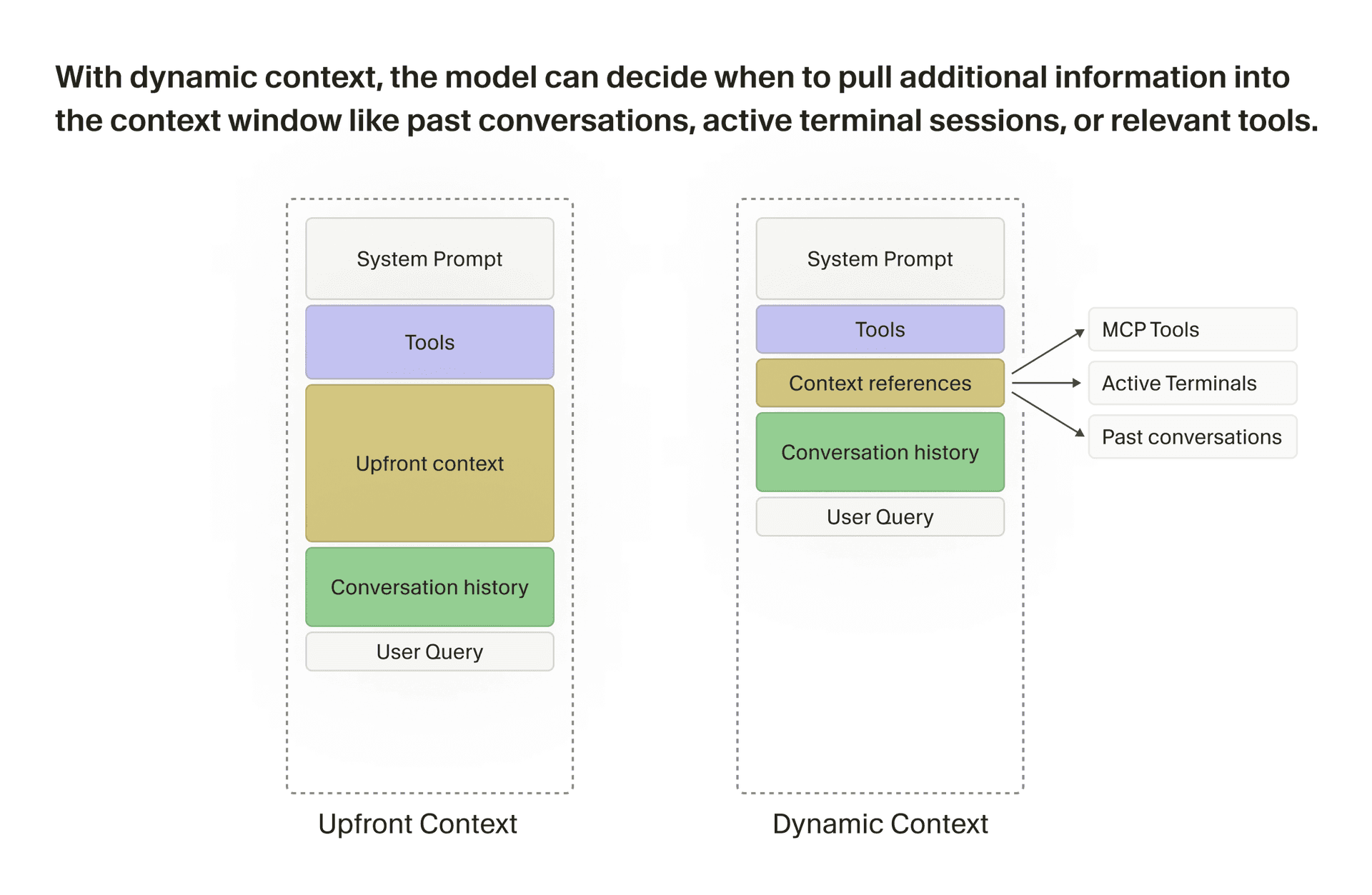
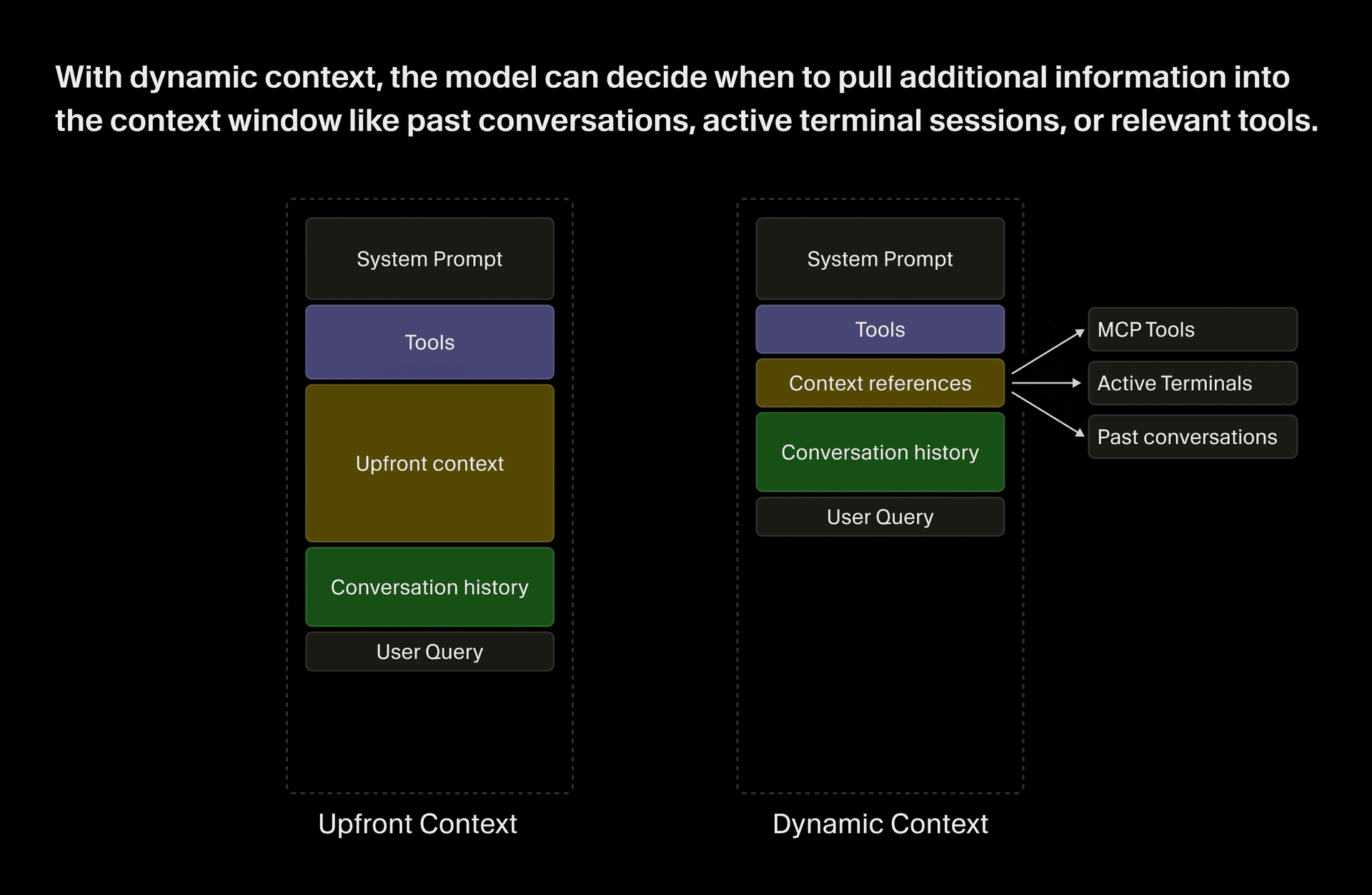
我们仍然会加入一些有用的静态上下文,比如操作系统、git 状态、当前文件和最近查看过的文件。但随着模型能力提升,我们也在不断拆掉护栏,转而提供更多动态上下文,让 agent 在工作过程中自行获取。我们此前写过一篇文章,深入讲过部分动态上下文技术的细节,见deep dive。其中很多方法后来也被其他 coding agent 采用。现在,我们的大部分工作都集中在为 agent 提供更多动态拉取上下文、并与外部世界交互的方式上。

Image 1: With dynamic context, the model can decide when to pull additional information into the context window like past conversations, active terminal sessions, or relevant tools.Image 2: With dynamic context, the model can decide when to pull additional information into the context window like past conversations, active terminal sessions, or relevant tools.

Two ways of assessing harness changes

评估 harness 改动的两种方式

The harness and the model together determine how good the agent is, but "good" is hard to pin down. To locate it, we've built several layers of measurement.

harness 和模型一起决定了 agent 的能力上限,但所谓好,到底是什么,其实很难精确定义。为了尽量靠近这个答案,我们搭建了好几层衡量体系。

We maintain public benchmarks alongside our own eval suite, CursorBench, which gives us a fast, standardized read on quality and lets us compare across time. But even the best benchmarks only approximate real usage, meaning we’d miss important signals if we relied on them entirely.

我们既维护公开基准,也维护自己的评测套件 CursorBench。它能让我们快速、标准化地读取质量变化,也方便做长期对比。但再好的基准,也只是对真实使用场景的近似。如果完全依赖它们,我们就会错过一些重要信号。

So we also run online experiments where we deploy two or more harness variants side by side and A/B test them on real usage. We measure agent quality in these tests through a variety of metrics. Some are straightforward like latency, token efficiency, tool call count, and cache hit rate. Those are directionally useful but still don’t get at fuzzier and more important questions of whether the agent actually did a good job. We measure those in two ways.

所以我们还会做线上实验,同时部署两个或更多 harness 版本,并在真实使用中做 A/B 测试。我们用多种指标来衡量这些测试里的 agent 质量。有些指标很直接,比如延迟、token 效率、工具调用次数和缓存命中率。它们能提供方向性的参考,但仍然触及不到更模糊、却更重要的问题,也就是 agent 到底有没有把事情做好。对此,我们主要用两种方式来衡量。

The first is the “Keep Rate” of agent-generated code. For a given set of code changes that the agent proposed, we track what fraction of those remain in the user’s codebase after fixed intervals of time. This allows us to understand when users have to manually adjust the agent's output, or need to iterate and have the agent fix things, indicating the agent’s initial response was of lower quality.

第一种,是 agent 生成代码的 Keep Rate。对于 agent 提出的某一组代码改动,我们会跟踪其中有多少比例在固定时间间隔后,仍然保留在用户的代码库里。这样我们就能知道,用户是否不得不手动调整 agent 的输出,或者需要继续迭代、让 agent 来修补问题。这些都说明 agent 的初始回答质量不够高。

Second, we use a language model to read the user's responses to the agent’s initial output in order to capture semantically whether the user was satisfied or not. A user moving on to the next feature is a strong signal the agent did its job, while a user pasting a stack trace is a reliable signal that it didn't.

第二种,是用语言模型去阅读用户对 agent 首次输出的回应,从语义层面判断用户是否满意。用户直接转去做下一个功能,通常是 agent 完成了工作的强信号;而用户贴出一段堆栈追踪,则通常说明它没做好。

Sometimes these online tests tell us to shelve an idea that seems promising. In one experiment, we tried a more expensive model for context summarization and observed it made a negligible difference in agent quality that wasn’t worth the higher cost.

有时,这些线上测试也会告诉我们,某个看上去很有前景的想法其实该先搁置。在一次实验中,我们尝试用一个成本更高的模型来做上下文总结,结果发现它对 agent 质量的提升几乎可以忽略,不值得为此付出更高成本。

Tracking and repairing degradations

跟踪并修复退化

As we add more models and capabilities, the harness gets more complex with more potential states, just like any piece of software. With this comes more surface area for bugs to crop up, many of which we can only detect at scale.

随着我们加入越来越多的模型和能力,harness 也和其他任何软件一样,变得更复杂,潜在状态更多。随之而来的,是更大的 bug 暴露面,其中许多问题只能在大规模使用下才会浮现。

The agent’s tools are one of the broadest surfaces for bugs, and tool call errors can be extremely harmful to a session in Cursor. While the agent can often self-correct, errors remain in context, wasting tokens and causing “context rot,” where accumulated mistakes degrade the quality of the model's subsequent decisions.

agent 的工具系统,是 bug 最容易出现的广阔区域之一,而工具调用错误对 Cursor 里的单次会话可能造成极大伤害。虽然 agent 往往能自行纠正,但错误本身仍会留在上下文中,浪费 token,并造成 context rot,也就是随着错误不断累积,模型后续决策的质量会逐步下降。

Sometimes, the agent can be blocked or go off the rails completely after a failed tool call. Though metrics like tool call volume and error rate don’t directly measure whether the agent did a good job, they act as indicators that can point to a broader issue.

有时,一次失败的工具调用甚至会让 agent 完全卡住,或者彻底跑偏。像工具调用量和错误率这样的指标,虽然不能直接衡量 agent 是否把事情做好,但它们能作为信号,帮助我们定位更广泛的问题。

Any unknown error represents a bug in the harness, and we treat it accordingly. But many errors are “expected,” for example the model occasionally proposing an incorrect edit or trying to read a file that doesn't exist. We classify these expected errors by cause. InvalidArguments and UnexpectedEnvironment capture model mistakes and contradictions in the context window, while ProviderError captures vendor outages from tools like GenerateImage or WebSearch.

任何未知错误,都意味着 harness 里存在 bug,我们也会按 bug 来处理。但很多错误是预期内的。比如模型偶尔会提出错误的编辑,或者尝试读取一个不存在的文件。我们会按照成因对这些预期错误做分类。InvalidArgumentsUnexpectedEnvironment 用来表示模型犯错,以及上下文窗口内部存在矛盾;ProviderError 则表示像 GenerateImageWebSearch 这类工具背后供应商发生了故障。

We have several other classifications like UserAborted and Timeout which altogether encompass most expected errors.
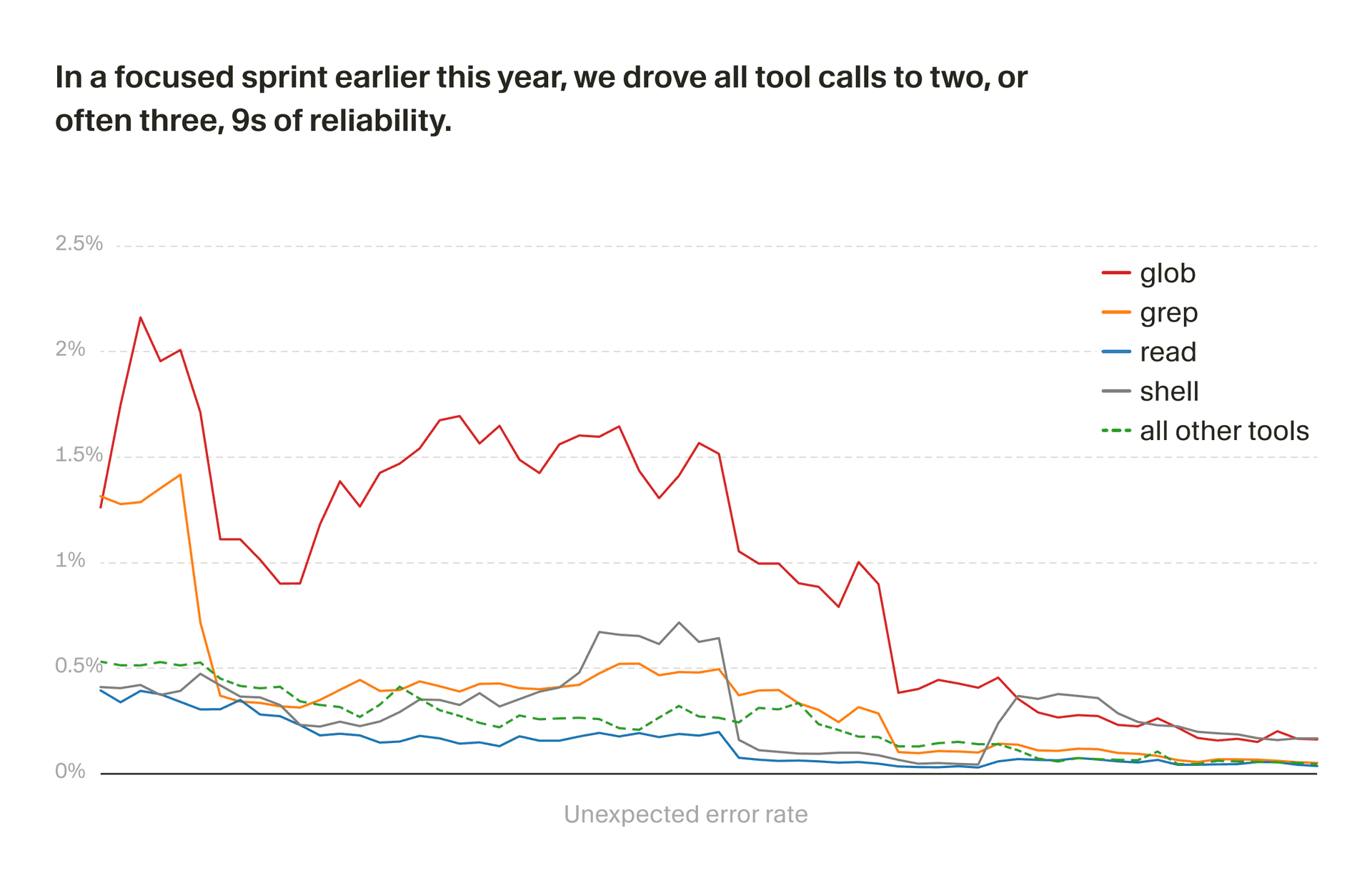
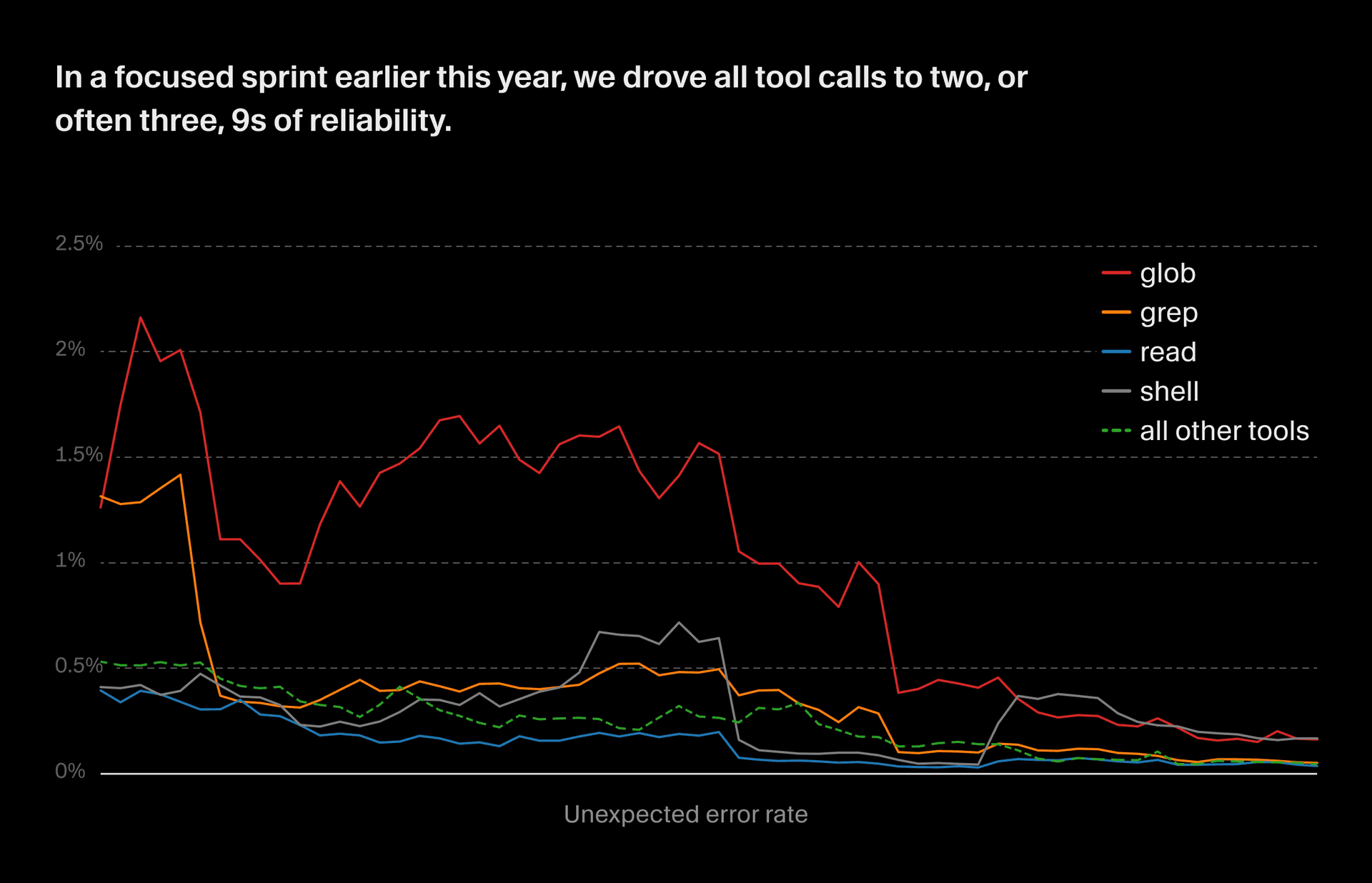
我们还有其他几类错误,比如 UserAbortedTimeout,这些加在一起,基本覆盖了大多数预期错误。

Image 3: In a focused sprint earlier this year, we drove all tool calls to at least 2 or often 3 9s of reliability.Image 4: In a focused sprint earlier this year, we drove all tool calls to at least 2 or often 3 9s of reliability.

We define alerts based on these metrics to catch significant regressions that make it into production. Since unknown errors are always bugs, we alert whenever the unknown error rate for any tool exceeds a fixed threshold. But it can be tricky to tell whether expected errors represent a bug in the harness or expected behavior.

我们会基于这些指标设定告警,用来捕捉那些进入生产环境的明显回退。由于未知错误一定是 bug,所以只要任何工具的未知错误率超过固定阈值,我们就会报警。但预期错误究竟代表 harness 里有 bug,还是只是正常行为,有时就没那么容易判断。

For example, a grep search timeout might be because of a performance issue with the tool, or the codebase might just be huge and the model formed an inefficient query. To deal with this, we have anomaly detection alerts which fire when expected errors significantly exceed the baseline. We compute baselines per-tool and per-model, because different models may mess up tool calls at different rates.

比如,一次 grep 搜索超时,可能是工具本身有性能问题,也可能只是代码库太大,而模型又构造了一个低效查询。为了解决这个问题,我们会设置异常检测告警。当预期错误明显高于基线时,告警就会触发。我们会按工具和按模型分别计算基线,因为不同模型在工具调用上的失误率本来就可能不同。

We also run a weekly Automation equipped with a skill that teaches the model how to search through our logs, surface issues that are new or recently spiked, and create or update tickets in a backlog with an investigation. We lean heavily on Cloud Agents to kick off fixes for many issues at once, and can even trigger them directly from Linear.

我们还会每周运行一次配好技能的 Automation。这个技能会教模型如何搜索我们的日志,找出新出现的问题或近期突然增多的问题,并在待办系统里创建或更新工单,同时附上调查结果。我们大量依赖 Cloud Agents 来同时启动许多问题的修复,甚至可以直接从 Linear 触发它们

This process is part of the way we’re instantiating an automated “software factory” for our agent harness. Over the course of a focused sprint earlier this year, we drove unexpected tool call errors down by an order of magnitude.

这是我们为 agent harness 搭建自动化软件工厂的一部分。今年早些时候,在一次集中的冲刺中,我们把意外工具调用错误压低了一个数量级。

Customizing the harness for different models

为不同模型定制 harness

All of our harness abstractions are model agnostic and can be heavily customized for every model we support. For instance, OpenAI's models are trained to edit files using a patch-based format, while Anthropic's models are trained on string replacement. Either model could use either tool, but giving it the unfamiliar one costs extra reasoning tokens and produces more mistakes. So in our harness, we provision each model with the tool format it had during training.

我们所有的 harness 抽象都与具体模型无关,而且可以针对每个支持的模型做深度定制。举例来说,OpenAI 的模型在训练时更习惯使用基于 patch 的格式来编辑文件,而 Anthropic 的模型则更习惯字符串替换。两种模型都能使用这两类工具,但如果给它们不熟悉的那一种,就会消耗更多推理 token,也更容易出错。所以在我们的 harness 里,我们会为每个模型提供它在训练中接触过的工具格式。

This customization goes very deep, and includes custom prompting for different providers and even for different model versions. OpenAI’s models tend to be more literal and precise in their instruction following, whereas Claude is a bit more intuitive and more tolerant to imprecise instructions.

这种定制非常深入,既包括针对不同提供方的定制提示词,也包括针对不同模型版本的定制。OpenAI 的模型往往更字面、更精确地遵循指令,而 Claude 则更偏直觉,对不够精确的指令容忍度更高一些。

When we get early access to a new model ahead of launch, we start from the closest existing model's harness and begin iterating. We run offline evals to find where the model gets confused, have people on our team use it and surface problems, and tweak the harness in response. We iterate like this until we have a model-harness combination we feel good about shipping.

当我们在模型正式发布前提前获得访问权限时,会先从最接近的现有模型 harness 出发,再开始持续迭代。我们会跑线下评测,找出模型容易困惑的地方;也会让团队成员实际去用,暴露问题;然后根据这些反馈去调整 harness。我们会一直这样迭代,直到形成一个我们愿意发布的模型与 harness 组合。

Much of this tuning process is about customizing the harness to a new model’s strengths, but sometimes we encounter genuine model quirks that we can mitigate with the harness. For example, we observed one model develop what we came to call context anxiety: As its context window filled up, it would start refusing work, hedging that the task seemed too big. We were able to reduce the behavior through prompt adjustments.

这个调优过程里,有很大一部分是在让 harness 更贴合新模型的优势。但有时,我们也会遇到真正属于模型自身的怪癖,而这些问题可以靠 harness 缓解。比如,我们曾观察到某个模型出现一种我们后来称为上下文焦虑的现象。随着上下文窗口逐渐填满,它会开始拒绝继续工作,含糊表示任务看起来太大了。后来我们通过调整提示词,减轻了这种行为。

Facilitating mid-chat model switching

支持在对话中途切换模型

It’s especially tricky to design the harness to support users switching models mid conversation, because different models have different behaviors, prompts, and tool shapes.

要让 harness 支持用户在对话进行中切换模型,尤其棘手,因为不同模型有不同的行为模式、提示词和工具形态。

When a user switches models, Cursor automatically switches to the appropriate harness, with that model’s customized set of prompts and tools. However, the model still has to apply those tools to a conversation history that was produced by a different model and is out of distribution from what it was trained on.

当用户切换模型时,Cursor 会自动切换到对应的 harness,也就是那个模型专属定制的一组提示词和工具。不过,模型仍然需要把这些工具应用到一段由另一个模型生成的对话历史上,而这种历史并不符合它训练时的分布。

To address this, we add custom instructions that tell the model when it's taking over mid-chat from another model. These instructions also steer it away from calling tools that appear in the conversation history but aren't part of its own tool set.
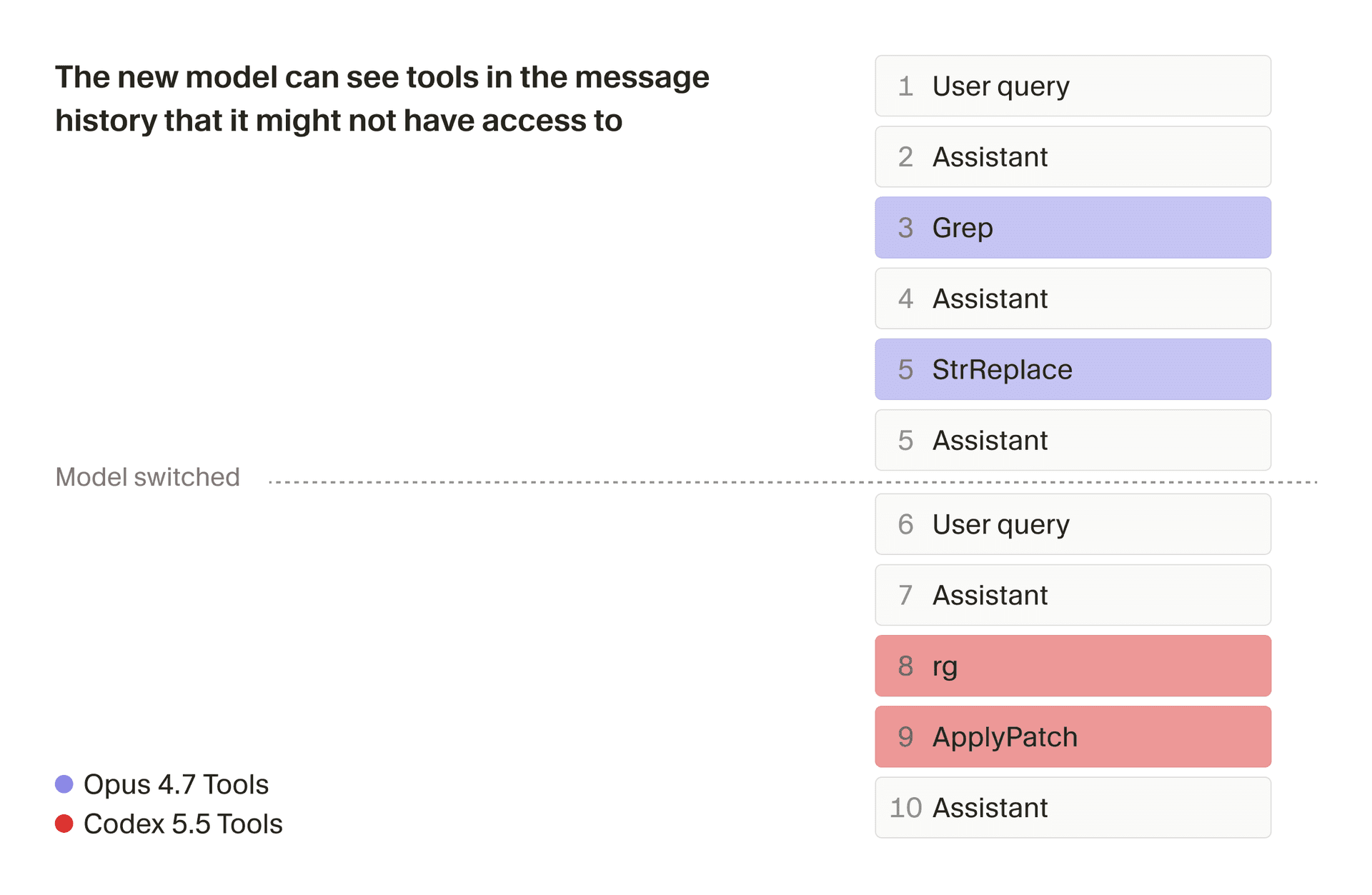
为了解决这个问题,我们会加入自定义指令,告诉模型它当前是在对话中途接手另一个模型的工作。这些指令还会引导它,不要去调用那些虽然出现在对话历史里、但并不属于它自己工具集的工具。

Image 5: Preventing models from calling tools that aren't in its toolsetImage 6: Preventing models from calling tools that aren't in its toolset

A second challenge is that caches are provider- and model-specific, so switching means a cache miss and a slower, more expensive first turn. We mitigate this by summarizing the conversation at switch time, which provides the model with a clean summary that reduces the cache penalty. But if the user is deep into a complex task, the summary can lose important details, which is why we generally recommend staying with one model for the duration of a conversation, unless you have a reason to switch.

第二个挑战是,缓存通常同时依赖提供方和模型本身,所以一旦切换,就会发生缓存未命中,导致切换后的第一轮更慢、成本也更高。我们缓解这个问题的方法,是在切换时对对话进行总结,让模型拿到一份干净的摘要,从而减少缓存损失。不过如果用户已经深入一个复杂任务,这种摘要就可能丢失重要细节。这也是为什么,除非你确实有切换的理由,否则我们通常建议在一次对话里尽量坚持使用同一个模型。

Another way to sidestep the challenges of mid-conversation model switching is to instead use a subagent, which starts from a fresh context window. We recently added to the harness the ability for users to directly ask for a subagent to be run with a particular model.

另一种绕开对话中途切换模型难题的方式,是改用 subagent,因为它会从一个全新的上下文窗口开始。我们最近已经把这样一种能力加入 harness,让用户可以直接指定某个subagent由特定模型来运行。

The harness and the future of software development

harness 与软件开发的未来

The future of AI-assisted software engineering will be multi-agent. Instead of running every subtask through a single agent, the system will learn to delegate across specialized agents and subagents: one for planning, another for fast edits, and a third for debugging, each scoped to what it does best.

AI 辅助软件工程的未来,会是多 agent 的。系统不会再把每个子任务都交给同一个 agent,而是会学会在不同的专用 agent 和 subagent 之间做委派。可能一个负责规划,一个负责快速编辑,第三个负责调试,各自只处理自己最擅长的部分。

Making that work well is fundamentally a harness challenge. The system needs to know which agent to dispatch, how to frame the task for that agent's strengths, and how to stitch the results into a coherent workflow. The ability to orchestrate that kind of coordination will live in the harness rather than any single agent. This means that, while harness engineering has always been important for agent success, it's only going to be more critical going forward.

要把这件事做好,归根到底是 harness 层面的挑战。系统必须知道该派出哪个 agent,怎样按照这个 agent 的优势来组织任务,以及怎样把结果重新拼接成一个连贯的工作流。编排这种协作的能力,会存在于 harness 里,而不是任何单个 agent 身上。这意味着,虽然 harness 工程一直都是 agent 成功的重要因素,但接下来它只会变得更加关键。

We approach building the Cursor agent harness the way we'd approach any ambitious software product. Much of the work is vision-driven, where we start with an opinion about what the ideal agent experience should look like.

From there, we form hypotheses about how to get closer to that vision, run experiments to test them, and iterate using quantitative and qualitative signals from evals and real usage. That process depends on having the right online and offline instrumentation, so we can tell when a change actually makes the harness better.

When we get early access to new models, all of these approaches converge. We spend weeks customizing our harness to a model's strengths and quirks until the same model inside our specially tuned harness is noticeably faster, smarter, and more efficient.

Occasionally we discover step-change improvements. More often, though, improving the harness is a matter of obsessively stacking small optimizations that together make agents better at building software.

Evolving the context window

At the heart of interacting with large language models is the context window. When asking the agent to build something, the context window starts with the system prompt and tool descriptions, followed by the current state of the conversation, and finally the user's request.

The way we populate and manage that window has evolved significantly over the history of Cursor.

When we first developed our coding agent in late 2024, models were much worse at choosing their own context and we invested lots of context engineering work into creating guardrails—for example, surfacing lint and type errors to the agent after every edit, rewriting its file reads when it requested too few lines, and even limiting the maximum number of tools it could call in one turn.

We also provided substantial amounts of static context that was always available to the agent at the start of each session. At various points, that included the folder layout of the codebase, code snippets that semantically matched the query, and compressed versions of files that the user manually attached.

That is mostly long gone.

We still include some useful static context (e.g., operating system, git status, current and recently viewed files). But we’ve adapted to increasing model capability by knocking down guardrails and providing more dynamic context, which can be fetched by the agent while it works. In an earlier post, we did a deep dive into some of our techniques behind dynamic context, many of which have since been adopted by other coding agents. Much of our work now focuses on providing more ways for the agent to dynamically pull context and interact with the world.

Image 1: With dynamic context, the model can decide when to pull additional information into the context window like past conversations, active terminal sessions, or relevant tools.Image 2: With dynamic context, the model can decide when to pull additional information into the context window like past conversations, active terminal sessions, or relevant tools.

Two ways of assessing harness changes

The harness and the model together determine how good the agent is, but "good" is hard to pin down. To locate it, we've built several layers of measurement.

We maintain public benchmarks alongside our own eval suite, CursorBench, which gives us a fast, standardized read on quality and lets us compare across time. But even the best benchmarks only approximate real usage, meaning we’d miss important signals if we relied on them entirely.

So we also run online experiments where we deploy two or more harness variants side by side and A/B test them on real usage. We measure agent quality in these tests through a variety of metrics. Some are straightforward like latency, token efficiency, tool call count, and cache hit rate. Those are directionally useful but still don’t get at fuzzier and more important questions of whether the agent actually did a good job. We measure those in two ways.

The first is the “Keep Rate” of agent-generated code. For a given set of code changes that the agent proposed, we track what fraction of those remain in the user’s codebase after fixed intervals of time. This allows us to understand when users have to manually adjust the agent's output, or need to iterate and have the agent fix things, indicating the agent’s initial response was of lower quality.

Second, we use a language model to read the user's responses to the agent’s initial output in order to capture semantically whether the user was satisfied or not. A user moving on to the next feature is a strong signal the agent did its job, while a user pasting a stack trace is a reliable signal that it didn't.

Sometimes these online tests tell us to shelve an idea that seems promising. In one experiment, we tried a more expensive model for context summarization and observed it made a negligible difference in agent quality that wasn’t worth the higher cost.

Tracking and repairing degradations

As we add more models and capabilities, the harness gets more complex with more potential states, just like any piece of software. With this comes more surface area for bugs to crop up, many of which we can only detect at scale.

The agent’s tools are one of the broadest surfaces for bugs, and tool call errors can be extremely harmful to a session in Cursor. While the agent can often self-correct, errors remain in context, wasting tokens and causing “context rot,” where accumulated mistakes degrade the quality of the model's subsequent decisions.

Sometimes, the agent can be blocked or go off the rails completely after a failed tool call. Though metrics like tool call volume and error rate don’t directly measure whether the agent did a good job, they act as indicators that can point to a broader issue.

Any unknown error represents a bug in the harness, and we treat it accordingly. But many errors are “expected,” for example the model occasionally proposing an incorrect edit or trying to read a file that doesn't exist. We classify these expected errors by cause. InvalidArguments and UnexpectedEnvironment capture model mistakes and contradictions in the context window, while ProviderError captures vendor outages from tools like GenerateImage or WebSearch.

We have several other classifications like UserAborted and Timeout which altogether encompass most expected errors.

Image 3: In a focused sprint earlier this year, we drove all tool calls to at least 2 or often 3 9s of reliability.Image 4: In a focused sprint earlier this year, we drove all tool calls to at least 2 or often 3 9s of reliability.

We define alerts based on these metrics to catch significant regressions that make it into production. Since unknown errors are always bugs, we alert whenever the unknown error rate for any tool exceeds a fixed threshold. But it can be tricky to tell whether expected errors represent a bug in the harness or expected behavior.

For example, a grep search timeout might be because of a performance issue with the tool, or the codebase might just be huge and the model formed an inefficient query. To deal with this, we have anomaly detection alerts which fire when expected errors significantly exceed the baseline. We compute baselines per-tool and per-model, because different models may mess up tool calls at different rates.

We also run a weekly Automation equipped with a skill that teaches the model how to search through our logs, surface issues that are new or recently spiked, and create or update tickets in a backlog with an investigation. We lean heavily on Cloud Agents to kick off fixes for many issues at once, and can even trigger them directly from Linear.

This process is part of the way we’re instantiating an automated “software factory” for our agent harness. Over the course of a focused sprint earlier this year, we drove unexpected tool call errors down by an order of magnitude.

Customizing the harness for different models

All of our harness abstractions are model agnostic and can be heavily customized for every model we support. For instance, OpenAI's models are trained to edit files using a patch-based format, while Anthropic's models are trained on string replacement. Either model could use either tool, but giving it the unfamiliar one costs extra reasoning tokens and produces more mistakes. So in our harness, we provision each model with the tool format it had during training.

This customization goes very deep, and includes custom prompting for different providers and even for different model versions. OpenAI’s models tend to be more literal and precise in their instruction following, whereas Claude is a bit more intuitive and more tolerant to imprecise instructions.

When we get early access to a new model ahead of launch, we start from the closest existing model's harness and begin iterating. We run offline evals to find where the model gets confused, have people on our team use it and surface problems, and tweak the harness in response. We iterate like this until we have a model-harness combination we feel good about shipping.

Much of this tuning process is about customizing the harness to a new model’s strengths, but sometimes we encounter genuine model quirks that we can mitigate with the harness. For example, we observed one model develop what we came to call context anxiety: As its context window filled up, it would start refusing work, hedging that the task seemed too big. We were able to reduce the behavior through prompt adjustments.

Facilitating mid-chat model switching

It’s especially tricky to design the harness to support users switching models mid conversation, because different models have different behaviors, prompts, and tool shapes.

When a user switches models, Cursor automatically switches to the appropriate harness, with that model’s customized set of prompts and tools. However, the model still has to apply those tools to a conversation history that was produced by a different model and is out of distribution from what it was trained on.

To address this, we add custom instructions that tell the model when it's taking over mid-chat from another model. These instructions also steer it away from calling tools that appear in the conversation history but aren't part of its own tool set.

Image 5: Preventing models from calling tools that aren't in its toolsetImage 6: Preventing models from calling tools that aren't in its toolset

A second challenge is that caches are provider- and model-specific, so switching means a cache miss and a slower, more expensive first turn. We mitigate this by summarizing the conversation at switch time, which provides the model with a clean summary that reduces the cache penalty. But if the user is deep into a complex task, the summary can lose important details, which is why we generally recommend staying with one model for the duration of a conversation, unless you have a reason to switch.

Another way to sidestep the challenges of mid-conversation model switching is to instead use a subagent, which starts from a fresh context window. We recently added to the harness the ability for users to directly ask for a subagent to be run with a particular model.

The harness and the future of software development

The future of AI-assisted software engineering will be multi-agent. Instead of running every subtask through a single agent, the system will learn to delegate across specialized agents and subagents: one for planning, another for fast edits, and a third for debugging, each scoped to what it does best.

Making that work well is fundamentally a harness challenge. The system needs to know which agent to dispatch, how to frame the task for that agent's strengths, and how to stitch the results into a coherent workflow. The ability to orchestrate that kind of coordination will live in the harness rather than any single agent. This means that, while harness engineering has always been important for agent success, it's only going to be more critical going forward.

📋 讨论归档

讨论进行中…