返回列表
🧠 阿头学 · 💬 讨论题

动态工作流不是魔法,但它确实把 Claude 从“会做事”推向了“会搭班子”

这篇文章最有价值的判断是:复杂任务的瓶颈往往不是模型不够聪明,而是单上下文执行架构太脆弱;但它对效果、成本和安全的论证明显停留在产品 PR 水位。
打开原文 ↗

2026-06-03 原文链接 ↗
阅读简报
双语对照
完整翻译
原文
讨论归档

核心观点

  • 核心突破在“结构”而不在“更大模型” 文章最站得住脚的地方,是把复杂任务失效归因为单一上下文的结构缺陷,而不是简单归因为模型智力不足,这个判断比“继续堆上下文窗口”更务实。
  • 多智能体隔离确实能缓解三类典型失效 作者提出的 agentic laziness、self-preferential bias、goal drift 都是现实问题,用独立上下文、独立 worktree 和对抗验证去拆分规划、执行、复核,这套方法在工程逻辑上是成立的。
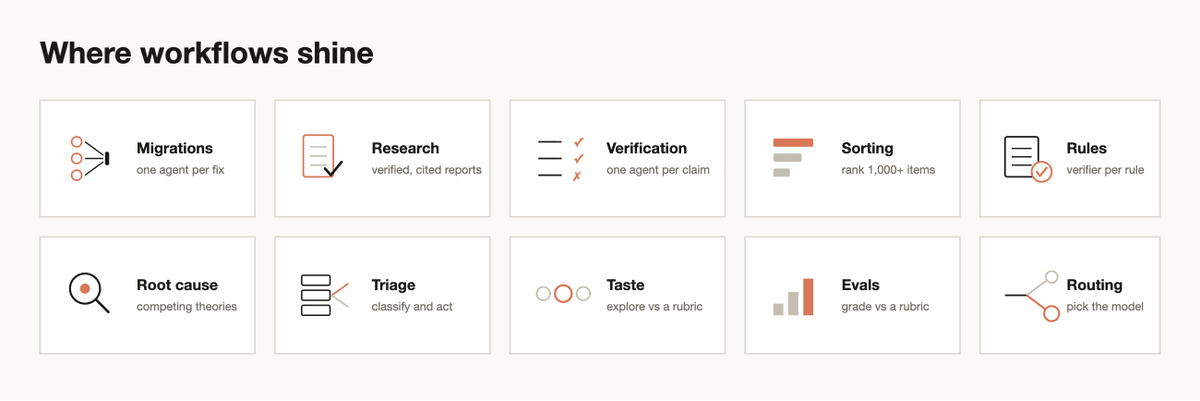
  • 六种工作流模式提供了可复用的方法库 分类并执行、分发并综合、对抗式验证、生成并筛选、锦标赛、循环直到完成,这不是花哨命名,而是一套能直接映射到研究、排序、调试、评审、分诊的任务模板。
  • 真正高价值场景不只是写代码,而是处理模糊且长程的知识工作 文章最有启发性的部分,恰恰是把动态工作流用于深度研究、事实核验、根因调查、规则提炼和排序,这说明它更像“认知流程编排器”,而不只是 IDE 插件增强。
  • 最大问题是证据严重不足且成本被弱化 文章反复暗示效果显著,却几乎不给 benchmark、成功率、失败率、人工介入比例或 token ROI,这让“动态工作流优于默认模式”的结论更像销售话术,而不是被验证的工程事实。

跟我们的关联

  • 对 ATou 意味着什么:如果你经常做开放式分析、长链路调试、批量筛选,重点不该再放在“怎么写一个更长 prompt”,而该转向“怎么设计 maker-checker 流程”;下一步可以先拿一个高返工任务,按“执行者+验证者+停止条件”做最小工作流实验。
  • 对 Neta 意味着什么:这篇文章证明了“比较判断优于绝对打分”在产品和研究里很实用,尤其适合排序、评审和优先级决策;下一步可以把简历筛选、选题排序、问题分桶改成 pairwise/tournament 流程验证稳定性。
  • 对 Uota 意味着什么:如果你的工作涉及研究、内容核验或多视角审稿,动态工作流最该被当成“反自嗨装置”,而不是“自动产出机器”;下一步可以用“生成—质疑—复核”三段式流程检查内容里的事实性陈述和论证漏洞。
  • 对团队协作意味着什么:这套方法本质上是在把组织管理机制移植到 AI,清晰分工、权限隔离、交叉审查会比“找一个全能 agent”更可靠;下一步应该优先定义哪些任务必须隔离权限、哪些任务值得为准确率支付更高 token 成本。

讨论引子

1. 动态工作流的真实拐点到底在哪里:什么任务复杂度以上,额外 token 成本才值得支付? 2. 多智能体真的能减少幻觉,还是只是把单点错误变成了“编排器错误 + 汇总错误”? 3. 如果把这套方法用于招聘、商业计划书评审或舆情分析,我们该如何防止“回音室式共识”而不是放大它?

上周,我们在 Claude Code 中发布了动态工作流。现在,Claude 可以按需即时为自己编写 harness,并针对手头任务量身打造。

默认的 Claude Code harness 是为编程而构建的,但它同样适用于许多其他类型的任务,因为事实证明,很多任务都和编程任务有相似之处。不过,也有一些任务类别,只有在 Claude Code 之上再构建专用 harness,才能达到最佳表现,比如研究、安全分析、智能体团队协作,或代码评审。

工作流让你可以动态创建 harness,使 Claude 能够在 Claude Code 内原生解决所有这些问题,甚至更多。你也可以把这些工作流分享给别人并重复使用。

这篇文章里,我会介绍自己初步使用工作流的经验与心得,帮助你充分发挥它的价值。

不过要先说明一点,最佳实践仍在形成中。动态工作流通常会消耗更多 token,所以要认真考虑何时使用、如何使用。

注意:这篇文章也可以在 Claude Blog 上看到

示例提示词

在深入技术细节之前,先看一些示例提示词,帮助你打开思路,想想工作流还能做什么:

  • 这个测试大概每跑 50 次会失败 1 次。搭一个工作流来复现它,提出理论,并在 worktree 里对这些理论做对抗式测试,/goal 在有一个理论成立之前不要停。

  • 用一个工作流检查我最近 50 次会话,挖出那些我反复在纠正的问题,再把其中反复出现的内容整理成 CLAUDE.md 规则。

  • 用工作流翻查 Slack 里过去六个月的 #incidents,找出那些反复出现、但还没人建 ticket 的根因。

  • 拿我的商业计划书,跑一个工作流,让不同智能体分别从投资人、客户和竞争对手的视角来挑毛病。

  • 这里有一个装着 80 份简历的文件夹,用工作流给后端岗位做排序,再复核前十名。用 AskUserQuestion 工具向我提问,拿到评分标准。

  • 这个 CLI 工具需要一个名字。用工作流头脑风暴一批方案,再跑一轮锦标赛,选出前 3 个。

  • 用工作流把我们系统里所有地方的 User model 全部改名为 Account。

  • 检查我的博客草稿,用工作流把里面每一条技术性说法都对照代码库核实一遍,不想带着错误发出去。

动态工作流如何运作

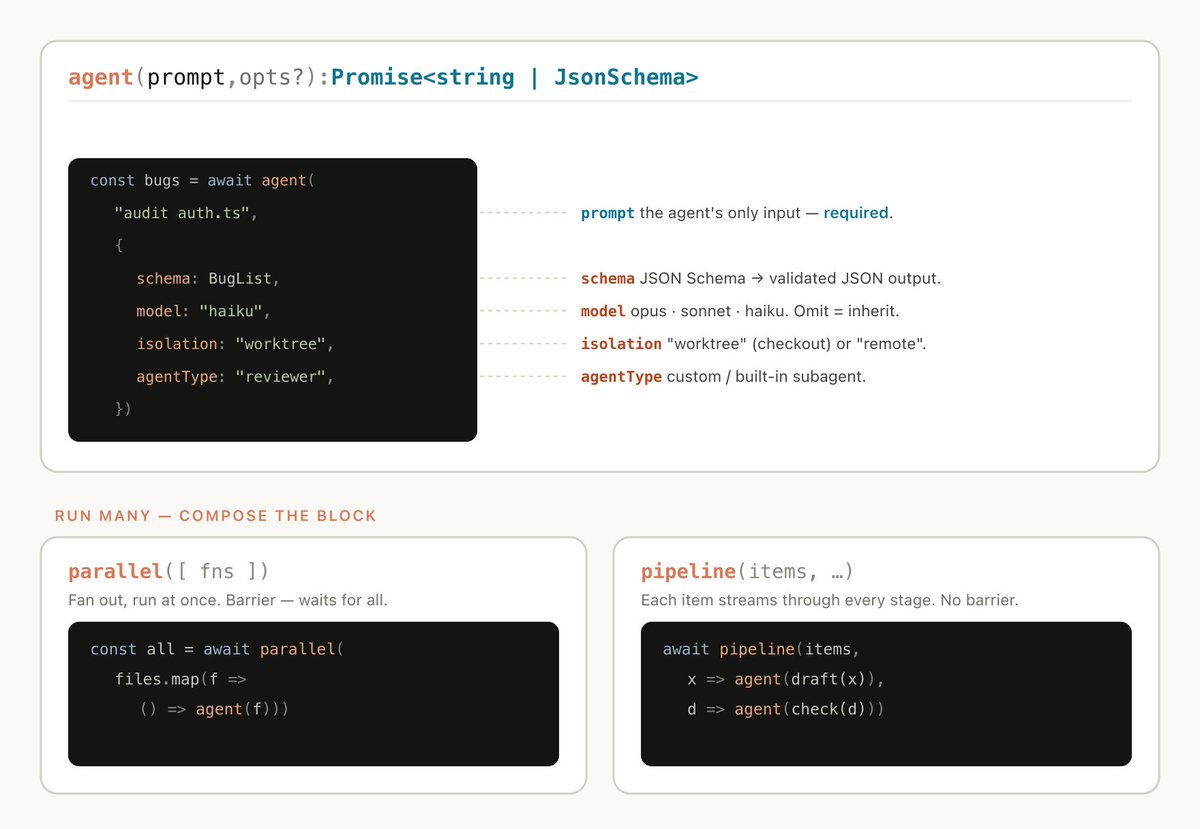
动态工作流会执行一个 javascript 文件,其中包含一些特殊函数,用来生成和协调子智能体:

https://bun.com/

动态工作流也包含标准的 JavaScript 功能,比如 JSON、Math 和 Array,方便处理数据。

有一点尤其值得知道,动态工作流可以决定某个智能体使用哪种模型,也可以决定子智能体是否在各自独立的 worktree 中运行,这让 Claude 能自行选择任务所需的智能水平和隔离程度。

如果工作流被中断,比如用户操作打断,或者终端退出,那么恢复会话后,工作流可以从中断的位置继续。

为什么需要动态工作流

当你让默认的 Claude Code harness 去执行任务时,它需要在同一个上下文窗口里同时完成规划和执行。对很多编程任务来说,这样做非常有效,但一旦任务变成长时间运行、大规模并行,或者高度结构化的对抗性任务,这种方式有时就会失效。

原因在于,Claude 在单一上下文窗口里处理复杂任务的时间越长,就越容易受到几种特定失效模式的影响:

  • Agentic laziness 指的是 Claude 在面对特别复杂、包含多个部分的任务时,还没做完就提前停下,并在只完成部分进展后宣布任务结束。比如在一次安全审查里,本该处理 50 项,它只处理了 20 项就说完成了。

  • Self-preferential bias 指的是 Claude 倾向于偏爱自己的结果或发现,尤其是在你要求它依据某个标准去核查或评判这些结果时。

  • Goal drift 指的是在多轮交互中,对原始目标的忠实度会逐渐下降,尤其是在压缩上下文之后。每一次总结都会丢失一部分信息,而像边界条件要求,或不要做 X 这样的限制,往往最容易丢失。

创建工作流有助于对抗这些问题,因为它会编排多个彼此独立的 Claude,每个都有自己的上下文窗口,以及清晰、聚焦、隔离的目标。

动态工作流与静态工作流

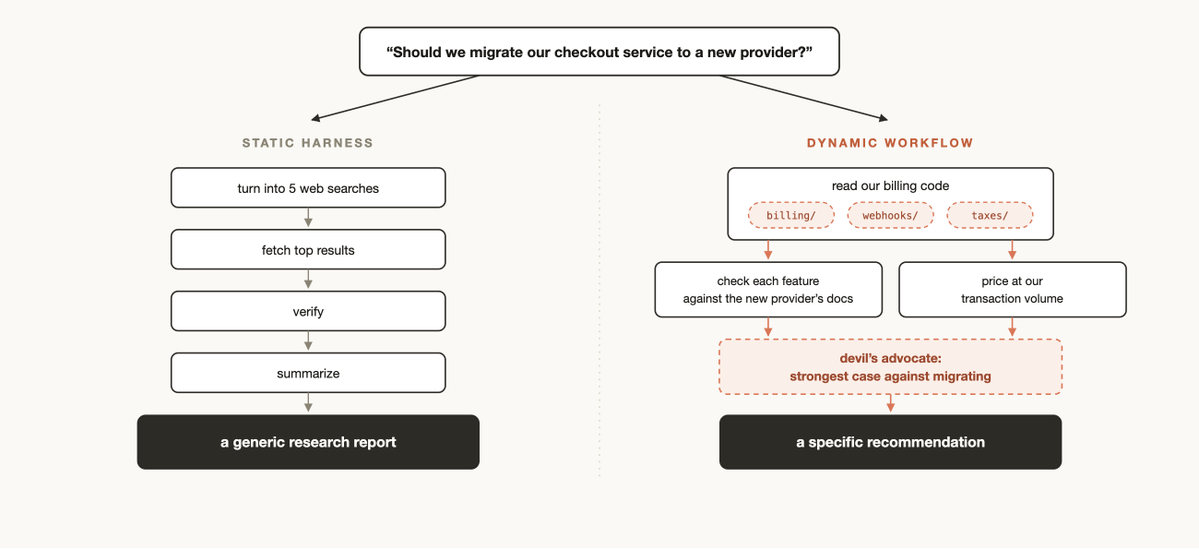
你以前可能已经用 Claude Agent SDK 或 claude -p 创建过静态工作流,用来协调多个 Claude Code 实例一起工作。

但静态工作流必须覆盖各种边界情况,所以往往做得更通用。随着 Claude Opus 4.8 和动态工作流的到来,Claude 现在已经足够聪明,能够为你的具体场景写出一个专门定制的 harness。

https://code.claude.com/docs/en/code-review

使用动态工作流时的一些实用模式

你现在就可以开始使用动态工作流,只要让 Claude 帮你创建一个,或者使用触发词 ultracode,确保 Claude Code 会生成工作流。

不过,先建立一套关于动态工作流如何运作的心智模型,会帮助你理解什么时候该用它,以及怎样通过提示词去引导 Claude。

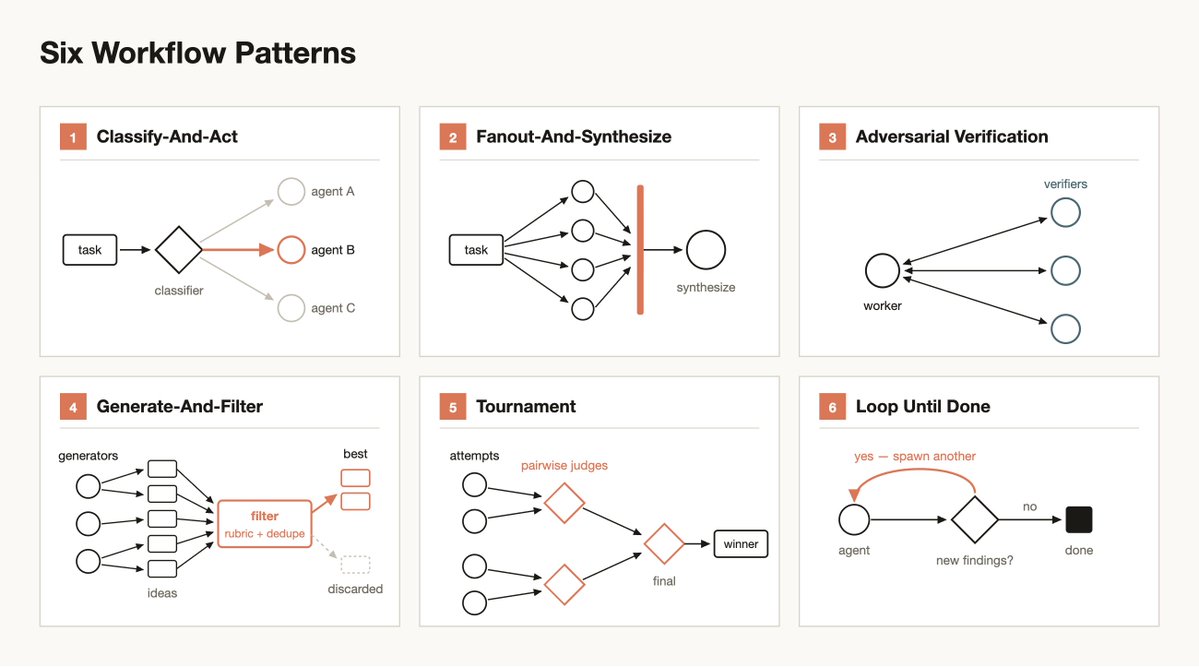
Claude 在构建工作流时,常会使用并组合一些常见模式:

分类并执行

先用一个分类器智能体判断任务属于哪一类,再根据任务类型分流到不同的智能体或行为。也可以在最后用分类器来决定输出结果。

分发并综合

把一个任务拆成很多更小的步骤,每一步各自交给一个智能体处理,最后再把这些结果综合起来。当任务包含大量小步骤时,这种方式尤其有用;或者每一步都更适合放在自己的干净上下文窗口里,避免相互干扰和污染时,也很适合。综合这一步是一个屏障,它会等所有分发出去的智能体完成后,再把它们结构化的输出合并成一个结果。

对抗式验证

对于每个生成出来的智能体,再额外运行一个独立生成的智能体,按照某个评分标准或条件,对它的输出做对抗式验证。

生成并筛选

围绕某个主题先生成一批想法,再按评分标准或验证结果进行筛选,去掉重复项,最后只返回质量最高、经过检验的那些想法。

锦标赛

不是把任务拆开,而是让多个智能体在同一任务上竞争。生成 N 个智能体,让它们分别用不同方法去完成同一个任务。然后通过提示词或模型,用一个裁判智能体逐对评判结果,直到决出赢家。

循环直到完成

对于工作量未知的任务,不要预设固定轮数,而是不断循环生成智能体,直到满足停止条件,比如没有新的发现,或者日志里不再出现错误。

使用场景

可以更有创造性地去想,什么时候、怎样让 Claude Code 生成动态工作流。实际用下来,工作流有时在非技术类工作里反而更有价值。

http://skill.md/

迁移与重构

Bun 从 Zig 重写到 Rust 的过程中就使用了工作流。你可以去看 Jarred 在 X 上的帖子,了解更多细节。

关键在于把任务拆成一系列需要处理的步骤,比如调用点、失败的测试、模块等等。为每一个修复在独立 worktree 里启动一个子智能体来完成修改,再让另一个智能体做对抗式审查,然后合并结果。可以考虑告诉智能体不要使用太耗资源的命令,这样你就能在机器资源不耗尽的前提下,把并行度拉到更高。

深度研究

我们在 Claude Code 里发布了一个深度研究技能 /deep-research,它就使用了动态工作流。具体来说,它会把网页搜索分发出去、抓取来源、对来源中的说法做对抗式验证,最后综合成一份带引用的报告。

但这种研究不只是适用于网页搜索。比如你也可以让 Claude 根据 Slack 中的上下文整理一份状态报告,或者深入探索代码库,研究某个功能到底是怎么实现的。

深度核验

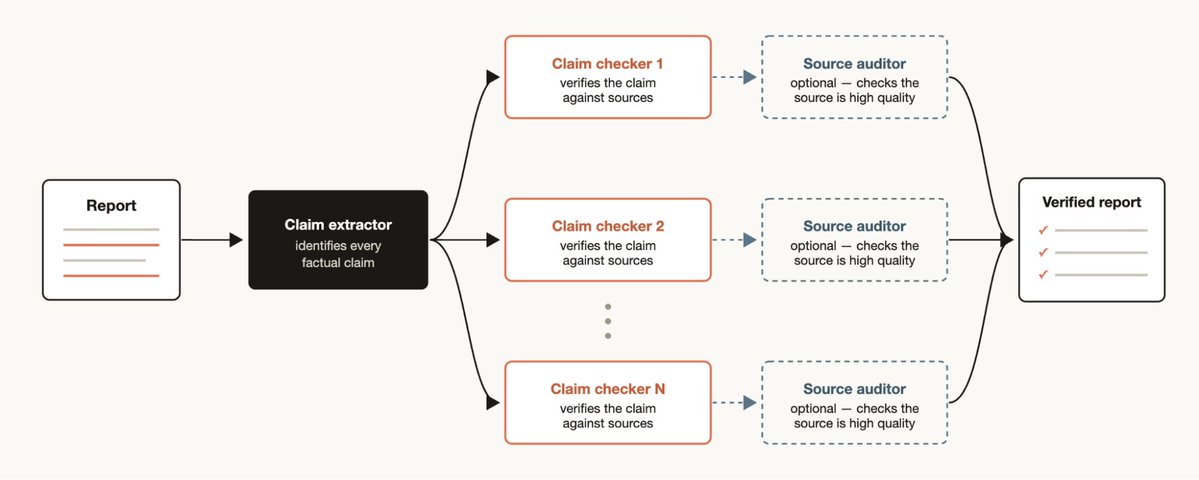
反过来,如果你手头有一份报告,希望把其中引用到的每一条事实性说法都核查并补上来源,那么可以生成一个工作流,先让一个智能体找出所有事实性陈述,再为每一条详细启动一个子智能体去核查。你也可以再加一个验证智能体,专门去检查这些查来源的子智能体,确保它们采用的来源质量足够高。

排序

https://x.com/jarredsumner/status/2060050578026189172

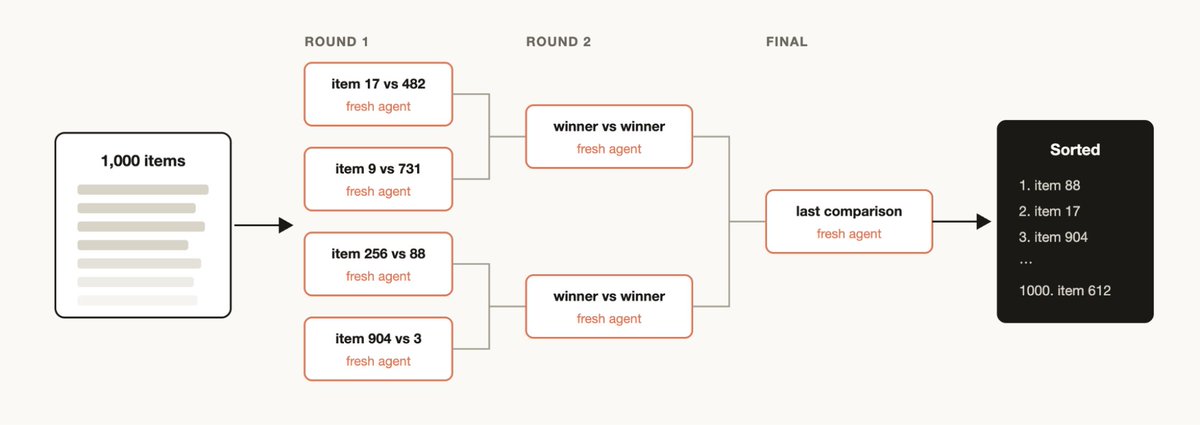
有时你会有一批条目,希望按照某种定性标准来排序,而你相信 Claude Code 在这类判断上表现不错。比如,按 bug 严重程度对支持工单排序。但如果你试图在一个提示词里给它 1000 多行数据做排序,质量会下降,而且上下文也装不下。这时更适合跑一场锦标赛,或者使用成对比较智能体组成的流水线,因为比较判断通常比绝对打分更可靠;也可以先并行做分桶排序,再合并。每一次比较都由各自独立的智能体完成,所以决定性的循环结构只需要维护赛程,保持在上下文中的也只有执行顺序。

记忆与规则遵守

https://code.claude.com/docs/en/workflows

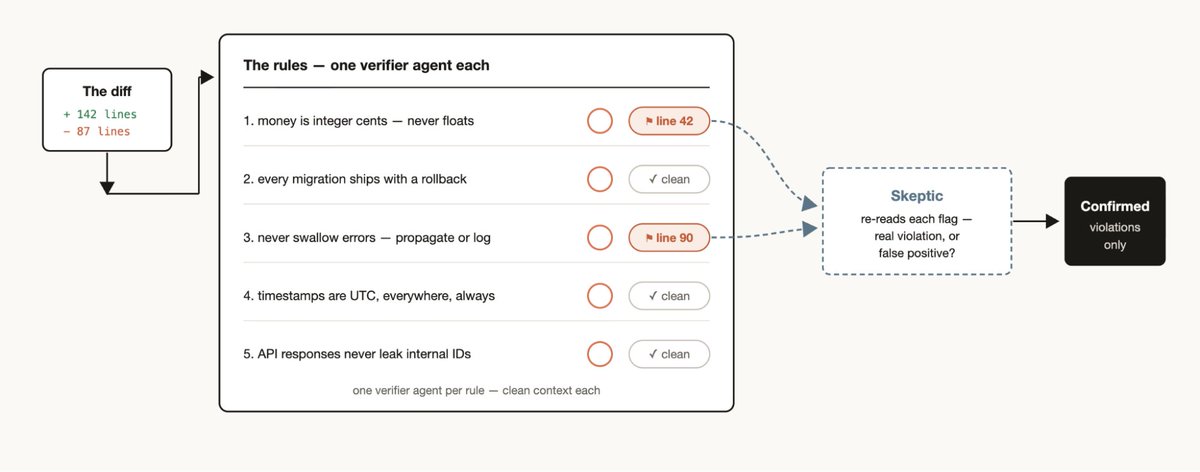
如果你有一组特定规则,发现 Claude 即使写进 CLAUDE.mds 里,仍然经常漏掉或执行不好,那就可以创建一个工作流,把这些规则列出来,交给验证智能体逐条检查,每条规则一个验证者。再额外创建一个持怀疑态度的人格子智能体,去复核这些规则本身是否合理,可以帮助减少误报。

反过来也成立。你可以挖掘最近的会话和代码评审评论,找出那些你反复在纠正的问题,用并行智能体把它们聚类,再对每一条候选规则做对抗式验证,看看这条规则是否真的能避免一次实际错误,最后把幸存下来的规则提炼回一个 CLAUDE.md。

根因调查

调试最有效的方式,往往是提出多个彼此独立的假设并逐一验证。但如果你只使用一个上下文窗口,Claude 就可能陷入自我偏好偏差。

工作流可以在结构上避免这个问题,方法是根据彼此分离的证据来源分别启动智能体来生成假设。比如,日志一个智能体,文件一个智能体,数据一个智能体。然后让每个假设都接受一组验证者和反驳者的检验。

这不只适用于代码。工作流也可以用于销售分析,比如为什么三月销售额下降了,也可以用于数据工程,比如为什么这条 pipeline 失败了,还可以用于任何事后复盘场景。

大规模分诊

https://support.claude.com/en/articles/11088861-using-research-on-claude

每个团队都会有支持队列、bug 报告,或者其他人类根本处理不完的积压工作。

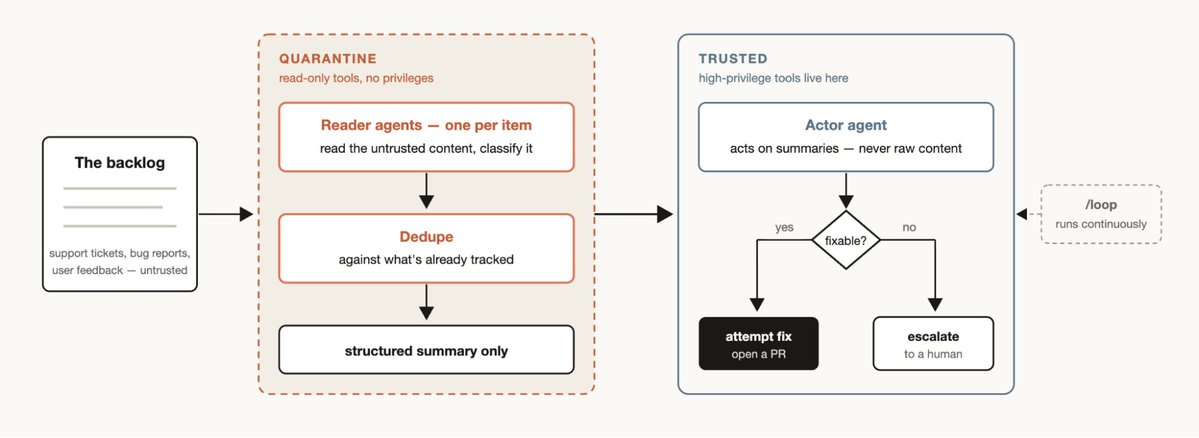
一个分诊工作流会先对每个条目分类,再和已有记录去重,然后采取行动。这个行动可以是尝试修复,也可以是升级交给人工处理。

分诊工作流里有一种很实用的模式叫隔离。它的做法是,禁止那些读取不可信公开内容的智能体去执行高权限操作,而这些高权限操作改由负责根据信息采取行动的智能体来执行。

把分诊工作流和 /loop 配合起来,就可以让 Claude 持续不断地做这件事。

探索与品味判断

工作流在探索不同解法时也很有用,尤其是那些更依赖品味判断的任务,比如设计或命名,而且这类任务通常适合配一套评分标准。

可以让 Claude 去探索一批方案,再给一个评审智能体一套标准,告诉它什么样才算好方案。当评审智能体认为已经达到标准时,任务就完成了。方案也可以依据这套标准,通过锦标赛的方式排序或选优。

评测

你可以针对特定任务运行轻量级 evals,方法是在 worktree 中分别启动独立智能体,再启动比较智能体,依据评分标准对这些具体输出做对比和打分。比如,按某套标准评估并改进你自己创建的某个技能。

模型与智能路由

可以创建一个针对你自己任务类型调优过的分类器智能体,让它决定该使用哪个模型。当任务会涉及大量工具调用,而且先做一些研究就能判断哪个模型更合适时,这种方式会很有帮助。

比如,解释 auth 模块是怎么工作的,这个任务最适合用哪个模型,其实取决于 auth 模块里有多少文件,以及整个代码库的结构。一个分类器智能体可以先完成这部分调研,再根据预期复杂度,把任务路由给 Sonnet 或 Opus。

什么时候不该使用动态工作流

工作流还是新东西。虽然有很多场景下它能带来远超预期的效果,但并不是每个任务都需要它,而且它最终可能会多消耗相当多的 token。

更好的做法,是有创造性地用工作流去把 Claude Code 推到你以前没试过的地方。至于常规编程任务,不妨先问问自己,它真的需要更多算力吗。比如,大多数传统编程任务,其实并不需要一个由 5 个评审组成的小组。

构建动态工作流的技巧

提示词编写

对于动态工作流,尽可能详细地写提示词,并使用上面提到的这些具体技巧,效果最好。

工作流不只是给大型任务准备的。你也可以提示模型使用一个 quick workflow。比如,快速对某个假设做一次对抗式审查。

结合 /goal 和 /loop

对于那些可以重复执行的工作流,比如分诊、研究或验证,最好搭配 /loop 定期运行,再用 /goal 设定一个硬性的完成要求。

Token 使用预算

你可以为动态工作流设置明确的 token 预算,限制任务最多消耗多少 token。可以像这样提示它,use 10k tokens,这样就会设置上限。

保存和分享动态工作流

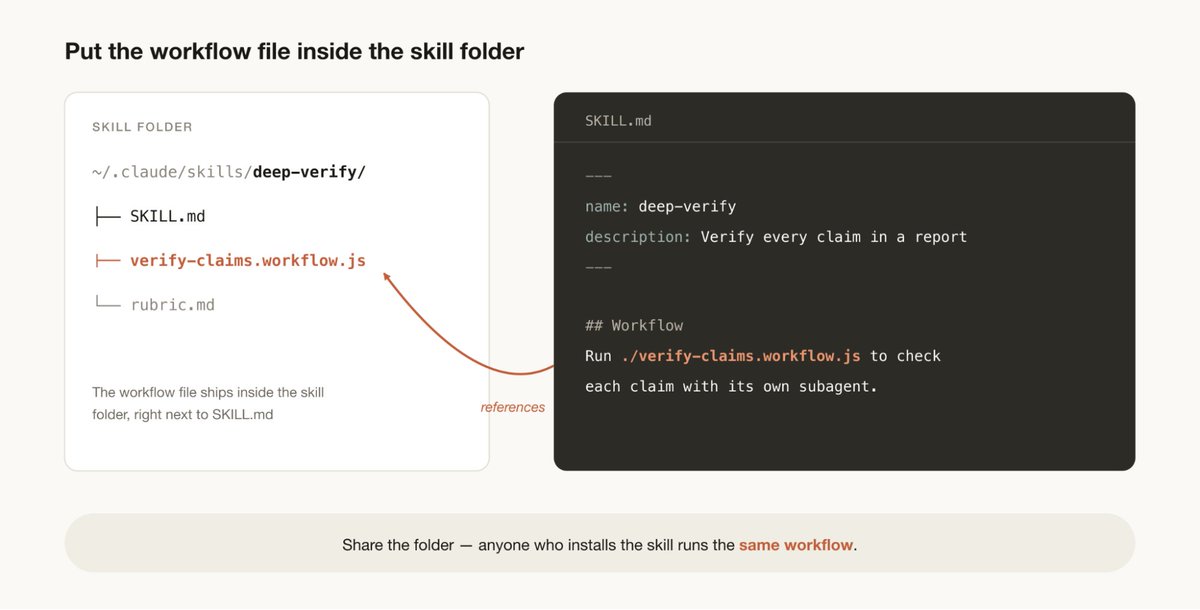
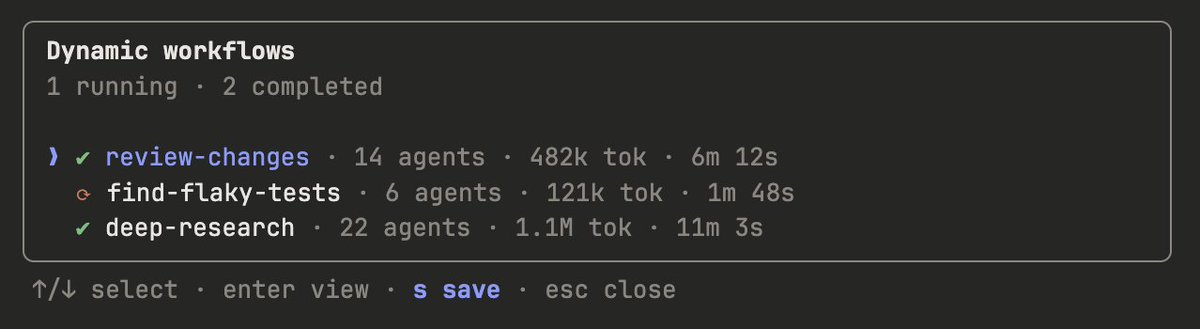
你可以在工作流菜单里按 s 来保存工作流。保存后可以提交到 ~/.claude/workflows,也可以通过技能分发。

http://claude.md/

如果想通过技能来分享,就把你的 JavaScript 工作流文件放进技能和文件夹里,并在 SKILL.MD 里引用它们。为了保留更多灵活性,你可能会希望提示 Claude,把技能里的这些工作流当作模板,而不是必须逐字执行的脚本。

https://support.claude.com/en/articles/11932705-automated-security-reviews-in-claude-code

一个全新的世界

工作流是扩展 Claude Code 的一种很有帮助的新方式。把它看作一个起点会更合适,关于怎样最好地使用它,仍然还有很多值得探索的空间。欢迎告诉我们你的发现。

Thariq Shihipar 和 Sid Bidasaria(@sidbid)是 Anthropic 的技术团队成员,负责 Claude Code。

Last week, we released dynamic workflows in Claude Code. Claude can now write its own harness on the fly, custom-built for the task at hand.
上周,我们在 Claude Code 中发布了动态工作流。现在,Claude 可以按需即时为自己编写 harness,并针对手头任务量身打造。

While the default Claude Code harness is built for coding, it is also useful for many other types of tasks because, as it turns out, many tasks resemble coding tasks. But there are certain classes of tasks where we have had to build custom harnesses on top of Claude Code to achieve peak performance such as Research, security analysis, agent teams, or Code Review.
默认的 Claude Code harness 是为编程而构建的,但它同样适用于许多其他类型的任务,因为事实证明,很多任务都和编程任务有相似之处。不过,也有一些任务类别,只有在 Claude Code 之上再构建专用 harness,才能达到最佳表现,比如研究、安全分析、智能体团队协作,或代码评审。

Workflows allow you to dynamically create harnesses that enable Claude to solve all of those problems and more natively inside of Claude Code. You can also share and re-use these workflows with others.

工作流让你可以动态创建 harness,使 Claude 能够在 Claude Code 内原生解决所有这些问题,甚至更多。你也可以把这些工作流分享给别人并重复使用。

In this article, I’ll cover my initial workflows experiences and learnings so you can take full advantage.

这篇文章里,我会介绍自己初步使用工作流的经验与心得,帮助你充分发挥它的价值。

That said, best practices are still developing! Dynamic workflows often use more tokens, so think carefully about when and how to use them.

不过要先说明一点,最佳实践仍在形成中。动态工作流通常会消耗更多 token,所以要认真考虑何时使用、如何使用。

Note: this post is also available on the Claude Blog

注意:这篇文章也可以在 Claude Blog 上看到

Example prompts

示例提示词

Before diving into the technical details, I’d like to start with some example prompts to get you thinking about the possibilities with workflows:

在深入技术细节之前,先看一些示例提示词,帮助你打开思路,想想工作流还能做什么:

  • "This test fails maybe 1 in 50 runs. Set up a workflow to reproduce it, form theories and adversarially test them in worktrees /goal don't stop until one theory works."
  • 这个测试大概每跑 50 次会失败 1 次。搭一个工作流来复现它,提出理论,并在 worktree 里对这些理论做对抗式测试,/goal 在有一个理论成立之前不要停。
  • "Using a workflow, go through my last 50 sessions and mine them for corrections I keep making and turn the recurring ones into CLAUDE.md rules"
  • 用一个工作流检查我最近 50 次会话,挖出那些我反复在纠正的问题,再把其中反复出现的内容整理成 CLAUDE.md 规则。
  • “Use a workflow to dig through #incidents in Slack for the past six months and find recurring root causes where nobody has filed a ticket."
  • 用工作流翻查 Slack 里过去六个月的 #incidents,找出那些反复出现、但还没人建 ticket 的根因。
  • "Take my business plan and run a workflow where different agents tear it apart from an investor's, a customer's, and a competitor's perspective."
  • 拿我的商业计划书,跑一个工作流,让不同智能体分别从投资人、客户和竞争对手的视角来挑毛病。
  • "Here's a folder of 80 resumes, use a workflow to rank them for the backend role and double-check the top ten. Interview me using the AskUserQuestion tool for a rubric."
  • 这里有一个装着 80 份简历的文件夹,用工作流给后端岗位做排序,再复核前十名。用 AskUserQuestion 工具向我提问,拿到评分标准。
  • "I need a name for this CLI tool. Use a workflow to brainstorm a bunch of options and run a tournament to pick the top 3."
  • 这个 CLI 工具需要一个名字。用工作流头脑风暴一批方案,再跑一轮锦标赛,选出前 3 个。
  • "Use a workflow to rename our User model to Account everywhere."
  • 用工作流把我们系统里所有地方的 User model 全部改名为 Account。
  • “Go through my blog post draft and using a workflow verify every technical claim against the codebase, I don't want to ship anything wrong."
  • 检查我的博客草稿,用工作流把里面每一条技术性说法都对照代码库核实一遍,不想带着错误发出去。

How dynamic workflows work

动态工作流如何运作

Dynamic workflows execute a javascript file with a few special functions that help spawn and coordinate subagents:

动态工作流会执行一个 javascript 文件,其中包含一些特殊函数,用来生成和协调子智能体:

Dynamic workflows also include standard JavaScript functions like JSON, Math, and Array, to help process data.

动态工作流也包含标准的 JavaScript 功能,比如 JSON、Math 和 Array,方便处理数据。

It’s particularly useful to know that dynamic workflows can decide which models an agent uses and whether subagents are run in their own worktree, allowing Claude to choose the intelligence level and isolation needed.

有一点尤其值得知道,动态工作流可以决定某个智能体使用哪种模型,也可以决定子智能体是否在各自独立的 worktree 中运行,这让 Claude 能自行选择任务所需的智能水平和隔离程度。

If a workflow is interrupted, for example by user action or quitting the terminal, resuming the session will allow the workflow to pick up where it left off.

如果工作流被中断,比如用户操作打断,或者终端退出,那么恢复会话后,工作流可以从中断的位置继续。

Why dynamic workflows

为什么需要动态工作流

When you ask the default Claude Code harness to do a task, it needs to both plan and execute in the same context window. For many coding tasks, this is highly effective, but it can sometimes break down over long-running, massively parallel and/or highly structured adversarial tasks.

当你让默认的 Claude Code harness 去执行任务时,它需要在同一个上下文窗口里同时完成规划和执行。对很多编程任务来说,这样做非常有效,但一旦任务变成长时间运行、大规模并行,或者高度结构化的对抗性任务,这种方式有时就会失效。

This is because the longer Claude works on a complex task in a single context window, the more it becomes susceptible to a few specific failure modes:

原因在于,Claude 在单一上下文窗口里处理复杂任务的时间越长,就越容易受到几种特定失效模式的影响:

  • Agentic laziness refers to when Claude stops before finishing a particularly complex, multi-part task and declares the job done after partial progress, for example addressing 20 of the 50 items in a security review.
  • Agentic laziness 指的是 Claude 在面对特别复杂、包含多个部分的任务时,还没做完就提前停下,并在只完成部分进展后宣布任务结束。比如在一次安全审查里,本该处理 50 项,它只处理了 20 项就说完成了。
  • Self-preferential bias refers to Claude’s tendency to prefer its own results or findings, especially when asked to verify or judge them against a rubric.
  • Self-preferential bias 指的是 Claude 倾向于偏爱自己的结果或发现,尤其是在你要求它依据某个标准去核查或评判这些结果时。
  • Goal drift refers to the gradual loss of fidelity to the original objective across many turns, especially after compaction. Each summarization step is lossy, and details like edge-case requirements or "don't do X" constraints can get lost.
  • Goal drift 指的是在多轮交互中,对原始目标的忠实度会逐渐下降,尤其是在压缩上下文之后。每一次总结都会丢失一部分信息,而像边界条件要求,或不要做 X 这样的限制,往往最容易丢失。

Creating a workflow helps combat these by orchestrating separate Claudes with their own context windows and focused, isolated goals.

创建工作流有助于对抗这些问题,因为它会编排多个彼此独立的 Claude,每个都有自己的上下文窗口,以及清晰、聚焦、隔离的目标。

Dynamic vs static workflows

动态工作流与静态工作流

You may have previously created a static workflow using the Claude Agent SDK or claude -p to coordinate multiple instances of Claude Code together.

你以前可能已经用 Claude Agent SDK 或 claude -p 创建过静态工作流,用来协调多个 Claude Code 实例一起工作。

But because static workflows need to work for all edge cases, they are usually more generic. With Claude Opus 4.8 and dynamic workflows, Claude is now intelligent enough to write a custom harness tailor-made for your use case.

但静态工作流必须覆盖各种边界情况,所以往往做得更通用。随着 Claude Opus 4.8 和动态工作流的到来,Claude 现在已经足够聪明,能够为你的具体场景写出一个专门定制的 harness。

Helpful patterns when using dynamic workflows

使用动态工作流时的一些实用模式

You can start using dynamic workflows just by asking Claude to make one, or by using the trigger word “ultracode” to ensure that Claude Code creates a workflow.

你现在就可以开始使用动态工作流,只要让 Claude 帮你创建一个,或者使用触发词 ultracode,确保 Claude Code 会生成工作流。

But building a mental model for how dynamic workflows work will help you understand when to use them and how you might nudge Claude via prompts.

不过,先建立一套关于动态工作流如何运作的心智模型,会帮助你理解什么时候该用它,以及怎样通过提示词去引导 Claude。

There are a few common patterns that Claude might use and compose together when building workflows:

Claude 在构建工作流时,常会使用并组合一些常见模式:

Classify-and-act

分类并执行

Use a classifier agent to decide on the type of task, and then route to different agents or behavior based on the task. Or, use a classifier at the end to determine output.

先用一个分类器智能体判断任务属于哪一类,再根据任务类型分流到不同的智能体或行为。也可以在最后用分类器来决定输出结果。

Fan-out-and-synthesize

分发并综合

Split up a task into many smaller steps, run an agent on each step and then synthesize those results. This is particularly useful for when there are a large number of smaller steps, or when each step benefits from its own clean context window so they don't interfere or cross-contaminate. The synthesize step is a barrier—it waits for all the fan-out agents, then merges their structured outputs into one result.

把一个任务拆成很多更小的步骤,每一步各自交给一个智能体处理,最后再把这些结果综合起来。当任务包含大量小步骤时,这种方式尤其有用;或者每一步都更适合放在自己的干净上下文窗口里,避免相互干扰和污染时,也很适合。综合这一步是一个屏障,它会等所有分发出去的智能体完成后,再把它们结构化的输出合并成一个结果。

Adversarial verification

对抗式验证

For each spawned agent, run a separate spawned agent to adversarially verify its output against a rubric or criteria.

对于每个生成出来的智能体,再额外运行一个独立生成的智能体,按照某个评分标准或条件,对它的输出做对抗式验证。

Generate-and-filter

生成并筛选

Generate a number of ideas on a topic and then filter them by a rubric or by verification, dedupe duplicates and return only the highest quality, tested ideas.

围绕某个主题先生成一批想法,再按评分标准或验证结果进行筛选,去掉重复项,最后只返回质量最高、经过检验的那些想法。

Tournament

锦标赛

Instead of dividing the work, have agents compete on it. Spawn N agents that each attempt the same task using different approaches. Prompts or models then judge the results in a pairwise fashion using a judging agent until you have a winner.

不是把任务拆开,而是让多个智能体在同一任务上竞争。生成 N 个智能体,让它们分别用不同方法去完成同一个任务。然后通过提示词或模型,用一个裁判智能体逐对评判结果,直到决出赢家。

Loop until done

循环直到完成

For tasks with an unknown amount of work, loop spawning agents until a stop condition is met (no new findings, or no more errors in the logs) instead of a fixed number of passes.

对于工作量未知的任务,不要预设固定轮数,而是不断循环生成智能体,直到满足停止条件,比如没有新的发现,或者日志里不再出现错误。

Use cases

使用场景

Think creatively of when and how to ask Claude Code to make dynamic workflows. I’ve found that workflows are sometimes even more useful for non-technical work.

可以更有创造性地去想,什么时候、怎样让 Claude Code 生成动态工作流。实际用下来,工作流有时在非技术类工作里反而更有价值。

Migrations and refactors

迁移与重构

Bun was rewritten from Zig to Rust using workflows. You can read more about how that was done in Jarred’s X thread.

Bun 从 Zig 重写到 Rust 的过程中就使用了工作流。你可以去看 Jarred 在 X 上的帖子,了解更多细节。

The key is to break down the task into a series of steps that need to be operated on for example callsites, failing tests, modules, etc. Spin off a subagent for every fix in a worktree to make the fix, then have another agent adversarially review, and merge them. Consider telling the agent not to use resource intensive commands so that you can maximally parallelize without running out of resources on your machine.

关键在于把任务拆成一系列需要处理的步骤,比如调用点、失败的测试、模块等等。为每一个修复在独立 worktree 里启动一个子智能体来完成修改,再让另一个智能体做对抗式审查,然后合并结果。可以考虑告诉智能体不要使用太耗资源的命令,这样你就能在机器资源不耗尽的前提下,把并行度拉到更高。

Deep research

深度研究

We published a deep research skill (/deep-research) inside Claude Code that uses dynamic workflows. Specifically, it fans-out web searches, fetches sources, adversarially verifies their claims, and synthesizes a cited report.

我们在 Claude Code 里发布了一个深度研究技能 /deep-research,它就使用了动态工作流。具体来说,它会把网页搜索分发出去、抓取来源、对来源中的说法做对抗式验证,最后综合成一份带引用的报告。

But you may do this sort of research for more than just web searches. For example, asking Claude to compile a status report from context in Slack or to research how a feature works by exploring a codebase in-depth.

但这种研究不只是适用于网页搜索。比如你也可以让 Claude 根据 Slack 中的上下文整理一份状态报告,或者深入探索代码库,研究某个功能到底是怎么实现的。

Deep verification

深度核验

On the other hand, if you have a report where you want to check and source every factual claim that it references you may want to generate a workflow which has one agent identify all of the factual claims and then spin off a subagent to check each one in-detail. You could also have a verification agent check the source subagent to make sure its source is high quality.

反过来,如果你手头有一份报告,希望把其中引用到的每一条事实性说法都核查并补上来源,那么可以生成一个工作流,先让一个智能体找出所有事实性陈述,再为每一条详细启动一个子智能体去核查。你也可以再加一个验证智能体,专门去检查这些查来源的子智能体,确保它们采用的来源质量足够高。

Sorting

排序

You may have a list of items that you want to sort by some qualitative measurement that you believe that Claude Code is good at evaluating, for example: support tickets sorted by severity of the bug. But if you try to sort 1000+ rows in one prompt, quality degrades and it won't fit in context. Instead run a tournament, a pipeline of pairwise-comparison agents (comparative judgment is more reliable than absolute scoring), or bucket-rank in parallel then merge. Each comparison is its own agent, so the deterministic loop holds the bracket and only the running order stays in context.

有时你会有一批条目,希望按照某种定性标准来排序,而你相信 Claude Code 在这类判断上表现不错。比如,按 bug 严重程度对支持工单排序。但如果你试图在一个提示词里给它 1000 多行数据做排序,质量会下降,而且上下文也装不下。这时更适合跑一场锦标赛,或者使用成对比较智能体组成的流水线,因为比较判断通常比绝对打分更可靠;也可以先并行做分桶排序,再合并。每一次比较都由各自独立的智能体完成,所以决定性的循环结构只需要维护赛程,保持在上下文中的也只有执行顺序。

Memory and rule adherence

记忆与规则遵守

If you have a particular set of rules that you find Claude misses or struggles with, even when put into the CLAUDE.mds, create a workflow with a list of rules that must be checked by verifier agents—one verifier per rule. Creating a skeptic persona subagent to review the rules to make sure they are in line will help avoid too many false positives.

如果你有一组特定规则,发现 Claude 即使写进 CLAUDE.mds 里,仍然经常漏掉或执行不好,那就可以创建一个工作流,把这些规则列出来,交给验证智能体逐条检查,每条规则一个验证者。再额外创建一个持怀疑态度的人格子智能体,去复核这些规则本身是否合理,可以帮助减少误报。

The reverse direction works too: mine your recent sessions and code review comments for corrections you keep making, cluster them with parallel agents, adversarially verify each candidate (would this rule have prevented a real mistake?), and then distill the survivors back into a CLAUDE.md.

反过来也成立。你可以挖掘最近的会话和代码评审评论,找出那些你反复在纠正的问题,用并行智能体把它们聚类,再对每一条候选规则做对抗式验证,看看这条规则是否真的能避免一次实际错误,最后把幸存下来的规则提炼回一个 CLAUDE.md。

Root-cause investigation

根因调查

Debugging works best when you come up with several independent hypotheses and test them, but if you’re only using one context window, Claude can run into self-preferential bias.

调试最有效的方式,往往是提出多个彼此独立的假设并逐一验证。但如果你只使用一个上下文窗口,Claude 就可能陷入自我偏好偏差。

A workflow can structurally prevent this by spinning up agents to generate hypotheses from disjoint evidence. For example, separate agents for logs, files, and data. Each hypothesis can then face a panel of verifiers and refuters.

工作流可以在结构上避免这个问题,方法是根据彼此分离的证据来源分别启动智能体来生成假设。比如,日志一个智能体,文件一个智能体,数据一个智能体。然后让每个假设都接受一组验证者和反驳者的检验。

This isn't just for code. Workflows can be used for sales (why did sales drop in March?), data engineering (why did this pipeline fail?), or any post-mortem exercise.

这不只适用于代码。工作流也可以用于销售分析,比如为什么三月销售额下降了,也可以用于数据工程,比如为什么这条 pipeline 失败了,还可以用于任何事后复盘场景。

Triaging at scale

大规模分诊

Every team has a support queue, bug reports, or some other backlog that cannot be fully processed by humans.

每个团队都会有支持队列、bug 报告,或者其他人类根本处理不完的积压工作。

A triage workflow classifies each item, dedupes against what's already tracked, and takes action. This could mean attempting the fix or escalating to a human user.

一个分诊工作流会先对每个条目分类,再和已有记录去重,然后采取行动。这个行动可以是尝试修复,也可以是升级交给人工处理。

A useful pattern for triage workflows is quarantine. This involves barring the agents that read untrusted public content from taking high-privilege actions, which are instead done by the agents in charge of acting on the information.

分诊工作流里有一种很实用的模式叫隔离。它的做法是,禁止那些读取不可信公开内容的智能体去执行高权限操作,而这些高权限操作改由负责根据信息采取行动的智能体来执行。

Pair triage workflows with /loop to have Claude do this continuously.

把分诊工作流和 /loop 配合起来,就可以让 Claude 持续不断地做这件事。

Exploration and taste

探索与品味判断

Workflows can be useful when exploring different approaches to a solution, especially when it is taste based, like design or naming, and would benefit from a rubric.

工作流在探索不同解法时也很有用,尤其是那些更依赖品味判断的任务,比如设计或命名,而且这类任务通常适合配一套评分标准。

Try asking Claude to explore a bunch of solutions, and give a review agent a rubric for what a good solution looks like. The task is complete when the review agent feels like it has met the criteria. Solutions can also be ordered or selected via a tournament based on the rubric.

可以让 Claude 去探索一批方案,再给一个评审智能体一套标准,告诉它什么样才算好方案。当评审智能体认为已经达到标准时,任务就完成了。方案也可以依据这套标准,通过锦标赛的方式排序或选优。

Evals

评测

You can run lightweight evals for particular tasks by spinning off separate agents in a worktree and then spinning off comparison agents to compare and grade the specific outputs against a rubric. For example, evaluating and then refining a skill you’ve created against a particular criteria.

你可以针对特定任务运行轻量级 evals,方法是在 worktree 中分别启动独立智能体,再启动比较智能体,依据评分标准对这些具体输出做对比和打分。比如,按某套标准评估并改进你自己创建的某个技能。

Model and intelligence routing

模型与智能路由

Create a classifier agent tuned to your tasks that decides which model to use. This can be helpful when your task will involve many tool calls and conducting research prior to execution can identify the best model for the job.

可以创建一个针对你自己任务类型调优过的分类器智能体,让它决定该使用哪个模型。当任务会涉及大量工具调用,而且先做一些研究就能判断哪个模型更合适时,这种方式会很有帮助。

For example, the best model for the task “explain how the auth module works” depends on how many files in the auth module there are and the shape of the codebase. A classifier agent can do this research and then route to Sonnet or Opus based on the expected complexity of the task.

比如,解释 auth 模块是怎么工作的,这个任务最适合用哪个模型,其实取决于 auth 模块里有多少文件,以及整个代码库的结构。一个分类器智能体可以先完成这部分调研,再根据预期复杂度,把任务路由给 Sonnet 或 Opus。

When not to use dynamic workflows

什么时候不该使用动态工作流

Workflows are new. While there are many use cases where it will create outsized results, they are not needed for every task and may end up using significantly more tokens.

工作流还是新东西。虽然有很多场景下它能带来远超预期的效果,但并不是每个任务都需要它,而且它最终可能会多消耗相当多的 token。

It’s best to use workflows creatively to push Claude Code in ways that you haven’t previously. For regular coding tasks, try and ask yourself does it really need more compute? For example, most traditional coding tasks do not need a panel of 5 reviewers.

更好的做法,是有创造性地用工作流去把 Claude Code 推到你以前没试过的地方。至于常规编程任务,不妨先问问自己,它真的需要更多算力吗。比如,大多数传统编程任务,其实并不需要一个由 5 个评审组成的小组。

Tips for building dynamic workflows

构建动态工作流的技巧

Prompting

提示词编写

Detailed prompting, using the specific techniques we described above, for dynamic workflows creates the best results.

对于动态工作流,尽可能详细地写提示词,并使用上面提到的这些具体技巧,效果最好。

Workflows are not just for large tasks. You can prompt the model to use a “quick workflow.” For example, you can create a quick adversarial review of an assumption.

工作流不只是给大型任务准备的。你也可以提示模型使用一个 quick workflow。比如,快速对某个假设做一次对抗式审查。

Combine with /goal and /loop

结合 /goal 和 /loop

When using workflows that can be repeated, for example triage, research, or verification, pair them with /loop to be run at regular intervals, and /goal to set a hard completion requirement.

对于那些可以重复执行的工作流,比如分诊、研究或验证,最好搭配 /loop 定期运行,再用 /goal 设定一个硬性的完成要求。

Token usage budgets

Token 使用预算

You can set explicit token usage budgets for dynamic workflows to limit how many tokens a task uses. You can prompt it with a budget like: “use 10k tokens,” which will set the cap.

你可以为动态工作流设置明确的 token 预算,限制任务最多消耗多少 token。可以像这样提示它,use 10k tokens,这样就会设置上限。

Saving and sharing dynamic workflows

保存和分享动态工作流

You can save workflows by pressing “s” in the workflow menu. You can check these into ~/.claude/workflows or distribute them via a skill.

你可以在工作流菜单里按 s 来保存工作流。保存后可以提交到 ~/.claude/workflows,也可以通过技能分发。

To share them via a skill, put your JavaScript workflow files in the skill and folder and reference them in the SKILL.MD. To allow for more flexibility, you may want to prompt Claude to think of the workflows in the skill as a template instead of a script that needs to be run verbatim.

如果想通过技能来分享,就把你的 JavaScript 工作流文件放进技能和文件夹里,并在 SKILL.MD 里引用它们。为了保留更多灵活性,你可能会希望提示 Claude,把技能里的这些工作流当作模板,而不是必须逐字执行的脚本。

A whole new world

一个全新的世界

Workflows are a helpful new way to extend Claude Code. I encourage you to think of this as a starting point, there's still much to discover in how to use them best. Let us know what you find.

工作流是扩展 Claude Code 的一种很有帮助的新方式。把它看作一个起点会更合适,关于怎样最好地使用它,仍然还有很多值得探索的空间。欢迎告诉我们你的发现。

Thariq Shihipar and Sid Bidasaria (@sidbid) are members of technical staff at Anthropic, working on Claude Code.

Thariq Shihipar 和 Sid Bidasaria(@sidbid)是 Anthropic 的技术团队成员,负责 Claude Code。

Last week, we released dynamic workflows in Claude Code. Claude can now write its own harness on the fly, custom-built for the task at hand.

While the default Claude Code harness is built for coding, it is also useful for many other types of tasks because, as it turns out, many tasks resemble coding tasks. But there are certain classes of tasks where we have had to build custom harnesses on top of Claude Code to achieve peak performance such as Research, security analysis, agent teams, or Code Review.
Workflows allow you to dynamically create harnesses that enable Claude to solve all of those problems and more natively inside of Claude Code. You can also share and re-use these workflows with others.

In this article, I’ll cover my initial workflows experiences and learnings so you can take full advantage.

That said, best practices are still developing! Dynamic workflows often use more tokens, so think carefully about when and how to use them.

Note: this post is also available on the Claude Blog

Example prompts

Before diving into the technical details, I’d like to start with some example prompts to get you thinking about the possibilities with workflows:

  • "This test fails maybe 1 in 50 runs. Set up a workflow to reproduce it, form theories and adversarially test them in worktrees /goal don't stop until one theory works."

  • "Using a workflow, go through my last 50 sessions and mine them for corrections I keep making and turn the recurring ones into CLAUDE.md rules"

  • “Use a workflow to dig through #incidents in Slack for the past six months and find recurring root causes where nobody has filed a ticket."

  • "Take my business plan and run a workflow where different agents tear it apart from an investor's, a customer's, and a competitor's perspective."

  • "Here's a folder of 80 resumes, use a workflow to rank them for the backend role and double-check the top ten. Interview me using the AskUserQuestion tool for a rubric."

  • "I need a name for this CLI tool. Use a workflow to brainstorm a bunch of options and run a tournament to pick the top 3."

  • "Use a workflow to rename our User model to Account everywhere."

  • “Go through my blog post draft and using a workflow verify every technical claim against the codebase, I don't want to ship anything wrong."

How dynamic workflows work

Dynamic workflows execute a javascript file with a few special functions that help spawn and coordinate subagents:
https://bun.com/

Dynamic workflows also include standard JavaScript functions like JSON, Math, and Array, to help process data.

It’s particularly useful to know that dynamic workflows can decide which models an agent uses and whether subagents are run in their own worktree, allowing Claude to choose the intelligence level and isolation needed.

If a workflow is interrupted, for example by user action or quitting the terminal, resuming the session will allow the workflow to pick up where it left off.

Why dynamic workflows

When you ask the default Claude Code harness to do a task, it needs to both plan and execute in the same context window. For many coding tasks, this is highly effective, but it can sometimes break down over long-running, massively parallel and/or highly structured adversarial tasks.

This is because the longer Claude works on a complex task in a single context window, the more it becomes susceptible to a few specific failure modes:

  • Agentic laziness refers to when Claude stops before finishing a particularly complex, multi-part task and declares the job done after partial progress, for example addressing 20 of the 50 items in a security review.

  • Self-preferential bias refers to Claude’s tendency to prefer its own results or findings, especially when asked to verify or judge them against a rubric.

  • Goal drift refers to the gradual loss of fidelity to the original objective across many turns, especially after compaction. Each summarization step is lossy, and details like edge-case requirements or "don't do X" constraints can get lost.

Creating a workflow helps combat these by orchestrating separate Claudes with their own context windows and focused, isolated goals.

Dynamic vs static workflows

You may have previously created a static workflow using the Claude Agent SDK or claude -p to coordinate multiple instances of Claude Code together.

But because static workflows need to work for all edge cases, they are usually more generic. With Claude Opus 4.8 and dynamic workflows, Claude is now intelligent enough to write a custom harness tailor-made for your use case.
https://code.claude.com/docs/en/code-review

Helpful patterns when using dynamic workflows

You can start using dynamic workflows just by asking Claude to make one, or by using the trigger word “ultracode” to ensure that Claude Code creates a workflow.

But building a mental model for how dynamic workflows work will help you understand when to use them and how you might nudge Claude via prompts.

There are a few common patterns that Claude might use and compose together when building workflows:
Classify-and-act

Use a classifier agent to decide on the type of task, and then route to different agents or behavior based on the task. Or, use a classifier at the end to determine output.

Fan-out-and-synthesize

Split up a task into many smaller steps, run an agent on each step and then synthesize those results. This is particularly useful for when there are a large number of smaller steps, or when each step benefits from its own clean context window so they don't interfere or cross-contaminate. The synthesize step is a barrier—it waits for all the fan-out agents, then merges their structured outputs into one result.

Adversarial verification

For each spawned agent, run a separate spawned agent to adversarially verify its output against a rubric or criteria.

Generate-and-filter

Generate a number of ideas on a topic and then filter them by a rubric or by verification, dedupe duplicates and return only the highest quality, tested ideas.

Tournament

Instead of dividing the work, have agents compete on it. Spawn N agents that each attempt the same task using different approaches. Prompts or models then judge the results in a pairwise fashion using a judging agent until you have a winner.

Loop until done

For tasks with an unknown amount of work, loop spawning agents until a stop condition is met (no new findings, or no more errors in the logs) instead of a fixed number of passes.

Use cases

Think creatively of when and how to ask Claude Code to make dynamic workflows. I’ve found that workflows are sometimes even more useful for non-technical work.

http://skill.md/

Migrations and refactors

Bun was rewritten from Zig to Rust using workflows. You can read more about how that was done in Jarred’s X thread.

The key is to break down the task into a series of steps that need to be operated on for example callsites, failing tests, modules, etc. Spin off a subagent for every fix in a worktree to make the fix, then have another agent adversarially review, and merge them. Consider telling the agent not to use resource intensive commands so that you can maximally parallelize without running out of resources on your machine.

Deep research

We published a deep research skill (/deep-research) inside Claude Code that uses dynamic workflows. Specifically, it fans-out web searches, fetches sources, adversarially verifies their claims, and synthesizes a cited report.

But you may do this sort of research for more than just web searches. For example, asking Claude to compile a status report from context in Slack or to research how a feature works by exploring a codebase in-depth.

Deep verification
On the other hand, if you have a report where you want to check and source every factual claim that it references you may want to generate a workflow which has one agent identify all of the factual claims and then spin off a subagent to check each one in-detail. You could also have a verification agent check the source subagent to make sure its source is high quality.

Sorting

https://x.com/jarredsumner/status/2060050578026189172

You may have a list of items that you want to sort by some qualitative measurement that you believe that Claude Code is good at evaluating, for example: support tickets sorted by severity of the bug. But if you try to sort 1000+ rows in one prompt, quality degrades and it won't fit in context. Instead run a tournament, a pipeline of pairwise-comparison agents (comparative judgment is more reliable than absolute scoring), or bucket-rank in parallel then merge. Each comparison is its own agent, so the deterministic loop holds the bracket and only the running order stays in context.

Memory and rule adherence

https://code.claude.com/docs/en/workflows

If you have a particular set of rules that you find Claude misses or struggles with, even when put into the CLAUDE.mds, create a workflow with a list of rules that must be checked by verifier agents—one verifier per rule. Creating a skeptic persona subagent to review the rules to make sure they are in line will help avoid too many false positives.

The reverse direction works too: mine your recent sessions and code review comments for corrections you keep making, cluster them with parallel agents, adversarially verify each candidate (would this rule have prevented a real mistake?), and then distill the survivors back into a CLAUDE.md.
Root-cause investigation

Debugging works best when you come up with several independent hypotheses and test them, but if you’re only using one context window, Claude can run into self-preferential bias.

A workflow can structurally prevent this by spinning up agents to generate hypotheses from disjoint evidence. For example, separate agents for logs, files, and data. Each hypothesis can then face a panel of verifiers and refuters.

This isn't just for code. Workflows can be used for sales (why did sales drop in March?), data engineering (why did this pipeline fail?), or any post-mortem exercise.

Triaging at scale

https://support.claude.com/en/articles/11088861-using-research-on-claude

Every team has a support queue, bug reports, or some other backlog that cannot be fully processed by humans.

A triage workflow classifies each item, dedupes against what's already tracked, and takes action. This could mean attempting the fix or escalating to a human user.

A useful pattern for triage workflows is quarantine. This involves barring the agents that read untrusted public content from taking high-privilege actions, which are instead done by the agents in charge of acting on the information.

Pair triage workflows with /loop to have Claude do this continuously.

Exploration and taste

Workflows can be useful when exploring different approaches to a solution, especially when it is taste based, like design or naming, and would benefit from a rubric.

Try asking Claude to explore a bunch of solutions, and give a review agent a rubric for what a good solution looks like. The task is complete when the review agent feels like it has met the criteria. Solutions can also be ordered or selected via a tournament based on the rubric.

Evals

You can run lightweight evals for particular tasks by spinning off separate agents in a worktree and then spinning off comparison agents to compare and grade the specific outputs against a rubric. For example, evaluating and then refining a skill you’ve created against a particular criteria.

Model and intelligence routing

Create a classifier agent tuned to your tasks that decides which model to use. This can be helpful when your task will involve many tool calls and conducting research prior to execution can identify the best model for the job.

For example, the best model for the task “explain how the auth module works” depends on how many files in the auth module there are and the shape of the codebase. A classifier agent can do this research and then route to Sonnet or Opus based on the expected complexity of the task.

When not to use dynamic workflows

Workflows are new. While there are many use cases where it will create outsized results, they are not needed for every task and may end up using significantly more tokens.

It’s best to use workflows creatively to push Claude Code in ways that you haven’t previously. For regular coding tasks, try and ask yourself does it really need more compute? For example, most traditional coding tasks do not need a panel of 5 reviewers.

Tips for building dynamic workflows

Prompting

Detailed prompting, using the specific techniques we described above, for dynamic workflows creates the best results.

Workflows are not just for large tasks. You can prompt the model to use a “quick workflow.” For example, you can create a quick adversarial review of an assumption.

Combine with /goal and /loop

When using workflows that can be repeated, for example triage, research, or verification, pair them with /loop to be run at regular intervals, and /goal to set a hard completion requirement.

Token usage budgets

You can set explicit token usage budgets for dynamic workflows to limit how many tokens a task uses. You can prompt it with a budget like: “use 10k tokens,” which will set the cap.

Saving and sharing dynamic workflows

You can save workflows by pressing “s” in the workflow menu. You can check these into ~/.claude/workflows or distribute them via a skill.

http://claude.md/

To share them via a skill, put your JavaScript workflow files in the skill and folder and reference them in the SKILL.MD. To allow for more flexibility, you may want to prompt Claude to think of the workflows in the skill as a template instead of a script that needs to be run verbatim.

https://support.claude.com/en/articles/11932705-automated-security-reviews-in-claude-code

A whole new world

Workflows are a helpful new way to extend Claude Code. I encourage you to think of this as a starting point, there's still much to discover in how to use them best. Let us know what you find.

Thariq Shihipar and Sid Bidasaria (@sidbid) are members of technical staff at Anthropic, working on Claude Code.

📋 讨论归档

讨论进行中…