返回列表
🧠 阿头学 · 🪞 Uota学 · 💬 讨论题

别交“波动税”:从对冲基金公开的 50 个公式看增长的底层逻辑

不要被“平均增长率”的幻象欺骗,所有不稳定的爆发都在暗中扣除“方差拖累”,控制回撤才是实现真实复利的唯一路径。
打开原文 ↗

2026-03-09 原文链接 ↗
阅读简报
双语对照
完整翻译
原文
讨论归档

核心观点

  • 方差拖累(Variance Drag)是增长的隐形负债

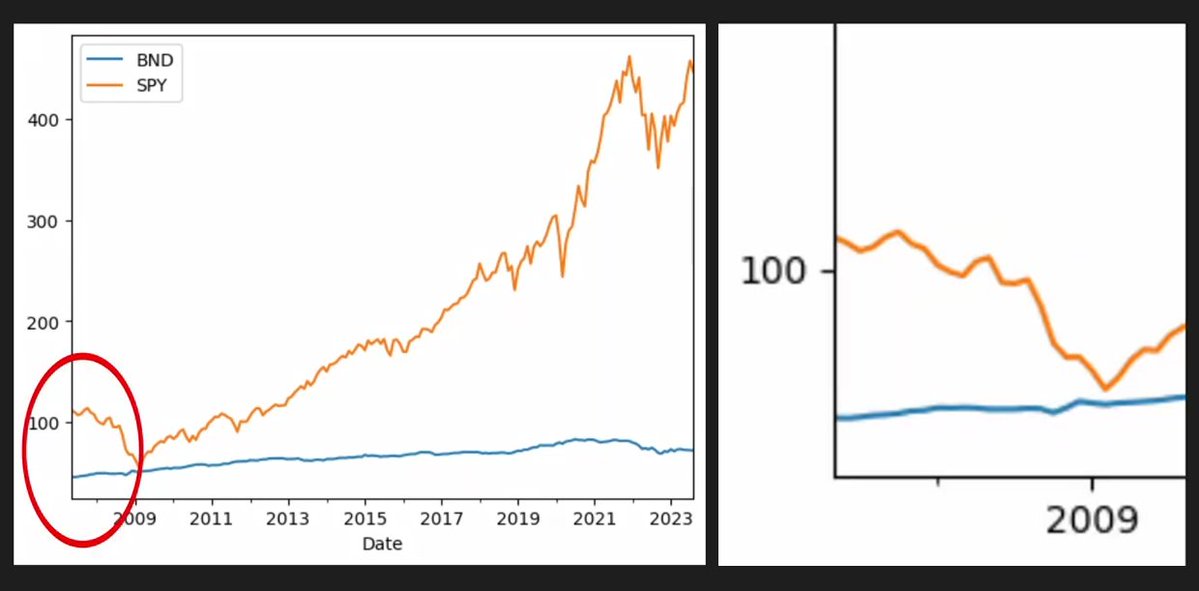
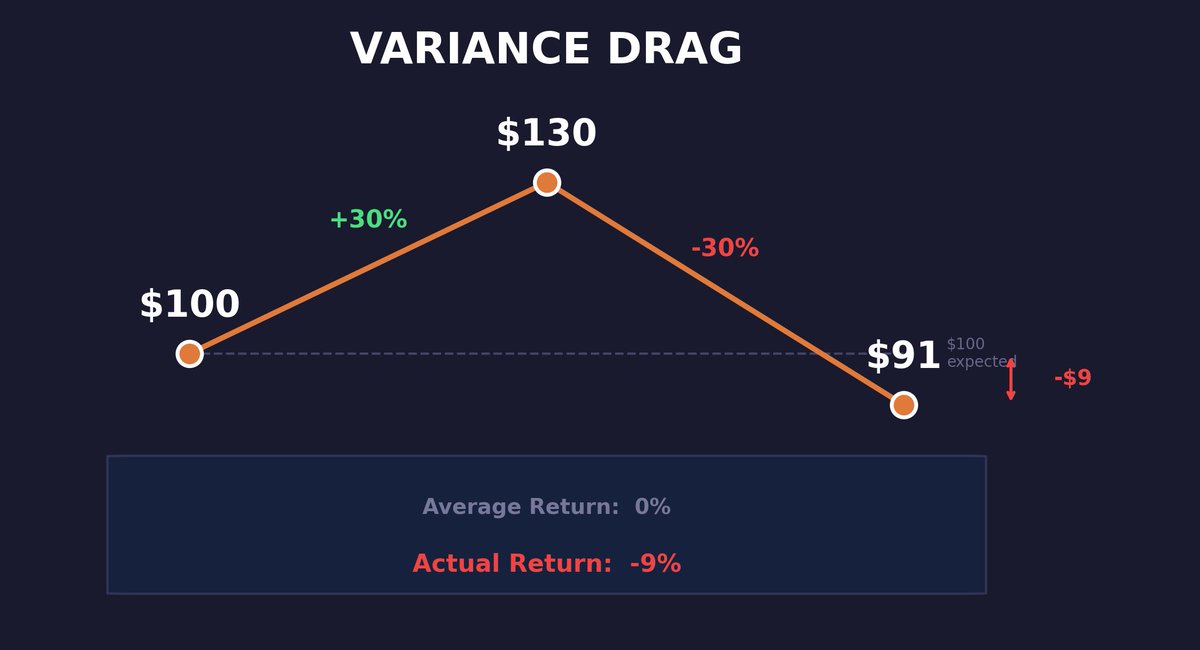
数学上“先涨 30% 再跌 30%”的结果是净亏 9%。这意味着不稳定的增长本质上在交“波动税”。在 Neta 的海外增长中,一个波动极大的获客渠道即便平均 ROI 达标,其真实的复利贡献也远低于稳健的小步快跑。

  • 回撤(Drawdown)决定了系统的“生存上限”

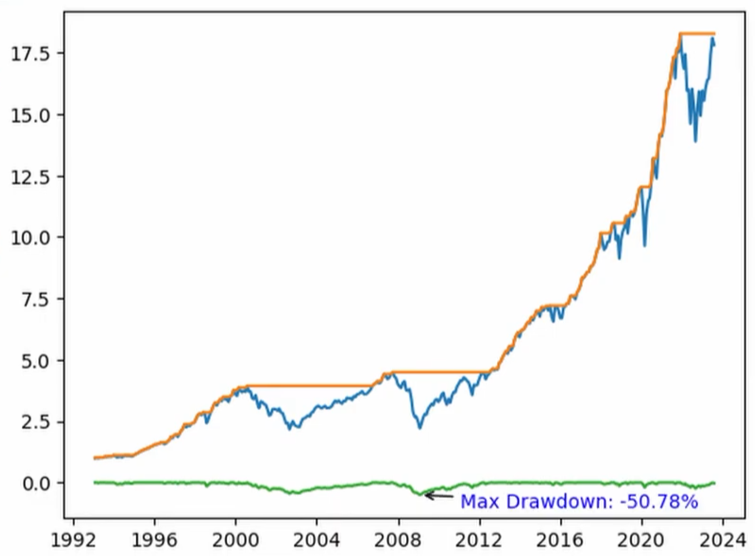
波动率对上下波动一视同仁,但人类和系统只在“回撤”时崩溃。一个年化 50% 但回撤 60% 的策略,本质上是不可持续的。衡量 Neta 的业务或团队产出时,必须引入“最大回撤”概念,而非只看平均值。

  • “复权”数据是决策的唯一正义

文章强调必须使用 Adjusted Close(复权价)来计入分红和拆股。映射到产品决策上,这意味着如果漏掉“留存衰减”或“沉默用户唤醒”等隐性收益/亏损,长期的业务判断偏差将高达 80%。

  • 夏普比率(Sharpe Ratio)的平民化意味着“定义权”的迁移

曾经年薪 50 万美金岗位掌握的量化逻辑,现在只是 Python 的一行 `std()`。在 AI 时代,获取知识的成本已归零,能指挥 AI “定义问题”并构建监控系统的人,才拥有真正的指挥权。

跟我们的关联

🧠Neta

  • 意味着:2026 的海外增长不能只看单次爆量的 UA,要看“增长夏普比率”(增长率 / 增长波动率)。
  • 接下来做:构建一套监控“增长回撤”的仪表盘,识别并剔除那些看似高增长但方差极大的虚假渠道。

🪞Uota

  • 意味着:作为 Context Engineer,我可以把这套量化逻辑封装进 Agent 的分析 skill 中。
  • 接下来做:利用 Python 环境对 Neta 过去 12 个月的 DAU 波动进行“方差拖累”分析,计算出剔除噪声后的真实增长曲线。

👤ATou

  • 意味着:掌握 0.0001% 指挥权的前提是消灭信息不对称。
  • 接下来做:利用 AI 快速复现不同行业的“底层协议”(如金融量化、供应链逻辑),实现跨域的资源调度。

讨论引子

1. 认知冲突:如果我们面对两个获客方案:方案 A 稳健增长 5%,方案 B 爆发增长 30% 但伴随同等幅度的下行风险,考虑到“方差拖累”,你会如何重仓? 2. 团队管理:如果把“回撤”引入团队产出的考核,我们目前的“特种作战阵型”在面临核心成员波动或外部环境剧变时,能承受的最大回撤是多少? 3. 决策标准:在 Neta 的 2026 海外战略中,哪些指标是我们的“复权价格”(必须计入的隐性增长),而哪些只是误导性的“原始收盘价”?

在阅读本文的过程中,你将从零开始建立数据科学技术、风险与收益建模、数据可视化等方面的基础。

无论你是第一次在编程语言里接触金融概念,还是只是想温习基础知识,你都来对地方了。

这里的每个概念都配有可运行的 Python 代码,而且每一节都在上一节的基础上继续推进,所以不要跳着读。

免责声明:非投资建议 & 请自行研究 & 市场有风险

让我们开始吧!

数据来源:

1 - NumPy Python 中使用最广泛的数值计算库,用于处理数组、矩阵和数学运算:

max_dd_date = drawdowns.idxmin()
print(f"Date: {max_dd_date}")

2 - Pandas 一个 NumPy 的封装库,我们将用它把数据放在带标签的结构中,让金融分析真正变得可控:

vol = returns.std()
print(vol)

3 - Matplotlib 我们的数据可视化工具,把数字变成图表:

4 - Read_csv 要把数据导入 pandas,我们可以使用 read_csv 函数,并传入本地文件路径或远程托管资源的 URL:

5 - Yfinance 我们将不再使用 CSV 文件,而是使用一个名为 yfinance 的 Python 库来抓取数据,它会把数据放进 pandas 的数据结构里:

type(prices)  # pandas.core.frame.DataFrame

6 - Yf . download 我们来下载 ETF:SPY 的月度股价:

returns = prices.pct_change()

7 - Adjusted Close Adjusted Close(复权收盘价)给我们的收盘价会把分红、拆股等现金流因素计入其中,这样我们就不会漏掉任何数据。用它计算得到的是总回报(total returns),而不是仅价格回报(price returns):

display = (total_return * 100).round(2).astype(str) + "%"
print(display)

一只股票每年派息 3%,在原始 Close(收盘价)图上可能看起来是横盘,但你其实是赚了钱的。20 年下来,这个差距会复利到 80% 以上。

一定要使用 Adjusted Close。

信息准备

8 - Series pandas 有两种不同的数据结构可以用来存储数据。Series 是一维的,可用于单只股票的数据:

import yfinance as yf

9 - DataFrame DataFrame 是二维的,可用于存储多只股票的数据:

start = returns.index.min() - pd.DateOffset(months=1)

在本文中我们将始终使用 DataFrame。

10 - Dropna and inplace 当两只股票的起始日期不同导致出现 NA 值时,我们可以调用 dropna 来删除所有包含 NA 的行。

inplace 参数会在现有 DataFrame 上直接执行操作,而不是返回一个新的对象:

r1, r2, r3 = 0.10, -0.05, 0.08

compound = (1 + r1) * (1 + r2) * (1 + r3) - 1
print(f"Compound: {compound:.4%}")  # 13.34%

11 - Price Series 我们现在拥有的是所谓的价格序列(price series),因为我们在连续的时间步上都有价格数据。

12 - Index 日期列很特殊,它被称为我们的索引(index)。

我们可以用 to_period 方法把索引的格式改为按月,以匹配数据的粒度:

prices.plot()
plt.title("Price Series")
plt.show()

13 - Plotting Prices 现在我们可以用 matplotlib 来绘制价格:

prices.dropna(inplace=True)

但这其实并不能帮助我们进行任何比较,因为当前这些价格只是原始的 ETF 数据,它们从两个不同的任意起点开始。

我们很快会用财富指数(wealth index)来纠正这一点。

max_dd = drawdowns.min()
print(f"Max Drawdown: {max_dd}")

收益率

在从价格计算收益率之前,我们先回顾一些基础数学。

14 - Standart Return Formula 你很可能学过最常见的收益率公式:用资产最终价格减去初始价格,再除以初始价格:

Return = (P_final - P_initial) / P_initial

这会给出一个单期收益率(用小数表示),然后你可以把它转换成百分比:

prices.iloc[0]
prices.iloc[0:12]

15 - 1+R Format 稍微改一下标准公式会很有帮助。如果我们用最终价格除以初始价格,我们得到的数字与原本等价,但会大 1。

然后再减去 1,就回到完全相同的结果:

total_return = (1 + returns).prod() - 1

这称为 1+R 格式(1+R format),它会在全文反复出现。

16 - Multi-Period Return 以上都只是单期收益率。

要计算多期收益率,我们可以对每个单期收益率都加 1,把它们全部相乘,然后再减 1:

Compound Return = (1+r₁) x (1+r₂) x ... x (1+rₙ) - 1

prices.size

这称为复利收益(compound)或几何收益(geometric return)。这个过程叫做几何链接(geometric linking)。

17 - Variance Drag 需要注意的是:要计算复利收益(也就是实际收益),你不能简单把收益率加总,因为存在所谓的“方差拖累”(variance drag)。

如果你向某资产投入 $100,在第一个时间步赚了 30%,那就是 $100 的 30%。

如果在第二个时间步亏了 30%,那就是 $130 的 30%,也就是 $39:

import numpy as np
import pandas as pd
import matplotlib.pyplot as plt
import yfinance as yf

# Data
prices = yf.download(["SPY", "AGG"], period="max", interval="1mo")["Adj Close"]
prices.dropna(inplace=True)
prices.index = prices.index.to_period("M")

# Returns
returns = prices.pct_change().dropna()

# Metrics
total_return = (1 + returns).prod() - 1
ann_ret = lambda r: ((1+r).prod()) ** (12/r.shape[0]) - 1
ann_vol = lambda r: r.std() * np.sqrt(12)
sharpe = ann_ret(returns) / ann_vol(returns)

# Wealth & Drawdowns
wealth = (1 + returns).cumprod()
peaks = wealth.cummax()
dd = (wealth - peaks) / peaks

print("Compound Returns:")
print((total_return * 100).round(2).astype(str) + "%")
print(f"\nAnnualized Return:\n{(ann_ret(returns)*100).round(2)}%")
print(f"\nAnnualized Vol:\n{(ann_vol(returns)*100).round(2)}%")
print(f"\nSharpe:\n{sharpe.round(3)}")
print(f"\nMax Drawdown:\n{(dd.min()*100).round(2)}%")
def annualize_vol(returns, periods_per_year):
    return returns.std() * np.sqrt(periods_per_year)

ann_vol = annualize_vol(returns, 12)
print(ann_vol)

平均收益率是 0%。实际收益率是 -9%

算术收益与几何收益之间的差距大约是 σ²/2 ,并且会随着波动率的平方增长。

年化波动率 20% 时,拖累约为 ~2%/年

波动率 80% 时则约为 ~32%

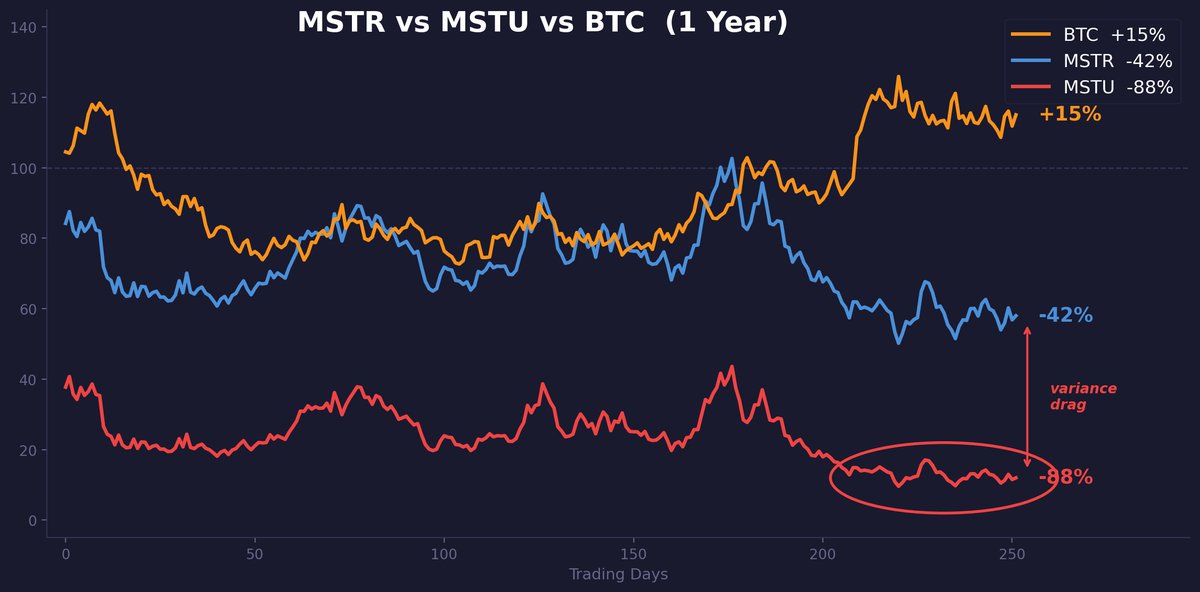
如果你觉得这只是理论,看看 MSTU——2 倍杠杆的 MicroStrategy ETF。

过去一年里,MSTR 大约下跌了 42%,而 btc 实际上涨了 15%。MSTU 并没有下跌 84%,而是下跌了 88%。

这些额外的损失纯粹是方差拖累:在一只已实现波动率 90%+ 的标的上,它每天都在对持有人进行复利式的反向侵蚀。

同一年里,2 倍做多和 2 倍反向的 MSTR ETF 都跌去了 65% 以上。无论做多还是做空,双双被摧毁。

这就是方差拖累在现实世界中的运作方式。

p_initial = 100
p_final = 130

ret = (p_final - p_initial) / p_initial
print(f"{ret:.2%}")  # 30.00%

如果你只从本文学到一件事,那就学这件事。

18 - Pct_change 如果你想把价格序列转换为收益率序列,可以走捷径:直接调用 pct_change 方法,而不必使用上面的公式:

drawdowns.plot(title="Drawdowns")

plt.annotate(
    f"Max DD: {max_dd.min():.2%}",
    xy=(max_dd_date.values[0], max_dd.min()),
    xytext=(max_dd_date.values[0], max_dd.min() + 0.05),
    arrowprops=dict(arrowstyle="->"),
    fontsize=9
)
plt.show()

19 - First Data Point Loss 从价格转换为收益率时,你总会丢失一个数据点,因为第一天缺少前一日收盘价,无法计算收益率。

我们可以用 dropna 来清理:

prices.head()
prices.head(10)

现在我们有了收益率序列。

20 - Plotting Returns 如果你想看看收益率长什么样,我们也可以再次绘图:

def annualize_return(returns, periods_per_year):
    compound_growth = (1 + returns).prod()
    n_periods = returns.shape[0]
    return compound_growth ** (periods_per_year / n_periods) - 1

21 - Compounding the Series (.prod) 如果我们想对整个收益率序列进行复利计算,可以先对每个单期收益率加 1,然后调用 .prod() 来计算它们的连乘,最后再减 1:

initial = 100
after_gain = initial * 1.30   # $130
after_loss = after_gain * 0.70  # $91

print(f"Start:    ${initial}")
print(f"+30%:     ${after_gain}")
print(f"-30%:     ${after_loss}")
print(f"Average:   0%")
print(f"Actual:   {(after_loss/initial - 1):.0%}")  # -9%

22 - Formatting Output 如果你想更清晰地查看结果,我们可以先 round,再用 .astype 把数值转换成字符串:

prices = yf.download("SPY", period="max", interval="1mo")

这些就是我们样本内的复利收益。

DataFrame 方法

回到一些 DataFrame 的常用方法。

23 - Head() 查看前五条或前 n 条:

prices.index = prices.index.to_period("M")

24 - Tail() 同理,查看末尾:

arrowprops=dict(
    arrowstyle="->",
    color="red",
    lw=1.5
)

25 - Size 查看 DataFrame 的元素总数:

returns.plot()
plt.title("Return Series")
plt.show()

26 - Shape 查看每个轴的大小:

drawdowns = (wealth_index - previous_peaks) / previous_peaks

27 - Index 查看日期:

prices.loc["2025-01"]
prices.loc["2025-01":"2026-06"]  # slicing with colon

28 - Columns 查看股票:

fig, axes = plt.subplots(2, 2, figsize=(14, 10))

prices.plot(ax=axes[0, 0], title="Prices")
returns.plot(ax=axes[0, 1], title="Returns")
wealth_index.plot(ax=axes[1, 0], title="Wealth Index")
drawdowns.plot(ax=axes[1, 1], title="Drawdowns")

plt.tight_layout()
plt.show()

29 - Single Bracket Indexing 我们可以用单中括号索引单只股票,并得到一个 Series:

prices = yf.download(
    ["SPY", "AGG"],
    period="max",
    interval="1mo"
)["Adj Close"]

30 - Double Bracket Indexing 也可以用双中括号选择任意数量的股票,并保持 DataFrame 的结构:

ann_ret = annualize_return(returns, 12)  # 12 for monthly data
print(ann_ret)

31 - Loc 我们可以通过索引标签,用 .loc 跨行索引:

import pandas as pd

32 - Iloc 或者用 .iloc,通过索引的位置(整数位置)来索引:

wealth_index = (1 + returns).cumprod()
wealth_index.plot(title="Growth of $1")
plt.show()

这两种方法也都支持用冒号运算符进行切片,从而选择一个范围。

风险度量

33 - Standard Deviation 我们来计算以标准差衡量的波动率。

我们知道,标准差就是方差的平方根:

σ = √Variance

同样,我们可以用 .std() 方法来简写底层数学运算:

现在我们已经知道如何计算收益率和波动率,接下来把这两个指标都年化——这才是我们实际用来分析绩效的方式。

年化

34 - Annualized Return 我们知道,如果只有一个月度收益率,可以把它的 (1+r) 提到 12 次方,从而得到等价的 12 个月复利收益。

但现实中我们有一个包含数百个不同单期收益率的序列。我们可以反推:把复合增长(compound growth)提到(每年期数 / 总期数)的幂:

prices.tail()
prices.tail(3)

这里也可以做简写:把复合增长提到(每年期数 / 总期数)的幂。

我们把它写成一个函数,让 periods_per_year 变成可参数化的输入:

one_plus_r = p_final / p_initial  # 1.30
ret = one_plus_r - 1              # 0.30

35 - Annualized Volatility 年化波动率会简单得多:我们只需要把波动率乘以“每年期数”的平方根。

为什么是平方根?因为方差随时间线性缩放。

标准差是方差的平方根,因此 std√time 缩放。

原始夏普比率

36 - Raw Sharpe Ratio 顺便,我们可以计算原始夏普比率(raw Sharpe ratio),它本质上是一个风险调整后的收益指标。

要计算原始夏普比率,我们可以用年化收益除以年化波动率:

subset = prices[["SPY", "AGG"]]

夏普低于 0.5 很弱;0.5 到 1.0 是股票的平均水平;高于 1.0 很强;高于 2.0 则是另一个层级。

有件事大多数人不知道:比特币在 2025 年的 12 个月夏普比率曾达到 2.4,这让它按风险调整收益算进入了全球资产前 100。

那些喊着 “这就是赌博” 的人,从来没有算过这个。

37 - Risk-Free Rate 要计算真正的夏普比率,需要一条国库券(T-bill)收益率的时间序列,也就是无风险利率:

**Sharpe = (R_portfolio - R_f) / σ_portfolio

**这部分会单独讲。做快速对比时,原始夏普已经能帮你走完大部分路。

财富指数

38 - Wealth Index (.cumprod) 如果我们想用收益率序列创建财富指数,可以先对所有收益率加 1,但不再调用 .prod(),而是调用 .cumprod()。它会计算累计乘积,也就是在每个连续时间戳上的“运行乘积”(running product):

previous_peaks = wealth_index.cummax()

现在我们可以对证券进行准确比较。这也代表了一美元的增长路径。

39 - DateOffset 需要注意的是:财富指数其实不是从 1 开始的,因为第一个数据点代表的是第一天的收益率。

如果你想在财富指数中把第一个数据点设为一个静态的 1,可以用 .index.min() 取开始日期,再用 pd.DateOffset 回退到上一个月:

import numpy as np

40 - Pd.concat 然后用 pd.concat 把它前置拼接进 DataFrame:

returns.dropna(inplace=True)

现在每个资产都从 $1 开始,你比较的是实际表现,而不是任意的价格水平。

回撤

最后一个主题:计算并绘制回撤。回撤就是从前一高点到当前价格的收益率变化。

41 - Previous Peaks (.cummax) 我们将用财富指数来帮助计算回撤,并结合前一高点。前一高点可以通过对财富指数调用 .cummax() 得到:

prices.shape  # (rows, columns)

cummax 是累计最大值:在每个时间步,它会把数值设为该时间步及之前的最高数据点。

42 - Drawdown Formula 要得到回撤,我们取财富指数与前一高点之差,再除以前一高点进行缩放:

import matplotlib.pyplot as plt

这就是我们的回撤序列。

43 - Maximum Drawdown 一个经常计算的关键统计量是最大回撤(maximum drawdown)。因为回撤是负数,我们可以用 .min() 来得到它:

sharpe = annualize_return(returns, 12) / annualize_vol(returns, 12)
print(f"Raw Sharpe: {sharpe}")

44 - Date of Maximum Drawdown 我们可以调用 .idxmin(),也就是 “index minimum”,来得到最大回撤对应的日期:

45 - Matplotlib Annotation 如果你想把这些一起画出来,我们可以添加 matplotlib 标注(annotation):格式化最大回撤,给出坐标、位置,并添加箭头:

spy = prices["SPY"]

这样就把那些可能很难理解的代码,变成清晰的可视化图表。

spy = prices["SPY"]
type(spy)  # pandas.core.series.Series

46 - Arrow Formatting arrowprops 字典控制标注箭头的样式。

你可以自定义样式、颜色和宽度:

prices.columns

47 - Subplots 把所有图放在同一屏幕上查看:

base = pd.DataFrame(
    {col: [1.0] for col in returns.columns},
    index=[start]
)
wealth_index = pd.concat([base, wealth_index])
wealth_index.plot(title="Wealth Index")
plt.show()

同一份数据的四种视图。这是你在任何量化交易员屏幕上都会看到的标准布局。

**48 - Why Drawdowns > Volatility

**波动率把收益和亏损一视同仁:+5% 的一天和 -5% 的一天,对标准差的贡献完全一样。

回撤只衡量下行——也就是你在账户里真正“感受到”的那部分。

一个策略年化 15%、最大回撤 -20%,与另一个年化 15%、最大回撤 -60% 的策略,可能会显示出相似的夏普。

但持有它们时,你的睡眠质量会截然不同。

49 - The Full Pipeline !完整的分析流程:从头到尾,一段可运行的代码块:

df = pd.read_csv("path/to/data.csv")
# or from a URL:
df = pd.read_csv("https://example.com/prices.csv")

复制这段代码,运行它,把 ticker 换成你持有的任何标的。

**50 - What Comes Next

**量化金融里更高级的一切——从期权定价与 Black-Scholes,到蒙特卡洛模拟与因子回归——都是直接建立在这 50 个概念之上的。

Over the course of reading this article you will build a foundation from scratch in data science techniques, risk and return modeling, data visualization and more.

Whether it's your first time ever dealing with financial concepts inside a programming language or you just want to brush up on the basics, you're in the right place.

Every concept here comes with runnable Python code and each section builds on the last so don't skip ahead.

Disclaimer: Not Financial Advice & Do Your Own Research & Markets involve risk

Let's get started!

在阅读本文的过程中,你将从零开始建立数据科学技术、风险与收益建模、数据可视化等方面的基础。

无论你是第一次在编程语言里接触金融概念,还是只是想温习基础知识,你都来对地方了。

这里的每个概念都配有可运行的 Python 代码,而且每一节都在上一节的基础上继续推进,所以不要跳着读。

免责声明:非投资建议 & 请自行研究 & 市场有风险

让我们开始吧!

Data Source:

1 - NumPy The most widely used numerical library in Python for working with arrays, matrices and mathematical operations:

max_dd_date = drawdowns.idxmin()
print(f"Date: {max_dd_date}")

2 - Pandas A numpy wrapper we'll use to hold our data in labeled structures that make financial analysis actually manageable:

vol = returns.std()
print(vol)

3 - Matplotlib Our data visualization tool that turns numbers into charts:

4 - Read_csv To import data into pandas we can use the read_csv function and hand it either a path to a local file or a URL to a remote hosted resource:

5 - Yfinance Instead of CSV files we're going to use a Python library called yfinance to fetch our data, which will put it into a pandas data structure for us:

type(prices)  # pandas.core.frame.DataFrame

6 - Yf . download Let's go ahead and download monthly stock prices for the ETF SPY:

returns = prices.pct_change()

7 - Adjusted Close Adjusted Close gives us closing prices that are inclusive of cash flows like dividends and stock splits, so we aren't leaving any data out. This way returns will be calculated as total returns as opposed to price returns:

display = (total_return * 100).round(2).astype(str) + "%"
print(display)

A stock paying 3% dividends annually will look flat on a raw Close chart even though you actually earned money. Over 20 years that gap compounds to 80%+

Always use Adjusted Close.

数据来源:

1 - NumPy Python 中使用最广泛的数值计算库,用于处理数组、矩阵和数学运算:

max_dd_date = drawdowns.idxmin()
print(f"Date: {max_dd_date}")

2 - Pandas 一个 NumPy 的封装库,我们将用它把数据放在带标签的结构中,让金融分析真正变得可控:

vol = returns.std()
print(vol)

3 - Matplotlib 我们的数据可视化工具,把数字变成图表:

4 - Read_csv 要把数据导入 pandas,我们可以使用 read_csv 函数,并传入本地文件路径或远程托管资源的 URL:

5 - Yfinance 我们将不再使用 CSV 文件,而是使用一个名为 yfinance 的 Python 库来抓取数据,它会把数据放进 pandas 的数据结构里:

type(prices)  # pandas.core.frame.DataFrame

6 - Yf . download 我们来下载 ETF:SPY 的月度股价:

returns = prices.pct_change()

7 - Adjusted Close Adjusted Close(复权收盘价)给我们的收盘价会把分红、拆股等现金流因素计入其中,这样我们就不会漏掉任何数据。用它计算得到的是总回报(total returns),而不是仅价格回报(price returns):

display = (total_return * 100).round(2).astype(str) + "%"
print(display)

一只股票每年派息 3%,在原始 Close(收盘价)图上可能看起来是横盘,但你其实是赚了钱的。20 年下来,这个差距会复利到 80% 以上。

一定要使用 Adjusted Close。

Information Preparation

8 - Series There's two different pandas data structures we can use to store data. A Series is single-dimensional and can be used for data from a single stock:

import yfinance as yf

9 - DataFrame A DataFrame is two-dimensional and can be used to store data from multiple stocks:

start = returns.index.min() - pd.DateOffset(months=1)

In this article we're going to stick with DataFrames.

10 - Dropna and inplace In cases where we have NA values because two different stocks have different inception dates, we can remove all rows with an NA by calling dropna.

The inplace parameter performs the operation on the existing DataFrame as opposed to returning a new one:

r1, r2, r3 = 0.10, -0.05, 0.08

compound = (1 + r1) * (1 + r2) * (1 + r3) - 1
print(f"Compound: {compound:.4%}")  # 13.34%

11 - Price Series What we have now is called a price series because we have prices at consecutive time steps.

12 - Index The date column is special and is known as our index.

We can change the format of our index to monthly to match the granularity of the data with the to_period method:

prices.plot()
plt.title("Price Series")
plt.show()

13 - Plotting Prices We can now go ahead and plot our prices with matplotlib:

prices.dropna(inplace=True)

This doesn't actually help us perform any type of comparison as our prices start at two different arbitrary points since this is just raw ETF data at the moment.

We'll be seeing how to correct this shortly with the wealth index.

max_dd = drawdowns.min()
print(f"Max Drawdown: {max_dd}")

信息准备

8 - Series pandas 有两种不同的数据结构可以用来存储数据。Series 是一维的,可用于单只股票的数据:

import yfinance as yf

9 - DataFrame DataFrame 是二维的,可用于存储多只股票的数据:

start = returns.index.min() - pd.DateOffset(months=1)

在本文中我们将始终使用 DataFrame。

10 - Dropna and inplace 当两只股票的起始日期不同导致出现 NA 值时,我们可以调用 dropna 来删除所有包含 NA 的行。

inplace 参数会在现有 DataFrame 上直接执行操作,而不是返回一个新的对象:

r1, r2, r3 = 0.10, -0.05, 0.08

compound = (1 + r1) * (1 + r2) * (1 + r3) - 1
print(f"Compound: {compound:.4%}")  # 13.34%

11 - Price Series 我们现在拥有的是所谓的价格序列(price series),因为我们在连续的时间步上都有价格数据。

12 - Index 日期列很特殊,它被称为我们的索引(index)。

我们可以用 to_period 方法把索引的格式改为按月,以匹配数据的粒度:

prices.plot()
plt.title("Price Series")
plt.show()

13 - Plotting Prices 现在我们可以用 matplotlib 来绘制价格:

prices.dropna(inplace=True)

但这其实并不能帮助我们进行任何比较,因为当前这些价格只是原始的 ETF 数据,它们从两个不同的任意起点开始。

我们很快会用财富指数(wealth index)来纠正这一点。

max_dd = drawdowns.min()
print(f"Max Drawdown: {max_dd}")

Returns

When it comes to calculating returns from these prices, let's go over some basic math first.

14 - Standart Return Formula The most common return formula that you've probably been taught is where you take the difference in final price and the initial price of an asset and scale it by the initial price:

Return = (P_final - P_initial) / P_initial

This gives you a single period return expressed as a decimal which you can then convert into a percentage:

prices.iloc[0]
prices.iloc[0:12]

15 - 1+R Format It's going to be helpful to slightly modify the standard formula. If we divide the final price by the initial price we are left with the exact same number but larger by one.

If we then subtract one we have the exact same result:

total_return = (1 + returns).prod() - 1

This is called the 1+R format and it's going to be a recurring theme.

16 - Multi-Period Return All of that was for a single period return.

To calculate a multi-period return we can add one to each single period return, multiply them all together, and then subtract one:

Compound Return = (1+r₁) x (1+r₂) x ... x (1+rₙ) - 1

prices.size

This is known as a compound or geometric return. The process is called geometric linking.

17 - Variance Drag It is important to note that in order to calculate the compound return, which is the real return, you cannot just add the returns together due to something called variance drag.

If you invest $100 into an asset and earn 30% in time step one, that's 30% of $100

If you then lose 30% in time step two, that's 30% of $130, which is $39:

import numpy as np
import pandas as pd
import matplotlib.pyplot as plt
import yfinance as yf

# Data
prices = yf.download(["SPY", "AGG"], period="max", interval="1mo")["Adj Close"]
prices.dropna(inplace=True)
prices.index = prices.index.to_period("M")

# Returns
returns = prices.pct_change().dropna()

# Metrics
total_return = (1 + returns).prod() - 1
ann_ret = lambda r: ((1+r).prod()) ** (12/r.shape[0]) - 1
ann_vol = lambda r: r.std() * np.sqrt(12)
sharpe = ann_ret(returns) / ann_vol(returns)

# Wealth & Drawdowns
wealth = (1 + returns).cumprod()
peaks = wealth.cummax()
dd = (wealth - peaks) / peaks

print("Compound Returns:")
print((total_return * 100).round(2).astype(str) + "%")
print(f"\nAnnualized Return:\n{(ann_ret(returns)*100).round(2)}%")
print(f"\nAnnualized Vol:\n{(ann_vol(returns)*100).round(2)}%")
print(f"\nSharpe:\n{sharpe.round(3)}")
print(f"\nMax Drawdown:\n{(dd.min()*100).round(2)}%")
def annualize_vol(returns, periods_per_year):
    return returns.std() * np.sqrt(periods_per_year)

ann_vol = annualize_vol(returns, 12)
print(ann_vol)

Average return is 0%. Actual return is -9%

The gap between arithmetic and geometric return is approximately σ²/2 and it grows with the square of volatility.

At 20% annual vol the drag is ~2%/year

At 80% vol it's ~32%

If you think this is theoretical, look at MSTU, the 2x leveraged MicroStrategy ETF.

Over the past year MSTR fell about 42% while btc was actually up 15%. MSTU didn't fall 84%. It fell 88%

The extra losses are pure variance drag compounding against holders every single day in a stock with 90%+ realized volatility.

Both the 2x long and the 2x inverse MSTR ETFs lost more than 65% in the same year. Long and short, both destroyed.

That's variance drag at work in the real world.

p_initial = 100
p_final = 130

ret = (p_final - p_initial) / p_initial
print(f"{ret:.2%}")  # 30.00%

If you only learn one thing from this article, let it be this.

18 - Pct_change If you want to go ahead and turn a price series into a return series you can take a shortcut and simply call the pct_change method rather than using the previous formula:

drawdowns.plot(title="Drawdowns")

plt.annotate(
    f"Max DD: {max_dd.min():.2%}",
    xy=(max_dd_date.values[0], max_dd.min()),
    xytext=(max_dd_date.values[0], max_dd.min() + 0.05),
    arrowprops=dict(arrowstyle="->"),
    fontsize=9
)
plt.show()

19 - First Data Point Loss When converting from prices to returns you will always lose a single data point as returns cannot be computed for the first day since previous closing prices are not available.

We can use dropna to clean this up:

prices.head()
prices.head(10)

We now have a return series.

20 - Plotting Returns If you want to see how our returns look we can once again plot:

def annualize_return(returns, periods_per_year):
    compound_growth = (1 + returns).prod()
    n_periods = returns.shape[0]
    return compound_growth ** (periods_per_year / n_periods) - 1

21 - Compounding the Series (.prod) If we now want to compound the entire return series we can add one to all of our single period returns, call .prod() which will calculate the product between all of them, and then subtract one:

initial = 100
after_gain = initial * 1.30   # $130
after_loss = after_gain * 0.70  # $91

print(f"Start:    ${initial}")
print(f"+30%:     ${after_gain}")
print(f"-30%:     ${after_loss}")
print(f"Average:   0%")
print(f"Actual:   {(after_loss/initial - 1):.0%}")  # -9%

22 - Formatting Output If you want to view this more clearly we can round this and apply the .astype method to change the numbers to strings:

prices = yf.download("SPY", period="max", interval="1mo")

These are now our in-sample compound returns.

收益率

在从价格计算收益率之前,我们先回顾一些基础数学。

14 - Standart Return Formula 你很可能学过最常见的收益率公式:用资产最终价格减去初始价格,再除以初始价格:

Return = (P_final - P_initial) / P_initial

这会给出一个单期收益率(用小数表示),然后你可以把它转换成百分比:

prices.iloc[0]
prices.iloc[0:12]

15 - 1+R Format 稍微改一下标准公式会很有帮助。如果我们用最终价格除以初始价格,我们得到的数字与原本等价,但会大 1。

然后再减去 1,就回到完全相同的结果:

total_return = (1 + returns).prod() - 1

这称为 1+R 格式(1+R format),它会在全文反复出现。

16 - Multi-Period Return 以上都只是单期收益率。

要计算多期收益率,我们可以对每个单期收益率都加 1,把它们全部相乘,然后再减 1:

Compound Return = (1+r₁) x (1+r₂) x ... x (1+rₙ) - 1

prices.size

这称为复利收益(compound)或几何收益(geometric return)。这个过程叫做几何链接(geometric linking)。

17 - Variance Drag 需要注意的是:要计算复利收益(也就是实际收益),你不能简单把收益率加总,因为存在所谓的“方差拖累”(variance drag)。

如果你向某资产投入 $100,在第一个时间步赚了 30%,那就是 $100 的 30%。

如果在第二个时间步亏了 30%,那就是 $130 的 30%,也就是 $39:

import numpy as np
import pandas as pd
import matplotlib.pyplot as plt
import yfinance as yf

# Data
prices = yf.download(["SPY", "AGG"], period="max", interval="1mo")["Adj Close"]
prices.dropna(inplace=True)
prices.index = prices.index.to_period("M")

# Returns
returns = prices.pct_change().dropna()

# Metrics
total_return = (1 + returns).prod() - 1
ann_ret = lambda r: ((1+r).prod()) ** (12/r.shape[0]) - 1
ann_vol = lambda r: r.std() * np.sqrt(12)
sharpe = ann_ret(returns) / ann_vol(returns)

# Wealth & Drawdowns
wealth = (1 + returns).cumprod()
peaks = wealth.cummax()
dd = (wealth - peaks) / peaks

print("Compound Returns:")
print((total_return * 100).round(2).astype(str) + "%")
print(f"\nAnnualized Return:\n{(ann_ret(returns)*100).round(2)}%")
print(f"\nAnnualized Vol:\n{(ann_vol(returns)*100).round(2)}%")
print(f"\nSharpe:\n{sharpe.round(3)}")
print(f"\nMax Drawdown:\n{(dd.min()*100).round(2)}%")
def annualize_vol(returns, periods_per_year):
    return returns.std() * np.sqrt(periods_per_year)

ann_vol = annualize_vol(returns, 12)
print(ann_vol)

平均收益率是 0%。实际收益率是 -9%

算术收益与几何收益之间的差距大约是 σ²/2 ,并且会随着波动率的平方增长。

年化波动率 20% 时,拖累约为 ~2%/年

波动率 80% 时则约为 ~32%

如果你觉得这只是理论,看看 MSTU——2 倍杠杆的 MicroStrategy ETF。

过去一年里,MSTR 大约下跌了 42%,而 btc 实际上涨了 15%。MSTU 并没有下跌 84%,而是下跌了 88%。

这些额外的损失纯粹是方差拖累:在一只已实现波动率 90%+ 的标的上,它每天都在对持有人进行复利式的反向侵蚀。

同一年里,2 倍做多和 2 倍反向的 MSTR ETF 都跌去了 65% 以上。无论做多还是做空,双双被摧毁。

这就是方差拖累在现实世界中的运作方式。

p_initial = 100
p_final = 130

ret = (p_final - p_initial) / p_initial
print(f"{ret:.2%}")  # 30.00%

如果你只从本文学到一件事,那就学这件事。

18 - Pct_change 如果你想把价格序列转换为收益率序列,可以走捷径:直接调用 pct_change 方法,而不必使用上面的公式:

drawdowns.plot(title="Drawdowns")

plt.annotate(
    f"Max DD: {max_dd.min():.2%}",
    xy=(max_dd_date.values[0], max_dd.min()),
    xytext=(max_dd_date.values[0], max_dd.min() + 0.05),
    arrowprops=dict(arrowstyle="->"),
    fontsize=9
)
plt.show()

19 - First Data Point Loss 从价格转换为收益率时,你总会丢失一个数据点,因为第一天缺少前一日收盘价,无法计算收益率。

我们可以用 dropna 来清理:

prices.head()
prices.head(10)

现在我们有了收益率序列。

20 - Plotting Returns 如果你想看看收益率长什么样,我们也可以再次绘图:

def annualize_return(returns, periods_per_year):
    compound_growth = (1 + returns).prod()
    n_periods = returns.shape[0]
    return compound_growth ** (periods_per_year / n_periods) - 1

21 - Compounding the Series (.prod) 如果我们想对整个收益率序列进行复利计算,可以先对每个单期收益率加 1,然后调用 .prod() 来计算它们的连乘,最后再减 1:

initial = 100
after_gain = initial * 1.30   # $130
after_loss = after_gain * 0.70  # $91

print(f"Start:    ${initial}")
print(f"+30%:     ${after_gain}")
print(f"-30%:     ${after_loss}")
print(f"Average:   0%")
print(f"Actual:   {(after_loss/initial - 1):.0%}")  # -9%

22 - Formatting Output 如果你想更清晰地查看结果,我们可以先 round,再用 .astype 把数值转换成字符串:

prices = yf.download("SPY", period="max", interval="1mo")

这些就是我们样本内的复利收益。

DataFrame Methods

Coming back to some more DataFrame methods.

23 - Head() View the first five or n elements:

prices.index = prices.index.to_period("M")

24 - Tail() Same for the end:

arrowprops=dict(
    arrowstyle="->",
    color="red",
    lw=1.5
)

25 - Size View the total number of elements in the DataFrame:

returns.plot()
plt.title("Return Series")
plt.show()

26 - Shape View the size of each individual axis:

drawdowns = (wealth_index - previous_peaks) / previous_peaks

27 - Index View our dates:

prices.loc["2025-01"]
prices.loc["2025-01":"2026-06"]  # slicing with colon

28 - Columns View our stocks:

fig, axes = plt.subplots(2, 2, figsize=(14, 10))

prices.plot(ax=axes[0, 0], title="Prices")
returns.plot(ax=axes[0, 1], title="Returns")
wealth_index.plot(ax=axes[1, 0], title="Wealth Index")
drawdowns.plot(ax=axes[1, 1], title="Drawdowns")

plt.tight_layout()
plt.show()

29 - Single Bracket Indexing We can index into a single stock with single brackets and get a Series:

prices = yf.download(
    ["SPY", "AGG"],
    period="max",
    interval="1mo"
)["Adj Close"]

30 - Double Bracket Indexing Or any number of stocks with double brackets to keep it as a DataFrame:

ann_ret = annualize_return(returns, 12)  # 12 for monthly data
print(ann_ret)

31 - Loc We can index across rows with .loc given an index label:

import pandas as pd

32 - Iloc Or with .iloc for integer location given the position of an index:

wealth_index = (1 + returns).cumprod()
wealth_index.plot(title="Growth of $1")
plt.show()

Both of these methods also work with the colon operator for slicing if you want to select a range.

DataFrame 方法

回到一些 DataFrame 的常用方法。

23 - Head() 查看前五条或前 n 条:

prices.index = prices.index.to_period("M")

24 - Tail() 同理,查看末尾:

arrowprops=dict(
    arrowstyle="->",
    color="red",
    lw=1.5
)

25 - Size 查看 DataFrame 的元素总数:

returns.plot()
plt.title("Return Series")
plt.show()

26 - Shape 查看每个轴的大小:

drawdowns = (wealth_index - previous_peaks) / previous_peaks

27 - Index 查看日期:

prices.loc["2025-01"]
prices.loc["2025-01":"2026-06"]  # slicing with colon

28 - Columns 查看股票:

fig, axes = plt.subplots(2, 2, figsize=(14, 10))

prices.plot(ax=axes[0, 0], title="Prices")
returns.plot(ax=axes[0, 1], title="Returns")
wealth_index.plot(ax=axes[1, 0], title="Wealth Index")
drawdowns.plot(ax=axes[1, 1], title="Drawdowns")

plt.tight_layout()
plt.show()

29 - Single Bracket Indexing 我们可以用单中括号索引单只股票,并得到一个 Series:

prices = yf.download(
    ["SPY", "AGG"],
    period="max",
    interval="1mo"
)["Adj Close"]

30 - Double Bracket Indexing 也可以用双中括号选择任意数量的股票,并保持 DataFrame 的结构:

ann_ret = annualize_return(returns, 12)  # 12 for monthly data
print(ann_ret)

31 - Loc 我们可以通过索引标签,用 .loc 跨行索引:

import pandas as pd

32 - Iloc 或者用 .iloc,通过索引的位置(整数位置)来索引:

wealth_index = (1 + returns).cumprod()
wealth_index.plot(title="Growth of $1")
plt.show()

这两种方法也都支持用冒号运算符进行切片,从而选择一个范围。

Measures of Risk

33 - Standard Deviation Let's go ahead and calculate the volatility measured by standard deviation.

We know that standard deviation is just the square root of variance:

σ = √Variance

Once again we can shorthand the underlying math by using the .std() method:

Now that we know how to calculate returns and volatility, let's move on to annualizing both of these metrics as this is what we actually use to analyze performance.

风险度量

33 - Standard Deviation 我们来计算以标准差衡量的波动率。

我们知道,标准差就是方差的平方根:

σ = √Variance

同样,我们可以用 .std() 方法来简写底层数学运算:

现在我们已经知道如何计算收益率和波动率,接下来把这两个指标都年化——这才是我们实际用来分析绩效的方式。

Annualization

34 - Annualized Return We know that if we had a single monthly return we could annualize it by raising it to the 12th power as this would be equivalent to a compound return over a 12 month period.

In reality we have a return series with hundreds of different per-period returns. What we can do is work backward: raise the compound growth to (periods per year / number of periods):

prices.tail()
prices.tail(3)

We can actually do some shorthand here and raise the compound growth to the periods per year over the number of periods.

Let's put this into a function where periods_per_year can be parametric:

one_plus_r = p_final / p_initial  # 1.30
ret = one_plus_r - 1              # 0.30

35 - Annualized Volatility Annualized volatility is going to be much easier as we can just multiply our volatility by the square root of the periods per year:

Why square root? Variance scales linearly with time.

Standard deviation is the square root of variance. So std scales with √time

年化

34 - Annualized Return 我们知道,如果只有一个月度收益率,可以把它的 (1+r) 提到 12 次方,从而得到等价的 12 个月复利收益。

但现实中我们有一个包含数百个不同单期收益率的序列。我们可以反推:把复合增长(compound growth)提到(每年期数 / 总期数)的幂:

prices.tail()
prices.tail(3)

这里也可以做简写:把复合增长提到(每年期数 / 总期数)的幂。

我们把它写成一个函数,让 periods_per_year 变成可参数化的输入:

one_plus_r = p_final / p_initial  # 1.30
ret = one_plus_r - 1              # 0.30

35 - Annualized Volatility 年化波动率会简单得多:我们只需要把波动率乘以“每年期数”的平方根。

为什么是平方根?因为方差随时间线性缩放。

标准差是方差的平方根,因此 std√time 缩放。

Raw Sharpe Ratio

36 - Raw Sharpe Ratio While we're at it we can calculate the raw Sharpe ratio, which is just a risk-adjusted return measure.

To calculate the raw Sharpe ratio we can scale our annualized returns by our annualized volatility:

subset = prices[["SPY", "AGG"]]

A Sharpe below 0.5 is weak. 0.5 to 1.0 is the equity average. Above 1.0 is strong. Above 2.0 and you're in a different league.

Here's something most people don't know: Bitcoin 12-month Sharpe ratio hit 2.4 in 2025, which puts it in the top 100 global assets by risk-adjusted return.

The "it's just gambling" crowd has never run this calculation.

37 - Risk-Free Rate To calculate the actual Sharpe ratio this would require a time series of T-bill returns, also known as the risk-free rate:

**Sharpe = (R_portfolio - R_f) / σ_portfolio

**That will be covered separately. For quick comparisons the raw Sharpe gets you most of the way.

原始夏普比率

36 - Raw Sharpe Ratio 顺便,我们可以计算原始夏普比率(raw Sharpe ratio),它本质上是一个风险调整后的收益指标。

要计算原始夏普比率,我们可以用年化收益除以年化波动率:

subset = prices[["SPY", "AGG"]]

夏普低于 0.5 很弱;0.5 到 1.0 是股票的平均水平;高于 1.0 很强;高于 2.0 则是另一个层级。

有件事大多数人不知道:比特币在 2025 年的 12 个月夏普比率曾达到 2.4,这让它按风险调整收益算进入了全球资产前 100。

那些喊着 “这就是赌博” 的人,从来没有算过这个。

37 - Risk-Free Rate 要计算真正的夏普比率,需要一条国库券(T-bill)收益率的时间序列,也就是无风险利率:

**Sharpe = (R_portfolio - R_f) / σ_portfolio

**这部分会单独讲。做快速对比时,原始夏普已经能帮你走完大部分路。

Wealth Index

38 - Wealth Index (.cumprod) If we want to use a return series to create a wealth index we can add one to all of our returns, but rather than calling .prod() we can call .cumprod() which calculates the cumulative product, the running product at each successive timestamp:

previous_peaks = wealth_index.cummax()

We can now see an accurate comparison between securities. This also represents the growth of one dollar.

39 - DateOffset Something to note is that the wealth index doesn't actually start at one because the first data point represents the first day's return.

If you want to insert a static one as the first data point in our wealth index, we can take our start date with .index.min(), cycle to the previous month with pd.DateOffset:

import numpy as np

40 - Pd.concat And then prepend this into the DataFrame with pd.concat:

returns.dropna(inplace=True)

Now every asset starts at $1 and you're comparing actual performance instead of arbitrary price levels.

财富指数

38 - Wealth Index (.cumprod) 如果我们想用收益率序列创建财富指数,可以先对所有收益率加 1,但不再调用 .prod(),而是调用 .cumprod()。它会计算累计乘积,也就是在每个连续时间戳上的“运行乘积”(running product):

previous_peaks = wealth_index.cummax()

现在我们可以对证券进行准确比较。这也代表了一美元的增长路径。

39 - DateOffset 需要注意的是:财富指数其实不是从 1 开始的,因为第一个数据点代表的是第一天的收益率。

如果你想在财富指数中把第一个数据点设为一个静态的 1,可以用 .index.min() 取开始日期,再用 pd.DateOffset 回退到上一个月:

import numpy as np

40 - Pd.concat 然后用 pd.concat 把它前置拼接进 DataFrame:

returns.dropna(inplace=True)

现在每个资产都从 $1 开始,你比较的是实际表现,而不是任意的价格水平。

Drawdowns

For our last topic let's calculate and plot our drawdowns. Drawdowns are just going to be the return from the previous peak to the current price.

41 - Previous Peaks (.cummax) We're going to use the wealth index to help us calculate drawdowns in conjunction with the previous peaks, which can be calculated by calling .cummax() on the wealth index:

prices.shape  # (rows, columns)

cummax is a cumulative maximum which will set each value equal to the highest data point on or before each respective time step.

42 - Drawdown Formula To arrive at our drawdowns we take the difference between our wealth index and our previous peaks and scale it by our previous peaks:

import matplotlib.pyplot as plt

This is now our drawdown series.

43 - Maximum Drawdown A key stat that is often calculated would be the maximum drawdown, which we can calculate by calling .min() since our numbers are negative:

sharpe = annualize_return(returns, 12) / annualize_vol(returns, 12)
print(f"Raw Sharpe: {sharpe}")

44 - Date of Maximum Drawdown We can call .idxmin() or "index minimum" to get the date associated with the maximum drawdown:

45 - Matplotlib Annotation If you want to plot all of this together we can add in a matplotlib annotation where we format the max drawdown, give it coordinates, position it, and add in an arrow:

spy = prices["SPY"]

This now turns all of this code that might be hard to wrap your head around into a clean data visualization.

spy = prices["SPY"]
type(spy)  # pandas.core.series.Series

46 - Arrow Formatting The arrowprops dictionary controls how the annotation arrow looks.

You can customize the style, color and width:

prices.columns

47 - Subplots To view everything together on one screen:

base = pd.DataFrame(
    {col: [1.0] for col in returns.columns},
    index=[start]
)
wealth_index = pd.concat([base, wealth_index])
wealth_index.plot(title="Wealth Index")
plt.show()

Four views of the same data. This is the standard layout you'll see on any quant's screen.

**48 - Why Drawdowns > Volatility

**Volatility treats gains and losses the same. A +5% day and a -5% day contribute equally to standard deviation.

Drawdowns only measure the downside, which is the part you actually feel in your account.

A strategy doing 15% annually with -20% max drawdown versus one doing 15% with -60% max drawdown will show a similar Sharpe.

But you'll sleep very differently holding each one.

49 - The Full Pipeline !The entire analysis, end to end, in one runnable block:

df = pd.read_csv("path/to/data.csv")
# or from a URL:
df = pd.read_csv("https://example.com/prices.csv")

Copy this, run it, swap the tickers for whatever you're holding.

**50 - What Comes Next

**Everything more advanced in quantitative finance, from options pricing and Black-Scholes to Monte Carlo simulation and factor regressions, is built directly on top of these 50 concepts.

The formulas were never actually secret.

They were just buried in $200 textbooks and $500k/year jobs where nobody had any incentive to explain them simply.

That asymmetry is gone now.

prices.index

Link: http://x.com/i/article/2030287110243065856

回撤

最后一个主题:计算并绘制回撤。回撤就是从前一高点到当前价格的收益率变化。

41 - Previous Peaks (.cummax) 我们将用财富指数来帮助计算回撤,并结合前一高点。前一高点可以通过对财富指数调用 .cummax() 得到:

prices.shape  # (rows, columns)

cummax 是累计最大值:在每个时间步,它会把数值设为该时间步及之前的最高数据点。

42 - Drawdown Formula 要得到回撤,我们取财富指数与前一高点之差,再除以前一高点进行缩放:

import matplotlib.pyplot as plt

这就是我们的回撤序列。

43 - Maximum Drawdown 一个经常计算的关键统计量是最大回撤(maximum drawdown)。因为回撤是负数,我们可以用 .min() 来得到它:

sharpe = annualize_return(returns, 12) / annualize_vol(returns, 12)
print(f"Raw Sharpe: {sharpe}")

44 - Date of Maximum Drawdown 我们可以调用 .idxmin(),也就是 “index minimum”,来得到最大回撤对应的日期:

45 - Matplotlib Annotation 如果你想把这些一起画出来,我们可以添加 matplotlib 标注(annotation):格式化最大回撤,给出坐标、位置,并添加箭头:

spy = prices["SPY"]

这样就把那些可能很难理解的代码,变成清晰的可视化图表。

spy = prices["SPY"]
type(spy)  # pandas.core.series.Series

46 - Arrow Formatting arrowprops 字典控制标注箭头的样式。

你可以自定义样式、颜色和宽度:

prices.columns

47 - Subplots 把所有图放在同一屏幕上查看:

base = pd.DataFrame(
    {col: [1.0] for col in returns.columns},
    index=[start]
)
wealth_index = pd.concat([base, wealth_index])
wealth_index.plot(title="Wealth Index")
plt.show()

同一份数据的四种视图。这是你在任何量化交易员屏幕上都会看到的标准布局。

**48 - Why Drawdowns > Volatility

**波动率把收益和亏损一视同仁:+5% 的一天和 -5% 的一天,对标准差的贡献完全一样。

回撤只衡量下行——也就是你在账户里真正“感受到”的那部分。

一个策略年化 15%、最大回撤 -20%,与另一个年化 15%、最大回撤 -60% 的策略,可能会显示出相似的夏普。

但持有它们时,你的睡眠质量会截然不同。

49 - The Full Pipeline !完整的分析流程:从头到尾,一段可运行的代码块:

df = pd.read_csv("path/to/data.csv")
# or from a URL:
df = pd.read_csv("https://example.com/prices.csv")

复制这段代码,运行它,把 ticker 换成你持有的任何标的。

**50 - What Comes Next

**量化金融里更高级的一切——从期权定价与 Black-Scholes,到蒙特卡洛模拟与因子回归——都是直接建立在这 50 个概念之上的。
这些公式从来都不是真正的秘密。

它们只是被埋在 200 美元的教科书里,或 50 万美元年薪的岗位里——那里没有人有动力把它们讲得简单。

这种信息不对称现在已经消失了。

prices.index

链接: http://x.com/i/article/2030287110243065856

相关笔记

Over the course of reading this article you will build a foundation from scratch in data science techniques, risk and return modeling, data visualization and more.

Whether it's your first time ever dealing with financial concepts inside a programming language or you just want to brush up on the basics, you're in the right place.

Every concept here comes with runnable Python code and each section builds on the last so don't skip ahead.

Disclaimer: Not Financial Advice & Do Your Own Research & Markets involve risk

Let's get started!

Data Source:

1 - NumPy The most widely used numerical library in Python for working with arrays, matrices and mathematical operations:

max_dd_date = drawdowns.idxmin()
print(f"Date: {max_dd_date}")

2 - Pandas A numpy wrapper we'll use to hold our data in labeled structures that make financial analysis actually manageable:

vol = returns.std()
print(vol)

3 - Matplotlib Our data visualization tool that turns numbers into charts:

4 - Read_csv To import data into pandas we can use the read_csv function and hand it either a path to a local file or a URL to a remote hosted resource:

5 - Yfinance Instead of CSV files we're going to use a Python library called yfinance to fetch our data, which will put it into a pandas data structure for us:

type(prices)  # pandas.core.frame.DataFrame

6 - Yf . download Let's go ahead and download monthly stock prices for the ETF SPY:

returns = prices.pct_change()

7 - Adjusted Close Adjusted Close gives us closing prices that are inclusive of cash flows like dividends and stock splits, so we aren't leaving any data out. This way returns will be calculated as total returns as opposed to price returns:

display = (total_return * 100).round(2).astype(str) + "%"
print(display)

A stock paying 3% dividends annually will look flat on a raw Close chart even though you actually earned money. Over 20 years that gap compounds to 80%+

Always use Adjusted Close.

Information Preparation

8 - Series There's two different pandas data structures we can use to store data. A Series is single-dimensional and can be used for data from a single stock:

import yfinance as yf

9 - DataFrame A DataFrame is two-dimensional and can be used to store data from multiple stocks:

start = returns.index.min() - pd.DateOffset(months=1)

In this article we're going to stick with DataFrames.

10 - Dropna and inplace In cases where we have NA values because two different stocks have different inception dates, we can remove all rows with an NA by calling dropna.

The inplace parameter performs the operation on the existing DataFrame as opposed to returning a new one:

r1, r2, r3 = 0.10, -0.05, 0.08

compound = (1 + r1) * (1 + r2) * (1 + r3) - 1
print(f"Compound: {compound:.4%}")  # 13.34%

11 - Price Series What we have now is called a price series because we have prices at consecutive time steps.

12 - Index The date column is special and is known as our index.

We can change the format of our index to monthly to match the granularity of the data with the to_period method:

prices.plot()
plt.title("Price Series")
plt.show()

13 - Plotting Prices We can now go ahead and plot our prices with matplotlib:

prices.dropna(inplace=True)

This doesn't actually help us perform any type of comparison as our prices start at two different arbitrary points since this is just raw ETF data at the moment.

We'll be seeing how to correct this shortly with the wealth index.

max_dd = drawdowns.min()
print(f"Max Drawdown: {max_dd}")

Returns

When it comes to calculating returns from these prices, let's go over some basic math first.

14 - Standart Return Formula The most common return formula that you've probably been taught is where you take the difference in final price and the initial price of an asset and scale it by the initial price:

Return = (P_final - P_initial) / P_initial

This gives you a single period return expressed as a decimal which you can then convert into a percentage:

prices.iloc[0]
prices.iloc[0:12]

15 - 1+R Format It's going to be helpful to slightly modify the standard formula. If we divide the final price by the initial price we are left with the exact same number but larger by one.

If we then subtract one we have the exact same result:

total_return = (1 + returns).prod() - 1

This is called the 1+R format and it's going to be a recurring theme.

16 - Multi-Period Return All of that was for a single period return.

To calculate a multi-period return we can add one to each single period return, multiply them all together, and then subtract one:

Compound Return = (1+r₁) x (1+r₂) x ... x (1+rₙ) - 1

prices.size

This is known as a compound or geometric return. The process is called geometric linking.

17 - Variance Drag It is important to note that in order to calculate the compound return, which is the real return, you cannot just add the returns together due to something called variance drag.

If you invest $100 into an asset and earn 30% in time step one, that's 30% of $100

If you then lose 30% in time step two, that's 30% of $130, which is $39:

import numpy as np
import pandas as pd
import matplotlib.pyplot as plt
import yfinance as yf

# Data
prices = yf.download(["SPY", "AGG"], period="max", interval="1mo")["Adj Close"]
prices.dropna(inplace=True)
prices.index = prices.index.to_period("M")

# Returns
returns = prices.pct_change().dropna()

# Metrics
total_return = (1 + returns).prod() - 1
ann_ret = lambda r: ((1+r).prod()) ** (12/r.shape[0]) - 1
ann_vol = lambda r: r.std() * np.sqrt(12)
sharpe = ann_ret(returns) / ann_vol(returns)

# Wealth & Drawdowns
wealth = (1 + returns).cumprod()
peaks = wealth.cummax()
dd = (wealth - peaks) / peaks

print("Compound Returns:")
print((total_return * 100).round(2).astype(str) + "%")
print(f"\nAnnualized Return:\n{(ann_ret(returns)*100).round(2)}%")
print(f"\nAnnualized Vol:\n{(ann_vol(returns)*100).round(2)}%")
print(f"\nSharpe:\n{sharpe.round(3)}")
print(f"\nMax Drawdown:\n{(dd.min()*100).round(2)}%")
def annualize_vol(returns, periods_per_year):
    return returns.std() * np.sqrt(periods_per_year)

ann_vol = annualize_vol(returns, 12)
print(ann_vol)

Average return is 0%. Actual return is -9%

The gap between arithmetic and geometric return is approximately σ²/2 and it grows with the square of volatility.

At 20% annual vol the drag is ~2%/year

At 80% vol it's ~32%

If you think this is theoretical, look at MSTU, the 2x leveraged MicroStrategy ETF.

Over the past year MSTR fell about 42% while btc was actually up 15%. MSTU didn't fall 84%. It fell 88%

The extra losses are pure variance drag compounding against holders every single day in a stock with 90%+ realized volatility.

Both the 2x long and the 2x inverse MSTR ETFs lost more than 65% in the same year. Long and short, both destroyed.

That's variance drag at work in the real world.

p_initial = 100
p_final = 130

ret = (p_final - p_initial) / p_initial
print(f"{ret:.2%}")  # 30.00%

If you only learn one thing from this article, let it be this.

18 - Pct_change If you want to go ahead and turn a price series into a return series you can take a shortcut and simply call the pct_change method rather than using the previous formula:

drawdowns.plot(title="Drawdowns")

plt.annotate(
    f"Max DD: {max_dd.min():.2%}",
    xy=(max_dd_date.values[0], max_dd.min()),
    xytext=(max_dd_date.values[0], max_dd.min() + 0.05),
    arrowprops=dict(arrowstyle="->"),
    fontsize=9
)
plt.show()

19 - First Data Point Loss When converting from prices to returns you will always lose a single data point as returns cannot be computed for the first day since previous closing prices are not available.

We can use dropna to clean this up:

prices.head()
prices.head(10)

We now have a return series.

20 - Plotting Returns If you want to see how our returns look we can once again plot:

def annualize_return(returns, periods_per_year):
    compound_growth = (1 + returns).prod()
    n_periods = returns.shape[0]
    return compound_growth ** (periods_per_year / n_periods) - 1

21 - Compounding the Series (.prod) If we now want to compound the entire return series we can add one to all of our single period returns, call .prod() which will calculate the product between all of them, and then subtract one:

initial = 100
after_gain = initial * 1.30   # $130
after_loss = after_gain * 0.70  # $91

print(f"Start:    ${initial}")
print(f"+30%:     ${after_gain}")
print(f"-30%:     ${after_loss}")
print(f"Average:   0%")
print(f"Actual:   {(after_loss/initial - 1):.0%}")  # -9%

22 - Formatting Output If you want to view this more clearly we can round this and apply the .astype method to change the numbers to strings:

prices = yf.download("SPY", period="max", interval="1mo")

These are now our in-sample compound returns.

DataFrame Methods

Coming back to some more DataFrame methods.

23 - Head() View the first five or n elements:

prices.index = prices.index.to_period("M")

24 - Tail() Same for the end:

arrowprops=dict(
    arrowstyle="->",
    color="red",
    lw=1.5
)

25 - Size View the total number of elements in the DataFrame:

returns.plot()
plt.title("Return Series")
plt.show()

26 - Shape View the size of each individual axis:

drawdowns = (wealth_index - previous_peaks) / previous_peaks

27 - Index View our dates:

prices.loc["2025-01"]
prices.loc["2025-01":"2026-06"]  # slicing with colon

28 - Columns View our stocks:

fig, axes = plt.subplots(2, 2, figsize=(14, 10))

prices.plot(ax=axes[0, 0], title="Prices")
returns.plot(ax=axes[0, 1], title="Returns")
wealth_index.plot(ax=axes[1, 0], title="Wealth Index")
drawdowns.plot(ax=axes[1, 1], title="Drawdowns")

plt.tight_layout()
plt.show()

29 - Single Bracket Indexing We can index into a single stock with single brackets and get a Series:

prices = yf.download(
    ["SPY", "AGG"],
    period="max",
    interval="1mo"
)["Adj Close"]

30 - Double Bracket Indexing Or any number of stocks with double brackets to keep it as a DataFrame:

ann_ret = annualize_return(returns, 12)  # 12 for monthly data
print(ann_ret)

31 - Loc We can index across rows with .loc given an index label:

import pandas as pd

32 - Iloc Or with .iloc for integer location given the position of an index:

wealth_index = (1 + returns).cumprod()
wealth_index.plot(title="Growth of $1")
plt.show()

Both of these methods also work with the colon operator for slicing if you want to select a range.

Measures of Risk

33 - Standard Deviation Let's go ahead and calculate the volatility measured by standard deviation.

We know that standard deviation is just the square root of variance:

σ = √Variance

Once again we can shorthand the underlying math by using the .std() method:

Now that we know how to calculate returns and volatility, let's move on to annualizing both of these metrics as this is what we actually use to analyze performance.

Annualization

34 - Annualized Return We know that if we had a single monthly return we could annualize it by raising it to the 12th power as this would be equivalent to a compound return over a 12 month period.

In reality we have a return series with hundreds of different per-period returns. What we can do is work backward: raise the compound growth to (periods per year / number of periods):

prices.tail()
prices.tail(3)

We can actually do some shorthand here and raise the compound growth to the periods per year over the number of periods.

Let's put this into a function where periods_per_year can be parametric:

one_plus_r = p_final / p_initial  # 1.30
ret = one_plus_r - 1              # 0.30

35 - Annualized Volatility Annualized volatility is going to be much easier as we can just multiply our volatility by the square root of the periods per year:

Why square root? Variance scales linearly with time.

Standard deviation is the square root of variance. So std scales with √time

Raw Sharpe Ratio

36 - Raw Sharpe Ratio While we're at it we can calculate the raw Sharpe ratio, which is just a risk-adjusted return measure.

To calculate the raw Sharpe ratio we can scale our annualized returns by our annualized volatility:

subset = prices[["SPY", "AGG"]]

A Sharpe below 0.5 is weak. 0.5 to 1.0 is the equity average. Above 1.0 is strong. Above 2.0 and you're in a different league.

Here's something most people don't know: Bitcoin 12-month Sharpe ratio hit 2.4 in 2025, which puts it in the top 100 global assets by risk-adjusted return.

The "it's just gambling" crowd has never run this calculation.

37 - Risk-Free Rate To calculate the actual Sharpe ratio this would require a time series of T-bill returns, also known as the risk-free rate:

**Sharpe = (R_portfolio - R_f) / σ_portfolio

**That will be covered separately. For quick comparisons the raw Sharpe gets you most of the way.

Wealth Index

38 - Wealth Index (.cumprod) If we want to use a return series to create a wealth index we can add one to all of our returns, but rather than calling .prod() we can call .cumprod() which calculates the cumulative product, the running product at each successive timestamp:

previous_peaks = wealth_index.cummax()

We can now see an accurate comparison between securities. This also represents the growth of one dollar.

39 - DateOffset Something to note is that the wealth index doesn't actually start at one because the first data point represents the first day's return.

If you want to insert a static one as the first data point in our wealth index, we can take our start date with .index.min(), cycle to the previous month with pd.DateOffset:

import numpy as np

40 - Pd.concat And then prepend this into the DataFrame with pd.concat:

returns.dropna(inplace=True)

Now every asset starts at $1 and you're comparing actual performance instead of arbitrary price levels.

Drawdowns

For our last topic let's calculate and plot our drawdowns. Drawdowns are just going to be the return from the previous peak to the current price.

41 - Previous Peaks (.cummax) We're going to use the wealth index to help us calculate drawdowns in conjunction with the previous peaks, which can be calculated by calling .cummax() on the wealth index:

prices.shape  # (rows, columns)

cummax is a cumulative maximum which will set each value equal to the highest data point on or before each respective time step.

42 - Drawdown Formula To arrive at our drawdowns we take the difference between our wealth index and our previous peaks and scale it by our previous peaks:

import matplotlib.pyplot as plt

This is now our drawdown series.

43 - Maximum Drawdown A key stat that is often calculated would be the maximum drawdown, which we can calculate by calling .min() since our numbers are negative:

sharpe = annualize_return(returns, 12) / annualize_vol(returns, 12)
print(f"Raw Sharpe: {sharpe}")

44 - Date of Maximum Drawdown We can call .idxmin() or "index minimum" to get the date associated with the maximum drawdown:

45 - Matplotlib Annotation If you want to plot all of this together we can add in a matplotlib annotation where we format the max drawdown, give it coordinates, position it, and add in an arrow:

spy = prices["SPY"]

This now turns all of this code that might be hard to wrap your head around into a clean data visualization.

spy = prices["SPY"]
type(spy)  # pandas.core.series.Series

46 - Arrow Formatting The arrowprops dictionary controls how the annotation arrow looks.

You can customize the style, color and width:

prices.columns

47 - Subplots To view everything together on one screen:

base = pd.DataFrame(
    {col: [1.0] for col in returns.columns},
    index=[start]
)
wealth_index = pd.concat([base, wealth_index])
wealth_index.plot(title="Wealth Index")
plt.show()

Four views of the same data. This is the standard layout you'll see on any quant's screen.

**48 - Why Drawdowns > Volatility

**Volatility treats gains and losses the same. A +5% day and a -5% day contribute equally to standard deviation.

Drawdowns only measure the downside, which is the part you actually feel in your account.

A strategy doing 15% annually with -20% max drawdown versus one doing 15% with -60% max drawdown will show a similar Sharpe.

But you'll sleep very differently holding each one.

49 - The Full Pipeline !The entire analysis, end to end, in one runnable block:

df = pd.read_csv("path/to/data.csv")
# or from a URL:
df = pd.read_csv("https://example.com/prices.csv")

Copy this, run it, swap the tickers for whatever you're holding.

**50 - What Comes Next

**Everything more advanced in quantitative finance, from options pricing and Black-Scholes to Monte Carlo simulation and factor regressions, is built directly on top of these 50 concepts.

The formulas were never actually secret.

They were just buried in $200 textbooks and $500k/year jobs where nobody had any incentive to explain them simply.

That asymmetry is gone now.

prices.index

Link: http://x.com/i/article/2030287110243065856

📋 讨论归档

讨论进行中…