返回列表
🧠 阿头学 · 💬 讨论题

长周期 AI 智能体不是更会聊天,而是更像分布式系统

这篇文章最有价值的判断是:一旦 AI 智能体要跨小时到跨天执行真实业务,决定成败的就不再是对话体验,而是检查点、审批暂停、记忆治理和多智能体编排;但它同时也是一篇把通用工程问题强行绑定到 Google 产品栈上的营销型文章。
打开原文 ↗

2026-04-23 原文链接 ↗
阅读简报
双语对照
完整翻译
原文
讨论归档

核心观点

  • 从聊天框转向进程模型 文章的核心判断是对的:长周期智能体不该再按“请求进来—回复出去”的无状态模式设计,而应按“长期运行的服务进程”来设计,因为保险理赔、销售触达、财务对账这类任务天然跨天,单轮对话架构扛不住局部失败和上下文恢复。
  • 检查点与恢复是真需求,不是高级功能 作者把长周期 agent 类比为数据管道,这个判断站得住脚;批量任务如果没有断点续传、局部失败恢复和幂等性设计,生产环境必然会因为一次中断而反复重跑,成本和稳定性都会失控。
  • 真正的 Human-in-the-Loop 不是发 webhook,而是冻结状态 文章对现有 HITL 方案的批评很准确:把状态打包成 JSON 丢给人审批,往往会丢失关键上下文;相比之下,“原地暂停、保留完整执行状态、审批后继续”明显更适合高价值流程,这一点是全文最强洞察之一。
  • 长期记忆必须先治理再开放 作者提出“记忆漂移”和共享记忆泄漏风险,这个判断很关键;智能体一旦能持续写记忆,就不只是调用模型,而是在改变自己未来的行为,因此 Memory、Identity、Gateway、Registry 这套治理框架有现实意义。
  • 集群编排有前途,但文章低估了非确定性风险 多智能体协作确实会成为企业落地方向,但作者把它过度类比为传统 coordinator/worker 微服务,明显忽视了 LLM 输出天然不稳定、子 agent 升级后可能破坏下游契约的问题,这块说得过于乐观。

跟我们的关联

  • 对 ATou 意味着什么、下一步怎么用 ATou 如果在看 agent 产品方向,重点不该再盯着“更像人聊天”,而该盯“能否承接真实流程”;下一步可以用文中的六个关键词做评审框架:状态持久化、断点恢复、审批挂起、记忆治理、权限隔离、编排观测。
  • 对 Neta 意味着什么、下一步怎么用 Neta 如果在拆业务自动化场景,这篇文章说明“跨天流程”是 agent 的天然高价值区;下一步应用时要先筛选那些重跑代价高、审批节点明确、跨系统多的流程,而不是把所有自动化都 agent 化。
  • 对 Uota 意味着什么、下一步怎么用 Uota 如果关注人与系统的协作体验,这篇文章提示真正影响体验的不是界面炫不炫,而是“暂停后能否无损恢复”;下一步可以围绕审批收件箱、异常分流、状态可见性来设计交互,而不是只设计一个聊天窗口。
  • 对投资判断意味着什么、下一步怎么用 这篇文章释放了一个清晰信号:agent 平台的价值正在从模型层外移到 runtime 和治理层;下一步看项目时要重点判断其是否有 workflow runtime、审计、权限、策略外置和运维观测能力,而不是只会包一层 prompt orchestration。

讨论引子

1. 如果一个业务流程可以用传统工作流引擎+规则系统解决,为什么还要上“长周期智能体”,边界到底在哪? 2. 长期记忆到底应该让 agent 自主写入多少,哪些信息必须经过治理层甚至人工审核? 3. 多智能体系统能否像微服务一样独立升级,还是说 LLM 的非确定性决定了它更适合强约束的单体流程?

开发者会花上数周打磨提示词工程、工具调用和响应延迟。但当你的智能体需要连续运行五天时,这些都不重要了。

真正会在生产环境里产生价值的工作流,比如处理成千上万份保险理赔、执行持续一周的销售触达流程、在多个系统之间对账财务数据,都无法塞进一次对话轮次里。它们需要的是几天,不是几秒。

当你真正开始构建这类长周期智能体时,就会发现大多数智能体架构都是无状态的。它们在每次交互时都要从数据库重建上下文。它们会丢失推理链、细微信号,以及那些让智能体过去的决策显得合理的置信度变化过程。

在 Cloud Next 26 上,我们宣布 Agent Runtime 现已支持最长可保持七天状态的长周期智能体。 在这篇文章里,我们会分享使用 Agent Runtime 构建长周期智能体的五种核心设计模式。

作者:@addyosmani 和 @Saboo_Shubham_

下面这五种设计模式,正是区分生产系统和演示项目的关键。

模式 1:检查点与恢复

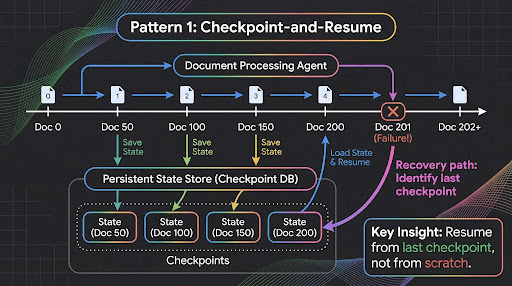
多日工作流中最常见的故障模式,是上下文丢失。一个智能体花了四个小时处理完 200 份文档,却在第 201 份文档上报错。没有检查点机制,就只能从头再来。

Agent Runtime 上的长周期智能体,会在安全的云端沙箱中维护持久化执行状态。智能体可以完整访问 bash 命令和受限文件系统,因此你可以把中间结果写入磁盘、保留处理日志,并在故障后恢复。

要把智能体当成长时间运行的服务进程,而不是请求处理器。就像你构建一个能处理数百万条记录的数据管道时那样,设置检查点、处理局部失败、确保幂等性。

下面展示的是如何使用 Google Agent Development Kit,为一个文档处理智能体设计按批次设置检查点的结构:

要注意检查点的粒度。不是每处理一份文档就记录一次,那样太浪费。也不能只在最后记录一次,那样风险太高。每 50 份文档为一批,是在持久性和开销之间做的平衡。具体数字取决于每个工作单元的成本有多高。

模式 2:委派审批(Human-in-the-Loop)

每个框架都在宣传 human-in-the-loop。

但在实际里,大多数实现方式都是把状态序列化成 JSON,发一个 webhook,然后指望有人会去看。问题很快就会层层叠加。JSON 序列化会丢掉隐含的推理上下文。通知又会和几十条其他告警混在一起。

等几小时后人真的回复了,智能体还得先反序列化、重新建立上下文,再祈祷中间什么都没变。

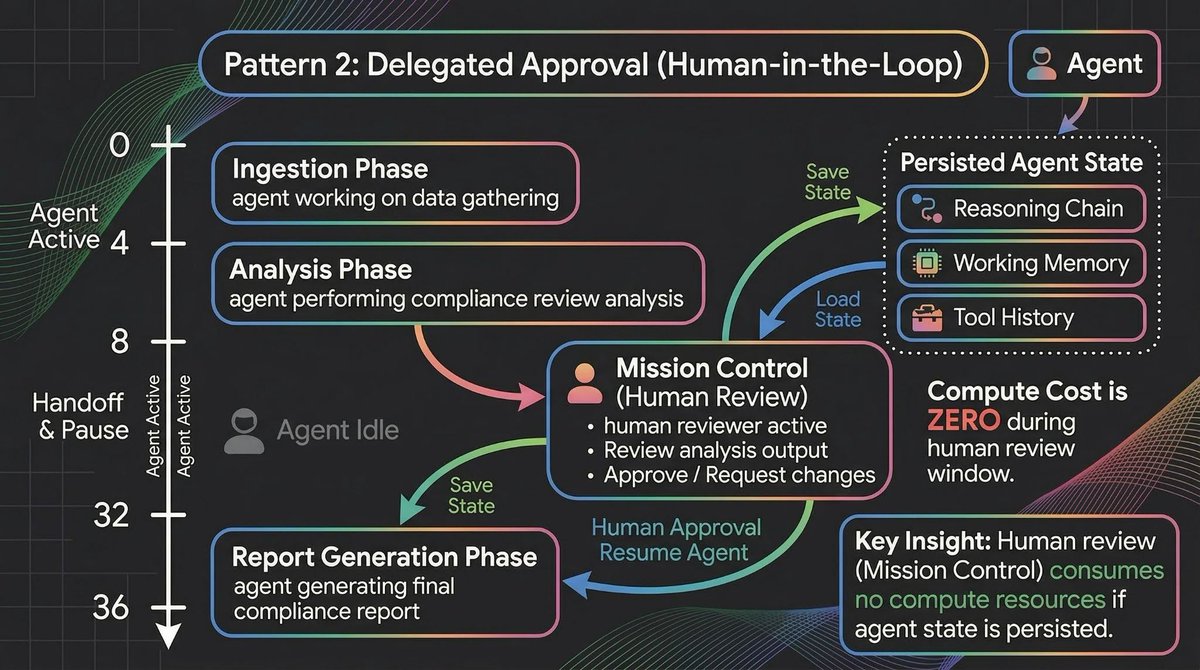
长周期智能体的处理方式不一样。当智能体走到一个需要审批的关口时,它会原地暂停。完整的执行状态会被保留下来,包括推理链、工作记忆、工具调用历史和待执行动作。

实际效果大概是这样:

关键细节在于,第 8 小时到第 32 小时,对智能体来说是空转时间,对人来说却是处理时间。智能体在暂停期间不会消耗任何算力。恢复时亚秒级冷启动,也意味着几乎没有延迟代价。

Mission Control 提供了一个收件箱,让这件事可以规模化管理。通知会按 Needs your input、Errors 和 Completed 分类。如果你同时管理二十个长周期智能体,就不用在 Slack 频道里翻来翻去,找哪个需要处理。

模式 3:分层记忆上下文

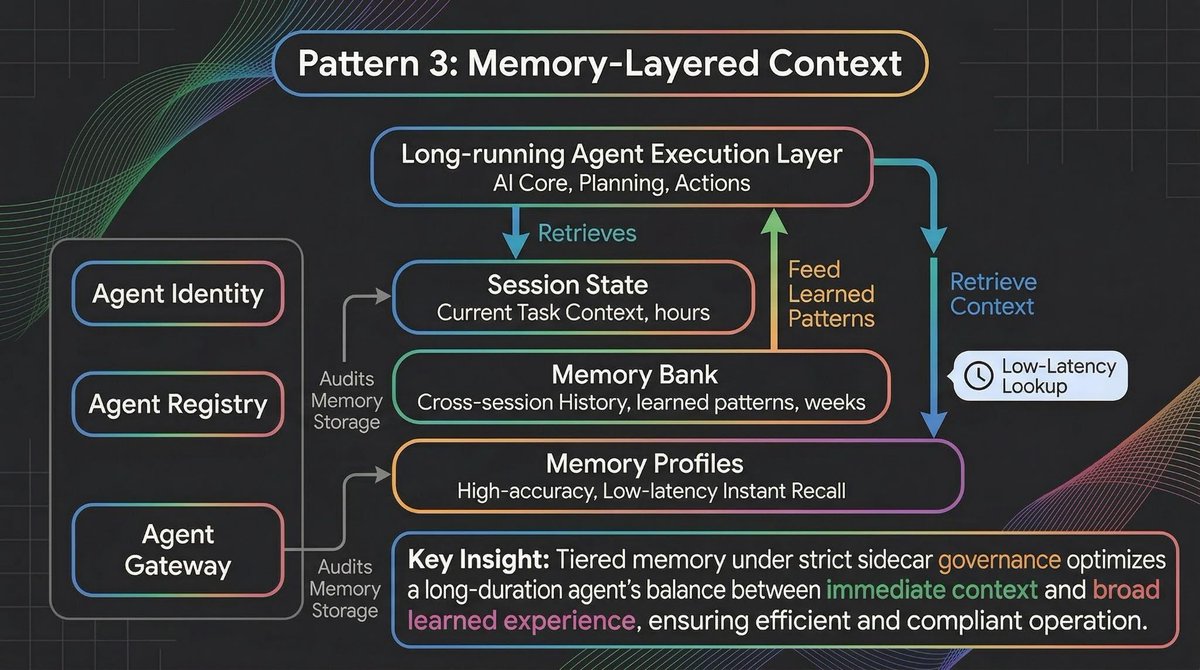
一个能运行七天的智能体,光有会话状态还不够。它还需要记住之前会话中的内容,记住几周前的用户偏好,也要能掌握任何一次单独对话都装不下的组织级上下文。

这正是 Memory Bank 和新的 Memory Profiles 配合发挥作用的地方。

from google.adk import Agent, ToolContext

class DocumentProcessor(Agent):
    """Processes large document sets with checkpoint-and-resume."""

    async def process_batch(self, docs: list, ctx: ToolContext):
        checkpoint = self.load_checkpoint()  # Resume from last position
        start_idx = checkpoint.get("last_processed", 0)

        for i, doc in enumerate(docs[start_idx:], start=start_idx):
            result = await self.classify_and_extract(doc)
            self.results.append(result)

            # Checkpoint every 50 documents
            if (i + 1) % 50 == 0:
                self.save_checkpoint({
                    "last_processed": i + 1,
                    "partial_results": self.results,
                    "timestamp": datetime.now().isoformat()
                })

        return self.compile_final_report()

Memory Bank 现在已经向所有人开放,它会从对话中动态生成并整理记忆,并按主题组织。Memory Profiles 则提供对特定、高准确度细节的低延迟访问。可以把 Memory Bank 理解为长期记忆,把 Memory Profiles 理解为工作记忆。

但这里有个大多数开发者不到进生产环境不会意识到的问题,就是记忆漂移。智能体的行为,不只受代码和提示词影响,也会被不断积累的经验塑造。如果某个智能体从少数几次非典型交互中“学会”某种流程捷径是可以接受的,它可能会开始把这种捷径广泛套用。若多个智能体同时读写共享记忆池,不同工作流之间的数据泄漏也会变成真实风险。

不能放任智能体随意往向量数据库里写东西。它们需要像微服务一样被治理。这时就轮到 Agent Identity、Agent Registry 和 Agent Gateway 上场了。它们把标准基础设施里的概念带进了智能体生命周期:

Agent Identity 对智能体的作用,类似 IAM 对服务的作用。就像一个微服务需要服务账号,一个智能体也需要加密身份,用来明确它到底被授权访问哪些记忆库和工具。

Agent Registry 的作用类似服务发现。当你有几十个长周期智能体时,就需要一个中心化方式来追踪哪些智能体处于活跃状态,它们运行的是哪个版本的提示词和代码,以及当前执行状态是什么。

Agent Gateway 类似一个专门面向 LLM 的 API 网关。它位于智能体与其记忆和工具之间,根据组织策略评估请求。如果某个智能体试图把 PII 提交进自己的长期 Memory Bank,Gateway 就会拦下这笔操作。

从第一天起,就要把审计能力建进记忆层里。问题不只是 我的智能体在做什么。更是 我的智能体记住了什么,这些记忆又是怎样改变它们行为的。

模式 4:环境式处理

不是所有长周期智能体都会和人交互。有些是环境式的。它们会监听事件、处理数据流,并在后台自主采取行动,不需要任何用户提示。

批处理型和事件驱动型智能体,可以直接连接 BigQuery 表和 Pub/Sub 流。

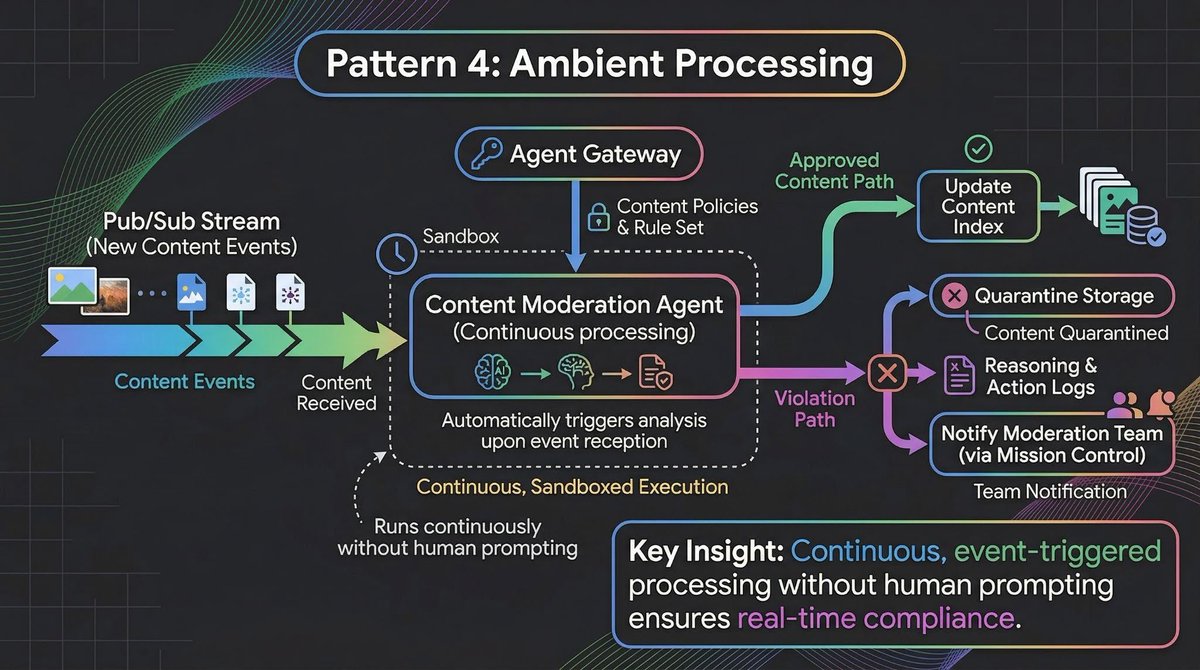
下面是一个具体例子,一个内容审核智能体,会在用户生成内容到达时立刻处理。

这个智能体会连续运行数天。它不会等着有人来要求它审核内容。它会在事件到达时直接处理,持续维护自己对趋势和模式的状态认知,并只在必要时升级处理。

这里重要的架构决策,又回到了模式 3 中提到的治理层。

不要把内容策略硬编码进智能体。应该把策略定义在 Agent Gateway 中,由智能体在运行时执行。策略发生变化时,只更新一次 Gateway,所有环境式智能体就都会拿到新规则。智能体的身份,也就是 Agent Identity,决定了哪些策略适用于它,而 Registry 则负责追踪某个版本的智能体当前对应的是哪一套策略。

这种分离很重要,因为环境式智能体会在无人监督的情况下长时间运行。如果把策略写死在代码里,每次策略变更都要重新部署所有智能体。如果通过 Gateway 把策略外置,你只需要更新一次,整支智能体集群就会自动适应。

模式 5:集群编排

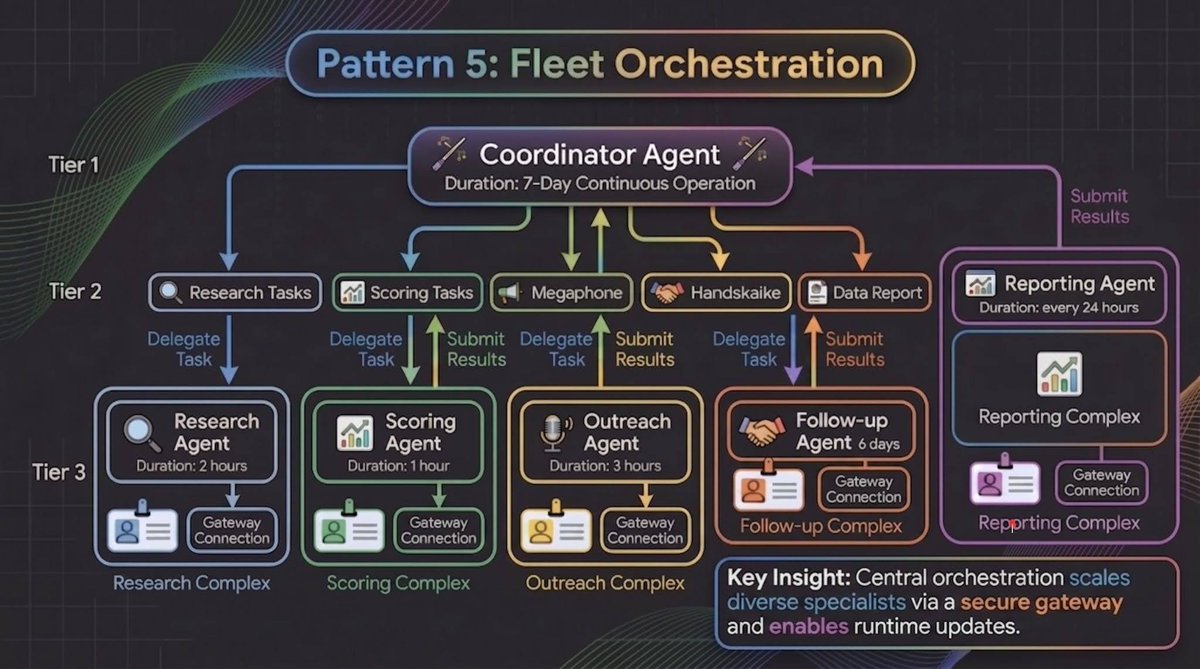
最后一种模式,讨论的是如何把多个长周期智能体当作一个协同集群来管理。在生产环境里,很少只有一个智能体单独工作。通常会有一个协调智能体,把子任务分派给各类专门智能体,而这些智能体会各自独立运行,持续时间也各不相同。

以一个销售线索挖掘流程为例:

每个专门智能体都有自己的 Agent Identity,这样它只能访问自己所需的工具和记忆;也都有自己通过 Agent Gateway 实现的策略约束,这样 Outreach Agent 就拿不到本该属于 Scoring Agent 的财务数据;同时它们在 Agent Registry 中也都有各自条目,方便你追踪整个集群中的版本和执行状态。

协调者负责维护全局状态,并处理各个专门智能体之间的交接。这其实就是分布式系统中已经用了几十年的 coordinator/worker 模式。新的地方在于,ADK 现在可以通过基于图的工作流原生处理这件事,用声明式方式定义协同逻辑。

把每个专门智能体都当作独立单元来对待,带来的运维优势是,它们也都可以独立更新。

如果你的 Scoring Agent 排序逻辑需要改进,你可以部署新版本,通过 Agent Observability 监控表现,等结果证明稳定后再推广。而且因为每个智能体都运行在自己的容器里,同时支持 Bring Your Own Container,方便接入现有的 CI/CD 和安全要求,所以某个专门智能体的一次错误部署,也不会连带拖垮其他智能体。

如何选择合适的模式

这些模式可以组合使用。一个合规系统,可能会用检查点与恢复来处理文档,用委派审批来做审核关口,用分层记忆上下文来承接跨会话知识,再用集群编排来协调多个专门智能体。

关键问题只有一个,你的智能体需要执行的最长连续工作单元,到底有多长。如果只是几分钟,你大概率不需要长周期智能体。如果是几小时甚至几天,这些模式就是起点。

开始使用

长周期智能体现已在 Gemini Enterprise Agent Platform 上可用。用 ADK 构建,用 Agent Runtime 部署,用 Mission Control 监控。七天持久化、人类审批介入和长期记忆这三者结合起来,才真正把智能体从聊天机器人变成自主工作的执行者。

从这里开始:https://cloud.google.com/gemini-enterprise/agents

🚢 把这些模式真正用起来:Google for Startups AI Agents Challenge

别只读智能体架构,去把它做出来。我们正在邀请创业公司参加一场为期 6 周的全球挑战,在 Gemini Enterprise Agent Platform 上构建、优化或重构 AI 智能体。你将获得 500 美元云额度、完整平台访问权限,还有机会争夺 9 万美元奖金池

现在就报名,开始构建吧。

Developers spend weeks perfecting prompt engineering, tool calling, and response latency. None of it matters when your agent needs to stay alive for five days.

开发者会花上数周打磨提示词工程、工具调用和响应延迟。但当你的智能体需要连续运行五天时,这些都不重要了。

The workflows that actually matter in production (processing thousands of insurance claims, running week-long sales sequences, reconciling financial data across systems) don't fit inside a single conversation turn. They take days, not seconds.

真正会在生产环境里产生价值的工作流,比如处理成千上万份保险理赔、执行持续一周的销售触达流程、在多个系统之间对账财务数据,都无法塞进一次对话轮次里。它们需要的是几天,不是几秒。

The moment you try to build these long-running agents, you realize most agent architectures are stateless. They reconstruct context from databases on every interaction. They lose the reasoning chain, the soft signals, and the confidence gradients that made the agent's previous decisions make sense.

当你真正开始构建这类长周期智能体时,就会发现大多数智能体架构都是无状态的。它们在每次交互时都要从数据库重建上下文。它们会丢失推理链、细微信号,以及那些让智能体过去的决策显得合理的置信度变化过程。

At Cloud Next 26, we announced that Agent Runtime now supports long-running agents that maintain state for up to seven days. In this article, we’ll share five essential agent design patterns for building long-running agents with Agent Runtime.

在 Cloud Next 26 上,我们宣布 Agent Runtime 现已支持最长可保持七天状态的长周期智能体。 在这篇文章里,我们会分享使用 Agent Runtime 构建长周期智能体的五种核心设计模式。

By @addyosmani and @Saboo_Shubham_

作者:@addyosmani 和 @Saboo_Shubham_

Here are five design patterns that separate production systems from demos.

下面这五种设计模式,正是区分生产系统和演示项目的关键。

Pattern 1: Checkpoint-and-Resume

模式 1:检查点与恢复

The most common failure mode in multi-day workflows is context loss. An agent processes 200 documents over four hours, then hits an error on document 201. Without checkpointing, you restart from scratch.
多日工作流中最常见的故障模式,是上下文丢失。一个智能体花了四个小时处理完 200 份文档,却在第 201 份文档上报错。没有检查点机制,就只能从头再来。

Long-running agents on Agent Runtime maintain persistent execution state in a secure cloud sandbox. The agent has full access to bash commands and a sandboxed file system, so you can write intermediate results to disk, maintain processing logs, and recover from failures.

Agent Runtime 上的长周期智能体,会在安全的云端沙箱中维护持久化执行状态。智能体可以完整访问 bash 命令和受限文件系统,因此你可以把中间结果写入磁盘、保留处理日志,并在故障后恢复。

Treat your agent like a long-running server process, not a request handler. The same way you build a data pipeline that processes millions of records: checkpoint progress, handle partial failures, ensure idempotency.

要把智能体当成长时间运行的服务进程,而不是请求处理器。就像你构建一个能处理数百万条记录的数据管道时那样,设置检查点、处理局部失败、确保幂等性。

Here is how you structure a document processing agent that checkpoints after every batch using Google Agent Development Kit:
下面展示的是如何使用 Google Agent Development Kit,为一个文档处理智能体设计按批次设置检查点的结构:

Notice the checkpoint granularity. Not after every document (wasteful). Not only at the end (risky). Fifty documents per batch balances durability against overhead. Your specific number depends on how expensive each unit of work is.

要注意检查点的粒度。不是每处理一份文档就记录一次,那样太浪费。也不能只在最后记录一次,那样风险太高。每 50 份文档为一批,是在持久性和开销之间做的平衡。具体数字取决于每个工作单元的成本有多高。

Pattern 2: Delegated Approval (Human-in-the-Loop)

模式 2:委派审批(Human-in-the-Loop)

Every framework advertises human-in-the-loop.

每个框架都在宣传 human-in-the-loop。

But in practice, most implementations are: serialize state to JSON, send a webhook, hope someone checks it. The problems compound fast. JSON serialization loses implicit reasoning context. Notifications compete with dozens of alerts.

但在实际里,大多数实现方式都是把状态序列化成 JSON,发一个 webhook,然后指望有人会去看。问题很快就会层层叠加。JSON 序列化会丢掉隐含的推理上下文。通知又会和几十条其他告警混在一起。

When the human responds hours later, the agent has to deserialize, re-establish context, and hope nothing changed.

等几小时后人真的回复了,智能体还得先反序列化、重新建立上下文,再祈祷中间什么都没变。

Long-running agents handle this differently. When the agent hits an approval gate, it pauses in place. Full execution state stays intact: reasoning chain, working memory, tool call history, pending action.

长周期智能体的处理方式不一样。当智能体走到一个需要审批的关口时,它会原地暂停。完整的执行状态会被保留下来,包括推理链、工作记忆、工具调用历史和待执行动作。

Here's what that looks like in practice:

实际效果大概是这样:

The critical detail: hours 8 through 32 are dead time for the agent but active time for the human. The agent consumes zero compute while paused. Sub-second cold starts mean zero latency penalty when it resumes.

关键细节在于,第 8 小时到第 32 小时,对智能体来说是空转时间,对人来说却是处理时间。智能体在暂停期间不会消耗任何算力。恢复时亚秒级冷启动,也意味着几乎没有延迟代价。

Mission Control provides the inbox that makes this manageable at scale. Notifications categorized into "Needs your input," "Errors," and "Completed." If you're managing twenty long-running agents, you're not hunting through Slack channels to figure out which ones need attention.

Mission Control 提供了一个收件箱,让这件事可以规模化管理。通知会按 Needs your input、Errors 和 Completed 分类。如果你同时管理二十个长周期智能体,就不用在 Slack 频道里翻来翻去,找哪个需要处理。

Pattern 3: Memory-Layered Context

模式 3:分层记忆上下文

A seven-day agent needs more than session state. It needs to remember things from previous sessions, user preferences from weeks ago, and organizational context that no single conversation could contain.

一个能运行七天的智能体,光有会话状态还不够。它还需要记住之前会话中的内容,记住几周前的用户偏好,也要能掌握任何一次单独对话都装不下的组织级上下文。

This is where Memory Bank and the new Memory Profiles work together.

这正是 Memory Bank 和新的 Memory Profiles 配合发挥作用的地方。

from google.adk import Agent, ToolContext

class DocumentProcessor(Agent):
    """Processes large document sets with checkpoint-and-resume."""

    async def process_batch(self, docs: list, ctx: ToolContext):
        checkpoint = self.load_checkpoint()  # Resume from last position
        start_idx = checkpoint.get("last_processed", 0)

        for i, doc in enumerate(docs[start_idx:], start=start_idx):
            result = await self.classify_and_extract(doc)
            self.results.append(result)

            # Checkpoint every 50 documents
            if (i + 1) % 50 == 0:
                self.save_checkpoint({
                    "last_processed": i + 1,
                    "partial_results": self.results,
                    "timestamp": datetime.now().isoformat()
                })

        return self.compile_final_report()
from google.adk import Agent, ToolContext

class DocumentProcessor(Agent):
    """Processes large document sets with checkpoint-and-resume."""

    async def process_batch(self, docs: list, ctx: ToolContext):
        checkpoint = self.load_checkpoint()  # Resume from last position
        start_idx = checkpoint.get("last_processed", 0)

        for i, doc in enumerate(docs[start_idx:], start=start_idx):
            result = await self.classify_and_extract(doc)
            self.results.append(result)

            # Checkpoint every 50 documents
            if (i + 1) % 50 == 0:
                self.save_checkpoint({
                    "last_processed": i + 1,
                    "partial_results": self.results,
                    "timestamp": datetime.now().isoformat()
                })

        return self.compile_final_report()

Memory Bank (now available for everyone) dynamically generates and curates memories from conversations, organized by topic. Memory Profiles add low-latency access to specific, high-accuracy details. Think of Memory Bank as long-term memory and Memory Profiles as working memory.

Memory Bank 现在已经向所有人开放,它会从对话中动态生成并整理记忆,并按主题组织。Memory Profiles 则提供对特定、高准确度细节的低延迟访问。可以把 Memory Bank 理解为长期记忆,把 Memory Profiles 理解为工作记忆。

But here's the problem most developers don't anticipate until production: memory drift. Your agent's behavior isn't shaped only by its code and prompts. It's shaped by accumulated experience. If an agent "learns" from a few atypical interactions that a procedural shortcut is acceptable, it might start applying that shortcut broadly. And if multiple agents read and write to shared memory pools, data leakage between distinct workflows becomes a real risk.

但这里有个大多数开发者不到进生产环境不会意识到的问题,就是记忆漂移。智能体的行为,不只受代码和提示词影响,也会被不断积累的经验塑造。如果某个智能体从少数几次非典型交互中“学会”某种流程捷径是可以接受的,它可能会开始把这种捷径广泛套用。若多个智能体同时读写共享记忆池,不同工作流之间的数据泄漏也会变成真实风险。

You can't let agents write to a vector database unchecked. You need to govern them the same way you govern microservices. This is where Agent Identity, Agent Registry, and Agent Gateway come in. They bring standard infrastructure concepts into the agent lifecycle:

不能放任智能体随意往向量数据库里写东西。它们需要像微服务一样被治理。这时就轮到 Agent Identity、Agent Registry 和 Agent Gateway 上场了。它们把标准基础设施里的概念带进了智能体生命周期:

Agent Identity works like IAM for agents. Just as a microservice needs a service account, an agent needs a cryptographic identity that determines exactly which memory banks and tools it's authorized to access.

Agent Identity 对智能体的作用,类似 IAM 对服务的作用。就像一个微服务需要服务账号,一个智能体也需要加密身份,用来明确它到底被授权访问哪些记忆库和工具。

Agent Registry works like service discovery. When you have dozens of long-running agents, you need a centralized way to track which agents are active, what version of the prompt and code they're running, and what their current execution state is.

Agent Registry 的作用类似服务发现。当你有几十个长周期智能体时,就需要一个中心化方式来追踪哪些智能体处于活跃状态,它们运行的是哪个版本的提示词和代码,以及当前执行状态是什么。

Agent Gateway works like an API gateway tailored for LLMs. It sits between the agent and its memory and tools, evaluating requests against organizational policies. If an agent tries to commit PII to its long-term Memory Bank, the Gateway blocks the transaction.

Agent Gateway 类似一个专门面向 LLM 的 API 网关。它位于智能体与其记忆和工具之间,根据组织策略评估请求。如果某个智能体试图把 PII 提交进自己的长期 Memory Bank,Gateway 就会拦下这笔操作。

Build auditing into your memory layer from day one. The question isn't just "what are my agents doing?" It's "what are my agents remembering, and how is that changing their behavior?"

从第一天起,就要把审计能力建进记忆层里。问题不只是 我的智能体在做什么。更是 我的智能体记住了什么,这些记忆又是怎样改变它们行为的。

Pattern 4: Ambient Processing

模式 4:环境式处理

Not every long-running agent interacts with humans. Some are ambient. They watch for events, process data streams, and take action in the background without any user prompting.

不是所有长周期智能体都会和人交互。有些是环境式的。它们会监听事件、处理数据流,并在后台自主采取行动,不需要任何用户提示。

Batch and Event-Driven Agents connect directly to BigQuery tables and Pub/Sub streams.

批处理型和事件驱动型智能体,可以直接连接 BigQuery 表和 Pub/Sub 流。

Here's a concrete example: a content moderation agent that processes user-generated content as it arrives.
下面是一个具体例子,一个内容审核智能体,会在用户生成内容到达时立刻处理。

This agent runs for days. It doesn't wait for someone to ask it to moderate content. It processes events as they arrive, maintains its own state about trends and patterns, and escalates only when necessary.

这个智能体会连续运行数天。它不会等着有人来要求它审核内容。它会在事件到达时直接处理,持续维护自己对趋势和模式的状态认知,并只在必要时升级处理。

The important architectural decision here ties back to the governance layer from Pattern 3.

这里重要的架构决策,又回到了模式 3 中提到的治理层。

Don't hardcode content policies into the agent. Define them in Agent Gateway and the agent enforces them at runtime. When policies change, you update Gateway once and every ambient agent picks up the new rules. The agent's identity (from Agent Identity) determines which policies apply to it, and the Registry tracks which version of the agent is running against which policy set.

不要把内容策略硬编码进智能体。应该把策略定义在 Agent Gateway 中,由智能体在运行时执行。策略发生变化时,只更新一次 Gateway,所有环境式智能体就都会拿到新规则。智能体的身份,也就是 Agent Identity,决定了哪些策略适用于它,而 Registry 则负责追踪某个版本的智能体当前对应的是哪一套策略。

This separation matters because ambient agents run unsupervised for long stretches. If you hardcode policies, every policy change requires redeploying every agent. If you externalize policies through the Gateway, you update once and the fleet adapts.

这种分离很重要,因为环境式智能体会在无人监督的情况下长时间运行。如果把策略写死在代码里,每次策略变更都要重新部署所有智能体。如果通过 Gateway 把策略外置,你只需要更新一次,整支智能体集群就会自动适应。

Pattern 5: Fleet Orchestration

模式 5:集群编排

The final pattern is about managing multiple long-running agents as a coordinated fleet. In production, you rarely have a single agent working alone. You have a coordinator agent that delegates sub-tasks to specialist agents, each running independently for different durations.

最后一种模式,讨论的是如何把多个长周期智能体当作一个协同集群来管理。在生产环境里,很少只有一个智能体单独工作。通常会有一个协调智能体,把子任务分派给各类专门智能体,而这些智能体会各自独立运行,持续时间也各不相同。

Consider a sales prospecting sequence:

以一个销售线索挖掘流程为例:

Each specialist has its own Agent Identity (so it can only access the tools and memory it needs), its own policy enforcement through Agent Gateway (so the Outreach Agent can't access financial data meant for the Scoring Agent), and its own entry in the Agent Registry (so you can track versions and execution state across the fleet).

每个专门智能体都有自己的 Agent Identity,这样它只能访问自己所需的工具和记忆;也都有自己通过 Agent Gateway 实现的策略约束,这样 Outreach Agent 就拿不到本该属于 Scoring Agent 的财务数据;同时它们在 Agent Registry 中也都有各自条目,方便你追踪整个集群中的版本和执行状态。

The coordinator maintains global state and handles handoffs between specialists. This is the same coordinator/worker pattern used in distributed systems for decades. What's new is that ADK handles this natively with graph-based workflows that define coordination logic declaratively.

协调者负责维护全局状态,并处理各个专门智能体之间的交接。这其实就是分布式系统中已经用了几十年的 coordinator/worker 模式。新的地方在于,ADK 现在可以通过基于图的工作流原生处理这件事,用声明式方式定义协同逻辑。

The operational advantage of treating each specialist as an independent unit is that you can update them independently too.

把每个专门智能体都当作独立单元来对待,带来的运维优势是,它们也都可以独立更新。

If your Scoring Agent's ranking logic needs improvement, you can deploy the new version, monitor its performance through Agent Observability, and promote it only when the results hold up. And because each agent runs in its own container (with Bring Your Own Container support for your existing CI/CD and security requirements), a bad deployment in one specialist never cascades to the others.

如果你的 Scoring Agent 排序逻辑需要改进,你可以部署新版本,通过 Agent Observability 监控表现,等结果证明稳定后再推广。而且因为每个智能体都运行在自己的容器里,同时支持 Bring Your Own Container,方便接入现有的 CI/CD 和安全要求,所以某个专门智能体的一次错误部署,也不会连带拖垮其他智能体。

Choosing the Right Pattern

如何选择合适的模式

These patterns compose. A compliance system might use Checkpoint-and-Resume for document processing, Delegated Approval for review gates, Memory-Layered Context for cross-session knowledge, and Fleet Orchestration to coordinate specialists.

这些模式可以组合使用。一个合规系统,可能会用检查点与恢复来处理文档,用委派审批来做审核关口,用分层记忆上下文来承接跨会话知识,再用集群编排来协调多个专门智能体。

The key question: what is the longest uninterrupted unit of work your agent needs to perform? If it's minutes, you probably don't need long-running agents. If it's hours or days, these patterns are where you start.

关键问题只有一个,你的智能体需要执行的最长连续工作单元,到底有多长。如果只是几分钟,你大概率不需要长周期智能体。如果是几小时甚至几天,这些模式就是起点。

Get started

开始使用

Long-running agents are available today on Gemini Enterprise Agent Platform. Build with ADK, deploy on Agent Runtime, monitor via Mission Control. The combination of 7-day persistence, human-in-the-loop approvals, and long-term memory is what turns an agent from a chatbot into an autonomous worker.

长周期智能体现已在 Gemini Enterprise Agent Platform 上可用。用 ADK 构建,用 Agent Runtime 部署,用 Mission Control 监控。七天持久化、人类审批介入和长期记忆这三者结合起来,才真正把智能体从聊天机器人变成自主工作的执行者。

Start here: https://cloud.google.com/gemini-enterprise/agents

从这里开始:https://cloud.google.com/gemini-enterprise/agents

🚢 Put These Patterns into Practice: Google for Startups AI Agents Challenge

🚢 把这些模式真正用起来:Google for Startups AI Agents Challenge

Don't just read about agent architecture - build it. We’re inviting startups to a 6-week global challenge to build, optimize, or refactor AI agents on the Gemini Enterprise Agent Platform. You'll get $500 in cloud credits, full platform access and a shot at the $90,000 prize pool.

别只读智能体架构,去把它做出来。我们正在邀请创业公司参加一场为期 6 周的全球挑战,在 Gemini Enterprise Agent Platform 上构建、优化或重构 AI 智能体。你将获得 500 美元云额度、完整平台访问权限,还有机会争夺 9 万美元奖金池

Sign up today to start building!

现在就报名,开始构建吧。

Developers spend weeks perfecting prompt engineering, tool calling, and response latency. None of it matters when your agent needs to stay alive for five days.

The workflows that actually matter in production (processing thousands of insurance claims, running week-long sales sequences, reconciling financial data across systems) don't fit inside a single conversation turn. They take days, not seconds.

The moment you try to build these long-running agents, you realize most agent architectures are stateless. They reconstruct context from databases on every interaction. They lose the reasoning chain, the soft signals, and the confidence gradients that made the agent's previous decisions make sense.

At Cloud Next 26, we announced that Agent Runtime now supports long-running agents that maintain state for up to seven days. In this article, we’ll share five essential agent design patterns for building long-running agents with Agent Runtime.

By @addyosmani and @Saboo_Shubham_

Here are five design patterns that separate production systems from demos.

Pattern 1: Checkpoint-and-Resume

The most common failure mode in multi-day workflows is context loss. An agent processes 200 documents over four hours, then hits an error on document 201. Without checkpointing, you restart from scratch.

Long-running agents on Agent Runtime maintain persistent execution state in a secure cloud sandbox. The agent has full access to bash commands and a sandboxed file system, so you can write intermediate results to disk, maintain processing logs, and recover from failures.

Treat your agent like a long-running server process, not a request handler. The same way you build a data pipeline that processes millions of records: checkpoint progress, handle partial failures, ensure idempotency.

Here is how you structure a document processing agent that checkpoints after every batch using Google Agent Development Kit:

Notice the checkpoint granularity. Not after every document (wasteful). Not only at the end (risky). Fifty documents per batch balances durability against overhead. Your specific number depends on how expensive each unit of work is.

Pattern 2: Delegated Approval (Human-in-the-Loop)

Every framework advertises human-in-the-loop.

But in practice, most implementations are: serialize state to JSON, send a webhook, hope someone checks it. The problems compound fast. JSON serialization loses implicit reasoning context. Notifications compete with dozens of alerts.

When the human responds hours later, the agent has to deserialize, re-establish context, and hope nothing changed.

Long-running agents handle this differently. When the agent hits an approval gate, it pauses in place. Full execution state stays intact: reasoning chain, working memory, tool call history, pending action.

Here's what that looks like in practice:

The critical detail: hours 8 through 32 are dead time for the agent but active time for the human. The agent consumes zero compute while paused. Sub-second cold starts mean zero latency penalty when it resumes.

Mission Control provides the inbox that makes this manageable at scale. Notifications categorized into "Needs your input," "Errors," and "Completed." If you're managing twenty long-running agents, you're not hunting through Slack channels to figure out which ones need attention.

Pattern 3: Memory-Layered Context

A seven-day agent needs more than session state. It needs to remember things from previous sessions, user preferences from weeks ago, and organizational context that no single conversation could contain.

This is where Memory Bank and the new Memory Profiles work together.

from google.adk import Agent, ToolContext

class DocumentProcessor(Agent):
    """Processes large document sets with checkpoint-and-resume."""

    async def process_batch(self, docs: list, ctx: ToolContext):
        checkpoint = self.load_checkpoint()  # Resume from last position
        start_idx = checkpoint.get("last_processed", 0)

        for i, doc in enumerate(docs[start_idx:], start=start_idx):
            result = await self.classify_and_extract(doc)
            self.results.append(result)

            # Checkpoint every 50 documents
            if (i + 1) % 50 == 0:
                self.save_checkpoint({
                    "last_processed": i + 1,
                    "partial_results": self.results,
                    "timestamp": datetime.now().isoformat()
                })

        return self.compile_final_report()

Memory Bank (now available for everyone) dynamically generates and curates memories from conversations, organized by topic. Memory Profiles add low-latency access to specific, high-accuracy details. Think of Memory Bank as long-term memory and Memory Profiles as working memory.

But here's the problem most developers don't anticipate until production: memory drift. Your agent's behavior isn't shaped only by its code and prompts. It's shaped by accumulated experience. If an agent "learns" from a few atypical interactions that a procedural shortcut is acceptable, it might start applying that shortcut broadly. And if multiple agents read and write to shared memory pools, data leakage between distinct workflows becomes a real risk.

You can't let agents write to a vector database unchecked. You need to govern them the same way you govern microservices. This is where Agent Identity, Agent Registry, and Agent Gateway come in. They bring standard infrastructure concepts into the agent lifecycle:

Agent Identity works like IAM for agents. Just as a microservice needs a service account, an agent needs a cryptographic identity that determines exactly which memory banks and tools it's authorized to access.

Agent Registry works like service discovery. When you have dozens of long-running agents, you need a centralized way to track which agents are active, what version of the prompt and code they're running, and what their current execution state is.

Agent Gateway works like an API gateway tailored for LLMs. It sits between the agent and its memory and tools, evaluating requests against organizational policies. If an agent tries to commit PII to its long-term Memory Bank, the Gateway blocks the transaction.

Build auditing into your memory layer from day one. The question isn't just "what are my agents doing?" It's "what are my agents remembering, and how is that changing their behavior?"

Pattern 4: Ambient Processing

Not every long-running agent interacts with humans. Some are ambient. They watch for events, process data streams, and take action in the background without any user prompting.

Batch and Event-Driven Agents connect directly to BigQuery tables and Pub/Sub streams.

Here's a concrete example: a content moderation agent that processes user-generated content as it arrives.

This agent runs for days. It doesn't wait for someone to ask it to moderate content. It processes events as they arrive, maintains its own state about trends and patterns, and escalates only when necessary.

The important architectural decision here ties back to the governance layer from Pattern 3.

Don't hardcode content policies into the agent. Define them in Agent Gateway and the agent enforces them at runtime. When policies change, you update Gateway once and every ambient agent picks up the new rules. The agent's identity (from Agent Identity) determines which policies apply to it, and the Registry tracks which version of the agent is running against which policy set.

This separation matters because ambient agents run unsupervised for long stretches. If you hardcode policies, every policy change requires redeploying every agent. If you externalize policies through the Gateway, you update once and the fleet adapts.

Pattern 5: Fleet Orchestration

The final pattern is about managing multiple long-running agents as a coordinated fleet. In production, you rarely have a single agent working alone. You have a coordinator agent that delegates sub-tasks to specialist agents, each running independently for different durations.

Consider a sales prospecting sequence:
Each specialist has its own Agent Identity (so it can only access the tools and memory it needs), its own policy enforcement through Agent Gateway (so the Outreach Agent can't access financial data meant for the Scoring Agent), and its own entry in the Agent Registry (so you can track versions and execution state across the fleet).

The coordinator maintains global state and handles handoffs between specialists. This is the same coordinator/worker pattern used in distributed systems for decades. What's new is that ADK handles this natively with graph-based workflows that define coordination logic declaratively.

The operational advantage of treating each specialist as an independent unit is that you can update them independently too.

If your Scoring Agent's ranking logic needs improvement, you can deploy the new version, monitor its performance through Agent Observability, and promote it only when the results hold up. And because each agent runs in its own container (with Bring Your Own Container support for your existing CI/CD and security requirements), a bad deployment in one specialist never cascades to the others.

Choosing the Right Pattern

These patterns compose. A compliance system might use Checkpoint-and-Resume for document processing, Delegated Approval for review gates, Memory-Layered Context for cross-session knowledge, and Fleet Orchestration to coordinate specialists.

The key question: what is the longest uninterrupted unit of work your agent needs to perform? If it's minutes, you probably don't need long-running agents. If it's hours or days, these patterns are where you start.

Get started

Long-running agents are available today on Gemini Enterprise Agent Platform. Build with ADK, deploy on Agent Runtime, monitor via Mission Control. The combination of 7-day persistence, human-in-the-loop approvals, and long-term memory is what turns an agent from a chatbot into an autonomous worker.

Start here: https://cloud.google.com/gemini-enterprise/agents

🚢 Put These Patterns into Practice: Google for Startups AI Agents Challenge

Don't just read about agent architecture - build it. We’re inviting startups to a 6-week global challenge to build, optimize, or refactor AI agents on the Gemini Enterprise Agent Platform. You'll get $500 in cloud credits, full platform access and a shot at the $90,000 prize pool.

Sign up today to start building!
📋 讨论归档

讨论进行中…